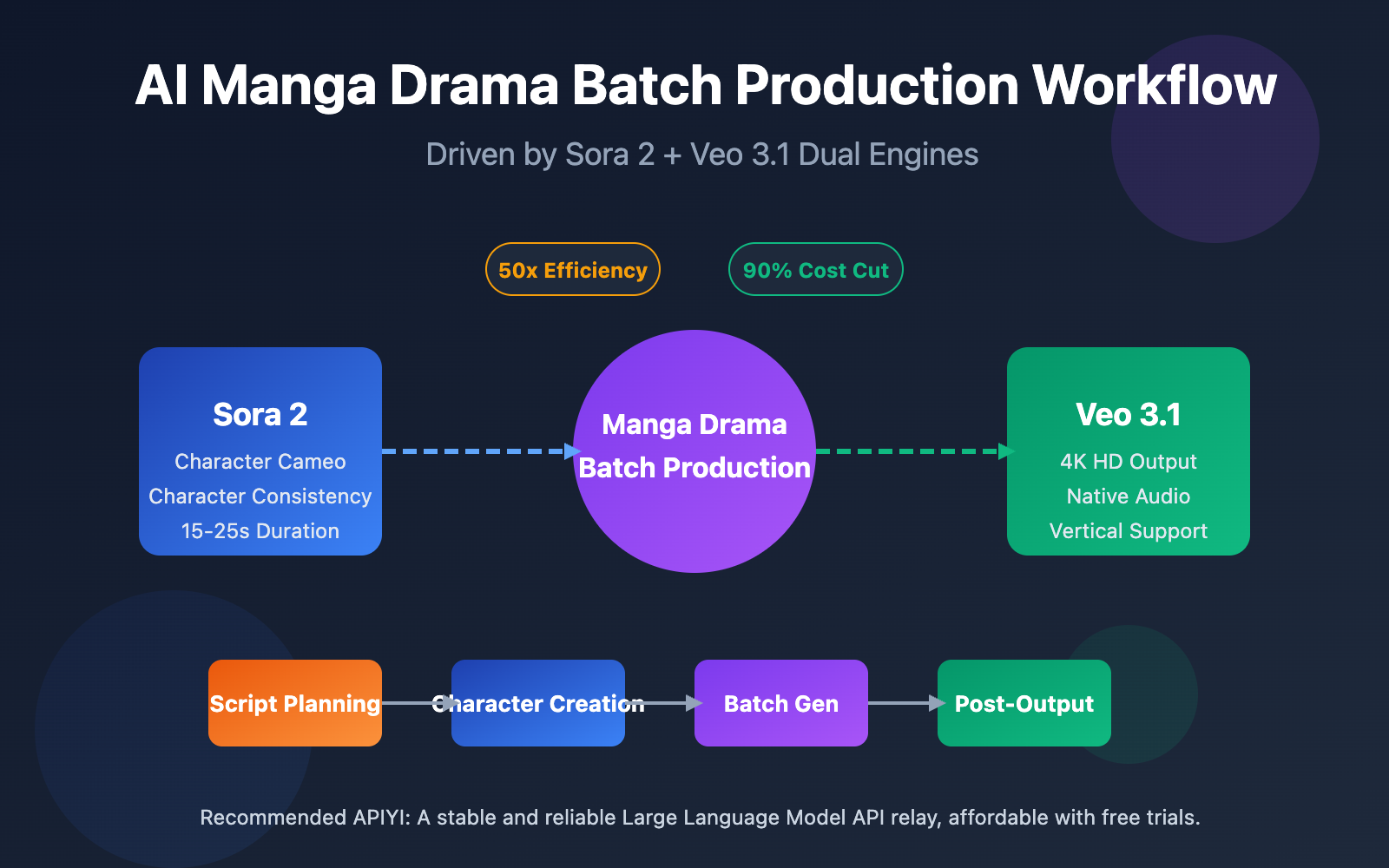
Author's Note: A deep dive into the complete workflow for AI manga drama batch production, detailing how to achieve efficient production using Sora 2's Character Cameo and Veo 3.1's 4K output.
AI manga drama is becoming the new frontier in content creation. Building an efficient batch production workflow with Sora 2 and Veo 3.1 is a core challenge that every creator is currently exploring.
Core Value: By reading this article, you'll master the complete production workflow for AI manga dramas, learn how to use Sora 2's Character Cameo to maintain character consistency, and gain practical tips for outputting 4K vertical videos with Veo 3.1.
The Core Value and Market Opportunities of AI Manga Drama Batch Production
AI manga drama batch production is redefining the efficiency boundaries of content creation. Traditional manga drama production requires extensive manual drawing and animation, but the arrival of Sora 2 and Veo 3.1 allows solo creators to achieve industrial-grade output.
| Comparison Dimension | Traditional Production | AI Batch Production | Efficiency Boost |
|---|---|---|---|
| Single Episode Cycle | 7-14 Days | 2-4 Hours | 50-80x |
| Character Consistency | Depends on Artist Skill | Maintained automatically via API | 100% Consistent |
| Scene Generation | Frame-by-frame Drawing | Batch Generation | 20-50x |
| Cost Investment | 10,000+ RMB/Episode | ~100 RMB/Episode | 90% Reduction |
| Capacity Ceiling | 2-4 Episodes/Month | 50-100 Episodes/Month | 25x |
Three Core Advantages of AI Manga Drama Batch Production
First, the technical breakthrough in character consistency. Sora 2's Character Cameo feature allows for the creation of reusable character IDs, ensuring that the same character maintains perfectly consistent appearance traits across different scenes. This solves the primary "face-shifting" pain point in traditional AI video generation.
Second, the standardization of batch production workflows. Through API interfaces, creators can integrate script parsing, prompt generation, video generation, and post-editing into a single automated pipeline. The generation time for 20-50 scenes can be compressed from several hours to under an hour.
Third, the flexibility of multi-platform adaptation. Veo 3.1 natively supports vertical video generation, meaning it can directly output 9:16 content perfectly suited for platforms like TikTok, Reels, and Xiaohongshu without the need for secondary cropping.
🎯 Platform Tip: Batch production for manga dramas requires a stable API environment. We recommend using APIYI (apiyi.com) to access unified interfaces for Sora 2 and other mainstream video models, which supports batch task submission and cost optimization.
Full Analysis of the Manga Drama Production Workflow
A complete manga drama production workflow can be divided into five core stages, each with clear inputs, outputs, and technical requirements.
Stage 1: Script Planning and Storyboarding
The starting point of any manga drama production workflow is a structured script. Unlike traditional scripts, AI-driven scripts need to provide detailed visual descriptions for every shot.
| Script Element | Traditional Style | AI Workflow Style | Purpose |
|---|---|---|---|
| Scene Description | Inside a cafe | Modern minimalist cafe, floor-to-ceiling windows, afternoon sun, warm tones | Provides the basis for visual generation |
| Character Action | Xiaoming drinks coffee | Black-haired male, white shirt, holding a coffee cup in his right hand, smiling out the window | Ensures actions are generatable |
| Camera Language | Close-up | Medium close-up, 45-degree profile, shallow depth of field with blurred background | Guides composition generation |
| Duration Label | N/A | 8 seconds | API parameter setting |
Example Storyboard Script Format:
episode: 1
title: "The First Encounter"
total_scenes: 12
characters:
  - id: "char_001"
    name: "Xiaoyu"
    description: "20-year-old female, long black hair, white dress"
  - id: "char_002"
    name: "A-Ming"
    description: "22-year-old male, short hair, casual suit"

scenes:
  - scene_id: 1
    duration: 6
    setting: "City street, evening, neon lights just starting to glow"
    characters: ["char_001"]
    action: "Xiaoyu walks alone on the street, looking down at her phone"
    camera: "Tracking shot, medium shot"
Stage 2: Character Asset Creation
Character consistency is the biggest challenge in mass-producing manga dramas. Sora 2 and Veo 3.1 offer different solutions for this.
Sora 2 Character Creation Method:
- Prepare character reference images (front, side, full-body).
- Upload reference materials via the Character API.
- Obtain a reusable Character ID.
- Reference this ID in all subsequent scene generations.
Veo 3.1 Character Consistency Method:
- Upload multiple character reference images.
- Use the style reference feature to lock in the look.
- Describe character traits in detail within the prompt.
- Maintain consistency through continuous generation.
Tech Tip: We recommend creating 3-5 reference images from different angles for your main characters. This significantly improves the AI model's accuracy in understanding character features.
Stage 3: Batch Video Generation
This is the most critical technical part of the workflow. Submitting generation tasks in batches via API can massively boost your productivity.
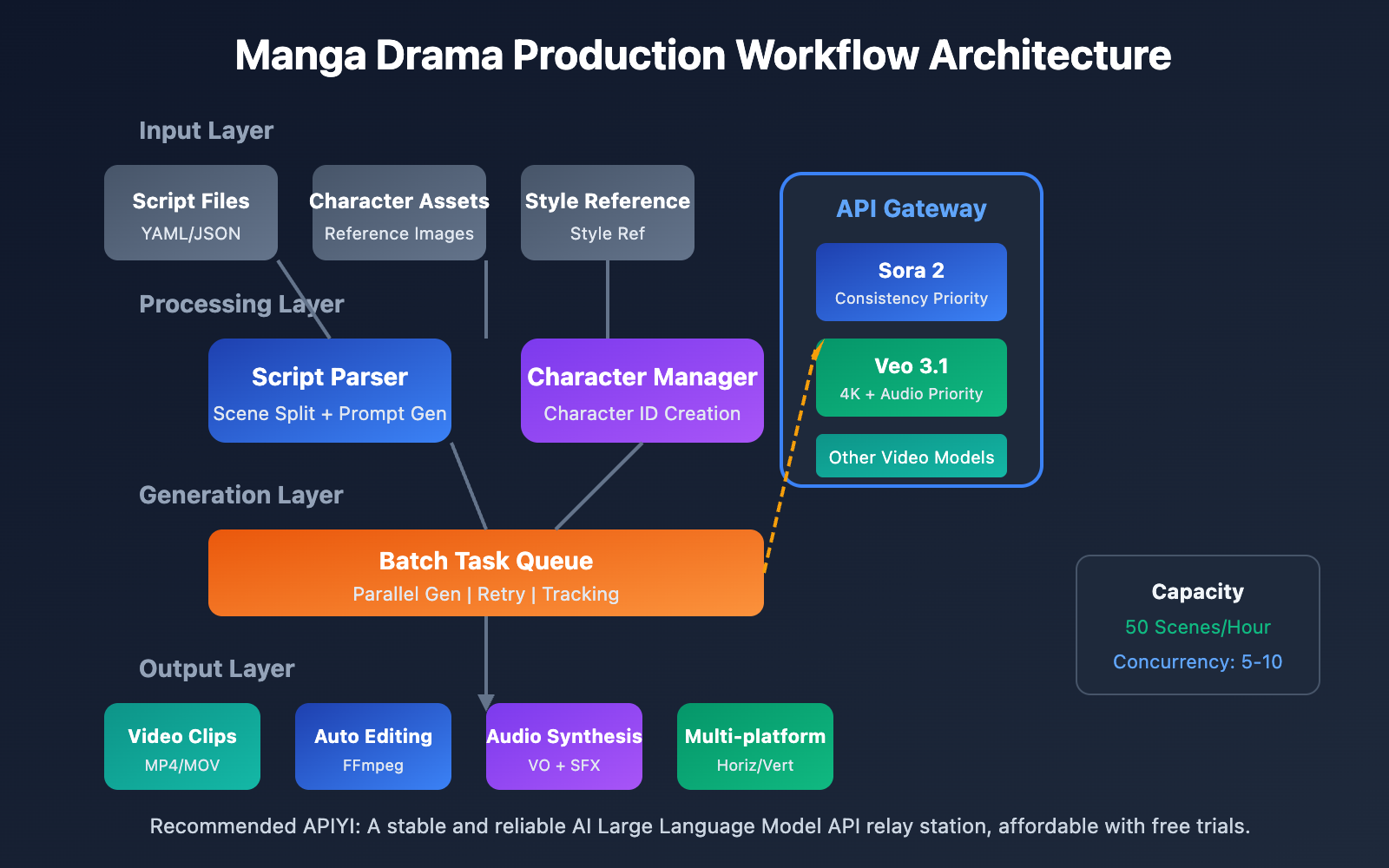
Batch Generation Strategy:
- Parallel Generation: Submit generation requests for multiple scenes simultaneously.
- Priority Management: Generate key scenes first so you can make adjustments early.
- Failure Retry: Automatically detect failed tasks and resubmit them.
- Result Validation: Auto-filter outputs that meet quality standards.
Stage 4: Post-Production and Audio
Once you have your video clips, they need to be edited together and have audio added.
| Post-Production Step | Recommended Tool | Time Share | Automation Level |
|---|---|---|---|
| Video Stitching | FFmpeg / Premiere | 15% | Fully Automatable |
| Transition Effects | After Effects | 10% | Semi-Automatic |
| VO & Music | Eleven Labs / Suno | 25% | Fully Automatable |
| Subtitle Addition | Whisper + Aegisub | 15% | Fully Automatable |
| Color Grading | DaVinci Resolve | 20% | Semi-Automatic |
| Quality Control | Human Review | 15% | Requires Manual Input |
Stage 5: Multi-Platform Distribution
Finally, output video files according to the specific requirements of different platforms.
- TikTok / Reels: 9:16 vertical, 1080×1920, under 60 seconds.
- YouTube / Bilibili: 16:9 horizontal, 1920×1080, no duration limit.
- Instagram / Red: 3:4 or 9:16, focus on thumbnail appeal.
- WeChat Channels: Supports multiple ratios, 9:16 recommended.
🎯 Efficiency Tip: Using the unified interface from APIYI (apiyi.com) allows you to call multiple video models simultaneously. You can choose the best model for each scene to balance cost and quality perfectly.
Core Use of Sora 2 in Comic Video Production
Sora 2 is the video generation model released by OpenAI, and its Character Cameo feature provides the critical technical support for the batch production of comic-style videos.
Sora 2 Character Cameo: Character Consistency Technology
Character Cameo allows you to create reusable character IDs, ensuring the same character maintains a consistent appearance across different scenes.
Two ways to create a Character ID:
Method 1: Extract from an existing video
import requests

# Extract character features from a video URL
response = requests.post(
    "https://vip.apiyi.com/v1/sora/characters/extract",
    headers={"Authorization": "Bearer YOUR_API_KEY"},
    json={
        "video_url": "https://example.com/character_reference.mp4",
        "character_name": "protagonist_male"
    }
)
character_id = response.json()["character_id"]
Method 2: Create from reference images
# Create a character from multi-angle reference images
response = requests.post(
    "https://vip.apiyi.com/v1/sora/characters/create",
    headers={"Authorization": "Bearer YOUR_API_KEY"},
    json={
        "images": [
            "base64_front_view...",
            "base64_side_view...",
            "base64_full_body..."
        ],
        "character_name": "protagonist_female",
        "description": "20-year-old Asian female, long black hair, gentle temperament"
    }
)
Application of Sora 2 Image-to-Video in Comic Production
Sora 2's Image-to-Video (I2V) feature can transform static comic frames into dynamic videos, making it a vital link in the comic production workflow.
| I2V Scenario | Input Requirements | Output Effect | Best For |
|---|---|---|---|
| Single Image Animation | HD static image | 6-15s dynamic video | Covers, transition scenes |
| Expressions & Actions | Character close-up | Adds micro-expressions like blinking or smiling | Dialogue scenes |
| Scene Extension | Partial frame | Camera pans/zooms, environmental expansion | Establishing shots |
| Style Transfer | Any image | Convert to anime/realistic style | Maintaining style unity |
Best Practices for Sora 2 Comic Generation
Structured Prompt Template:
[Subject Description] + [Action/Behavior] + [Scene/Environment] + [Camera Language] + [Style Specification]

Example:
"A black-haired girl (character_id: char_001) sitting by a café window,
gently stirring a cup of coffee, sunlight pouring in from the floor-to-ceiling window,
warm tones, medium close-up, shallow depth of field, Japanese anime style, soft colors"
Recommended Generation Parameters:
- Duration: We recommend 6-10 seconds per shot to make post-editing easier.
- Resolution: Prioritize 1080p to balance quality and cost.
- Style Presets: Use the "Comic" preset to get a more stable comic art style.
🎯 API Calling Tip: For batch calls to the Sora 2 API, we recommend using APIYI (apiyi.com). It supports task queue management and automatic retries, which really helps improve the success rate of batch generations.
Core Use of Veo 3.1 in Comic Video Production
Veo 3.1 is the latest video generation model from Google DeepMind, offering unique advantages in the field of batch comic production.
Veo 3.1 4K Output and Quality Advantages
Compared to its predecessors, Veo 3.1 has seen significant improvements in image quality and stability, making it particularly suitable for comic projects that require high-definition output.
| Veo Version | Max Resolution | Audio Support | Character Consistency | Generation Speed |
|---|---|---|---|---|
| Veo 2 | 1080p | None | Average | Fast |
| Veo 3 | 4K | Native Audio | Good | Medium |
| Veo 3.1 | 4K | Enhanced Audio | Excellent | 30-60s |
Core Advantages of Veo 3.1:
- Native Audio Generation: It can simultaneously generate sound effects, ambient noise, and even character dialogue.
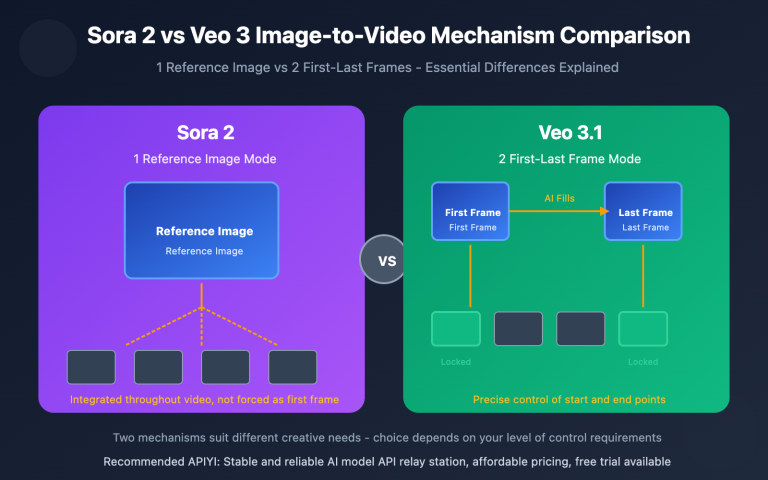
- Enhanced Character Consistency: The multi-reference image upload feature drastically improves consistency.
- Native Vertical Support: Directly generates 9:16 videos, perfectly adapted for short video platforms.
- Precise Style Control: Use a style reference image to accurately control the output style.
Application of Veo 3.1 Vertical Video Generation in Comic Production
Comic content on short video platforms needs to be in vertical format. Veo 3.1's native vertical support avoids the quality loss caused by secondary cropping.
Vertical Generation Method:
# Trigger vertical generation by uploading a vertical reference image
response = requests.post(
    "https://vip.apiyi.com/v1/veo/generate",
    headers={"Authorization": "Bearer YOUR_API_KEY"},
    json={
        "prompt": "Anime style, black-haired girl under cherry blossom trees, breeze blowing through hair, aesthetic atmosphere",
        "reference_image": "vertical_reference_9_16.jpg",
        "duration": 8,
        "with_audio": True,
        "audio_prompt": "Soft piano background music, rustling leaves"
    }
)
Veo 3.1 Multi-Reference Character Control Technology
Veo 3.1 supports uploading multiple reference images to guide the generation of characters, objects, and scenes, which is crucial for maintaining consistency in batch comic production.
Multi-Reference Usage Strategy:
- Character Images: 3-5 shots of the character from different angles (concept art/model sheets).
- Scene Images: 2-3 references for the scene's environment and style.
- Style Images: 1-2 references for the overall art style.
🎯 Model Selection Tip: Choose Veo 3.1 when you need high-definition quality and native audio. Choose Sora 2 when character consistency is your top priority. APIYI (apiyi.com) supports unified calls for both models, making it easy to switch between them as needed.
Manga Drama Batch Production Technical Solution: API Automation in Action
Automating the manga drama production workflow is key to boosting your output. Here's the complete technical implementation plan.
Automation Script Architecture for Batch Manga Drama Production
import asyncio
from typing import List, Dict

class MangaDramaProducer:
    """Automation framework for batch manga drama production"""

    def __init__(self, api_key: str):
        self.api_key = api_key
        self.base_url = "https://vip.apiyi.com/v1"

    async def batch_generate(
        self,
        scenes: List[Dict],
        model: str = "sora-2"
    ) -> List[str]:
        """Batch generate scene videos"""
        tasks = []
        for scene in scenes:
            task = self.generate_scene(scene, model)
            tasks.append(task)

        results = await asyncio.gather(*tasks)
        return results

    async def generate_scene(
        self,
        scene: Dict,
        model: str
    ) -> str:
        """Single scene generation"""
        # Build prompt
        prompt = self.build_prompt(scene)
        # Call API
        video_url = await self.call_api(prompt, model)
        return video_url
View full automation script code
import asyncio
import aiohttp
from typing import List, Dict, Optional
from dataclasses import dataclass
import json

@dataclass
class Scene:
    """Scene data structure"""
    scene_id: int
    duration: int
    setting: str
    characters: List[str]
    action: str
    camera: str
    dialogue: Optional[str] = None

@dataclass
class Character:
    """Character data structure"""
    char_id: str
    name: str
    description: str
    reference_images: List[str]

class MangaDramaProducer:
    """Complete framework for batch manga drama production"""

    def __init__(self, api_key: str):
        self.api_key = api_key
        self.base_url = "https://vip.apiyi.com/v1"
        self.characters: Dict[str, str] = {}  # name -> character_id

    async def create_character(
        self,
        character: Character
    ) -> str:
        """Create character ID"""
        async with aiohttp.ClientSession() as session:
            async with session.post(
                f"{self.base_url}/sora/characters/create",
                headers={"Authorization": f"Bearer {self.api_key}"},
                json={
                    "images": character.reference_images,
                    "character_name": character.char_id,
                    "description": character.description
                }
            ) as resp:
                result = await resp.json()
                char_id = result["character_id"]
                self.characters[character.name] = char_id
                return char_id

    def build_prompt(self, scene: Scene) -> str:
        """Build scene prompt"""
        char_refs = []
        for char_name in scene.characters:
            if char_name in self.characters:
                char_refs.append(
                    f"(character_id: {self.characters[char_name]})"
                )

        prompt_parts = [
            scene.action,
            f"Setting: {scene.setting}",
            f"Camera: {scene.camera}",
            "Anime style, high quality, rich details"
        ]

        if char_refs:
            prompt_parts.insert(0, " ".join(char_refs))

        return ", ".join(prompt_parts)

    async def generate_scene(
        self,
        scene: Scene,
        model: str = "sora-2",
        with_audio: bool = False
    ) -> Dict:
        """Generate a single scene"""
        prompt = self.build_prompt(scene)

        async with aiohttp.ClientSession() as session:
            endpoint = "sora" if "sora" in model else "veo"
            async with session.post(
                f"{self.base_url}/{endpoint}/generate",
                headers={"Authorization": f"Bearer {self.api_key}"},
                json={
                    "prompt": prompt,
                    "duration": scene.duration,
                    "with_audio": with_audio
                }
            ) as resp:
                result = await resp.json()
                return {
                    "scene_id": scene.scene_id,
                    "video_url": result.get("video_url"),
                    "status": result.get("status")
                }

    async def batch_generate(
        self,
        scenes: List[Scene],
        model: str = "sora-2",
        max_concurrent: int = 5
    ) -> List[Dict]:
        """Batch generate scenes"""
        semaphore = asyncio.Semaphore(max_concurrent)

        async def limited_generate(scene):
            async with semaphore:
                return await self.generate_scene(scene, model)

        tasks = [limited_generate(s) for s in scenes]
        results = await asyncio.gather(*tasks, return_exceptions=True)

        # Handle failed tasks
        successful = []
        failed = []
        for i, result in enumerate(results):
            if isinstance(result, Exception):
                failed.append(scenes[i])
            else:
                successful.append(result)

        # Retry failed tasks
        if failed:
            retry_results = await self.batch_generate(
                failed, model, max_concurrent
            )
            successful.extend(retry_results)

        return successful

# Example Usage
async def main():
    producer = MangaDramaProducer("your_api_key")

    # Create character
    protagonist = Character(
        char_id="char_001",
        name="Xiaoyu",
        description="20-year-old female, long black hair, gentle temperament",
        reference_images=["base64_img1", "base64_img2"]
    )
    await producer.create_character(protagonist)

    # Define scenes
    scenes = [
        Scene(1, 8, "City street at dusk", ["Xiaoyu"], "Walking alone looking at phone", "Following medium shot"),
        Scene(2, 6, "Cafe interior", ["Xiaoyu"], "Sitting by the window drinking coffee", "Fixed medium-close shot"),
        Scene(3, 10, "Park bench", ["Xiaoyu"], "Staring at the sunset", "Slow push-in close-up")
    ]

    # Batch generate
    results = await producer.batch_generate(scenes, model="sora-2")
    print(json.dumps(results, indent=2, ensure_ascii=False))

if __name__ == "__main__":
    asyncio.run(main())
Cost Optimization Strategies for Manga Drama Batch Production
| Optimization Direction | Specific Measures | Expected Savings | Implementation Difficulty |
|---|---|---|---|
| Model Selection | Use low-cost models for simple scenes | 30-50% | Low |
| Resolution Control | Choose 720p/1080p/4K based on need | 20-40% | Low |
| Batch Discounts | Use API aggregation platforms | 10-20% | Low |
| Cache Reuse | Reuse generated results for similar scenes | 15-25% | Medium |
| Duration Optimization | Precisely control the duration of each shot | 10-15% | Medium |
🎯 Cost Control Tip: APIYI (apiyi.com) provides a unified interface for various video models, allowing you to choose different model tiers as needed. Combined with batch task discounts, it can effectively lower the overall cost of batch manga drama production.
Sora 2 vs Veo 3.1: Comparative Analysis for Manga Drama Production
Choosing the right video generation model is key to the success of batch manga drama production. Here’s a detailed comparison of two mainstream models.
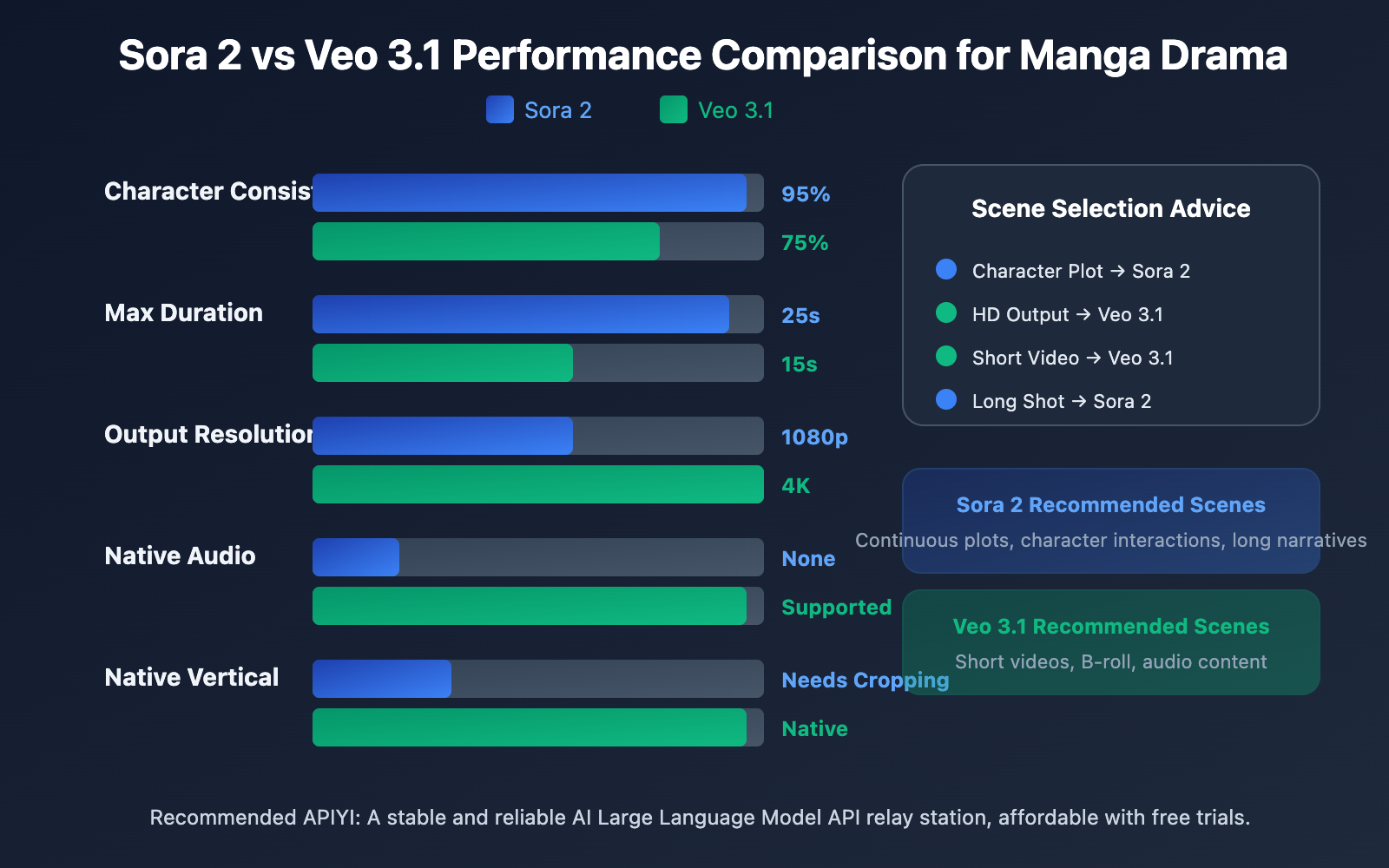
Core Capability Comparison: Sora 2 vs. Veo 3.1
| Dimension | Sora 2 | Veo 3.1 | Manga Drama Production Advice |
|---|---|---|---|
| Max Duration | 15-25 seconds | 8-15 seconds | Sora 2 is better for long shots |
| Character Consistency | Native Character Cameo support | Multi-reference image solution | Sora 2 is more stable |
| Audio Generation | Needs separate dubbing | Native audio support | Veo 3.1 is more efficient |
| Output Resolution | 1080p | 4K | Veo 3.1 has better image quality |
| Vertical Support | Needs post-cropping | Native support | Veo 3.1 is better for short videos |
| Style Presets | Comic/Anime presets | Style Reference | Both have their strengths |
| Generation Speed | Medium | 30-60s per clip | Veo 3.1 is slightly faster |
| API Stability | High | High | Both are ready for commercial use |
Manga Drama Production Scene Selection Guide
Choose Sora 2 for:
- Continuous plots requiring strict character consistency
- Long-shot narrative scenes (over 10 seconds)
- Complex character interaction scenes
- Projects where a mature dubbing workflow already exists
Choose Veo 3.1 for:
- Projects aiming for 4K high-definition output
- Content for short video platforms (TikTok, Reels, etc.)
- Fast turnarounds requiring native audio
- Projects primarily focused on vertical content
Hybrid Strategy:
For large-scale manga drama projects, we recommend mixing both models based on scene requirements:
- Core character scenes → Sora 2 (to ensure consistency)
- Environment/B-roll shots → Veo 3.1 (high quality + sound effects)
- Dialogue scenes → Veo 3.1 (native audio)
- Action scenes → Sora 2 (long duration support)
🎯 Model Switching Tip: Through the unified interface of APIYI (apiyi.com), you can flexibly switch between Sora 2 and Veo 3.1 within the same project. No need to change your code structure—just update the model parameters.
FAQ
Q1: Sora 2 vs. Veo 3.1: Which is better for batch manga production?
Both have their unique strengths. Sora 2's Character Cameo feature is superior for character consistency, making it perfect for continuous plots that require fixed characters. On the other hand, Veo 3.1’s native audio and 4K output are better suited for short video projects where you're chasing top-tier visual quality and fast turnaround times. I'd recommend mixing and matching them based on your specific needs.
Q2: What’s the estimated cost for batch manga production?
By using AI for batch production, the cost per episode (3-5 minutes) can be kept within the 50-200 RMB range. This mostly depends on the number of scenes, your resolution settings, and the model tier you choose. It’s over 90% cheaper than traditional production methods. You can also snag extra bulk discounts through aggregation platforms like APIYI (apiyi.com).
Q3: How can I quickly get started with batch production?
Here’s a quick-start checklist:
- Visit APIYI (apiyi.com) to register an account and get your API Key.
- Prepare reference images for 2-3 of your main characters.
- Write a structured storyboard script (start with 5-10 scenes).
- Run some tests using the code examples provided in this article.
- Fine-tune your prompts and parameters based on the output.
Q4: How do you ensure character consistency throughout the workflow?
The core strategies include: using Sora 2 Character Cameo to create unique Character IDs; preparing multi-angle reference photos for every character; keeping your character descriptions consistent within your prompts; and using fixed style presets. It's always a good idea to generate 3-5 test scenes to verify consistency before you dive into full production.
Wrapping Up
Here are the key takeaways for batch manga production:
- Workflow Standardization: Build a complete production workflow from script to distribution, ensuring every stage has clear inputs and outputs.
- Model Selection Strategy: Lean on Sora 2 for character consistency and Veo 3.1 for high-res visuals and audio. Switch between them flexibly depending on the scene's requirements.
- Batch Automation: Use APIs to submit tasks in bulk, compressing the generation time for 50 scenes into under an hour.
- Cost Optimization: Choose resolutions and model tiers based on your actual needs, and use aggregation platforms to get those bulk discounts.
AI-driven manga production is maturing rapidly. Mastering the core capabilities of Sora 2 and Veo 3.1 while establishing an efficient production workflow is the secret to catching this content wave.
We recommend using APIYI (apiyi.com) to access a unified video model API. The platform supports major models like Sora 2 and Veo 3.1, and they offer free test credits and technical support to get you moving.
References
⚠️ Link Format Note: All external links use the format
Resource Name: domain.com. This makes them easy to copy without being clickable, helping prevent SEO juice leakage.
-
OpenAI Sora Official Documentation: Sora 2 Feature Introduction and API Usage Guide
- Link:
help.openai.com/en/articles/12593142-sora-release-notes - Description: Detailed explanation of the official Character Cameo feature.
- Link:
-
Google Veo Official Page: Veo 3.1 Model Introduction
- Link:
deepmind.google/models/veo - Description: Breakdown of 4K output and audio generation capabilities.
- Link:
-
AI Comic Factory: Open-source comic generation project
- Link:
github.com/jbilcke-hf/ai-comic-factory - Description: Implementation reference for comic generation using Large Language Models + SDXL.
- Link:
-
Hugging Face AI Comic: Comic generation technical blog
- Link:
huggingface.co/blog/ai-comic-factory - Description: Technical details on batch generation and API integration.
- Link:
Author: Tech Team
Tech Talk: Feel free to discuss your hands-on experience with batch comic production in the comments. For more AI video generation resources, visit the APIYI apiyi.com tech community.