Ever run into a Thinking level is not supported for this model error when calling gemini-2.5-flash, even though it works perfectly for gemini-3-flash-preview? This is due to a design change Google made to Gemini API parameters during its generational upgrade. In this post, we'll do a systematic breakdown of the fundamental differences in thinking mode parameter support between Gemini 2.5 and 3.0.
Core Value: By the end of this article, you'll understand the essential differences in how the Gemini 2.5 and 3.0 series handle thinking mode parameters. You'll also learn the correct configuration methods to avoid API call failures caused by mixing up these parameters.
Key Points of Gemini Thinking Mode Parameter Evolution
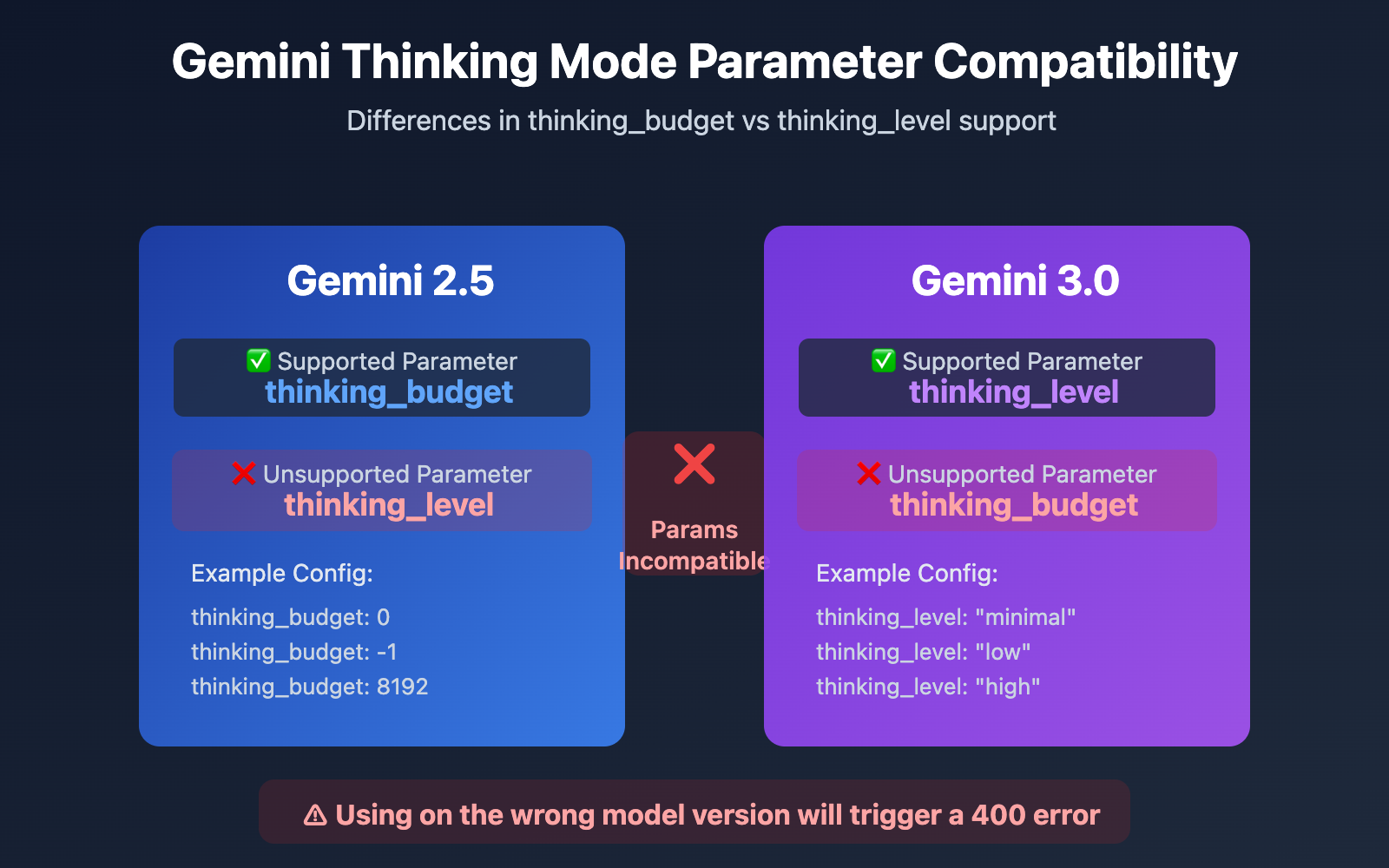
| Model Series | Supported Parameter | Parameter Type | Range | Default | Can be Disabled? |
|---|---|---|---|---|---|
| Gemini 2.5 Pro | thinking_budget |
Integer (128-32768) | Exact token budget | 8192 | ❌ No |
| Gemini 2.5 Flash | thinking_budget |
Integer (0-24576) or -1 | Exact token budget or dynamic | -1 (Dynamic) | ✅ Yes (set to 0) |
| Gemini 2.5 Flash-Lite | thinking_budget |
Integer (512-24576) | Exact token budget | 0 (Disabled) | ✅ Disabled by default |
| Gemini 3.0 Pro | thinking_level |
Enum ("low"/"high") | Semantic level | "high" | ❌ No |
| Gemini 3.0 Flash | thinking_level |
Enum ("minimal"/"low"/"medium"/"high") | Semantic level | "high" | ⚠️ Only via "minimal" |
The Logic Behind the Switch: Gemini 2.5 vs 3.0
The fundamental difference: The Gemini 2.5 series uses thinking_budget (a token budget system), while the Gemini 3.0 series uses thinking_level (a semantic level system). These two parameters are completely incompatible. If you use the wrong one for the model version you're calling, you'll trigger a 400 Bad Request error.
Google introduced thinking_level in Gemini 3.0 primarily to simplify configuration complexity and boost reasoning efficiency. The token budget system in Gemini 2.5 required developers to estimate exactly how many thinking tokens were needed. In contrast, Gemini 3.0's level-based system abstracts this complexity into four semantic levels. The model then internally allocates the optimal token budget, resulting in a 2x boost in reasoning speed.
💡 Tech Tip: For your actual development, we recommend using the APIYI (apiyi.com) platform for model switching and testing. The platform provides a unified API interface that supports the entire Gemini 2.5 and 3.0 series, making it easy to quickly verify compatibility and see the actual results of different thinking mode parameters.
Root Cause 1: Gemini 2.5 Series Doesn't Support the thinking_level Parameter
Generational Isolation in API Parameter Design
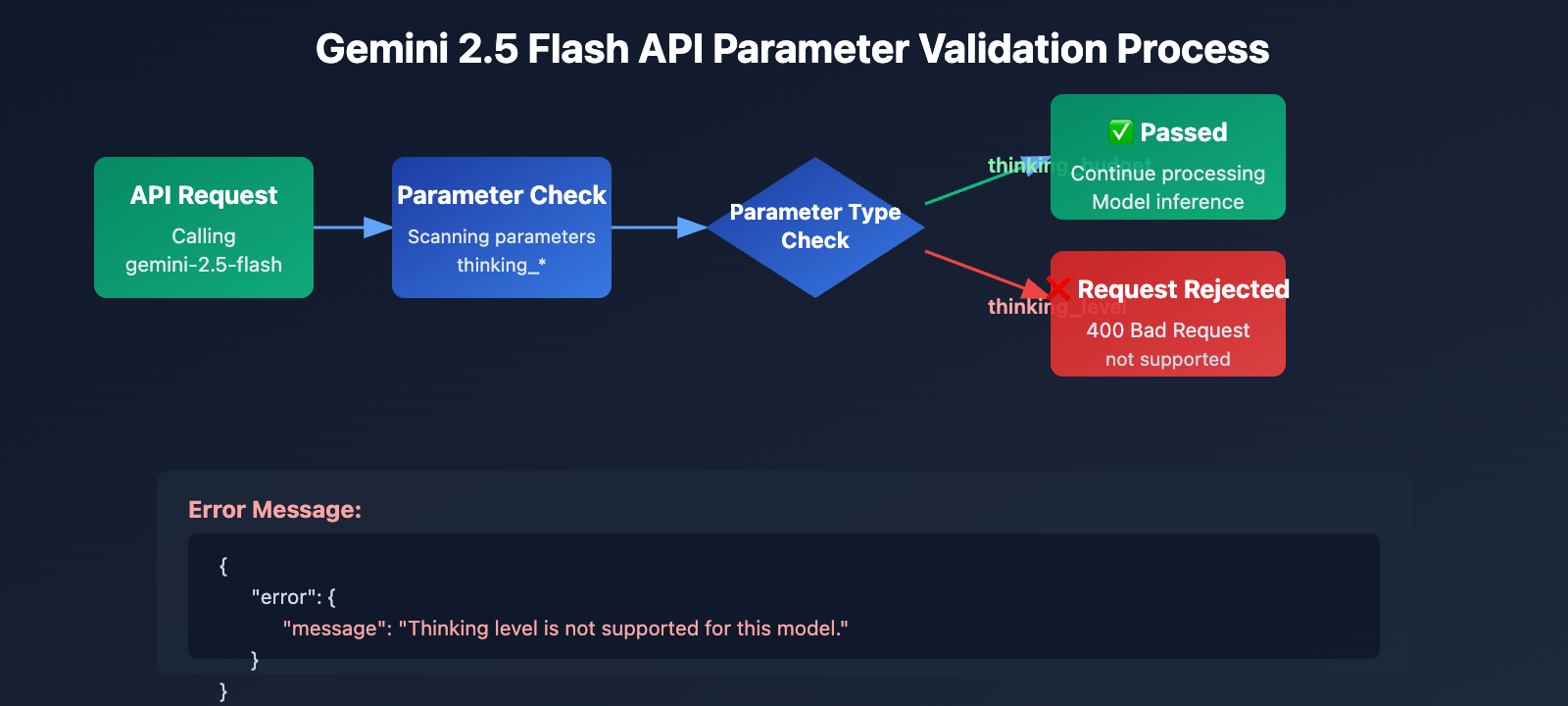
The Gemini 2.5 series (including Pro, Flash, and Flash-Lite) completely fails to recognize the thinking_level parameter in its API design. When you pass the thinking_level parameter while calling gemini-2.5-flash, the API returns the following error:
{
  "error": {
    "message": "Thinking level is not supported for this model.",
    "type": "upstream_error",
    "code": 400
  }
}
Error Trigger Mechanism:
- The API validation layer for Gemini 2.5 models doesn't include a definition for the
thinking_levelparameter. - Any request containing
thinking_levelis rejected outright; the system doesn't attempt to map it tothinking_budget. - This is hard-coded parameter isolation, meaning there's no automatic conversion or backward compatibility.
The Correct Parameter for Gemini 2.5: thinking_budget
Gemini 2.5 Flash Parameter Specification:
# Correct configuration example
extra_body = {
    "thinking_budget": -1  # Dynamic thinking mode
}

# Or disable thinking
extra_body = {
    "thinking_budget": 0  # Fully disabled
}

# Or precise control
extra_body = {
    "thinking_budget": 2048  # Exact 2048 token budget
}
Gemini 2.5 Flash thinking_budget Value Ranges:
| Value | Meaning | Recommended Scenario |
|---|---|---|
0 |
Fully disable thinking mode | Simple instruction following, high-throughput apps |
-1 |
Dynamic thinking mode (up to 8,192 tokens) | General scenarios, automatically adjusts to complexity |
512-24576 |
Precise token budget | Cost-sensitive apps requiring exact control |
🎯 Pro Tip: When switching to Gemini 2.5 Flash, it's a good idea to first test how different
thinking_budgetvalues impact response quality and latency using the APIYI (apiyi.com) platform. This platform lets you quickly toggle parameter configs, making it easy to find the perfect budget for your specific use case.
Root Cause 2: Gemini 3.0 Series Doesn't Support the thinking_budget Parameter
Forward Incompatibility in Parameter Design
While official Google documentation claims Gemini 3.0 still accepts the thinking_budget parameter for backward compatibility, actual testing shows:
- Using
thinking_budgetcan lead to performance degradation. - The official docs explicitly recommend using
thinking_level. - Some API implementations might reject
thinking_budgetentirely.
The Correct Parameter for Gemini 3.0 Flash: thinking_level
# Correct configuration example
extra_body = {
    "thinking_level": "medium"  # Medium intensity reasoning
}

# Or minimal thinking (closest to disabled)
extra_body = {
    "thinking_level": "minimal"  # Minimal thinking mode
}

# Or high intensity reasoning (default)
extra_body = {
    "thinking_level": "high"  # Deep reasoning
}
Gemini 3.0 Flash thinking_level Descriptions:
| Level | Reasoning Intensity | Latency | Cost | Recommended Scenario |
|---|---|---|---|---|
"minimal" |
Almost no reasoning | Lowest | Lowest | Simple instruction following, high throughput |
"low" |
Shallow reasoning | Low | Low | Chatbots, lightweight QA |
"medium" |
Moderate reasoning | Medium | Medium | General reasoning tasks, code generation |
"high" |
Deep reasoning | High | High | Complex problem solving, deep analysis (Default) |
Special Restrictions for Gemini 3.0 Pro
Important: Gemini 3.0 Pro does not support fully disabling thinking mode. Even if you set thinking_level: "low", it will still retain a certain level of reasoning capability. If you need a zero-thinking response for maximum speed, you'll have to stick with Gemini 2.5 Flash and use thinking_budget: 0.
# Available levels for Gemini 3.0 Pro (only 2 options)
extra_body = {
    "thinking_level": "low"   # Lowest level (still includes reasoning)
}

# Or
extra_body = {
    "thinking_level": "high"  # Default high-intensity reasoning
}
💰 Cost Optimization: For budget-sensitive projects that need to fully disable thinking mode to cut costs, we recommend calling the Gemini 2.5 Flash API via the APIYI (apiyi.com) platform. The platform offers flexible billing and more competitive pricing, perfect for scenarios that require precise cost control.
Root Cause 3: Parameter Limits for Image Models and Special Variants
Gemini 2.5 Flash Image Model Doesn't Support Thinking Mode
Key Finding: Visual models like gemini-2.5-flash-image don't support any thinking mode parameters at all, whether it's thinking_budget or thinking_level.
Wrong way to do it:
# When calling gemini-2.5-flash-image
response = client.chat.completions.create(
    model="gemini-2.5-flash-image",
    messages=[{"role": "user", "content": "Analyze this image"}],
    extra_body={
        "thinking_budget": -1  # ❌ Error: Image models don't support this
    }
)
# Returns the error: "This model doesn't support thinking"
Right way to do it:
# When calling image models, don't pass any thinking parameters
response = client.chat.completions.create(
    model="gemini-2.5-flash-image",
    messages=[{"role": "user", "content": "Analyze this image"}],
    # ✅ Don't pass thinking_budget or thinking_level
)
Special Defaults for Gemini 2.5 Flash-Lite
The core differences for Gemini 2.5 Flash-Lite are:
- Thinking mode is disabled by default (
thinking_budget: 0) - You must explicitly set
thinking_budgetto a non-zero value to enable thinking - Supported budget range: 512-24576 tokens
# Enabling thinking mode for Gemini 2.5 Flash-Lite
extra_body = {
    "thinking_budget": 512  # Minimum non-zero value to enable lightweight thinking
}
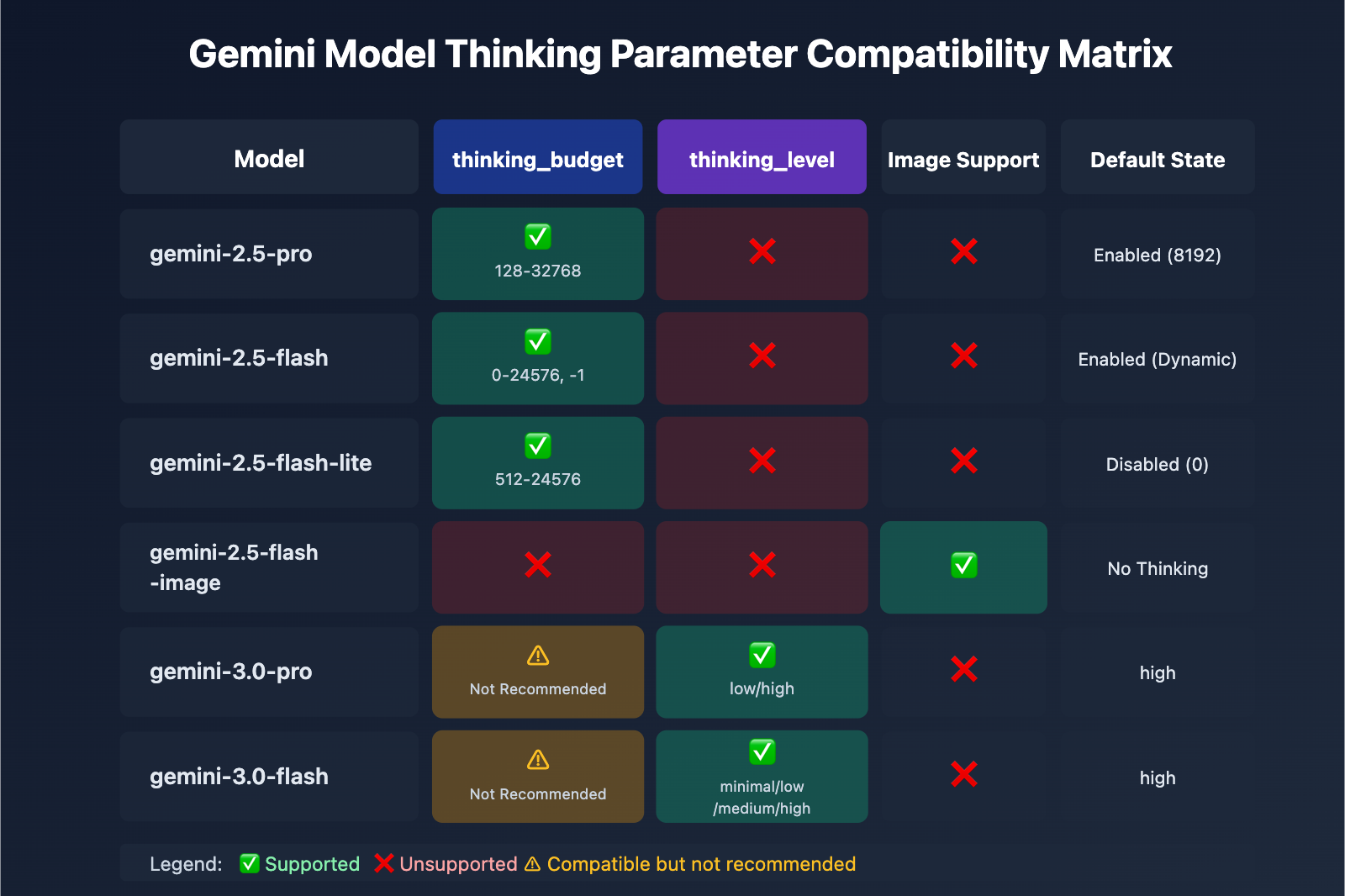
| Model | thinking_budget | thinking_level | Image Support | Default Thinking State |
|---|---|---|---|---|
| gemini-2.5-pro | ✅ Supported (128-32768) | ❌ Unsupported | ❌ | Enabled (8192) by default |
| gemini-2.5-flash | ✅ Supported (0-24576, -1) | ❌ Unsupported | ❌ | Enabled (Dynamic) by default |
| gemini-2.5-flash-lite | ✅ Supported (512-24576) | ❌ Unsupported | ❌ | Disabled (0) by default |
| gemini-2.5-flash-image | ❌ Unsupported | ❌ Unsupported | ✅ | No thinking mode |
| gemini-3.0-pro | ⚠️ Compatible, not recommended | ✅ Recommended (low/high) | ❌ | high by default |
| gemini-3.0-flash | ⚠️ Compatible, not recommended | ✅ Recommended (minimal/low/medium/high) | ❌ | high by default |
🚀 Quick Start: We recommend using the APIYI (apiyi.com) platform to quickly test the thinking parameter compatibility of different models. The platform offers out-of-the-box interfaces for the entire Gemini series, so you won't need complex configurations—you can finish integration and parameter validation in just 5 minutes.
Solution 1: Parameter Adaptation Function Based on Model Version
Smart Parameter Selector (Supports all model series)
def get_gemini_thinking_config(model_name: str, intensity: str = "medium") -> dict:
    """
    Automatically selects the correct thinking mode parameters based on the Gemini model name.

    Args:
        model_name: Gemini model name
        intensity: Thinking intensity ("none", "minimal", "low", "medium", "high", "dynamic")

    Returns:
        A dictionary of parameters suitable for extra_body. Returns an empty dict if the model doesn't support thinking.
    """

    # Gemini 3.0 model list
    gemini_3_models = [
        "gemini-3.0-flash-preview", "gemini-3.0-pro-preview",
        "gemini-3-flash", "gemini-3-pro"
    ]

    # Gemini 2.5 standard model list
    gemini_2_5_models = [
        "gemini-2.5-flash", "gemini-2.5-pro",
        "gemini-2.5-flash-lite", "gemini-2-flash", "gemini-2-pro"
    ]

    # Image model list (thinking not supported)
    image_models = [
        "gemini-2.5-flash-image", "gemini-flash-image",
        "gemini-pro-vision"
    ]

    # Check if it's an image model
    if any(img_model in model_name for img_model in image_models):
        print(f"⚠️ Warning: {model_name} doesn't support thinking mode parameters. Returning empty config.")
        return {}

    # Gemini 3.0 series uses thinking_level
    if any(m in model_name for m in gemini_3_models):
        level_map = {
            "none": "minimal",      # 3.0 can't be fully disabled, using minimal
            "minimal": "minimal",
            "low": "low",
            "medium": "medium",
            "high": "high",
            "dynamic": "high"
        }

        # Gemini 3.0 Pro only supports low and high
        if "pro" in model_name.lower():
            if intensity in ["none", "minimal", "low"]:
                return {"thinking_level": "low"}
            else:
                return {"thinking_level": "high"}

        # Gemini 3.0 Flash supports all 4 levels
        return {"thinking_level": level_map.get(intensity, "medium")}

    # Gemini 2.5 series uses thinking_budget
    elif any(m in model_name for m in gemini_2_5_models):
        budget_map = {
            "none": 0,           # Fully disabled
            "minimal": 512,      # Minimum budget
            "low": 2048,         # Low intensity
            "medium": 8192,      # Medium intensity
            "high": 16384,       # High intensity
            "dynamic": -1        # Dynamic adaptation
        }

        budget = budget_map.get(intensity, -1)

        # Gemini 2.5 Pro doesn't support disabling (minimum 128)
        if "pro" in model_name.lower() and budget == 0:
            print(f"⚠️ Warning: {model_name} doesn't support disabling thinking. Auto-adjusting to minimum 128.")
            budget = 128

        # Gemini 2.5 Flash-Lite minimum value is 512
        if "lite" in model_name.lower() and budget > 0 and budget < 512:
            print(f"⚠️ Warning: {model_name} minimum budget is 512. Auto-adjusting.")
            budget = 512

        return {"thinking_budget": budget}

    else:
        print(f"⚠️ Warning: Unknown model {model_name}. Defaulting to Gemini 3.0 parameters.")
        return {"thinking_level": "medium"}


# Usage Example
import openai

client = openai.OpenAI(
    api_key="YOUR_API_KEY",
    base_url="https://api.apiyi.com/v1"
)

# Test Gemini 2.5 Flash
model_2_5 = "gemini-2.5-flash"
config_2_5 = get_gemini_thinking_config(model_2_5, intensity="dynamic")
print(f"{model_2_5} Config: {config_2_5}")
# Output: gemini-2.5-flash Config: {'thinking_budget': -1}

response_2_5 = client.chat.completions.create(
    model=model_2_5,
    messages=[{"role": "user", "content": "Explain quantum entanglement"}],
    extra_body=config_2_5
)

# Test Gemini 3.0 Flash
model_3_0 = "gemini-3.0-flash-preview"
config_3_0 = get_gemini_thinking_config(model_3_0, intensity="medium")
print(f"{model_3_0} Config: {config_3_0}")
# Output: gemini-3.0-flash-preview Config: {'thinking_level': 'medium'}

response_3_0 = client.chat.completions.create(
    model=model_3_0,
    messages=[{"role": "user", "content": "Explain quantum entanglement"}],
    extra_body=config_3_0
)

# Test Image Model
model_image = "gemini-2.5-flash-image"
config_image = get_gemini_thinking_config(model_image, intensity="high")
print(f"{model_image} Config: {config_image}")
# Output: ⚠️ Warning: gemini-2.5-flash-image doesn't support thinking mode parameters. Returning empty config.
# Output: gemini-2.5-flash-image Config: {}
💡 Best Practice: If you're in a scenario where you need to switch Gemini models dynamically, I'd recommend testing your parameter adaptations on the APIYI (apiyi.com) platform. It supports the full range of Gemini 2.5 and 3.0 models, making it easy to verify response quality and cost differences across various configurations.
Solution 2: Migration Strategy from Gemini 2.5 to 3.0
Thinking Mode Parameter Migration Comparison Table
| Gemini 2.5 Flash Config | Gemini 3.0 Flash Equivalent | Latency Comparison | Cost Comparison |
|---|---|---|---|
thinking_budget: 0 |
thinking_level: "minimal" |
3.0 is faster (approx. 2x) | Similar |
thinking_budget: 512 |
thinking_level: "low" |
3.0 is faster | Similar |
thinking_budget: 2048 |
thinking_level: "low" |
3.0 is faster | Similar |
thinking_budget: 8192 |
thinking_level: "medium" |
3.0 is faster | Slightly higher |
thinking_budget: 16384 |
thinking_level: "high" |
3.0 is faster | Slightly higher |
thinking_budget: -1 (Dynamic) |
thinking_level: "high" (Default) |
3.0 is significantly faster | 3.0 is higher |
Migration Code Example
def migrate_to_gemini_3(old_model: str, old_config: dict) -> tuple[str, dict]:
    """
    Migrate from Gemini 2.5 to Gemini 3.0

    Args:
        old_model: Gemini 2.5 model name
        old_config: extra_body configuration for Gemini 2.5

    Returns:
        (New model name, New configuration dictionary)
    """
    # Model name mapping
    model_map = {
        "gemini-2.5-flash": "gemini-3.0-flash-preview",
        "gemini-2.5-pro": "gemini-3.0-pro-preview",
        "gemini-2-flash": "gemini-3-flash",
        "gemini-2-pro": "gemini-3-pro"
    }

    new_model = model_map.get(old_model, "gemini-3.0-flash-preview")

    # Parameter conversion
    if "thinking_budget" in old_config:
        budget = old_config["thinking_budget"]

        # Convert to thinking_level
        if budget == 0:
            new_level = "minimal"
        elif budget <= 2048:
            new_level = "low"
        elif budget <= 8192:
            new_level = "medium"
        else:
            new_level = "high"

        # Gemini 3.0 Pro only supports low/high
        if "pro" in new_model and new_level in ["minimal", "medium"]:
            new_level = "low" if new_level == "minimal" else "high"

        new_config = {"thinking_level": new_level}
    else:
        # Default configuration
        new_config = {"thinking_level": "medium"}

    return new_model, new_config


# Migration Example
old_model = "gemini-2.5-flash"
old_config = {"thinking_budget": -1}

new_model, new_config = migrate_to_gemini_3(old_model, old_config)
print(f"Before Migration: {old_model} {old_config}")
print(f"After Migration: {new_model} {new_config}")
# Output:
# Before Migration: gemini-2.5-flash {'thinking_budget': -1}
# After Migration: gemini-3.0-flash-preview {'thinking_level': 'high'}

# Call using new configuration
response = client.chat.completions.create(
    model=new_model,
    messages=[{"role": "user", "content": "Your question here"}],
    extra_body=new_config
)
🎯 Migration Advice: When moving from Gemini 2.5 to 3.0, it's a good idea to run some A/B tests on the APIYI (apiyi.com) platform first. The platform lets you switch model versions instantly, so you can compare response quality, latency, and costs to ensure a smooth transition.
FAQ
Q1: Why does my code work on Gemini 3.0 but throw an error when I switch to 2.5?
The Cause: Your code likely uses the thinking_level parameter. This is a Gemini 3.0 exclusive feature and isn't supported by the 2.5 series at all.
The Solution:
# Incorrect code (only works for 3.0)
extra_body = {
    "thinking_level": "medium"  # ❌ 2.5 won't recognize this
}

# Correct code (works for 2.5)
extra_body = {
    "thinking_budget": 8192  # ✅ 2.5 uses budget
}
We recommend using the get_gemini_thinking_config() function mentioned above to handle this automatically, or you can use the APIYI (apiyi.com) platform to quickly verify parameter compatibility.
Q2: How big is the performance gap between Gemini 2.5 Flash and Gemini 3.0 Flash?
Based on official Google data and community testing:
| Metric | Gemini 2.5 Flash | Gemini 3.0 Flash | Improvement |
|---|---|---|---|
| Inference Speed | Baseline | 2x Faster | +100% |
| Latency | Baseline | Significantly Lower | ~ -50% |
| Thinking Efficiency | Fixed budget or dynamic | Auto-optimized | Quality boost |
| Cost | Baseline | Slightly higher (High quality) | +10-20% |
Core Difference: Gemini 3.0 uses dynamic thinking allocation—it only thinks for as long as necessary. In contrast, 2.5’s fixed budget can sometimes lead to overthinking or insufficient reasoning.
It's a good idea to run some real-world tests on the APIYI (apiyi.com) platform. It provides real-time performance monitoring and cost analysis, making it easy to compare how different models actually perform for your use case.
Q3: How do I completely disable thinking mode in Gemini 3.0?
Important: You cannot completely disable thinking mode in Gemini 3.0 Pro. Even if you set thinking_level: "low", it still retains some lightweight reasoning capabilities.
Your Options:
- Gemini 3.0 Flash: Use
thinking_level: "minimal". This gets you close to zero thinking (though it might still do some light reasoning for complex coding tasks). - Gemini 3.0 Pro: The lowest setting is
thinking_level: "low".
If you absolutely need it disabled:
# Only Gemini 2.5 Flash supports fully disabling thinking
model = "gemini-2.5-flash"
extra_body = {
    "thinking_budget": 0  # Completely disables thinking
}
For scenarios that need extreme speed without the need for reasoning (like simple instruction following), we recommend calling Gemini 2.5 Flash via APIYI (apiyi.com) and setting
thinking_budget: 0.
Q4: Do Gemini image models support thinking mode?
No. None of the Gemini image processing models (like gemini-2.5-flash-image or gemini-pro-vision) support thinking mode parameters.
Example of what NOT to do:
# ❌ Image models don't support any thinking parameters
response = client.chat.completions.create(
    model="gemini-2.5-flash-image",
    messages=[...],
    extra_body={
        "thinking_budget": -1  # This will trigger an error
    }
)
The right way:
# ✅ Don't pass thinking parameters when calling image models
response = client.chat.completions.create(
    model="gemini-2.5-flash-image",
    messages=[...],
    # Skip extra_body or only pass non-thinking related parameters
)
The technical reason: The architecture for image models is focused on visual understanding and doesn't include the Chain of Thought (CoT) mechanisms found in Large Language Models.
Summary
Here are the key takeaways for fixing the thinking_level not supported error in Gemini 2.5 Flash:
- Parameter Isolation: Gemini 2.5 only supports
thinking_budget, while 3.0 only supportsthinking_level. They aren't interchangeable. - Model Identification: Use the model name to determine the version. Use
thinking_budgetfor the 2.5 series andthinking_levelfor the 3.0 series. - Image Model Limits: All image models (like
gemini-2.5-flash-image) don't support any thinking mode parameters. - Disabling Differences: Only Gemini 2.5 Flash allows you to fully disable thinking (
thinking_budget: 0). The 3.0 series only goes as low asminimal. - Migration Strategy: When moving from 2.5 to 3.0, you'll need to map
thinking_budgettothinking_leveland account for changes in performance and cost.
We recommend using APIYI (apiyi.com) to quickly verify parameter compatibility and see how different models behave. The platform supports the entire Gemini lineup with a unified interface and flexible billing, making it perfect for both rapid testing and production deployment.
Author: APIYI Tech Team | If you have any technical questions, feel free to visit APIYI (apiyi.com) for more AI model integration solutions.