作者注:详细图文教程教你完成 Sora 2 手机号验证,解决中国手机号无法绑定的问题,7 步轻松通过 OpenAI 新增的手机验证要求
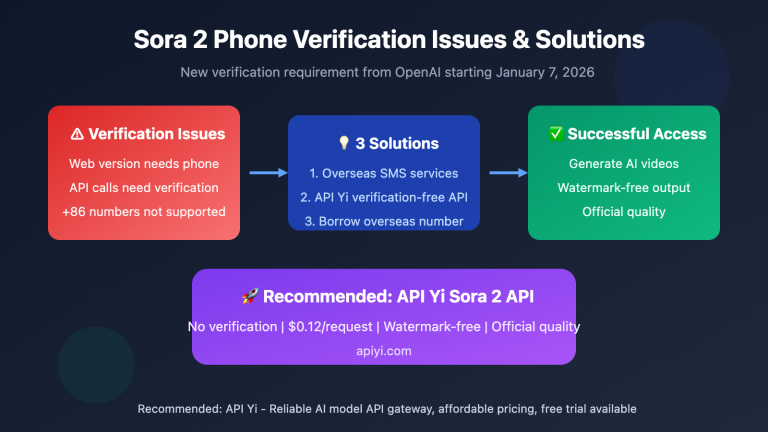
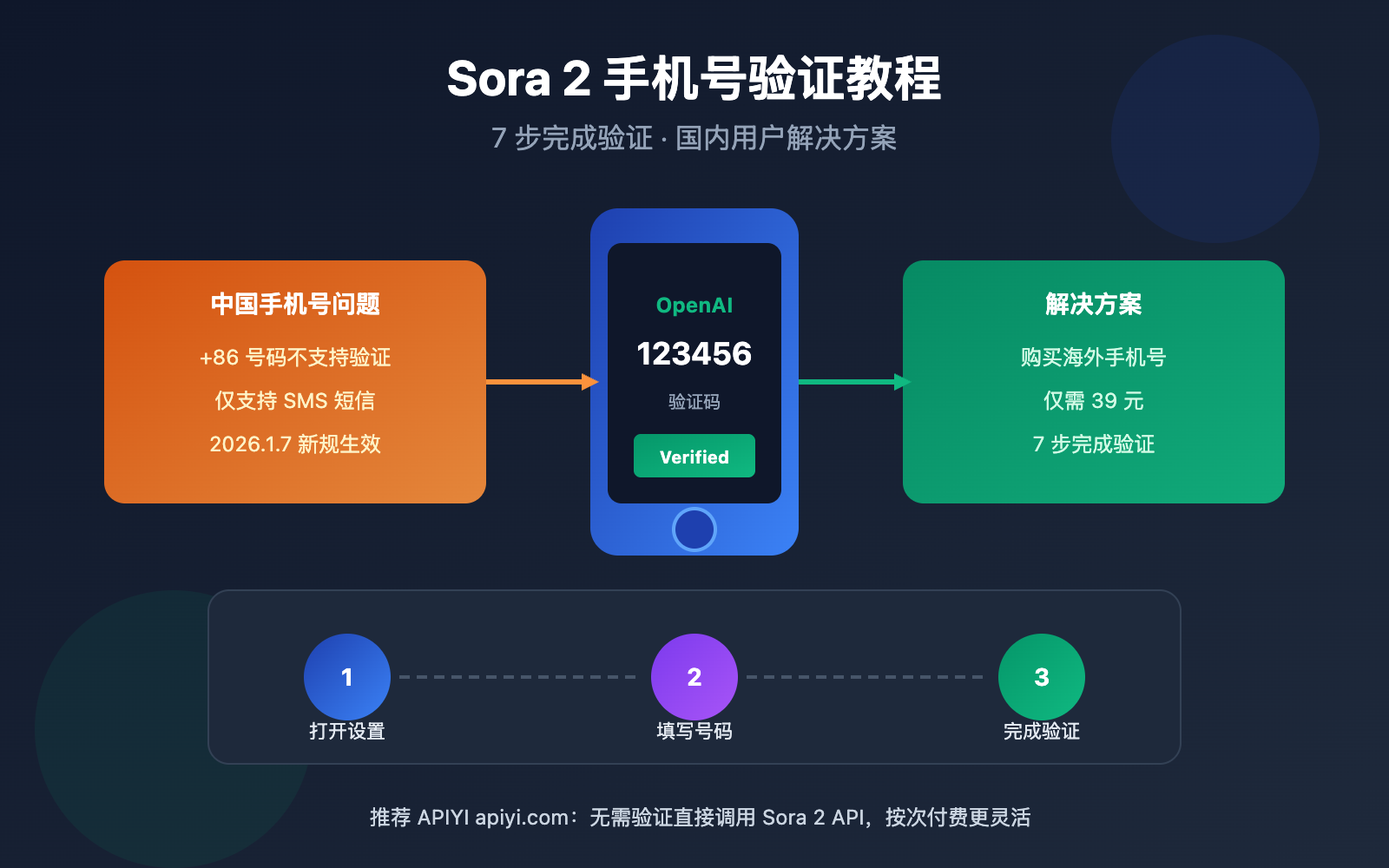
2026 年 1 月 7 日,OpenAI 悄然为 Sora 2 新增了手机号验证要求。无论是通过网页版还是 API 调用,都必须完成手机验证才能使用。本文将提供 Sora 2 手机号验证 的完整教程,帮助国内用户顺利通过验证。
核心价值: 读完本文,你将掌握 Sora 2 手机验证的完整流程,解决中国手机号无法绑定的问题,顺利使用 Sora 2 视频生成服务。
Sora 2 手机验证新规解读
| 要点 | 说明 | 影响 |
|---|---|---|
| 生效日期 | 2026 年 1 月 7 日 | 新政策已全面实施 |
| 验证方式 | 仅支持 SMS 短信 | 不支持邮件或电话验证 |
| 中国手机号 | 不在支持列表 | 需使用海外手机号 |
| 验证后绑定 | 号码与账户绑定 | 更换需重新验证 |
为什么 OpenAI 新增手机验证?
OpenAI 在 1 月 7 日为 Sora 2 增加手机验证,主要出于以下考虑:
1. 防止服务滥用
Sora 2 的视频生成需要大量 GPU 算力,手机验证可以有效限制批量注册和滥用行为。
2. 配合免费版关闭
1 月 10 日起,免费用户无法使用 Sora。手机验证与付费订阅结合,进一步收紧访问权限。
3. 区域合规要求
部分地区因法规原因暂不支持 Sora 服务,手机验证是实现区域限制的技术手段。
中国手机号为何无法验证?
中国大陆手机号 (+86) 目前不在 OpenAI 的支持列表中。这是国内用户遇到验证障碍的主要原因。OpenAI 的手机验证只能通过 SMS 短信完成,不支持邮件或电话方式。
Sora 2 Phone Verification: 7-Step Tutorial
Follow these steps to complete phone number verification for Sora 2:
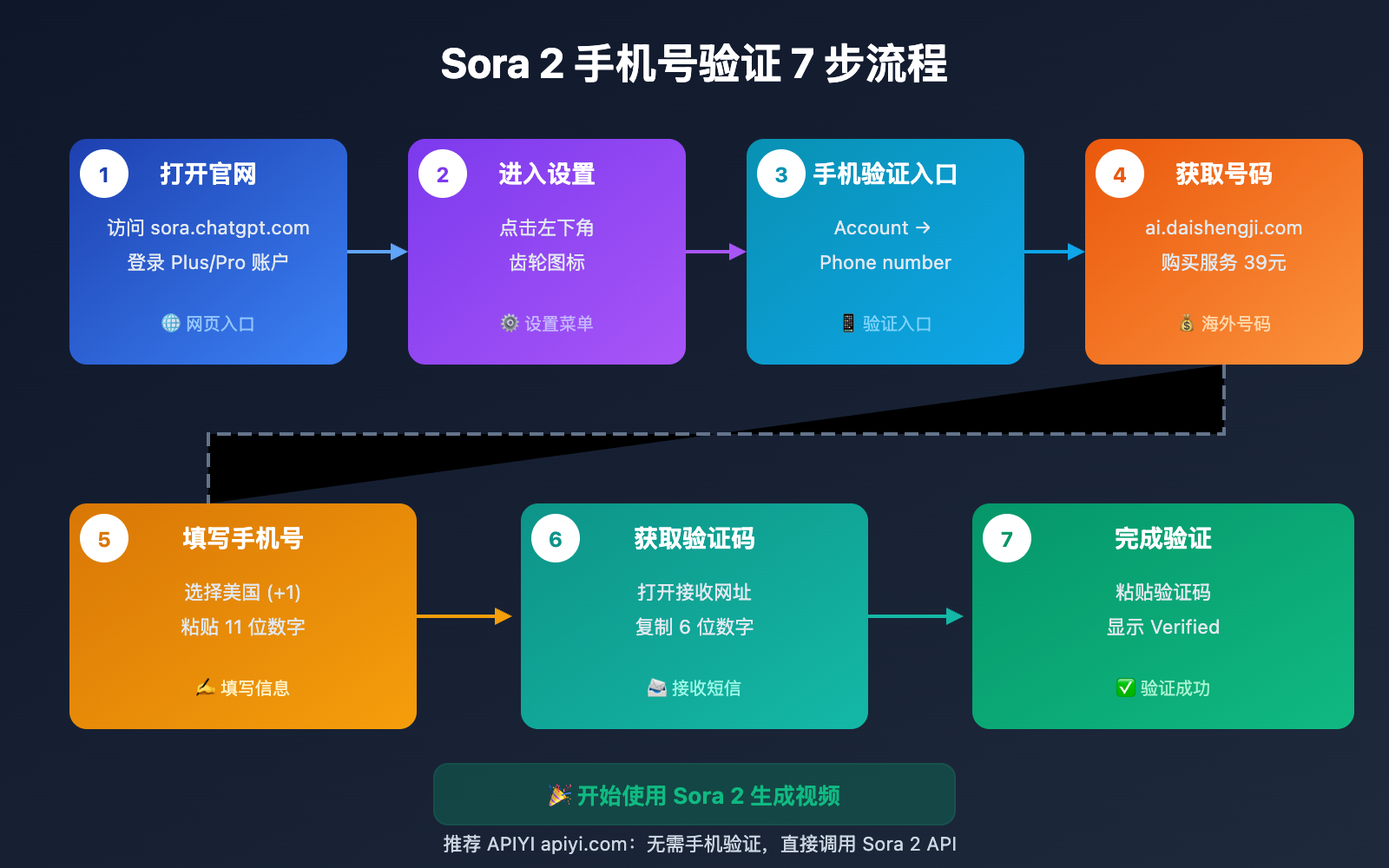
Step 1: Open the Sora Official Website
Visit the official Sora website:
https://sora.chatgpt.com/
Make sure you're logged into your ChatGPT Plus or Pro account.
Step 2: Access Settings Page
Click the settings icon in the bottom-left corner (gear icon) to open the settings menu.
Step 3: Find Phone Verification Entry
In the settings page:
- Select the Account section
- Find the Phone number option
- Click to enter the phone verification interface
Step 4: Obtain an International Phone Number
Since Chinese phone numbers are not supported, you'll need to obtain an international phone number for verification.
Recommended Solution: Visit ai.daishengji.com to purchase Sora 2 phone verification service for only 39 RMB.
After purchase, you will receive:
- A US phone number available for verification
- Verification code receiving website URL
Step 5: Enter Phone Number
In Sora's phone verification interface:
- Select United States (+1) for country/region
- Paste the complete 11-digit phone number
- Click to send verification code
Note: When entering, only input the 11 digits without repeating the +1 prefix.
Step 6: Retrieve Verification Code
Open the verification code receiving website URL you obtained and wait for the SMS to arrive. You'll see a message in the following format:
Your OpenAI verification code is: 123456
Copy this 6-digit verification code.
Step 7: Complete Verification
Paste the copied verification code into Sora's verification code input box and click confirm.
After successful verification, the interface will display: Verified
Congratulations! You can now use Sora 2 normally!
Sora 2 Phone Verification FAQ
| Issue | Cause | Solution |
|---|---|---|
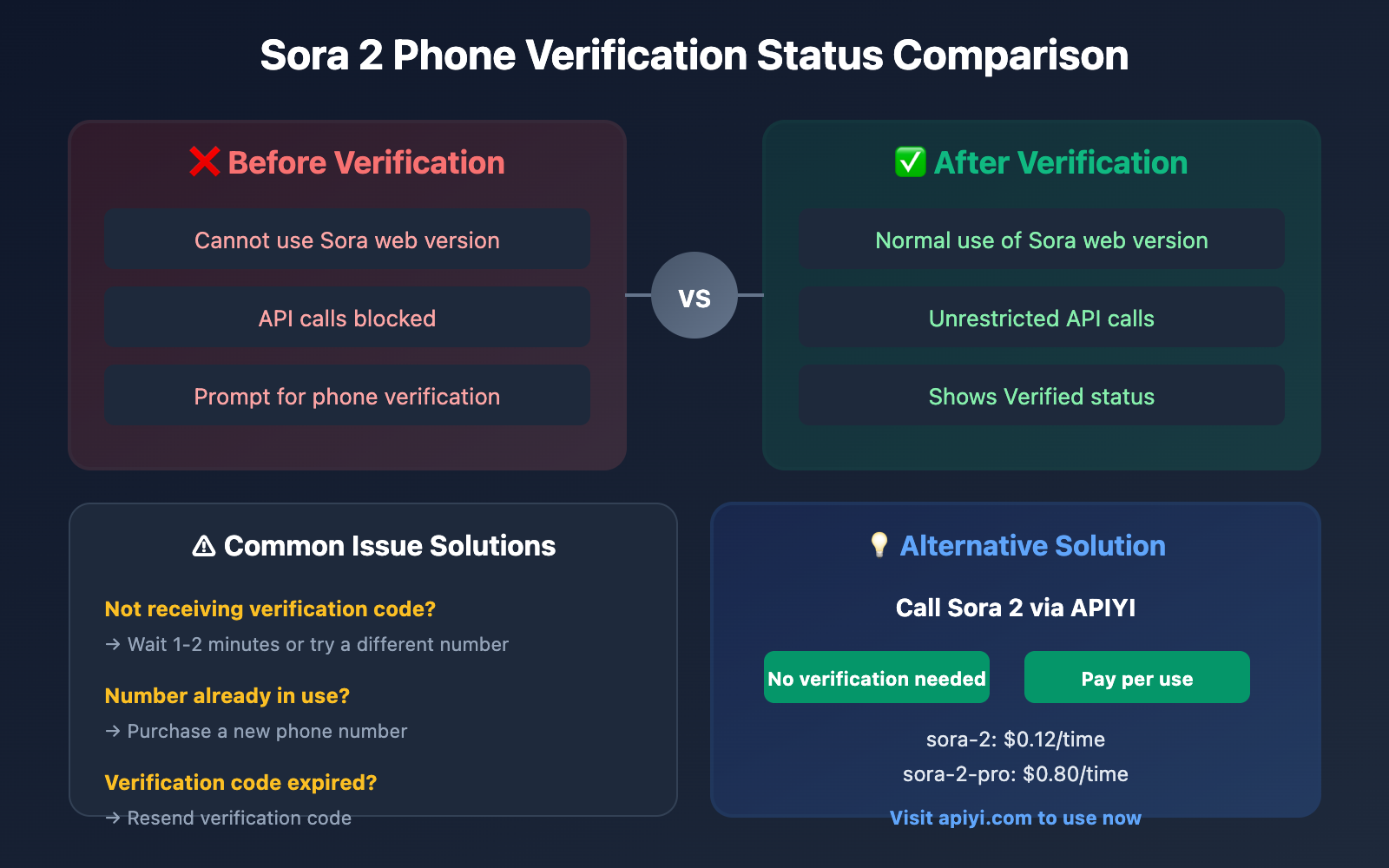
| Not receiving verification code | Network delay or number issue | Wait 1-2 minutes, or try a different number |
| Verification code expired | Exceeded validity period | Resend verification code |
| Number already in use | Number already bound to another account | Use a new phone number |
| Wrong country code | Selected wrong country/region | Confirm United States +1 is selected |
Important Notes After Verification
1. Number Bound to Account
After completing verification, the phone number will be bound to your OpenAI account. If you need to change the number, you'll need to go through the verification process again.
2. Virtual Number Risk Warning
OpenAI may impose restrictions on accounts using virtual numbers. It's recommended to:
- Choose reputable number service providers
- Avoid using obviously disposable virtual numbers
- Use the account normally after successful verification and avoid frequent changes
3. Full Functionality After Successful Verification
After completing official phone verification, account functionality is fully operational with no additional restrictions. You can:
- Normally use Sora web version to generate videos
- Call Sora 2 services through API
Alternatives Without Phone Verification
If you don't want to go through phone verification, or if you encounter difficulties during the verification process, you can consider using an API proxy service.
Calling Sora 2 via APIYi
APIYi (apiyi.com) provides Sora 2 API services without requiring you to complete phone verification yourself:
import openai

client = openai.OpenAI(
    api_key="YOUR_API_KEY",
    base_url="https://vip.apiyi.com/v1"
)

# Call Sora 2 directly without phone verification
response = client.chat.completions.create(
    model="sora-2",
    messages=[{
        "role": "user",
        "content": "A cat playing piano in a cozy living room"
    }]
)
| Solution | Phone Verification | Price | Best For |
|---|---|---|---|
| Official Web Version | Required | $20-200/month subscription | Full web functionality needed |
| APIYi API | Not Required | Starting at $0.12/call | Developers, pay-as-you-go users |
Recommendation: If you're primarily using it for API development or want to avoid verification hassles, we recommend calling Sora 2 through APIYi (apiyi.com) to eliminate verification concerns with flexible pay-per-use pricing.
Frequently Asked Questions
Q1: Why can’t Chinese phone numbers be verified?
Chinese mainland phone numbers (+86) are currently not on OpenAI's supported list. This is due to OpenAI's regional policy restrictions and is unrelated to mobile carriers. The solution is to use a supported overseas phone number for verification.
Q2: What should I do if I never receive the verification code?
Possible causes and solutions:
- Network delay: Wait 1-2 minutes
- Number issue: Try a different phone number
- Send frequency limit: Wait a few minutes before sending again
- Number expired: Contact the number service provider to confirm status
Q3: Can I still use Sora without phone verification?
Yes. You can call Sora 2 through third-party API services like APIYi (apiyi.com) without completing phone verification yourself. Priced at $0.12/call (standard version) or $0.80/call (Pro version), pay-as-you-go, suitable for developers and users who don't want to deal with verification.
Summary
Key points about Sora 2 phone number verification:
- New Policy Effective: Starting January 7, 2026, Sora 2 requires phone verification
- Chinese Numbers Not Supported: +86 phone numbers are not on the supported list; overseas numbers required
- Verification Method: Only SMS verification supported, no email or phone call options
- Getting Overseas Numbers: Purchase verification service through
ai.daishengji.com(39 yuan) - 7 Steps to Complete Verification: Settings → Account → Phone number → Enter number → Get verification code → Input → Complete
- Alternative Solution: Use API through apiyi.com to call the API without self-verification
Choose the solution based on your use case. If you need full web version functionality, follow the tutorial to complete verification; if mainly for development or on-demand use, the API service from apiyi.com is more convenient.
📚 References
⚠️ Link Format Notice: All external links use the format
Resource Name: domain.comfor easy copying but are not clickable to avoid SEO weight loss.
-
OpenAI Phone Verification Help Center: Official verification instructions and FAQs
- Link:
help.openai.com/en/collections/8471299-phone-verification - Description: Learn about OpenAI's official phone verification policy
- Link:
-
Sora Supported Countries/Regions List: Check which regions support Sora
- Link:
help.openai.com/en/articles/10250692 - Description: Confirm if your region is within the supported range
- Link:
-
Sora 2 Phone Number Verification Service: Get overseas phone numbers
- Link:
ai.daishengji.com - Description: Purchase US phone number service specifically for Sora verification
- Link:
Author: Technical Team
Technical Discussion: Welcome to discuss in the comments section. For more resources, visit the apiyi.com technical community