Author’s note: An introduction to LongCat 2.5. This article covers its parameters and architecture, eight official demos, results from 25 official benchmarks, the limited-time discounted pricing, and how to connect it to Claude Code and Cline.
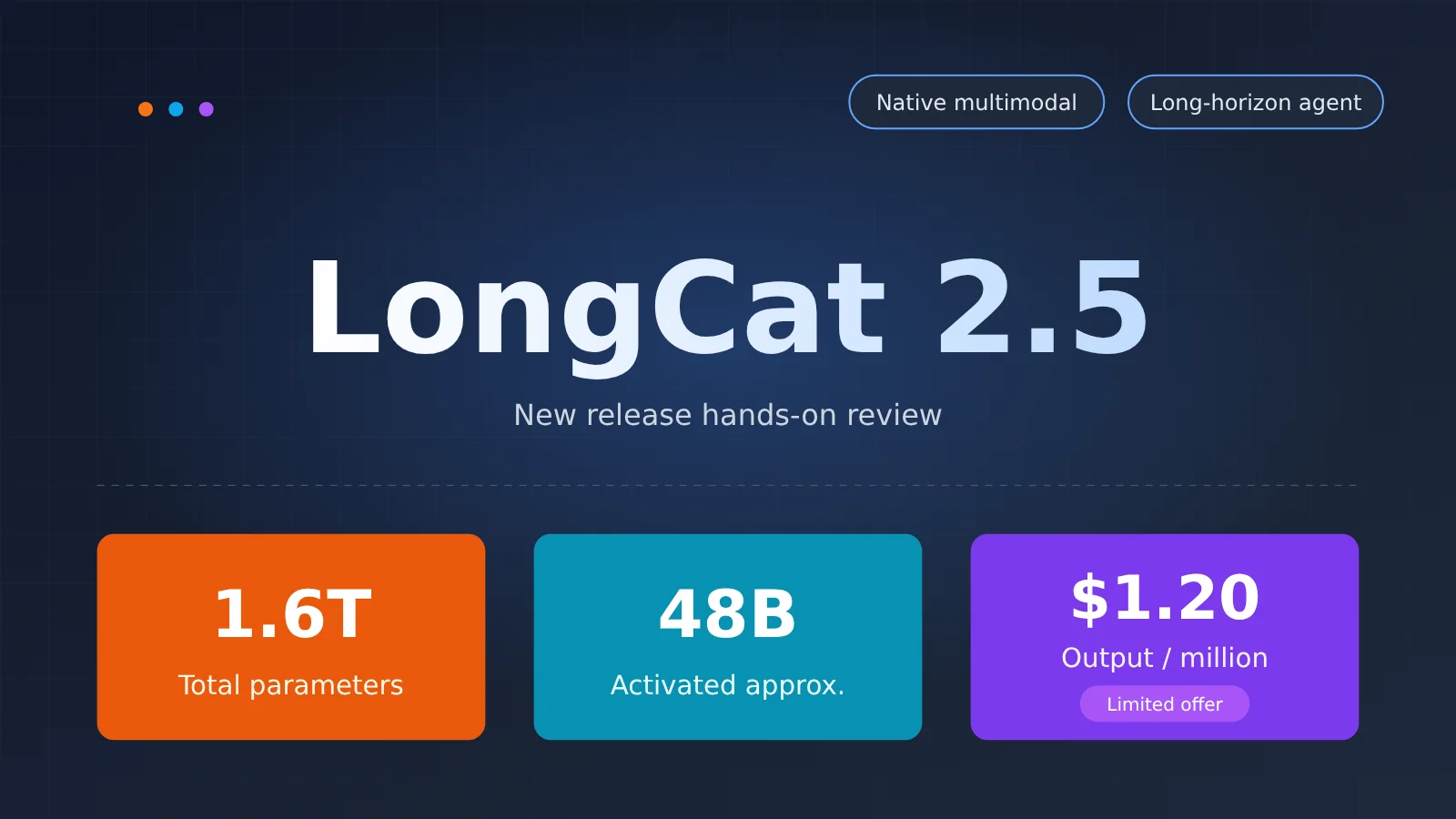
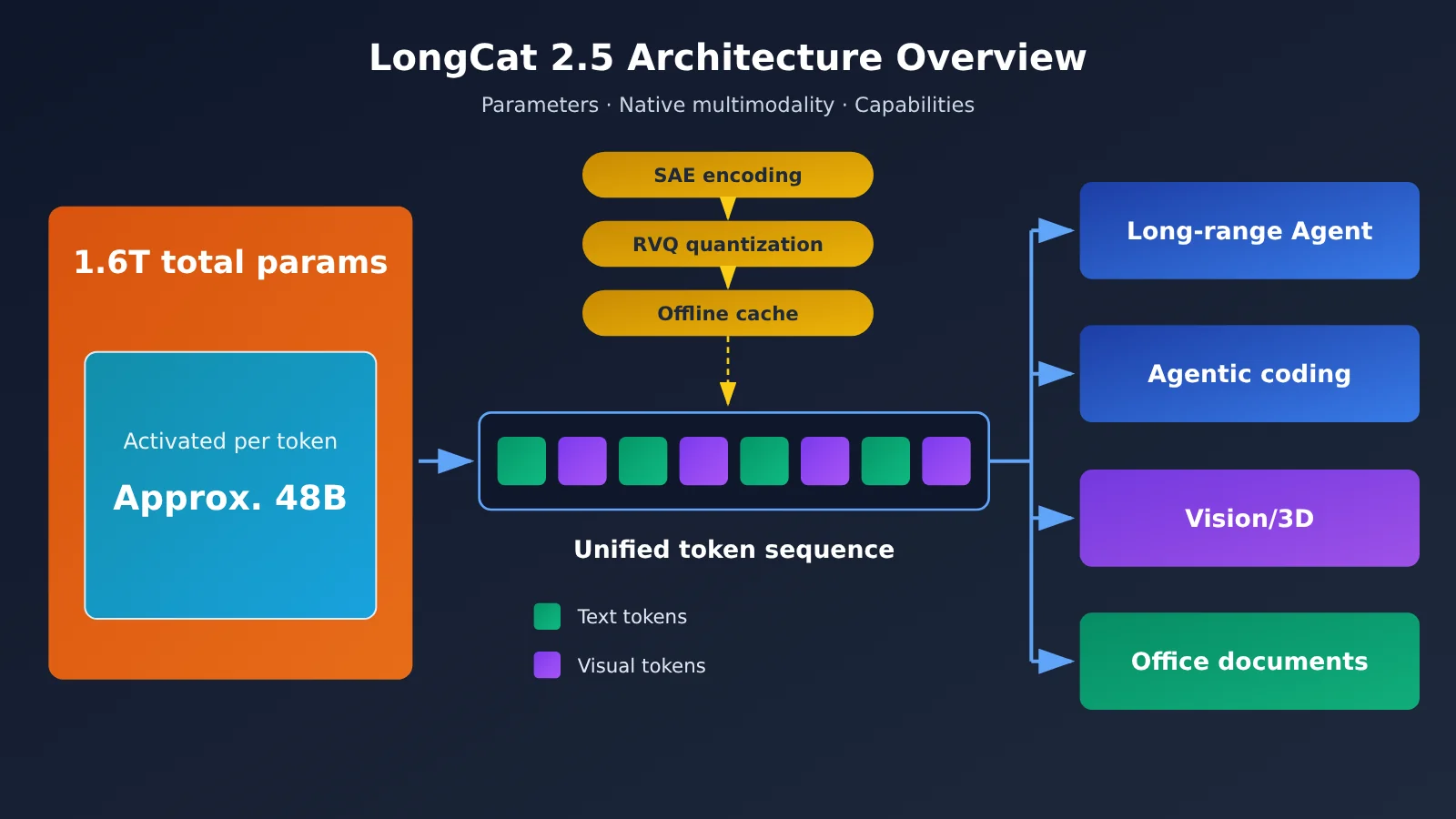
On November 1, Meituan’s LongCat team released LongCat-2.5. It has 1.6 trillion total parameters, with approximately 48 billion activated per token. It’s a natively multimodal model built for long-horizon agent tasks. Compared with 2.0, its main upgrades are native visual understanding and agentic coding. Limited-time discounted pricing is $1.20 per million output tokens, $0.30 per million cache-miss input tokens, and $0.006 per million cache-hit input tokens.
This isn’t a model selection showdown. We’ll focus on three things: what it is, what it’s good at, and what it costs to use. Benchmark scores are included for comparison, not to claim that one model replaces another.
What you’ll get: A map of its capabilities, a clear cost breakdown, and the shortest path to getting started.
LongCat 2.5 at a Glance
| Item | Details |
|---|---|
| Release date | 2026-11-01 (official blog) |
| Positioning | A native multimodal model for long-running agent tasks |
| Model size | 1.6T total parameters, with approximately 48B activated per token |
| Upgrades over 2.0 | Native visual understanding and agentic coding |
| Context window / maximum output | 1M tokens / 128K tokens |
| API formats | Supports both OpenAI and Anthropic formats |
| Pricing (limited-time discount) | Input: $0.30 (cache miss) / $0.006 (cache hit); output: $1.20 per million tokens |
| Weights | Marked “coming soon” on both GitHub and Hugging Face; not yet released |
There’s an easy point of confusion about activated parameters. On launch day, some community posts listed the figure as 440B. The official blog says approximately 48 billion parameters are activated per token—that’s 48B. We use 48B throughout this article.
What Is LongCat 2.5? Parameters, Architecture, and Native Multimodality
LongCat 2.5’s Scale and Training Approach
With 1.6 trillion total parameters and about 48 billion active per inference, LongCat 2.5 is a sparsely activated Large Language Model: it has a large overall capacity but uses only a small portion of it on each inference. This architecture helps balance knowledge capacity against inference costs and is one reason the model can be offered at a lower price.
For training, the team highlighted several techniques directly relevant to long-running tasks:
- More long-horizon trajectory data: Long-sequence training incorporates more long-horizon trajectories, followed by large-scale long-horizon reinforcement learning. This trains the model on end-to-end engineering tasks such as working with complex codebases and building complete projects.
- Turning real failure trajectories into training tasks: The team scaled up data synthesis, environment construction, and mixed training across harnesses to turn real Agent failure trajectories into reproducible, verifiable tasks.
- Reducing overthinking and repeated calls: Repeated reasoning and tool calls receive extra penalties. Positive-sample rewards are also redistributed to address overthinking and responses that grow too long too quickly.
The third point is especially practical for Agent use cases. In long-running tasks, one of the biggest costs often comes from the model repeatedly calling the same tool without making progress. Curbing that behavior during training translates directly into token savings.
How LongCat 2.5 Handles Native Multimodality
“Native multimodality” has a specific meaning here. Visual signals are represented as discrete tokens at multiple levels, and the backbone model processes visual and text data in a unified token format. It doesn’t rely on a separate visual encoder whose features are then spliced into the model.
The official description breaks the approach into three stages:
- Native-resolution visual discretization: A semantic-aligned encoder (SAE) and residual vector quantization (RVQ) convert images into discrete tokens.
- Offline visual token preprocessing: Once the tokenizer is fixed, visual token IDs can be precomputed and cached offline.
- Joint learning: Visual embeddings are trained alongside the backbone model.
According to the official announcement, this design gives the model strong Visual Coding performance and supports tasks such as creative design and 3D. The 3DCodeBench and Vision2Web benchmarks in the results table below test these kinds of capabilities.
Why LongCat 2.5 Can Be Priced This Low
The official blog spends a lot of time on engineering efficiency, which helps explain the price. Training runs on domestically produced compute hardware with less than 80GB of memory per GPU. The team reduces memory usage with techniques such as double-sharded FSDP, hybrid vocabulary parallelism, and dynamic expert replication. On long-sequence SFT tasks, this FSDP configuration delivers 86% higher per-GPU throughput than the DDP baseline.
For inference, LongCat uses W4A4, quantizing both expert weights and activations to 4 bits. In the official online load test, compared with a W8A8 INT8 baseline, prefill throughput rose 43.3%, decode throughput rose 42.77%, time to first token (TTFT) fell 15.91%, and time per output token (TPOT) fell 19.72%. With throughput up by more than 40%, the cost per token naturally comes down.
Where LongCat 2.5 Excels: Long-Horizon Agents and 8 Official Examples
The Leap From LongCat 2.0 to 2.5
First, let’s compare the two generations. The figures below come from LongCat’s own tests; comparisons marked with an asterisk come from public leaderboards. This section cites only the scores for LongCat’s two generations.
- Terminal Bench v4.0: 3.0 for 2.0, 38.5 for 2.5.
- DeepSWE v1.1: 9.7 for 2.0, 64.6 for 2.5.
- Program Bench Almost Resolved: 2.5 for 2.0, 25.5 for 2.5.
- AutomationBench v1.0.6: 15.8 for 2.0, 51.8 for 2.5.
These benchmarks cover long-horizon tasks such as multistep terminal operations, repository-level fixes, and automated workflows. Version 2.0 scored close to zero on these tasks, while 2.5 reached a range where it can be compared with other models. That’s a substantial upgrade in agentic coding. The official results also note that all LongCat-2.5 scores were obtained with thinking enabled, temperature=1.0, and top_p=0.95.
8 Official LongCat 2.5 Demos
The team released 8 examples generated end to end, split into two groups. These are official demos; this article hasn’t independently rerun each one.
| Category | Example | What It Tests |
|---|---|---|
| Software development | Real-time fluid simulation | Physics calculations + real-time frontend rendering |
| Software development | Interactive 3D artifact display | 3D scene building and interaction logic |
| Software development | City-scale model | Layout and organization of many objects |
| Software development | Miniature scene assets | Fine-grained control over 3D asset generation |
| Professional work | Business operations analysis | Data reading, metric breakdown, and written conclusions |
| Professional work | Customer feedback analysis report | Categorizing and summarizing unstructured text |
| Professional work | Chinese-inspired color aesthetics page | Visual aesthetics and web layout |
| Professional work | Event invitation generator | Form interactions + layout design |
Three of the four software development examples are directly related to 3D, reflecting the model’s native visual capabilities and Visual Coding focus. The professional work examples lean toward reading source material and producing finished deliverables, aligning with benchmarks such as JobBench and GDPVal.
Where LongCat 2.5 Stands on Benchmarks
The official evaluation covers more than 25 benchmarks across three categories: Code Agent, General Agent, and Visual. Here are nine of them, comparing five models side by side.
| Benchmark | LongCat-2.5 | Claude Opus 5 | GPT-5.6-Sol | GLM-5.3 | Kimi K3 |
|---|---|---|---|---|---|
| Terminal Bench v2.1 | 88.4 | 89.1* | 88.8* | 88.2* | 88.3* |
| Terminal Bench v4.0 | 38.5 | 53.9* | 37.3* | 41.8* | 12.6* |
| DeepSWE v1.1 | 64.6 | 68.8* | 72.7* | 66.9* | 67.5* |
| BrowseComp | 91.9 | 90.8* | 90.4* | 81.0 | 91.2* |
| HLE w/tools | 63.1 | 64.7* | 58.0* | 62.5* | 56.0* |
| JobBench | 65.4 | 66.7* | 45.4* | 61.4* | 52.9* |
| MCP Atlas | 83.1 | 85.8* | 81.8* | 84.2* | 84.2* |
| 3DCodeBench Text to 3D | 55.4 | 54.3 | 52.3 | 53.4 | 49.3 |
| Vision2Web | 78.6 | 80.2* | 73.5* | 77.8* | 79.0* |
Scores marked with * come from public leaderboards or technical reports cited by LongCat. The rest are from LongCat’s own testing and are included for comparison only.
Looking strictly at the results, a few points stand out:
- Search tasks: LongCat scores 91.9 on BrowseComp, the highest of the five. The team used its own lightweight harness, with only the search and browse_with_goal tools enabled and a maximum of 1,024 turns.
- 3D generation: Its 3DCodeBench Text to 3D score of 55.4 is the highest of the five, but none of the scores in this row has an asterisk—all five come from LongCat’s own testing.
- Terminal tasks: All five models score between 88.2 and 89.1 on Terminal Bench v2.1. On the harder v4.0, LongCat-2.5 scores 38.5 versus Claude Opus 5’s 53.9, a gap of 15.4 points.
- Repository-level fixes: LongCat scores 64.6 on DeepSWE v1.1, the lowest of the five. GPT-5.6-Sol scores 72.7.
- Tool use and office tasks: LongCat scores 83.1 on MCP Atlas and 65.4 on JobBench, trailing Opus 5 by 2.7 and 1.3 points, respectively.
The harness matters too. Both versions of Terminal Bench use the Claude Code harness with a max_seq_length of 512K; DeepSWE uses mini-swe-agent with a sequence length of 1M. Scores from different benchmarks using different harnesses shouldn’t be compared directly.
LongCat 2.5 Pricing: Model Comparison and a 1 Million Token Bill
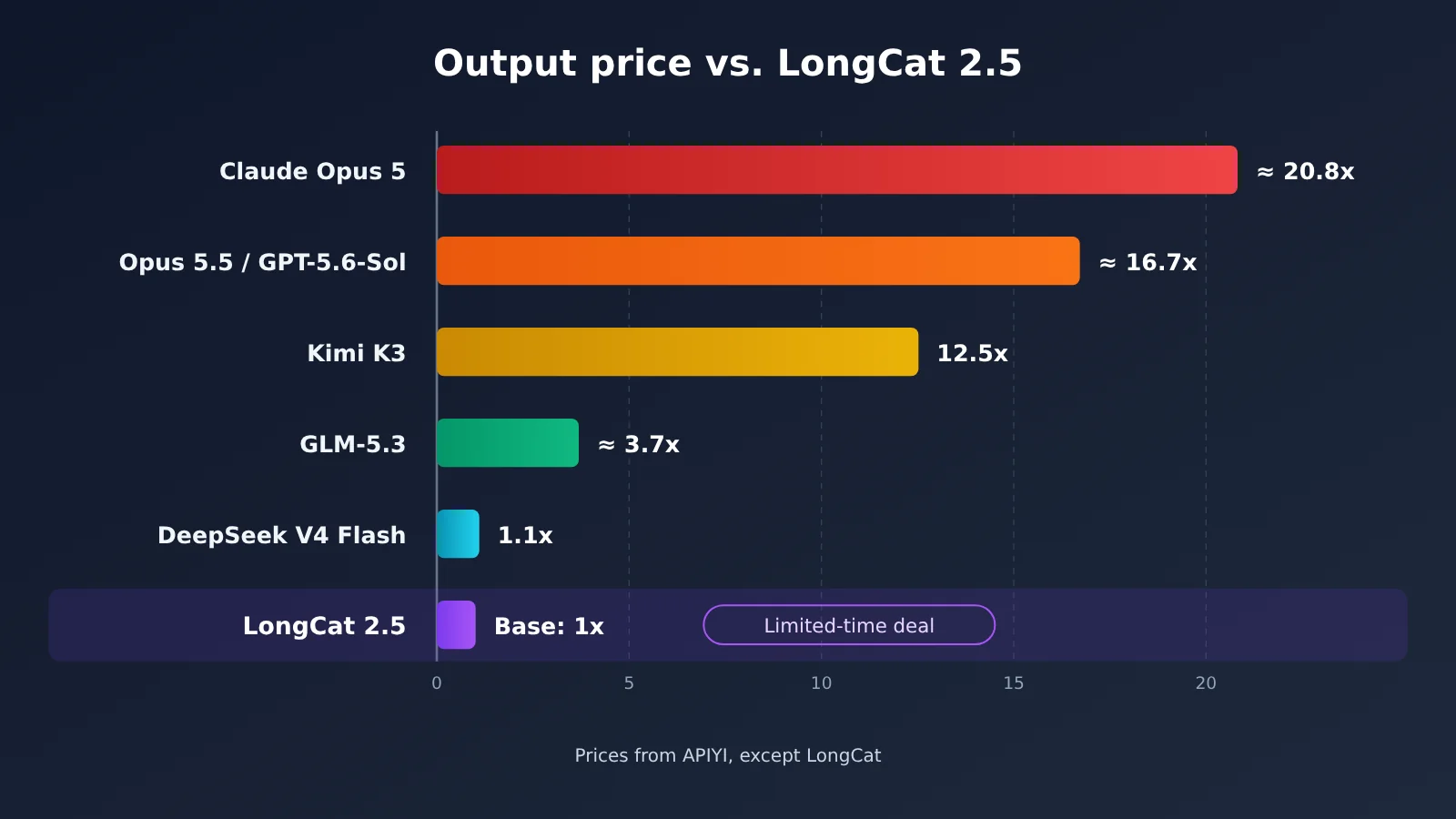
Caption: LongCat-2.5 pricing reflects a limited-time discount on the official API platform. Prices for the other models come from the model list on APIYI at apiyi.com.
| Model | Input (per 1 million tokens) | Output (per 1 million tokens) | Output price vs. LongCat |
|---|---|---|---|
| LongCat-2.5 (limited-time discount, official platform) | $0.30 (cache hit: $0.006) | $1.20 | 1× |
| Claude Opus 5 | $5 | $25 | Approx. 20.8× |
| Claude Opus 5.5 | $4 | $20 | Approx. 16.7× |
| GPT-5.6-Sol | $4 | $20 | Approx. 16.7× |
| Kimi K3 | $3 | $15 | 12.5× |
| GLM-5.3 | $1.4 | $4.396 | Approx. 3.7× |
| DeepSeek V4 Flash | $0.44 | $1.32 | Approx. 1.1× |
APIYI apiyi.com prices were checked on November 2, 2026, against the platform’s model list on that date. LongCat-2.5 pricing comes from the LongCat API platform, which notes that prices may change.
The bill for 1 million tokens
Suppose a batch task uses 1 million tokens in total: 800,000 input and 200,000 output, with no caching.
- LongCat-2.5 (limited-time discount): 0.8 × $0.30 + 0.2 × $1.20 = $0.48
- DeepSeek V4 Flash: $0.352 + $0.264 = $0.616
- GLM-5.3: $1.12 + $0.879 ≈ $2.00
- Kimi K3: $2.40 + $3.00 = $5.40
- GPT-5.6-Sol or Claude Opus 5.5: $3.20 + $4.00 = $7.20
- Claude Opus 5: $4.00 + $5.00 = $9.00
For the same task, Opus 5 costs about 18.75 times as much as LongCat-2.5. If your task gets cache hits, the gap grows even wider. In the official example, 1 million input tokens (400,000 cached and 600,000 uncached) plus 500,000 output tokens cost $0.18 + $0.0024 + $0.6 = $0.7824. Cached input costs just $0.006 per million tokens—1/50 of the uncached price.
Two other billing details are worth remembering: you’re only charged for requests that return HTTP 200; failed requests such as 401, 403, 429, and 500 aren’t billed. Your balance is prepaid and doesn’t expire, and promotional credits are used first when available.
A simpler way to compare multiple models
The reality is that Agent projects rarely use just one model. You might want to run the same set of prompts through LongCat-2.5, Claude, GPT, and GLM to compare their outputs. With APIYI at apiyi.com, you can switch between models using one account and one API key, without opening and funding a separate account for each provider.
📌 Note: Available models and prices are subject to the model list on APIYI at apiyi.com. APIYI doesn’t yet offer LongCat-2.5, but plans to add it soon.
Getting Started with LongCat 2.5: Website and API Access
Step 1: Try It on the Web
The official online chat is at longcat.ai/chat. According to a community launch post, new users receive 10M tokens and existing users receive 5M tokens during the launch period. The credits are added automatically, and cache hits don’t consume them. The post also mentions a limited-time ¥9.9 offer that’s “coming soon.” Start by testing retrieval and image understanding tasks—LongCat ranks highly on benchmarks for both.
Step 2: Use the API—Remember Four Parameters
- OpenAI-compatible endpoint:
https://api.longcat.ai/openai - Anthropic-compatible endpoint:
https://api.longcat.ai/anthropic - model field:
LongCat-2.5 - Context and output: 1M context window, maximum output of 128K tokens
For rate limits, the official documentation only says that exceeding the limit returns HTTP 429, error code rate_limit_exceeded, and a retry_after value of 60. It recommends that clients retry with exponential backoff. Specific RPM and TPM limits haven’t been published.
If your code already uses the OpenAI SDK to call another model, you only need to change three settings: base_url, api_key, and model. For example, if you normally use APIYI with the base_url https://api.apiyi.com/v1, switch it to https://api.longcat.ai/openai and set model to LongCat-2.5 to use LongCat’s official API.
Step 3: Connect It to Claude Code
- Claude Code, in the env section of
~/.claude/settings.json: SetANTHROPIC_AUTH_TOKENto your LongCat API key - In the same file’s env section: Set
ANTHROPIC_BASE_URLtohttps://api.longcat.ai/anthropic - In the same file’s env section: Set
ANTHROPIC_MODELtoLongCat-2.5 - In the same file’s env section: Set
CLAUDE_CODE_MAX_OUTPUT_TOKENSto131072 - In the same file’s env section (recommended): Set
ANTHROPIC_SMALL_FAST_MODEL,ANTHROPIC_DEFAULT_SONNET_MODEL, andANTHROPIC_DEFAULT_OPUS_MODELall toLongCat-2.5
If you don’t change the last three variables, Claude Code’s internal subtasks may still request the default models, causing errors or charges on the wrong account.
Step 4: Connect It to Cline
- Cline, in the VS Code sidebar settings panel: Choose an OpenAI-compatible API Provider
- In the same panel: Set Base URL to
https://api.longcat.ai/openai - In the same panel: Enter your LongCat API key as the API Key and set Model ID to
LongCat-2.5
LongCat’s official documentation has a dedicated integration page for Cline; check it for the exact field names. There are also integration pages for more than a dozen other tools, including Codex, OpenCode, Kilo Code, Cherry Studio, Chatbox, and CC Switch.
🚀 Quick-start tip: Use the free official credits to get your tasks working first, then decide whether you want a long-term integration. If you also need to compare results from Claude, GPT, and Gemini, you can manage them through a single OpenAI-compatible interface at APIYI apiyi.com. Once LongCat-2.5 becomes available there, you’ll be able to switch to it within the same account.
What LongCat 2.5 Is Good For
| Good fits for LongCat 2.5 | Proceed with caution |
|---|---|
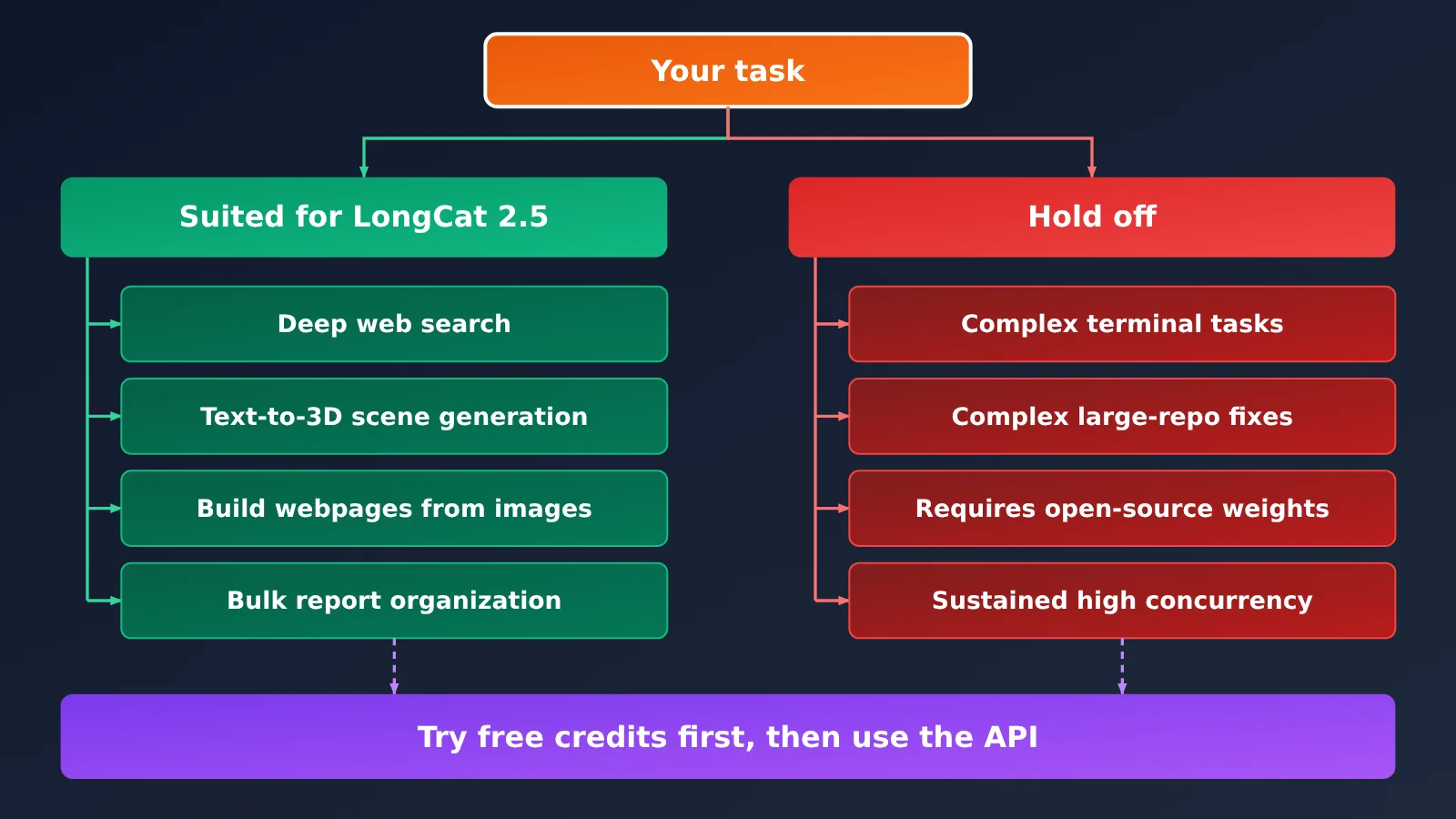
| Multi-round web research and information gathering (BrowseComp: 91.9) | Difficult, multi-step terminal operations tasks (Terminal Bench v4.0: 38.5, versus 53.9 for Opus 5) |
| Generating 3D scenes in Three.js and similar tools from text descriptions (3DCodeBench: 55.4) | Fixing difficult bugs in large repositories (DeepSWE v1.1: 64.6, the lowest of the five models) |
| Building web pages from design mockups or screenshots (Vision2Web: 78.6) | Projects requiring private deployment and local weights (weights haven’t been released) |
| Organizing customer feedback and business data into reports in batches (JobBench: 65.4; limited-time discounted output price: $1.20 per million tokens) | Production services requiring a fixed high-concurrency quota (official RPM/TPM limits haven’t been published) |
The tasks on the left have something in common: they’re lengthy, use lots of tokens, and are sensitive to per-token pricing. LongCat-2.5’s scores and pricing make it a solid option for them. The right column doesn’t mean it can’t handle those tasks—but its scores show a noticeable gap, or its deployment and quota terms are still unclear. Start with a small-scale trial.
LongCat 2.5 FAQ
Q1: Were LongCat 2.5’s benchmark scores independently tested?
No. All LongCat-2.5 scores in the table come from LongCat’s own tests. Scores marked with an asterisk for comparison models come from public reports or official leaderboards; those without an asterisk also come from LongCat’s own tests. It’s best to treat them as a point of comparison.
Q2: Is $1.20 per million tokens the long-term price?
No. The official pricing is marked as a limited-time discount and may change. Check the LongCat API platform page and your bill for current pricing. For long-term budgeting, consider having a backup model and using an aggregation platform like APIYI apiyi.com to keep your options open.
Q3: Is LongCat 2.5 open source?
Not yet. The GitHub and HuggingFace buttons on the official blog both say “Coming soon.” For now, you can only try it online or access it via API. LongCat hasn’t announced an open-source timeline.
Q4: Can I use LongCat 2.5 through APIYI?
Not yet. APIYI plans to add the model as soon as possible. For now, you can use the official LongCat API directly. If you want to compare Claude, GPT, and GLM, you can use a single API key on APIYI apiyi.com to run those models. Check the platform’s model list for availability and pricing.
Q5: What should I do if I get a 429 error?
You’ve hit a rate limit. The response body will include `retry_after` set to 60. LongCat recommends using exponential backoff for client retries. Requests that receive a 429 aren’t billed, so you won’t incur extra charges.
Summary: Is LongCat 2.5 Worth Integrating?
The key takeaways for LongCat 2.5:
- Positioning: A native multimodal model with 1.6T total parameters and roughly 48B activated per token, built for long-running agent tasks.
- Upgrades: Compared with 2.0, Terminal Bench v4.0 rose from 3.0 to 38.5, and DeepSWE v1.1 rose from 9.7 to 64.6.
- Strengths: It scores 91.9 on BrowseComp and 55.4 on 3DCodeBench—the highest among the five models compared in this article, according to official figures.
- Gaps: There’s still a noticeable gap on Terminal Bench v4.0 and DeepSWE v1.1.
- Pricing: The limited-time discounted output price is $1.20 per million tokens. A request with 800,000 input tokens and 200,000 output tokens costs about $0.48.
- Integration: Supports both OpenAI and Anthropic protocols. For Claude Code, you only need to change four variables.
The takeaway: Try search and image understanding tasks at longcat.ai/chat using the free 10M token allowance, then move to the API once you’ve tested it. If you plan to switch between multiple models long-term, manage them together through APIYI at apiyi.com.
📚 References
- LongCat official blog: LongCat-2.5 release article, including architecture, training, and benchmark tables
- Link:
longcat.ai/blog/longcat-2.5 -
Details: Primary source for parameter counts, eight demo examples, and benchmark methodology
-
LongCat API platform documentation: API endpoints, billing, and tool integrations
- Link:
longcat.ai/platform/docs -
Details: Dual-protocol endpoints, limited-time discount pricing, and integration guides for Claude Code and Cline
-
APIYI model list: Model pricing across platforms
- Link:
docs.apiyi.com/models - Details: Source for the prices compared in this article; check the displayed prices for the day
Author: APIYI Technical Team
Technical discussions: Contact us through the APIYI website homepage. For more resources, visit the documentation center at docs.apiyi.com.