Author’s note: Claude Max 20x has been renamed Ultra, and Max 5x has been renamed Max. Prices haven’t changed. Verified Ultra accounts no longer have a 5-hour limit, but their weekly limit stays the same. This article uses a comparison table, a three-step check, and some math to help you decide whether to switch plans.
Here’s the bottom line: On October 30, 2026, Anthropic announced that Max 5x is now called Max, and Max 20x is now called Ultra, with no price changes. Verified Ultra accounts no longer have a 5-hour limit, but their weekly limit remains unchanged. The pricing page also now officially lists monthly API credits as a benefit for Max and Ultra: $100 per month for Max and $200 per month for Ultra. Prices were retrieved on October 31, 2026; check the official website and platform model list for the latest information.
Whether you’re affected depends on your plan. Nothing changes for Free or Pro users. Former Max 5x users get a new plan name, but both the 5-hour and weekly limits remain. Former Max 20x users will automatically move to Ultra. Once their account is verified, the 5-hour limit will be removed, but the weekly limit will stay the same. Existing subscribers don’t need to do anything.
This isn’t “unlimited usage.” The weekly limit hasn’t changed, so heavy users may still run out of their weekly allowance before the weekend. Below, we’ll break down the three changes and walk through how to check your plan and whether switching makes financial sense.
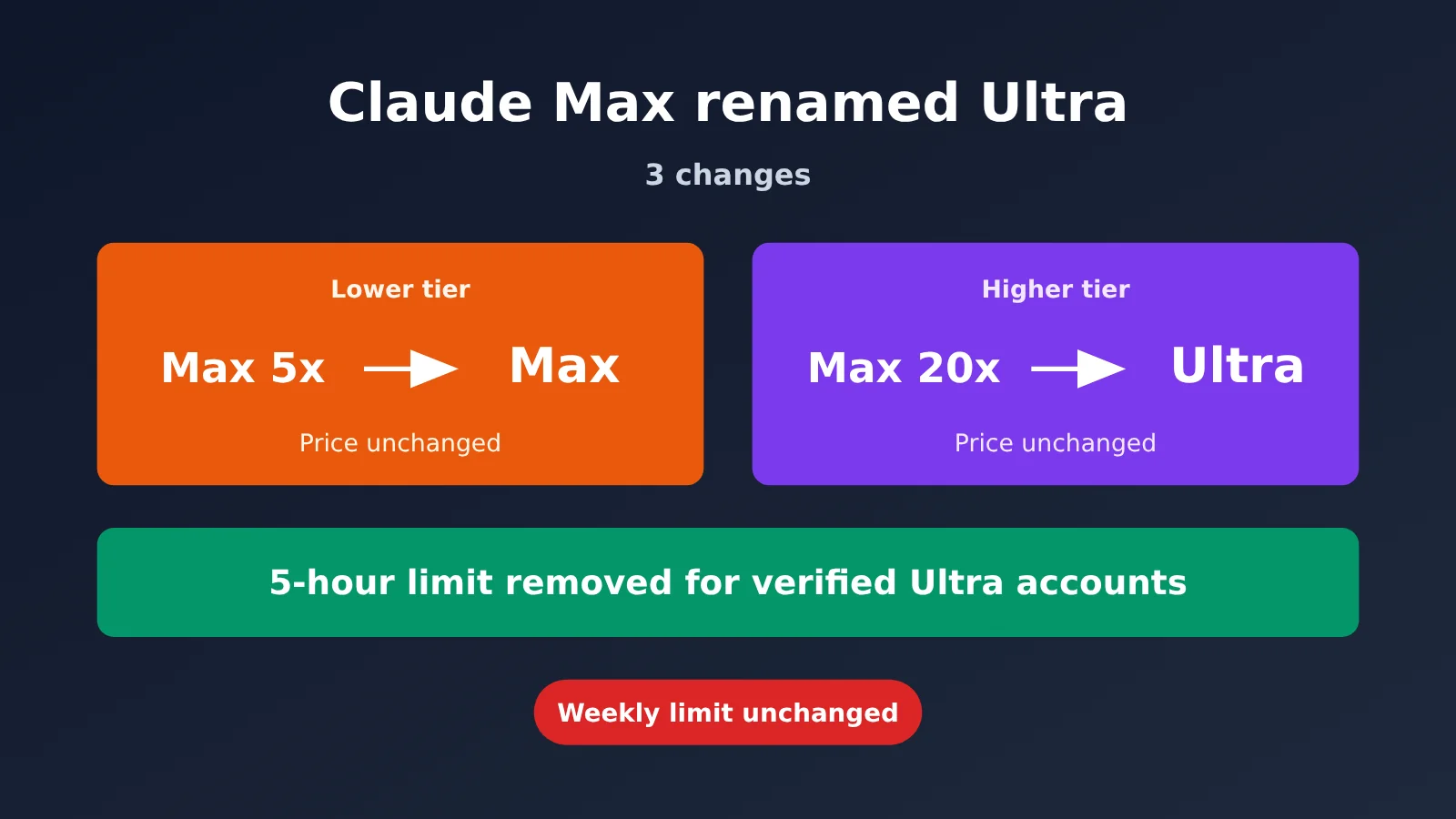
Claude Max Renamed Ultra: Key Facts at a Glance
There are only two substantive changes: verified Ultra accounts no longer have a five-hour limit, and monthly API credits are now listed as benefits for Max and Ultra. The rename itself is just a change of labels. The table below brings together details from the official announcement, pricing page, and Help Center documentation. Prices were retrieved on 2026-10-31; check the official website and platform model list for the latest information.
| Plan | Price | 5-hour limit | Weekly allowance | Monthly API credits |
|---|---|---|---|---|
| Free | $0 | Yes (Limited) | Limited | None |
| Pro | $20/month ($17/month when billed annually) | Yes (1x) | 1x Pro | None |
| Max (formerly Max 5x) | $100/month, unchanged | Yes (5x Pro) | 5x Pro, unchanged | $100/month (newly listed) |
| Ultra (formerly Max 20x) | $200/month, unchanged | Removed for verified accounts; temporary limits apply to new accounts | 10x Pro, unchanged | $200/month (newly listed) |
Here’s the simplest way to remember the change: the numeric suffixes are gone, the lower tier keeps the “Max” name, and the higher tier becomes “Ultra.” We’ve separated the three types of sources below so you can see what’s officially stated:
- Official announcement (X @claudeai, 2026-10-30 17:29 UTC, 10-31 01:29 Beijing time): Confirms the rename, unchanged prices, no action required for existing subscribers, removal of the five-hour limit for verified Ultra accounts, and unchanged weekly limits.
- Pricing page and Help Center documentation: Add that Ultra’s weekly allowance is 10 times Pro’s, subscriptions are available only on the web and billed monthly, Fable can use up to 50% of the weekly limit, and monthly API credits can be claimed under Settings > Billing.
- Our analysis: The later sections on “the same weekly allowance per dollar” and “what the extra $100 buys you” are our conclusions, not official statements.
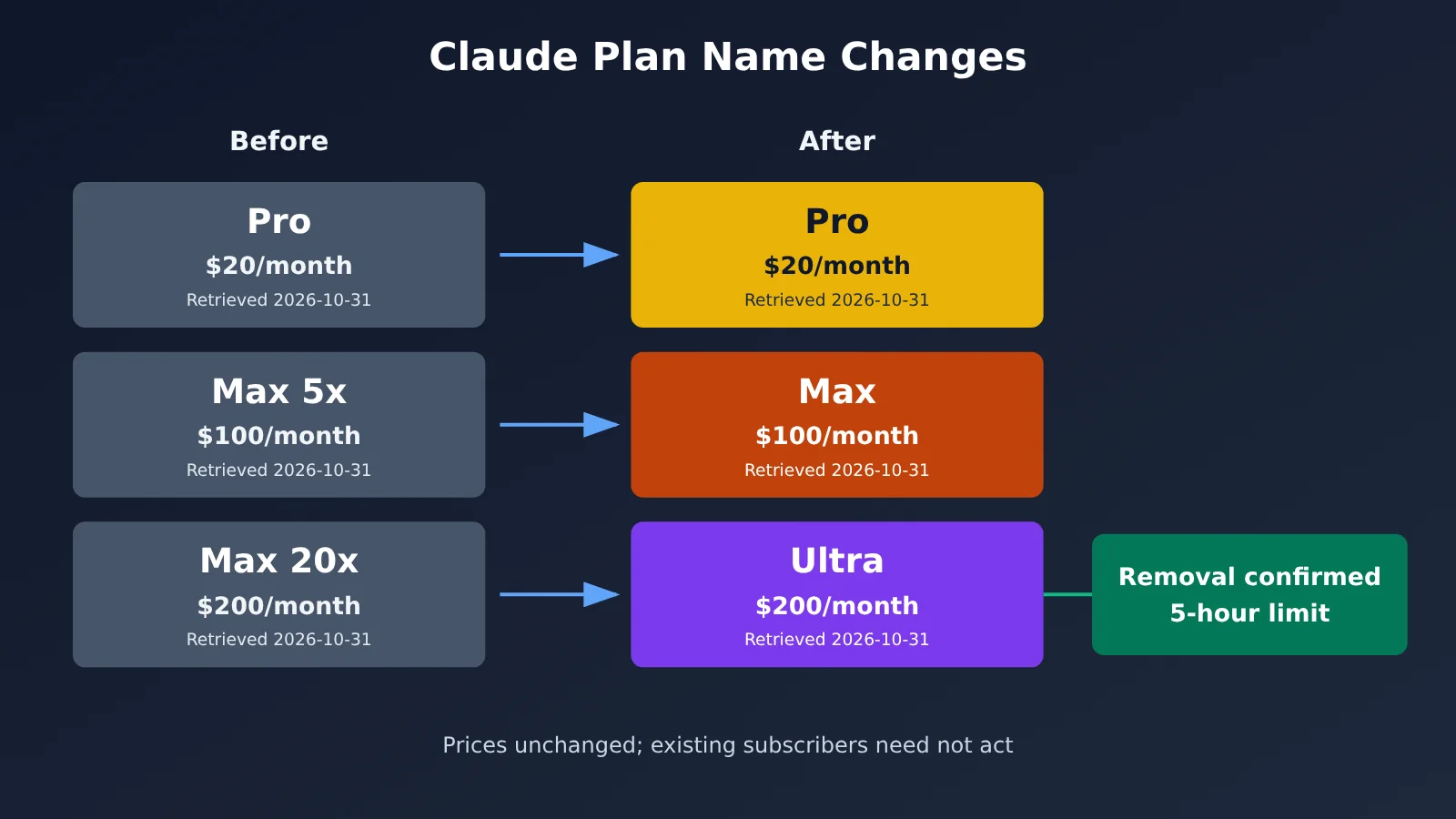
Image placeholder: Comparison of the four plans on the official pricing page (editor to add an actual screenshot later)
Ultra Removes the 5-Hour Limit: Understanding Claude’s Three Usage Limits
Ultra has removed only the outermost layer—the “5-hour wall.” The weekly limit and API allowance are still in place, and API credits are separate from chat and coding usage. Many people have mistaken this for “unlimited use” because they’ve conflated the three.
| Usage limit | Applicable plans | What changed? | Key details (source: Help Center documentation) |
|---|---|---|---|
| 5-hour limit | Pro, Max, and unverified Ultra | Removed for verified Ultra | Max users get a wrap-up allowance when they hit the limit; verified Ultra users no longer have this limit |
| Weekly limit | All paid plans | Unchanged | Calculated across all models and reset at a fixed time for each account; Fable also has a separate weekly limit |
| Monthly API credits | Max, Ultra | Listed on the pricing page | Separate from plan usage; can’t be used in Claude Code or the Claude app, or as usage credits |
Three details are easy to miss. First, Claude on the web and Claude Code share the same allowance: usage from both is combined, and running agents in the terminal counts against your weekly limit. Second, Fable 5 / 5.1 is included with Max and Ultra, but you can use it for no more than 50% of your weekly limit. It also counts against your regular weekly allowance and consumes it faster. Third, once you’ve used up your weekly or Fable limit, you can turn on usage credits to keep going at standard API rates. That’s paying for extra usage, not getting a larger allowance.
The Help Center also states that Anthropic reserves the right to impose additional limits for capacity management and fair use, and doesn’t guarantee uninterrupted service. So the accurate way to understand “removing the 5-hour limit” is this: within your weekly allowance, you can set your own pace—for example, using a large chunk of it in a single day.
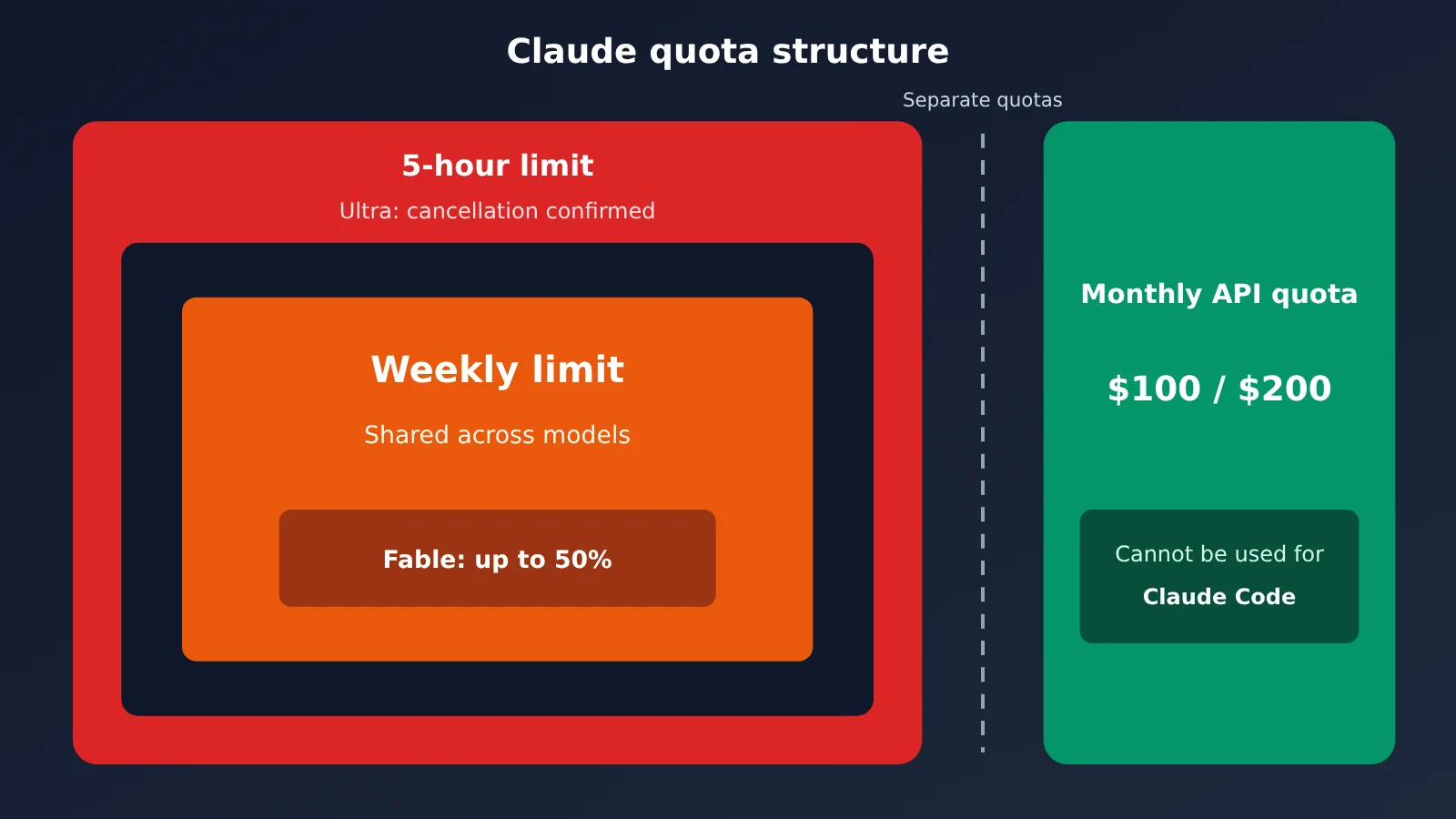
Check in 3 steps whether Claude Ultra’s 5-hour limit still affects you
Take a minute to follow these three steps and see whether the change applies to your account. This check is based on the official method in the Ultra Help Center.
- Open Settings > Usage and look for a Current session progress bar. In Claude’s web app, open the Usage page in Settings. If you see a progress bar labeled Current session, your account is still subject to the 5-hour limit. If it’s gone and you only see weekly usage information, your Ultra account has been verified and the 5-hour limit has been removed.
- Check whether you’re on the Ultra plan. In the same settings area, check your current plan name. If it says Ultra, you were previously on Max 20x and have been automatically migrated at the same price. If it says Max, you were previously on Max 5x, and the 5-hour limit still applies. The only part of this change that applies to you is the $100 in monthly API credits (pricing retrieved on 2026-10-31; check the official website and platform model list for current details). If you see Ultra but still have a Current session progress bar, your account is under a temporary limit that will be removed once verification is complete.
- Check how much of your weekly allowance remains. On the Usage page, look at the percentage of your weekly allowance you’ve used and when it resets. Your weekly allowance resets at a fixed time for your account. Even without the 5-hour limit, this is your real ceiling. If you regularly use most of it by Wednesday or Thursday, removing the 5-hour limit may not help much.
One important note about “verification”: the system completes it automatically based on factors such as your account and payment history. Verifying your phone number at checkout is a separate process and won’t remove the temporary limit. Once verification is complete, the limit will be removed automatically and you’ll receive an email. Anthropic hasn’t said how long verification takes, so you’ll need to wait for that email.
Claude Max vs. Ultra: What Does an Extra $100 Get You?
The short answer: Max and Ultra give you the same weekly allowance per dollar. The extra $100 for Ultra gets you no 5-hour limit and an additional $100 in API credits. These figures are our calculations, based on prices retrieved on 2026-10-31. Check the official website and platform model list for current details.
| Comparison | Max | Ultra | Difference |
|---|---|---|---|
| Monthly fee | $100 | $200 | +$100 |
| Weekly allowance | 5x Pro | 10x Pro | Double, in proportion to the price |
| Weekly allowance per dollar | 0.05x Pro | 0.05x Pro | Same (our calculation) |
| 5-hour limit | Yes | Confirmed removed | Ultra only |
| Monthly API credits | $100 | $200 | +$100 |
| Payment options | Monthly only | Web subscription only, monthly only | — |
This calculation assumes the weekly allowance scales linearly as “Pro multiplier ÷ monthly fee,” and that you value the API credits at face value and actually use them up on Claude Platform. Under those assumptions, doubling the weekly allowance just means paying twice as much for twice as much usage—there’s no premium or discount. The real extras are that you can use your weekly allowance in a single day without being interrupted by the 5-hour window, and you get an additional $100 in Claude Platform API credits each month.
If you already spend more than $100 a month on the Claude API, the extra API credits can almost offset the upgrade cost, bringing Ultra’s marginal cost close to zero (our calculation). But keep in mind that you can’t use these API credits to run Claude Code or as usage credits. If you normally access multiple models through OpenAI-compatible interfaces, you can also use the free test credits on APIYI at apiyi.com to estimate your actual monthly API usage before deciding what the extra $100 in credits is worth to you.
The takeaway: If you don’t use the API and have never hit the 5-hour limit, Max is enough. If you already spend money on the Claude API every month and often get interrupted by the 5-hour window, upgrading to Ultra is likely worth it.
Who doesn’t need Claude Ultra—and when not to switch
Not everyone should upgrade from Max to Ultra. Here’s a look at both sides.
You probably shouldn’t upgrade if:
- You never use up your weekly allowance: Your limit isn’t the bottleneck, so upgrading just means paying more for capacity you don’t need.
- You’ve never hit the five-hour limit: Ultra’s main new benefit won’t be useful to you.
- You don’t use the Claude Platform API: You won’t be able to use the extra $100 in API credits, and those credits can’t be applied to Claude Code usage.
- Your account is new and hasn’t been verified: After upgrading, you’ll still be subject to a temporary five-hour limit. The official documentation doesn’t say how long it lasts.
- You can only subscribe on mobile: Ultra subscriptions are available only through the web, and the help center notes that mobile pricing may differ.
An upgrade may be worth considering if:
- You often hit the five-hour limit on Max, especially if you run long tasks with Claude Code and need to work uninterrupted for extended periods.
- You run out of your weekly allowance before the weekend: Ultra doubles the weekly allowance, and the price doubles in proportion, so at least you’re not paying more per unit of usage.
- You already spend money on the Claude API: The $200/month in API credits can offset some of that cost. Pricing was retrieved on 2026-10-31; check the official website and platform model list for the latest details.
One other situation doesn’t fit neatly into either category: you rely heavily on Fable. Both Max and Ultra cap Fable usage at 50% of the weekly allowance. Upgrading gives you a larger absolute amount, but the percentage stays the same, and it’s consumed faster, so you’ll need to estimate your own usage.
An Alternative Way for Developers in China to Access Claude Opus 5.5 via API
For developers in mainland China, a more practical option is to use a pay-as-you-go API. This avoids subscription-related regional restrictions, so there’s no need to choose between Max and Ultra. According to the official regional availability documentation, the supported list includes approximately 180 countries and regions, but not mainland China.
APIYI (APIYI · apiyi.com) is a Large Language Model API aggregation platform that lets you access Claude, OpenAI, Gemini, and other models with a single API key. It offers an OpenAI-compatible interface and pay-as-you-go pricing. Claude is available through two channels: AWS Bedrock and official Anthropic API keys. The table below shows the platform’s prices for the Claude 5.5 series (per 1M tokens, collected on 2026-10-31; check the official website and platform model list for current details):
| Model | Input | Output | Cache Read | Notes |
|---|---|---|---|---|
| claude-opus-5-5 | $4 | $20 | $0.2 | 1M context window, 128K maximum output; a -thinking version is also available at the same price |
| claude-sonnet-5-5 | $2 | $10 | $0.1 | Suited to everyday programming |
| claude-haiku-5-5 | $0.1 | $0.5 | $0.01 | Tiered pricing |
The ClaudeCode group has a default 5% discount, which can be combined with a 10%–20% bonus from account top-up promotions. According to the platform documentation, the combined cost is approximately 79%–86% of the official price, with top-ups settled at a fixed exchange rate of 1 USD to 7 CNY. Check the platform’s model list for details.
Connect APIYI to Claude Code in 4 Steps
- Register an account: Sign up at APIYI, apiyi.com. New users get free testing credits.
- Select the ClaudeCode group when creating a key: Choose the ClaudeCode group when creating your token to get the default 5% discount.
- Configure environment variables: Set
ANTHROPIC_BASE_URL=https://api.apiyi.comandANTHROPIC_AUTH_TOKEN=sk-your-key. To skip official account verification, add{"hasCompletedOnboarding": true}to.claude.jsonin your user directory. Store persistent settings in.claude/settings.json. - Switch models: Once you’re in Claude Code, run
/model claude-opus-5-5or setANTHROPIC_MODEL=claude-opus-5-5. If you’re using an OpenAI-compatible SDK, set base_url tohttps://api.apiyi.com/v1.
There are a few things to watch out for when migrating to Opus 5.5: setting thinking to disabled returns a 400 error, as does setting tool_choice to any or tool. The default effort has also dropped from high to medium. In addition, Prompt Cache only works through the native Anthropic /v1/messages endpoint, so be sure to use it for long-context coding.
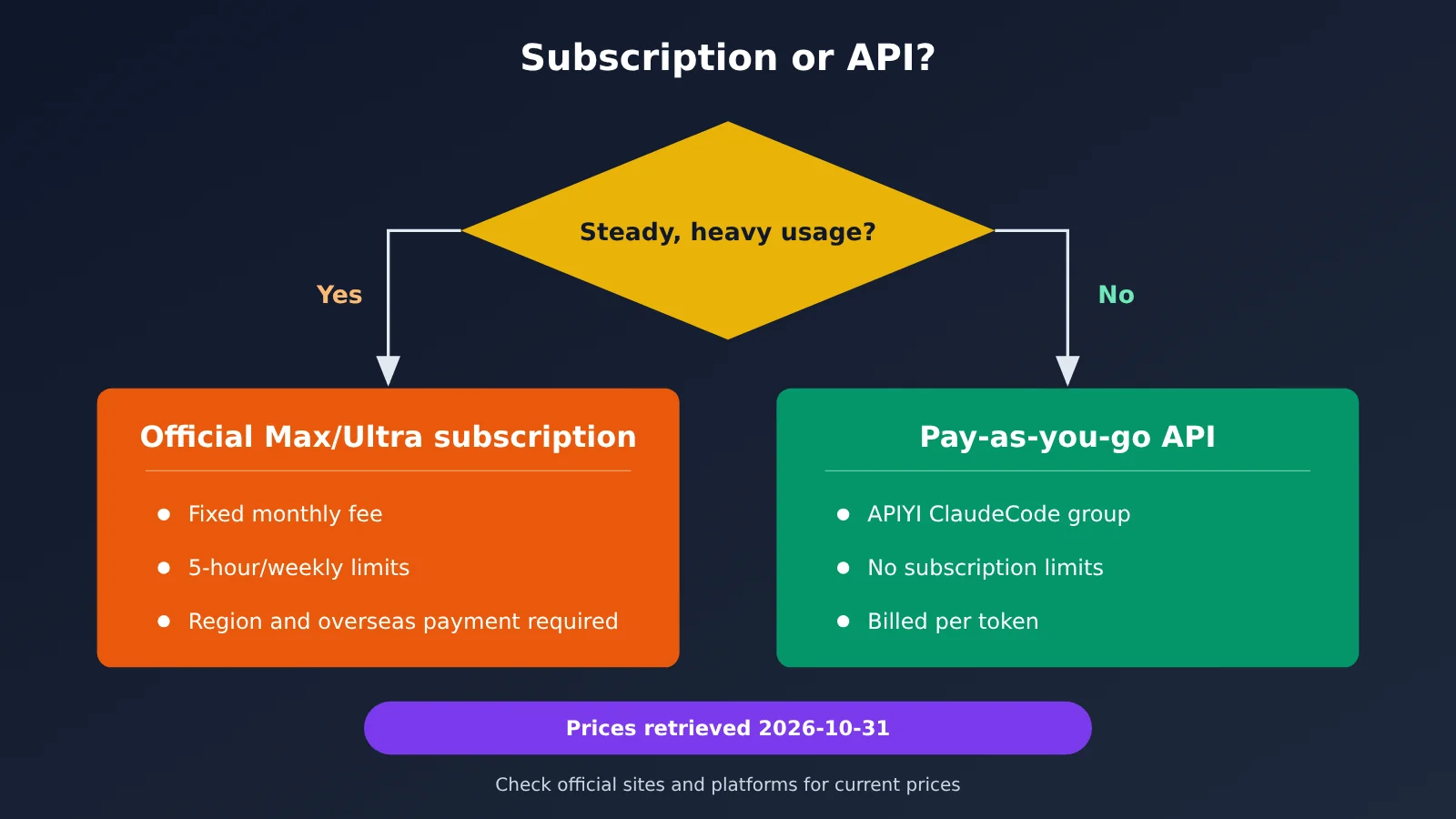
Risks of the Claude Subscription and API Routes
Both routes come with risks worth spelling out. For subscriptions, mainland China isn’t on the supported regions list, you’ll need an overseas payment method, and you bear the risk of account restrictions or bans. The API route has no 5-hour or weekly limits. APIYI’s documentation says there’s “no rate limit,” but billing is based on tokens: you pay for what you use.
A rough calculation using Opus 5.5’s output price: $100 buys only about 5M output tokens, not counting input (calculated for this article at $20 per 1M output tokens; prices retrieved on 2026-10-31; check the official website and platform model list for current pricing). Long-context coding agents can consume a lot of tokens, and APIYI’s own documentation notes that heavy direct users may find an official subscription more cost-effective. If you run agents intensively every day and can subscribe in compliance with the rules, a subscription isn’t necessarily more expensive than the API. If your usage fluctuates or you’re subject to regional restrictions, the API offers more flexibility.
Claude Max Renamed to Ultra: FAQ
Q1: Will the price go up now that Claude Max has been renamed Ultra?
There was no price increase this time. The official announcement says Max remains $100 per month and Ultra remains $200 per month (prices retrieved on 2026-10-31; check the official website and platform model list for current pricing). A footnote on the pricing page says “plans and pricing may change.” That’s a standard disclaimer; the company hasn’t announced any plans for future price changes.
Q2: Do existing subscribers need to do anything?
No. The announcement explicitly says there’s “nothing you need to do.” Max 20x will automatically migrate to Ultra. If you have a newer account, the 5-hour limit won’t be removed until the system verifies your account. You’ll receive an email when that happens.
Q3: Have the weekly limits changed?
No. The announcement says “Weekly limits remain unchanged.” Max remains at 5x Pro and Ultra at 10x Pro. Usage is counted across models, and the limit resets at a fixed time for your account.
Q4: Can you subscribe directly to Claude Max or Ultra from mainland China?
Not directly. Mainland China isn’t on the official list of supported regions, subscriptions require an overseas payment method, and you bear the account risks yourself. Developers in mainland China can use the ClaudeCode group on APIYI at apiyi.com to call claude-opus-5-5 on a pay-as-you-go basis. Follow the four steps above to use it in Claude Code.
Summary: 3 Changes as Claude Max Becomes Ultra
In short: the names have changed, but the prices haven’t. Only verified Ultra accounts get the 5-hour limit removed, and weekly limits remain unchanged.
- Change 1: New names. Max 5x is now Max, and Max 20x is now Ultra. Existing subscriptions migrate automatically, with no action required.
- Change 2: No 5-hour limit for Ultra. This applies only to verified accounts. New accounts must first go through a temporary restriction period. Weekly limits still apply, so it’s not “unlimited.”
- Change 3: Monthly API credits listed on the pricing page. Max gets $100 and Ultra gets $200. These credits can’t be used for Claude Code.
- The math: Both plans offer the same weekly allowance per dollar. The extra $100 for Ultra gets you “no 5-hour limit + an additional $100 in API credits” (our estimate).
- How to check: Go to Settings > Usage. If there’s no Current session progress bar, your account is verified.
If you’re in mainland China, or your usage varies and you don’t want to be constrained by subscription limits, you can use the free credits from APIYI · apiyi.com to test your actual workloads before deciding between a subscription and pay-as-you-go pricing.
Claude Max to Ultra: References
- Official Claude announcement: The renaming and removal of the 5-hour limit, announced by X @claudeai on 2026-10-30
- Link:
x.com/claudeai - Claude pricing page: Prices for all four plans and the Models and usage table
- Link:
claude.com/pricing - Ultra Help Center: How verification works and how to check your status
- Link:
support.claude.com/en/articles/17728952 - Claude Code usage Help Center: Shared allowances and wrap-up allowance
- Link:
support.claude.com/en/articles/11145838 - APIYI model pricing list: Prices for models including claude-opus-5-5
- Link:
docs.apiyi.com/models
Author: APIYI Technical Team
Technical discussions: Contact us through the APIYI homepage. For more integration resources, visit the docs.apiyi.com documentation center.