Author’s note: Starting October 28, OpenAI is offering paid ChatGPT Pro and Business users up to $500 in monthly API credits. This article covers eligibility, two ways to claim the credits, how much usage they’ll cover, and four gotchas—including the fact that they don’t cover Codex.
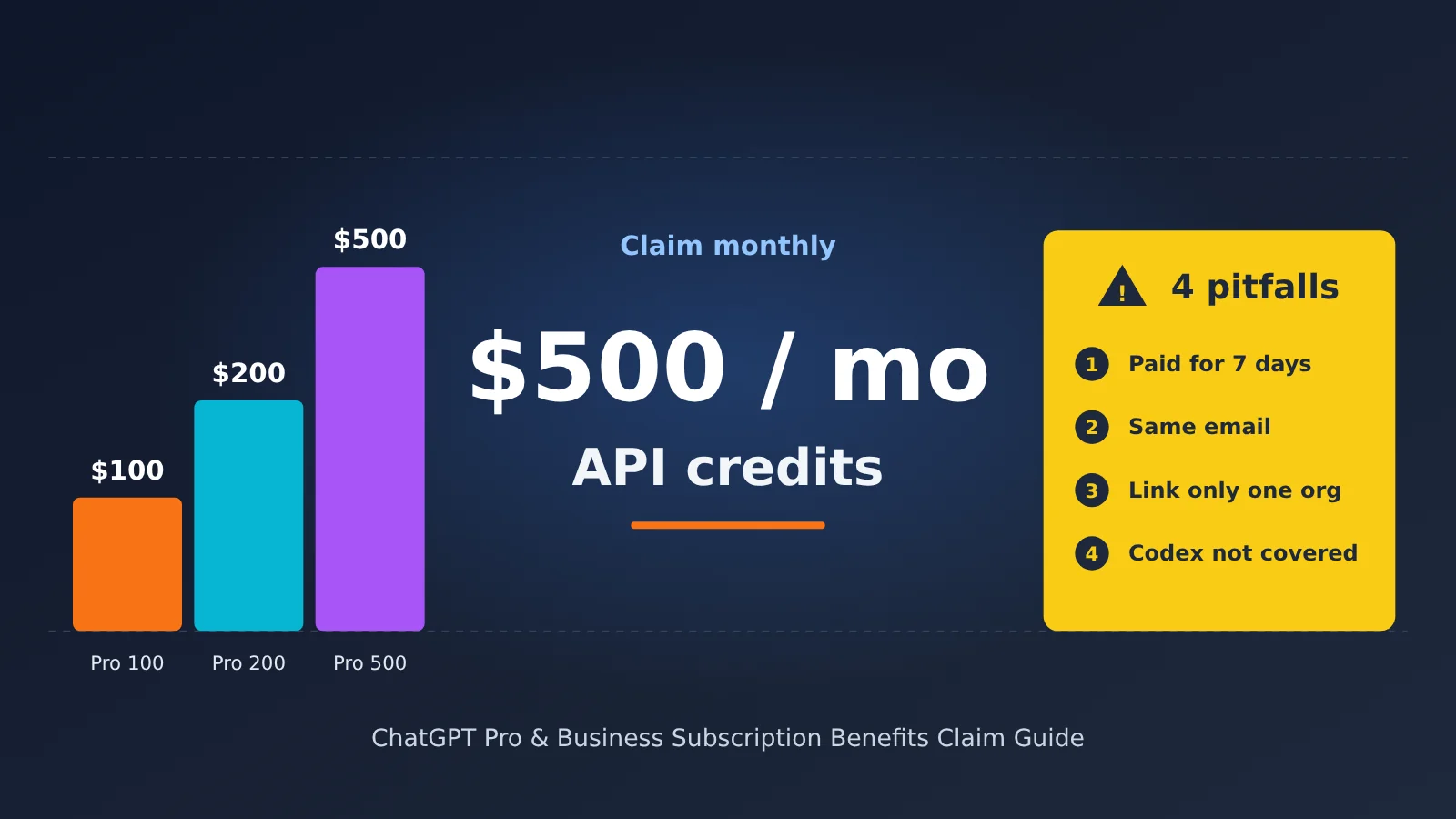
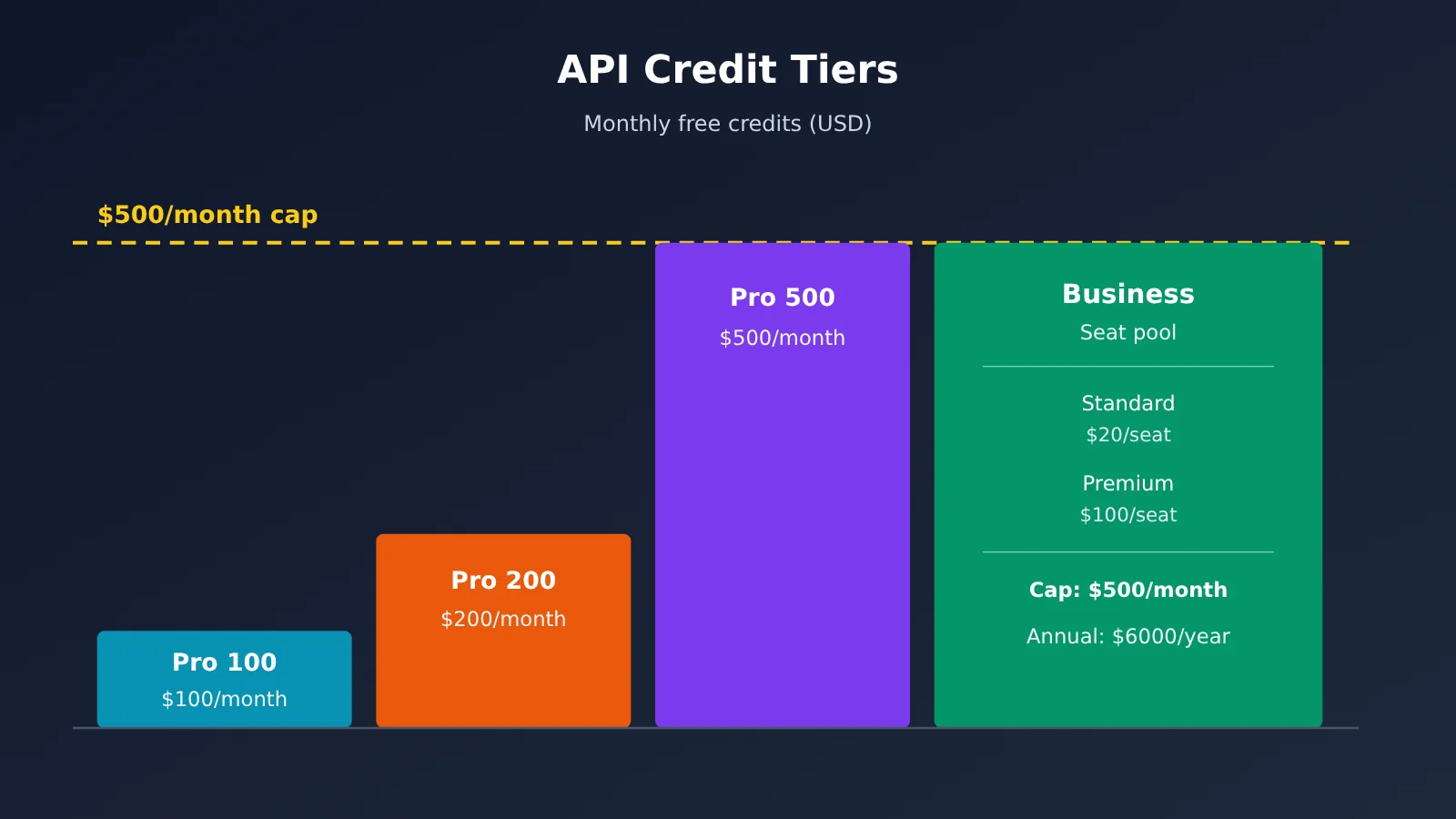
Only two groups qualify: paid ChatGPT Pro users on the $100, $200, or $500 tier, and ChatGPT Business workspaces with paid seats. The benefit is up to $500 in API credits per month. The three Pro tiers receive $100, $200, or $500 per monthly billing cycle, respectively. For Business, credits are pooled across seats, up to $500 per month. There are three requirements: your subscription must have been paid for at least seven days, your ChatGPT and API accounts must use the same email address, and each subscription can be linked to only one API organization.
This isn’t just a repost of the announcement. We’ll walk through the claiming process: where to go, what to click, what you’ll see, and how to confirm you’ve successfully claimed the credits. We’ll also use the official pricing to calculate how many requests $500 can cover and flag four easy-to-miss gotchas in the official terms.
The takeaway: You’ll know whether you qualify and be able to claim the credits in 10 minutes. You’ll also know how to spend them without wasting them.
ChatGPT Pro API Credits: How Much Do You Get?
Let’s start with the official credit table. The figures below come from OpenAI Help Center article 20001626. All amounts are in US dollars and apply to monthly billing periods, with annual Business billing noted separately.
| Eligible subscription | API credits per full billing period | Monthly subscription price (for comparison) | Credit-to-price ratio |
|---|---|---|---|
| Pro 100 | $100 / month | $100 / month | 100% |
| Pro 200 | $200 / month | $200 / month | 100% |
| Pro 500 | $500 / month | $500 / month | 100% |
| Business Standard seat | $20 / month per paid seat, combined into a shared pool | $20 with annual billing / $25 with monthly billing, per seat per month | 100% with annual billing, 80% with monthly billing |
| Business Premium seat | $100 / month per paid seat, combined into a shared pool | $100 with annual billing / $125 with monthly billing, per seat per month | 100% with annual billing, 80% with monthly billing |
| Business workspace cap | Capped at $500 per monthly billing period; issued as a lump sum with annual billing, capped at $6,000 / year | — | — |
The Business formula is: workspace credits = min(20 × number of paid Standard seats + 100 × number of paid Premium seats, 500). OpenAI gives two examples. With 5 Standard seats and 3 Premium seats, the credits are $100 + $300 = $400 per month. With 10 Standard seats and 4 Premium seats, the calculation comes to $600, which exceeds the cap, so the workspace receives $500.
The initial credit grant is prorated based on the time remaining in your billing period. If you claim it midway through the period, you’ll see less than the full amount. That’s normal—it isn’t a mistake.
As for the three Pro tiers, the monthly prices of $100, $200, and $500 match the names used in the official Help Center: Pro 100, Pro 200, and Pro 500. When we checked, the official pricing page didn’t show specific figures; it only mentioned “Pro starting at / month” and “3 usage tiers.” Third-party pricing summaries report the same figures, but check the official site for the final prices.
ChatGPT Pro API Credits: Who’s Eligible and Who Isn’t
To qualify, you must meet all of these conditions:
- Have an active paid Pro subscription (any of the three tiers), or a paid Standard / Premium seat in a Business workspace;
- Have had an active paid subscription for at least 7 days;
- Use the same email address for your ChatGPT and API accounts;
- If you’re a Pro user, be both the subscription owner and the owner of the API organization receiving the credits. Business users must own both the workspace and the API organization; being a member or administrator isn’t enough;
- Have an account in an eligible rollout batch and country / region.
Ineligible plans and seats include Plus, free trials, gifted subscriptions, Enterprise, Edu, and legacy Codex seats. The official wording is that these are “not intended eligible plans or seats for this offer.” Also, a custom billing role on the API side doesn’t substitute for being the API organization owner.
ChatGPT Pro API Credits: What You Can and Can’t Spend Them On
Let’s start with what’s covered. Credits are applied to API usage in the linked organization, including the Responses API (text, code, and image understanding), Agents API (including hosted sandbox costs), Decisions API, GPT-Live and Realtime voice, and Images API. Invocation and storage fees for built-in tools such as web search, file search, and Code Interpreter are also covered.
Now for what’s not covered—the most important part. The official wording is: “Codex usage through API keys is not supported by this benefit.” In other words, token usage from running Codex with an API key isn’t covered. These credits also won’t increase your usage limits for ChatGPT or Codex when signed in, won’t be added to your personal usage-credit balance, and won’t go into your Business workspace credit balance.
Also, these credits aren’t the same as the $50 offered through the Business add-on promotion. That $50 is in agentic credits, which can only be used for agentic tasks in the ChatGPT workspace and expire after 30 days. As the official wording states, “It is not an API credit.”
How Much Can You Do With ChatGPT Pro API Credits? The $500 Breakdown
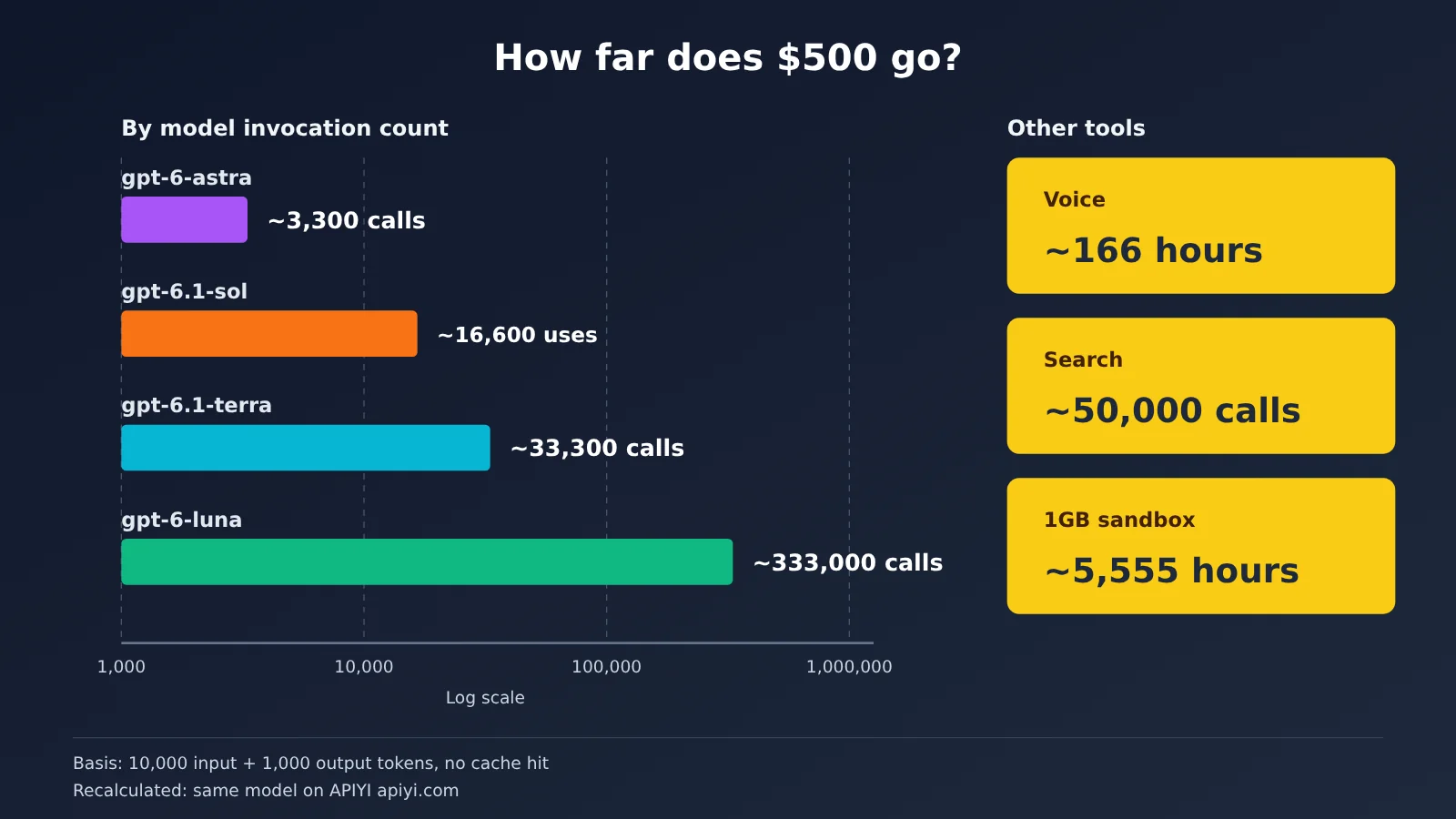
This is the key section of the article. For a consistent comparison, we’ll assume a typical agent request uses 10,000 input tokens and 1,000 output tokens, with no cache hits. Prices come from OpenAI’s official pricing page, retrieved on October 29, 2026, and are in US dollars per 1 million tokens.
| Model | Input / output ($ per 1M tokens) | Cost per request | Requests per $500 |
|---|---|---|---|
| gpt-6.1-sol | 2.00 / 10.00 | $0.02 + $0.01 = $0.03 | About 16,600 |
| gpt-6.1-terra | 1.00 / 5.00 | $0.01 + $0.005 = $0.015 | About 33,300 |
| gpt-6-luna | 0.10 / 0.50 | $0.001 + $0.0005 = $0.0015 | About 333,000 |
| gpt-6-astra | 10.00 / 50.00 | $0.10 + $0.05 = $0.15 | About 3,300 |
Here’s how $500 translates for services that aren’t billed by token:
- Voice: gpt-live-1 costs $0.05 per minute, so $500 buys about 10,000 minutes, or roughly 166 hours.
- Web search: Web search costs $10 per 1,000 calls, so $500 buys about 50,000 calls. Retrieved content is billed separately at the selected model’s token rate.
- Sandbox: A 1GB container costs $0.03 per 20-minute session, so $500 buys about 16,700 sessions, totaling roughly 5,555 hours.
- Cached reads: Cached input for gpt-6.1-sol costs $0.10 per 1 million tokens. If every input is served from the cache, $500 covers about 5 billion tokens.
The takeaway is straightforward. For everyday agent workloads using gpt-6.1-terra or gpt-6-luna, you’re unlikely to use up $500 in a month. If you need gpt-6-astra for heavy reasoning, roughly 3,300 requests a month can still support an internal test of a small product. If you’d already spend that much on API usage each month, the third Pro tier pays for itself entirely—effectively making ChatGPT free. With monthly Business seats, $25 gets you $20 in credits and $125 gets you $100, so you recover only 80% of the cost.
Here’s another way to compare prices. On APIYI, gpt-6.1-sol costs $2 per 1M input tokens, $10 per 1M output tokens, and $0.10 per 1M cached input tokens—the same as the official rates. APIYI top-ups are settled at a fixed exchange rate of 1 USD to 7 RMB, so $500 in credit converts to approximately RMB 3,500. This is just the conversion basis, not official pricing. With top-up bonuses, the effective cost is about 91% of the listed price, dropping to around 83% during promotional periods. For current models and prices, check the platform’s model list (docs.apiyi.com/models).
How to Claim ChatGPT Pro API Credits: 6 Steps to Get Started
The entire process takes place in the web console—no command line required. Before you start, check three things: your subscription has been paid for at least 7 days, the email addresses match on both platforms, and you’re the owner of the API organization.
Path A: Claim Credits in ChatGPT (Officially Recommended)
- Sign in: Log in to the ChatGPT account with the Pro subscription. Business users should switch to the workspace they own. Check that the target account or workspace appears in the upper-right corner.
- Open the billing page: Pro users can go to Settings → Billing at
chatgpt.com/settings/billing. Business users should open their workspace billing settings or Admin Console. You should see an API credits benefit on the page. If it’s missing, skip ahead to “What If You Can’t Claim Credits?” - Start the claim: Click to claim the API credits. A dialog will appear asking you to select the receiving organization. Check that you can see a list of API organizations you own.
- Choose an organization: If you own multiple organizations, select the one you actually plan to use. You can’t change this binding yourself afterward, so choose carefully.
- Confirm activation: Review the terms and click confirm. The page will indicate that the organization was linked successfully. But linking the organization and receiving the credits are separate steps—you’re not done yet.
- Verify the credits: Open the API Platform billing page at
platform.openai.com/settings/organization/billing/overview, select the organization you just linked, and go to Credit grants. Your claim is complete only when the credit amount and expiration date appear here.
Path B: Claim Credits in the API Platform
Log in to platform.openai.com using the same email address as your ChatGPT subscription. Select the organization you want to link, then open Billing and find the API credits benefit. Choose an eligible subscription or workspace you own, review the terms, and confirm activation. As with Path A, the claim is complete only when the amount and expiration date appear on the Credit grants page.
After Claiming: Create an API Key
OpenAI recently introduced the OpenAI Developers plugin (chatgpt.com/plugins/openai-developers), which lets you create a project API key directly in ChatGPT or Codex. You can also create one on the project page in the API Platform, as usual. There are two things to watch: when making API calls, you must select the linked organization and use a project key belonging to that organization. Otherwise, the charges will come from another organization’s balance.
What If You Can’t Claim Credits?
If you can’t see the claim option, check the following in order: whether your plan is eligible, whether you’ve paid for at least 7 days, whether you’ve selected the right workspace, and whether the email addresses match on both platforms. Business users can ask the owner to check the workspace billing page.
If everything checks out, the benefit likely hasn’t been rolled out to your batch or region yet. A paid Pro user in Germany reported in the community that the option was missing entirely from their billing page. That suggests the rollout is happening in stages, and not everyone can claim it right away.
The situation is more complicated for developers in China. Mainland China and Hong Kong aren’t on the official list of supported ChatGPT regions, and a subscription requires a payment method from outside China. An alternative commonly used by teams in China is to access the same OpenAI models through APIYI (apiyi.com). You only need to change the OpenAI-compatible API’s base_url to https://api.apiyi.com/v1; the calling method stays the same. Pricing is usage-based and matches official pricing. API proxy services have their own rate limits and grouping rules, so check the endpoints against the platform documentation before choosing one.
🚀 Get started: If you can’t access the official credits yet but want to test how gpt-6.1-sol and gpt-6-luna perform in your business right away, you can claim free test credits for new users at APIYI apiyi.com. Use the same OpenAI-compatible code to build your prototype, then switch to the official credits later without changing your business logic.
4 Pitfalls of ChatGPT Pro API Credits
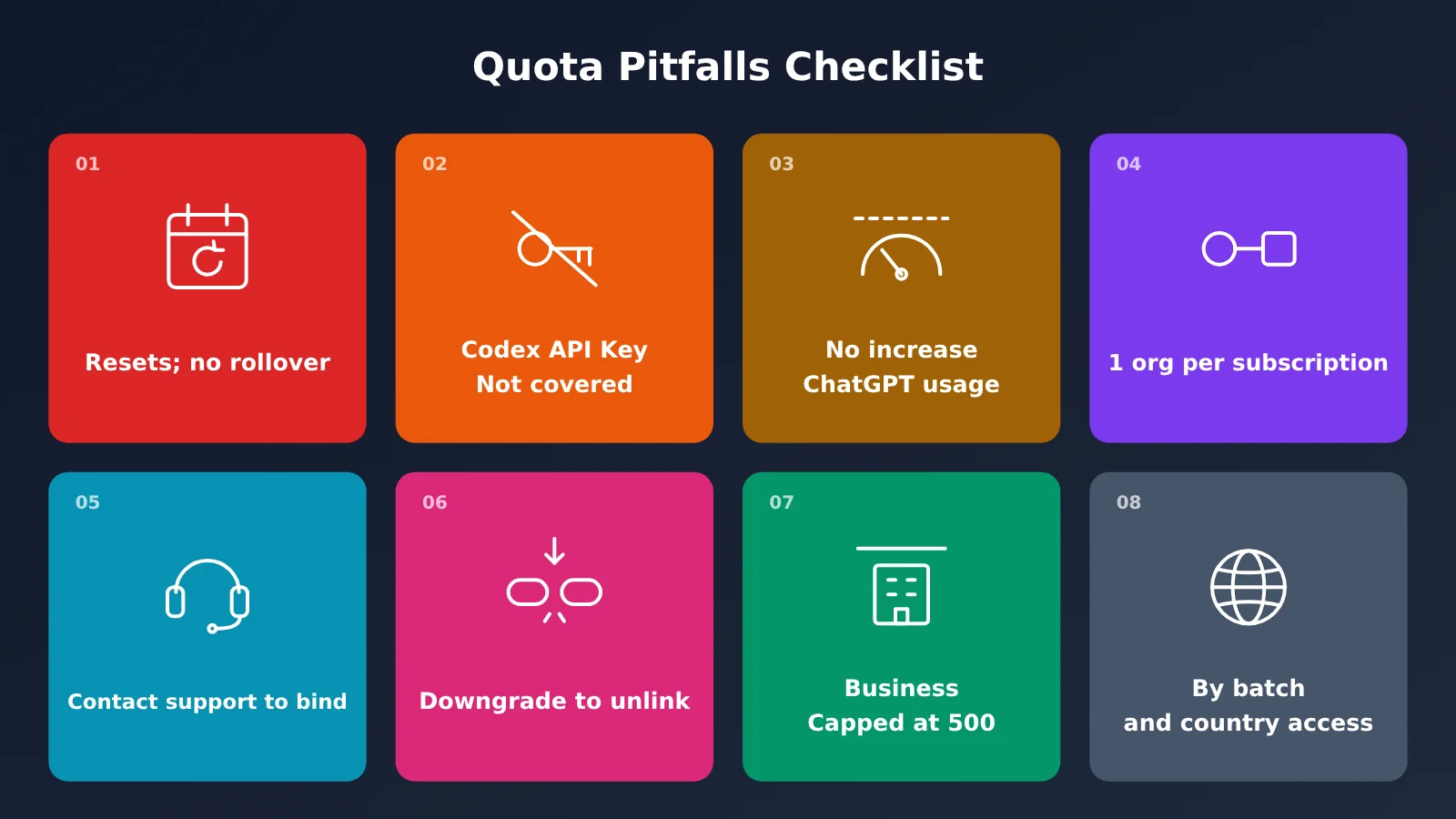
There are four main pitfalls in the terms: Codex isn’t covered, credits don’t roll over, bindings can’t be freely changed, and not everyone is eligible. Here’s the full list.
| Pitfall | Official rule | What to do |
|---|---|---|
| No rollover; credits expire at the end of the billing period | Monthly credits expire at the end of the billing period; annual Business credits expire at the end of the year | Test early and use your credits before the end of the month |
| Codex API key usage isn’t covered | Running Codex with an API key doesn’t use these credits | Budget separately for coding agents |
| Doesn’t increase ChatGPT usage limits | It doesn’t raise limits for ChatGPT or Codex when using it while signed in | Don’t expect it to get you past conversation limits |
| One subscription can bind to only one organization | The binding is one-to-one, and an organization can have only one active binding | Choose the organization carefully before claiming |
| Changing the binding requires support | You must contact support to change the receiving organization, and transferring or reissuing credits isn’t guaranteed | Don’t repeatedly create new bindings to claim credits |
| Downgrading removes the binding | Downgrading to Plus, Go, or Free removes the binding at the end of the billing period | Use your credits before downgrading |
| Business is capped at $500 | $500 for monthly billing, $6,000 for annual billing | The cap stays the same no matter how many seats you have |
| Rollout depends on batch and country | Availability depends on the rollout batch and country or region | If you don’t see the option, wait or consider an alternative |
What happens when you change plans, downgrade, or switch organizations
- Upgrade your Pro tier: You may receive a prorated credit for the rest of the current period, followed by credits at the new tier each period;
- Switch from Pro to Business: The original Pro binding ends, and you must wait until Business has been paid for seven days before binding again;
- Switch from Business to Enterprise: The binding is removed at the end of the billing period, and Enterprise isn’t eligible;
- The person who set up the binding leaves the workspace: The binding is removed, and neither the subscription nor the organization can be rebound before the current period ends. You’ll need to contact support;
- Cancel your subscription: No new credits are issued, but you can use credits already issued until they expire. A full refund removes the corresponding unused credits.
Risks to keep in mind
The binding is a one-to-one relationship you can’t change freely, so binding the wrong organization can be costly. Credits expire monthly, and OpenAI may change or remove the benefit at any time. In its own words, “The benefit may change or be removed in the future.” Don’t count on these free credits as part of a long-term cost plan.
Also, once you exceed your credits, you’ll be paying out of pocket. If you have no purchased credits, requests will return HTTP 429 with the error code credit_balance_exhausted.
ChatGPT Pro API Credits vs. Claude Max Monthly API Credits
This isn’t unique to OpenAI. Anthropic gave Claude Max and Team users similar monthly API credits on October 7, 2026.
| Comparison | OpenAI (ChatGPT) | Anthropic (Claude) |
|---|---|---|
| Launch date | October 28, 2026 | October 7, 2026 |
| Individual credits | Pro: $100 / $200 / $500 per month | Max 5x: $100, Max 20x: $200 per month |
| Team credits | Standard: $20 / Premium: $100 per seat, capped at $500 | Standard: $20 / Premium: $100 per seat, capped at $500 |
| Ineligible plans | Plus, trial, Enterprise, Edu | Free, Pro, Enterprise |
| Eligibility requirements | 7 days, same email address, one API organization per subscription | 7 days, same email address, one Console organization per plan |
| Rollover / billing order | No rollover; credits are used first | No rollover; credits are used first |
| Coding agents | Doesn’t cover Codex run through an API key | Doesn’t cover interactive Claude Code |
| Rollout | Released in batches by country | Phased rollout over several days |
The two programs are remarkably similar, and both exclude coding agents from the credits. The takeaway: This money is meant for building your own apps or agents with the API, not for subsidizing coding agents. Neither provider officially supports mainland China.
Frequently Asked Questions
Q1: Is Plus eligible?
No. Only the three paid Pro tiers and paid Business seats are eligible.
Q2: Are free trials eligible?
No. Free trials and complimentary subscriptions aren’t eligible. Paid subscriptions must also be at least 7 days old before you can claim the credit.
Q3: Does the credit roll over to the next month?
No. It expires at the end of the billing period. Once activated, new credit is automatically issued with each renewal. The first allocation is prorated based on the remaining billing period.
Q4: Can I use it to run Codex CLI?
Codex usage through an API key isn’t covered. This credit also doesn’t increase usage limits for Codex when you sign in.
Q5: Can I share it with my team?
Yes. It can be shared within the linked API organization, and project API keys in that organization draw from the same credit balance. ChatGPT seats don’t include API access, which must be granted separately. If your team wants to split budgets by project and manage multiple models in one place, you can also use APIYI apiyi.com as an additional option.
Q6: What error will I get when the credit runs out?
If you don’t have any purchased credits, you’ll get an HTTP 429 response with the error code `credit_balance_exhausted`. You’ll need to purchase credits or enable automatic recharge on the API billing page. Also, credits and rate limits are separate: having a balance doesn’t mean you won’t be rate-limited.
Q7: What if I switch API organizations?
You’ll need to contact customer support, and there’s no guarantee that the credit can be transferred or reissued. Provide your subscription details, organization ID, the time of the action, and any error messages. Redact sensitive information in screenshots, and don’t send passwords or API keys.
Q8: Is it available in mainland China?
Not at the moment. Mainland China and Hong Kong aren’t on the official list of supported regions, and no availability date has been announced. Developers in China can use APIYI apiyi.com to access models of the same name on a pay-as-you-go basis.
Q9: Does promotional credit count toward a usage tier upgrade?
The official documentation doesn’t say. It states that usage tiers update automatically when the requirements are met, but doesn’t specify whether promotional credit counts. It’s best not to rely on it for a tier upgrade.
ChatGPT Pro API Credits: Key Takeaways
- How much you get: The three Pro tiers receive $100, $200, or $500 per month. Business credits are pooled by seat and capped at $500 per month.
- Who qualifies: Pro or Business users who have been paying for at least seven days, use the same email address, and have the owner role.
- How to confirm: The credits are claimed only when the amount and expiration date appear on the Credit grants page.
- What’s covered: Responses, Agents, voice, images, and built-in tools are covered. Codex used through an API key isn’t covered.
- What they’re worth: At $0.015 per request, the credits can cover around 33,000 Agent requests with gpt-6.1-terra.
- The biggest catches: Credits don’t roll over, bindings are one-to-one, downgrading removes the binding, and access rolls out in batches.
- What if you can’t claim them? You can get started with the same models at the same prices through APIYI at apiyi.com.
Summary
- Claim your credits as soon as you’re eligible: All three Pro tiers offer a 100% return in credits, effectively making ChatGPT itself free.
- Choose the right organization to bind: You can’t change the binding yourself afterward, so double-check before claiming.
- Plan your usage monthly: Credits expire at the end of the month, and you’ll need a separate budget for Codex and chat.
If you can’t claim the official credits yet, or want to compare a few models first, you can use APIYI’s free new-user credits at apiyi.com to test them quickly. Check the platform’s model list for current availability and pricing.
📚 References
- OpenAI Help Center: API credits benefit for eligible ChatGPT subscriptions
- Link:
help.openai.com/zh-hans-cn/articles/20001626 - Details: The authoritative source for eligibility, credit amounts, renewals, and changes
- OpenAI Developer Documentation: API credits for ChatGPT subscribers
- Link:
developers.openai.com/api/docs/guides/chatgpt-api-credits - Details: Coverage, billing order, and error codes
- OpenAI Official Pricing
- Link:
developers.openai.com/api/docs/pricing - Details: The source of the unit prices used in this article’s calculations (retrieved 2026-10-29)
- Claude Help Center: Monthly API credits
- Link:
support.claude.com/en/articles/17154008 - Details: Rules for Anthropic’s comparable benefit, used for comparison
Author: APIYI Technical Team
Technical discussions: Feel free to contact us through the APIYI homepage. For models and pricing, visit the docs.apiyi.com documentation center.