Author’s note: A hands-on guide to getting started with K-Dense-AI’s 177 scientific Agent Skills, from checking your environment and choosing skills to installing dependencies and verifying that they work. Troubleshooting and risks are covered separately.
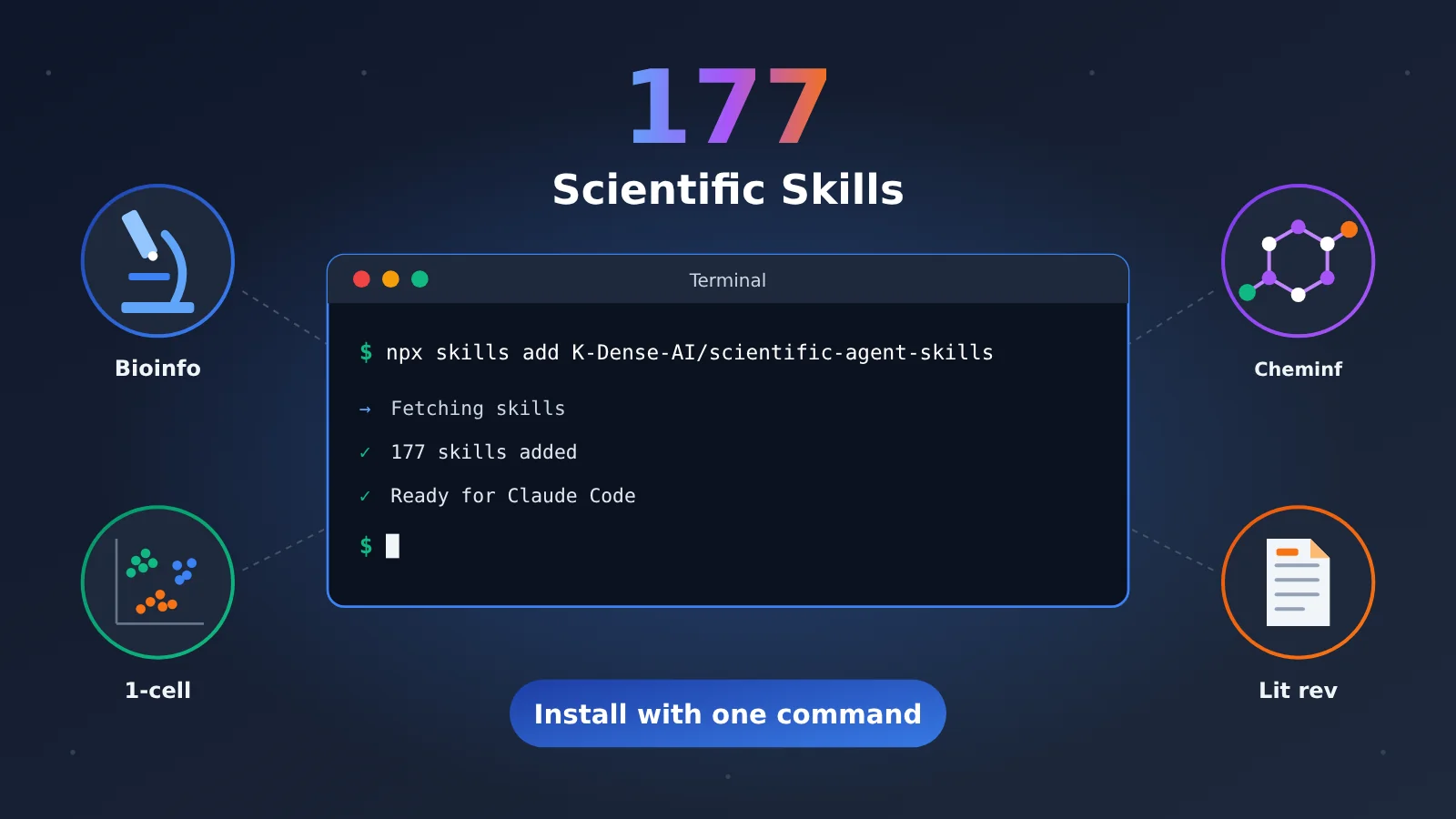
K-Dense-AI’s open-source Scientific Agent Skills is a collection of 177 scientific skills for coding agents like Claude Code and Cursor. It turns workflows such as single-cell analysis, cheminformatics, literature reviews, and database searches into playbooks that agents can follow. That means you don’t have to write QC workflows from scratch, dig through API docs, or check DOIs every time. But you shouldn’t install everything at once: skills can let an agent run code, install packages, and access the internet, and installing the skill files doesn’t automatically install their Python dependencies.
This isn’t a pitch claiming that installation will solve everything. It’s a five-step setup guide, with results you can check at every stage.
What you’ll get: By the end of this article, you’ll be able to pick the 5–10 scientific Skills relevant to your work, install them in the right directory, add their dependencies, and get your agent to use them—then verify the outputs and numbers one by one.
What’s Inside the 177 Research Skills?
The repository is K-Dense-AI/scientific-agent-skills, and it’s licensed under MIT. As of October 28, 2026, it had 54,959 stars, 4,846 forks, and 177 subdirectories under skills/. The current version was 2.72.0. The README claims “250,000+ scientists” use it and calls it the “#1 Agent Skills library for science.” Those are the project’s own claims, not third-party statistics. The accompanying paper is arXiv:2609.00065.
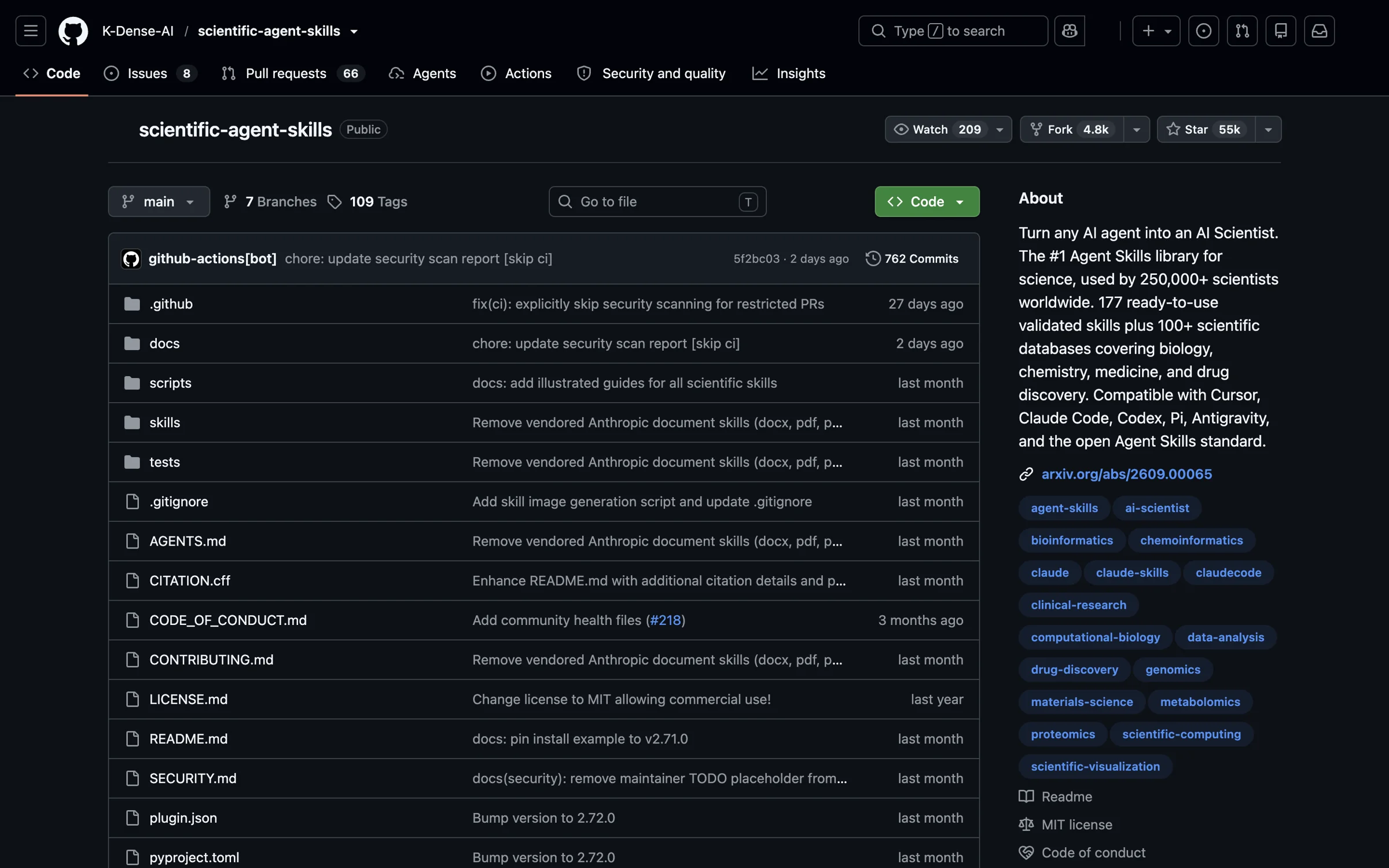
Figure 1: The repository homepage, captured on October 28, 2026. It shows 55k stars and 4.8k forks, while the About section lists 177 skills and 100+ databases.
Why 177? Version 2.71.0 had 181 skills. Starting with 2.72.0, the four document skills—docx, pdf, pptx, and xlsx—are no longer distributed with the repository. If you need them, you’ll have to install them separately from Anthropic’s repository.
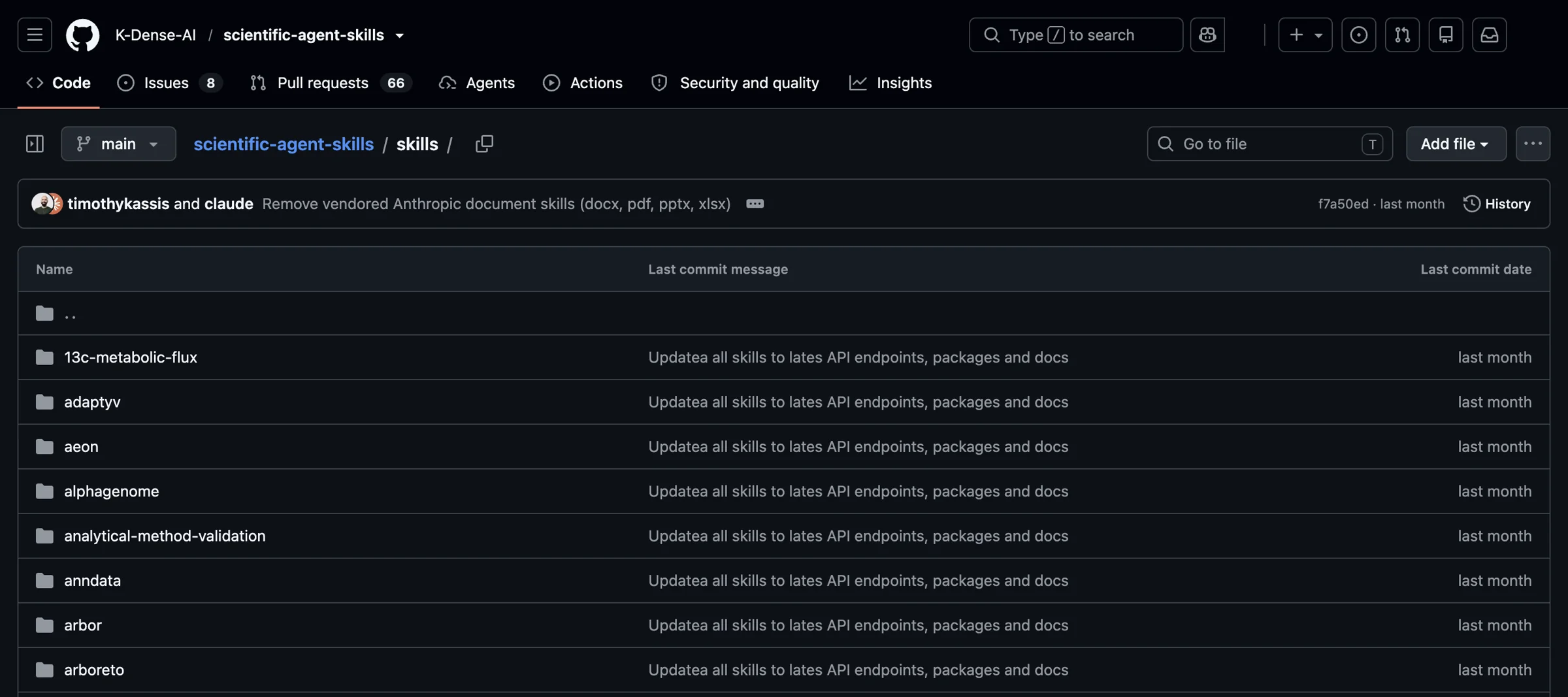
Figure 2: Dozens of skill folders are visible at once in the skills/ directory. The latest commit says “Remove vendored Anthropic document skills”—the change that brought the count down from 181 to 177.
The README divides the skills into 22 broad categories. The table below combines related areas and lists representative skills and packages rather than every entry:
| Area (README categories) | Representative skills / packages | Typical uses |
|---|---|---|
| Bioinformatics, multi-omics, proteomics, and mass spectrometry | scanpy, pydeseq2, pyopenms, nextflow; package skills such as scVelo |
Single-cell QC and clustering, differential expression, mass spectrometry processing, workflow orchestration |
| Cheminformatics and drug discovery, materials science | rdkit, pymatgen |
Molecular filtering and descriptors, crystal structures and materials calculations |
| Physics and astronomy, engineering and simulation | qiskit; package skills such as QuTiP |
Quantum circuits, quantum system simulation |
| Clinical research, medical AI, regulations and standards | clinical-reports; package skills such as pydicom |
Clinical report drafts, medical image reading |
| Data analysis and visualization, machine learning, geospatial | scientific-visualization, timesfm-forecasting; package skills such as scikit-learn, PyTorch Lightning, and GeoPandas |
Publication-quality charts, time-series forecasting, modeling, spatial data analysis |
| Science communication, research methodology | literature-review, scientific-writing, paper-lookup, paperzilla, scientific-slides, research-grants, peer-review, generate-image |
Systematic reviews, paper writing, lab meeting slides, grant applications, peer review comments |
| Database lookup | database-lookup; specialized skills such as DepMap, Imaging Data Commons, PrimeKG, NCATS ARAX, and AlphaGenome |
Unified queries across public, registered-access, and licensed data sources |
The database-lookup skill alone covers 80 data sources. Add the specialized skills and multi-database packages, and the README’s stated coverage reaches 100+ databases. There are also 70+ Python package skills, including RDKit, Scanpy, scikit-learn, PyTorch Lightning, pydicom, QuTiP, GeoPandas, pymatgen, Qiskit, scVelo, and TimesFM. Each skill specifies the applicable package version and how to use it.
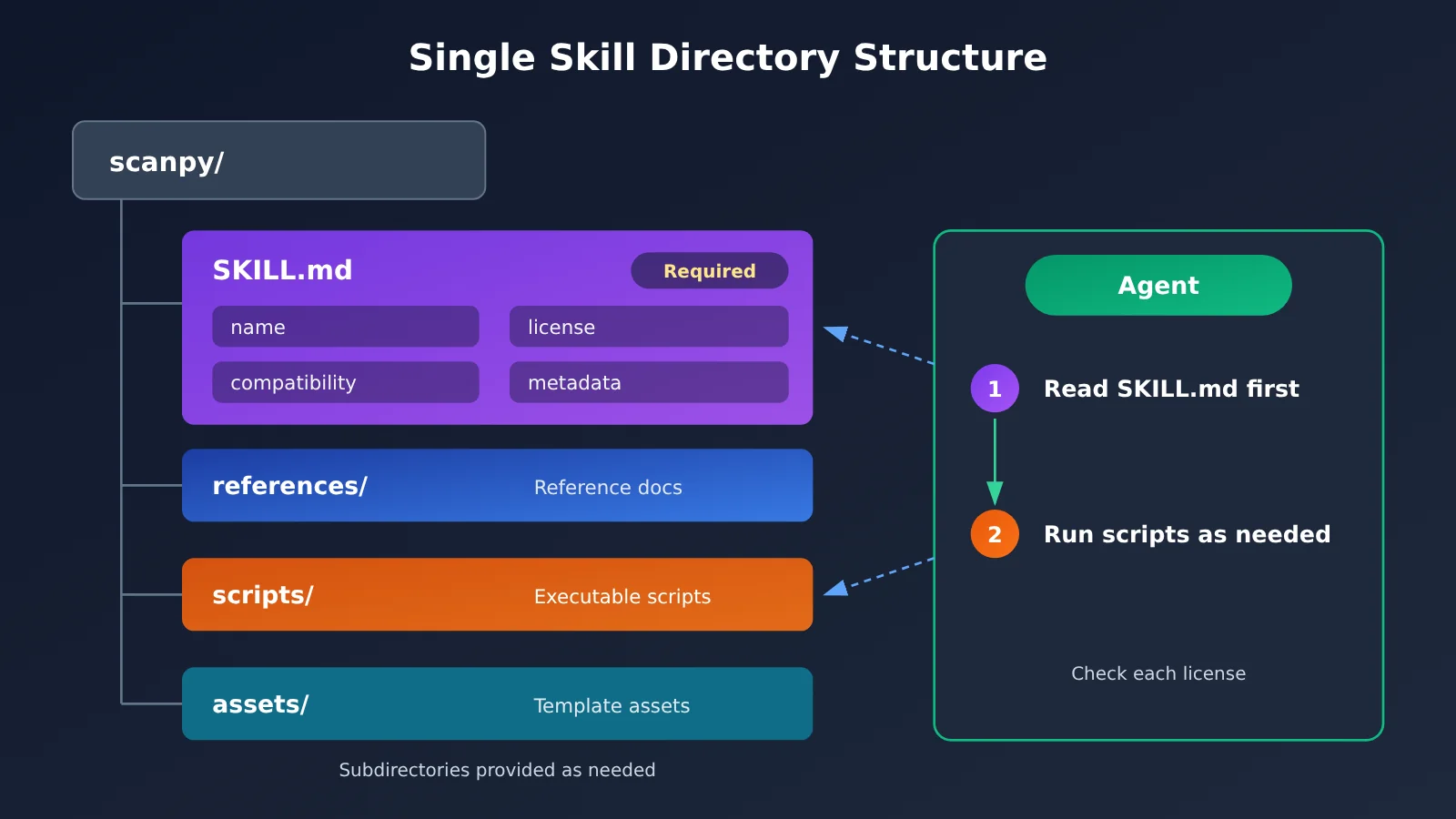
Directory Structure of an Individual Research Skill
Each skill is a folder. SKILL.md is required; references/, scripts/, and assets/ are included as needed. For example, the scanpy skill’s frontmatter specifies a BSD-3-Clause license, Python 3.12+, metadata.version 1.8, and last-reviewed 2026-10-01.
One easy detail to miss: the repository as a whole is MIT-licensed, but each skill specifies its own license in the license field of SKILL.md. That license may differ from the repository’s. If you plan to use the skills commercially or redistribute them, check each one individually.
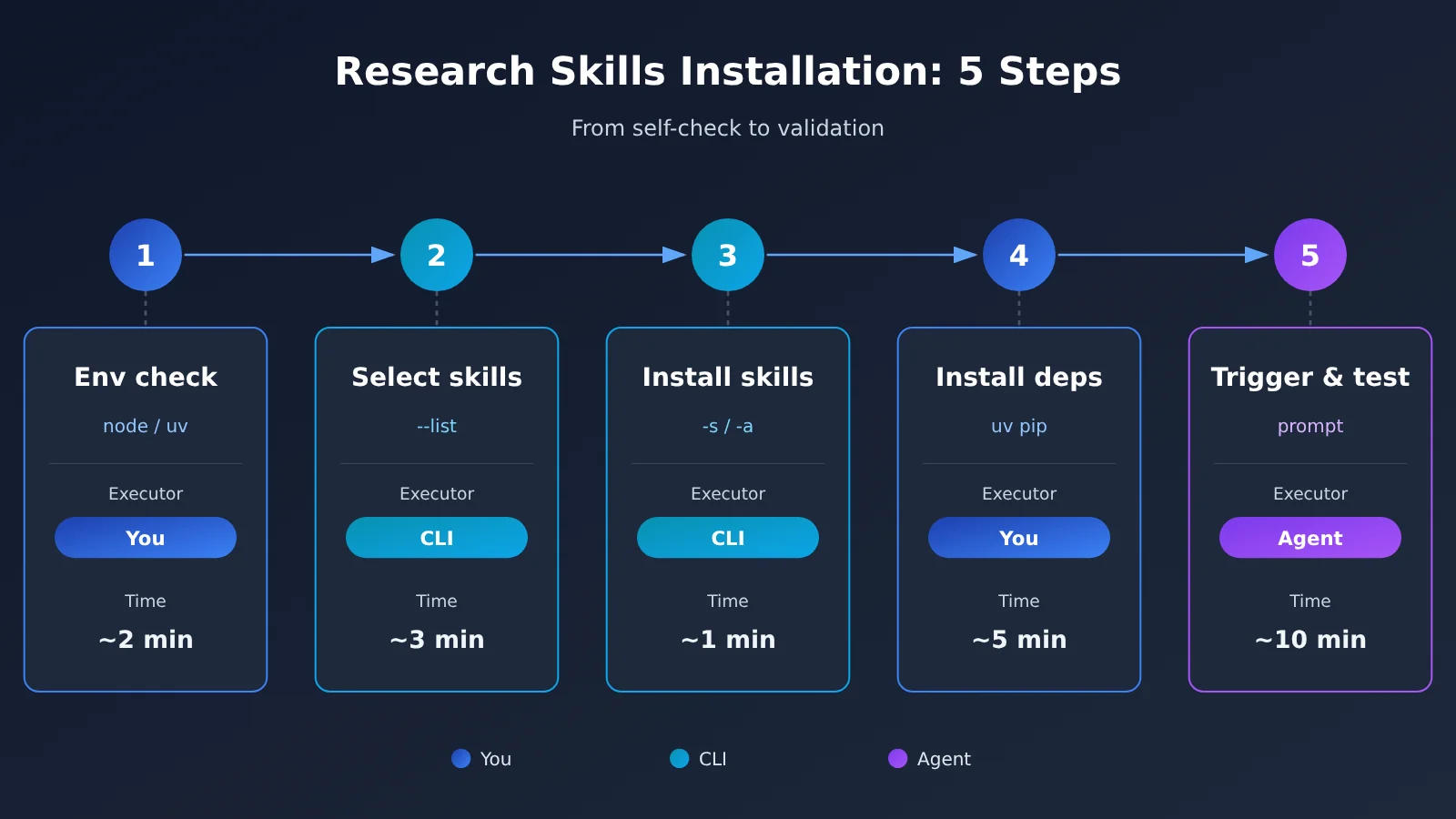
Setting Up Research Skills in 5 Steps
The setup process has five steps: check your environment → browse the list and pick skills → install only what you need → add dependencies and credentials → trigger and verify. Each step specifies whether you enter the command, a command-line tool runs it, or an Agent carries it out.
Step 1: Understand How Research Skills Are Installed and Check the Prerequisites
Time: About 5 minutes Prerequisites: Access to a terminal Difficulty: Low (skip this if your environment is already set up)
What to do: Run each of the following checks yourself to determine whether you’re ready to install, need to install missing tools first, or are using an unsupported host.
node -v: Thenpx skillsinstaller requires Node.js 22.20 or laterpython3 --version: The repository’s built-in toolchain requires Python 3.13+ (check each skill’s compatibility information for its specific dependencies)uv --version: uv is used to install skill dependenciesgh --version: Only needed if you plan to install using the GitHub CLI; version 2.90.0 or later is required- Operating system: macOS, Linux, or Windows + WSL2
What you’ll see: Each command should output a version number. If you see “command not found,” that tool isn’t installed yet.
Success criteria: Node is at least v22.20, Python is at least 3.13, uv outputs a version number, and your host supports the Agent Skills standard. The skills installer (npm package, vercel-labs/skills, MIT, latest version 1.7.4) officially supports more than 70 hosts, including Claude Code, Cursor, Codex, Gemini CLI, Antigravity, and OpenClaw. The skills themselves aren’t tied to a particular model: you choose which model your host uses. Step 5 covers how to connect a model through APIYI.
Step 2: List the Research Skills Before Deciding Which to Install
Time: About 10 minutes Prerequisite: Step 1 passed Difficulty: Low (don’t skip this step)
What to do: Run the list-only command yourself. The CLI will clone the repository and read the names and descriptions of all available skills, but it won’t install any skills on your machine.
npx skills add K-Dense-AI/scientific-agent-skills --list
What you’ll see: The terminal lists 177 skills, each with a name and brief description.
From testing: This step first clones the entire repository locally, which is over 400 MB. On a slow connection, the terminal may stay at Cloning repository… for a long time. After 300 seconds, it’ll fail with Clone timed out. To allow more time, run it again with SKILLS_CLONE_TIMEOUT_MS=600000 (10 minutes). Alternatively, git clone the repository yourself first, then run skills add against the local directory.
Success criteria: You have a shortlist of 5–10 skills. The README explicitly says, “Do not install everything at once,” and the maintainers don’t recommend installing them all in one go. The more skills you install, the more options the agent has to sift through—and the more code you’ll need to review.
Here are some suggestions by field:
- Bioinformatics:
scanpy,pydeseq2,database-lookup; addpyopenmsfor mass spectrometry - Cheminformatics:
rdkit,database-lookup; addpymatgenfor materials science - Literature and writing:
literature-review,paper-lookup,scientific-writing,peer-review - Data visualization:
scientific-visualization; addtimesfm-forecastingfor time series - Lab automation: Check the
--listoutput for the exact skill names in this category; for workflow orchestration, start withnextflow
Step 3: Install Only the Research Skills You Need
Time: About 5 minutes Prerequisite: A shortlist of skills Difficulty: Medium
What to do: Run the installation command yourself. The command-line tool will write the skills to the host’s skills directory. The “one command” mentioned in the title is npx skills add K-Dense-AI/scientific-agent-skills. Running it directly starts an interactive session where you select skills and hosts. If you select everything, you’ll install every skill, which isn’t recommended.
Parameter options:
-s/--skill: Specify a skill name;'*'means all skills-a/--agent: Specify a host, such asclaude-codeorcodex-g: Install to your user directory (globally); without it, skills are installed in the current project--copy: Copy files instead of using the default symlinks. Symlinks keep just one local copy, making updates easier-y: Skip confirmation, useful for scripts or CI
Here are non-interactive commands you can copy directly (using Claude Code and project-level installation as an example, with one skill per line):
npx skills add K-Dense-AI/scientific-agent-skills -s scanpy -a claude-code -ynpx skills add K-Dense-AI/scientific-agent-skills -s database-lookup -a claude-code -ynpx skills add K-Dense-AI/scientific-agent-skills -s pydeseq2 -a claude-code -y
For a global installation, add -g to the end of the command. To copy files instead of using symlinks, add --copy. For instructions on installing multiple skills at once, see npx skills add --help.
| Host | Project-level directory | Global directory |
|---|---|---|
| Claude Code | .claude/skills/ |
~/.claude/skills/ |
| Cursor | .agents/skills/ |
~/.cursor/skills/ |
| Codex | .agents/skills/ |
~/.agents/skills/ |
| Gemini CLI | .agents/skills/ |
~/.gemini/skills/ |
| Antigravity | .agents/skills/ |
~/.gemini/antigravity/skills/ |
| OpenClaw | skills/ |
~/.openclaw/skills/ |
How to choose between project-level and global installation: Put skills tied to a specific research project (such as pydeseq2 for a particular analysis) at the project level so you can share them with your team along with the project. Install skills you use every day, such as those for literature research and writing, globally.
What you’ll see: The installer reports each successful installation and displays the destination path.
How to verify: Run npx skills list yourself, or use ls .claude/skills/ directly. Confirm that all the skill directories you just installed are there and that each contains a SKILL.md file.
There are two alternative installation methods:
gh skill install K-Dense-AI/scientific-agent-skills --agent claude-code --pin v2.71.0: Use--pinto lock to a specific version or commit SHA, useful for projects where results need to be reproduciblegit cloneto~/.agents/skills/scientific-agent-skills(user-level) or.agents/skills/scientific-agent-skills(project-level)
Step 4: Install Python Dependencies and Credentials for Research Skills
Time: 10–30 minutes (depending on package size) Prerequisite: Skills are installed Difficulty: Medium (don’t skip this)
What to do: This is the step most likely to cause problems, so it’s worth repeating: installing skill files ≠ installing dependencies. Open each skill’s SKILL.md yourself, check its compatibility field, and install the dependencies with uv. Note that uv sync only installs the repository’s own development and validation tools—not all the scientific computing packages.
cat .claude/skills/scanpy/SKILL.md: Check compatibility. The scanpy skill says it’s “tested on Python 3.13 + Scanpy 1.12.4 + AnnData 0.13.4”uv venv .venv-scrna --python 3.13: Create a separate environment for each workflow to avoid conflicts between single-cell and cheminformatics packagessource .venv-scrna/bin/activateuv pip install "scanpy[leiden]"
Some skills need your own API key. For example, generate-image uses OpenRouter’s image API, so you’ll need to set export OPENROUTER_API_KEY=YOUR_KEY. It’s also billed per use. Listing models or adding --dry-run is free, so try those first. literature-review needs an internet connection to validate DOIs, and exporting PDFs requires separate installations of Pandoc and XeLaTeX.
If you’re already using APIYI, you don’t need a separate OpenRouter account for image generation: The APIYI documentation includes two community-contributed Skills: apiyi-gpt-image-2-gen (official API proxy for gpt-image-2, billed by token, with support for 4K and custom sizes) and apiyi-gpt-image-2-all-gen (reverse-engineered official API, $0.025 per use, with conversational image editing). Once you’ve installed one in Cursor, Codex CLI, Gemini CLI, OpenCode, GitHub Copilot, or Amp, just say, “Use apiyi-gpt-image-2-gen to generate a 3840×2160 image.” Both use the APIYI_API_KEY environment variable for the key.
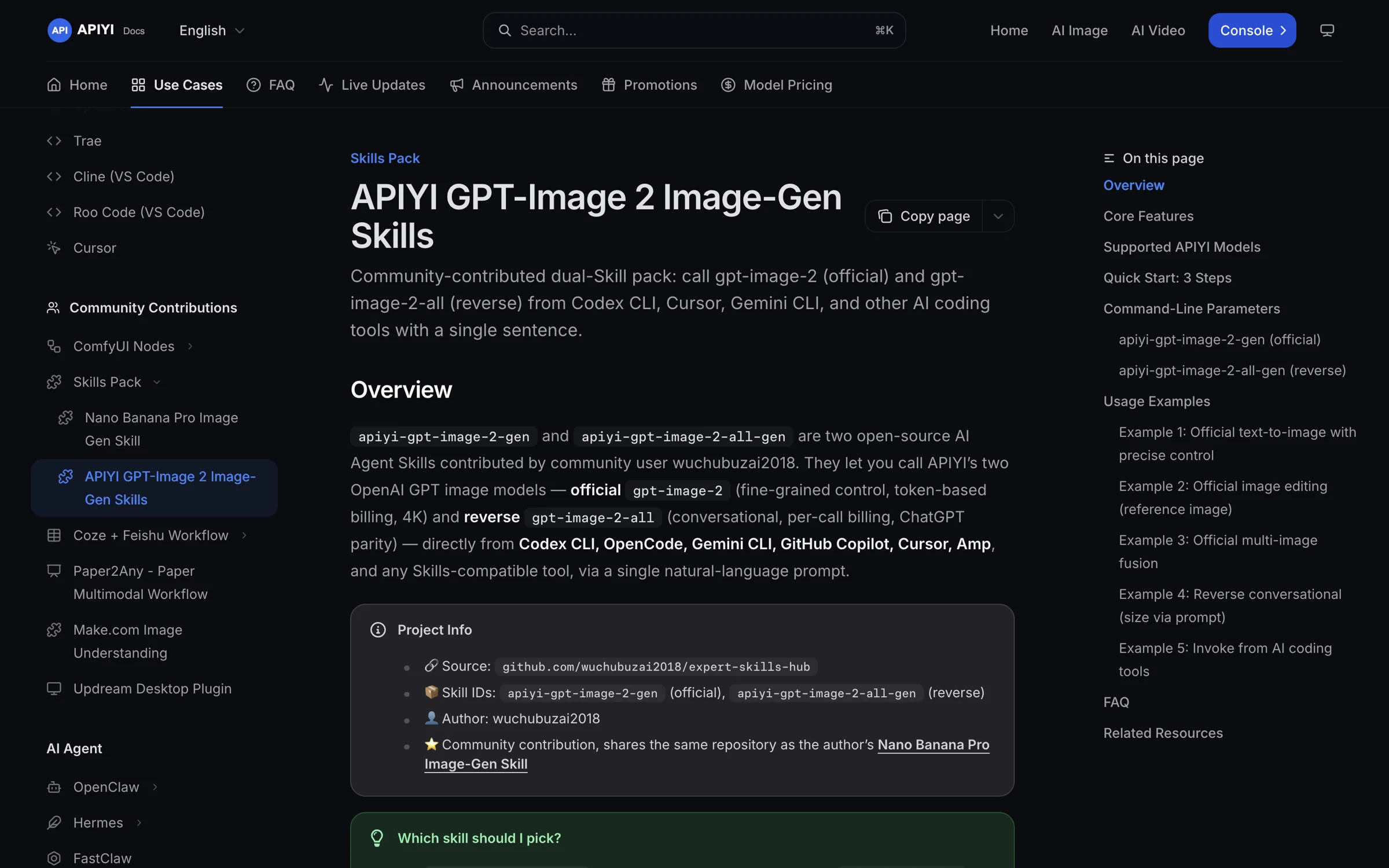
Figure 3: The Skills collection page in the APIYI documentation. Both image generation skills specify their model identifiers, billing methods, and how to troubleshoot installation errors.
What you’ll see: uv prints a list of the packages it resolved and installed.
Acceptance criteria: Run python -c "import scanpy, anndata; print(scanpy.__version__, anndata.__version__)" yourself and check that the output versions match the compatibility field. For skills that need a key, use echo $OPENROUTER_API_KEY | head -c 6 to confirm the environment variable is set.
Step 5: Trigger Research Skills and Verify the Results
Time: About 10 minutes Prerequisite: Dependencies installed Difficulty: Low
What to do: Restart the host application so it rescans the skills directory. Then enter a prompt in the chat yourself. The Agent handles the rest: reading SKILL.md, running scripts, and generating outputs. A good prompt combines a general instruction with the name of the skill:
- Start with
Use available skills you have access to whenever possible. - Then name the skill, for example: “Use the literature-review skill to conduct a systematic review.”
What you’ll see: The Agent’s response will identify the skill it read and list the commands it plans to run.
Acceptance criteria (check all three):
- Did the Agent clearly state which skill it used? If not, ask, “Which skill did you use?”
- Where are the outputs saved, and do the files actually exist? Run
lsto check for yourself. - Can you verify the numbers against their sources? Do the DOI links open, and can you look up the database record IDs?
Routine maintenance commands (run these yourself): npx skills check checks for updates, npx skills update installs updates, and npx skills remove uninstalls skills. The installer collects anonymous usage data by default. Add DISABLE_TELEMETRY=1 or DO_NOT_TRACK=1 to turn it off.
🎯 Check the costs once it’s working: The skills themselves are free and open source. What costs money is the model invocation when a skill runs. A complete single-cell workflow often involves multiple rounds of reading documentation, writing code, and fixing errors, so token usage can add up. If your host supports custom OpenAI-compatible endpoints, you can set base_url to
https://api.apiyi.com/v1and use one API key through APIYI apiyi.com to switch between Claude, GPT, Gemini, and other models. This lets you compare the results and costs of running the same skill with different models. For Claude Code, setup takes just two environment variables: pointANTHROPIC_BASE_URLtohttps://api.apiyi.comand setANTHROPIC_AUTH_TOKENto your API key. Once configured, the skills still work in Claude Code.
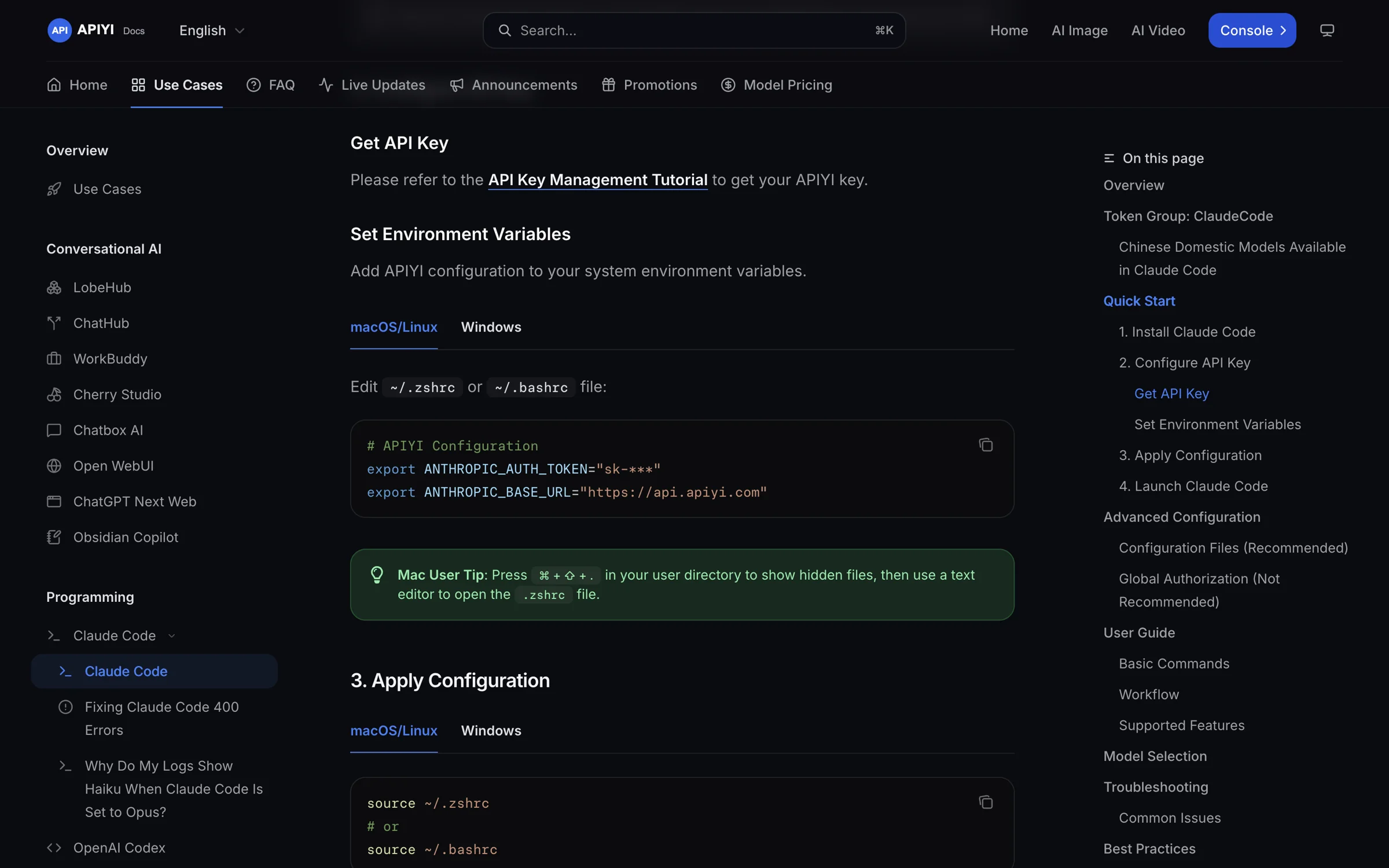
Figure 4: Claude Code configuration in the APIYI docs requires just two environment variables (the API key is masked in the screenshot).
| Model | Input | Output | Cache read | Available platform |
|---|---|---|---|---|
| claude-opus-5-5 | $4 / million tokens | $20 / million tokens | $0.2 / million tokens | APIYI apiyi.com |
Check the platform’s model list for current models and prices. Research skill prompts repeatedly include the same SKILL.md, and cache reads cost just one-twentieth of the input rate, which can save a lot over long sessions.
Three Real-World Scenarios for Running Research Skills for the First Time
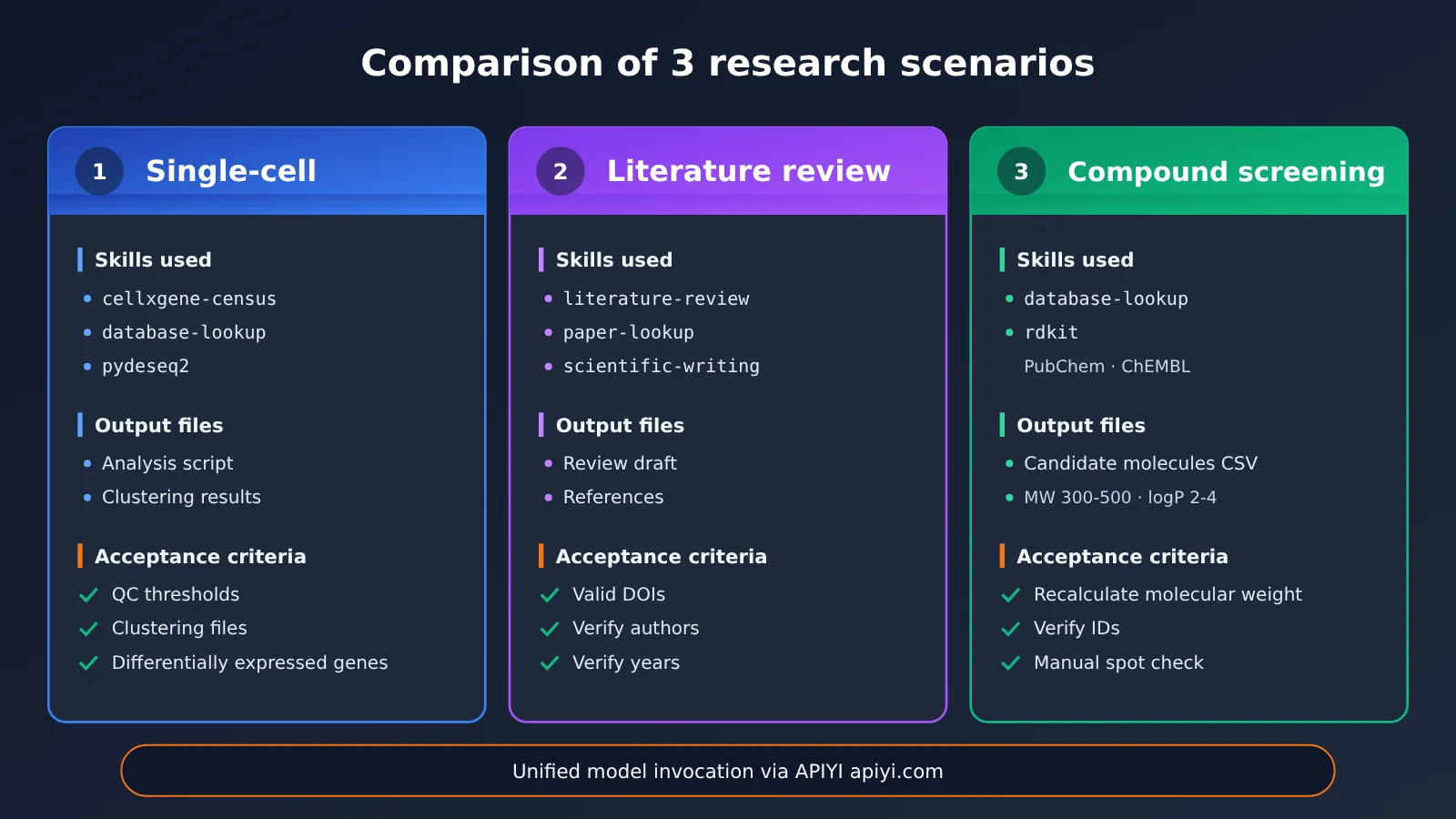
Scenario 1: Single-Cell Analysis
Prompt: Use available skills you have access to whenever possible. Then add: “Use scanpy for QC, normalization, dimensionality reduction, and clustering; use cellxgene-census as a cell type reference; use database-lookup to find marker genes; and use pydeseq2 for differential expression.” The agent will read each skill in turn, then generate and run an analysis script.
When reviewing the results, check three things: whether the QC thresholds are documented, whether the clustering output files exist, and whether the differentially expressed genes can be found in the data sources returned by database-lookup.
Scenario 2: Literature Review
Prompt: “Use the literature-review skill to conduct a systematic review of a specific topic, use paper-lookup to find additional papers, and then use scientific-writing to organize everything into a first draft.” This skill checks DOIs online, so open each DOI to confirm that the paper exists and that the authors and publication year are correct.
Scenario 3: Compound Screening
Prompt: “Use database-lookup to retrieve a set of candidate molecules from PubChem and ChEMBL, use rdkit to filter them for a molecular weight of 300–500 and a logP of 2–4, and output a CSV.” To verify the results, spot-check a few entries yourself: recalculate their molecular weights with RDKit and compare them with the CSV, then look up the compound IDs in PubChem to make sure they match.
Research Skills Troubleshooting
| Issue | Common cause | Solution |
|---|---|---|
| Skill doesn’t load | The directory is in the wrong place, or the skill directory is missing SKILL.md |
Check the directory table in Step 3. Restart your IDE after making changes. In Cursor, check Settings → Rules to see if the skill is recognized. |
| Missing Python dependencies | The skill files were installed, but the dependencies weren’t | Follow the compatibility instructions in SKILL.md to install them with uv pip install, and make sure the correct environment is active. |
| Database rate limiting | Batch requests are too frequent, or you’ve exceeded the free quota | Check the database documentation, add caching, send requests in batches, and reduce concurrency. |
| Authentication error | The key isn’t set, has expired, or lacks permissions | Use echo to check the environment variable, then verify permissions in the service’s dashboard. |
Old scientific-skills/ path returns 404 |
The skill path changed to skills/ in v2.43.0 |
Update the paths in your local scripts and bookmarks, or reinstall. |
| Want to uninstall and reinstall | Versions are mixed up, or a symlink is broken | Run npx skills remove, then npx skills add. Use gh skill install --pin if you need to pin a version. |
Stuck at Cloning repository…, followed by Clone timed out |
The repository is over 400 MB, and 300 seconds isn’t enough | Try again with SKILLS_CLONE_TIMEOUT_MS=600000, or run git clone first and install from the local path. |
Research Skills: Risks and Disclaimer
Please read this section carefully. Scientific Agent Skills is an open-source community project, not an official API from any platform. We recommend it, but we don’t endorse it.
Skills can execute actions. A skill can instruct an agent to run arbitrary code, install packages, make network requests, and modify local files. Malicious or poorly written skills can lead an agent astray. Here’s what we recommend:
- Read
SKILL.mdbefore installing a skill, and check which packages and external services it uses. - Review its contribution history: Skills attributed to K-Dense-AI have undergone internal review, while community contributions receive only a “best effort” review.
- Run your own scan: First run
uv pip install cisco-ai-skill-scanner, then runskill-scanner scan <path> --use-behavioral, replacing<path>with the skill directory. The project team runs incremental scans weekly and a full rescan at least every 30 days. Results are published indocs/security-report.md.
Third-party service restrictions. Some skills require you to register with third-party databases or use your own key. In those cases, you must follow the services’ terms and usage limits. Bulk scraping can trigger rate limits or even account bans, so test first with a secondary account or in an isolated environment.
Clinical and regulatory boundaries. Clinical, medical, and regulatory skills are for research and drafting only. They can’t replace decisions about diagnosis, release, or certification.
Responsibility. You’re responsible for assessing and accepting any consequences of using these skills. Neither this platform nor the author of this article assumes responsibility.
Frequently Asked Questions
Q1: What exactly is Scientific Agent Skills?
It’s a research skills library maintained by K-Dense-AI. It contains 177 skill folders that follow the Agent Skills standard, telling an agent how to carry out a research workflow, which packages to use, and which databases to connect to. It’s not a model or an API service.
Q2: Why not install all 177 research skills with one command?
First, the official README explicitly advises against installing them all at once. Second, the more skills you install, the harder it is for an agent to choose the right one. Third, each skill can execute code, so more skills mean more content to review. Picking 5–10 that match your field is usually enough.
Q3: Why are there 177 skills now instead of 181?
Starting with version 2.72.0, the four document skills—docx, pdf, pptx, and xlsx—are no longer distributed with the repository. If you need them, install them separately from Anthropic’s skills repository.
Q4: If the skills are free, what are the main costs?
Most of the cost comes from model invocations when running the skills. Some skills also incur third-party service fees. For example, `generate-image` uses OpenRouter, which charges per request. For model usage, APIYI apiyi.com offers pay-as-you-go access with no fixed monthly fee. You can test a small workflow to see how many tokens it uses before deciding which model to use long term.
Q5: I’ve installed the skills in Cursor, but the agent isn’t using them. What should I do?
First, check Settings → Rules to make sure the skills are recognized. Then add `Use available skills you have access to whenever possible.` to the beginning of your prompt and mention the skill by name. If the agent still doesn’t use it, try a different model for comparison. With APIYI apiyi.com, you can switch between models using a single API key, making troubleshooting easier.
Q6: How can I make sure research results are reproducible?
Use `gh skill install –pin` to pin the skill to a specific version or commit. Pin Python dependencies in a separate uv environment, and record the `metadata.version` and `last-reviewed` date from `SKILL.md`.
Q7: Are all these skills licensed under MIT?
Not necessarily. The repository as a whole is MIT-licensed, but each skill has its own license field. For example, `scanpy` uses BSD-3-Clause. Check each license before commercial use.
Research Skills: Key Takeaways
- What they are: 177 open-source research skills covering the 22 categories listed in the README
- How to install them: Use
--listto see what’s available, then use-sand-ato install only what you need - Prerequisites: Node.js 22.20+, Python 3.13+, uv, and a host that supports the Agent Skills standard
- Most common pitfall: Installing skill files doesn’t install their dependencies. Create a separate uv environment for each workflow
- How to verify results: Check which skill was used, where the outputs were saved, and whether the numbers match their sources
- Security: Read
SKILL.mdbefore installing, and run a Cisco scanner on it - Cost: The skills are free. For model invocation, you can use APIYI apiyi.com as a single access point and compare models
Summary
These 177 research skills are useful, but take things one step at a time. Don’t try to install everything at once:
- Check your setup first: Confirm your environment versions and host support, then use
--listto pick 5–10 skills - Install skills and dependencies separately: Use
npx skills addfor skill files and uv for Python dependencies. You’ll need both - Make results verifiable: After each run, check which skill was used, where the outputs are, and where the numbers came from
Start by running one small workflow you know well from end to end—for example, clustering a small dataset with scanpy—then gradually add more skills. For model access, consider using APIYI apiyi.com on a pay-as-you-go basis to get started, then choose a model for long-term use based on your token consumption.
📚 References
- Scientific Agent Skills repository: Skill source code, README, and security report
- Link:
github.com/K-Dense-AI/scientific-agent-skills -
Details: Includes 177 skills, installation instructions, troubleshooting guidance, and
docs/security-report.md -
skills installer: Commands and options for npx skills
- Link:
github.com/vercel-labs/skills -
Details: Covers commands such as add, list, check, update, and remove, plus a directory mapping for 70+ hosts
-
Anthropic Skills repository: docx, pdf, pptx, and xlsx document skills
- Link:
github.com/anthropics/skills -
Details: After version 2.72.0, these four document skills need to be installed separately from this repository
-
Companion paper: Scientific Agent Skills: A Library of Procedural Knowledge for Research Agents
- Link:
arxiv.org/abs/2609.00065 -
Details: Explains the design behind the skill library
-
APIYI Docs · Connecting Claude Code: Environment variables, groups, and troubleshooting
- Link:
docs.apiyi.com/scenarios/programming/claude-code -
Details: Connect Claude Code to APIYI with two environment variables. Once your skills are installed, use this guide to get the model running.
-
APIYI Docs · GPT-Image 2 Image Generation Skills: Two community-contributed image generation skills
- Link:
docs.apiyi.com/scenarios/ecosystem/apiyi-gpt-image-skills -
Details: Parameters, billing, and common errors for
apiyi-gpt-image-2-genandapiyi-gpt-image-2-all-gen -
APIYI model pricing: Models, types, billing methods, and unit prices
- Link:
docs.apiyi.com/models - Details: This table is the source for the claude-opus-5-5 prices cited in this article. Prices can change, so check them before use.
Author: APIYI Technical Team
Technical discussion: Contact us through the APIYI homepage. For more model integration resources, visit the docs.apiyi.com documentation center.