Author’s note: This article walks you through two core skills from mattpocock/skills, even if you’re starting from scratch. First, use /grill-me to clarify the requirements, then use /tdd to write the code. Each step includes acceptance criteria.
Bottom line: Use /grill-me first to get the Agent to clarify the requirements, then use /tdd to write code one test at a time.
As of October 22, 2026, Beijing time, mattpocock/skills has around 300,000 stars on GitHub, is licensed under MIT, and its latest version is v1.3.1. A high star count shows that a project gets a lot of attention, but it doesn’t mean it’ll work well in your project. So this article focuses on how to install it, use it, and tell whether it’s working as expected—without making claims about its results.
A hands-on walkthrough you can follow step by step. We’ll use a small task—adding coupon validation to an order flow—and go from installation to getting the first test to pass.
- Goal: Install the skills, complete one round of requirements questions with /grill-me, then use /tdd to write the first test and take it from “red” to “green”
- Time: Installation takes just a few minutes (the author says it takes “30 seconds”). The time needed for questions and test-writing mostly depends on how quickly you respond. The estimates below are editorial; expect about 30 minutes to 1 hour in total
- Prerequisites: You’re already using a coding Agent (such as Claude Code, Codex, GitHub Copilot, Gemini CLI, or Cursor) and have a code repository you can experiment with
- Difficulty: Beginner. Most of the process uses a graphical interface and chat; terminal commands are included as an optional route
mattpocock/skills at a glance: What grill-me and tdd each do
mattpocock/skills is a public collection of Agent skills by Matt Pocock. The repository describes them as “Skills for Real Engineers.” In the README, the author says the skills are small, composable, work with any model, and are “based on decades of engineering experience.”
| Key point | What it does | Why it’s useful |
|---|---|---|
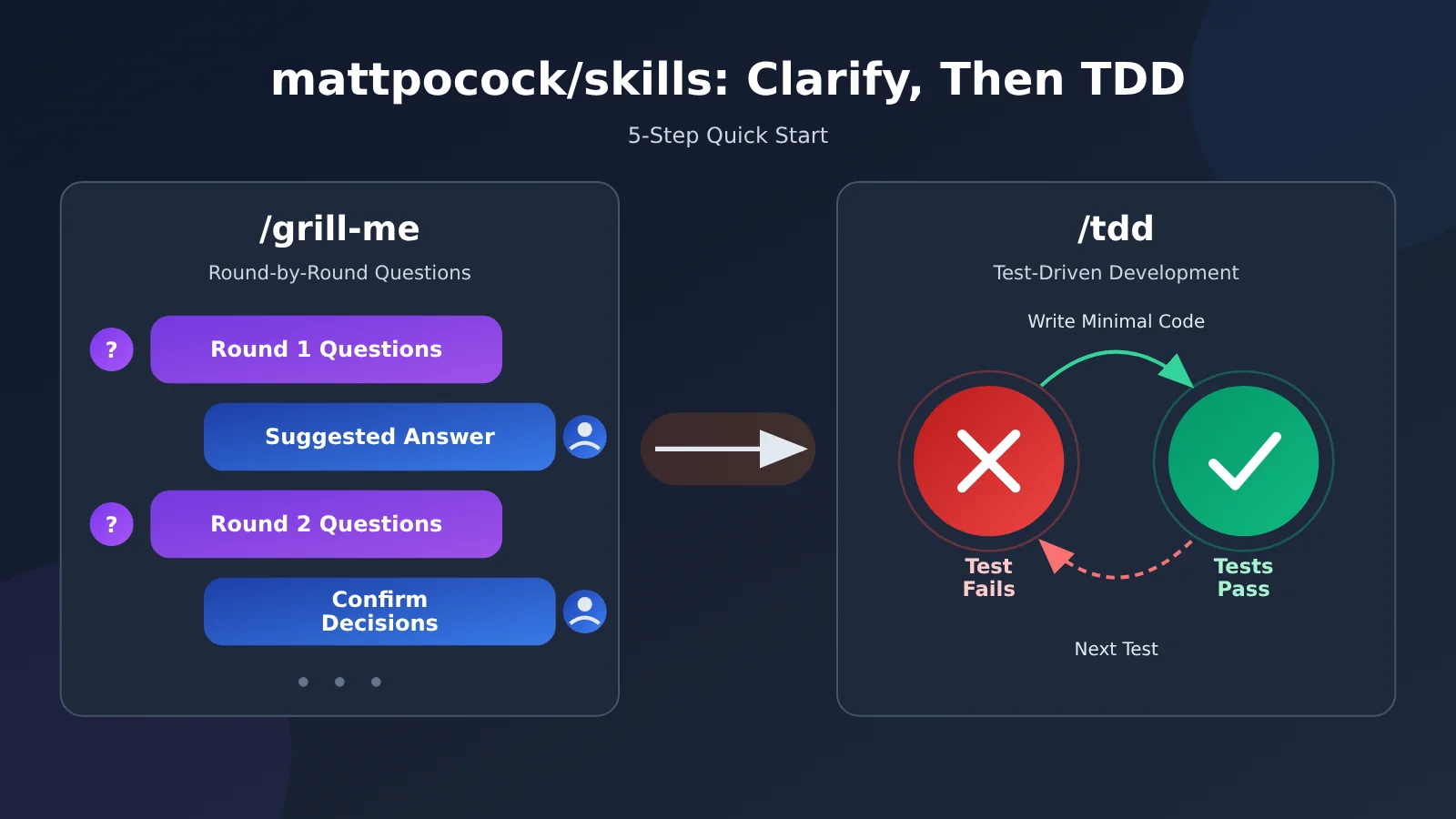
| /grill-me | Asks questions one at a time, with a recommended answer for each. It doesn’t write any files and can only be triggered by you manually | Aligns you and the Agent on requirements before you start, and surfaces decisions you might not have realized you needed to make |
| /tdd | Lists the test boundaries (seams) and waits for your confirmation, then follows the “red → green” cycle, one test at a time | Gives you feedback at every step, and produces tests that can withstand refactoring |
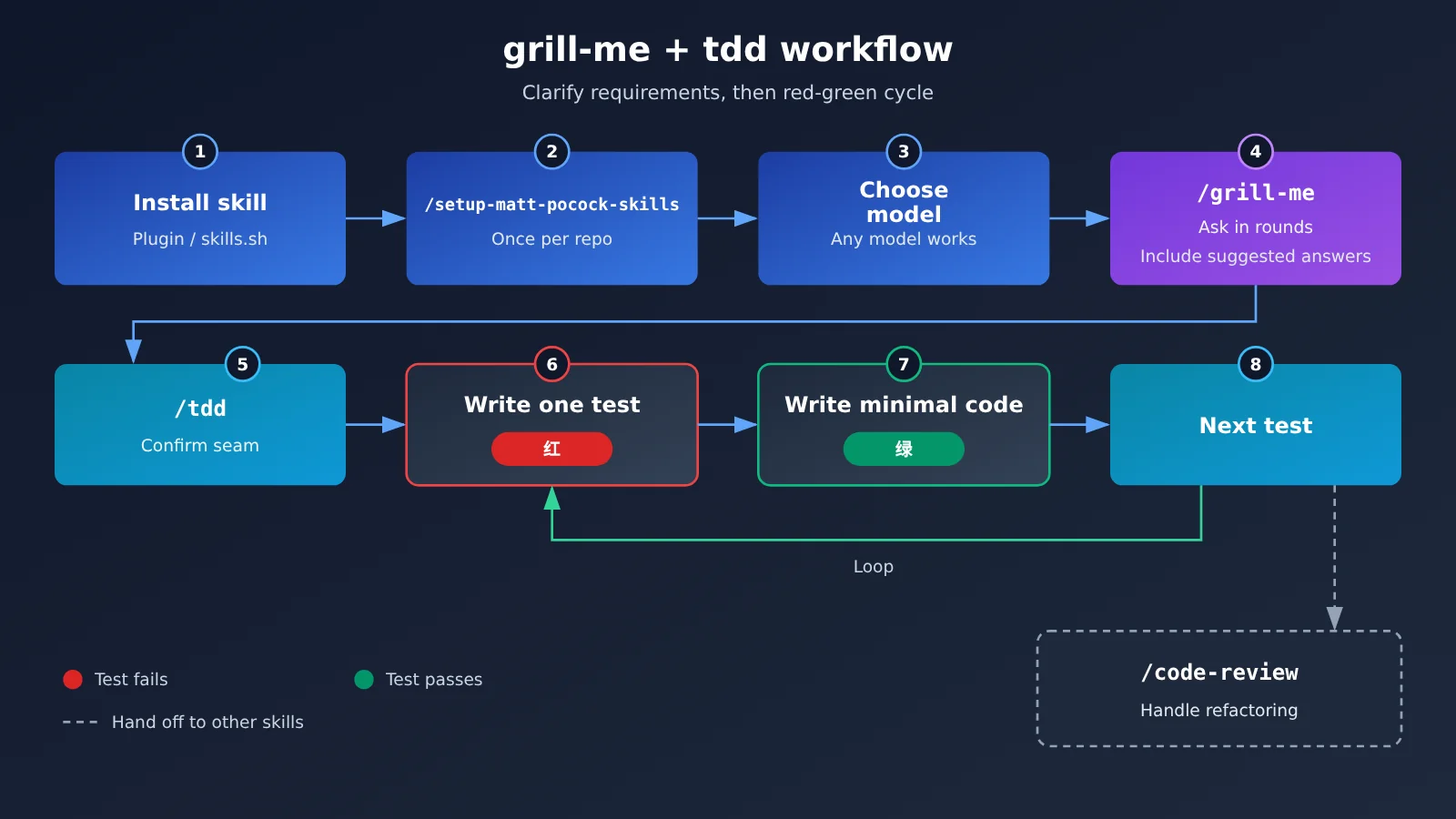
| /setup-matt-pocock-skills | Run once per repository to configure the issue tracker, triage labels, and where to store documentation | Tells engineering skills where to write things |
| Installation options | Choose between the plugin (automatic updates) and skills.sh (editable files) | Installing both means you’ll get two copies of every skill |
Why use grill-me and tdd together?
The README lists a few common failure modes, and two of them map directly to these skills. The first is “the Agent didn’t do what I wanted,” which comes down to a communication gap between you and the Agent. The fix is a round of grilling: have the Agent ask detailed questions about what you want to do. The /grill-me skill itself is just one line: call the grilling skill. The actual rules for asking questions are in the grilling skill.
Another failure mode is “the code doesn’t work.” Even when the requirements are clear, an Agent that can’t see the actual results of running the code is flying blind. /tdd starts by writing a failing test, then adds just enough code to make it pass, giving the Agent reliable feedback at every step. Used together, the first skill answers “what should we do?” and the second answers “did we get it right?”
How to Install mattpocock/skills and Get grill-me and tdd Running: 5 Steps to Get Started
Step 1: Install mattpocock/skills (GUI recommended)
The official instructions cover Claude Code, Codex, GitHub Copilot, and Gemini CLI. For other agents, use skills.sh. The README explicitly says these skills work with any model. The maintainers also mention that Auggie, Droid, Goose, and others haven’t been tested yet, so skills.sh is the recommended option for now.
| Agent | Recommended installation method | Auto-updates? |
|---|---|---|
| GitHub Copilot (VS Code) | Open the Command Palette, run Chat: Install Plugin From Source, and enter https://github.com/mattpocock/skills |
Yes, daily |
| Claude Code | Install mattpocock-skills from the official claude-plugins-official marketplace |
Yes, enabled by default |
| Codex | Add the mattpocock/skills plugin marketplace, then install the plugin |
Yes, updates at startup |
| Copilot CLI | Install it from the mattpocock plugin marketplace |
Yes, after setting autoUpdate: true once |
| Gemini CLI | Install the engineering and productivity directories separately | No, rerun the commands |
| Cursor, OpenCode, Windsurf, Devin, Amp, Pi, and others | skills.sh | No, update manually |
VS Code users have the easiest setup. Press Ctrl+Shift+P (Cmd+Shift+P on macOS) to open the Command Palette, enter Chat: Install Plugin From Source, press Enter, and paste the repository URL. If you prefer the terminal, here are the official installation commands:
- Claude Code: Run
claude plugin install mattpocock-skills@claude-plugins-official. Auto-updates are enabled by default. - Codex: First run
codex plugin marketplace add mattpocock/skills, then runcodex plugin add mattpocock-skills@mattpocock. It updates automatically at startup. - GitHub Copilot CLI: First run
copilot plugin marketplace add mattpocock/skills, then runcopilot plugin install mattpocock-skills@mattpocock. - Gemini CLI: Run
gemini skills install https://github.com/mattpocock/skills.git --path skills/engineeringandgemini skills install https://github.com/mattpocock/skills.git --path skills/productivityseparately. It won’t update automatically, so rerun both commands when you want to update. - Other agents (skills.sh): Run
npx skills@latest add mattpocock/skills -a cursor, replacingcursorwith your agent, such asopencode,devin,windsurf,amp, orpi. Leave out-ato choose an agent interactively. To update, runnpx skills@latest update; if new skills are available, runaddagain. - Install a single skill: Run
npx skills@latest add mattpocock/skills --skill=<name>, replacing<name>with the skill name.
Copilot CLI also requires a one-time edit to ~/.copilot/settings.json. Add this configuration: {"extraKnownMarketplaces": {"mattpocock": {"source": {"source": "github", "repo": "mattpocock/skills"}, "autoUpdate": true}}}. This registers the mattpocock plugin marketplace as coming from the GitHub repository mattpocock/skills and enables auto-updates. The official docs provide this configuration, but no one has tested it in practice yet.
Choose either plugins or skills.sh, not both. Plugins are read-only packages that update automatically, while skills.sh copies editable files into your project. Installing both will give you two copies of each skill. When using skills.sh, remember to select setup-matt-pocock-skills when the installer asks which skills to install.
If you only want to install a single skill, there are two dependencies to keep in mind. grill-me only calls grilling, so you need to install grilling as well. tdd depends on codebase-design, whose interface-design vocabulary it uses to discuss seams.
You’re all set when you can type / in your Agent’s chat box and see grill-me, tdd, and setup-matt-pocock-skills in the suggestions—with each appearing only once.
Step 2: Run /setup-matt-pocock-skills in the chat
The first time you use this skill set in a repository, enter /setup-matt-pocock-skills in the Agent chat. It’ll ask you three questions in turn: which issue tracker you use (GitHub, GitLab, local files, or another option you describe), which labels to use when triaging issues, and where to store generated documents.
Just answer honestly. If you’re not sure, choose local files—you can change it later. Strictly speaking, /grill-me doesn’t depend on the repository, so you can skip this step. But it’s a good idea to configure the engineering skills, such as /tdd, first. You only need to do this once per repository.
You’re done when: the Agent has asked all three questions, confirmed that setup is complete, and you know where future documents will be stored.
Step 3: Choose the right models for /grill-me and /tdd
The official documentation specifically notes that the questioning phase relies more heavily on the model than most skills do. Grilling depends on the model’s own knowledge of how systems can fail, so use the best model available to you. When writing the implementation, the model mostly follows the context, so a less expensive model can work well.
| Phase | What the model needs to do | Recommendation |
|---|---|---|
/grill-me questioning |
Relies on the model’s own engineering knowledge; the stronger the model, the sharper the questions | Use the strongest model available to you, such as Claude Opus 5.5 |
/tdd implementation |
Mostly follows the context you’ve established | You can switch to a less expensive model |
| How to switch | Change models by phase in Claude Code or Codex | Use one APIYI key to access multiple models |
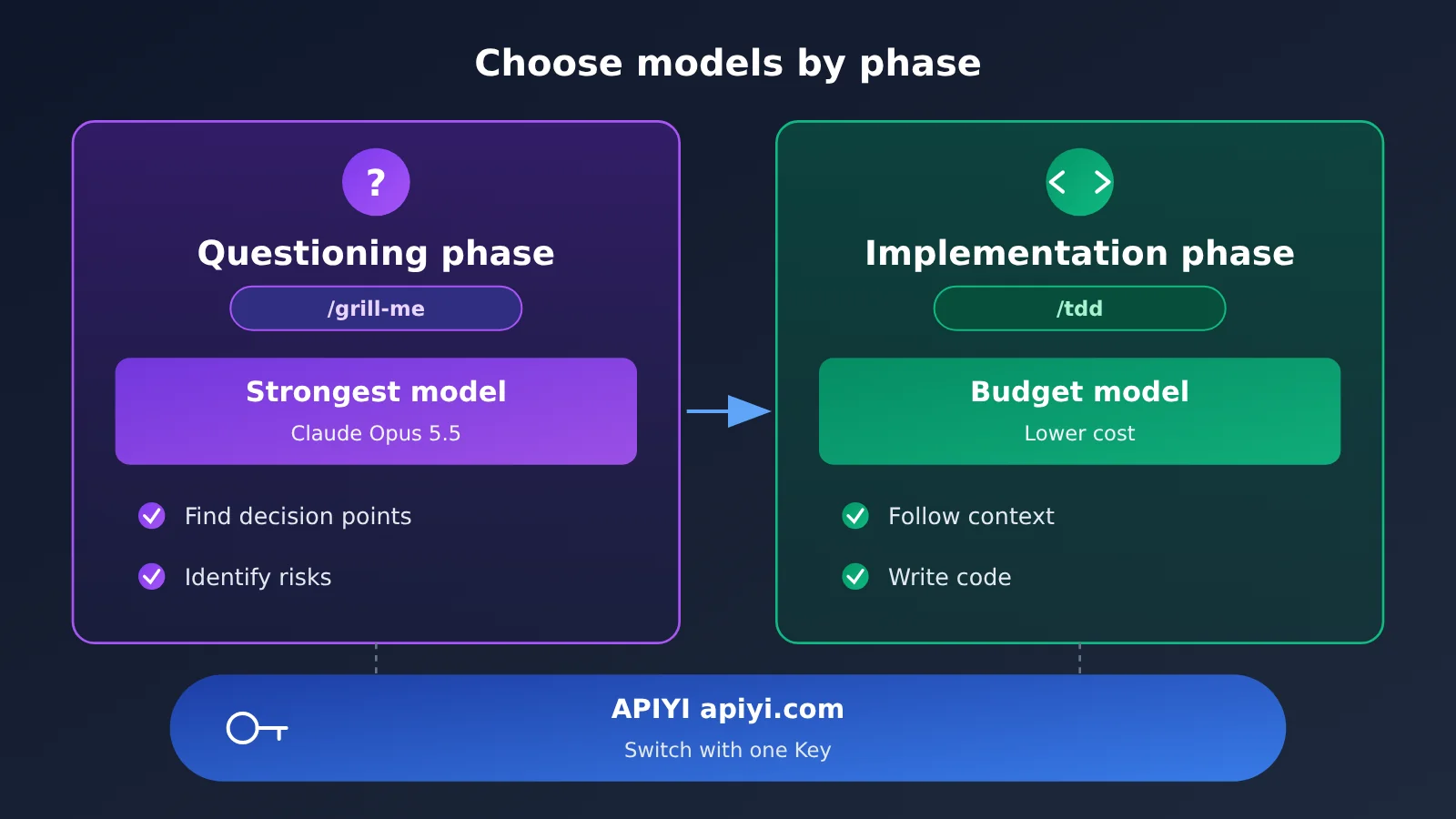
To configure a unified endpoint in Claude Code or Codex, follow these steps:
- Claude Code: First, set two environment variables: set
ANTHROPIC_BASE_URLtohttps://api.apiyi.com(the APIYI unified endpoint) andANTHROPIC_AUTH_TOKENto your API key. Then runclaudeto launch the app and use/modelin the chat to switch models. - Codex: Open
~/.codex/config.tomland add the two linesmodel = "<模型ID>"andmodel_provider = "apiyi". Then add a[model_providers.apiyi]section with these three lines:name = "APIYI",base_url = "https://api.apiyi.com/v1", andenv_key = "APIYI_API_KEY". Use the model ID shown in the console.
Field names may vary across tool versions. Check the official tool documentation and docs.apiyi.com for the latest details.
🎯 Model selection tip: Use your best model for the questioning phase, then switch to a less expensive one for implementation. Using one APIYI apiyi.com key to switch models in Claude Code or Codex is convenient. Keep in mind that APIYI only handles model invocation—it doesn’t replace the skills themselves, such as
grill-meandtdd.
You’re done when: you’ve checked the current model in the chat (in Claude Code, you can use /model) and confirmed that the questioning phase is using the strong model you chose.
Step 4: Use /grill-me to clarify the coupon validation requirements
Start a new conversation—don’t continue in a conversation where the Agent has already written a plan. Also turn off plan mode. Plan mode pushes the Agent to produce a plan quickly, but at this step you want it to keep asking questions. Enter /grill-me I want to add coupon validation to the checkout flow in the chat box, then press Enter.
The Agent won’t invoke grill-me automatically; it only starts when you enter the command. It breaks the requirements down into a “decision tree” and asks, in each round, every question whose prerequisites have already been settled. Each question is numbered and includes a recommended answer, worded so that replying “yes” means accepting the recommendation. A typical round of questions might look like this:
❓ Q1 – Which time should determine whether a coupon has expired? When the order is placed, or when payment succeeds?
➡️ Recommendation: Use the time the order is placed, so the coupon doesn’t suddenly expire while the customer is paying.❓ Q2 – Does the minimum spend include shipping?
➡️ Recommendation: No. Count only the item subtotal.❓ Q3 – How many coupons can be used on one order?
➡️ Recommendation: One.
The most common mistake is to answer “yes” to everything. That just rubber-stamps the Agent’s plan without making any decisions yourself. A better reply makes your preferences clear:
Q1 yes. Q2 no—we include shipping under our promotion rules. Q3 I’m not sure; I’ll check with the operations team. For now, assume one.
The next round of questions will build on your answers—for example, “If shipping counts toward the minimum spend, can a shipping coupon be combined with a spend-and-save coupon?” If a question requires checking facts in the repository, the Agent should send a subagent to investigate instead of asking you. The official documentation notes that it’s normal for four rounds to add up to more than 40 questions.
You’ve succeeded if:
– Questions are asked in rounds, with each one numbered and paired with a recommended answer you can accept by replying “yes.”
– Later rounds clearly build on your earlier answers.
– You’ve disagreed at least once or thoughtfully said “I don’t know” at least once.
– At the end, the Agent asks you to confirm that you’ve reached an agreement. It won’t take action or write any files before you confirm.
Step 5: Use /tdd to write one test at a time
Continue in the same session so all the context you just established is still available. If needed, switch to a more economical model, then enter /tdd Implement coupon validation according to the rules we just confirmed.
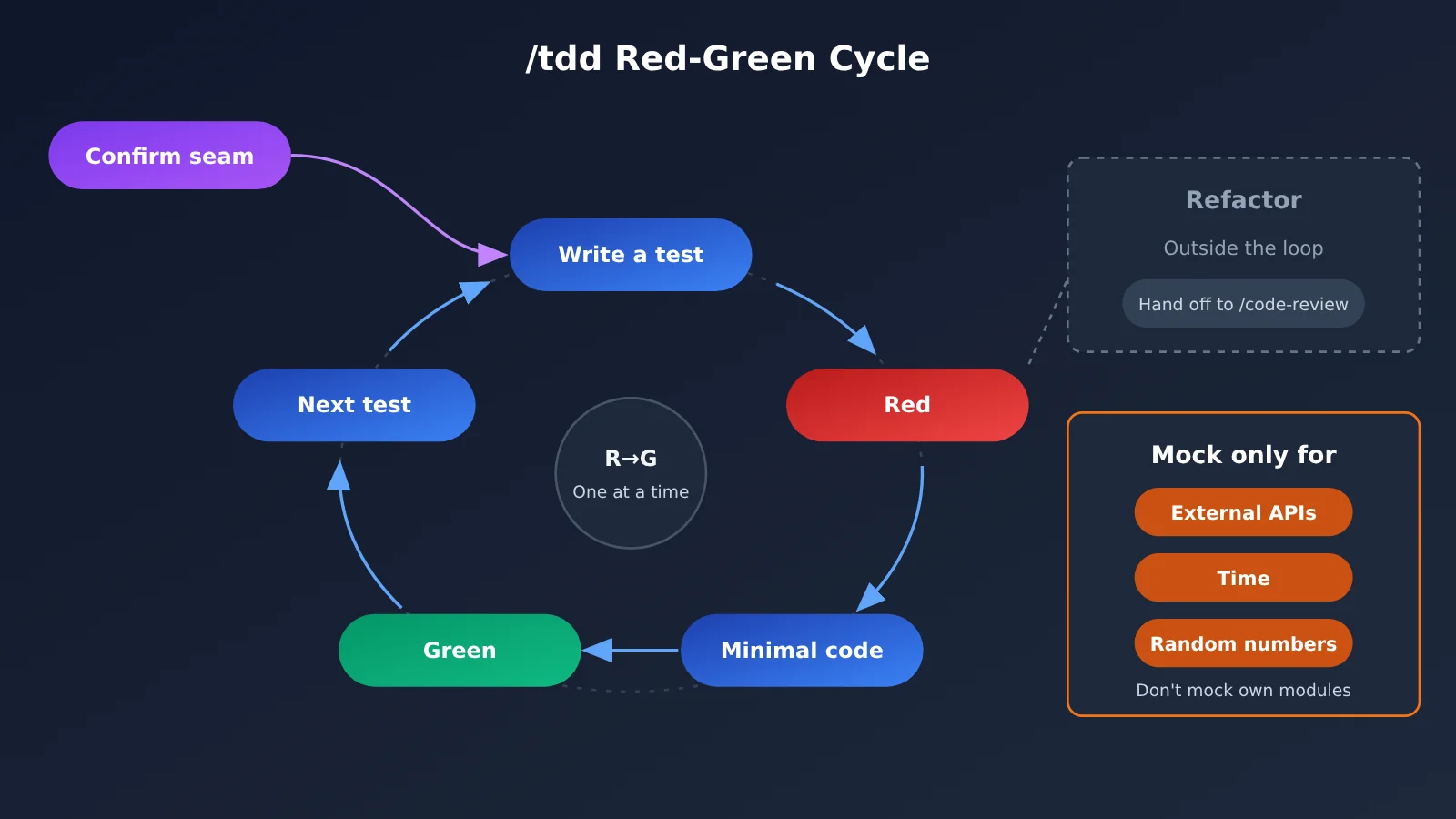
It won’t write a test right away. First, it’ll list the interface boundaries (seams) it plans to test, then wait for your confirmation. For example, candidate A is the pure function validateCoupon(coupon, order, now). It can cover the rule logic, but not how it connects to the checkout flow. Candidate B is the checkout service’s checkout() function. It can test that integration, but it’s slower. If it only gives you the names, ask what each seam can and can’t catch. Here, we’ll confirm A.
Here’s an example of the first test, using TypeScript + Vitest. This is just an illustration—the skill itself isn’t limited to any language or test framework:
- Test file:
coupon.test.ts, importingitandexpectfromvitest, andvalidateCouponfrom./coupon - Test name: Users can’t use an expired coupon
- Coupon input:
{ code: "SAVE10", minSubtotal: 100, expiresAt: new Date("2026-10-01") }, meaning it’s valid for orders of at least 100 and expires on October 1 - Order input:
{ subtotal: 120 }, with a subtotal of 120 - Current time input:
new Date("2026-10-22"). Pass the time in as an argument instead of reading the current time inside the function, so the result is the same no matter when you run the test - Expected result:
expect(result).toEqual({ ok: false, reason: "expired" }), meaning validation fails because the coupon has expired
Run the test first. It’ll fail because validateCoupon doesn’t exist yet. Then the Agent writes just enough code to make the test pass—for example, returning an expired result when now >= coupon.expiresAt. Once the test passes, it moves on to the next test, such as “Reject when the subtotal doesn’t meet the minimum.” Note that the expected value is a literal derived from the rule, and the test name describes what the user can do, not “a call to some internal function.”
The current version of tdd only has “red → green”; it no longer includes a refactoring phase. That phase was removed in June 2026 because the Agent almost never performed it. Refactoring is now handled by /code-review. The skill description still says red-green-refactor—this is a known issue, but the phrase still triggers the skill. Use mocks only at system boundaries such as external APIs, time, and random numbers. Don’t mock your own modules.
You’re doing it right if:
– Before writing any test files, it lists the seams and waits for you to confirm
– It presents one test at a time: red first, then green, and only then the next test—never “a batch of tests first, then a batch of code”
– Renaming an internal function doesn’t break the tests
When to Use grill-me, tdd, and Other Skills—and a Troubleshooting Checklist
Many people get stuck not because they don’t know how to use these skills, but because they use them in the wrong situations. Save this table and refer to it when you’re deciding what to use.
| Your situation | Which one to use | Notes |
|---|---|---|
| Your idea is still vague and may not involve code | /grill-me | No repository needed, and it won’t write files. You can use it for business decisions, writing, and more. |
| You’re changing code in a repository and want to capture terminology and decisions | /grill-with-docs | Uses the same questioning process and updates GLOSSARY.md and ADRs. |
| The work is too large to fit in one session | /wayfinder | Creates a map of decision tickets in your issue tracker so you can work through them one at a time. |
| You need to implement behavior with clearly defined inputs and outputs | /tdd | Well suited to business logic, request/response contracts, data transformations, and validation. |
| You already have a spec or ticket and want the whole thing implemented | /implement | Drives /tdd through agreed-upon seams and runs /code-review before committing. |
If you’re not sure which one to use, enter /ask-matt. It’ll recommend a suitable skill based on your situation. Most problems that come up in practice are covered in the table below.
| Symptom | Common cause | What to do |
|---|---|---|
| There are too many questions—hundreds of them | The scope is too large, or the context is too full and question quality is suffering | Ask the Agent to break the work into smaller pieces, then grill each one separately. |
| The process ends quickly, and you’ve only said “agree” the whole time | You’re being too passive in your answers | Push back, point out scope drift, and say “I don’t know” when that’s the truth. |
| You keep rephrasing a question but still can’t answer it | It’s a question you can’t resolve through discussion alone, such as how an interaction should feel | Stop asking questions and use /prototype to build a quick, disposable prototype. |
| You can’t choose a test boundary | The candidate seams have only been named | Ask what each seam can catch, what it might miss, and how much slower it is. |
| You wrote the implementation before adding tests | That’s the model’s default behavior | Keep an eye on key slices as they run. If you catch this, have it go back and “make it fail first.” |
| Browser tests get stuck in an endless loop | End-to-end tests were written before the feature existed | Add a note to CLAUDE.md saying to write browser tests only after the behavior is working. |
| The tests just repeat the implementation | There’s no independent expected result for configuration or glue code | Don’t use tdd for these changes. You can add the rule to CLAUDE.md. |
| Each skill appears twice | You installed it through both the plugin and skills.sh | Uninstall it from one of them. |
mattpocock/skills FAQ
Q1: With around 300,000 stars, does that mean it definitely works well?
No. Star counts reflect interest, not how well something will work in your project. The author says the skills are based on decades of engineering experience, but there are no third-party benchmarks showing how much time they save. The most reliable way to judge them is to run through each step in your own repository and check it against the acceptance criteria in this article.
Q2: Can I only use these with tools like Claude Code and Codex?
No. The tools listed officially are just the ones the skills have been tested with. For agents that aren’t listed, you can use skills.sh and specify one with `-a` or choose one interactively. The README also says these skills work with any model; they’re simply skill instructions written in Markdown.
Q3: After grill-me asks its questions, should I start a new session to write the code?
No. The context built up during the questioning process is the most valuable part. The official recommendation is to continue in the same session and use /to-spec to generate a spec. In this article’s example, we go straight to /tdd in the same session.
Q4: If one round of questions feels like too much, can I make it ask one question at a time?
Yes. Just add `When grilling, ask one question at a time.` to your global `CLAUDE.md`. That said, asking questions in rounds lets you see all the decisions you could make at once, so try it a few times before deciding whether to change it.
Q5: Why does the tdd description say red-green-refactor if it doesn’t actually refactor?
The refactoring phase was intentionally removed in June 2026, but the description hasn’t been updated yet. This is a known issue that’s still open. The current workflow is “red → green”; leave refactoring to /code-review. It works better to write the implementation and review it in separate sessions.
Q6: What’s the easiest way to use different models for the questioning and implementation phases?
You can configure a unified interface in Claude Code or Codex using the setup described in Step 3 of this article. With a single API key from APIYI at apiyi.com, you can use Claude Opus 5.5 for the questioning phase and switch to a more economical model for implementation. The API proxy service handles model invocation; the skills themselves are installed as usual.
Q7: What kinds of changes aren’t a good fit for tdd?
Configuration, wiring, glue code, type annotations, and straightforward CRUD that just forwards requests don’t have an independent expected result to compare against. Tests can easily end up just copying the implementation. The authors acknowledge that the skills don’t currently help you decide whether a change is worth using TDD for, so you’ll need to make that call yourself. If you’re unsure, you can ask an agent to list the change’s inputs and observable outputs using a lightweight model on APIYI at apiyi.com. If it can’t list them, don’t use tdd.
mattpocock/skills Key Takeaways and Summary
Key Takeaways
- Ask before you write: Use
/grill-meto align on requirements, then use/tddto implement one test at a time. - Choose one installation method: Install either the plugin or use skills.sh—not both—or you’ll get two copies of every skill.
- Don’t miss the dependencies: When installing skills individually, pair
grill-mewithgrillingandtddwithcodebase-design. - Answer actively: Push back more and say “I don’t know” when you need to. Agreeing all the way through is the most common failure mode.
- Confirm the seams first:
/tddstarts by listing the test boundaries and waiting for your confirmation, then goes red → green, with no refactoring. - Choose models by task: Use your strongest model for questions and a less powerful one for implementation. With APIYI, you can switch models using a single API key.
Summary
The value of mattpocock/skills isn’t its roughly 300,000 stars. It’s that it turns two sound engineering practices—aligning first and validating in small steps—into repeatable skills. Follow the five steps in this article: install, run setup, choose a model, clarify requirements with /grill-me, and use /tdd to write your first test and take it from red to green. You’ll be able to tell whether this approach works for your project.
If you want to use different models for the question and implementation stages, you can switch between them in Claude Code and Codex with a single API key through APIYI at apiyi.com. The rest is practice: work through real requirements and keep answering actively.
References
- GitHub – mattpocock/skills: The repository homepage, with the README and all
SKILL.mdfiles - Link:
github.com/mattpocock/skills -
Note: Refer here for installation methods, the skills list, and update history.
-
AI Hero – Skills Documentation: Official documentation for skills like
grill-meandtdd - Link:
aihero.dev/skills -
Note: Includes the “It’s working if” acceptance checklist and answers to common questions.
-
skills.sh – mattpocock/skills: A general installation option for other agents
- Link:
skills.sh/mattpocock/skills - Note: Suitable for tools like Cursor, OpenCode, and Windsurf; updates need to be installed manually.
Author: APIYI Technical Team
Technical Support: Feel free to contact us from the homepage at APIYI (apiyi.com). For more integration resources, visit the documentation center at docs.apiyi.com.