Great news! Previously, many users reported that the recharge process via USDT or manual wire transfers was cumbersome, involved long wait times, and lacked the seamless international experience provided by major vendors like OpenAI and Anthropic. To ensure our global users can pay as easily as they would for a local SaaS service, APIYI (apiyi.com) officially launched the Stripe credit card payment channel today (May 9, 2026), supporting real-time payments across 195 countries and 135+ currencies.
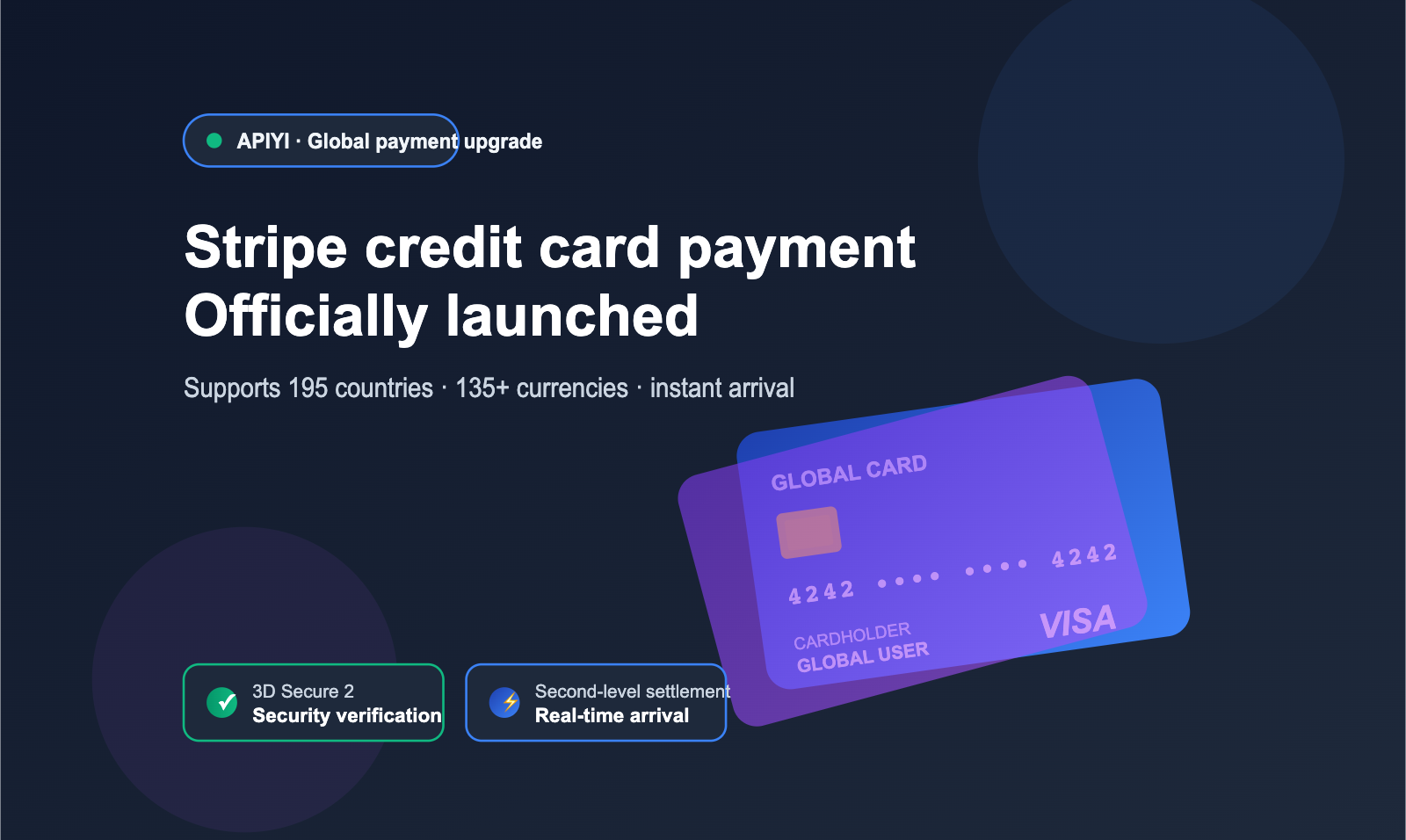
This upgrade marks the full coverage of our platform's payment system for global users. Combined with our existing channels like Alipay, WeChat Pay, and USDT, the platform now supports 7 payment methods, truly realizing a "pay-as-you-go, instant-access" global experience.
1. Core Advantages of Stripe Credit Card Payments
Stripe is one of the world's largest online payment processing platforms. With a service network covering 195 countries and real-time processing capabilities for 135+ currencies, it is widely adopted as the default payment gateway by major AI vendors like OpenAI and Anthropic. For AI API users, choosing the Stripe channel means faster processing speeds and a more standardized international payment experience.
After integrating Stripe, overseas users can directly use major international credit cards such as Visa, Mastercard, and American Express to top up their accounts, without relying on USDT transfers or manual remittances. This change is particularly well-suited for developer teams based abroad, cross-border enterprises, and international students.
1.1 Stripe's Global Currency and Card Network Coverage
The Stripe platform natively supports 135+ fiat currencies and connects to major card networks, including Visa, Mastercard, American Express, Discover, JCB, and UnionPay. This means that whether you hold a USD, EUR, or HKD card, you can settle payments on the platform, and the system will automatically convert the amount to a USD balance based on the daily exchange rate.
The table below summarizes the core coverage capabilities of the Stripe channel on our platform to help you quickly determine if your credit card is supported:
| Capability | Coverage | Notes |
|---|---|---|
| Countries | 195 countries and regions | Includes markets in Europe, America, SE Asia, Middle East, and Latin America |
| Currencies | 135+ fiat currencies | Automatically converted to USD for settlement |
| Card Networks | Visa / Mastercard / Amex / Discover / JCB | All major international cards supported |
| Settlement Time | Real-time (seconds) | Effective immediately after 3D Secure verification |
| Chargeback Protection | Stripe Radar anti-fraud engine | Automatically flags suspicious transactions |
1.2 Real-Time Payment Experience with Stripe
Unlike USDT, which requires on-chain confirmation taking several minutes, or manual wire transfers that require customer service intervention, Stripe credit card payments utilize a real-time clearing channel. Once you complete the 3D Secure verification, your balance will be synced to your account within seconds, and your API key can immediately initiate higher-volume model invocations. This "swipe-and-go" experience is critical for teams racing against project deadlines or needing to scale up instantly, and it is the core competitive advantage of Stripe over other overseas channels like PayPal or Wise.
2. Quick Start Guide to Stripe Payments
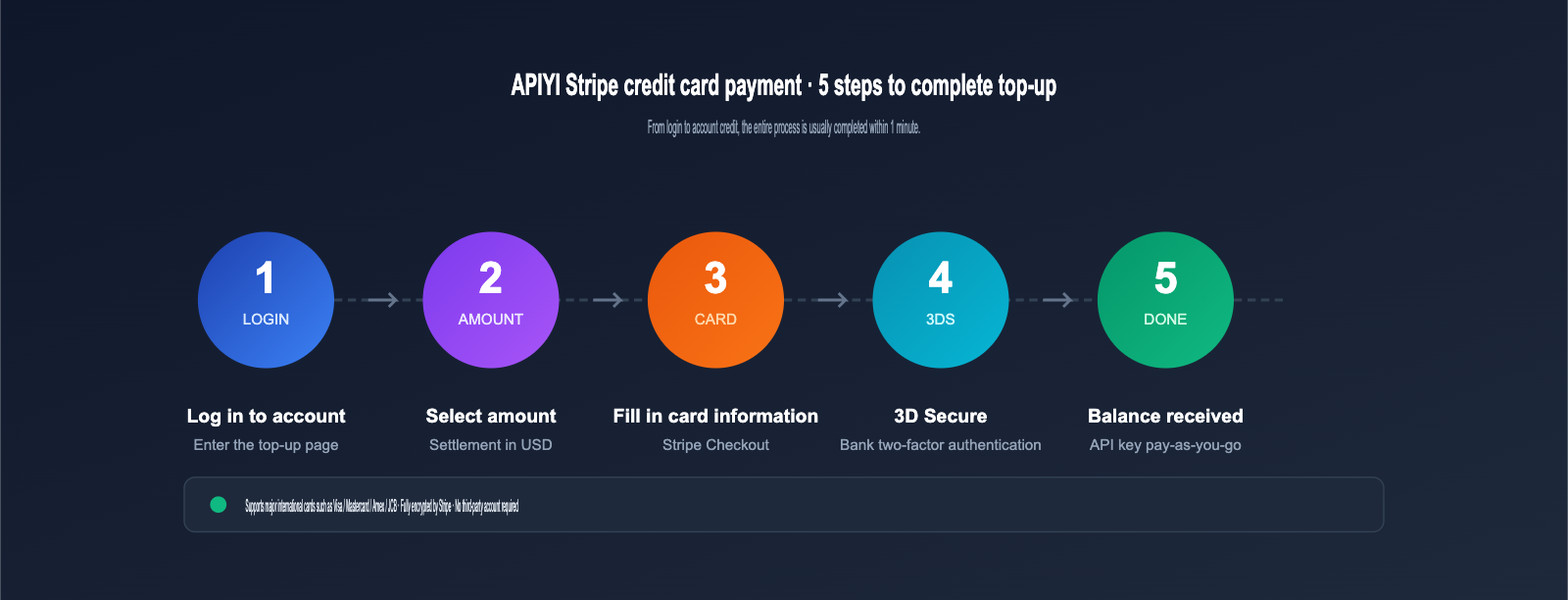
The entire Stripe top-up process is seamless—no need to leave the platform or link third-party accounts. Everything happens right in your browser. Here’s a 5-step guide that’ll have you finished in under a minute.
2.1 Log in and Access the Stripe Top-up Portal
After logging into your account at api.apiyi.com, click the "Top-up" button in the top right corner to reach the payment method selection page. In the latest version of the console, the Stripe channel is displayed as a default option, marked with a "Recommended for overseas users" tag so you can spot it easily.
🎯 Pro Tip: If it's your first time using Stripe, we recommend starting with a small amount (e.g., 10 USD) to test that your credit card supports 3D Secure verification before making a larger deposit. This helps avoid failures caused by card issuer restrictions. We also suggest keeping a backup channel (like Alipay or USDT) in your APIYI console just in case.
2.2 Select Your Amount and Currency
The console uses USD as the base currency for top-ups. Common tiers include 10, 50, 100, 500, and 1000 USD, though you can also enter a custom amount. The checkout page will show you the equivalent in your local currency to help you keep track of your budget.
2.3 Enter Card Details in the Stripe Checkout Form
Once you click "Pay with Stripe," you'll be redirected to the official Stripe-hosted Checkout form. The fields are simple and straightforward:
- Card Number: Your 16-digit international credit card number.
- Expiry (MM/YY): The card's expiration month and year.
- CVC: The 3 or 4-digit security code on the back of your card.
- Name on Card: Must match your real-name identity.
2.4 Complete Stripe 3D Secure Verification
If your card issuer has 3D Secure enabled (which is standard for most banks in Europe, the US, and Asia-Pacific), Stripe will automatically trigger an extra verification step. This usually takes the form of a one-time SMS code, a push notification from your banking app, or biometric authentication (fingerprint or face scan), depending on your bank. Once verified, the payment is processed.
2.5 Automatic Balance Update and Instant API Key Access
As soon as the payment succeeds, Stripe notifies our backend, and your balance updates automatically—no need to refresh the page or contact support. The whole process, from entering your card details to seeing the funds in your account, usually takes less than a minute. Your API key quota will immediately adjust to your new balance, allowing you to scale up your model invocations right away.
3. Stripe Payment Security and Compliance
Payment security is a top priority for cross-border transactions. We chose Stripe as our credit card processor precisely because its maturity in fraud prevention and compliance auditing far exceeds that of standard payment gateways.
3.1 How 3D Secure 2 Protects Stripe Transactions
Stripe enables the 3D Secure 2 (3DS2) protocol by default. It's the current international standard for card payment authentication and is mandatory under European PSD2 regulations. 3DS2 requires the card issuer to verify the cardholder's identity during the transaction, ensuring that only the actual cardholder can complete the payment.
Transactions verified via 3DS2 trigger a "Liability Shift" mechanism. If a fraudulent chargeback occurs, the liability falls on the card issuer rather than the merchant. This provides dual protection: users can request a refund if their card is stolen, and the platform isn't left holding the risk for fraudulent transactions.
3.2 Stripe Radar Fraud Prevention and Identity Verification
Stripe’s built-in Radar engine uses machine learning trained on billions of global transactions to assess the risk level of every payment in real-time. The system automatically rejects high-risk cards (such as stolen, virtual, or unverified cards) to stop unauthorized payments at the source.
APIYI (apiyi.com) states clearly in our documentation: "Unsafe or non-real-name credit cards will be rejected directly." This means you should ensure your credit card is a valid, personally registered card; virtual or test cards will not pass the system check. While this makes our review process stricter, it prevents refund disputes caused by card issues.
3.3 PCI DSS Compliance for Credit Card Data
Stripe holds PCI DSS Level 1 certification, the highest level of security in the payment card industry. Sensitive information like card numbers and CVCs never passes through our servers; instead, it is encrypted and stored directly by Stripe, significantly reducing the risk of data breaches.
| Security Mechanism | Protects Against | User Experience |
|---|---|---|
| 3D Secure 2 | Theft and unauthorized transactions | SMS code / Banking app confirmation |
| Stripe Radar | High-risk transactions | Anomalous cards are automatically rejected |
| PCI DSS Level 1 | Card data privacy | Card details never touch merchant servers |
| Liability Shift | Fraud-related losses | No user liability after 3DS verification |
4. Stripe and Other Payment Methods: A Comparative Overview
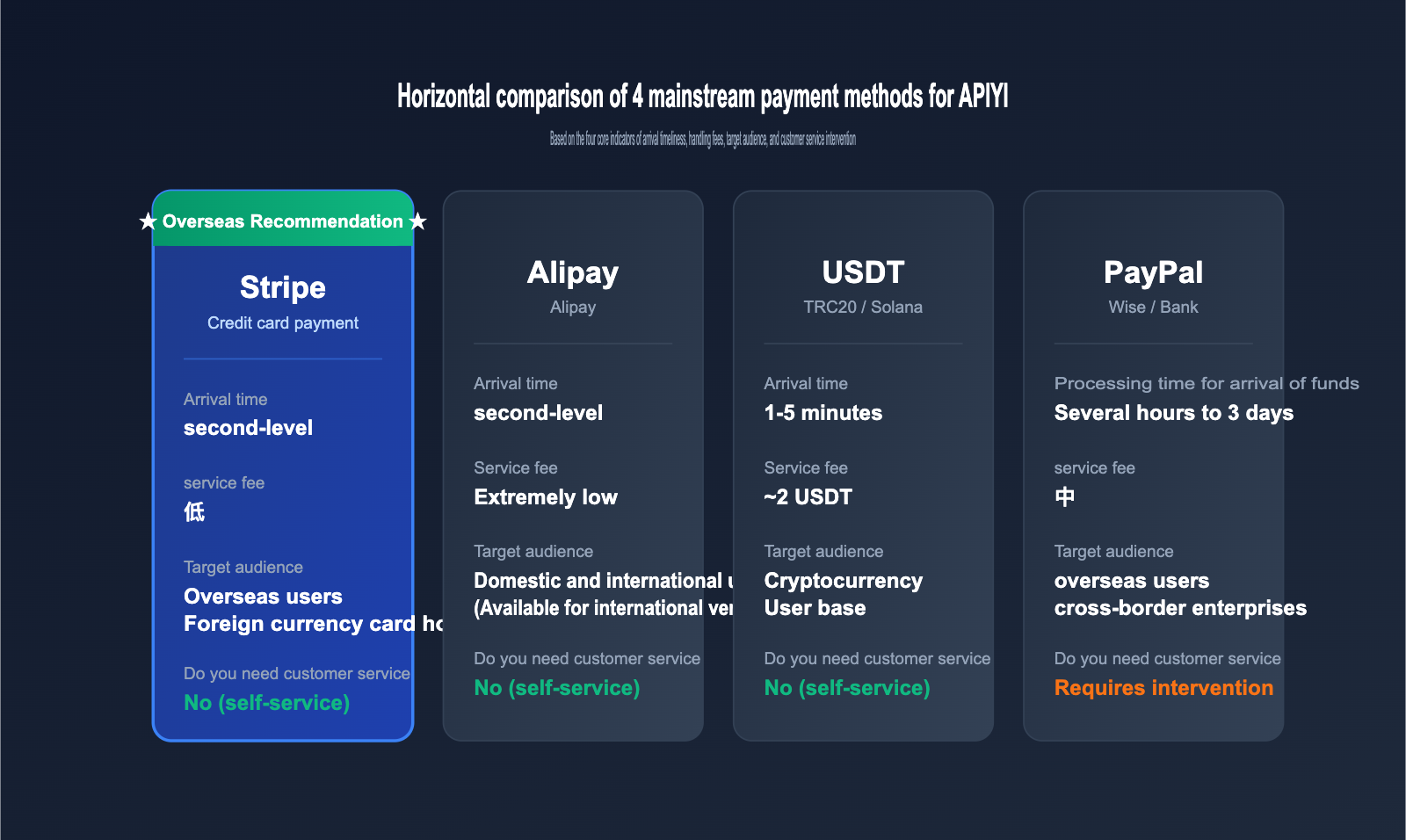
Our platform currently supports 7 different payment channels, each tailored to specific needs. To help you avoid any unnecessary hassle, we’ve put together a comparison table so you can quickly identify the best option for your situation.
4.1 Core Parameters of the Seven Payment Methods
| Payment Method | Target Audience | Processing Time | Fees | Customer Support Required |
|---|---|---|---|---|
| Stripe Credit Card | Overseas users / Foreign cardholders | Instant | Low | No |
| Alipay | Domestic & International users | Instant | Very Low | No |
| WeChat Pay | Mainland China users | Instant | Very Low | No |
| USDT (TRC20/Solana) | Crypto users | 1-5 mins | ~2 USDT | No |
| PayPal | Overseas users | A few hours | Medium | Yes |
| Wise / Mercury | Cross-border enterprises | 1-3 business days | Medium | Yes |
| Bank Transfer | Large-scale enterprise users | 1-3 business days | Medium | Yes |
4.2 Choosing the Right Payment Method for Your Needs
Recommendations vary depending on your location and user profile. Here’s a quick guide to help you choose:
- Overseas individual developers: Stripe is the top choice, offering an experience that mirrors the official payment flows of OpenAI and Anthropic.
- Mainland China users: Alipay or WeChat Pay are recommended for their zero-fee structure and instant processing.
- Crypto users: The USDT channel is perfect if you prioritize privacy and cross-border convenience.
- Cross-border enterprise bulk top-ups: Wise, Mercury, or bank transfers are ideal for obtaining formal VAT invoices.
🎯 Pro Tip: If you’re part of a developer team based overseas, you can use the Stripe channel for your daily top-ups. For enterprise clients who require invoices or large-scale settlements, we recommend contacting the APIYI (apiyi.com) support team to set up a corporate bank transfer channel, which provides more professional financial support and customized settlement cycles.
5. Common Issues and Solutions for Stripe Credit Card Payments
Although the Stripe process is streamlined, cross-border payments can still encounter edge cases. Here are 6 frequently asked questions our support team receives, along with their solutions.
5.1 Why was my credit card declined on the Stripe gateway?
There are four common reasons for Stripe card declines: the issuing bank has disabled cross-border transactions, 3D Secure verification failed, the card is a virtual or test card, or the card network has restrictions on AI service subscriptions. We recommend trying a different credit card or contacting your issuing bank to enable cross-border payment permissions, which usually takes effect within half an hour.
5.2 Can I use a CNY credit card on the Stripe gateway?
Currently, the Stripe gateway only supports foreign currency credit cards; domestic credit cards settled in CNY are usually declined directly. If you are a user in mainland China, we recommend using the Alipay or WeChat Pay channels for a smoother experience with zero cross-border fees. If you hold a dual-currency card (CNY + USD), ensure that the transaction is processed via the foreign currency settlement route.
5.3 What should I do if I don't receive the 3D Secure verification SMS?
Please confirm whether the mobile number registered with your issuing bank is in international roaming mode; some banks require you to manually enable international SMS in their app. If you still cannot receive it, you can log in to your bank's app and change the 3DS verification method to "App Push" or "Dynamic Password" in the security settings. These methods do not rely on SMS and offer higher stability.
5.4 Stripe shows the payment was successful, but my platform balance hasn't updated?
Under normal circumstances, Stripe will trigger a callback and update your balance within 30 seconds. If it hasn't arrived after 5 minutes, you can log in to the APIYI (apiyi.com) console and check the "Billing History" module. If it still doesn't appear, please contact our support team and provide your Stripe transaction ID (starting with ch_ or pi_) for manual verification. This is typically resolved within 10 minutes.
5.5 Does Stripe support subscription-based automatic billing?
While Stripe itself supports subscription billing, our platform currently focuses on a one-time top-up model to help users manage costs and budgets more precisely. If you require a subscription model, monthly billing, or an enterprise auto-renewal plan, please contact the APIYI (apiyi.com) business team for a customized solution, which is ideal for medium-to-large teams with stable usage.
5.6 What are the fees for the Stripe gateway?
The rates for the Stripe international card gateway are set by Stripe, and we do not add any extra markups. The specific fees will be clearly displayed on the checkout page. These are typically a small percentage of the transaction amount, which is far lower than the fixed fees of dozens of dollars often charged by traditional cross-border wire transfers (SWIFT). This is especially friendly for users who make frequent, small-amount top-ups.
6. Conclusion: Stripe Brings Global Payment Experiences Closer to Mainstream AI Providers
The launch of the Stripe credit card payment gateway completes a key piece of our platform's payment ecosystem for global users. Leveraging Stripe's global network across 195 countries and 135+ currencies, along with the dual security protection of 3D Secure 2 and the Radar engine, overseas developers can now top up their AI API credits as easily as using a local SaaS service, finally saying goodbye to cumbersome cross-border wire transfer processes.
For users in mainland China, Alipay and WeChat Pay remain the most convenient choices; for cryptocurrency users, the USDT channel remains available. For overseas individual developers and cross-border enterprises, the Stripe gateway provides an international experience consistent with mainstream providers like OpenAI and Anthropic. We recommend choosing the payment method that best suits your location and card type.
For more detailed rules and the latest updates on payment methods, please visit the official APIYI (apiyi.com) documentation site. We also welcome feedback through our ticketing system to help us continuously optimize the global payment experience.
Author: APIYI Team — Continuously providing stable and efficient API proxy services for global AI developers. Visit apiyi.com for more details.