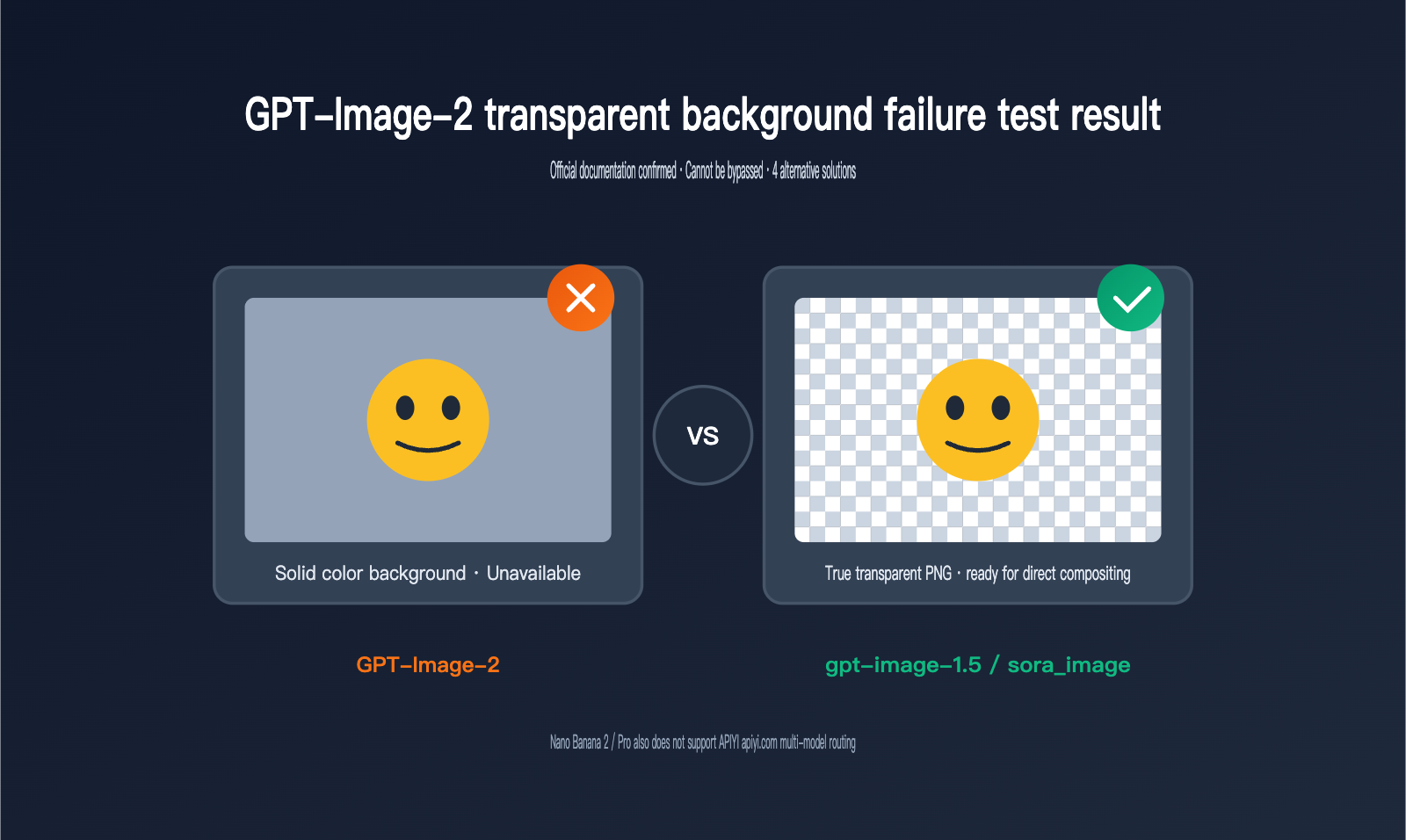
While helping a client troubleshoot image generation issues recently, we discovered a phenomenon worth sharing: GPT-Image-2 can no longer generate true transparent background PNGs. Whether you include "the background must be transparent" in your prompt or explicitly pass the background: "transparent" parameter via API, the latest generation of GPT-Image-2 either returns an image with a solid background or throws an error. This is a stark contrast to its predecessors, sora_image and gpt-4o-image, and has caught many teams off guard—especially those working on e-commerce SKU background removal, social media stickers, and PPT illustrations.
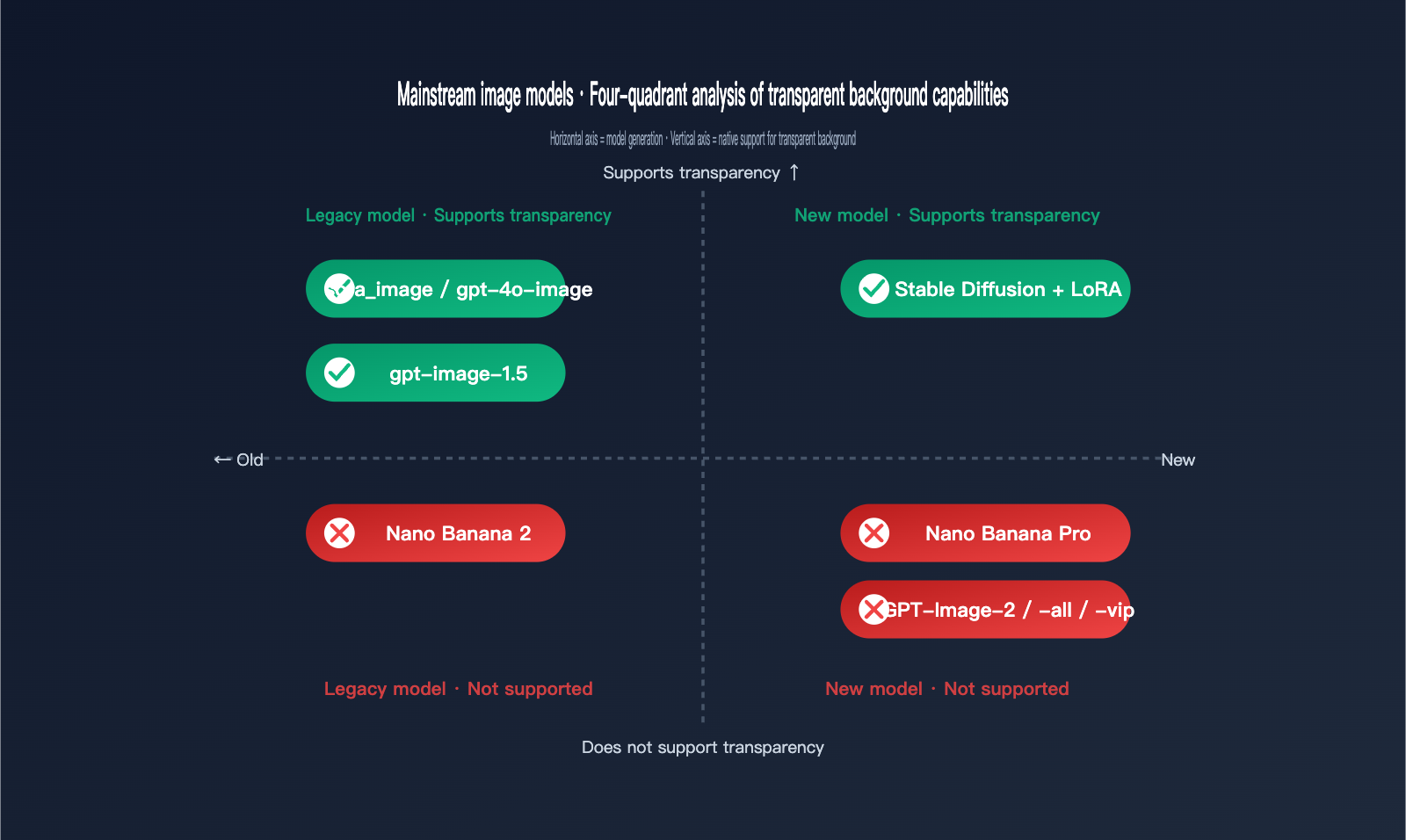
Coincidentally, Google's flagship image model released in late 2025, Nano Banana Pro (based on Gemini 3 Pro Image), also lacks support for transparent background generation, with the same limitation applying to its predecessor, Nano Banana 2. In other words, the two most mainstream image generation backbones in the industry have effectively cut this seemingly fundamental feature. We ran a full round of regression tests on APIYI (apiyi.com) and have compiled the phenomena, root causes, and alternative solutions into this article to help teams currently working on product integrations make quick decisions.
Full Reproduction Experiment of GPT-Image-2 Transparent Background Failure
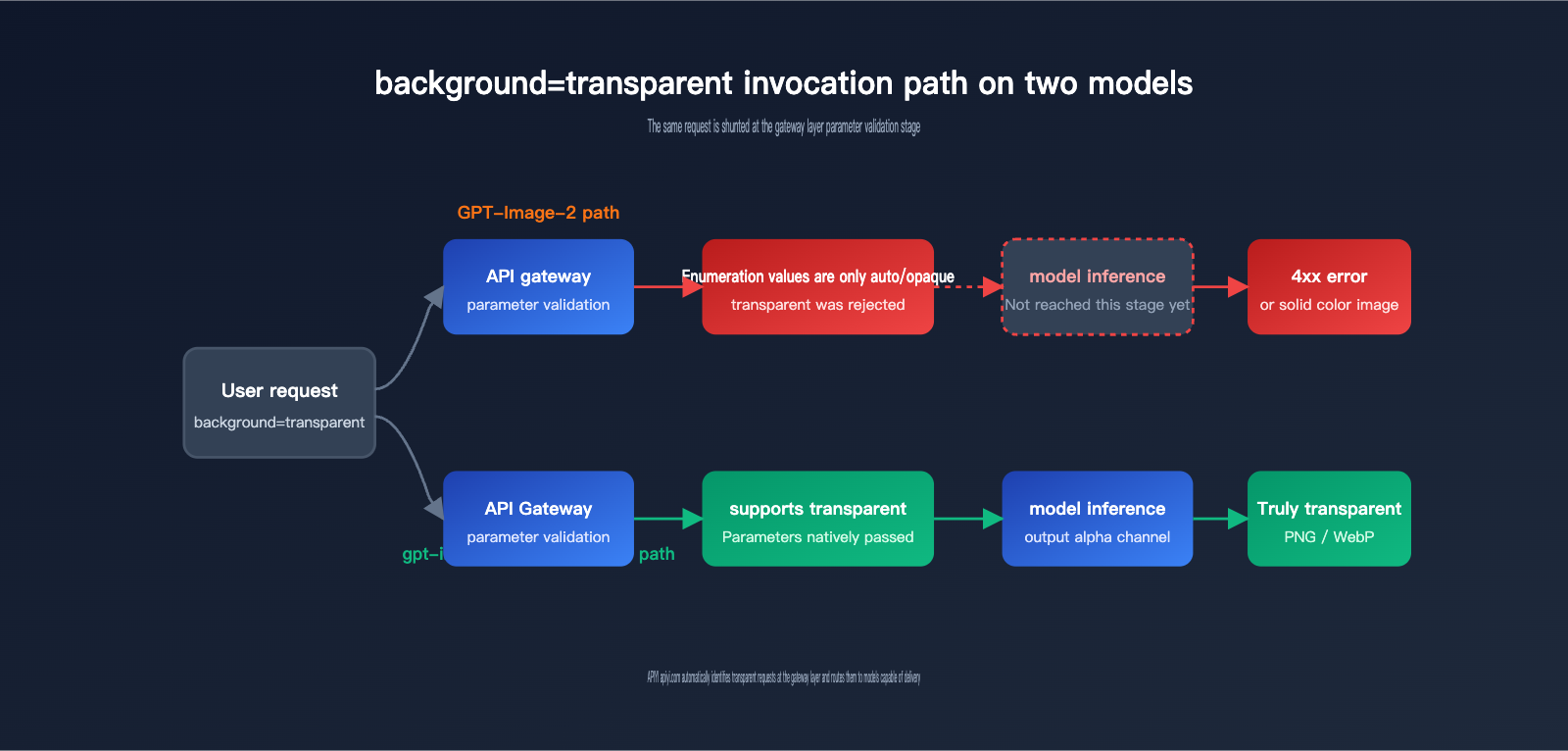
The most direct way to understand this capability gap is to run it yourself. We used the APIYI gateway to simultaneously call three versions—gpt-image-2, gpt-image-1.5, and gpt-image-2-all—with the prompt "a cute orange cat sticker, transparent background," while explicitly setting the background parameter to transparent. The results were consistent: the gpt-image-2 series either returned a 4xx error or generated an image with a solid or checkerboard background, while only gpt-image-1.5 faithfully returned a true transparent PNG with an alpha channel.
# Testing transparent background capabilities for 3 versions via the APIYI gateway
from openai import OpenAI

client = OpenAI(
    api_key="your-apiyi-key",
    base_url="https://api.apiyi.com/v1"
)

# ❌ gpt-image-2 does not support transparent, and will be rejected by the gateway layer
client.images.generate(
    model="gpt-image-2",
    prompt="a cute orange cat sticker",
    background="transparent",
    output_format="png"
)

# ✅ gpt-image-1.5 still natively supports transparent background output
client.images.generate(
    model="gpt-image-1.5",
    prompt="a cute orange cat sticker",
    background="transparent",
    output_format="png"
)
🎯 Quick Start Tip: If you just want to get your existing workflow running, the lowest-cost approach is to switch the
modelfield back togpt-image-1.5, point thebase_urlto APIYI (apiyi.com), and leave other parameters unchanged. You'll restore transparent output capabilities within 5 minutes.
We also reproduced scenarios where we forced phrases like "background must be transparent," "isolated on transparent canvas," or "PNG with alpha channel" into the prompt. GPT-Image-2 remained stubborn: it either provided a white background or generated a solid image with a gray-and-white checkerboard "sticker" pattern, effectively drawing the visualization of transparency rather than creating it. This is highly consistent with the failure mode of Nano Banana Pro and represents a fundamental flaw in the model's semantic alignment layer, rather than an issue with prompt precision.
| Trigger Method | GPT-Image-2 Performance | gpt-image-1.5 Performance | Recommended Action |
|---|---|---|---|
background="transparent" parameter |
API Rejected / Solid Color | True transparent PNG | Switch models |
| Prompt "transparent background" | White or checkerboard pattern | True transparent PNG | Don't rely on text |
| Prompt "isolated subject on white" | Light gray background | Subject on white | Use with parameters |
Output output_format=webp |
Still solid color | True transparent webp | webp doesn't affect capability |
| Edit interface + alpha mask | Invalid | Partially transparent | Only 1.5 works |
3 Fundamental Reasons Why Transparent Backgrounds Were Removed from GPT-Image-2
The first reason is an architectural trade-off. OpenAI explicitly states in the official documentation for GPT-Image-2 that "gpt-image-2 doesn't currently support transparent backgrounds." While the exact reasoning hasn't been made public, it's widely speculated in the industry that this is tied to its upgrade toward a stronger "scene consistency" training objective. The model is trained to complete a real-world scene rather than "cut out" objects, meaning the alpha channel supervision signal is absent at the foundational level. This is a product-level design choice, not a bug.
The second reason is mandatory API gateway validation. We inspected the responses from OpenAI's official endpoints and found that the background parameter for gpt-image-2 only accepts auto and opaque as valid enum values; transparent has been completely removed from the parameter space. This means any upstream platform (including the APIYI gateway) will reject such requests at the initial stage, long before they ever reach the model inference step. Therefore, the idea that "switching to a third-party platform will bypass this" is a misconception—channels like gpt-image-2-all or gpt-image-2-vip are simply routing to the same underlying backend model.
The third reason is security and copyright filtering policies. Transparent background images are frequently used for secondary compositing, often involving portraits or brand logos. Over the past two years, OpenAI has clearly tightened output permissions for "re-composable assets," and gpt-image-2 now incorporates a stricter content moderation pipeline. The removal of transparent background capabilities is consistent with this broader trend.
🎯 Architectural Insight: In a unified gateway like APIYI (apiyi.com), we perform separate validation for the parameter spaces of gpt-image-2 and gpt-image-1.5. When we encounter a
transparentrequest, we automatically provide a downgrade suggestion to prevent business-side confusion where calls fail without a clear explanation.
GPT-Image-2 vs. Nano Banana Pro: The Transparent Background Struggle
Many clients have asked us, "Can't we just switch to Google Nano Banana 2 or Nano Banana Pro?" The answer is pretty brutal: no, that won't work either. In fact, Nano Banana Pro’s failure mode is even more "creative" than GPT-Image-2's. It will generate an image that looks like it has a transparent background, but if you look closely, the checkerboard pattern is actually rendered as solid pixels—it’s essentially "drawing" the Photoshop transparency grid directly onto your image.
The community consensus is that because the model was trained on massive amounts of stock photos, Photoshop screenshots, and design tutorials, it has formed a flawed association: "transparency = checkerboard pattern." Google has confirmed on the Gemini API forums that the Nano Banana series won't natively support transparent background output for the time being. For now, you'll need to use a "combo move" of Gemini 3 Flash and code execution to get the results you need.
| Model | Release Date | Transparency Support | Failure Behavior | Recommended Use Case |
|---|---|---|---|---|
| GPT-Image-2 | Early 2026 | ❌ No | Solid background / Error | Realistic scenes, posters |
| GPT-Image-2-all | Early 2026 | ❌ No | Same as official | Equivalent to GPT-Image-2 |
| GPT-Image-1.5 | Mid 2025 | ✅ Native | / | Stickers, e-commerce cutouts |
| sora_image / gpt-4o-image | March 2025 | ✅ Yes | / | Legacy workflow compatibility |
| Nano Banana 2 | Late 2025 | ❌ No | Gray/white checkerboard | Creative, stylized work |
| Nano Banana Pro | Late 2025 | ❌ No | Gray/white checkerboard | High-fidelity editing |
| Stable Diffusion + LoRA | Ongoing | ✅ Indirect | Requires post-processing | Self-hosted batch production |
🎯 Selection Tip: If your goal is simply to "extract the subject," the most cost-effective approach in 2026 is to use GPT-Image-1.5 or sora_image for direct output, or use Nano Banana Pro and run a background removal step afterward. You can handle both paths using unified authentication and billing on APIYI (apiyi.com), saving you the headache of managing multiple API keys.
4 Alternatives for GPT-Image-2 Transparency
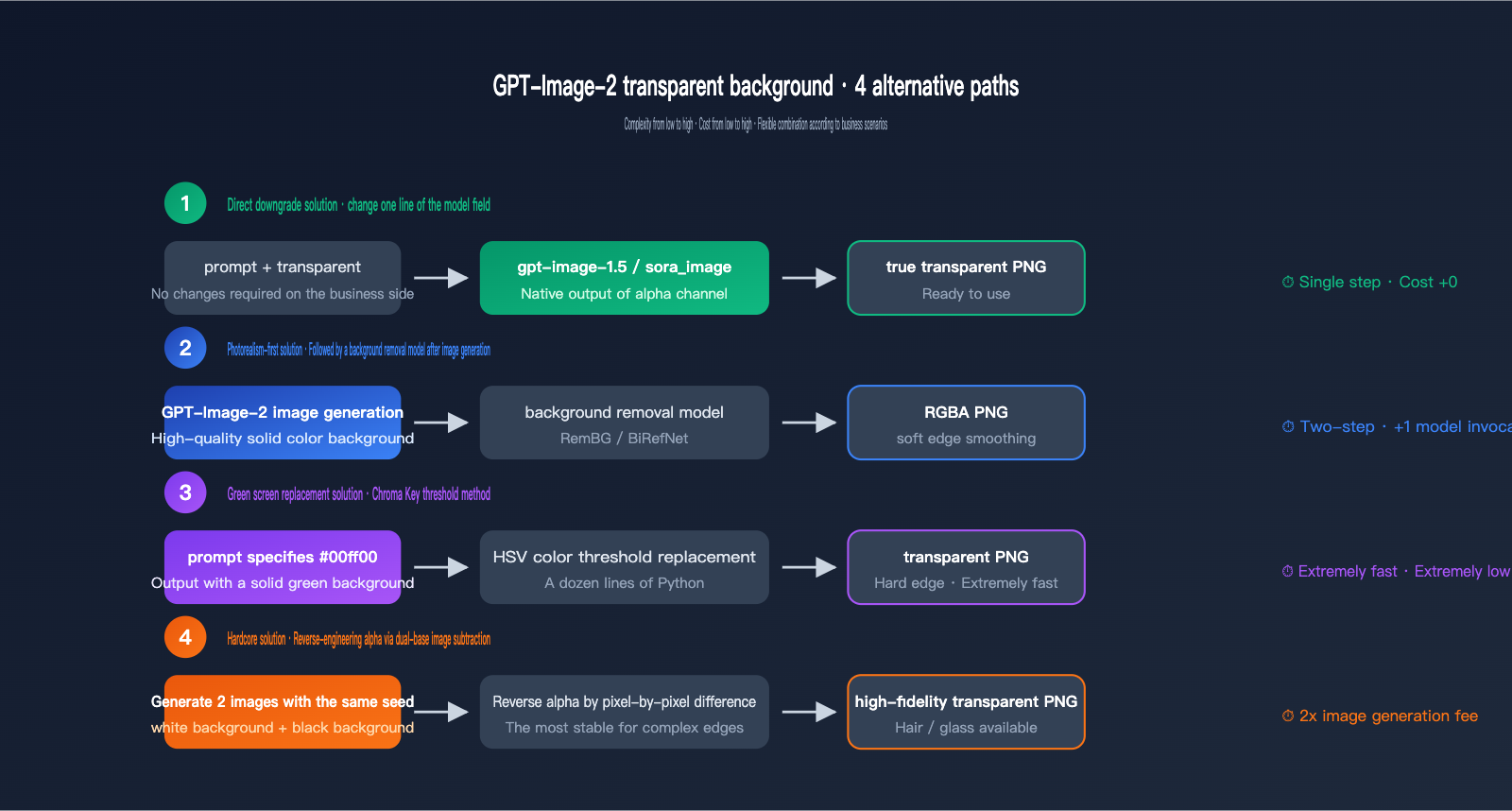
Even though GPT-Image-2 refuses to output transparent images, there are four mature paths to get the job done. Each has its own cost and quality trade-offs, so you can mix and match based on your specific needs.
-
Downgrade to sora_image / gpt-image-1.5: This is the path of least resistance. Your client-side code barely needs to change—just swap the
modelfield fromgpt-image-2togpt-image-1.5orsora_image, and you'll get alpha channel output immediately. The trade-off is that realism and long-text rendering might be slightly weaker than GPT-Image-2, but it's perfect for stickers, logos, and e-commerce product shots. -
GPT-Image-2 + Post-processing: Generate a high-quality solid-background image with GPT-Image-2, then chain it with a background removal model (like 851-labs/background-remover, RemBG, or BiRefNet) to strip the alpha channel. This preserves the realism of GPT-Image-2, though it adds 1–3 seconds of latency. The precision of complex edges (hair, glass, smoke) depends on the removal model you choose.
-
Chroma Key (Green Screen): Force the model to generate a "solid pure green background, hex #00ff00" in your prompt, then use code to perform HSV threshold replacement. This is faster and cheaper than general-purpose background removal, but it's not ideal if your subject contains green tones.
-
Double-Image Subtraction: Have GPT-Image-2 generate two images with the same seed—one with a white background and one with a black background—then calculate the pixel-by-pixel difference to derive the alpha value. This is a "hardcore" method popular in the OpenAI community; it offers the most stable quality, but it doubles your generation costs.
| Alternative | Implementation Complexity | Extra Cost per Image | Edge Quality | Best For |
|---|---|---|---|---|
| Switch to GPT-Image-1.5 / sora_image | ⭐ | 0 | High | Stickers, e-commerce |
| GPT-Image-2 + Background Removal | ⭐⭐ | +1 removal call | Med-High | Realistic portraits, products |
| Chroma Key | ⭐⭐⭐ | Negligible | Med | Cartoons, geometric shapes |
| Double-Image Subtraction | ⭐⭐⭐⭐ | 2x generation cost | High | Glass, hair, complex edges |
🎯 Engineering Advice: At APIYI (apiyi.com), we route "transparent background" requests to gpt-image-1.5 by default. If you need to keep the realistic style of GPT-Image-2, you can use our unified interface to chain "generation + removal" into a single two-step call. This exposes only one endpoint to your business logic, keeping your integration clean.
If your project is sensitive to both edge quality and cost, this comparison table of background removal tools is a great place to start:
| Tool | Edge Precision | Avg. Latency | Deployment | Recommended Combo |
|---|---|---|---|---|
| 851-labs/background-remover | High | 1.5-2s | Cloud API | With GPT-Image-2 |
| RemBG (U2Net) | Med | 0.5s | Self-hosted | With solid backgrounds |
| BiRefNet | Very High | 2-3s | Self-hosted | Hair, complex edges |
| HSV Thresholding | Med | <0.1s | Python script | With Chroma Key |
GPT-Image-2 Transparent Background FAQ
Q1: Why does adding "background must be transparent" to my GPT-Image-2 prompt always fail?
Because the model hasn't been trained to output an alpha channel; it can only generate images within the RGB color space. When you force a "transparent background" description into the prompt, the model interprets it literally and draws a visual symbol that "represents transparency"—which usually ends up being a checkerboard pattern. This is a classic case of semantic alignment failure, and it has nothing to do with how detailed your prompt is.
Q2: Why don't official proxy channels like gpt-image-2-all or gpt-image-2-vip work either?
These official proxy channels are essentially just calling the same OpenAI backend model; they just use account pools or proxies on the frontend. If a capability isn't supported at the model level, no amount of frontend packaging can fix it. If you see third-party platforms claiming "GPT-Image-2 supports transparent backgrounds," they're likely performing background removal as a post-processing step at the API gateway level, rather than having GPT-Image-2 natively output transparency.
Q3: Which API should I choose if my project specifically requires transparent backgrounds?
Based on our tests at APIYI (apiyi.com), we recommend the following: for stickers, emojis, or e-commerce product images, go with GPT-Image-1.5; for photorealistic subject extraction, use GPT-Image-2 paired with a dedicated background removal model; for domestic compliance scenarios, consider self-hosted Stable Diffusion models. All three paths can be switched within the same gateway, making A/B testing a breeze.
Q4: When will GPT-Image-2 / Nano Banana Pro support transparent backgrounds again?
Neither OpenAI nor Google has released a roadmap for this. Looking at past iteration cycles, OpenAI typically adds missing parameters in minor version updates (like GPT-Image-2.1 or 2.5). Google's Nano Banana series is more likely to solve this through a "combo" approach—using Gemini 3 Flash + code execution—rather than modifying the base model itself.
Q5: How can APIYI (apiyi.com) help me with this?
We’ve done three things: ① We automatically detect transparent requests at the gateway level and suggest a fallback; ② We provide multi-model routing that connects GPT-Image-1.5, GPT-Image-2, Nano Banana Pro, and more; ③ We offer unified billing, quotas, and logging, making it easy for teams to compare the real costs of different solutions without having to maintain multiple SDKs.
3 Key Takeaways on the GPT-Image-2 Transparent Background Issue
First, the lack of transparent background support in GPT-Image-2 is a deliberate product strategy, not a prompt engineering issue or an integration error. Any workflow that repeatedly tries to use "transparent" in the prompt should be migrated to version 1.5 or a post-processing pipeline as soon as possible; otherwise, you'll just keep spinning your wheels with checkerboard patterns.
Second, Nano Banana 2 / Pro also does not support transparent backgrounds. Currently, "native transparent output" in this space is limited to the previous generation (GPT-Image-1.5, sora_image / gpt-4o-image) or self-hosted Stable Diffusion. It's unrealistic to hope for a "hidden switch" to appear.
Third, the most stable approach for business applications is to abstract the model behind a gateway, allowing "transparent background requests" to be automatically routed to a model that can actually deliver. We’ve made this routing strategy a default behavior, saving your team the time of trial and error so you can focus on your core business logic.
If you're refactoring your image generation workflows, feel free to head over to APIYI (apiyi.com) to run a regression test: run your existing prompts through both GPT-Image-2 and GPT-Image-1.5 simultaneously. Within 10 minutes, you'll have a comparison table showing which model to use for which scenario, helping you decide whether to downgrade or add a post-processing removal step.
📌 Author: APIYI Technical Team — We track capability changes from major models like OpenAI, Google, and Anthropic to provide developers with a unified multi-model API gateway experience. To learn more, visit APIYI at apiyi.com.