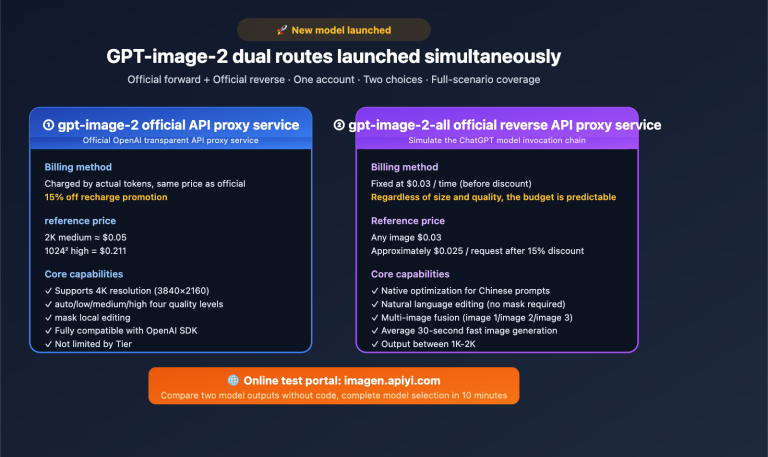
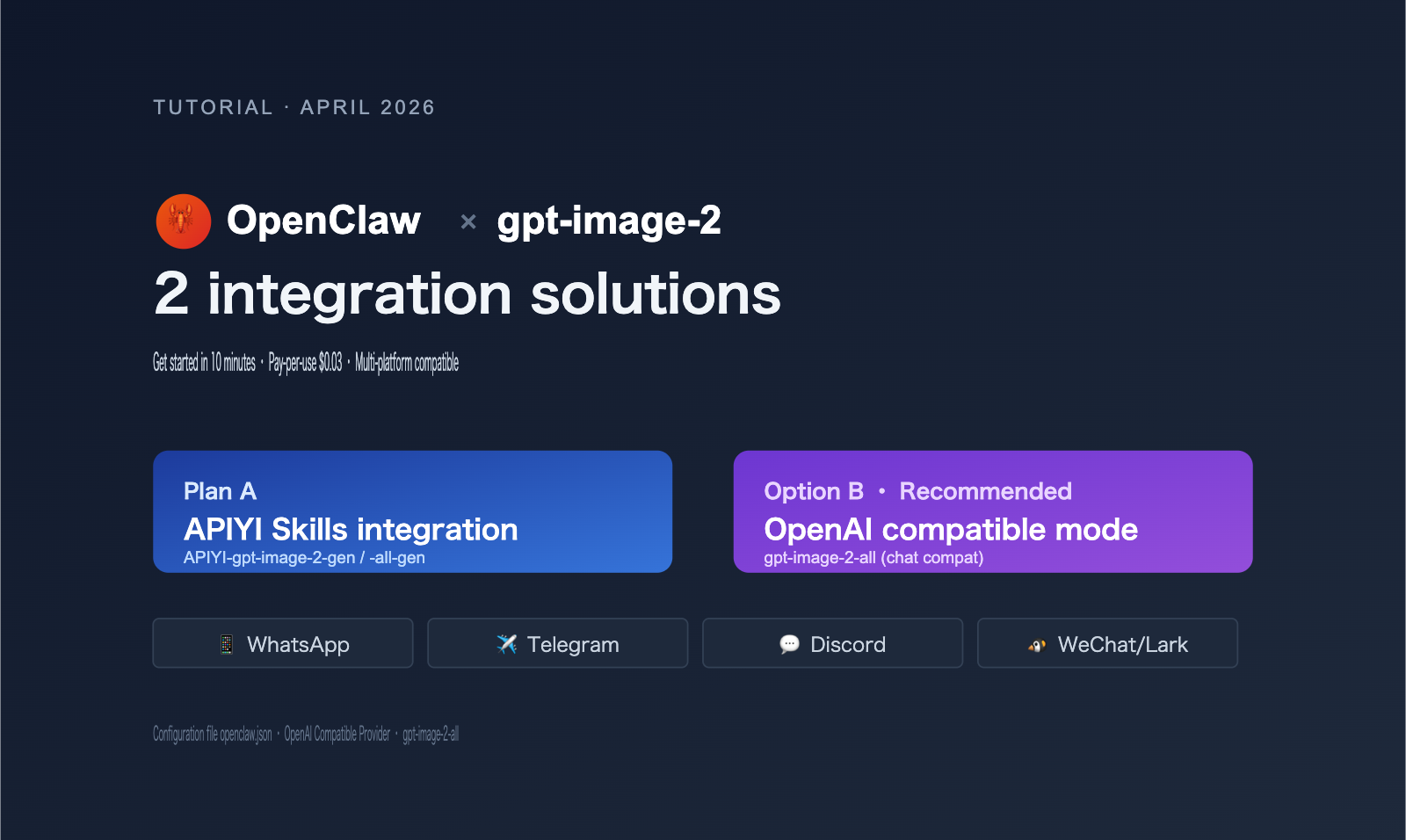
The bottom line: There are two ways to integrate gpt-image-2 into OpenClaw. Option A uses APIYI's GPT-Image Skills, which takes about 5 minutes and is perfect for clients that support Skills like Codex CLI or Cursor. Option B uses the OpenAI chat-compatible mode with the reverse-engineered model gpt-image-2-all, which is billed per request ($0.03/request, pre-discount) and is the best choice for OpenClaw users who want to generate images directly via messaging platforms like WhatsApp, Telegram, or Discord.
OpenClaw (github.com/openclaw/openclaw) is one of the most popular open-source autonomous AI Agents of 2026, supporting over 20 messaging platforms including WhatsApp, Telegram, Slack, Discord, iMessage, Feishu, WeChat, and WeCom. It is model-agnostic and connects to third-party API services via the OpenAI-compatible protocol, providing a perfect entry point for top-tier image models like gpt-image-2.
This article covers everything from architectural selection to deployment configuration, explaining the differences between the two integration methods and providing openclaw.json configuration code that you can copy and use directly.
1. Why OpenClaw needs a specific approach for gpt-image-2
Many users' first reaction is: "Doesn't OpenClaw already support OpenAI? Can't I just configure the OpenAI API key?" While this is theoretically correct, there are three unavoidable engineering hurdles in practice.
1.1 Three limitations of using the official OpenAI API directly
| Limitation | Manifestation | Impact |
|---|---|---|
| Regional Access | api.openai.com is inaccessible in mainland China/parts of SE Asia | Service fails to start |
| Billing Barrier | Requires foreign credit card + Tier 1 minimum (Tier 5 needed for stable image API) | Difficult for individuals/small teams |
| Organization Verified | High-quality gpt-image-2 parameters require organization verification (face recognition) |
Domestic developers get stuck at verification |
🎯 Quick Start Tip: If you've already integrated other models (like Claude) into OpenClaw, you only need to replace the
models.providersconfiguration to makegpt-image-2available across all messaging platforms supported by OpenClaw (WhatsApp/Telegram/Discord, etc.). We recommend connecting via the APIYI (apiyi.com) platform, which has already addressed the issues above and offers low-latency domestic nodes and a pay-per-use plan.
1.2 Two internal mechanisms for image generation in OpenClaw
OpenClaw has two internal paths for image generation:
Path A: Using the image_generate tool
  - Configuration: models.providers.openai.baseUrl
  - Call: Standard OpenAI Images API (POST /v1/images/generations)
  - Applicable to: gpt-image-2 / gpt-image-1 / DALL-E 3

Path B: Using the chat completions tool
  - Configuration: Custom OpenAI-compatible provider
  - Call: Standard Chat API (POST /v1/chat/completions)
  - Applicable to: Any "conversational image model" that returns images in the chat stream
Key Insight: gpt-image-2-all is a "chat-compatible" version of the image model provided by APIYI. It encapsulates image generation capabilities within the standard chat completions protocol, returning the image URL directly in the response format. This design allows OpenClaw to call it just like a regular conversational model, without needing to switch to a dedicated image API.
1.3 Essential differences between the two options
| Dimension | Option A: Skills | Option B: OpenAI Compatible Mode |
|---|---|---|
| Invocation | Triggered via pre-installed Skill | Standard chat completions call |
| Client Requirements | Must support Skills (Codex CLI/Cursor, etc.) | Any OpenAI-compatible client |
| OpenClaw Adaptation | Indirect support (via Agent sub-call) | ✅ Direct support |
| Deployment Cost | Requires npm install + env var config | Only requires modifying openclaw.json |
| Model Type | gpt-image-2 (official) / gpt-image-2-all (reverse) | gpt-image-2-all (reverse, recommended) |
| Billing | Per token / Per image | $0.03 per request (pre-discount) |
| Use Case | Generating images in dev tools | Conversational image generation in messaging apps |
II. Option A: Integrating gpt-image-2 via APIYI Skills
If your workflow involves generating images while executing tasks via OpenClaw Agent within development tools like Codex CLI, Cursor, OpenCode, or Gemini CLI, the Skills approach is the most elegant way to get started.
2.1 Two Available Models for the Skills Approach
APIYI has open-sourced two Skills on GitHub (Author: wuchubuzai2018, Repository: expert-skills-hub):
| Skill Name | Underlying Model | Features | Recommended Use Case |
|---|---|---|---|
apiyi-gpt-image-2-gen |
gpt-image-2 (Official Proxy) | Official OpenAI, highest quality | Commercial projects, requires indemnification |
apiyi-gpt-image-2-all-gen |
gpt-image-2-all (Official Reverse) | Pay-per-use, low barrier to entry | Personal projects, rapid prototyping |
2.2 Installing Skills (3-Line Command)
# 1. Install the official proxy version (recommended for commercial use)
npx skills add https://github.com/wuchubuzai2018/expert-skills-hub --skill apiyi-gpt-image-2-gen

# 2. Or install the reverse proxy version (pay-per-use)
npx skills add https://github.com/wuchubuzai2018/expert-skills-hub --skill apiyi-gpt-image-2-all-gen

# 3. Configure environment variables
export APIYI_API_KEY="sk-your-key-from-apiyi-console"
🎯 Getting your API key: After registering, go to the "API Keys" page to create a new key starting with
sk-. This key works across all provided services, including both official proxy and reverse proxy models.
2.3 Invoking Installed Skills in OpenClaw
OpenClaw allows you to sub-invoke installed Skills when performing complex tasks via Agent configuration:
# openclaw configuration snippet (example)
agents:
  - id: image-helper
    description: "Image generation assistant"
    skills:
      - apiyi-gpt-image-2-gen
      - apiyi-gpt-image-2-all-gen
    triggers:
      - keyword: "generate image"
      - keyword: "draw a"
In practice, you simply send a message through the platform connected to OpenClaw (e.g., Telegram):
@OpenClawBot Help me generate a cyberpunk-style cafe illustration, 1024x1024
OpenClaw will:
- Identify the trigger word and activate the
image-helperagent. - Invoke the
apiyi-gpt-image-2-genSkill. - Call
gpt-image-2via the APIYI platform. - Return the image URL to the chat.
2.4 Advantages and Limitations of the Skills Approach
Advantages:
- ✅ Reuse community-maintained Skill code; no need to write your own image generation logic.
- ✅ Automatically handles prompt optimization, error retries, and image format conversion.
- ✅ Native compatibility with development tools (Codex CLI/Cursor).
Limitations:
- ❌ OpenClaw's support for Skills depends on specific Agent configurations.
- ❌ Requires a Node.js environment.
- ❌ Not "out-of-the-box" for pure messaging platforms (e.g., WhatsApp-only users).
If your OpenClaw is primarily used for messaging platforms, check out Option B.
III. Option B: OpenAI Compatibility Mode for gpt-image-2-all
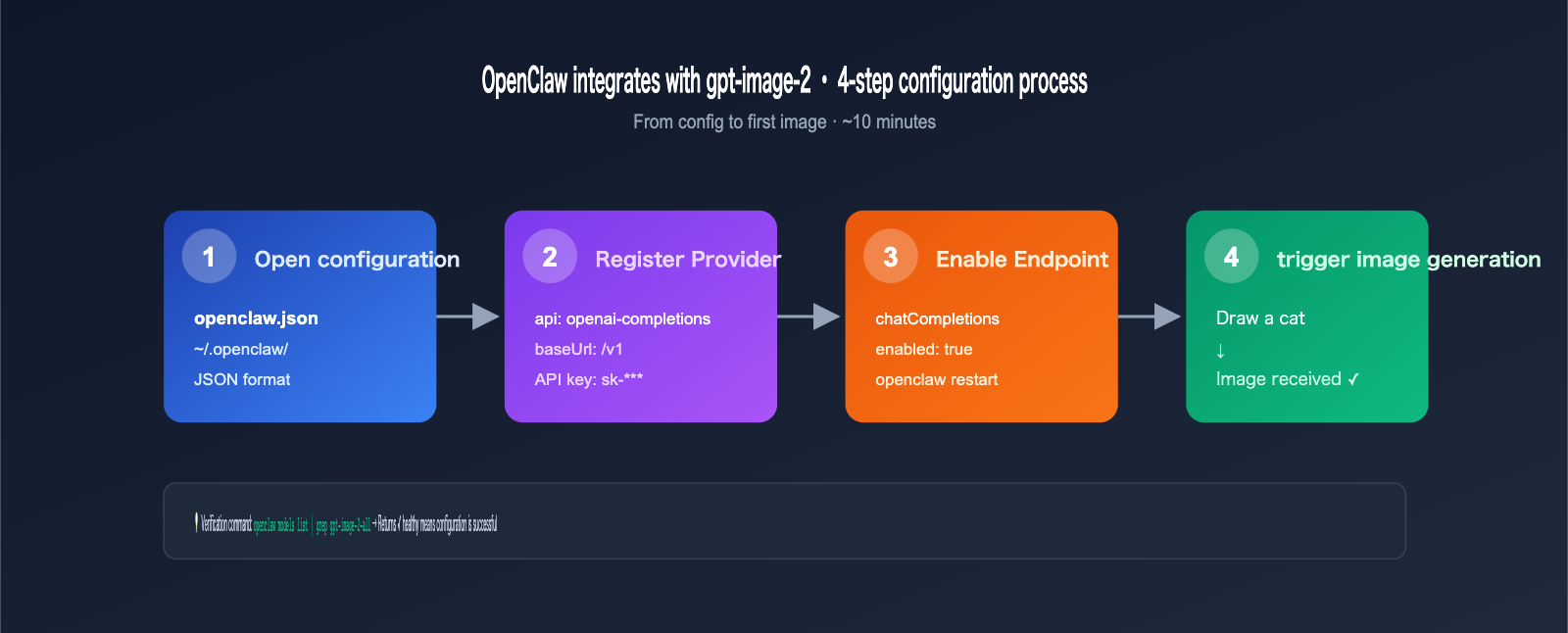
This is the most suitable integration method for mainstream OpenClaw scenarios. By modifying the models.providers configuration in OpenClaw, you can register APIYI as a custom OpenAI-compatible provider and then invoke the gpt-image-2-all model, which is designed for chat compatibility.
3.1 Modifying the openclaw.json Configuration
The core configuration file for OpenClaw is located at ~/.openclaw/openclaw.json (macOS/Linux) or %APPDATA%\openclaw\openclaw.json (Windows).
{
  "models": {
    "providers": {
      "apiyi": {
        "api": "openai-completions",
        "baseUrl": "https://api.apiyi.com/v1",
        "apiKey": "sk-your-key-from-apiyi-console",
        "models": [
          {
            "id": "gpt-image-2-all",
            "name": "GPT Image 2 (Chat Compatible)",
            "contextWindow": 8000,
            "maxTokens": 4096,
            "capabilities": ["text", "image_generation"]
          }
        ]
      }
    }
  },
  "gateway": {
    "http": {
      "endpoints": {
        "chatCompletions": {
          "enabled": true
        }
      }
    }
  }
}
🎯 base_url configuration: The
baseUrlin the configuration above must end with/v1. The standard endpoint is fully compatible with the official OpenAI API, so no other parameters need to be changed.
3.2 Restarting OpenClaw and Verifying
# Restart the OpenClaw service (depending on your installation)
openclaw restart

# Or via systemd
sudo systemctl restart openclaw

# Verify that the provider is loaded
openclaw models list | grep apiyi
Successful output example:
Provider: apiyi (status: ✓ healthy)
  Models:
    - apiyi/gpt-image-2-all (chat + image_generation)
3.3 Invoking in Messaging Platforms
Once configured, any messaging platform connected to OpenClaw can generate images directly. Taking Telegram as an example:
[User Message]
Draw a picture of a kitten in a spacesuit sitting on the moon's surface, cartoon style

[OpenClaw Response]
🎨 Generating image for you...
[Image] https://files.apiyi.com/generated/xxx.png
✅ Generation complete, cost $0.03
3.4 Complete Chat Completions Invocation Example (For Developers)
If you want to debug at the code level, here is how OpenClaw internally invokes gpt-image-2-all:
import openai
client = openai.OpenAI(
api_key="sk-your-key",
base_url="https://api.apiyi.com/v1"
)
response = client.chat.completions.create(
model="gpt-image-2-all",
messages=[
{
"role": "user",
"content": "Draw a picture of a kitten in a spacesuit sitting on the moon's surface, cartoon style"
}
]
)
# The response will contain the image URL (in Markdown format)
print(response.choices[0].message.content)
# Output: 
📦 Full version with error handling (Click to expand)
import os
import openai
import logging
from openai import APIError, RateLimitError

client = openai.OpenAI(
    api_key=os.environ["APIYI_API_KEY"],
    base_url="https://api.apiyi.com/v1",
    timeout=120.0  # Image generation requires a longer timeout
)

def generate_image_via_chat(prompt: str, max_retries: int = 3):
    """Invoke gpt-image-2-all via chat completions"""
    for attempt in range(max_retries):
        try:
            response = client.chat.completions.create(
                model="gpt-image-2-all",
                messages=[{"role": "user", "content": prompt}],
                stream=False
            )
            content = response.choices[0].message.content
            return parse_image_url(content)
        except RateLimitError:
            logging.warning(f"Rate limit, retry {attempt+1}/{max_retries}")
            continue
        except APIError as e:
            logging.error(f"API error: {e}")
            if attempt == max_retries - 1:
                raise
    return None


def parse_image_url(content: str) -> str:
    """Extract image URL from Markdown response"""
    import re
    match = re.search(r'!\[.*?\]\((.*?)\)', content)
    return match.group(1) if match else None


if __name__ == "__main__":
    url = generate_image_via_chat(
        "Draw a picture of a kitten in a spacesuit sitting on the moon's surface, cartoon style"
    )
    print(f"Image URL: {url}")
IV. gpt-image-2 vs. gpt-image-2-all: Model Selection Guide
The most common question from OpenClaw users is: should I use the official model or the reverse-engineered one? It really comes down to your specific use case and priorities.
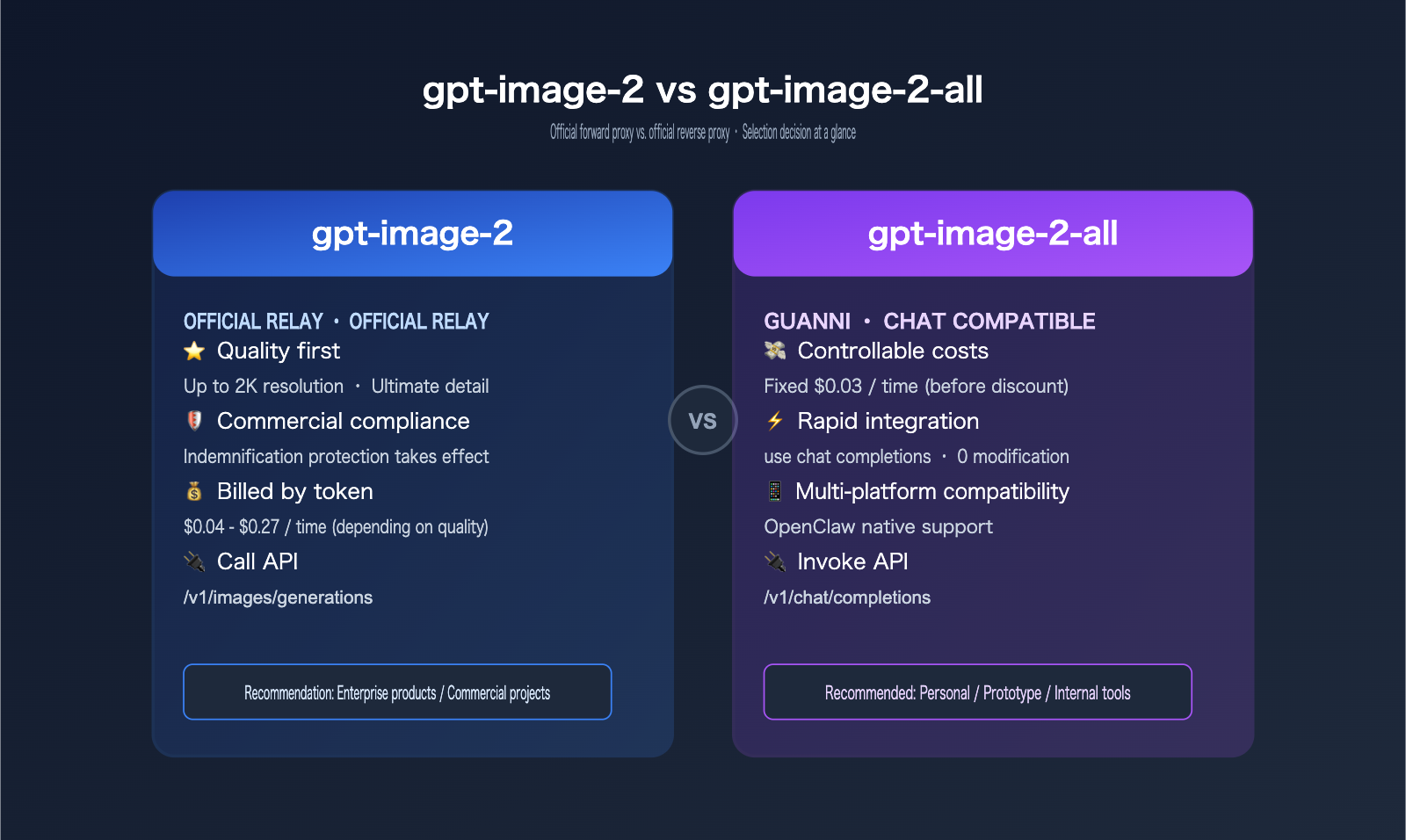
4.1 Key Differences
| Dimension | gpt-image-2 (Official) | gpt-image-2-all (Reverse) |
|---|---|---|
| API Endpoint | /v1/images/generations |
/v1/chat/completions |
| OpenClaw Integration | Indirect via Skills | Direct via chat tools |
| Billing Model | Per token + output size | Per request ($0.03) |
| Unit Cost | $0.04 – $0.19 (varies) | $0.03 (fixed) |
| Content Safety | OpenAI dual-layer | Same-source safety |
| Indemnification | ✅ Included | ❌ Not included |
| Response Speed | 8-15 seconds | 10-20 seconds |
| Resolution | Up to 2K | Up to 1024×1024 |
| Commercial Use | ✅ Recommended | Internal/Prototyping only |
4.2 Selection Advice
| Use Case | Recommended Model | Reason |
|---|---|---|
| Personal OpenClaw + Telegram | gpt-image-2-all | Low cost, simple setup |
| Enterprise SaaS / Customer Service | gpt-image-2 | Compliance, Indemnification |
| E-commerce Product Images | gpt-image-2 | 2K resolution, commercial rights |
| Internal Brainstorming | gpt-image-2-all | Cost-effective, good for prototypes |
| Educational Content | gpt-image-2-all | Low cost, batch-friendly |
🎯 Hybrid Strategy: For real-world projects, we recommend using
gpt-image-2-allduring development to keep costs down, then switching togpt-image-2for production. On the APIYI (apiyi.com) platform, both models share the same API key, so you just need to update themodelfield in your request—the migration effort is practically zero.
4.3 Cost Comparison
Assuming an OpenClaw group bot handles 100 image generation requests per day:
| Model | Unit Price | Daily Cost | Monthly (30 days) | Annual Cost |
|---|---|---|---|---|
| gpt-image-2 (high quality) | $0.19 | $19 | $570 | $6,840 |
| gpt-image-2 (medium) | $0.07 | $7 | $210 | $2,520 |
| gpt-image-2-all | $0.03 | $3 | $90 | $1,080 |
| gpt-image-2-all (discounted) | ~$0.02 | $2 | $60 | $720 |
Key Insight: For personal or small team OpenClaw deployments, choosing gpt-image-2-all can save you over $5,000 annually, with negligible functional differences for messaging platform use cases.
V. OpenClaw + gpt-image-2 Practical Examples
Now that we've covered the theory and configuration, let's look at some real-world, reproducible scenarios.
5.1 Scenario 1: Telegram Group Image Assistant
Configuration: OpenClaw + Telegram + APIYI custom provider + gpt-image-2-all
User Experience:
[Group Member A]
@OpenClawBot Draw me a cartoon illustration for a Monday morning meeting, featuring a sleepy programmer and a large cup of coffee.

[OpenClawBot]
🎨 Generating, estimated 15 seconds...
[Image Displayed]
✅ Generated ($0.03)
👍 If you like it, send me a ⭐️
Configuration Highlights:
- Add Telegram channel configuration in
openclaw.json. - Set up keyword triggers for image generation: "draw", "generate image", etc.
- Enable rate limiting to prevent abuse.
5.2 Scenario 2: WhatsApp Customer Service Auto-Illustration
Business Context: E-commerce support agents on WhatsApp need to quickly generate product context images for customers.
Configuration:
{
  "agents": {
    "wa-cs-agent": {
      "channel": "whatsapp",
      "model": "apiyi/gpt-image-2-all",
      "system_prompt": "You are an e-commerce support assistant. When a user asks about a product, generate a context image to help explain.",
      "tools": ["image_generate", "knowledge_search"]
    }
  }
}
Conversation Example:
[Customer]
Does this Bluetooth headset look good when worn?

[Agent]
Let me generate a reference image of it being worn for you 👇
[Image: Young person jogging outdoors wearing the Bluetooth headset]
You can use this as a reference. Our headset weighs only 8g, so it won't feel heavy even after long periods of use 🏃
5.3 Scenario 3: Discord Community Content Bot
Business Context: A gaming community Discord where admins want a bot to generate character art based on user descriptions.
Implementation:
- Connect OpenClaw to Discord.
- Use slash command
/generateto trigger image generation. - Implement role-based access (e.g., 5 free generations/day for regular users, unlimited for members).
- Use
gpt-image-2-allto save costs.
Discord Command Snippet:
@bot.command(name="generate")
async def generate_image(ctx, *, prompt: str):
    # Check user permissions and daily quota
    if not check_quota(ctx.author):
        await ctx.send("❌ Daily quota reached. Upgrade to member to remove limits.")
        return

    # Call OpenClaw's chat completions endpoint
    image_url = await openclaw_client.generate(
        model="apiyi/gpt-image-2-all",
        prompt=prompt
    )

    await ctx.send(f"🎨 {ctx.author.mention} Here is your character art:\n{image_url}")
    decrement_quota(ctx.author)
5.4 Scenario 4: Enterprise WeChat + Feishu Internal Tools
Business Context: Internal teams need to quickly generate meeting posters, social media images, and event banners.
OpenClaw Strategy:
- Connect to both Enterprise WeChat and Feishu channels.
- Use
gpt-image-2(official model) for commercial compliance. - Add keyword filters for brand protection (to avoid generating competitor logos).
- Log all generated images to internal object storage for audit and reuse.
🎯 Enterprise Integration Tip: For enterprise use cases, we recommend the official model (
gpt-image-2) to ensure Indemnification coverage. We also suggest using an API proxy service like APIYI (apiyi.com), which supports corporate accounts and monthly invoicing, making financial accounting and compliance audits much easier.
6. Understanding "Pay-Per-Use" at $0.03: Cost Transparency
Many users have questions about what "pay-per-use" actually means. This section breaks down the billing logic for gpt-image-2-all.
6.1 Cost Breakdown per Request
gpt-image-2-all Billing Rules (Pre-discount)
─────────────────────────────────
Base generation cost: $0.03 / request
├─ 1024×1024 standard resolution: Included
├─ 1024×1792 (portrait): Included
├─ 1792×1024 (landscape): Included
└─ Failed requests (safety violations): No charge

Additional costs: $0
├─ No token-based billing
├─ No image byte-based billing
└─ No prompt length differentiation
6.2 Cost Comparison with Official Proxy Models
| Invocation Mode | Price per Request (Pre-discount) | Notes |
|---|---|---|
| gpt-image-2 low quality 1024² | ~$0.04 | Converted by token |
| gpt-image-2 medium quality 1024² | ~$0.07 | Converted by token |
| gpt-image-2 high quality 1024² | ~$0.19 | Converted by token |
| gpt-image-2 high 2K | ~$0.27 | High-res premium |
| gpt-image-2-all (any resolution) | $0.03 | Fixed per request |
6.3 Actual Costs After Discounts
The APIYI platform offers tiered discounts based on your top-up amount:
| Top-up Amount | Discount Rate | Actual Unit Price for gpt-image-2-all |
|---|---|---|
| < $50 | No discount | $0.030 |
| $50 – $200 | 10% off | $0.027 |
| $200 – $1000 | 20% off | $0.024 |
| $1000+ | 30% off | $0.021 |
| Enterprise Monthly | Negotiated | As low as $0.018 |
🎯 Cost Optimization Tip: If your OpenClaw deployment expects to generate over 5,000 images per month, we recommend contacting the APIYI (apiyi.com) business team to apply for an enterprise monthly plan. You can secure discounts of 30% or more, which is ideal for AI product developers and startup teams.
6.4 Why Pay-Per-Use is Better for OpenClaw Scenarios than Token-Based Billing
OpenClaw is primarily used on messaging platforms where user prompt lengths vary significantly:
- Short prompt: "Draw a cat" (~5 tokens)
- Long prompt: "Draw a cyberpunk-style future city night scene, neon lights reflecting on wet streets, flying cars in the distance…" (~80 tokens)
If billed by token, users with long prompts might feel "psychological pressure" to shorten their descriptions, which ultimately degrades image quality. Pay-per-use allows users to focus on the quality of their description rather than token count—this is the core design philosophy of gpt-image-2-all.
7. OpenClaw and gpt-image-2 High-Frequency FAQ
Q1: Does OpenClaw support gpt-image-2 with default configurations?
No. OpenClaw only connects to official OpenAI APIs by default, which users in mainland China cannot access directly. Furthermore, gpt-image-2 requires a Tier 5 account or higher for stable usage. You must use a custom provider (e.g., configuring APIYI as an OpenAI-compatible service) to use it.
Q2: I modified openclaw.json, but OpenClaw isn't recognizing the new provider?
Troubleshooting steps:
- JSON format check:
cat ~/.openclaw/openclaw.json | jq .(No errors mean the format is correct) - Restart service:
openclaw restartor the corresponding systemctl command - Check logs:
openclaw logs --tail 100to see if there are any provider loading errors - Verify baseUrl: Ensure it ends with
/v1, do not include a trailing slash (e.g.,/v1/) - Verify apiKey: Confirm in the console that the key is still valid
Q3: Why do I get a "model not found" error when calling gpt-image-2-all?
This is usually due to one of the following:
- The
idfield in themodelsarray is misspelled (it should begpt-image-2-all, notgpt-image-2-all-model) - The
apifield is set toopenaiinstead ofopenai-completions - Your OpenClaw version is too old (v0.45 or higher is required for full custom provider support)
Q4: Can images generated by gpt-image-2-all be used commercially?
Legal perspective: APIYI outlines usage restrictions for reverse-engineered models in the user agreement. For strict commercial use, we recommend using official proxy models (gpt-image-2). This is because reverse-engineered channels violate OpenAI's ToS, and the resulting images are not covered by indemnification.
Practical choice:
- Personal projects, internal tools, prototype validation: ✅ Use gpt-image-2-all
- Commercial advertisements, client deliverables, brand assets: ✅ Use gpt-image-2
Q5: Calls to gpt-image-2-all in WhatsApp/Telegram often time out?
Image generation typically takes 10-20 seconds. If your messaging platform shows a timeout, it might be because:
- OpenClaw
requestTimeoutis set too low (we recommend setting it to ≥ 60 seconds) - Network jitter (you can choose Hong Kong/Singapore proxy nodes to improve latency)
- Model load peaks (we recommend adding retry logic; usually, a single retry results in a >95% success rate)
Q6: Can one API key be used by multiple OpenClaw instances simultaneously?
Yes. However, we recommend:
- Keeping the total QPS for a single key under 50 (to avoid rate limiting)
- Using multiple keys for load balancing in large-scale deployments (10+ instances)
- Enabling "Usage Logs" in the console to make troubleshooting across instances easier
Q7: How do I permanently save images generated by OpenClaw to my own object storage?
By default, OpenClaw returns the image URL directly to the messaging platform, but these URLs usually have an expiration (24-72 hours). If you need permanent storage:
# Configure in the OpenClaw agent hook
async def post_image_generation_hook(image_url: str):
    # Download image locally
    image_data = await download(image_url)
    # Upload to enterprise object storage
    permanent_url = await upload_to_oss(image_data, bucket="ai-images")
    return permanent_url
Q8: How can I limit the number of images a single user can generate daily in OpenClaw?
OpenClaw has a built-in rate limiting mechanism. Configure it in openclaw.json:
{
  "rateLimits": {
    "imageGeneration": {
      "perUser": {
        "daily": 50,
        "hourly": 10
      },
      "perChannel": {
        "daily": 500
      }
    }
  }
}
Q9: Does gpt-image-2-all not support reference image editing (image-to-image)?
The current version does not support it. If you need reference image editing, there are two options:
- Use the
gpt-image-2official proxy model via the/v1/images/editsendpoint (requires using the Skills integration) - Wait for the
gpt-image-2-all-editvariant that APIYI plans to release (currently on the roadmap)
Q10: Does OpenClaw report usage data to OpenAI when calling gpt-image-2?
The API call itself definitely does. OpenAI servers log all prompts and generated images made via API calls (for security review, retained for 30 days by default). However, OpenAI explicitly promises not to use API data to train their models, which is stated in their Service Terms.
8. Summary: Best Practices for Integrating OpenClaw with gpt-image-2
Looking back at this guide, your choice of integration path can be summarized in three simple rules.
8.1 Three-Rule Decision Guide
✅ If you're only using OpenClaw + messaging platforms (WhatsApp/Telegram/Discord)
   → Choose Option B: OpenAI-compatible mode + gpt-image-2-all
   Reason: Simplest configuration, most transparent pay-per-use billing, and native compatibility with chat flows.

✅ If you're using Codex CLI / Cursor + OpenClaw for collaborative development
   → Choose Option A: APIYI Skills (apiyi-gpt-image-2-gen)
   Reason: The Skills ecosystem is better suited for development toolchains.

✅ If you're building an enterprise-grade commercial product
   → Choose Option A + gpt-image-2 official proxy
   Reason: Indemnification protection, commercial compliance, and 2K resolution support.
8.2 Complete Integration Checklist
Once you've finished the integration, use this checklist for a final review:
| Check Item | Success Criteria |
|---|---|
| openclaw.json format | Passes jq validation with no errors |
| baseUrl configuration | Ends with /v1, no trailing slash |
| apiKey verification | curl test returns a successful response |
| chatCompletions endpoint | enabled: true is set |
| Model list | openclaw models list shows apiyi/* |
| Messaging platform test | Sending "draw a cat" returns an image |
| Error logs | openclaw logs shows no ERROR level output |
| Rate limit | Anti-abuse thresholds are configured |
8.3 Further Optimization Directions
Integration is just the starting point. In a production environment, you can implement these optimizations:
- Prompt Enhancement: Add a system prompt to your OpenClaw agent configuration to automatically append style, composition, and other parameters to users' brief descriptions.
- Image Caching: Hash identical prompts so that requests hitting the cache don't trigger redundant API calls.
- Multi-model Fallback: Automatically downgrade to a backup model (e.g., Imagen 4) if the primary model (gpt-image-2-all) fails.
- Generation Logs: Record prompts and generation results in a database for post-event auditing and data analysis.
🎯 Overall Recommendation: The combination of
gpt-image-2andOpenClawis one of the most worthwhile pairings to try for AI Agent deployment in 2026—bringing a top-tier image model directly into the messaging platforms you use daily significantly lowers the barrier to entry for AI tools. We recommend using the APIYI (apiyi.com) platform to complete your integration quickly; the platform supports both official proxy and reverse proxy modes, allowing you to switch flexibly based on your actual usage.
OpenClaw's open architecture allows it to connect to almost any OpenAI-compatible service, and gpt-image-2 is currently one of the most powerful models in the image generation field. By combining the two, you get an SOTA-level image generation assistant running on WhatsApp/Telegram/Discord—a combination of capabilities that would have been unimaginable just a year ago.
To wrap up: "The value of a tool isn't in how powerful its features are, but in how quickly it can be integrated into your daily workflow." The OpenClaw + gpt-image-2 combination hits this mark perfectly—10 minutes to configure, ready to use immediately. That’s its greatest appeal.
Author: APIYI Team — An enterprise-grade Large Language Model API integration platform (apiyi.com). We provide unified API access to 200+ mainstream models including gpt-image-2, gpt-image-2-all, Claude 4.7, and Gemini 3 Pro. We support the OpenAI-compatible protocol and are compatible with mainstream clients like OpenClaw, Cursor, Codex CLI, and Open WebUI.
References: OpenClaw Official Documentation docs.openclaw.ai · GPT-Image Skills GitHub: github.com/wuchubuzai2018/expert-skills-hub