If you’ve been seeing "Hermes Agent" pop up on Twitter / X lately and aren't sure what the buzz is about, this guide is for you. Hermes Agent is an open-source, "self-evolving" AI agent framework released by Nous Research in 2026. Its core superpower? It learns from every conversation you have, summarizing new skills, improving its own performance, and building long-term memory as it goes.
Core Value: By the end of this article, you'll understand what Hermes Agent is, what it can do, how it differs from tools like LangChain, Claude Code, or OpenClaw, and how to get it up and running in just 5 minutes.
What is Hermes Agent? Key Highlights
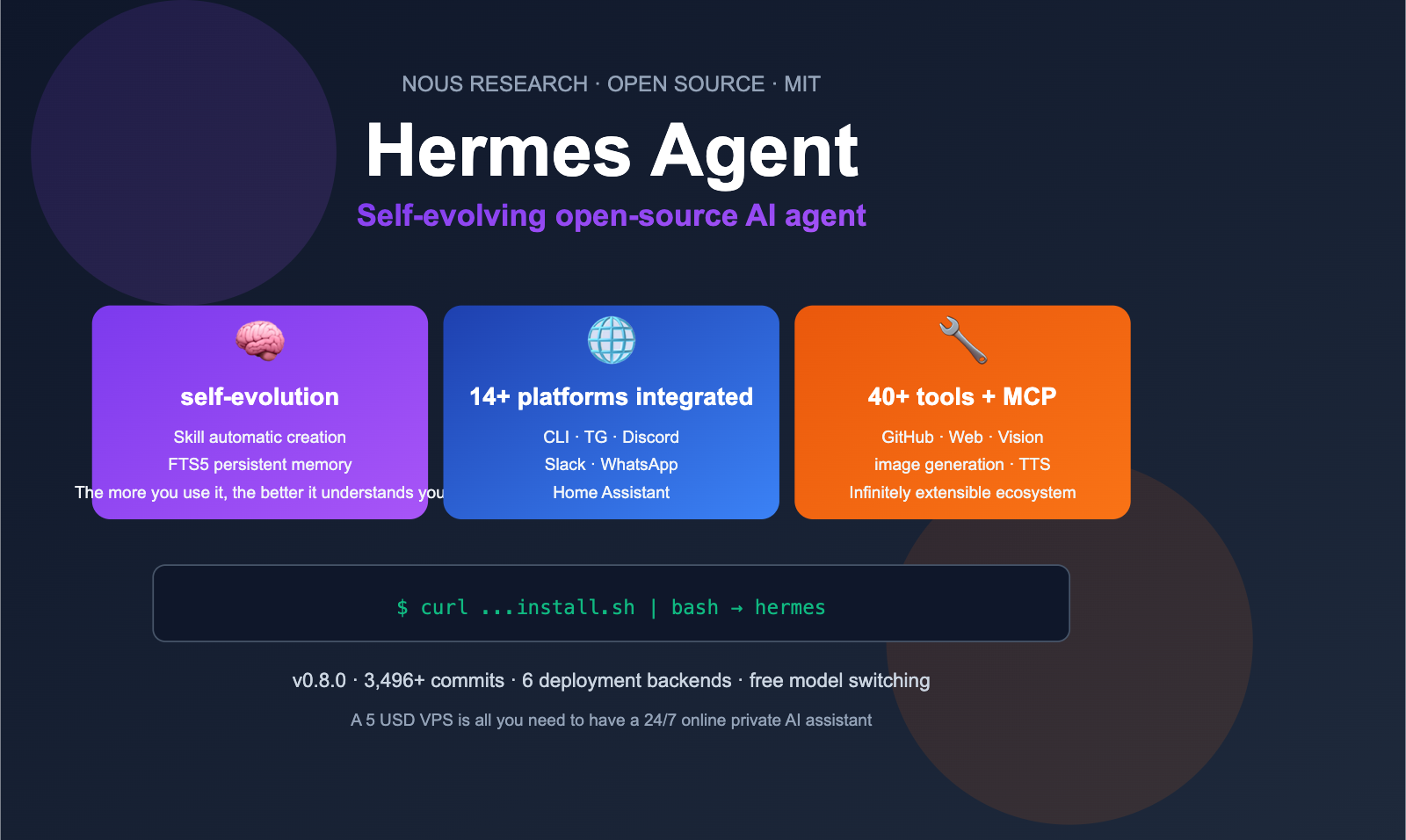
In a nutshell: Hermes Agent = An open-source + self-evolving + multi-platform AI agent framework.
Developed by Nous Research and released under the MIT license on GitHub, it’s built primarily in Python. It lets you chat with your agent via terminal, Telegram, Discord, Slack, WhatsApp, Signal, or even Home Assistant. The coolest part is its "learning loop": every task you complete is distilled into reusable skills, and every conversation is stored in persistent memory, making the agent more intuitive the more you use it.
| Feature | Description | Value |
|---|---|---|
| Open Source (MIT) | GitHub: NousResearch/hermes-agent | Completely free, commercial-ready |
| Self-Evolving | Auto-creates/improves skills, FTS5 full-text memory | Gets to know you better over time |
| 40+ Built-in Tools | MLOps / GitHub / Web / Vision / TTS | Ready to use out of the box |
| 14+ Platform Integrations | CLI / TG / Discord / Slack / WA / Signal / Email | Deploy once, use everywhere |
| Model Agnostic | OpenRouter / Anthropic / OpenAI / GLM / Kimi, etc. | No vendor lock-in, switch anytime |
| 6 Terminal Backends | Local / Docker / SSH / Daytona / Singularity / Modal | Works on anything from a $5 VPS to GPU clusters |
| MCP Support | Connects to any MCP Server | Infinite tool ecosystem expansion |
Deep Dive into Hermes Agent
Hermes Agent is spearheaded by the Nous Research team. They’re a powerhouse in the open-source Large Language Model community, famous for their Hermes series (Nous Hermes 2, Nous Hermes 3). Hermes Agent is their "application layer" framework built on top of the "model layer," designed to let anyone deploy a self-growing personal AI assistant with a single command.
As of April 2026, Hermes Agent has reached v0.8.0 with over 3,496 commits, making it one of the most active open-source agent frameworks on GitHub.
💡 Quick Take: If Claude Code is a "Claude-bound coding CLI," then Hermes Agent is a "universal agent for any model." It doesn't just code—it can run in Telegram to manage your schedule, in Slack to answer team questions, or in Home Assistant to control your smart home. If you want to connect Hermes Agent to mainstream international models without worrying about account or network restrictions, you can use the OpenAI-compatible
base_urlprovided by APIYI (apiyi.com) for a seamless one-click setup.
The 5 Core Capabilities of Hermes Agent
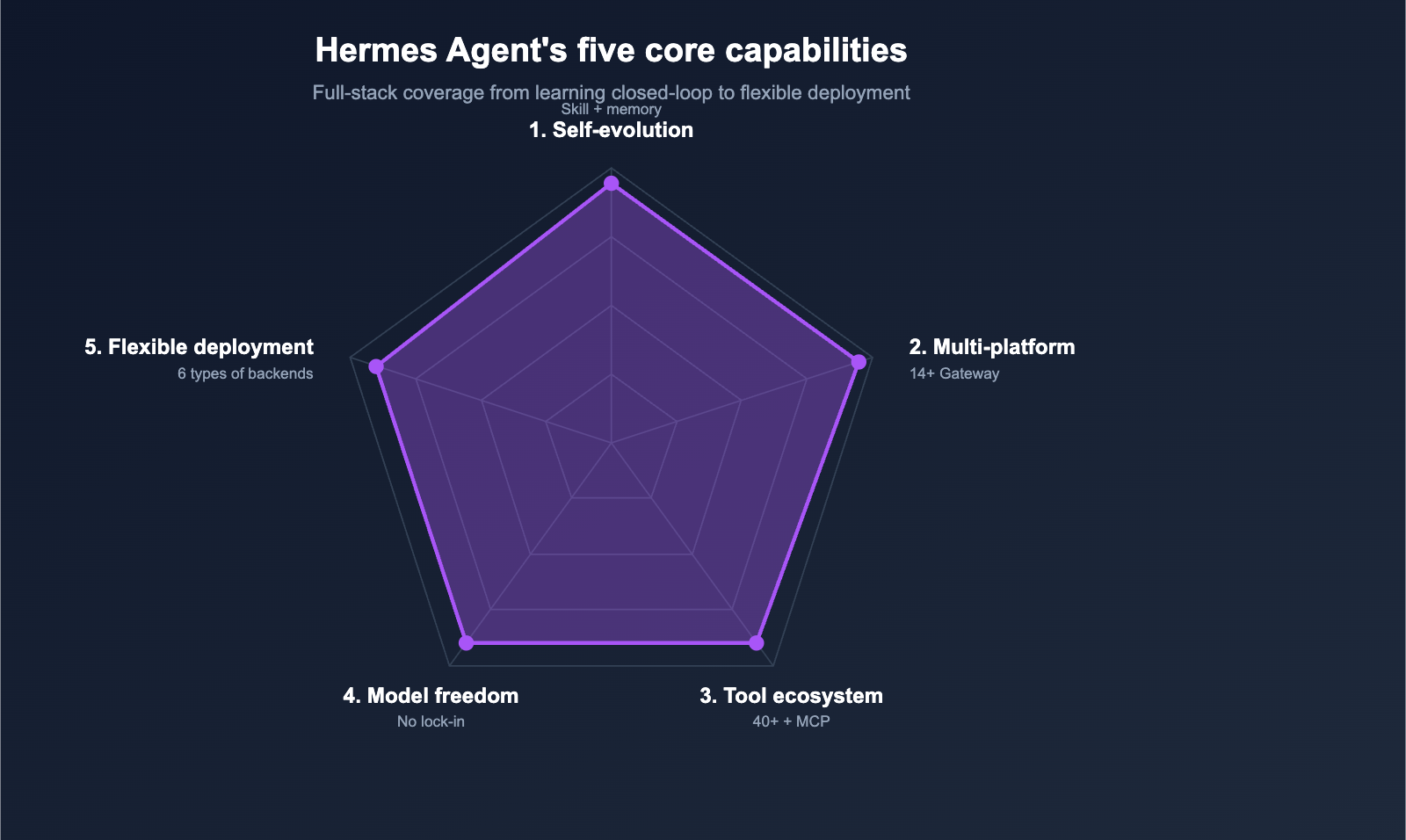
Capability 1: Self-Improving Learning Loop
This is what makes Hermes Agent truly unique. It has a built-in "learning loop":
- Automatic Skill Creation: After you complete a task with it, it distills the solution path into a reusable skill.
- Skill Self-Improvement: When encountering similar tasks later, it refines the skill based on past experience.
- Persistent Memory: Using FTS5 full-text search and LLM summarization, it can recall previous conversations across sessions.
- User Modeling: Based on Honcho's dialectical user modeling, it gets to know your preferences better the more you use it.
The benefit of this design is simple: Teach it once today, and you won't have to teach it again tomorrow. This is something mainstream Agent frameworks (like LangChain or AutoGen) can't do.
Capability 2: One-Click Integration for 14+ Platforms
Hermes Agent provides a unified gateway process. You only need to start it once to chat with your agent across these platforms:
| Category | Supported Platforms |
|---|---|
| CLI | Local CLI terminal |
| IM | Telegram, Discord, Slack, WhatsApp, Signal |
| Collaboration | Matrix, Mattermost |
| Communication | Email, SMS |
| Smart Home | Home Assistant |
The startup command is just one line: hermes gateway. This means the same Hermes Agent running on your $5 VPS can simultaneously serve your Telegram DMs, Discord server, and your home's Home Assistant.
Capability 3: 40+ Built-in Tools + MCP Protocol
It comes with over 40 out-of-the-box tools covering:
- Code/Dev: GitHub operations, shell execution, Python RPC, Docker
- Web: Search, extraction, browsing, visual understanding
- Generation: Image generation, text-to-speech
- MLOps: Training task management, model invocation scheduling
- Lifestyle: Calendar, reminders, email
More importantly, Hermes Agent fully supports the Model Context Protocol (MCP). You can connect to any MCP Server from the community, meaning there's theoretically no limit to the number of tools you can use.
Capability 4: Model Freedom (No Vendor Lock-in)
Hermes Agent isn't tied to any single model provider. It natively supports:
- Nous Portal (Nous Research's own gateway)
- OpenRouter (Aggregation of 200+ models)
- OpenAI / Anthropic Claude
- z.ai / GLM / Kimi / Moonshot / MiniMax
- Any OpenAI-compatible custom endpoint
Switching models takes just one command: hermes model, with zero code changes required. This is the fundamental reason it can connect to API proxy services like APIYI (apiyi.com) — to Hermes Agent, a "custom endpoint + API key" is a first-class provider.
Capability 5: 6 Execution Backends + Flexible Deployment
Hermes Agent supports 6 different "execution backends":
| Backend | Use Case |
|---|---|
| Local | Run directly on your PC |
| Docker | Isolated environment, local or server |
| SSH | Remote machine execution |
| Daytona | Cloud-based, hibernatable dev environment |
| Singularity | HPC / GPU clusters |
| Modal | Serverless, near-zero cost when idle |
This means Hermes Agent can run on your MacBook, a $5/month VPS, or even an enterprise GPU cluster. The serverless support from Daytona and Modal brings the cost of a "24/7 personal agent" down to just a few dollars a month.
Getting Started with Hermes Agent
Installation: One-Line Command
Hermes Agent provides an official installation script for Linux, macOS, and WSL2. The only prerequisite is git:
curl -fsSL https://raw.githubusercontent.com/NousResearch/hermes-agent/main/scripts/install.sh | bash
Once finished, you'll have the hermes command available in your environment.
Quick Start: Up and Running in 5 Minutes
# 1. Run the configuration wizard (required for first-time setup)
hermes setup

# 2. Select your model provider (we'll show how to connect to APIYI below)
hermes model

# 3. Start the interactive CLI and begin chatting
hermes
During the first hermes setup, the wizard will ask:
- Which model provider do you want to use? (OpenAI / Anthropic / OpenRouter / Custom…)
- What is your API key?
- Do you want to enable the gateway (for multi-platform access)?
- Do you want to enable cron (for scheduled tasks)?
💡 Tip: For your first time, we recommend selecting "Custom OpenAI-compatible endpoint." Set the
base_urltohttps://api.apiyi.com/v1and use the API key created in your APIYI dashboard. This way, you can call GPT-5, Claude Opus 4.6, Gemini 3 Pro, and other mainstream models through a single configuration without managing separate accounts for each provider.
View full configuration for APIYI proxy
# In the hermes setup wizard, select "Custom OpenAI-compatible endpoint"
# Then enter:
Base URL: https://api.apiyi.com/v1
API Key:  sk-xxxxxxxxxxxxxxxx
Default Model: gpt-5

# You can switch models at any time using the /model command:
/model openai:claude-opus-4-6
/model openai:gemini-3-pro
/model openai:deepseek-v3
Alternatively, you can edit the config file at ~/.hermes/config.toml:
[providers.apiyi]
type = "openai"
base_url = "https://api.apiyi.com/v1"
api_key = "sk-xxxxxxxxxxxxxxxx"

[providers.apiyi.models]
default = "gpt-5"
available = ["gpt-5", "claude-opus-4-6", "gemini-3-pro", "deepseek-v3"]
Common Commands Cheat Sheet
| Command | Description |
|---|---|
hermes |
Start interactive CLI |
hermes setup |
Configuration wizard |
hermes gateway |
Start multi-platform gateway |
hermes model |
Switch LLM provider |
hermes tools |
Enable/disable tools |
hermes claw migrate |
One-click migration from OpenClaw |
/new or /reset |
Start a new session |
/skills |
View accumulated skills |
/personality |
Switch persona |
/compress |
Compress context |
/usage |
View token usage |
Hermes Agent vs. Other Agent Frameworks
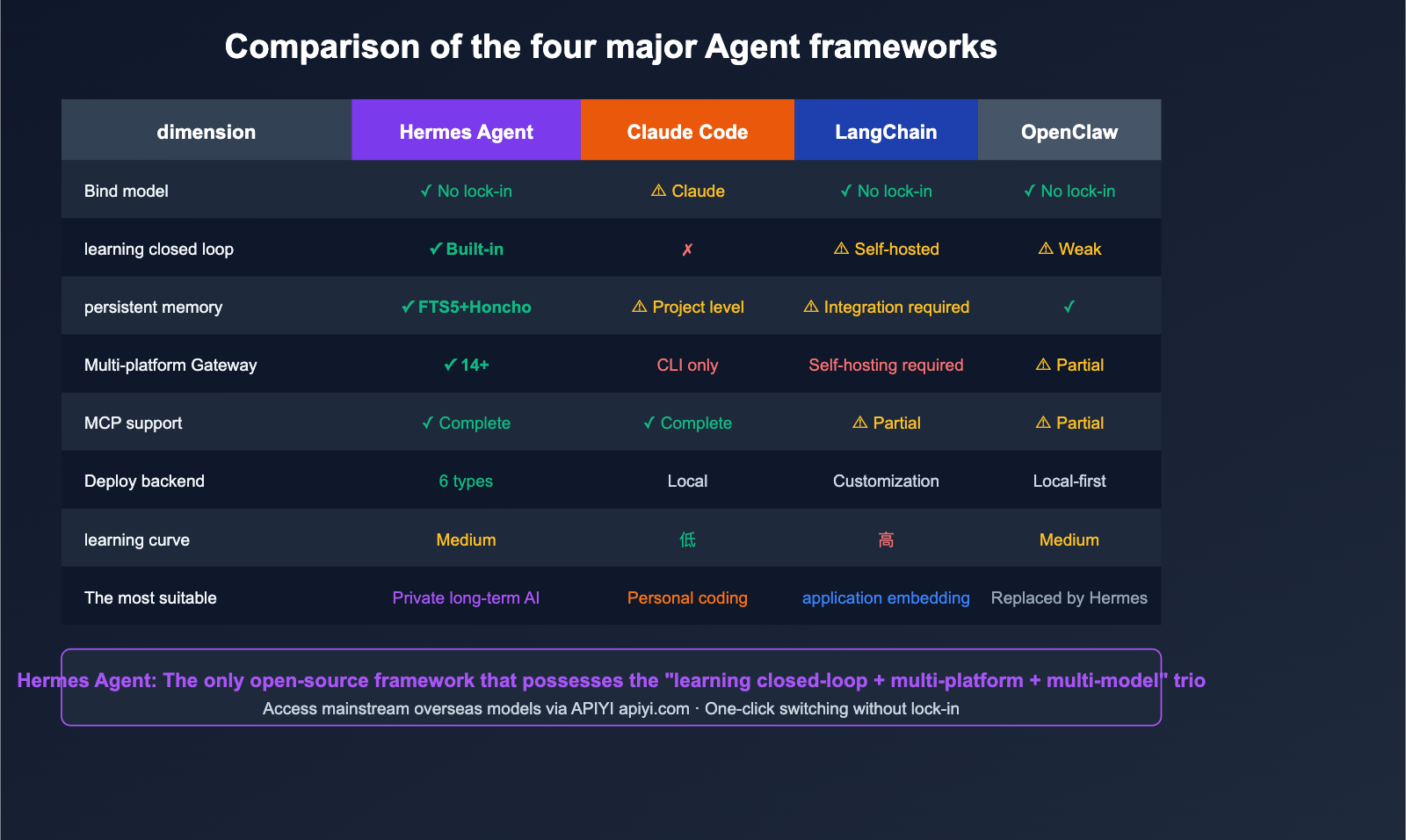
A common question from new users is: "How is Hermes Agent different from X, which I'm already using?" The table below provides a clear comparison.
| Comparison Dimension | Hermes Agent | Claude Code | LangChain | OpenClaw |
|---|---|---|---|---|
| Positioning | General self-evolving agent | Anthropic coding CLI | Python Agent library | Early general agent |
| Model Binding | ❌ None | ⚠ Claude default | ❌ None | ❌ None |
| Learning Loop | ✅ Built-in | ❌ None | ⚠ DIY required | ⚠ Weak |
| Persistent Memory | ✅ FTS5 + Honcho | ⚠ Project-level | ⚠ Integration needed | ✅ |
| Multi-platform Gateway | ✅ 14+ platforms | ❌ CLI only | ❌ Self-built | ⚠ Partial |
| MCP Support | ✅ Full | ✅ Full | ⚠ Partial | ⚠ Partial |
| Deployment Backend | 6 types | Local CLI | Custom | Mostly local |
| Learning Curve | Moderate | Low | High | Moderate |
| Best For | Developers wanting a "long-term AI assistant" | Individual coding | Teams building AI apps | (Replaced by Hermes) |
🎯 Recommendation: If you just want "an AI to edit code in your terminal," go with Claude Code. If you need to "embed agent logic into a Python application," choose LangChain. If you want "a cross-platform, evolving, model-agnostic private AI," Hermes Agent is the best choice. Regardless of your choice, you can use APIYI (apiyi.com) to access mainstream overseas models in one place, bypassing regional access barriers.
Who is Hermes Agent for?
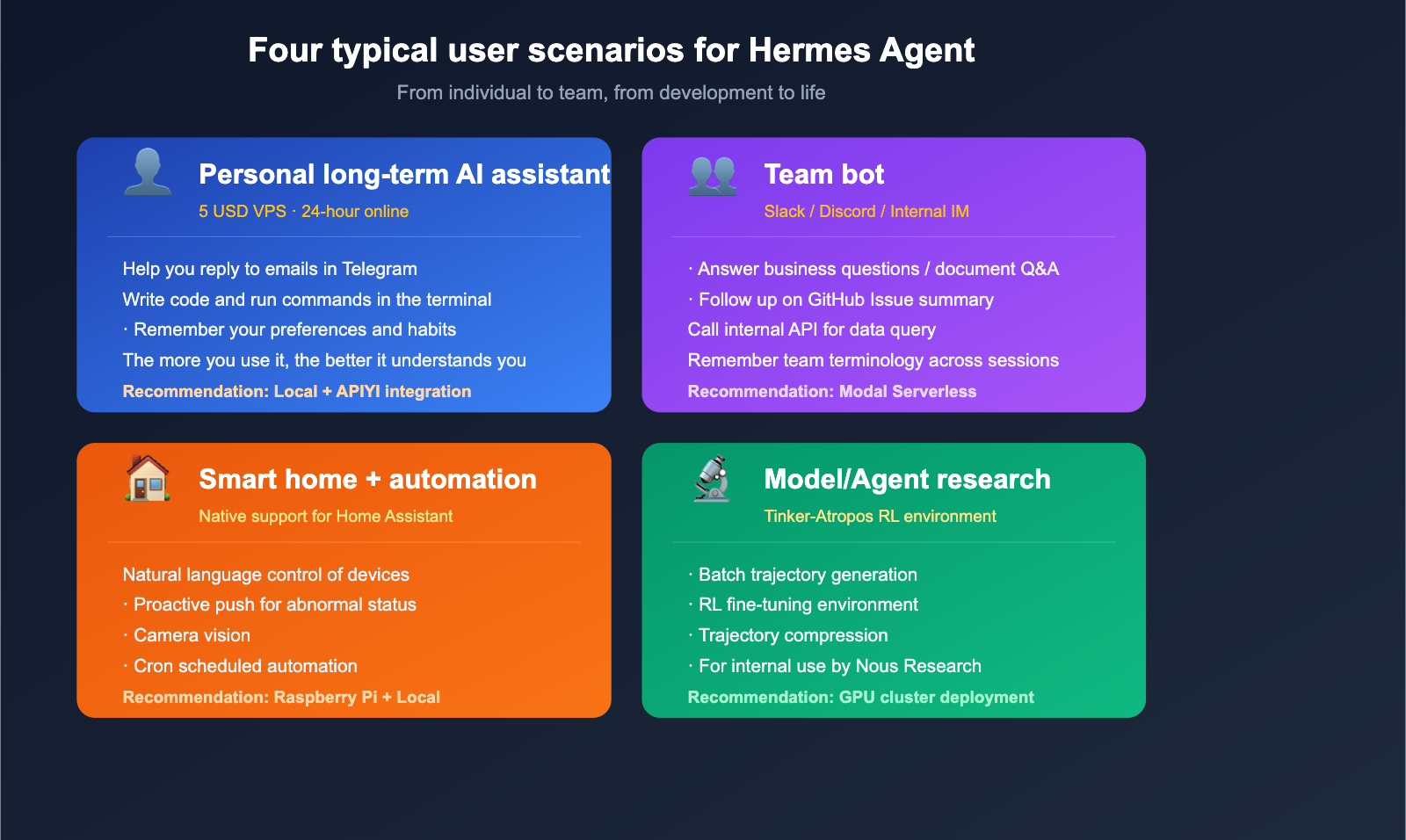
Scenario 1: Personal Long-term AI Assistant
You want a 24/7 personal assistant that can:
- Reply to emails via Telegram
- Write code and run commands in your terminal
- Remember your preferences ("I prefer zsh," "My projects are in ~/code/")
- Understand you better the more you use it
Using Hermes Agent + a $5 VPS is currently the most cost-effective solution.
Scenario 2: Team Slack/Discord Bot
You want a bot for your team that can:
- Answer business questions in Slack
- Automatically summarize GitHub Issues
- Query data by calling internal APIs
- Remember team terminology across sessions
Hermes Agent + Modal serverless is the most elegant solution, with near-zero costs when idle.
Scenario 3: Smart Home + Automation
You have Home Assistant at home and want to:
- Control devices using natural language
- Have the agent proactively push alerts for abnormal states
- Integrate camera vision for understanding your environment
Hermes Agent has native support for Home Assistant and works right out of the box.
Scenario 4: Model and Agent Research
Hermes Agent includes built-in tools for research, such as batch trajectory generation and Tinker-Atropos RL environments, which can be used to generate agent training data and perform RL fine-tuning. This is the same research toolchain used by Nous Research themselves, making it highly accessible for model researchers.
Hermes Agent FAQ
Q1: Is Hermes Agent free?
It's completely free. Hermes Agent itself is open-source under the MIT license; you only need to cover the token costs for your Large Language Model usage. If you connect to models like GPT-5 or Claude Opus 4.6 via APIYI (apiyi.com), you'll benefit from pay-as-you-go pricing with no minimums. For personal assistant use cases, this typically costs anywhere from a few dollars to a few dozen dollars per month.
Q2: Does Hermes Agent really “self-evolve”?
Yes, but it's important to understand what "evolve" means here. It doesn't modify its own model weights—that would require training. Instead, it does the following: (1) It automatically distills successful task paths into skill files; (2) It writes conversation content into an FTS5 full-text index; (3) It uses an LLM to periodically summarize your preferences. The next time you encounter a similar task, it checks the skills library and searches your conversation history first, making it feel "smarter the more you use it."
Q3: Which Large Language Models does Hermes Agent support?
It supports almost all mainstream models: OpenAI (GPT-4/5), Anthropic (Claude Opus/Sonnet), Google (Gemini), Nous Portal, OpenRouter (200+), z.ai/GLM, Kimi/Moonshot, MiniMax, and any custom OpenAI-compatible endpoint (including APIYI, Ollama, and local vLLM deployments). You can switch models with a single hermes model command—zero code changes required.
Q4: Can I use Hermes Agent smoothly in China?
Yes, but you'll need to handle network access for overseas models. The easiest way is to select "Custom OpenAI-compatible endpoint" during hermes setup, set the base_url to https://api.apiyi.com/v1, and use an API key created in the APIYI console. This way, all overseas model invocations go through the API proxy service, eliminating the need for any proxy configuration.
Q5: I used OpenClaw before; can I migrate to Hermes Agent?
Yes, and it's very simple. Hermes Agent provides an official migration command: hermes claw migrate. It automatically imports your SOUL.md, memories, skills, API keys, messaging platform settings, command whitelists, and workspace instructions. We recommend running hermes claw migrate --dry-run first to preview the changes before executing the actual migration.
Q6: Which is better, Hermes Agent or Claude Code?
They have different goals, so there's no "better" one—only the one that fits your needs. Claude Code is Anthropic's official coding CLI with top-tier tool use, but it's locked to the Claude family. Hermes Agent is a general-purpose agent that is cross-platform, model-agnostic, and features a learning loop, though its coding precision is slightly behind Claude Code. In practice, you can install both: use Claude Code for heavy coding, and Hermes Agent for daily assistance, cross-platform tasks, or team bots. Both can connect to the same underlying models via APIYI (apiyi.com).
Summary
Hermes Agent is a fascinating project contributed to the open-source community by Nous Research in 2026. It integrates "self-evolution, multi-platform, multi-model, and multi-backend" capabilities into an MIT-licensed framework, with the goal of giving everyone a truly personal AI agent.
In a nutshell: If you want a personal AI assistant that isn't locked to any specific model vendor, works across 14+ platforms, and gets to know you better the more you use it, Hermes Agent is the best choice for 2026.
🚀 Action Plan: The fastest way to get Hermes Agent running in 5 minutes: First, install it with a single curl command; second, select "Custom OpenAI-compatible endpoint" during
hermes setup, set thebase_urlto apiyi.com/v1, and use a key generated from the APIYI console; third, runhermesto enter the interactive CLI and start chatting. The whole process takes less than 5 minutes, and you can switch models at any time using/modelwithout reconfiguring.
Author: APIYI Team — Dedicated to providing developers with stable access to mainstream AI Large Language Models. Visit apiyi.com to learn more.
References
-
Hermes Agent GitHub Main Repository
- Link:
github.com/NousResearch/hermes-agent - Description: Source code, issues, and the latest version (v0.8.0).
- Link:
-
Hermes Agent Official Documentation
- Link:
hermes-agent.nousresearch.com/docs - Description: Installation, configuration, and a complete reference for slash commands.
- Link:
-
Hermes Agent Official Website
- Link:
hermes-agent.nousresearch.com - Description: Project homepage and feature overview.
- Link:
-
Nous Research Official Website
- Link:
nousresearch.com - Description: Information on the Hermes model series and the team behind it.
- Link:
-
MarkTechPost – Hermes Agent Coverage
- Link:
marktechpost.com/2026/02/26/nous-research-releases-hermes-agent - Description: In-depth third-party report.
- Link:
-
agentskills.io – Skills Sharing Standard
- Link:
agentskills.io - Description: The open skill ecosystem for Hermes Agent.
- Link: