Author's Note: This is an in-depth breakdown based on the official Seedance 2.0 prompt guide. We’ll cover the 6-step prompt formula, 8 types of camera movement, style keywords, negative prompts, and common pitfalls, complete with plenty of ready-to-use templates.
When generating videos with Seedance 2.0, you might have noticed that while using the same model, some people produce stunning, fluid videos, while others end up with jittery or blurry results. The difference isn't in the model—it's in the prompt. Seedance 2.0 has released a comprehensive prompt guide that covers everything from prompt structure to camera movements, and from style keywords to negative prompts.
Core Value: By the end of this article, you'll have mastered the standard formula for Seedance 2.0 prompts, learned how to describe 8 types of camera movements, and know exactly which words to use and which to avoid.
Seedance 2.0 Prompting Core Essentials
| Key Point | Description | Importance |
|---|---|---|
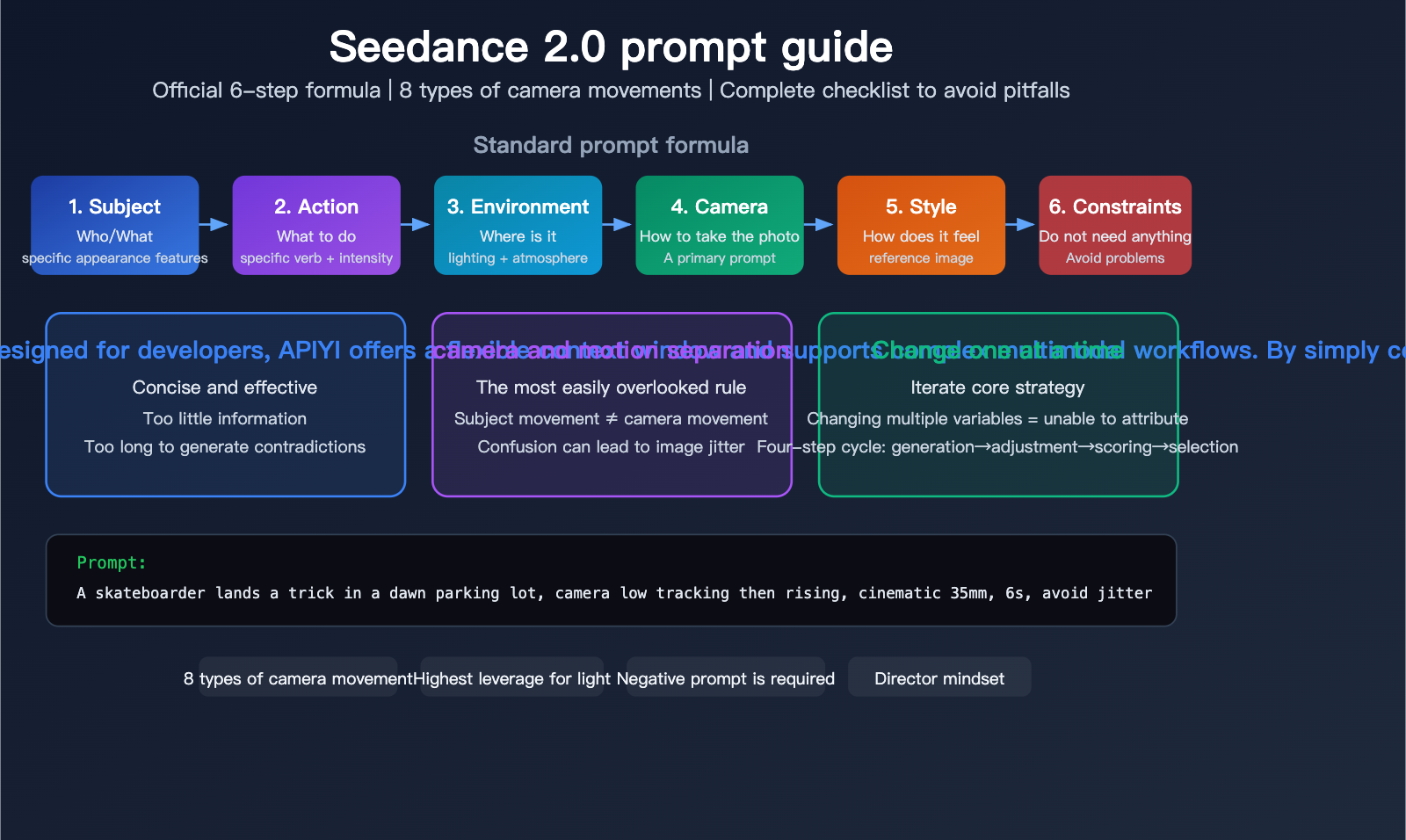
| 6-Step Formula | Subject → Action → Environment → Camera → Style → Constraints | Core Framework |
| 60-100 Words | Keep it concise; excessive length degrades quality | Length Control |
| Separate Camera & Action | Describe subject movement and camera movement separately | Most Overlooked |
| One Variable at a Time | Adjust only one element during iterations | Tuning Strategy |
| Negative Prompts | Clearly exclude unwanted effects | Key to Avoiding Pitfalls |
| Director Mindset | Write like a director, not an engineer | Mindset Shift |
Why Prompting Technique Matters So Much
Seedance 2.0 is the industry's first video generation model to support four-modal input (image + video + audio + text). It can generate 2K resolution, up to 15-second videos with native audio in under a minute. However, the output quality is highly dependent on how you write your prompt—the difference between a well-structured prompt and a vague one can be night and day.
The core philosophy of the official guide is: Write your prompt like a director—describe the scene, the action, and the mood you want, rather than just stacking technical parameters.
Seedance 2.0 6-Step Prompt Formula
The Officially Recommended Standard Prompt Structure
[Subject], [Action], in [Environment], camera [Camera Movement], style [Style], avoid [Constraints]
Each part of this formula has specific writing guidelines:
| Step | Element | Requirement | Example |
|---|---|---|---|
| 1. Subject | Describe who/what | Prioritize specific visual features | "A young woman in a white dress" |
| 2. Action | Describe what happens | Use specific verbs, quantify intensity | "Slowly turns around, breeze blowing the skirt" |
| 3. Environment | Describe where | Include lighting and atmosphere | "in a seaside at dusk, golden glow" |
| 4. Camera | Describe how to shoot | Use only one primary camera instruction | "camera slow push-in" |
| 5. Style | Describe the feel | Specific visual references | "style cinematic film tone, 35mm" |
| 6. Constraints | Describe what to avoid | Exclude common issues | "avoid jitter and bent limbs" |
Complete Example
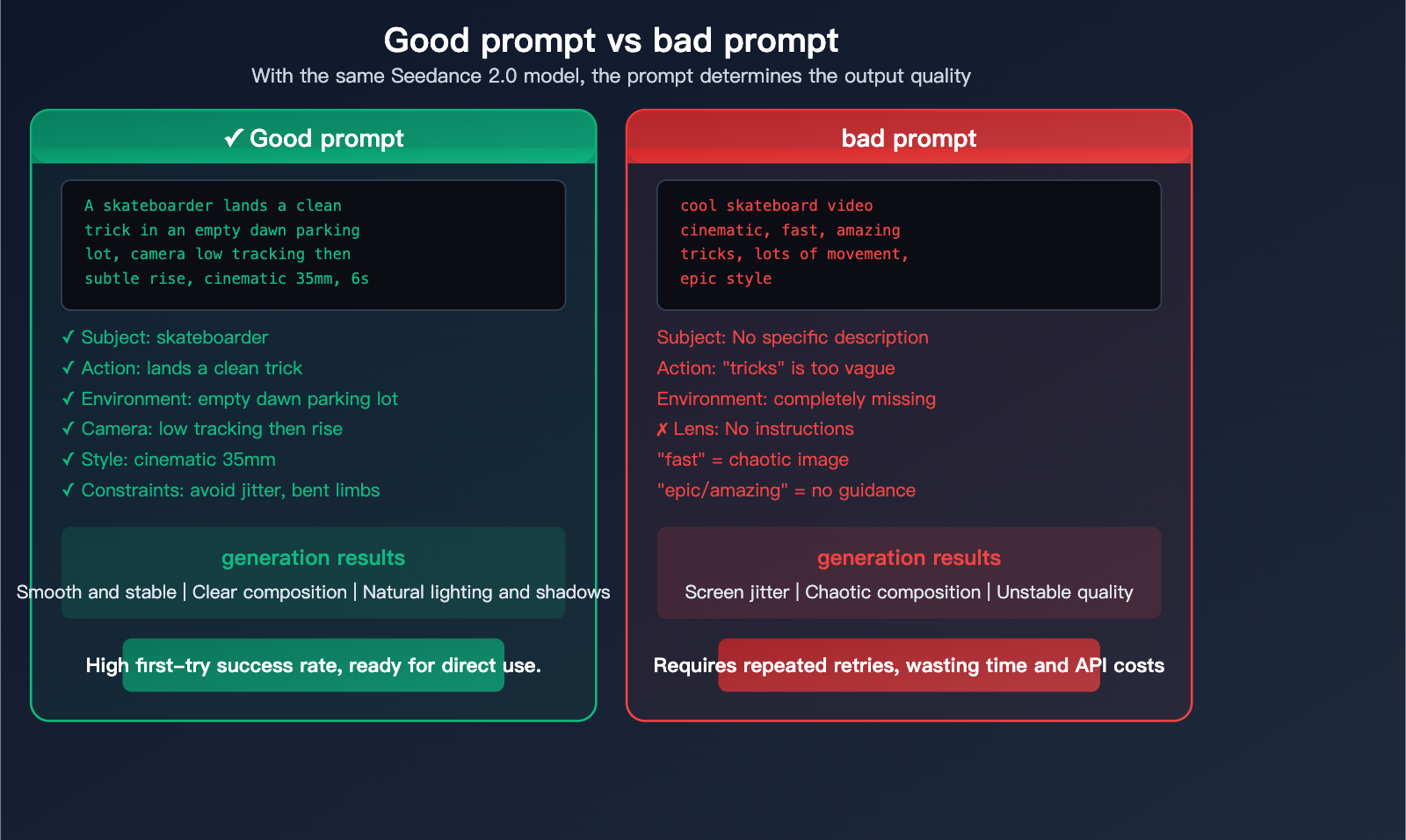
Good Prompt:
A skateboarder lands a clean trick in an empty dawn parking lot,
camera low tracking shot then subtle rise, modern cinematic contrast,
6 seconds, 16:9, avoid jitter and bent limbs.
Bad Prompt:
cool skateboard video, cinematic, fast, amazing tricks,
lots of movement, epic style
Analysis of the Gap: The good prompt includes a specific subject (skateboarder), action (lands a clean trick), environment (empty dawn parking lot), camera movement (low tracking shot then subtle rise), and constraints (avoid jitter and bent limbs). The bad prompt is full of vague adjectives without any concrete instructions.
🎯 Writing Tip: We recommend printing out the 6-step formula and keeping it by your monitor to check against every time you write a prompt. This formula also applies when you use the Seedance 2.0 API via APIYI (apiyi.com).
Seedance 2.0 Camera Movement: The Complete Guide
8 Types of Camera Movements
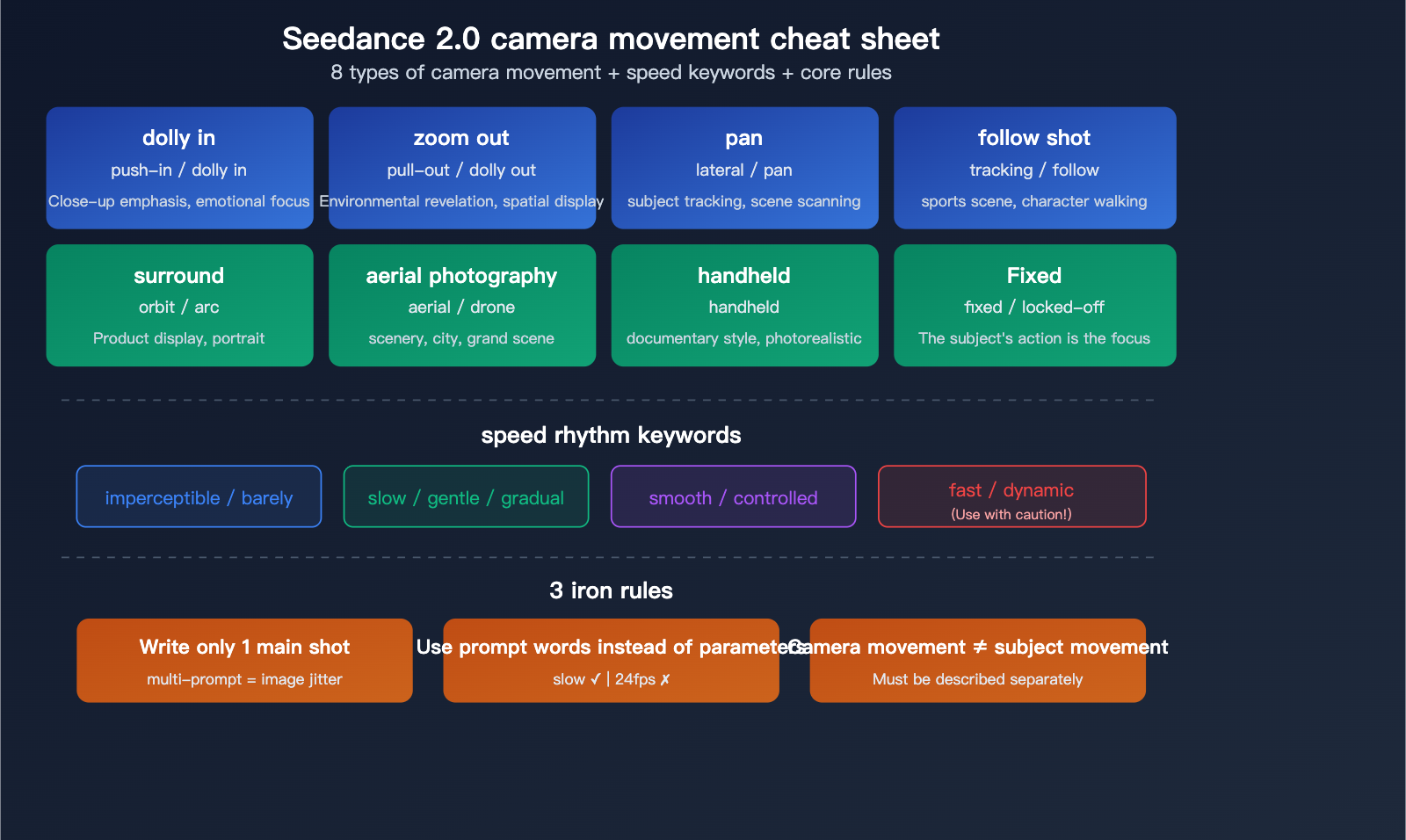
Camera movement is the single most effective way to boost video quality in your Seedance 2.0 prompts. The official guide lists these supported camera types:
| Camera Type | English Term | Effect Description | Best For |
|---|---|---|---|
| Push-in | push-in / dolly in | Camera slowly moves toward the subject | Close-up emphasis, emotional focus |
| Pull-out | pull-out / dolly out | Camera moves away to reveal a wide shot | Environmental reveal, spatial context |
| Pan | lateral motion / pan | Camera moves horizontally | Tracking subjects, scanning scenes |
| Tracking | tracking shot / follow | Camera follows the subject's movement | Action scenes, walking characters |
| Orbit | orbit / arc | Camera rotates around the subject | Product showcases, character portraits |
| Aerial | aerial / drone shot | High-altitude or bird's-eye view | Landscapes, cities, grand scale |
| Handheld | handheld | Simulates slight, natural camera shake | Documentary style, realism |
| Fixed | fixed / locked-off | Camera remains completely still | Focusing on subject action |
Core Rules for Camera Movement Prompts
Rule 1: Use only one primary camera instruction
✅ Correct: camera slow push-in
❌ Incorrect: camera push-in, then pan left, zoom out, orbit around
Multiple conflicting instructions will confuse the model, leading to jittery or incoherent footage. If you need a compound movement, describe the primary motion followed by a secondary one:
✅ Correct: camera low tracking shot then subtle rise
Rule 2: Use rhythmic descriptions, not technical specs
✅ Correct: slow, smooth, stable, gradual, gentle
❌ Incorrect: 24fps, f/2.8, ISO 800, focal length 85mm
Seedance 2.0 understands human-like rhythmic descriptions rather than photography jargon. The official guide suggests: "Describe the rhythm as if you're talking to an editor."
Rule 3: Separate camera movement from subject movement
✅ Correct: The dancer spins slowly. Camera holds fixed framing.
❌ Incorrect: spinning camera around a dancing person
Mixing up camera movement and subject movement is the most common mistake, often resulting in uncontrollable, shaky video.
Seedance 2.0 Reference Speed Keywords
| Speed | Keywords | Effect |
|---|---|---|
| Extremely Slow | imperceptible, barely | Almost unnoticeable movement |
| Slow | slow, gentle, gradual | Smooth and stable movement |
| Medium | smooth, controlled | Natural movement rhythm |
| Fast | dynamic, swift | High impact (use with caution) |
⚠️ Important Warning: "Fast" is the keyword most likely to degrade video quality. Combining fast camera movement + fast cuts + busy scenes almost guarantees jitter and artifacts. If you need a fast pace, only choose one element to be fast.
Seedance 2.0 Style Keywords and Lighting
Effective Style Keywords
| Style Category | Recommended Keywords | Effect |
|---|---|---|
| Cinematic | cinematic, film tone, 35mm | Classic movie aesthetic |
| Quality | 4K, high detail, sharp | High-definition detail |
| Film | film grain, analog, vintage | Retro texture |
| Tone | warm tone, cool palette, desaturated | Color bias |
| Atmosphere | moody, dreamy, ethereal | Emotional mood |
| Realism | realistic, natural, documentary | Realistic style |
Lighting: The Highest-Leverage Element in Prompts
The official guide emphasizes: Lighting descriptions have the biggest impact on video quality among all prompt elements.
| Lighting Keyword | Effect | Example Usage |
|---|---|---|
| golden hour | Warm golden hour tones | "soft golden hour lighting" |
| rim light | Highlights subject edges | "dramatic rim light against dark bg" |
| natural light | Natural illumination | "soft natural window light" |
| neon | Neon glow | "neon-lit rainy street" |
| backlit | Light from behind | "backlit silhouette at sunset" |
| overcast | Soft, diffused light | "even overcast diffused light" |
💡 Pro Tip: If you can only add one element to your prompt to improve quality, add a lighting description. The difference between "A person walking" and "A person walking in soft golden hour lighting" is massive.
Differences in Prompting for Seedance 2.0's Three Generation Modes
Text-to-Video
Describe the entire video content directly using text, following this 6-step formula:
A lone astronaut walks across an amber desert under
twin moons, camera slow lateral tracking, cinematic
sci-fi tone, 8 seconds, 16:9, avoid temporal flicker.
Image-to-Video
Starting with a reference image, your prompt only needs to describe the motion and changes:
Animate the provided image, preserve composition and
colors, add gentle wind motion to the leaves, camera
slowly pushes in, keep consistent lighting, 6 seconds.
| Element | Text-to-Video | Image-to-Video |
|---|---|---|
| Subject Description | Must be detailed | Already in image, can be omitted |
| Motion Description | Full description | Focus on dynamic changes |
| Composition Retention | Not applicable | Must emphasize "preserve" |
| Camera Movement | Flexible | Must align with image composition |
Video-to-Video
Using a video as a reference, your prompt should describe the style transformation:
Transform source clip to anime watercolor style,
preserve core motion and timing, adjust color palette
to pastel, keep identity consistent, avoid identity drift.
Seedance 2.0 Negative Prompt Checklist
Essential Negative Prompts
| Negative Prompt | What it Excludes | Use Case |
|---|---|---|
| avoid jitter | Screen shaking | All videos |
| avoid bent limbs | Distorted limbs | Character videos |
| avoid temporal flicker | Temporal flickering | Long-duration videos |
| avoid identity drift | Subject feature drift | Character consistency |
| avoid chaotic composition | Messy composition | Complex scenes |
Keywords That Often Lower Quality
| Dangerous Keyword | Why it's risky | Alternative |
|---|---|---|
| fast (unqualified) | Causes total chaos | Make only one element "fast" |
| cinematic (used alone) | Too vague, lacks guidance | "cinematic film tone, 35mm, warm" |
| epic | Model doesn't know what it means | Describe specific visual effects |
| amazing/beautiful | Adjectives lack practical guidance | Use specific lighting and composition |
| lots of movement | Too much movement causes jitter | Describe a specific, single motion |
🎯 API Usage Tip: When performing model invocation for Seedance 2.0 via APIYI (apiyi.com), these prompt guidelines apply perfectly. We recommend building a team-level prompt template library, categorizing and storing verified high-quality prompts by scenario to avoid starting from scratch every time.
Seedance 2.0 Prompt Iteration Methodology
The "One Variable at a Time" Rule
The official guide recommends a four-step loop for iteration:
- Baseline Generation: Generate 2-3 options using a standard prompt.
- Single Variable Adjustment: Change only one element at a time (e.g., camera angle, motion intensity, or style).
- Quality Scoring: Score based on continuity, instruction adherence, and post-production usability.
- Final Selection: Choose the version with the highest overall score.
Core Principle: By changing only one variable at a time, you can pinpoint exactly which change impacted the result. If you change three things at once, you'll never know which one actually made the difference.
Three-Tier Prompt Template Management
| Tier | Purpose | Characteristics |
|---|---|---|
| Starter Template | Quick direction validation | Short and precise |
| Production Template | Official delivery | Strict camera and consistency constraints |
| Fallback Template | Downgrade for unstable output | Highly simplified, back to basics |
Pre-Publishing Prompt Checklist
- Read the entire text from a non-author perspective.
- Remove redundant adjectives.
- Confirm there is only one primary camera instruction.
- Ensure constraints are achievable in post-production.
- Check for conflicts between style and motion instructions.
🚀 Efficiency Tip: When using the APIYI (apiyi.com) API to perform batch testing for Seedance 2.0, we recommend using scripts to automate the "one variable at a time" iteration process. This helps you quickly identify the optimal prompt combination.
Seedance 2.0 Input Specifications Quick Reference
| Input Type | Format | Limits | Notes |
|---|---|---|---|
| Image | JPEG/PNG/WebP/BMP/TIFF/GIF | Max 9 files, <30MB each | For composition and style reference |
| Video | MP4/MOV | Max 3 clips, 2-15 seconds | For motion and rhythm reference |
| Audio | MP3/WAV | Max 3 clips, <15 seconds/<15MB | For sound effects and rhythm reference |
| Output Duration | 4-15 seconds optional | – | Select as needed |
| Output Resolution | Up to 2K | – | – |
| Total File Count | Max 12 | Across all types | Images + Videos + Audio |
Important Restriction: Uploading identifiable real-face photos is not supported; content containing real faces will be blocked.
FAQ
Q1: What’s the ideal length for a prompt?
The official recommendation is 60-100 words. If it's too short, you'll miss key details; if it's too long, you might end up with conflicting instructions. The key is to ensure every word serves a specific purpose—cut out filler adjectives like "beautiful" or "amazing" that don't provide actual guidance. When using APIYI (apiyi.com) for model invocation, we recommend sticking to this range as well.
Q2: What should I do if the video keeps jittering?
There are three common culprits: (1) specifying multiple conflicting camera movements; (2) using the "fast" keyword, which often leads to chaos; or (3) demanding fast camera movement, fast subject movement, and a complex scene all at once. The solution: stick to one primary camera instruction, add pacing words like "slow," "smooth," or "stable," and include "avoid jitter" in your negative prompt.
Q3: How do prompts for image-to-video differ from text-to-video?
For image-to-video, you don't need to describe the subject's appearance in detail (since the image already provides that); instead, focus on the movement and camera action. You must include "preserve composition and colors" to keep the visual consistency of the original image. Text-to-video, however, requires the full 6-step formula. You can test both modes easily via APIYI (apiyi.com).
Summary
Here are the core takeaways from the Seedance 2.0 prompt guide:
- The 6-Step Formula: Subject → Action → Environment → Camera → Style → Constraints. Aim for 60-100 words.
- Camera Movement is Key: Use only one primary camera instruction and rely on pacing words (slow/smooth/gentle) rather than technical parameters.
- Lighting Descriptions are High-Leverage: Adding a single line about lighting is more effective than adding ten adjectives.
- Negative Prompts are Essential: "Avoid jitter and bent limbs" should be a standard part of every character-based video prompt.
- Change One Variable at a Time: When iterating, only change one element so you can actually track what's causing the results.
Mastering these official prompt guidelines will give your Seedance 2.0 videos a massive quality boost. We recommend using the APIYI (apiyi.com) platform to call the Seedance 2.0 API for batch testing and optimization. The platform also supports other video and image models like Jimeng and Wan2.7, making it easy to compare results across different models.
📚 References
-
Seedance 2.0 Official Prompt Guide: Volcengine official documentation
- Link:
volcengine.com/docs/82379/2222480 - Description: Includes complete prompt specifications and official examples.
- Link:
-
Seedance 2.0 Prompt Templates and Examples: Community-curated prompt library
- Link:
cdance.ai/seedance-2-0-prompt-guide - Description: Contains ready-to-use prompt templates and visual showcases.
- Link:
-
500+ Seedance 2.0 Prompt Collection: Open-source prompt library
- Link:
github.com/YouMind-OpenLab/awesome-seedance-2-prompts - Description: Covers a wide range of styles including cinematic, animation, advertising, and UGC.
- Link:
-
RunDiffusion Seedance Guide: Practical tutorial
- Link:
learn.rundiffusion.com/seedance-2-0-prompt-guide - Description: Includes detailed explanations of input specifications and generation modes.
- Link:
Author: APIYI Technical Team
Technical Discussion: Feel free to share your Seedance 2.0 prompt tips in the comments section. For more resources on Large Language Model integration, visit the APIYI documentation center at docs.apiyi.com.