description: Google's new Veo 3.1 Lite video generation API is here, offering the best price-to-performance ratio at just $0.05/second. Learn how to integrate it today.
Google's Veo 3.1 Lite video generation API has just been released, becoming the most cost-effective video generation model currently available at just $0.05/second. Following OpenAI's discontinuation of Sora, Google has taken the lead by establishing a complete video API ecosystem featuring the Lite, Fast, and Pro tiers of Veo.
Core Value: By reading this article, you'll master the complete integration process for the Veo 3.1 Lite API, understand the differences between the three model tiers, and learn how to implement high-quality AI video generation at the lowest possible cost.
Key Highlights of Google Veo 3.1 Lite Video Generation
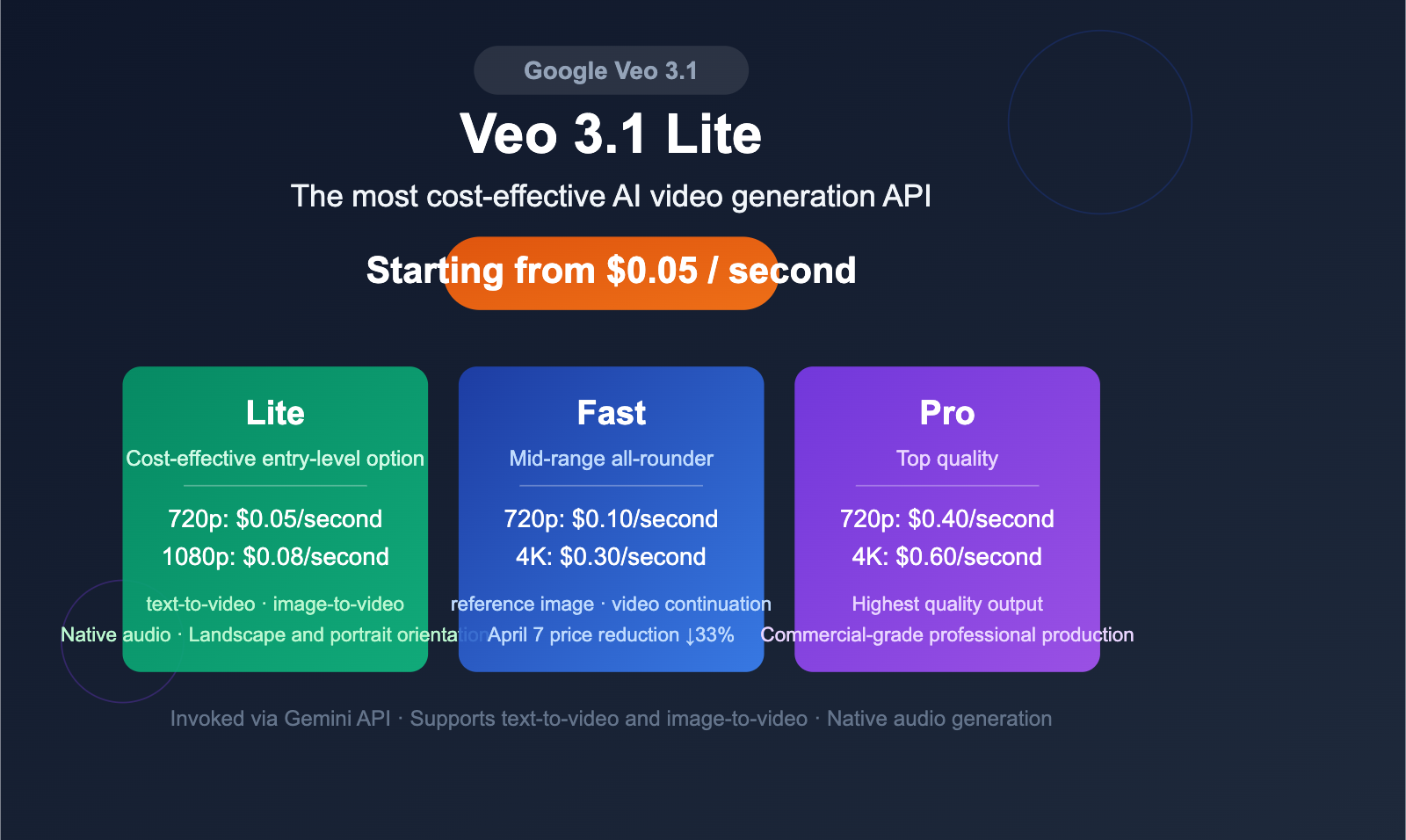
Veo 3.1 Lite is the latest video generation model released by Google on March 31, 2026, specifically designed for high-frequency usage scenarios. As the entry-level product in the Veo 3.1 series, it offers a price reduction of over 50% while maintaining the same generation speed as the Fast version.
| Key Highlight | Description | Developer Value |
|---|---|---|
| Price as low as $0.05/sec | 720p video costs only $0.05/sec, 1080p is $0.08/sec | Significantly lowers video generation costs, ideal for batch production |
| No compromise on speed | Same generation speed as Veo 3.1 Fast | Low price doesn't mean slow speed; consistent experience |
| Native audio support | All Veo 3.x models support dialogue, sound effects, and ambient audio generation | Generate video + audio in one go, no post-production synthesis needed |
| Text-to-video + Image-to-video | Supports both text-to-video and image-to-video | Covers all mainstream video generation scenarios |
| Flexible aspect ratios | Supports both 16:9 and 9:16 aspect ratios | Adapts to both desktop and mobile content |
Veo 3.1 Lite Video Generation: Core Parameters Overview
The model ID for Veo 3.1 Lite is veo-3.1-lite-generate-preview, which is invoked via the Gemini API. It is currently in the Paid Preview phase and does not support free tiers.
| Parameter | Support Range | Notes |
|---|---|---|
| Resolution | 720p, 1080p | 1080p requires a video duration of 8 seconds |
| Video Duration | 4s, 6s, 8s | Flexible selection, billed by the second |
| Aspect Ratio | 16:9 (landscape), 9:16 (portrait) | Defaults to 16:9 |
| Frame Rate | 24fps | Fixed frame rate |
| Audio | Native support | Includes dialogue, sound effects, and ambient audio |
| Input Method | Text prompt / Image | Text limit of 1024 tokens |
| Output Quantity | 1 video per request | Videos are retained for 2 days; download promptly |
🎯 Technical Advice: Veo 3.1 Lite is an ideal choice for batch video generation. If you are currently evaluating various video generation APIs, we recommend using the APIYI (apiyi.com) platform to integrate mainstream AI models, making it easier to quickly compare the actual results of different solutions.
Veo 3.1 Lite vs. Fast vs. Pro Video Generation Price Comparison
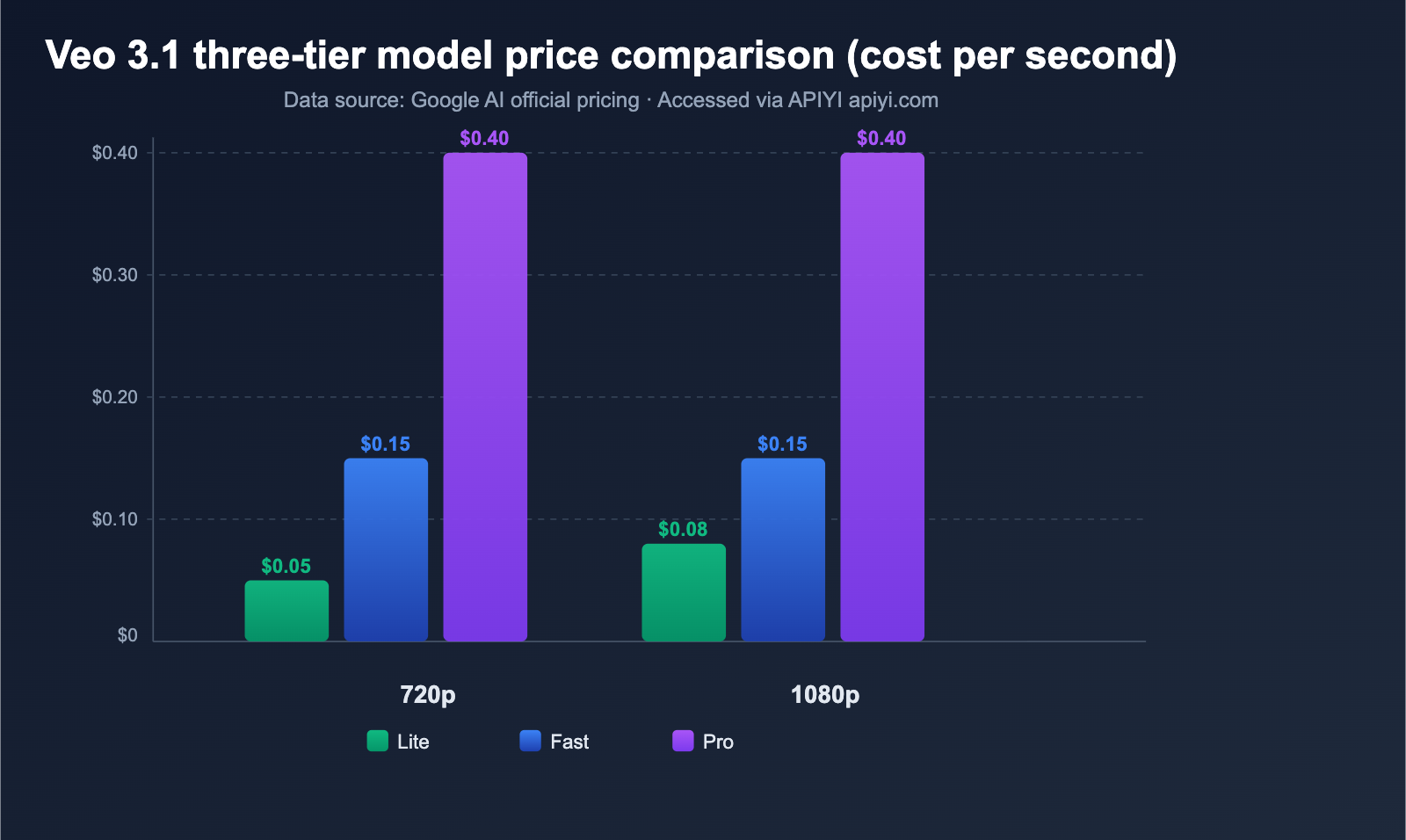
Google has established a three-tier video generation API product lineup: Veo Lite, Fast, and Pro. These three models cover the entire spectrum of needs, from low-cost bulk production to high-end, premium content creation.
Veo 3.1 Video Generation Price Breakdown
| Resolution | Veo 3.1 Lite | Veo 3.1 Fast (Current) | Veo 3.1 Fast (After Apr 7) | Veo 3.1 Pro |
|---|---|---|---|---|
| 720p | $0.05/sec | $0.15/sec | $0.10/sec | $0.40/sec |
| 1080p | $0.08/sec | $0.15/sec | $0.12/sec | $0.40/sec |
| 4K | N/A | $0.35/sec | $0.30/sec | $0.60/sec |
Veo 3.1 Lite Video Generation Cost Calculation
Let's look at the actual costs of using Veo 3.1 Lite with some common scenarios:
| Scenario | Duration | Resolution | Cost per Clip | Cost for 100 Clips |
|---|---|---|---|---|
| Social Media Short | 4 sec | 720p | $0.20 | $20 |
| Product Demo | 6 sec | 720p | $0.30 | $30 |
| Marketing Promo | 8 sec | 720p | $0.40 | $40 |
| HD Content Creation | 8 sec | 1080p | $0.64 | $64 |
Key Takeaway: Generating 100 four-second social media clips costs only $20, providing a solid economic foundation for bulk video content production.
April 7th Veo 3.1 Fast Price Reduction Announcement
Google has announced that Veo 3.1 Fast will see further price cuts starting April 7, 2026:
| Resolution | Before Cut | After Cut | Reduction |
|---|---|---|---|
| 720p | $0.15/sec | $0.10/sec | 33% |
| 1080p | $0.15/sec | $0.12/sec | 20% |
| 4K | $0.35/sec | $0.30/sec | 14% |
After the price drop, the 720p version of Fast will be only twice the price of Lite, yet it includes advanced features like 4K output, support for reference images, and video extension.
Veo 3.1 Three-Tier Model Feature Comparison
Choosing between Lite, Fast, and Pro isn't just about price—there are clear functional differences between the three models.
| Feature | Veo 3.1 Lite | Veo 3.1 Fast | Veo 3.1 Pro |
|---|---|---|---|
| Text-to-Video | ✅ | ✅ | ✅ |
| Image-to-Video | ✅ | ✅ | ✅ |
| Native Audio | ✅ | ✅ | ✅ |
| 720p Output | ✅ | ✅ | ✅ |
| 1080p Output | ✅ | ✅ | ✅ |
| 4K Output | ❌ | ✅ | ✅ |
| Reference Image (Max 3) | ❌ | ✅ | ✅ |
| Video Extension (Up to 20x) | ❌ | ✅ | ✅ |
| Start/End Frame Interpolation | ✅ | ✅ | ✅ |
Veo 3.1 Video Generation Selection Guide
Choose the right model tier based on your business needs:
- Choose Lite: For bulk social media content, rapid prototyping, budget-sensitive projects, or scenarios where 720p/1080p is sufficient.
- Choose Fast: When you need 4K output, want to use reference images to control style, or need to extend videos to create longer sequences.
- Choose Pro: For professional production requiring commercial-grade quality and the highest standards for video fidelity.
💡 Recommendation: The right tier depends entirely on your specific use case and budget. We recommend testing and comparing them via the APIYI (apiyi.com) platform. It supports unified API calls for mainstream AI video models, making it easy to switch between and evaluate different options.
Quick Start: Integrating the Google Veo 3.1 Lite Video Generation API
Here is the complete 5-step process for quickly integrating the Veo 3.1 Lite API.
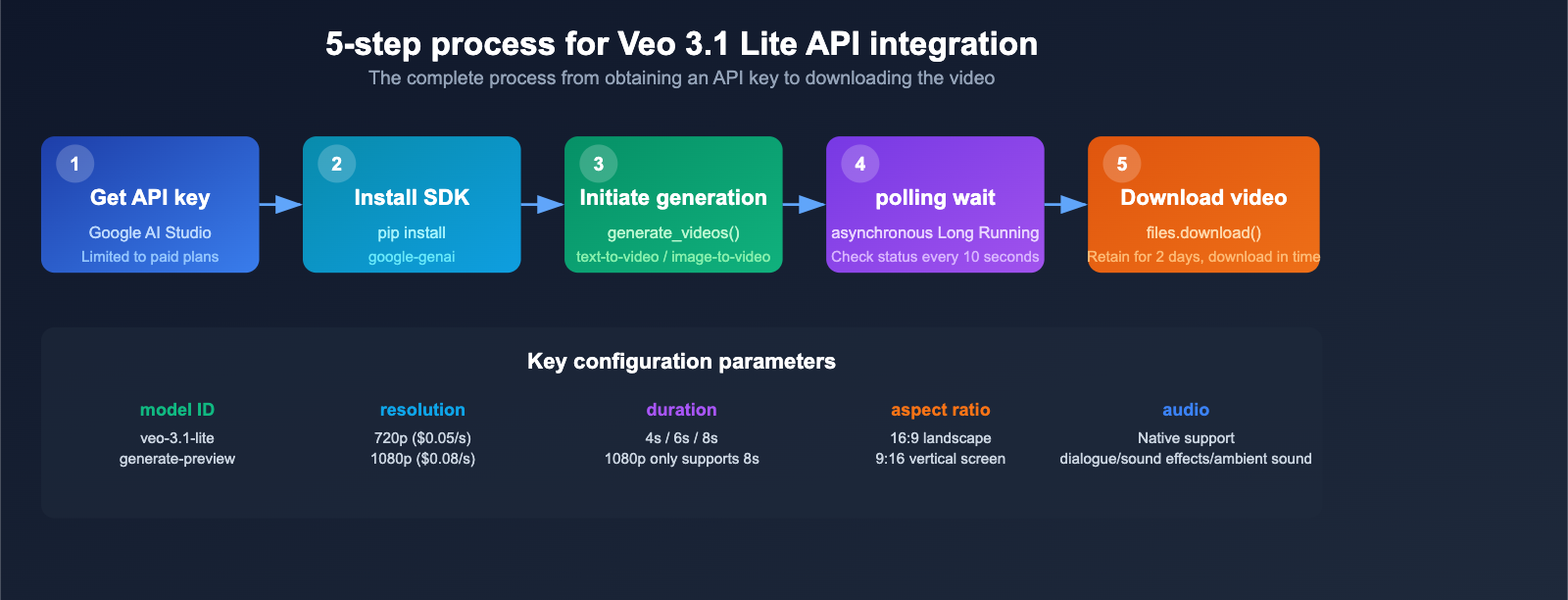
Step 1: Get your API key
Veo 3.1 Lite is accessed via the Gemini API. You'll need to grab your API key from Google AI Studio. Note that this currently requires a paid plan; free-tier access is not supported.
Step 2: Install the SDK
# Python SDK
pip install google-genai
Step 3: Text-to-Video – Minimal Code Example
from google import genai

client = genai.Client(api_key="YOUR_API_KEY")

# Initiate video generation request
operation = client.models.generate_videos(
    model="veo-3.1-lite-generate-preview",
    prompt="A golden retriever running on the beach, sunlight reflecting on the water, slow motion shot",
    config={
        "aspect_ratio": "16:9",
        "duration_seconds": 8,
        "resolution": "720p",
        "person_generation": "allow_all",
    },
)

# Poll until generation is complete
import time
while not operation.done:
    time.sleep(10)
    operation = client.operations.get(operation)

# Download the generated video
video = operation.result.generated_videos[0].video
client.files.download(file=video, download_path="output.mp4")
print("Video generation complete: output.mp4")
View Image-to-Video Code
from google import genai
from google.genai import types
import pathlib, time

client = genai.Client(api_key="YOUR_API_KEY")
image_bytes = pathlib.Path("input_frame.jpg").read_bytes()

operation = client.models.generate_videos(
    model="veo-3.1-lite-generate-preview",
    prompt="Slow camera push, showing the city skyline transitioning from sunset to night",
    image=types.Image(image_bytes=image_bytes, mime_type="image/jpeg"),
    config={"aspect_ratio": "16:9", "duration_seconds": 8,
            "resolution": "720p", "person_generation": "allow_adult"},
)

while not operation.done:
    time.sleep(10)
    operation = client.operations.get(operation)

video = operation.result.generated_videos[0].video
client.files.download(file=video, download_path="output_i2v.mp4")
Step 4: Key Parameters
| Parameter | Type | Description | Options |
|---|---|---|---|
model |
string | Model ID | veo-3.1-lite-generate-preview |
prompt |
string | Text prompt, up to 1024 tokens | Free text, supports audio descriptions |
image |
Image | Input image (for image-to-video) | JPEG/PNG format |
aspect_ratio |
string | Aspect ratio | 16:9 (default) / 9:16 |
duration_seconds |
int | Video duration | 4 / 6 / 8 |
resolution |
string | Resolution | 720p (default) / 1080p |
person_generation |
string | Person generation control | allow_all / allow_adult |
Step 5: Download and Manage Videos
Generated videos are only stored on Google's servers for 2 days, so you must download them locally within that window. It's recommended to download them immediately after generation and store them on your own server or object storage.
🚀 Quick Start: If you need to compare the performance of multiple video generation models, we recommend using the APIYI (apiyi.com) platform. It provides a unified interface to access various AI video models, so you don't have to configure SDKs for different providers individually.
Veo 3.1 Lite Video Generation: Audio Capabilities Explained
All Veo 3.x models support native audio generation, which is a standout feature of the Google Video API. You don't need post-production dubbing; your videos come with full sound effects right out of the gate.
Audio Type Support
| Audio Type | Description | Prompt Example |
|---|---|---|
| Dialogue | Supports multi-person conversations | "Two people chatting in a cafe, discussing the weather" |
| Sound Effects | Scene-specific audio | "The roar of a car engine starting" |
| Ambient Sound | Background atmosphere | "Birdsong and flowing water in a forest" |
| Mixed Audio | Layered audio tracks | "A busy street with pedestrians talking and cars passing by" |
Prompt Optimization Tips for Video Generation
High-quality prompts are the secret to better video generation. We recommend describing your scene across these dimensions:
| Dimension | Recommendation | Example |
|---|---|---|
| Scene | Clearly describe the environment and space | "Modern minimalist office, city skyline visible through floor-to-ceiling windows" |
| Action | Specify the movement style and speed | "Slow-moving aerial shot" instead of "filming a city" |
| Lighting | Define lighting conditions and mood | "Golden sunset glow," "soft indoor warm light" |
| Audio | Clarify sound layers and sources | "Distant birds chirping, rustling of leaves in the breeze" |
| Camera | Specify camera movement | "Slow motion," "time-lapse," "tracking shot" |
The Complete Google Veo Video Generation API Lineup
Following OpenAI's shutdown of Sora in early 2026, Google has established the most comprehensive video generation API ecosystem currently available with the Veo series.
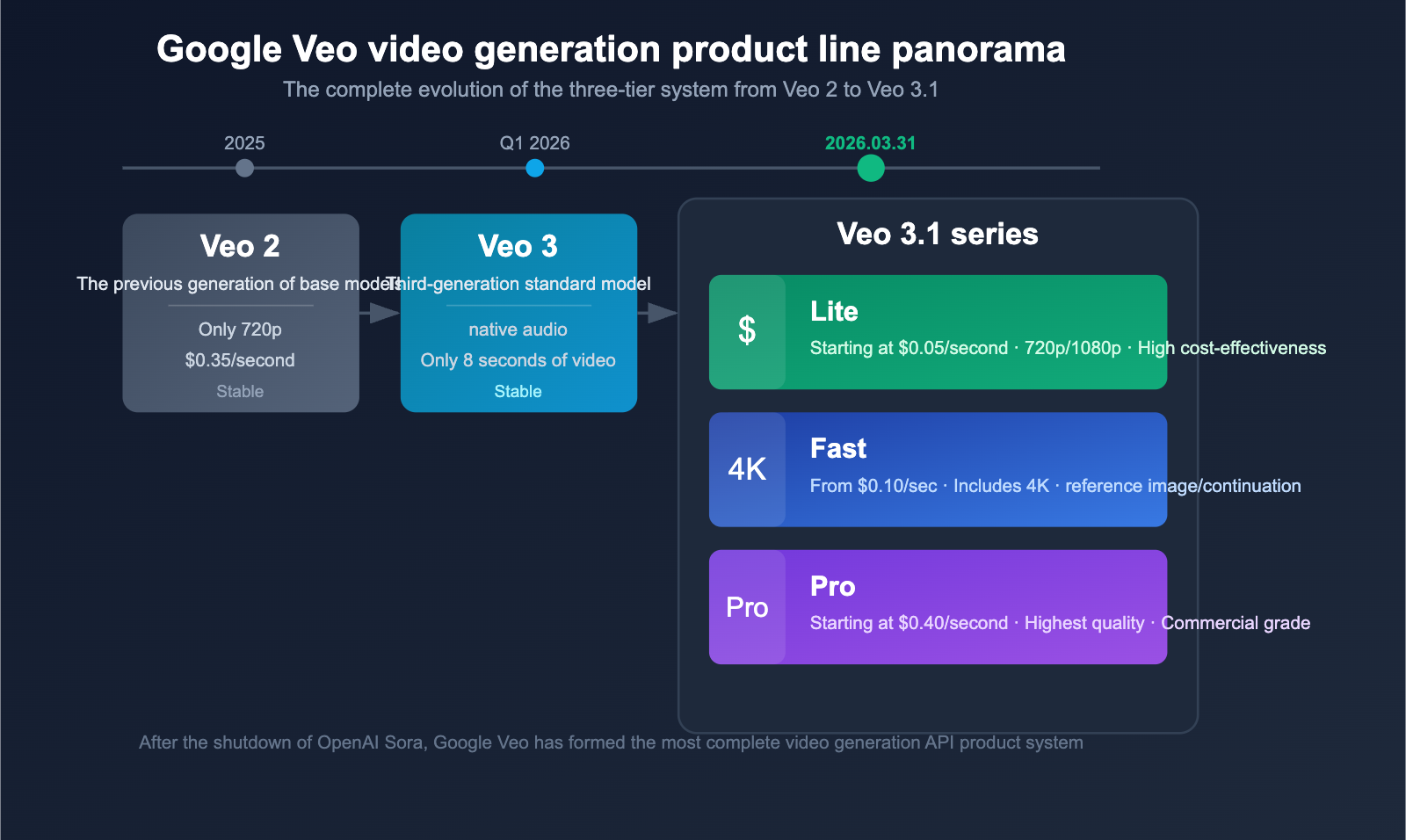
Veo Product Line Evolution
| Version | Model ID | Status | Positioning | Minimum Price |
|---|---|---|---|---|
| Veo 2 | Legacy | Stable | Previous generation base model | $0.35/sec (720p) |
| Veo 3 | veo-3-generate-preview |
Stable | 3rd Gen standard model | 8-second video limit |
| Veo 3.1 Lite | veo-3.1-lite-generate-preview |
Preview | High cost-performance entry | $0.05/sec |
| Veo 3.1 Fast | veo-3.1-generate-preview |
Preview | Mid-range all-rounder | $0.15/sec (dropping to $0.10) |
| Veo 3.1 Pro | veo-3.1-generate-preview |
Preview | Top-tier quality | $0.40/sec |
Market Landscape Analysis
Sora's closure created a perfect market window for Google Veo. Here’s the current competitive landscape for video generation APIs:
- Google Veo: A complete three-tier product line with pricing from $0.05 to $0.60/sec; the most comprehensive feature set.
- Runway Gen-3/4: Focused on high-quality video generation, but with a higher price point.
- Kling: A domestic (Chinese) solution with advantages in specific scenarios.
- Pika: Emphasizes creative and stylized video generation.
For developers needing to scale their video production, the release of Veo 3.1 Lite offers a highly attractive starting point.
💰 Cost Optimization: For budget-sensitive projects, consider a Lite + Fast hybrid strategy—use Lite for daily batch content to cut costs, and reserve Fast for high-priority content to boost quality. You can manage model invocations and costs flexibly via the APIYI (apiyi.com) platform.
Veo 3.1 Lite Video Generation Notes
Known Limitations
- 1080p Restriction: When selecting 1080p resolution, the video duration must be set to 8 seconds.
- No 4K / Reference Image / Video Extension: These features are exclusive to the Fast/Pro versions.
- Paid Only: None of the Veo models support free-tier usage.
- Video Retention: Generated videos are only stored for 2 days, so make sure to download them promptly.
Best Practices
- Prompt Quality: Detailed and specific prompts significantly improve generation quality. We recommend including descriptions of the scene, actions, and lighting.
- Resolution Selection: 720p is sufficient for social media content; consider 1080p only for formal projects.
- Batch Strategy: For high-volume video generation tasks, we recommend using an asynchronous queue to manage your requests.
- Watermark Notice: All Veo videos automatically include a SynthID digital watermark (invisible but detectable).
FAQ
Q1: Is there a significant quality gap between Veo 3.1 Lite and Fast?
According to various user reviews, the visual quality difference between Veo 3.1 Lite and the Fast version is minimal. The Lite version is perfectly capable for daily content generation and offers excellent value for money. If you need to compare quality across different models, you can use the APIYI (apiyi.com) platform to quickly invoke and test them side-by-side.
Q2: How long does it take to generate a video?
The generation speed for Veo 3.1 Lite is on par with the Fast version. In our tests, an 8-second video typically completes within a minute, with the fastest results around 11 seconds; during peak times, it may take a few minutes. Since it's an asynchronous API, we recommend setting a 10-second polling interval to check task status.
Q3: Can I use Veo 3.1 Lite to generate videos featuring people?
Yes. In text-to-video mode, set person_generation to allow_all to generate videos containing people. For image-to-video mode, we recommend using allow_adult. All person generation follows Google's safety policies.
Q4: After the Veo 3.1 Fast price drop on April 7th, is there still a need for Lite?
Yes, there is. Even after the price drop, Fast 720p costs $0.10/second, which is still double the price of Lite. For daily bulk content generation, the cost advantage of Lite remains significant. We suggest a hybrid strategy: use Lite for routine content and Fast for high-priority projects. You can flexibly switch between models via the APIYI (apiyi.com) platform.
Summary
The release of Google Veo 3.1 Lite marks the entry of AI video generation into an era of low-cost scalability. With an entry-level price of $0.05/second, generation speeds matching the Fast version, and a full suite of features including text-to-video, image-to-video, and native audio, the Lite version offers developers a highly compelling video API solution.
Key Takeaways:
- Pricing: $0.05/second for 720p and $0.08/second for 1080p—less than 50% of the Fast version.
- Speed: Matches the Fast version; an 8-second video typically completes within one minute.
- Features: Supports text-to-video, image-to-video, native audio, and both landscape/portrait orientations.
- Limitations: No 4K support, no reference image support, no video extension, and 1080p is limited to 8 seconds in duration.
- Price Drop Announcement: Veo 3.1 Fast will see a price reduction of 14%-33% starting April 7th.
We recommend using APIYI (apiyi.com) to quickly integrate Veo 3.1 Lite and other mainstream video generation models, allowing you to manage your model invocation and costs in one place.
References
- Google Official Blog – Veo 3.1 Lite Release:
blog.google/innovation-and-ai/technology/ai/veo-3-1-lite/ - Google AI Video Generation API Documentation:
ai.google.dev/gemini-api/docs/video - Google AI Pricing Page:
ai.google.dev/gemini-api/docs/pricing
This article was written by the APIYI technical team. For more tutorials on using AI models, please visit APIYI at apiyi.com.