If you've encountered this error while connecting Claude Code to AWS Bedrock:
InvokeModelWithResponseStream: operation error Bedrock Runtime:
InvokeModelWithResponseStream, https response error StatusCode: 400,
RequestID: 47574f13-c884-4b12-a003-6d0cf252d8dd,
ValidationException: system.1.cache_control.***.scope:
Extra inputs are not permitted
This happens frequently, especially when using --resume to pick up a previous session—this is a known compatibility issue, not a mistake in your configuration.
The root cause is that Claude Code sends a scope field that Bedrock doesn't support. You can fix it in 30 seconds by setting a single environment variable.
Core Value: After reading this, you'll understand the root cause of this error, master 3 ways to fix it, and learn how to configure it correctly across CLI, VS Code, JetBrains, and other environments.
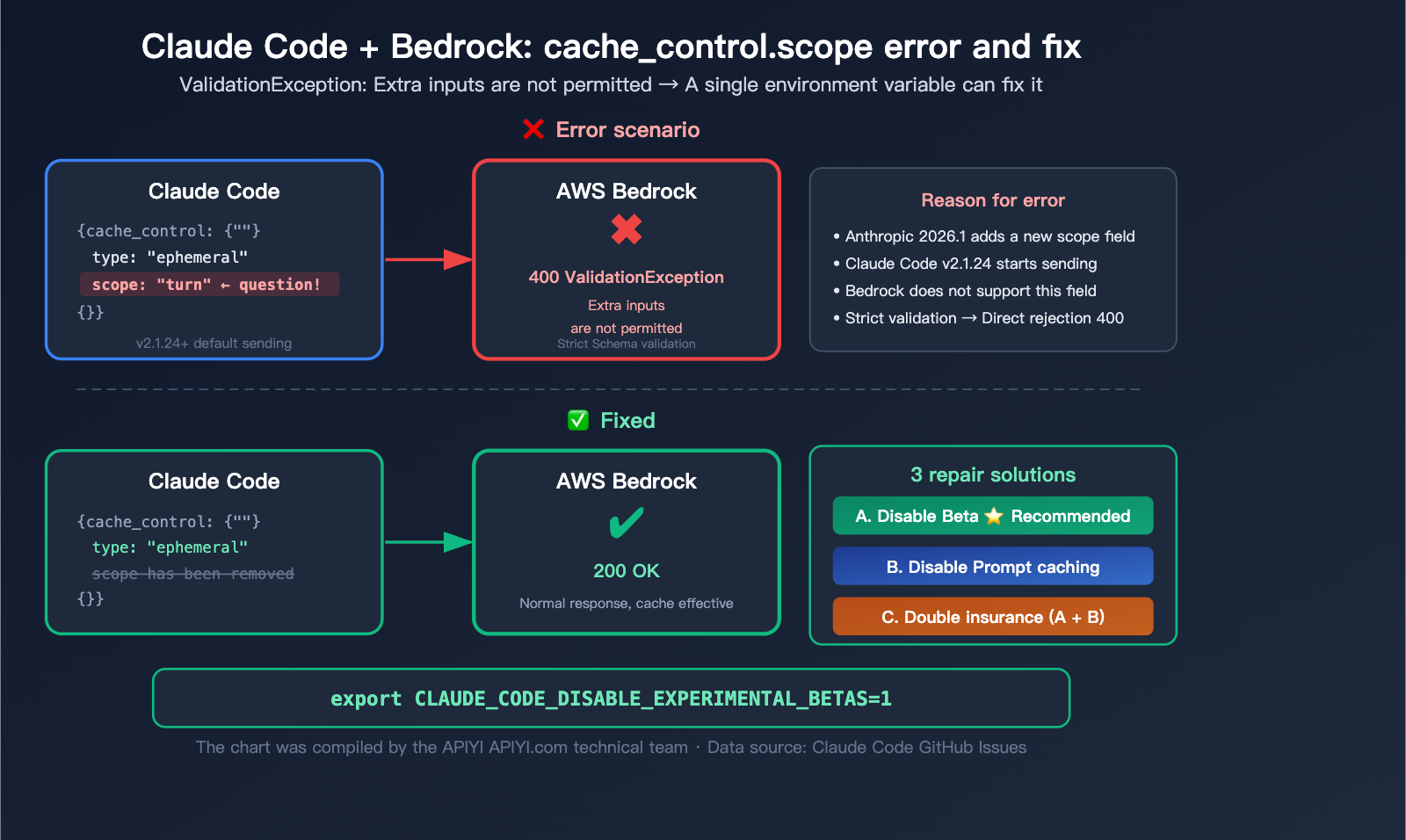
Deep Analysis of the Claude Code Bedrock Error
To understand this error, you need to know a key background detail: Anthropic's native API and AWS Bedrock have different levels of support for cache_control.
The Technical Root Cause
In January 2026, Anthropic introduced a Beta feature prompt-caching-scope-2026-01-05 for its native API, adding a scope field to the cache_control object:
{
  "cache_control": {
    "type": "ephemeral",
    "scope": "turn"
  }
}
Starting from Claude Code v2.1.24, this scope field is included in API requests by default.
The problem is: AWS Bedrock does not recognize the scope field, and Bedrock's schema validation is extremely strict—it returns a 400 error immediately upon encountering any unknown field.
| Feature | Anthropic Native API | AWS Bedrock |
|---|---|---|
cache_control.type: "ephemeral" |
Supported | Supported |
cache_control.ttl: "5m" |
Supported | Supported |
cache_control.ttl: "1h" |
Supported | Supported (since Jan 2026) |
cache_control.scope |
Supported (Beta) | Unsupported, returns 400 |
| Beta headers | Accepted | Rejected (invalid beta flag) |
| Schema validation | Loose (ignores unknown fields) | Strict (rejects unknown fields) |
In short: The Anthropic native API is more lenient and ignores fields it doesn't recognize. Bedrock is strict and rejects them outright. Claude Code sends a field Bedrock doesn't know, and Bedrock throws an error.
🎯 Technical Advice: This issue only affects users calling Claude via AWS Bedrock. If you use the Anthropic native API (e.g., via the APIYI platform), you won't encounter this error at all, as the native API fully supports the
scopefield.
Why --resume Triggers It More Often
While this error isn't exclusive to --resume, it is definitely more likely to trigger when you use it to restore a historical session. Here's why:
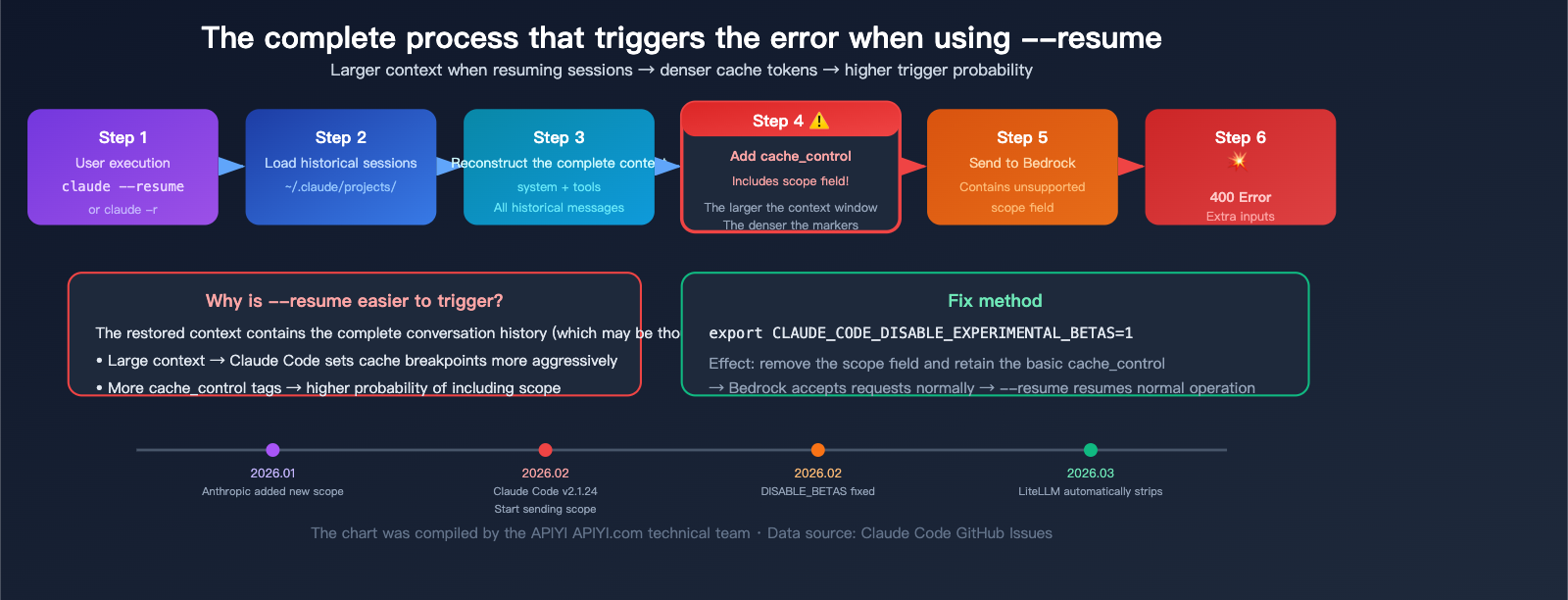
Internal mechanics of --resume:
- Load session history: Reads the full conversation record from
~/.claude/projects/<project>/<sessionID>.jsonl. - Rebuild context: Reassembles the system prompt, tool definitions, and all historical messages into a complete
messagesarray. - Cache optimization: Because the restored context is usually large (containing the full conversation history), Claude Code more aggressively sets
cache_controlbreakpoints on system messages to optimize costs. - Send request: The first API call includes the full rebuilt context +
cache_control(containing thescopefield).
Key takeaway: Larger context when restoring a session → more aggressive cache optimization → higher frequency of cache_control fields → higher probability of triggering the error.
New sessions can also trigger it, but because the initial context is smaller, cache markers may be less dense.
Claude Code Bedrock Error Fix Method 1: Disable Experimental Betas (Recommended)
This is our top recommendation—it fixes the error while keeping the core prompt caching functionality intact.
How it Works
By setting CLAUDE_CODE_DISABLE_EXPERIMENTAL_BETAS=1, Claude Code will:
- Remove Beta headers from requests (such as
prompt-caching-scope-2026-01-05) - Remove the
scopefield fromcache_control - Keep fields supported by Bedrock, such as
cache_control.typeandcache_control.ttl
In other words, you still get the cost-saving benefits of prompt caching; you're just opting out of the new scope feature.
CLI Terminal Setup
macOS / Linux:
# Temporary (valid for the current terminal session)
export CLAUDE_CODE_DISABLE_EXPERIMENTAL_BETAS=1

# Permanent (add to your shell profile)
echo 'export CLAUDE_CODE_DISABLE_EXPERIMENTAL_BETAS=1' >> ~/.zshrc
source ~/.zshrc

# If you're using bash
echo 'export CLAUDE_CODE_DISABLE_EXPERIMENTAL_BETAS=1' >> ~/.bashrc
source ~/.bashrc
Windows (PowerShell):
# Temporary
$env:CLAUDE_CODE_DISABLE_EXPERIMENTAL_BETAS = "1"

# Permanent
[System.Environment]::SetEnvironmentVariable("CLAUDE_CODE_DISABLE_EXPERIMENTAL_BETAS", "1", "User")
Once set, just run Claude Code as usual:
# Start a new session
claude

# Resume a session (no more errors!)
claude --resume
VS Code Extension Setup (Important!)
The VS Code extension doesn't read shell environment variables—even if you've set them in your .zshrc, the Claude Code extension inside VS Code won't see them. You must configure it as follows:
Method 1: Edit the global Claude config file (Recommended)
Edit ~/.claude/settings.json:
{
  "env": {
    "CLAUDE_CODE_DISABLE_EXPERIMENTAL_BETAS": "1"
  }
}
Method 2: Via VS Code Settings
Open VS Code Settings → search for claude → locate the environment variable configuration section → add CLAUDE_CODE_DISABLE_EXPERIMENTAL_BETAS=1.
JetBrains IDE Setup
Claude Code plugins for JetBrains IDEs (IntelliJ, WebStorm, PyCharm, etc.) also require separate configuration:
Edit ~/.claude/settings.json (it shares the same file as VS Code):
{
  "env": {
    "CLAUDE_CODE_DISABLE_EXPERIMENTAL_BETAS": "1"
  }
}
💡 Pro Tip:
~/.claude/settings.jsonis the global configuration file for Claude Code. All clients (CLI, VS Code, JetBrains) read from it. Setting your environment variables here is the easiest way to ensure it works across all platforms at once.
Claude Code Bedrock Error Fix Method 2: Disable Prompt Caching
If Method 1 doesn't resolve your issue (which is rare), you can disable prompt caching entirely.
How it Works
By setting DISABLE_PROMPT_CACHING=1, Claude Code removes all cache_control fields from requests. Without cache_control, there's no scope field, and the error disappears completely.
The Trade-off: You lose the cost-saving benefits of prompt caching. For long conversations, this might result in higher token costs.
Setup
# CLI
export DISABLE_PROMPT_CACHING=1

# ~/.claude/settings.json (Universal for all platforms)
{
  "env": {
    "DISABLE_PROMPT_CACHING": "1"
  }
}
When should you choose Method 2?
| Scenario | Choose Method 1 | Choose Method 2 |
|---|---|---|
| Standard Bedrock user | ✅ Recommended | |
| Still getting errors after Method 1 | ✅ | |
| Using a gateway proxy like LiteLLM | ✅ Safer | |
| Short conversations, don't care about cache costs | ✅ No impact | |
| Long conversations, care about cost optimization | ✅ Keep caching | ❌ Will increase costs |
Claude Code Bedrock Error Fix Solution 3: The "Double Insurance" Configuration
Set both environment variables simultaneously to ensure that all fields unsupported by Bedrock are stripped out.
# CLI
export CLAUDE_CODE_DISABLE_EXPERIMENTAL_BETAS=1
export DISABLE_PROMPT_CACHING=1
// ~/.claude/settings.json
{
  "env": {
    "CLAUDE_CODE_DISABLE_EXPERIMENTAL_BETAS": "1",
    "DISABLE_PROMPT_CACHING": "1"
  }
}
This is the most robust configuration, perfect for production environments where absolute stability is required.
🚀 Another Approach: If you'd rather avoid messing with environment variables or dealing with Bedrock compatibility issues, consider switching to the native Anthropic API. Through the APIYI (apiyi.com) platform, you can directly access native Anthropic endpoints with full support for all Prompt Caching features (including
scope), all without needing an AWS account.
Complete Troubleshooting Workflow for Claude Code Bedrock Errors
If you're unsure which solution applies to your situation, follow this troubleshooting workflow:
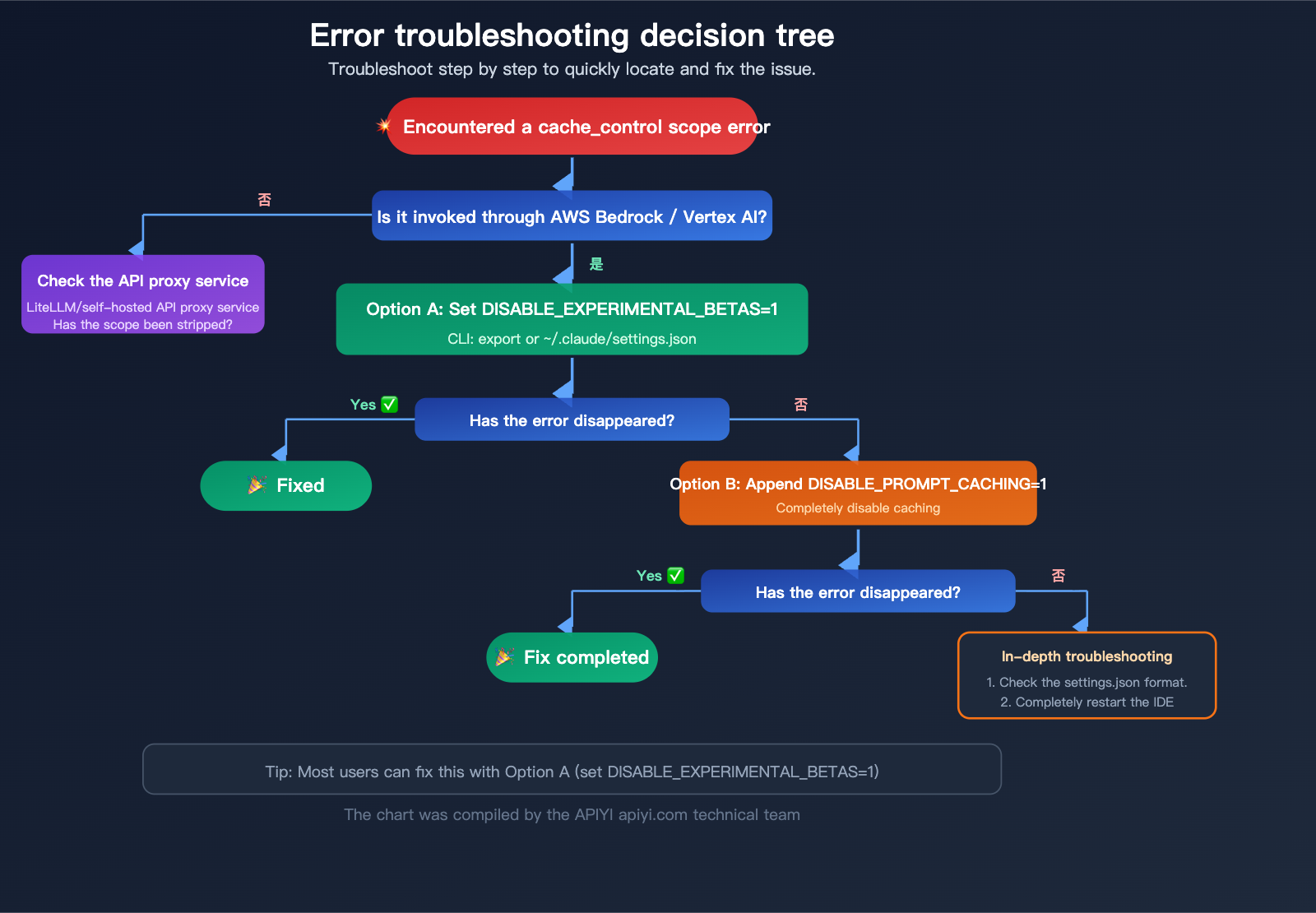
Step 1: Identify the Error Type
Check if your error message contains the following keywords:
cache_control.***.scope: Extra inputs are not permitted
or
ValidationException: ... cache_control ... scope
If so, it's a compatibility issue with the scope field.
Step 2: Confirm the Invocation Path
# Check the API endpoint currently used by Claude Code
echo $ANTHROPIC_BASE_URL
echo $CLAUDE_CODE_USE_BEDROCK
If you have set CLAUDE_CODE_USE_BEDROCK=1 or AWS_REGION and other Bedrock-related variables, you are using Bedrock.
Step 3: Apply the Fix
# Try Solution 1 first
export CLAUDE_CODE_DISABLE_EXPERIMENTAL_BETAS=1

# Test if the issue is resolved
claude --resume
Step 4: Verify the Fix
# Verify if the environment variable is active
echo $CLAUDE_CODE_DISABLE_EXPERIMENTAL_BETAS
# Should output: 1

# Test creating a new session
claude

# Test resuming a session
claude --resume
Step 5: If the Error Persists
# Apply Solution 2
export DISABLE_PROMPT_CACHING=1

# Also check settings.json
cat ~/.claude/settings.json
Ensure your settings.json is formatted correctly:
{
  "env": {
    "CLAUDE_CODE_DISABLE_EXPERIMENTAL_BETAS": "1",
    "DISABLE_PROMPT_CACHING": "1"
  }
}
🎯 Technical Advice: If you are using a gateway proxy like LiteLLM to connect to Bedrock, LiteLLM has included automatic stripping of the
scopefield since March 2026 (PR #22867). Updating to the latest version of LiteLLM should also resolve this. If you are looking for a more stable Claude API access solution, APIYI (apiyi.com) provides native Anthropic API channels that are naturally free from such compatibility limitations.
Other Common Compatibility Issues with Claude Code and Bedrock
cache_control.scope isn't the only compatibility hurdle when using Bedrock. Here are some other common issues Bedrock users run into:
| Error Keyword | Cause | Fix |
|---|---|---|
cache_control.scope: Extra inputs |
scope field not supported |
CLAUDE_CODE_DISABLE_EXPERIMENTAL_BETAS=1 |
invalid beta flag |
Beta header not supported | CLAUDE_CODE_DISABLE_EXPERIMENTAL_BETAS=1 |
thinking: undefined |
Thinking parameter format mismatch | Update Claude Code to the latest version |
context_management related |
Context management field not supported | CLAUDE_CODE_DISABLE_EXPERIMENTAL_BETAS=1 |
eager_input_streaming |
Streaming input optimization not supported | CLAUDE_CODE_DISABLE_EXPERIMENTAL_BETAS=1 |
Most of these issues can be resolved with a single blanket fix: CLAUDE_CODE_DISABLE_EXPERIMENTAL_BETAS=1. This works because these unsupported fields are essentially Beta features of the native Anthropic API.
💰 Cost Optimization: Bedrock's Prompt Caching only supports 5-minute and 1-hour TTLs. If your use case relies heavily on caching, connecting to the native Anthropic API via APIYI (apiyi.com) gives you more flexible caching strategies while avoiding the troubleshooting costs associated with the compatibility issues mentioned above.
Claude Code Bedrock Error FAQ
Q1: I set the environment variables, but VS Code is still throwing errors?
The VS Code extension does not inherit environment variables set in your .zshrc or .bashrc. You must set them via the env field in your ~/.claude/settings.json file:
{
  "env": {
    "CLAUDE_CODE_DISABLE_EXPERIMENTAL_BETAS": "1"
  }
}
After saving, restart VS Code (a full exit and reopen, not just reloading the window) to ensure the configuration takes effect.
Q2: Will disabling Prompt Caching affect performance?
It won't affect the model's output quality or response speed. Prompt Caching is strictly a cost-optimization mechanism—it reduces the cost of re-processing tokens when a cache hit occurs. If you disable it, you'll be billed for the full input on every request, but the model's behavior remains identical. For short conversations, the cost difference is negligible. In long-conversation scenarios, caching can save you 30-50% on input token costs.
Q3: Will this be fixed officially?
This is a known issue tracked by several GitHub issues (#23220, #41731, etc.). However, because Bedrock's schema validation is handled on the AWS side, it's difficult for Anthropic to fully resolve it from within Claude Code. The environment variable workaround is the officially recommended solution. In the long run, we may need AWS Bedrock to relax its schema validation or add support for the scope field.
Q4: I’m using Google Vertex AI; will I run into this too?
Yes. Google Vertex AI also doesn't support the cache_control.scope field and will trigger similar errors. The solution is the same: set CLAUDE_CODE_DISABLE_EXPERIMENTAL_BETAS=1. Vertex AI users should also keep an eye on configurations related to CLAUDE_CODE_USE_VERTEX=1.
Q5: What’s the difference between –resume and -c (–continue)? Do they trigger the same errors?
--resume/-r: Opens a session picker so you can choose any historical session to resume.--continue/-c: Directly resumes the most recent session.
Technically, both trigger context reconstruction and cache_control tagging, so the conditions for triggering the error are identical. If you're a Bedrock user, both commands are likely to encounter this 400 error.
Q6: Will using LiteLLM as a proxy for Bedrock still cause this issue?
Since March 2026 (PR #22867), LiteLLM has included a built-in _remove_scope_from_cache_control function, which automatically strips the scope field from requests sent to Bedrock and Azure AI. If you're using the latest version of LiteLLM as your Bedrock proxy, this should be handled automatically. However, for peace of mind, it's still recommended to set CLAUDE_CODE_DISABLE_EXPERIMENTAL_BETAS=1.
Q7: Is there a perfect solution that doesn’t sacrifice any features?
For Bedrock users, there is currently no "zero-loss" solution. The first option (disabling Beta features) only sacrifices the scope feature, which has the minimal impact. If you want to fully utilize all of Claude's Prompt Caching features (including scope), you'll need to use the native Anthropic API. You can quickly connect to the native API via the APIYI (apiyi.com) platform to bypass Bedrock's compatibility limitations.
Quick Fix Guide: Claude Code Bedrock Errors
| Action | Command / Configuration |
|---|---|
| Option 1: Disable Beta (Recommended) | export CLAUDE_CODE_DISABLE_EXPERIMENTAL_BETAS=1 |
| Option 2: Disable Caching | export DISABLE_PROMPT_CACHING=1 |
| VS Code / JetBrains Config | Edit the env field in ~/.claude/settings.json |
| Verify Environment Variable | echo $CLAUDE_CODE_DISABLE_EXPERIMENTAL_BETAS |
| Test Resume Session | claude --resume |
| View Config File | cat ~/.claude/settings.json |
| Check Claude Code Version | claude --version |
| GitHub Issue Tracking | anthropics/claude-code#23220 |
Summary
When using Claude Code via AWS Bedrock, you might run into the cache_control.scope: Extra inputs are not permitted error. The root cause is that Bedrock doesn't support the scope Beta field found in the native Anthropic API.
The quickest fix:
# In your CLI
export CLAUDE_CODE_DISABLE_EXPERIMENTAL_BETAS=1
// In ~/.claude/settings.json (Recommended, works across all platforms)
{
  "env": {
    "CLAUDE_CODE_DISABLE_EXPERIMENTAL_BETAS": "1"
  }
}
Three things to keep in mind:
- It's not your fault—it's simply a feature mismatch between Bedrock and the Anthropic API.
- VS Code users must set this in settings.json—shell environment variables aren't picked up by the VS Code extension.
--resumeisn't the root cause—all Bedrock calls can trigger this;--resumejust makes it more likely to surface.
If you're tired of dealing with Bedrock compatibility issues, switching to the native Anthropic API is the permanent solution. You can quickly integrate the native Claude API via APIYI (apiyi.com), which provides full support for all features without needing AWS infrastructure.
Author: APIYI Technical Team
Technical Support: Visit APIYI at apiyi.com for more Claude Code tutorials and support.
Last Updated: April 2026
Applicable Versions: Claude Code v2.1.24+, AWS Bedrock
References:
- GitHub Issue #23220: Claude Code v2.1.24+ cache_control.scope error
- Link:
github.com/anthropics/claude-code/issues/23220
- Link:
- GitHub Issue #41731: VS Code extension sends unsupported scope field
- Link:
github.com/anthropics/claude-code/issues/41731
- Link:
- AWS Bedrock Prompt Caching Documentation:
- Link:
docs.aws.amazon.com/bedrock/latest/userguide/prompt-caching.html
- Link:
- Anthropic Prompt Caching Documentation:
- Link:
docs.anthropic.com/en/docs/build-with-claude/prompt-caching
- Link:
- Claude Code on Amazon Bedrock Official Documentation:
- Link:
docs.anthropic.com/en/docs/claude-code/bedrock
- Link: