Author's Note: Deep analysis of the Token consumption differences when setting Nano Banana 2's response_modalities to IMAGE-only output. Breaks down the billing rules for image/text/thinking Tokens and provides the optimal cost-saving configuration.
When calling Nano Banana 2 for image generation, the response_modalities parameter has two settings: ["Text", "Image"] (default) and ["Image"] (image only). A natural question arises: How many Tokens and costs can you save by setting it to image-only output?
Core Value: After reading this article, you'll thoroughly understand the billing rules for Nano Banana 2's three types of output Tokens (image/text/thinking), know exactly how much money response_modalities=["Image"] can save, and learn the truly effective cost-saving strategies.
Nano Banana 2's Three Types of Output Token Pricing Rules
Nano Banana 2's output pricing isn't a simple "one price fits all" – it's split into three independently priced token types:
| Token Type | Price per Unit | Description | Can be Eliminated via Parameters? |
|---|---|---|---|
| Image Output Tokens | $60.00 / M Tokens | Tokens consumed to generate images, accounts for 95%+ of total cost | ❌ No (core output) |
| Text Output Tokens | $3.00 / M Tokens | Text descriptions/captions accompanying the image | ✅ Yes, set ["Image"] |
| Thinking Tokens | $3.00 / M Tokens | Consumed during the model's internal reasoning process | ❌ Always generated, cannot be turned off |
| Input Tokens | $0.50 / M Tokens | Your prompt text and reference images | ⚠️ Can be optimized by shortening prompt |
Nano Banana 2 Image Tokens are the Absolute Cost Driver
Key numbers: Image output tokens cost $60/M, while text and thinking tokens cost only $3/M – image tokens are 20 times more expensive.
| Resolution | Image Output Tokens | Image Cost | % of Total Output Cost |
|---|---|---|---|
| 512px | ~747 | ~$0.045 | ~95% |
| 1K (Default) | ~1,120 | ~$0.067 | ~96% |
| 2K | ~1,680 | ~$0.101 | ~97% |
| 4K | ~2,520 | ~$0.151 | ~97% |
🔑 Key Takeaway: Image tokens make up 95-97% of total output costs. Text and thinking tokens combined only account for 3-5%. So even if you completely eliminate text output, the savings are minimal.
Token Comparison for the Two response_modalities Settings
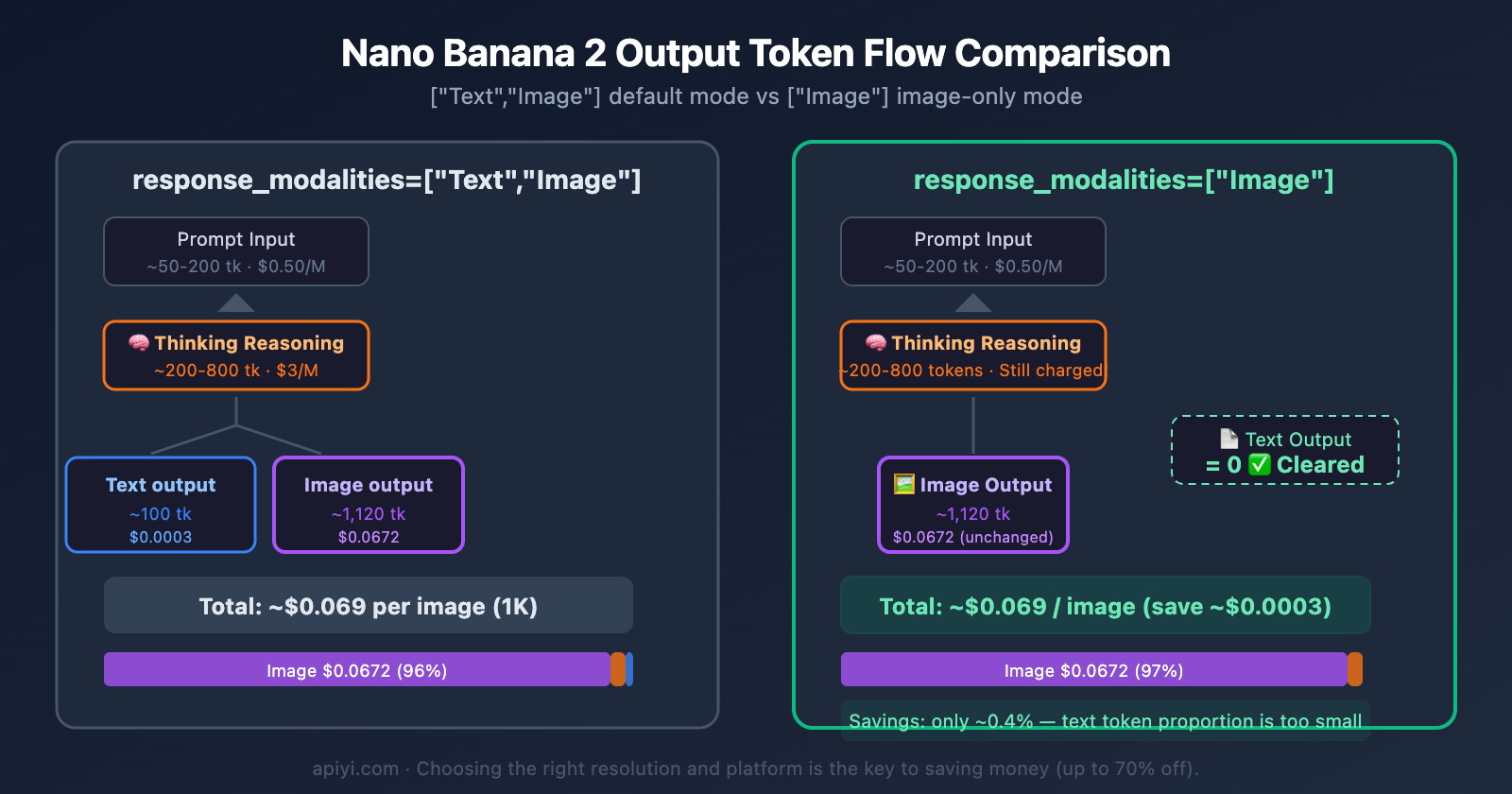
Setting ["Text", "Image"] — Default Mode
By default, Nano Banana 2 returns an image + a text description. The model will "think" (Thinking) first, then output a text description and an image.
from google import genai
from google.genai import types

client = genai.Client(api_key="YOUR_API_KEY")

response = client.models.generate_content(
    model="gemini-3.1-flash-image-preview",
    contents="Generate a cat in a spacesuit",
    config=types.GenerateContentConfig(
        response_modalities=["Text", "Image"],  # Default: Text + Image
    )
)
Output: A text description (e.g., "This is an orange cat wearing a spacesuit…") + 1 image
Token Consumption Breakdown (using 1K resolution as an example):
- Thinking Tokens: ~200-800 (varies with prompt complexity)
- Text Output Tokens: ~50-200
- Image Output Tokens: ~1,120
Setting ["Image"] — Image-Only Mode
Set to return only the image, without the text description.
response = client.models.generate_content(
    model="gemini-3.1-flash-image-preview",
    contents="Generate a cat in a spacesuit",
    config=types.GenerateContentConfig(
        response_modalities=["Image"],  # Image only, no text returned
    )
)
Output: Only 1 image, no text description
Token Consumption Breakdown (using 1K resolution as an example):
- Thinking Tokens: ~200-800 (still generated, still billed)
- Text Output Tokens: 0 (eliminated ✅)
- Image Output Tokens: ~1,120 (unchanged)
Cost Comparison for Nano Banana 2's Two Modes
| Comparison | ["Text", "Image"] Default |
["Image"] Image-Only |
Difference |
|---|---|---|---|
| Image Tokens (~1,120) | $0.0672 | $0.0672 | 0 (unchanged) |
| Thinking Tokens (~500) | $0.0015 | $0.0015 | 0 (unchanged) |
| Text Tokens (~100) | $0.0003 | $0 | Save $0.0003 |
| Total Cost per Image (1K) | ~$0.069 | ~$0.069 | Save ~0.4% |
⚠️ Conclusion:
response_modalities=["Image"]does eliminate text output tokens. However, since text tokens are cheap at $3/M and their quantity is small (~50-200), the actual savings per image is only about $0.0001-$0.0006, which is negligible.
Why Can't You Skip Thinking Tokens in Nano Banana 2?
This is the most easily overlooked point in Nano Banana 2's billing: Thinking tokens are always generated and always billed, regardless of whether you view the thinking process.
Google's official documentation clearly states:
Thinking tokens are billed regardless of whether
includeThoughtsis set totrueorfalse, as the thinking process always happens by default.
This means:
includeThoughts=True: You can see the thinking process, and you're billed for it.includeThoughts=False: You can't see the thinking process, but you're still billed for it.- Thinking token billing rate: $3/M (same as text output tokens).
Nano Banana 2 supports two thinking levels:
| Thinking Level | How to Set | Thinking Token Usage | Image Quality | Recommended Use Case |
|---|---|---|---|---|
| minimal | Default | ~200-500 | Sufficient for most scenarios | Daily image generation |
| high | thinking_level="high" |
~500-2000 | Better for complex scenes | Multiple characters / precise composition |
💡 Optimization Tip: If you don't need the absolute best image quality, stick with the default
minimalthinking level. Thehighlevel adds hundreds to thousands of thinking tokens. While the unit price is low ($3/M), it can add up in batch scenarios.
Truly Effective Cost-Saving Strategies for Nano Banana 2
Since response_modalities=["Image"] doesn't save much, which strategies actually work?
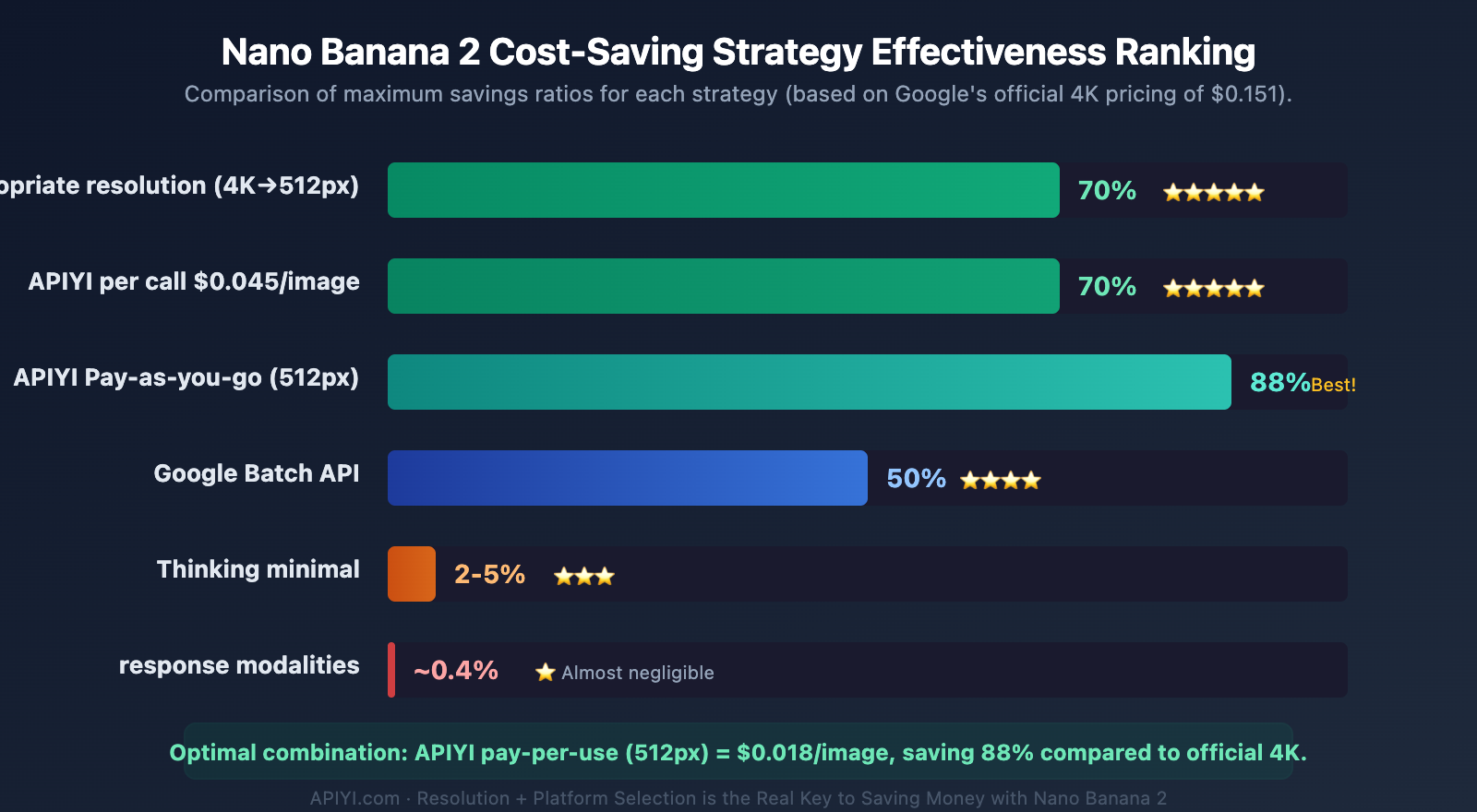
| Cost-Saving Strategy | Savings | How To | Recommendation |
|---|---|---|---|
| Choose the Right Resolution | Up to 70% | 4K→512px reduces cost from $0.151 to $0.045 | ⭐⭐⭐⭐⭐ |
| Use APIYI Per-Call Billing | Up to 70% | $0.045/image (incl. 4K), no resolution distinction | ⭐⭐⭐⭐⭐ |
| Use APIYI Volume Billing | Up to 63% | Low-res only $0.018/image (512px) | ⭐⭐⭐⭐⭐ |
| Google Batch API | 50% | Offline batch processing, image tokens half price | ⭐⭐⭐⭐ |
| Thinking minimal | 2-5% | Keep the default thinking level | ⭐⭐⭐ |
| response_modalities=["Image"] | ~0.4% | Remove text output | ⭐ |
Price Comparison for Nano Banana 2 Across Different Resolutions and Platforms
| Resolution | Google Official | APIYI Per-Call | APIYI Volume | Max Savings |
|---|---|---|---|---|
| 512px | $0.045 | $0.045 | $0.018 | 60% |
| 1K | $0.067 | $0.045 | $0.025 | 63% |
| 2K | $0.101 | $0.045 | $0.03 | 70% |
| 4K | $0.151 | $0.045 | $0.045 | 70% |
🎯 Best Practice: If your use case allows for 1K instead of 4K, you save 55% right away. Combine that with APIYI's volume billing at apiyi.com, and 1K resolution costs only $0.025/image—that's an 83% saving compared to the official 4K price of $0.151. The platform also offers a free image generation testing tool, AI 图片大师: imagen.apiyi.com, where you can quickly test different resolutions without writing any code.
Nano Banana 2 Optimal Configuration via APIYI
Based on the analysis above, here's the recommended optimal configuration:
import requests
import base64

API_KEY = "your-apiyi-api-key"
ENDPOINT = "https://api.apiyi.com/v1beta/models/gemini-3.1-flash-image-preview:generateContent"

headers = {
    "Content-Type": "application/json",
    "x-goog-api-key": API_KEY
}

payload = {
    "contents": [{"parts": [{"text": "A cat in an astronaut suit, digital art style"}]}],
    "generationConfig": {
        "responseModalities": ["IMAGE"],  # Image only, saves text tokens
        "imageConfig": {
            "aspectRatio": "1:1",
            "imageSize": "1K"  # Choose resolution as needed - this is the real money saver
        }
    }
}

response = requests.post(ENDPOINT, headers=headers, json=payload, timeout=120)
result = response.json()

image_data = result["candidates"][0]["content"]["parts"][0]["inlineData"]["data"]
with open("output.png", "wb") as f:
    f.write(base64.b64decode(image_data))
Recommendation: When calling Nano Banana 2 via APIYI at apiyi.com, you can choose per-call billing at $0.045/image (any resolution) or usage-based billing starting from $0.018/image. It supports native Google format calls with zero migration cost.
Frequently Asked Questions
Q1: Will thinking tokens still be generated if response_modalities=[“Image”] is set?
Yes. Nano Banana 2's thinking process is enabled by default and cannot be turned off. Whether you set response_modalities to ["Image"] or ["Text", "Image"], and regardless of whether includeThoughts is set to true or false, thinking tokens will always be generated and billed. The good news is that thinking tokens are billed at the text rate of $3/M, which is much lower than the image token rate of $60/M.
Q2: What’s the point of setting [“Image”] then?
There are two main benefits: First, it reduces network transfer volume – not returning text content means faster response parsing. Second, it simplifies code logic – you don't need to handle the text portion separately. While the cost saving is less than 1%, in scenarios requiring pure image output (like batch material production), getting the image directly is more convenient.
Q3: Which is more cost-effective – APIYI’s per-call billing or usage-based billing?
It depends on your commonly used resolution. Per-call billing at $0.045/image (any resolution) is suitable for scenarios where you frequently generate 2K/4K large images. Usage-based billing charges flexibly based on token consumption, with low resolution (512px) images costing only $0.018/image, making it ideal for batch production of low-resolution images. Register at APIYI apiyi.com to access both billing modes.
Summary
The key points of the response_modalities cost analysis for Nano Banana 2 are:
- Image Tokens are the absolute majority: The $60/M price for image tokens accounts for 95-97% of the total output cost. Text and reasoning tokens combined only make up 3-5%.
- Setting
["Image"]doesn't save much: It only eliminates text output tokens, saving about $0.0003 per image (less than 0.5%). - Reasoning tokens cannot be eliminated: They are always generated and billed at a $3/M rate, regardless of the
response_modalitiessetting. - Real savings come from resolution and platform: Choosing the right resolution can save up to 70%, and using APIYI can save an additional 63%.
We recommend calling Nano Banana 2 through APIYI at apiyi.com. It's $0.045 per call for 4K images with unlimited resolution, and volume-based pricing can go as low as $0.018 per image. The platform has no concurrency limits, supports native Google format calls, and includes a free image generation tool: imagen.apiyi.com.
📚 References
-
Google Gemini API Pricing Page: Official Nano Banana 2 token price list
- Link:
ai.google.dev/gemini-api/docs/pricing - Description: View the latest pricing for image, text, and reasoning tokens.
- Link:
-
Google AI Image Generation Documentation: Explanation of the
response_modalitiesparameter- Link:
ai.google.dev/gemini-api/docs/image-generation - Description: Official documentation on configuring the
["Image"]and["Text","Image"]modes.
- Link:
-
Google AI Token Counting Documentation: Understanding token composition and billing
- Link:
ai.google.dev/gemini-api/docs/tokens - Description: Learn about the relationship between image output token count and resolution.
- Link:
-
APIYI Nano Banana 2 Documentation: Details on per-call and volume-based billing modes
- Link:
docs.apiyi.com/en/api-capabilities/nano-banana-2-image - Description: Explanation of APIYI's pricing plans and calling methods.
- Link:
Author: APIYI Technical Team
Technical Discussion: Feel free to discuss in the comments. For more resources, visit the APIYI documentation center at docs.apiyi.com.