Author's Note: A deep dive into GPT-5.4's native Computer Use capability, its 75.0% OSWorld score surpassing human experts, and how to combine it with the OpenClaw AI Agent framework for efficient automation.
GPT-5.4 isn't just another model upgrade—it's OpenAI's first product to natively build computer usage capabilities into a general-purpose model. This means the AI can directly control your computer without needing external tools: clicking buttons, typing text, scrolling pages, dragging files—it all happens inside the model.
Core Value: After reading this article, you'll understand the technical principles and practical capabilities of GPT-5.4 Computer Use, and how to combine it with OpenClaw to build efficient AI Agent workflows.
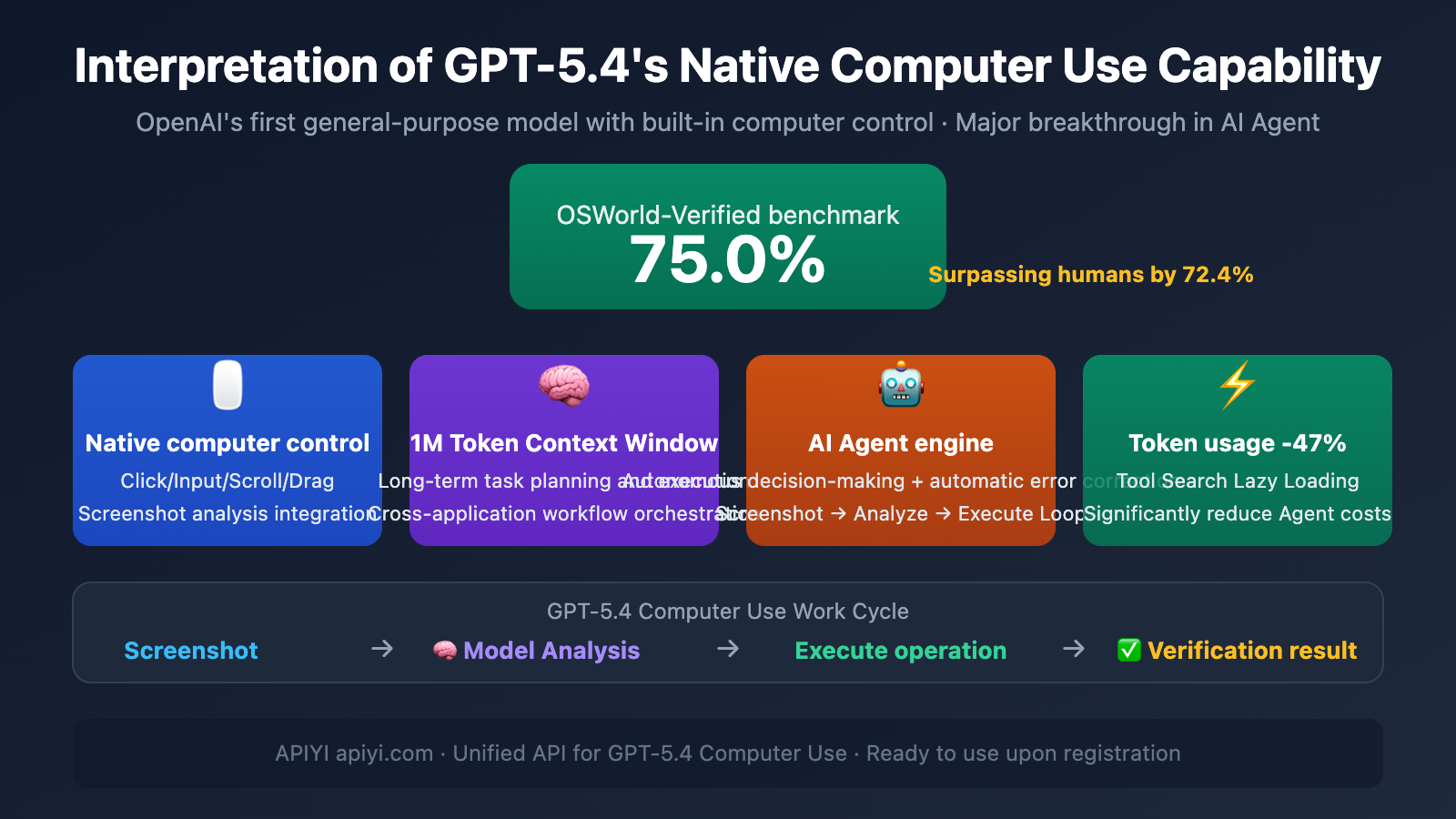
GPT-5.4 Computer Use: Key Points
| Key Point | Description | AI Agent Value |
|---|---|---|
| Native Integration | Computer control capability is directly integrated into the model, no external tools needed | Simpler deployment, lower latency |
| OSWorld 75.0% | First to surpass human expert performance (72.4%) on desktop control benchmark | Reliably executes complex desktop tasks |
| Full-Resolution Vision | Supports screenshot analysis up to 10.24M pixels | Precise UI element localization |
| 1M Token Context | 1.05 million tokens support long-horizon task planning | Cross-application, multi-step workflows |
| 47% Token Usage Reduction | Tool Search lazy loading technology | Significantly reduces Agent runtime costs |
Why GPT-5.4 Computer Use is "Native"
Previous AI solutions for controlling computers typically required a dedicated "agent layer" or "tool layer" to translate the model's intent into actual operations. The revolutionary aspect of GPT-5.4 is that computer usage capability is directly embedded into the model's weights, not a later-attached external module.
This brings three fundamental advantages:
- Perception-Decision Integration: After seeing a screenshot, the model directly outputs the action to execute (click coordinates, type text, key combinations) within the same reasoning process, without needing intermediate tool-call translation.
- More Decisive Autonomous Behavior: Compared to Claude's Computer Use, which tends to pause for confirmation, GPT-5.4 exhibits greater autonomy in multi-step tasks, capable of executing complex chains of operations continuously.
- Hybrid Programming Capability: It can not only control the GUI through screenshot-action loops but also directly write automation scripts like Playwright, seamlessly switching between visual control and programmatic control.
Practical Significance: For AI Agent developers, GPT-5.4's native Computer Use means you can have an AI operate any software like a human—no API, no plugins needed, as long as it can see the interface, it can control it. Access GPT-5.4 through APIYI at apiyi.com to start building your own Computer Use Agent.
Detailed Explanation of GPT-5.4 Computer Use Supported Operations
GPT-5.4's Computer Use tool supports a rich set of operation types, covering all common desktop interaction scenarios:
| Operation Type | Function Description | Parameters | Typical Use Case |
|---|---|---|---|
| click | Mouse click | button (left/middle/right), x, y coordinates | Clicking buttons, selecting menu items |
| double_click | Mouse double-click | button, x, y coordinates | Opening files, selecting words |
| type | Keyboard text input | text content | Filling out forms, entering search terms |
| keypress | Key press operation | Key identifier (including key combinations) | Shortcuts like Ctrl+C, pressing Enter to confirm |
| scroll | Scroll operation | x, y, scrollX, scrollY | Browsing long pages, zooming maps |
| drag | Drag operation | Start and end coordinates | Dragging files, resizing windows |
| screenshot | Capture current screen | None | Getting the latest interface state |
| wait | Wait operation | None | Waiting for a page to load |
The GPT-5.4 Computer Use Work Cycle
The core of Computer Use is a closed loop of screenshot → analyze → act → verify:
- Screenshot: The Agent captures the current screen state.
- Model Analysis: GPT-5.4 understands the interface content and decides the next action.
- Execute Action: Returns a structured
computer_callinstruction (can be a batch of operations). - Verify Result: Takes another screenshot to confirm if the action succeeded, automatically retrying on failure.
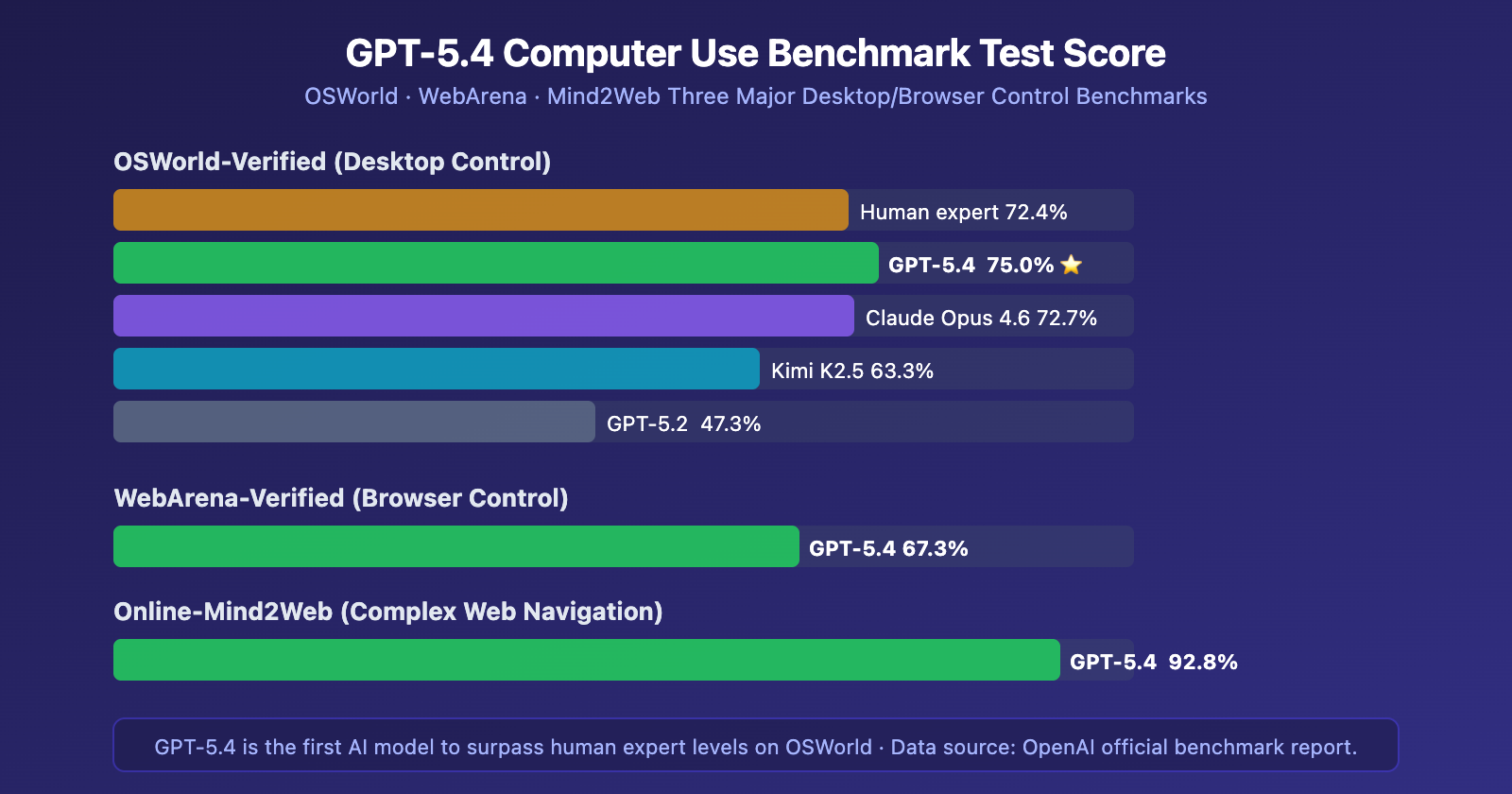
This set of benchmark data clearly demonstrates GPT-5.4's leading position in the field of computer control. Particularly, the 92.8% score on Online-Mind2Web means it can navigate various complex, unoptimized real-world webpages—exactly the scenarios where many traditional DOM-parsing-based solutions often fail.
GPT-5.4 Computer Use vs. Claude Comparative Analysis
GPT-5.4 isn't the only model with Computer Use capabilities. Anthropic's Claude series has been exploring computer control since Claude 3.5 Sonnet, and Claude Opus 4.6 is already quite mature. The differences in their approaches are worth noting:
| Comparison Dimension | GPT-5.4 | Claude Opus 4.6 |
|---|---|---|
| OSWorld Score | 75.0% ⭐ | 72.7% |
| Control Style | Autonomous and decisive, executes continuously | Cautious and confirmatory, pauses for instructions |
| Suitable Scenarios | Background autonomous Agents, batch tasks | Supervised tasks, safety-sensitive operations |
| Context Window | 1,050K tokens | 200K (1M Beta) |
| Integration Ecosystem | Operator + Codex + ChatGPT Agent | Anthropic API + MCP |
| Token Optimization | Tool Search reduces usage by 47% | Standard consumption |
| Programming Control | Supports Playwright hybrid mode | Primarily screenshot-action mode |
| SWE-Bench Coding | 77.2% | 79.2% ⭐ |
The Practical Impact of GPT-5.4 Computer Use's Two Behavioral Styles
This difference is crucial for AI Agent architecture selection:
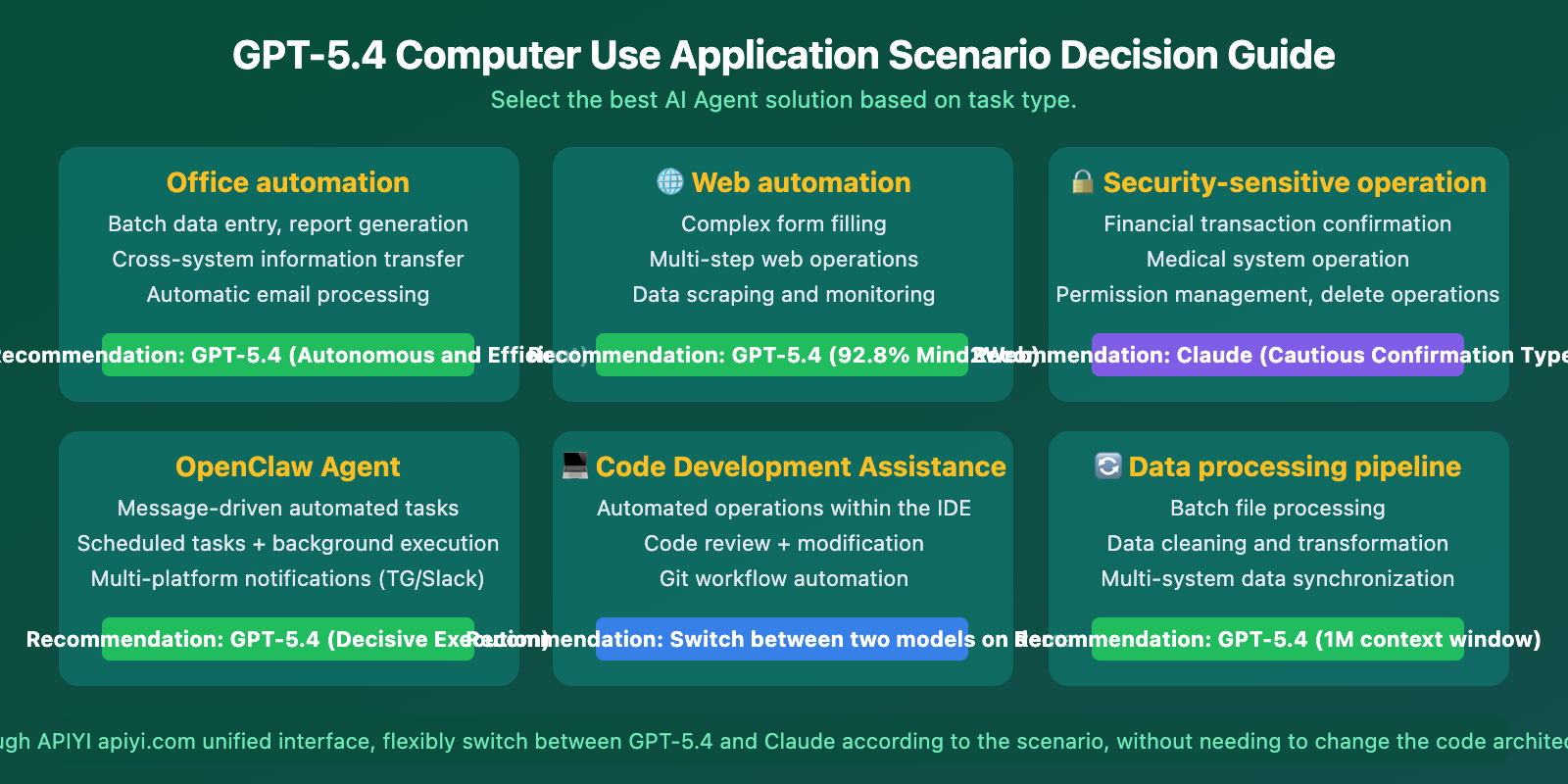
GPT-5.4's "Decisive" Style: Ideal for scenarios where the AI needs to complete multi-step operations continuously in the background. Examples include batch data processing, automatic form filling, and cross-application workflow orchestration. It doesn't frequently pause for your confirmation, leading to higher efficiency.
Claude's "Cautious" Style: Suitable for scenarios involving sensitive data or requiring human oversight. Examples include financial transaction confirmations, medical system operations, or deletion actions. It proactively pauses at critical junctures, letting you decide whether to proceed.
Selection Advice: If your Agent needs to run highly autonomously and unattended for long periods, GPT-5.4 is the better choice. If safety is the top priority and human-AI collaboration is needed, Claude is more prudent. Both models can be invoked through the unified interface of APIYI (apiyi.com), making it easy to switch based on the scenario.
The Significance of GPT-5.4 Computer Use for AI Agents
The launch of GPT-5.4's native Computer Use capability marks a pivotal inflection point in the AI Agent domain.
Why GPT-5.4 is a Major Boon for AI Agents
First, it lowers the barrier to Agent development. Previously, getting an AI to control a computer required either writing complex automation scripts with Selenium/Playwright or using a dedicated Computer Use API for a screenshot-action loop. Now, a single API call handles it all—the model sees the screen, performs actions, and validates results on its own.
Second, it surpasses human-level performance for the first time. Achieving 75.0% on OSWorld, exceeding the human expert benchmark of 72.4%, isn't just lab data. It's a capability assessment for completing complex tasks in real desktop environments. AI Agents can now genuinely replace humans for desktop operations.
Third, it drastically reduces token consumption. The Tool Search technology cuts token usage for tool calls by 47%. For Agents that rely heavily on tool calls, this translates to nearly halving the operational cost.
Practical Synergy: GPT-5.4 Computer Use with OpenClaw
OpenClaw is one of the hottest open-source AI Agent frameworks, developed by Peter Steinberger. It supports controlling AI Agents via messaging platforms like WhatsApp, Telegram, and Slack to execute various automation tasks.
Advantages of Combining OpenClaw with GPT-5.4 Computer Use
OpenClaw supports multi-model switching. You can switch the underlying model to GPT-5.4 with just one command:
/model openai/gpt-5.4
By leveraging GPT-5.4's native Computer Use, OpenClaw can achieve more efficient automated workflows:
- Cross-application Operations: Use messaging commands to have the Agent complete tasks across multiple desktop applications.
- Web Automation: Navigate complex websites using its 92.8% Mind2Web capability.
- Background Batch Processing: Send an instruction, and the Agent works autonomously, notifying you via message upon completion.
- File Management: Automatically organize files, perform batch renaming, and extract data.
GPT-5.4 Computer Use API Quick Start
Minimal Example
Here's the basic flow for calling the GPT-5.4 Computer Use API:
from openai import OpenAI

client = OpenAI(
    api_key="YOUR_API_KEY",
    base_url="https://vip.apiyi.com/v1"
)

# Start a Computer Use task
response = client.responses.create(
    model="gpt-5.4",
    tools=[{"type": "computer"}],
    input="Open the browser and search for the latest AI news"
)

# Process the returned action instructions
for action in response.output.actions:
    print(f"Action: {action.type}, Parameters: {action}")
View Full Computer Use Loop Code
from openai import OpenAI
import base64
import subprocess

client = OpenAI(
    api_key="YOUR_API_KEY",
    base_url="https://vip.apiyi.com/v1"
)

def capture_screenshot():
    """Capture the current screen"""
    subprocess.run(["screencapture", "-x", "/tmp/screen.png"])
    with open("/tmp/screen.png", "rb") as f:
        return base64.b64encode(f.read()).decode()

def execute_action(action):
    """Execute the action instructions returned by the model"""
    if action.type == "click":
        # Use system tools to click at specified coordinates
        print(f"Click coordinates: ({action.x}, {action.y})")
    elif action.type == "type":
        print(f"Input text: {action.text}")
    elif action.type == "keypress":
        print(f"Key press: {action.key}")

# Initial request
response = client.responses.create(
    model="gpt-5.4",
    tools=[{"type": "computer"}],
    input="Help me complete the specified task"
)

# Computer Use loop
while response.status != "completed":
    # Execute actions
    for action in response.output.actions:
        execute_action(action)

    # Take a screenshot and send it to the model
    screenshot = capture_screenshot()
    response = client.responses.create(
        model="gpt-5.4",
        tools=[{"type": "computer"}],
        previous_response_id=response.id,
        input=[{
            "type": "computer_call_output",
            "call_id": response.output.call_id,
            "output": {
                "type": "computer_screenshot",
                "image_url": f"data:image/png;base64,{screenshot}"
            }
        }]
    )

print("Task completed!")
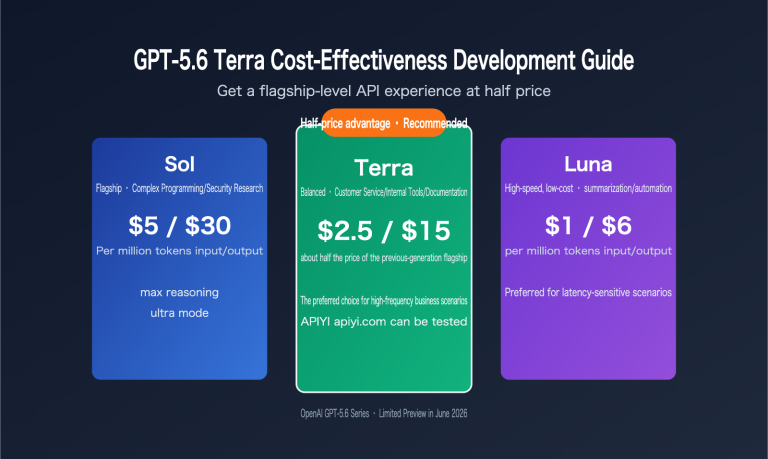
Recommendation: Get your API Key through APIYI at apiyi.com. Prices are synchronized with the official rates ($2.50/M input, $15.00/M output). Register to access all GPT-5.4 capabilities, including Computer Use. Top-ups of $100 or more receive a 10%+ bonus credit.
GPT-5.4 Computer Use Application Scenarios
GPT-5.4 Computer Use Best Practices
Recommended Screenshot Resolution: OpenAI officially recommends a desktop resolution of 1440×900 or 1600×900. Use the detail: "original" parameter to get full-resolution screenshot analysis.
Batch Operations: GPT-5.4 supports returning multiple operations in a single computer_call. Execute them in order and then take a screenshot for verification to reduce the number of API calls.
Error Recovery: The model has automatic error correction capabilities. If an operation doesn't achieve the expected result, it will recognize the issue in the next screenshot analysis and adjust its strategy.
Frequently Asked Questions
Q1: What’s the difference between GPT-5.4 Computer Use and traditional RPA?
Traditional RPA (like UiPath) relies on predefined process scripts and DOM selectors, which fail when the interface changes. GPT-5.4 is based on visual understanding; it "sees" and operates on the screen like a human, giving it a natural adaptability to interface changes. Its 92.8% score on Mind2Web proves it can handle various complex, unoptimized real-world interfaces.
Q2: Do I need to change code to switch OpenClaw to GPT-5.4?
No. OpenClaw supports hot-swapping between multiple models. You just need to run the /model openai/gpt-5.4 command. The underlying API calls and task orchestration logic remain unchanged. If your API Key is from APIYI apiyi.com, you simply need to set the corresponding base_url in the OpenClaw configuration.
Q3: How can I quickly start testing GPT-5.4 Computer Use?
Recommended steps:
- Visit APIYI apiyi.com to register an account and get an API Key.
- Install the OpenAI Python SDK:
pip install openai - Use the minimal code example in this article for quick verification.
- Refer to OpenAI's official sample application:
github.com/openai/openai-cua-sample-app
Summary
Key takeaways about GPT-5.4 Computer Use:
- Native Integration is the Key Breakthrough: It's not an add-on but a capability integrated at the model weight level, achieving perception-decision unification.
- OSWorld 75.0% Surpasses Humans: The first time an AI has exceeded expert human performance on a desktop control benchmark.
- A Boon for the AI Agent Ecosystem: Lowers the barrier to building agents, reduces runtime costs (-47% Tokens), and promotes the large-scale application of Agents.
- OpenClaw is Plug-and-Play: Switch models with a single command and immediately benefit from the enhanced native Computer Use capability.
GPT-5.4's native Computer Use capability truly ushers AI Agents into an era of "seeing and doing." Whether you're building automated workflows with OpenClaw or developing custom Agent applications, it's recommended to access it via APIYI apiyi.com—prices are synchronized with the official ones, ready to use upon registration, with a 10%+ bonus on top-ups starting from $100.
📚 References
-
OpenAI GPT-5.4 Announcement: Details on GPT-5.4's Native Computer Use Capability
- Link:
openai.com/index/introducing-gpt-5-4/ - Description: Official release blog containing core capabilities and benchmark test data.
- Link:
-
OpenAI Computer Use API Documentation: Guide for Integrating the Computer Use Tool
- Link:
developers.openai.com/api/docs/guides/tools-computer-use/ - Description: Detailed API integration documentation, including operation types and code examples.
- Link:
-
OpenAI CUA Sample Application: Computer Use Agent Reference Implementation
- Link:
github.com/openai/openai-cua-sample-app - Description: Official sample code for a Computer Use Agent.
- Link:
-
OpenClaw Project: Open-Source AI Agent Framework
- Link:
github.com/openclaw/openclaw - Description: An autonomous AI Agent framework supporting multiple models, controllable via messaging platforms.
- Link:
Author: APIYI Technical Team
Technical Discussion: Feel free to discuss GPT-5.4 Computer Use and AI Agent development experiences in the comments. For more resources, visit the APIYI documentation center at docs.apiyi.com.