Author's Note: A deep dive into why Claude Opus 4.6 is the ultimate model for OpenClaw, and how to achieve peak performance by connecting via APIYI's Anthropic mode—complete with configuration code.
OpenClaw exploded past 175k GitHub Stars in less than two weeks, becoming the breakout AI Agent framework of 2026. But many users are hitting a wall with model selection—opting for cheaper models might seem like a cost-saver, but the reality is that failed tool calls and broken task chains end up costing far more in retries.
Core Value: This post breaks down why Claude Opus 4.6 is the S-tier choice for OpenClaw, and why you must use Anthropic native mode (rather than OpenAI compatibility mode) to get the best results. You'll find the full configuration code at the end—just copy, paste, and go.
Why Claude Opus 4.6 is the Best Model for OpenClaw
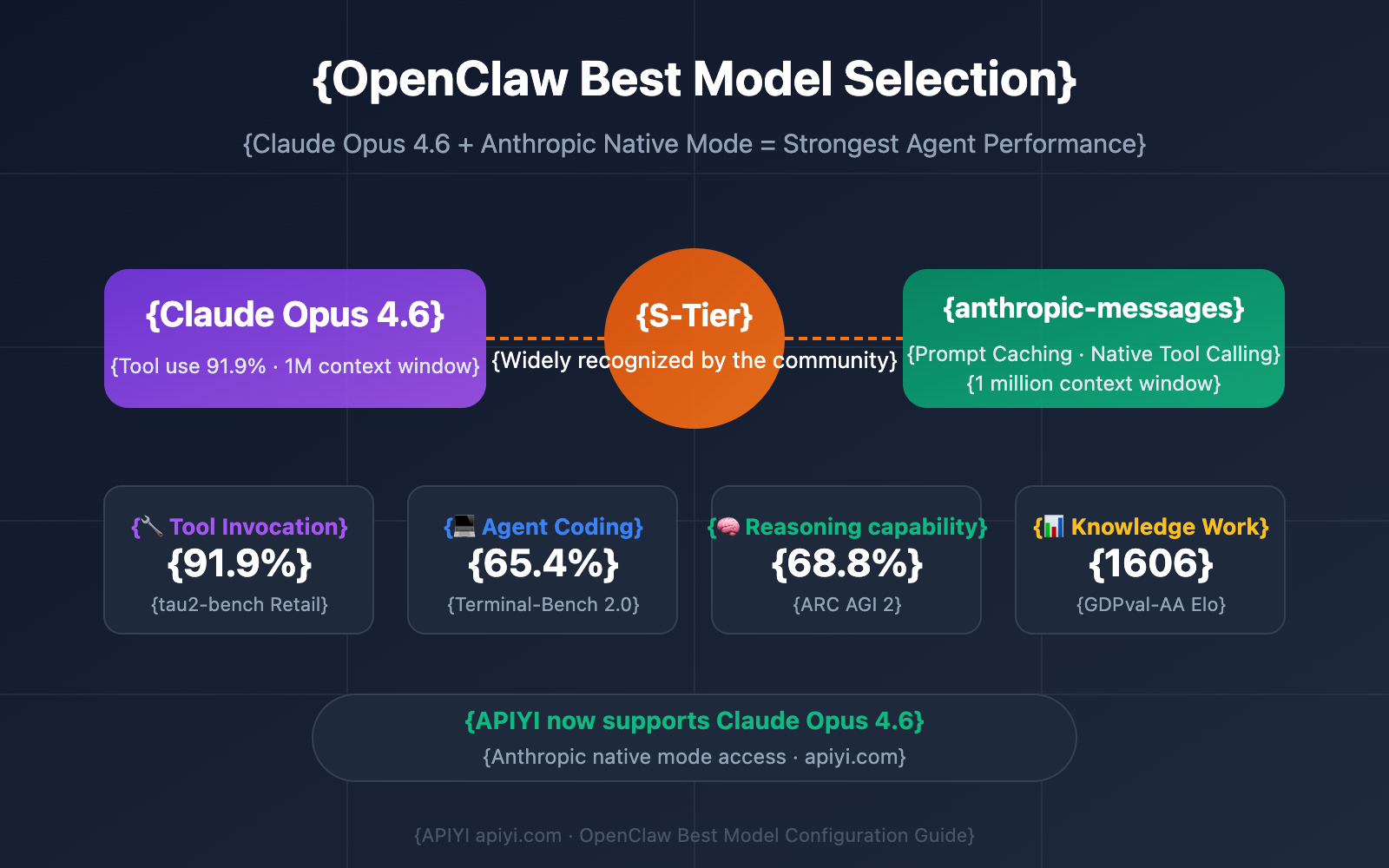
The consensus in the OpenClaw community is clear: if you want top-tier Agent execution, Claude Opus 4.6 is the current gold standard. This isn't just a subjective take; it's baked into how OpenClaw actually works.
| OpenClaw Core Requirements | Claude Opus 4.6 Advantages | Key Data |
|---|---|---|
| Tool Calling Accuracy | Highest Function Calling precision of any model | tau2-bench Retail 91.9%, Telecom 99.3% |
| Ultra-Long Context | Agent sessions easily cross 200k tokens; Opus 4.6 supports 1M | MRCR v2 Long-Context Eval 76% (Sonnet 4.5 only 18.5%) |
| Prompt Injection Resistance | OpenClaw handles untrusted content like emails and web pages; security is paramount | Lowest alignment bias rate among frontier models |
| Agent Coding Capability | Executing Shell commands and writing scripts is core to OpenClaw | Terminal-Bench 2.0 score of 65.4%, the highest of all models |
| Knowledge Work Capability | High-value tasks like research synthesis and data analysis | GDPval-AA 1606 Elo, outperforming GPT-5.2 by 144 points |
Claude Opus 4.6 Full Performance Data
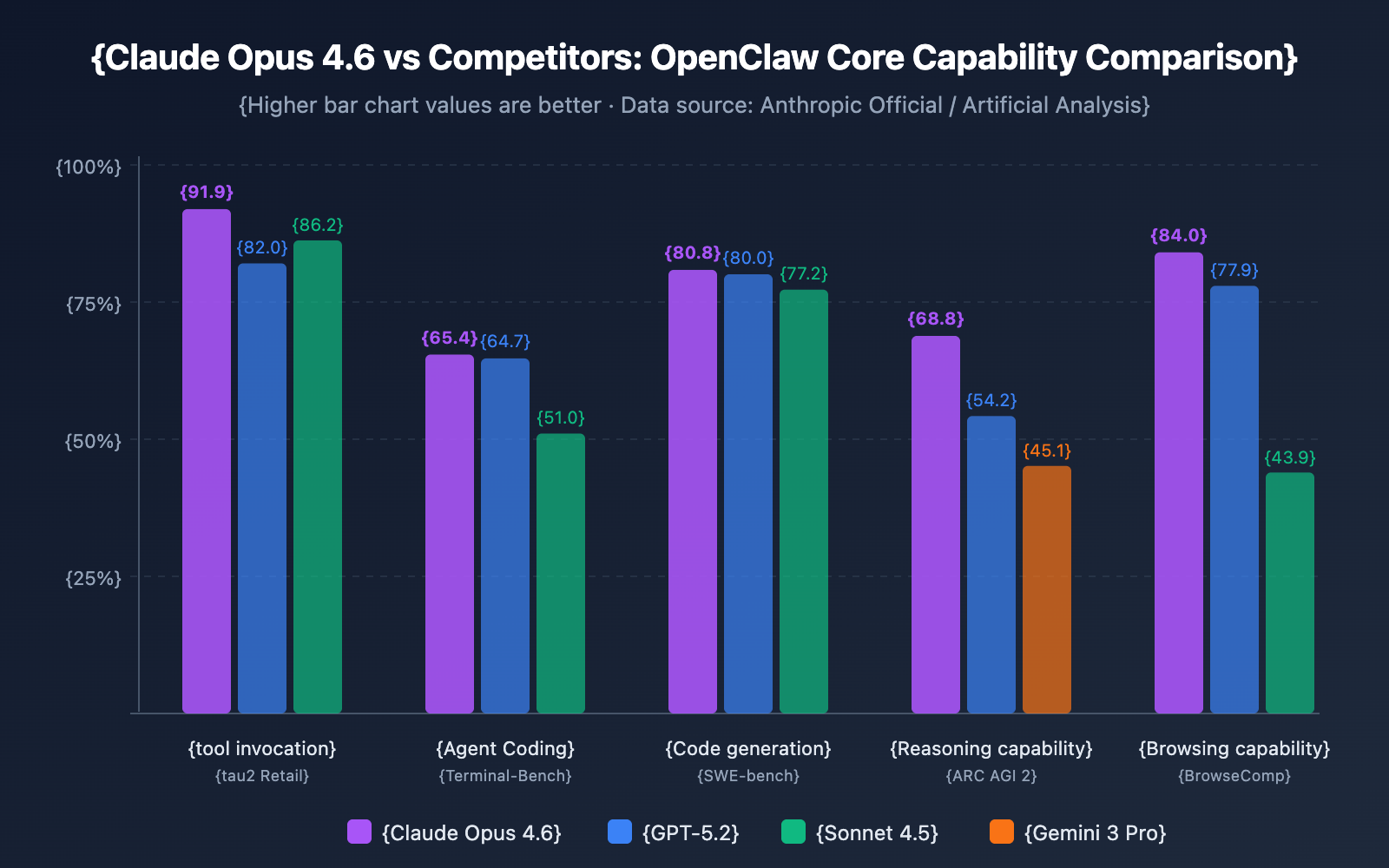
Here's a side-by-side comparison of Opus 4.6 against other popular OpenClaw models:
| Benchmark Dimension | Claude Opus 4.6 | GPT-5.2 | Gemini 3 Pro | Claude Sonnet 4.5 |
|---|---|---|---|---|
| Terminal-Bench 2.0 | 65.4% | 64.7% | 56.2% | 51.0% |
| SWE-bench Verified | 80.8% | 80.0% | 76.2% | 77.2% |
| tau2-bench Retail | 91.9% | 82.0% | 85.3% | 86.2% |
| ARC AGI 2 | 68.8% | 54.2% | 45.1% | – |
| BrowseComp | 84.0% | 77.9% | – | 43.9% |
| GDPval-AA Elo | 1606 | 1462 | – | 1277 |
| OSWorld | 72.7% | – | – | – |
🎯 Key Finding: Opus 4.6 shows a massive 31.2 percentage point jump in ARC AGI 2 and a 16.2 point increase in BrowseComp compared to the previous Opus 4.5. This represents a qualitative leap in handling complex reasoning and web browsing—the two most frequent use cases for OpenClaw Agents.
Why You Must Use Anthropic Mode to Connect OpenClaw
Here's a key detail many users overlook: OpenClaw supports two API formats for connecting to Claude models—the openai compatibility mode and the anthropic-messages native mode. Choosing the wrong mode means missing out on core features.
| Feature Comparison | anthropic-messages (Native) | openai (Compatibility Mode) |
|---|---|---|
| Tool Call Format | ✅ Native Tool Use, highest precision | ⚠️ Converted format, may lose details |
| Prompt Caching | ✅ Supports cacheRetention parameter | ❌ Not supported, full billing every time |
| 1 Million Context | ✅ Supports context1m parameter | ❌ Standard 200K only |
| Extended Thinking | ✅ Full support for adaptive thinking | ⚠️ May be unstable |
| Safety Filtering | ✅ Anthropic native safety layer | ⚠️ Depends on proxy implementation |
Prompt Caching: The Hidden Money-Saver
When using the Anthropic native mode, you can enable the cacheRetention parameter. OpenClaw Agent sessions often contain a large volume of repetitive system prompts and tool definitions. Caching this content can significantly slash your actual costs.
"short": Cache for 5 minutes, ideal for continuous conversations."long": Cache for 1 hour, perfect for Heartbeat scheduled tasks."none": No caching, best for one-off tasks.
Pro Tip: When connecting via APIYI (apiyi.com), simply set
"api": "anthropic-messages"to use the native Anthropic mode while enjoying the platform's free test credits and unified management capabilities.
Complete OpenClaw Configuration for Claude Opus 4.6
Minimalist Example
Here's a minimalist example for connecting Claude Opus 4.6 via the APIYI platform. Just copy this into your ~/.openclaw/openclaw.json to get started:
{
  "models": {
    "providers": {
      "apiyi": {
        "baseUrl": "https://api.apiyi.com",
        "apiKey": "sk-REPLACE_ME",
        "api": "anthropic-messages",
        "models": [
          {
            "id": "anthropic/claude-opus-4-6",
            "name": "Claude Opus 4.6",
            "reasoning": false,
            "input": ["text"],
            "cost": { "input": 5, "output": 25 },
            "contextWindow": 1000000,
            "maxTokens": 128000
          }
        ]
      }
    }
  }
}
View Full Configuration (Including fallback models and Agent parameter optimization)
{
  "models": {
    "mode": "merge",
    "providers": {
      "apiyi": {
        "baseUrl": "https://api.apiyi.com",
        "apiKey": "sk-REPLACE_ME",
        "api": "anthropic-messages",
        "models": [
          {
            "id": "anthropic/claude-opus-4-6",
            "name": "Claude Opus 4.6",
            "reasoning": false,
            "input": ["text"],
            "cost": { "input": 5, "output": 25 },
            "contextWindow": 1000000,
            "maxTokens": 128000
          },
          {
            "id": "anthropic/claude-sonnet-4-5",
            "name": "Claude Sonnet 4.5",
            "reasoning": false,
            "input": ["text"],
            "cost": { "input": 3, "output": 15 },
            "contextWindow": 200000,
            "maxTokens": 64000
          }
        ]
      }
    }
  },
  "agents": {
    "defaults": {
      "model": {
        "primary": "anthropic/claude-opus-4-6",
        "fallbacks": ["anthropic/claude-sonnet-4-5"]
      },
      "models": {
        "anthropic/claude-opus-4-6": {
          "alias": "opus",
          "params": {
            "cacheRetention": "short",
            "context1m": true
          }
        },
        "anthropic/claude-sonnet-4-5": {
          "alias": "sonnet"
        }
      }
    }
  }
}
Pro Tip: Register at APIYI (apiyi.com) to get your API key and replace
sk-REPLACE_MEin the config. The platform supports native Anthropic mode, ensuring OpenClaw's tool calling and caching features are fully functional.
OpenClaw Claude Opus 4.6 Cost Optimization Strategies
Opus 4.6's pricing is $5/$25 (Input/Output per million tokens), which is about 67% more expensive than Sonnet 4.5's $3/$15. However, the hybrid routing strategy recommended by the OpenClaw community can significantly slash your actual spending:
| Strategy | Model Allocation | Est. Monthly Cost | Best Use Case |
|---|---|---|---|
| Pure Opus | 100% Opus 4.6 | $80-$750+ | Safety-critical, budget is no object |
| Hybrid Routing (Recommended) | 70% Sonnet + 30% Opus | $25-$250 | Balancing quality and cost |
| Daily + Upgrade | 90% Haiku + 10% Opus | $5-$80 | Budget-sensitive, upgrade as needed |
Hybrid Routing Configuration Tips
OpenClaw supports setting primary and fallbacks models in the configuration. In practice, you can:
- Set Sonnet 4.5 as the default model for daily tasks (message forwarding, calendar management, simple queries).
- Manually or via Agent rules route complex tasks (multi-step reasoning, coding, data analysis) to Opus 4.6.
- Enable Prompt caching (
cacheRetention: "short") to further reduce costs for repetitive context.
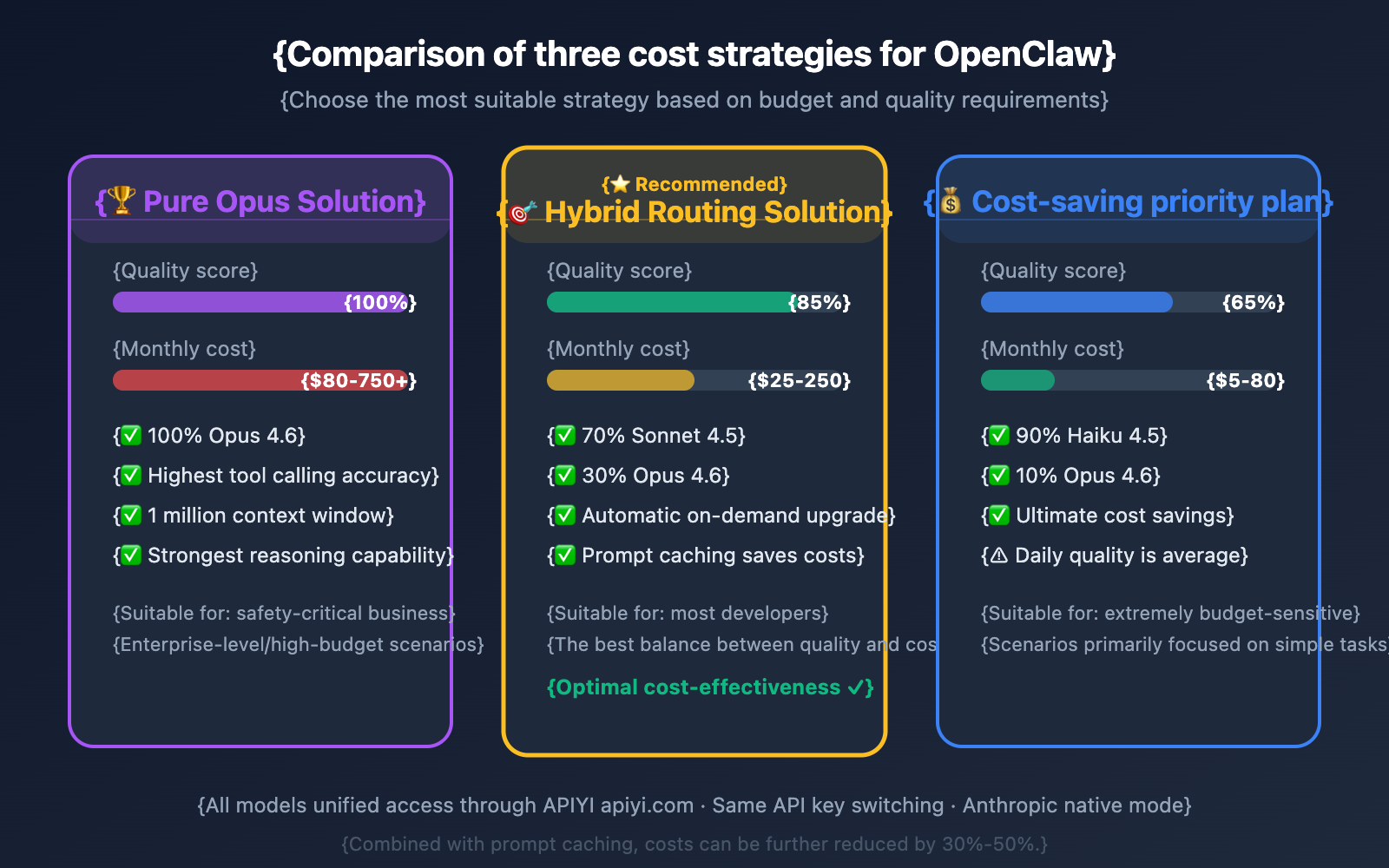
🎯 Cost Tip: Accessing via the APIYI platform offers discounted pricing. Combined with prompt caching and hybrid routing, most users can keep their monthly costs between $25-$100 while maintaining Opus-level quality for critical tasks.
Troubleshooting OpenClaw Configuration
Here are the most common pitfalls you might run into during configuration:
| Issue | Cause | Solution |
|---|---|---|
| Tool call format error | Using openai compatibility mode |
Change to "api": "anthropic-messages" |
| Error when context exceeds 200K | 1M context window not enabled | Add the "context1m": true parameter |
| Unusually high token costs | Prompt caching not enabled | Set "cacheRetention": "short" |
| Connection timeout | Incorrect baseUrl format |
Ensure there are no extra paths in the URL, e.g., https://api.apiyi.com |
| Model unavailable | Model ID typo | Use the full ID: anthropic/claude-opus-4-6 |
Once you've finished your configuration, run openclaw doctor. It'll automatically check your config file syntax, provider connectivity, model availability, and authentication status.
FAQ
Q1: Why shouldn’t I just use OpenAI compatibility mode to connect to Claude?
OpenAI compatibility mode converts Anthropic's native tool call format into the OpenAI format. This conversion process can lose fine details, leading to a drop in tool call precision. More importantly, Prompt caching and the 1M context window—two features that are absolutely vital for OpenClaw—aren't available in OpenAI compatibility mode. You can use the native mode on the APIYI platform simply by setting "api": "anthropic-messages".
Q2: Opus 4.6 is too expensive. Is there a cheaper alternative?
If you're on a budget, we recommend a hybrid routing strategy: use Sonnet 4.5 ($3/$15) for daily tasks and only switch to Opus 4.6 for complex ones. In our tests, Sonnet 4.5 covers 80%-90% of OpenClaw's daily scenarios, only falling noticeably behind Opus in multi-step reasoning and long-context tasks. You can switch between both models on the APIYI (apiyi.com) platform using the same API key.
Q3: How do I verify if Anthropic mode is configured correctly?
After configuring, follow these steps to verify:
- Run
openclaw doctorto check the configuration status. - Send a test message that includes a tool call to confirm the return format is correct.
- Check the logs to see if
anthropic-messagesis being used as the API mode. - Confirm that Prompt caching is working (token consumption should drop significantly during continuous conversations).
Summary
Key takeaways for the optimal OpenClaw model configuration:
- Model Choice: Claude Opus 4.6: With 91.9% tool-calling accuracy, 65.4% on Terminal-Bench, and a 1-million-token context window, it leads across all core capability dimensions of OpenClaw.
- Must use Anthropic Native Mode: You need to set
"api": "anthropic-messages"to take advantage of prompt caching, the 1-million-token context window, and native tool-calling formats. - Hybrid Routing for Cost Control: Use Sonnet 4.5 for daily tasks and switch to Opus 4.6 for complex ones. This keeps monthly costs between $25 and $100.
The APIYI platform already supports Claude Opus 4.6 and Anthropic native mode access. We recommend getting your API key via APIYI (apiyi.com); combined with the configuration code in this article, you'll have OpenClaw running at its absolute best.
📚 References
-
OpenClaw Official Documentation: Anthropic Provider Configuration Guide
- Link:
docs.openclaw.ai/providers/anthropic - Description: Official configuration documentation for integrating Anthropic models into OpenClaw.
- Link:
-
Claude Opus 4.6 Release Announcement: Anthropic Official Tech Blog
- Link:
anthropic.com/news/claude-opus-4-6 - Description: Full benchmark data and new feature introductions for Opus 4.6.
- Link:
-
OpenClaw Configuration Reference: Complete JSON configuration field descriptions
- Link:
docs.openclaw.ai/gateway/configuration-reference - Description: Detailed documentation for all configuration items, including models, agents, tools, etc.
- Link:
-
OpenClaw Model Discussions: Community discussions on model selection and cost optimization
- Link:
github.com/openclaw/openclaw/discussions/12267 - Description: Real-world user feedback and price-performance analysis.
- Link:
Author: Technical Team
Technical Exchange: Feel free to share your OpenClaw model configuration experiences in the comments. For more AI model updates, visit APIYI (apiyi.com).