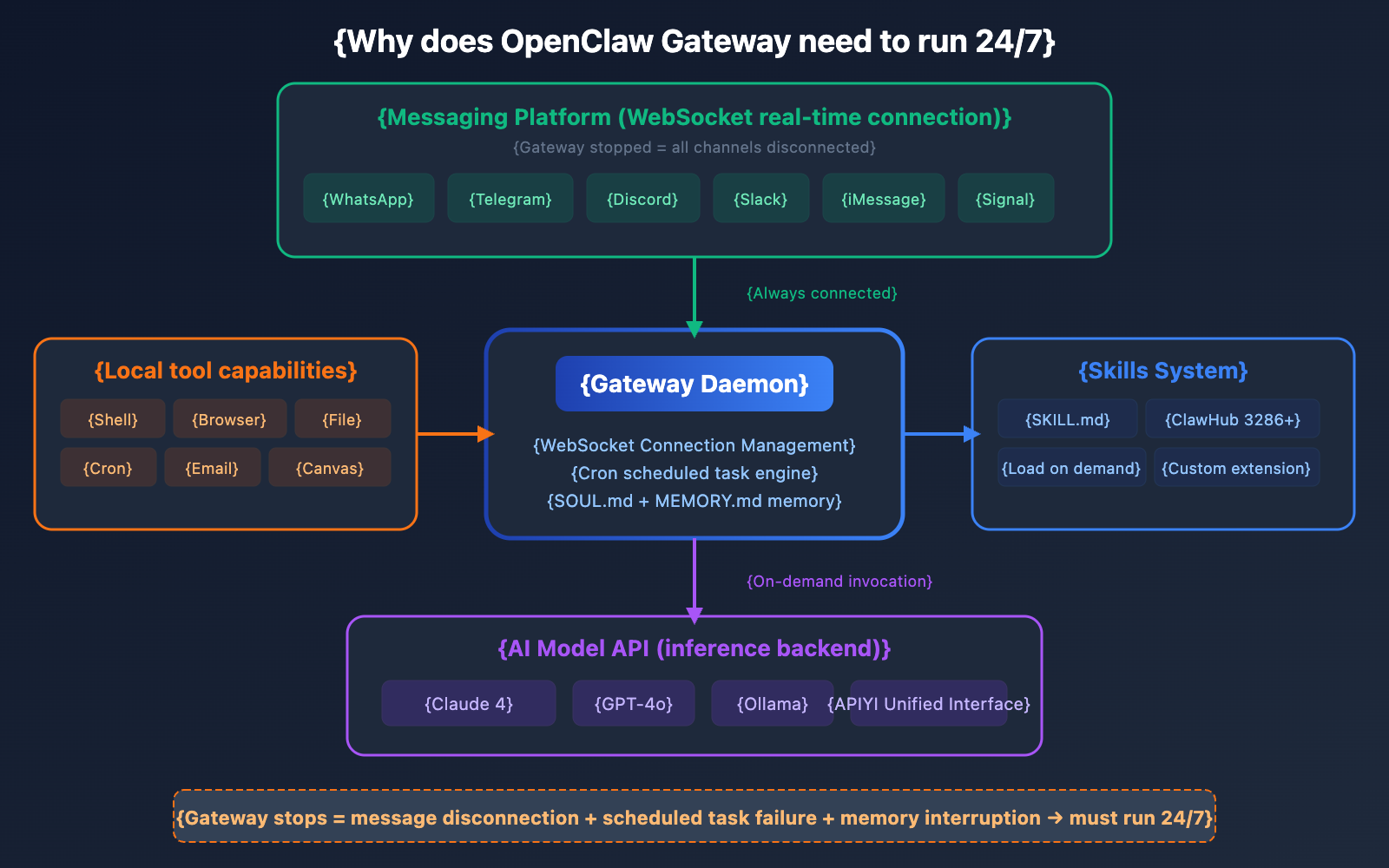
APIYI shares: OpenClaw is an AI Agent that needs to run continuously. Unlike standard chat tools, it must maintain real-time WebSocket connections with platforms like WhatsApp, Telegram, and Discord, execute scheduled tasks, and maintain cross-session memory—all of which require the Gateway process to be online 24/7.
This brings us to a core question: Should OpenClaw run on a local computer or a cloud server?
The answer depends on your use case, budget, and technical background. In this article, we'll compare four mainstream deployment solutions—Mac Mini local deployment, VPS cloud servers, Raspberry Pi, and 1Panel/Baota panels—across four dimensions: cost, stability, privacy, and ease of use, to help you choose the best fit.
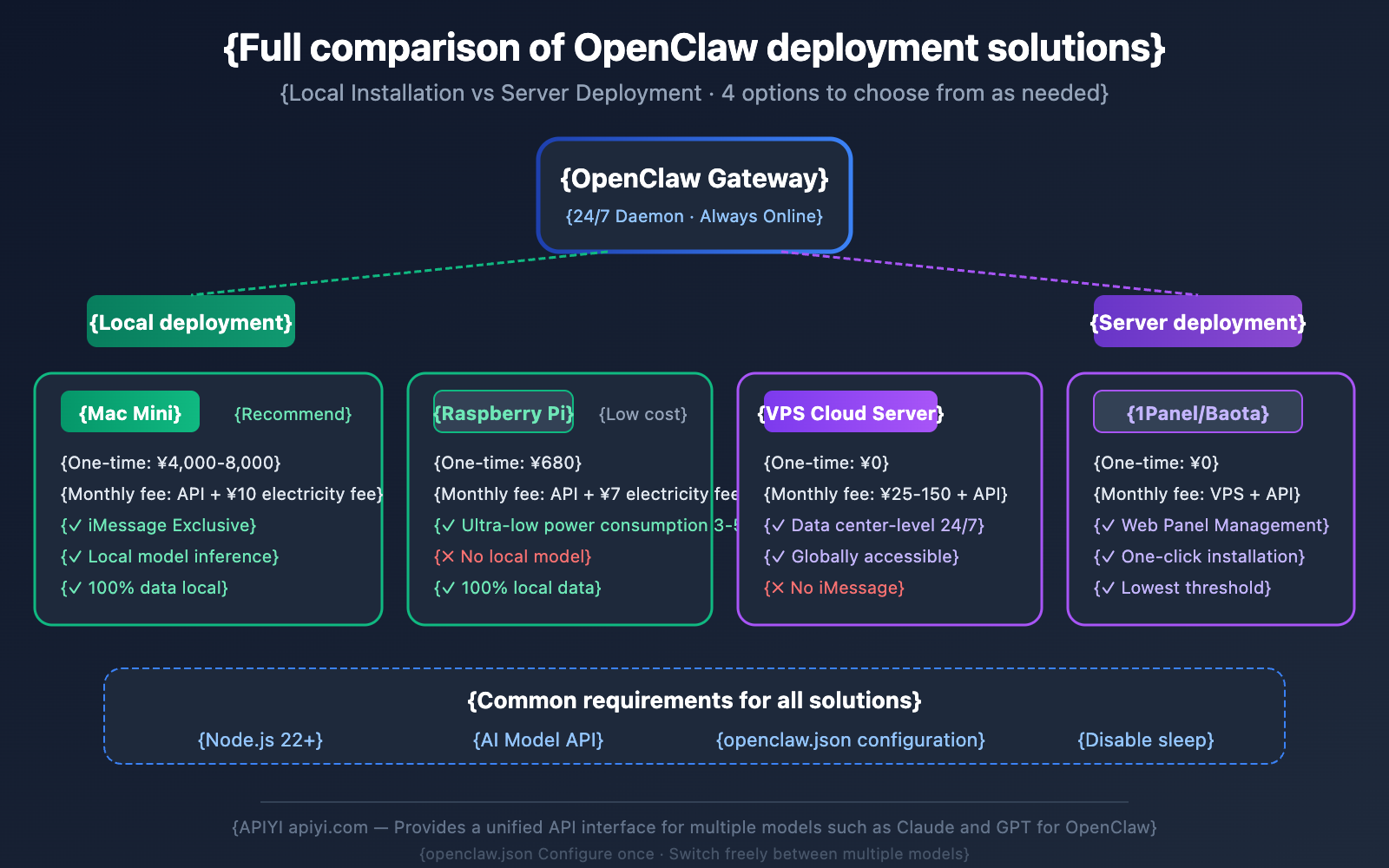
The comparison table is as follows:
| Deployment Option | Upfront Cost | Monthly Cost | 24/7 Stability | Technical Barrier |
|---|---|---|---|---|
| Mac Mini Local | ¥4,000-8,000 | API costs + ¥10 electricity | Depends on home network | Low |
| VPS Cloud Server | ¥0 | ¥25-150/mo + API costs | Data center grade | Medium |
| Raspberry Pi | ¥400-600 | API costs + ¥7 electricity | Depends on home network | Medium |
| 1Panel/Baota Panel | ¥0 | VPS costs + API costs | Data center grade | Low |
🚀 Quick Start: No matter which deployment method you choose, OpenClaw requires API support from Large Language Models. Through APIYI (apiyi.com), you can get one-stop access to API interfaces for models like Claude and GPT-4o. Just configure it once in
openclaw.jsonand you're good to go.
Why OpenClaw Needs to Run 24/7: Gateway Architecture Deep Dive
Before we dive into deployment options, let's clear up a key concept: OpenClaw Gateway is a daemon, not an on-demand tool.
The 3 Reasons OpenClaw Gateway Needs to Stay Online
1. Real-time Connectivity with Messaging Platforms
OpenClaw maintains long-lived connections with various messaging platforms via WebSockets. If the Gateway stops, all message channels drop immediately:
| Platform | Connection Method | Impact After Gateway Stops |
|---|---|---|
| WebSocket (baileys) | Completely disconnected; cannot send or receive messages | |
| Telegram | Bot Token + Webhook | Messages queue up; recovers after restart |
| Discord | Bot Token + WebSocket | Disconnected; auto-reconnects after restart |
| Slack | Bot Token + Events API | Messages queue up; recovers after restart |
| iMessage | BlueBubbles (macOS only) | Disconnected; requires the macOS device to be online |
| Signal | WebSocket | Disconnected; messages might be lost |
Among these, WhatsApp is the most sensitive. It uses the @whiskeysockets/baileys library to implement the WhatsApp Web protocol, giving the Gateway full control over the WebSocket connection and reconnection loops. If the Gateway isn't running, WhatsApp messages simply won't go through in either direction.
2. Scheduled Tasks (Cron)
OpenClaw's Cron system runs directly inside the Gateway process. If you've set up tasks like "remind me of the meeting at 9 AM every morning" or "check my email every hour," these tasks will only trigger if the Gateway is running continuously.
3. Persistent Memory and Proactive Behavior
OpenClaw uses SOUL.md and MEMORY.md files to maintain memory across different sessions. A continuously running Agent can accumulate context and exhibit truly proactive behavior—it doesn't just wait for you to start a conversation; it can monitor, schedule, and respond on its own initiative.
Option 1: Local Deployment on Mac Mini—Why the OpenClaw Community Loves It
The Mac Mini is widely recognized as the "reference deployment device" within the OpenClaw community. Even the founder, Peter Steinberger, uses a Mac Mini as his primary operating environment.
5 Core Advantages of the Mac Mini
| Advantage | Description |
|---|---|
| Ultra-low Power | Idles at just 5-10W; monthly electricity costs are negligible. |
| Plenty of Performance | Apple Silicon's single-thread performance is excellent, making Node.js run incredibly fast. |
| Local Models | With 16-32GB of unified memory, you can run local Large Language Models via Ollama. |
| iMessage | A macOS exclusive feature, integrated through BlueBubbles. |
| Silent & Compact | Fanless design (M2/M4 models) ensures silent 24/7 operation. |
Recommended Mac Mini Configurations
| Use Case | Recommended Model | Memory | Budget |
|---|---|---|---|
| Cloud Models Only | Mac Mini M2 | 8GB | ~$500 |
| Cloud + Local Models | Mac Mini M4 | 16GB | ~$600 |
| Heavy Local Inference | Mac Mini M4 Pro | 24-32GB | $1,000+ |
Tips for Running Mac Mini "Headless"
When using a Mac Mini as an OpenClaw server, you don't need to connect a monitor. However, macOS sometimes needs to "see" a display to function correctly. Here's how to handle it:
- HDMI Dummy Plug ($5-10): Plug in an HDMI dummy load to trick macOS into thinking a monitor is attached.
- Disable Sleep: Go to System Settings → Energy Saver → Set to "Never Sleep."
- Wired Network: Use an Ethernet cable instead of Wi-Fi to ensure a stable connection.
- Remote Access: Manage your setup via Tailscale or macOS's built-in Screen Sharing.
Installing OpenClaw on Mac Mini
# Install Node.js 22+
brew install node@22

# Install OpenClaw
npm install -g openclaw

# Run the installation wizard
openclaw onboard --install-daemon

# Start the Gateway
openclaw gateway start

# Verify status
openclaw status
The installation wizard will automatically configure the Gateway as a system daemon, so it starts up whenever you boot your Mac.
🎯 Configuration Tip: Once you've deployed OpenClaw locally on your Mac Mini, I recommend using APIYI (apiyi.com) to configure your AI model interfaces. You can set up both Claude and GPT models at once to handle different task scenarios.
Limitations of Mac Mini Deployment
- Home Network Dependency: If your internet goes down, your connection drops.
- Power Dependency: If the power goes out, the service stops.
- LAN Restrictions: By default, it's only accessible locally (though Tailscale can solve this).
- Hardware Investment: An upfront cost of $500-$1,000+.
Option 2: VPS Cloud Server Deployment—True 24/7 Availability
If you need your OpenClaw message channels to never go down, a VPS is the most reliable choice. Data-center-grade power and network redundancy ensure true 24/7 availability.
Recommended VPS Providers
| Provider | Starting Price | Features |
|---|---|---|
| Oracle Cloud | Free (4 ARM CPUs + 24GB RAM) | Always Free tier, plenty of performance. |
| DigitalOcean | $4-6/month | One-click OpenClaw images available. |
| Hetzner | $3-5/month | European nodes, great price-to-performance ratio. |
| Hostinger | $5/month | One-click OpenClaw VPS templates. |
| Local Cloud Providers | Varies | Low latency, but may require registration. |
Deploying OpenClaw via Docker on VPS
# SSH into your server
ssh root@your-server-ip

# Install Docker (if not already installed)
curl -fsSL https://get.docker.com | sh

# Clone OpenClaw
git clone https://github.com/openclaw/openclaw.git
cd openclaw

# Start with Docker Compose
docker-compose up -d

# Check logs
docker-compose logs -f
Security Essentials for VPS Deployment
This is the most critical point—never expose your Gateway port to the public internet:
{
  "gateway": {
    "bind": "127.0.0.1",
    "port": 18789,
    "auth": {
      "token": "your-secure-token"
    }
  }
}
- Set
bindto127.0.0.1to restrict access to local only. - Set an
auth.tokenfor added authentication protection. - Use Tailscale to create an encrypted tunnel for remote access.
💡 Note: OpenClaw deployed on a VPS does not support iMessage (which requires macOS hardware). If you need iMessage functionality, you'll have to go with the Mac Mini local deployment.
Option 3: 1Panel/BT Panel Deployment — The Lowest Barrier Server Solution
If you already have a server and are using 1Panel or BT Panel (Baota) for management, this is the most hassle-free option.
Installing OpenClaw via 1Panel
OpenClaw is already built into the 1Panel App Store, allowing for one-click installation:
- Log in to your 1Panel management dashboard.
- Go to the "App Store."
- Search for "OpenClaw."
- Click "Install" and wait for the Docker container to start.
- Access the container configuration to edit
openclaw.json.
1Panel Docker Image: 1panel/openclaw
Installing OpenClaw via BT Panel
While BT Panel doesn't have an official one-click install for OpenClaw, you can easily set it up using the Docker Manager:
- Install the "Docker Manager" plugin from the BT Panel software store.
- Create a new "Docker Compose" project.
- Use the official OpenClaw
docker-compose.ymlfile. - Once configured, start the container.
Configuring APIYI Models via openclaw.json
Whether you're using 1Panel or BT Panel, the core configuration lives in the openclaw.json file. Here’s a verified, complete configuration to get you started:
{
  "agents": {
    "defaults": {
      "model": {
        "primary": "apiyi/claude-sonnet-4-6-20250514"
      }
    }
  },
  "models": {
    "providers": {
      "apiyi": {
        "baseUrl": "https://api.apiyi.com/v1",
        "apiKey": "sk-xxxxxYour_API_Key_xxxxx",
        "api": "openai-response",
        "models": [
          {
            "id": "claude-sonnet-4-6-20250514",
            "name": "Claude Sonnet 4.6"
          },
          {
            "id": "gpt-4o",
            "name": "GPT-4o"
          }
        ]
      }
    }
  },
  "gateway": {
    "bind": "127.0.0.1",
    "port": 18789
  }
}
Key Configuration Details:
| Parameter | Description | Recommended Value |
|---|---|---|
agents.defaults.model.primary |
The default model to use | apiyi/Model_ID (provider/model name) |
models.providers.apiyi.baseUrl |
API endpoint address | https://api.apiyi.com/v1 |
models.providers.apiyi.apiKey |
Your API key | Obtain from the APIYI platform |
models.providers.apiyi.api |
API protocol type | Use openai-response for OpenAI compatibility |
gateway.bind |
Listening address | 127.0.0.1 (recommended for security) |
💰 Cost Optimization: By configuring APIYI (apiyi.com) as your model provider in
openclaw.json, you can use both Claude and GPT series models simultaneously. APIYI offers flexible billing, making it perfect for long-running AI Agent scenarios like OpenClaw.
After modifying the configuration, the OpenClaw Gateway will automatically hot-reload most settings—no manual restart required. However, if you change infrastructure settings like the Gateway port, you'll need to run:
openclaw gateway restart
You can verify if your configuration is correct using the diagnostic command:
openclaw doctor
Option 4: Raspberry Pi Deployment — The Ultimate Low-Cost, Always-On Solution
If you're on a tight budget but need a dedicated OpenClaw device, the Raspberry Pi is your most economical bet.
Recommended Raspberry Pi Hardware
| Hardware | Recommended Config | Price |
|---|---|---|
| Motherboard | Raspberry Pi 5 (8GB) | ~¥500 |
| Storage | 64GB+ SD Card | ~¥50 |
| Power Supply | Official USB-C Power Supply | ~¥50 |
| Cooling | Official Active Cooler/Case | ~¥80 |
| Total | ~¥680 |
Electricity for a Raspberry Pi costs about ¥7 per month (power consumption ~3-5W), making the annual operating cost incredibly low.
Limitations of Raspberry Pi
- No support for local model inference: It lacks the RAM and compute power, so you'll have to rely on cloud APIs.
- Lower Node.js performance: On ARM architecture, performance is roughly 60-70% of an x86 system.
- SD card reliability: Constant read/write cycles can wear out an SD card over time; using a high-endurance card is highly recommended.
The Raspberry Pi is positioned as a lightweight orchestration hub—it handles message connections and task scheduling, while offloading all AI inference work to cloud APIs.
Side-by-Side Comparison of 4 OpenClaw Deployment Options
| Dimension | Mac Mini | VPS Cloud Server | Raspberry Pi | 1Panel/BT Panel |
|---|---|---|---|---|
| Upfront Cost | ¥4,000-8,000 | ¥0 | ¥680 | ¥0 |
| Monthly Cost | API + ¥10 electricity | ¥25-150 + API | API + ¥7 electricity | VPS cost + API |
| 24/7 Stability | Depends on home environment | Data center grade | Depends on home environment | Data center grade |
| Data Privacy | 100% Local | Server-side | 100% Local | Server-side |
| iMessage | Supported | Not supported | Not supported | Not supported |
| Local Models | Supported (16GB+) | Depends on VPS config | Not supported | Depends on VPS config |
| Technical Barrier | Basic Terminal | SSH + Ops | Terminal + Hardware | Panel operations |
| Remote Access | Requires Tailscale | Native support | Requires Tailscale | Native support |
| Scalability | Single device | Easily upgradeable | Single device | Easily upgradeable |
| Ideal For | Privacy-first users | DevOps users | Budget-conscious users | Existing server users |
Official Recommended Progressive Deployment Path
The OpenClaw official docs suggest this deployment pace:
- Month 1: Run it on your local computer to learn the system.
- Month 2: Dockerize your configuration.
- Month 3: Deploy to a VPS for 24/7 uptime.
Hybrid Deployment Mode
OpenClaw supports a hybrid architecture: the Gateway is deployed on a cloud VPS to ensure 24/7 availability, while local Mac/iOS/Android devices are paired as "Nodes" to provide hardware features like screen control, camera access, and canvas.
This mode balances cloud stability with the unique hardware capabilities of your local devices.
OpenClaw Deployment FAQ
Q1: Will OpenClaw still work if my computer goes to sleep during local deployment?
No, it won't. When your computer sleeps, all processes are suspended, and the Gateway's connection to the messaging platform will be disconnected. You'll need to disable the sleep function in your system settings to keep the computer awake at all times. A Mac Mini's idle power consumption is only about 5-10W, so the electricity cost for running it long-term is very low.
Q2: How do I modify openclaw.json after installing via 1Panel?
Go to the Docker management interface in 1Panel, find the OpenClaw container, and either enter the container terminal or use the file manager to access ~/.openclaw/openclaw.json. The Gateway will automatically hot-reload once you've made changes, so there's no need for a manual restart. Alternatively, you can edit it directly on the host machine if you've set up Docker volume mapping.
Q3: What are the typical API invocation costs for OpenClaw?
It depends on your usage frequency and model choice. For typical daily use (about 20-50 messages per day), here's what you might expect:
- Using Claude Sonnet: Approx. $15-30/month
- Using GPT-4o: Approx. $10-25/month
Using the APIYI (apiyi.com) platform provides flexible top-up options and usage management, which is ideal for a long-running OpenClaw Agent.
Q4: What's the difference between VPS deployment and 1Panel deployment?
Essentially, they use the same type of server; the difference lies in the management style:
- Pure VPS: Managed via SSH command line. It offers high flexibility but requires some O&M (Operations and Maintenance) knowledge.
- 1Panel/BT Panel: Provides a Web management interface for visual operations, significantly lowering the barrier to entry.
If you're already using 1Panel or BT Panel to manage your server, deploying OpenClaw directly through the panel is the most convenient method. The API configuration provided by APIYI (apiyi.com) remains exactly the same for both methods.
OpenClaw Deployment Summary
Here is the core decision tree for choosing your OpenClaw deployment plan:
- Need iMessage? → Mac Mini (macOS exclusive feature)
- Prioritize ultimate privacy? → Mac Mini or Raspberry Pi (100% local data)
- Need 24/7 absolute uptime? → VPS or 1Panel/BT Panel (datacenter-grade stability)
- Already have a server + panel? → 1Panel one-click install (easiest path)
- On an extremely tight budget? → Raspberry Pi (One-time hardware cost + minimal monthly electricity)
- Starting with zero budget? → Oracle Cloud Free Tier VPS (4 CPU + 24GB RAM)
Regardless of the plan you choose, we recommend using APIYI (apiyi.com) for unified AI model API configuration. By setting the APIYI baseUrl and apiKey once in your openclaw.json, you can access multiple models like Claude and GPT simultaneously, making management simpler and switching between models more flexible.
References
-
OpenClaw Official Installation Documentation: Official deployment guide
- Link:
docs.openclaw.ai/install - Description: Contains detailed steps for all installation methods.
- Link:
-
OpenClaw VPS Deployment Documentation: Dedicated guide for cloud servers
- Link:
docs.openclaw.ai/vps - Description: VPS security configuration and Docker deployment.
- Link:
-
1Panel Official Documentation: Installing OpenClaw via the panel
- Link:
1panel.cn/docs - Description: OpenClaw installation guide for the 1Panel App Store.
- Link:
-
APIYI Official Documentation: OpenClaw Model Configuration Guide
- Link:
help.apiyi.com - Description: Tutorial for configuring APIYI interfaces in
openclaw.json.
- Link:
This article was written by the APIYI technical team, based on practical OpenClaw deployment experience. For more technical tutorials, visit APIYI at apiyi.com.