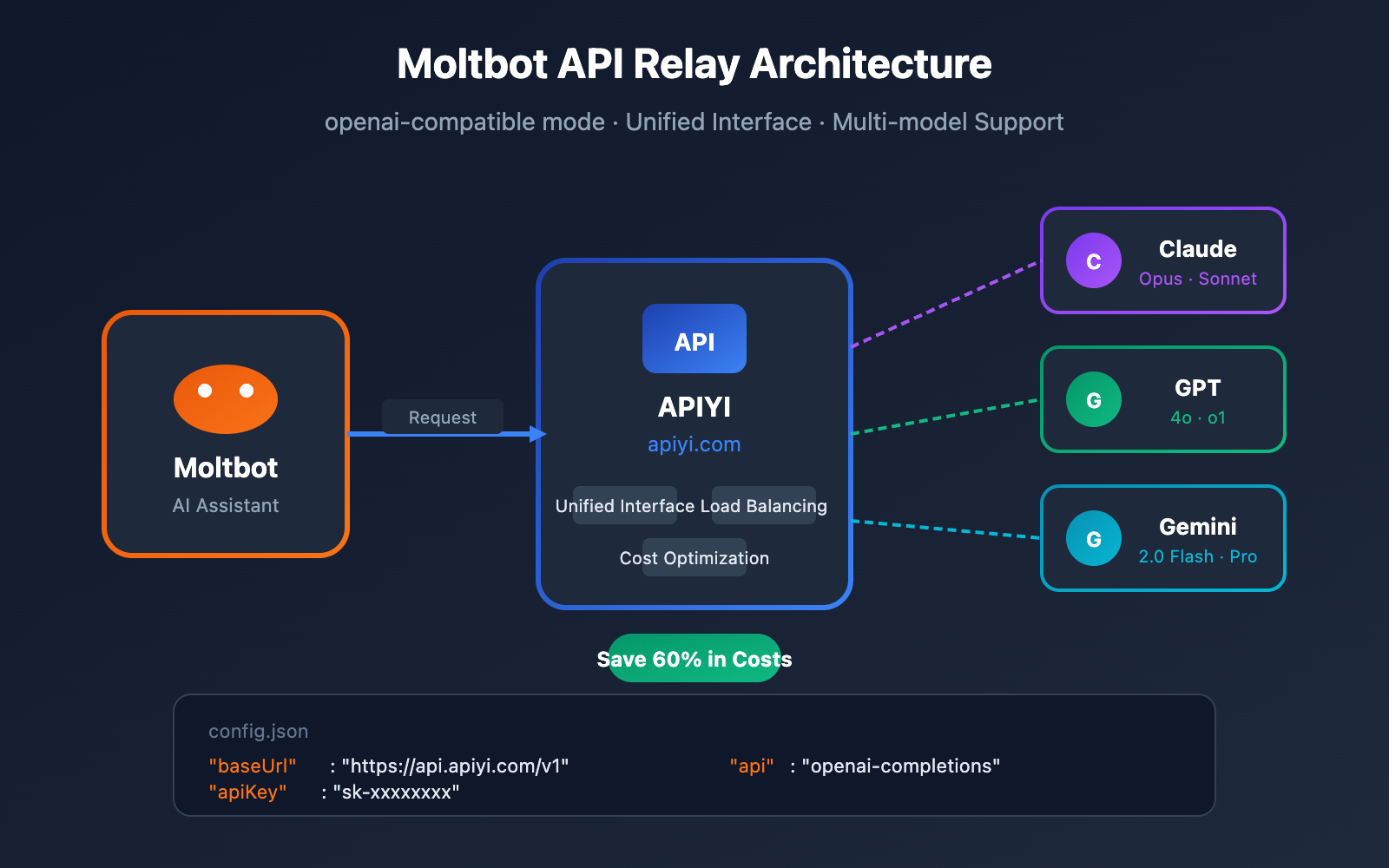
By default, Moltbot uses the official Anthropic API, but the official service comes with certain access restrictions and higher costs. In this article, we'll walk you through how to configure Moltbot to connect to an API relay, allowing you to use third-party API services via the openai-compatible mode.
Core Value: After reading this, you'll know how to set up Moltbot with an API relay for a more affordable and stable AI assistant experience.
Key Points for Moltbot API Relay Configuration
Before diving into the setup, let's look at Moltbot's API configuration mechanism and why using a relay is beneficial.
| Key Point | Description | Value |
|---|---|---|
| openai-compatible | Moltbot supports the OpenAI-compatible API protocol | Connects to any compatible service |
| Custom baseUrl | Supports modifying the API endpoint address | Switch between providers with ease |
| Multi-model Support | Can use various models after configuration | Switch between Claude/GPT/Gemini at will |
| Cost Optimization | Relays usually offer better pricing | Save 40-60% on API fees |
| Improved Stability | Relays provide built-in load balancing | Reduces official API rate-limiting issues |
Comparison of Moltbot API Configuration Methods
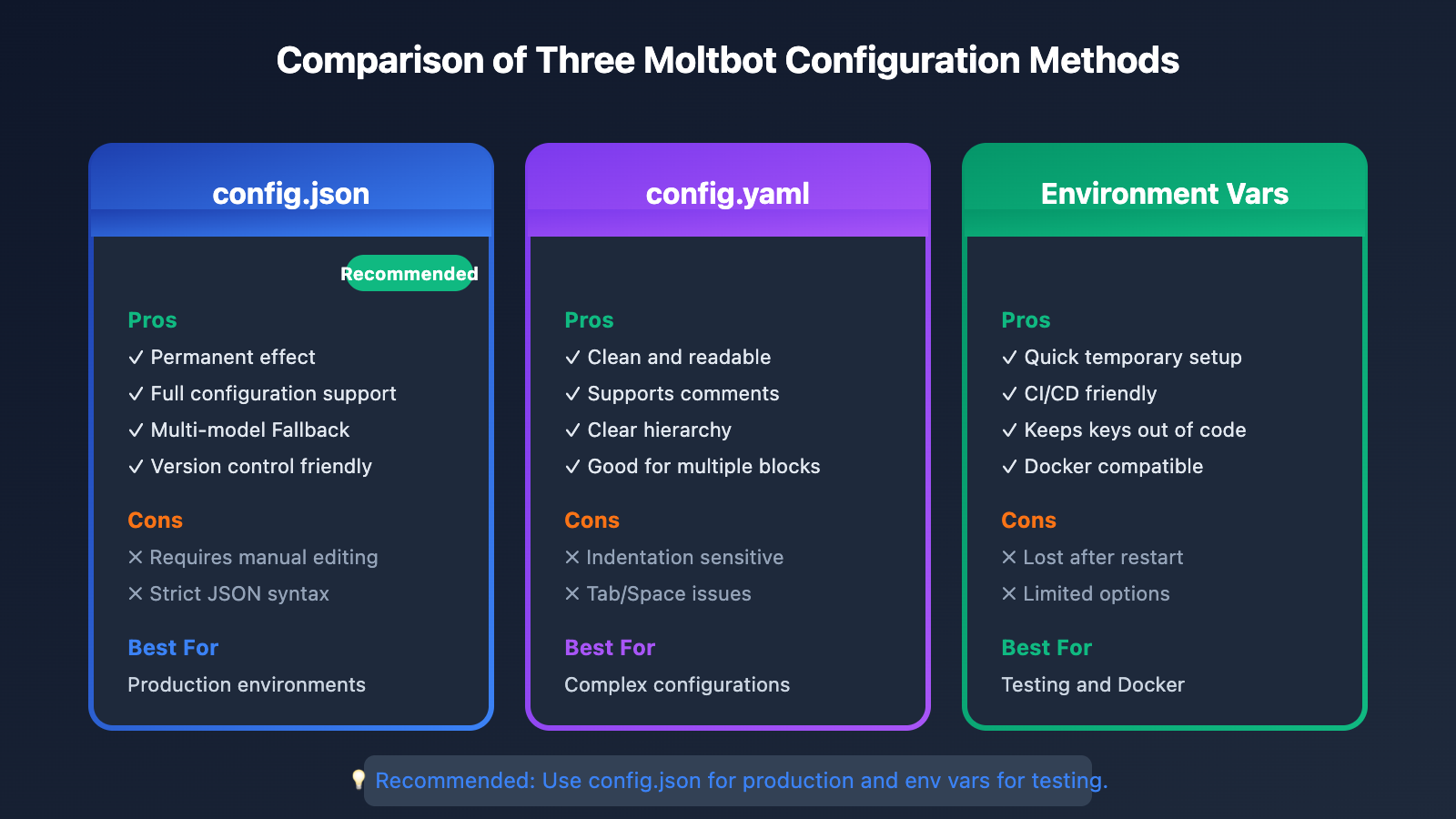
| Config Method | Best For | Complexity | Recommendation |
|---|---|---|---|
| config.json file | Permanent setup | Medium | ⭐⭐⭐⭐⭐ |
| Environment Variables | Quick tests | Easy | ⭐⭐⭐ |
| CLI Arguments | One-off runs | Easy | ⭐⭐ |
| Onboarding Wizard | First-time setup | Easy | ⭐⭐⭐⭐ |
Moltbot API Proxy Configuration: Getting Started
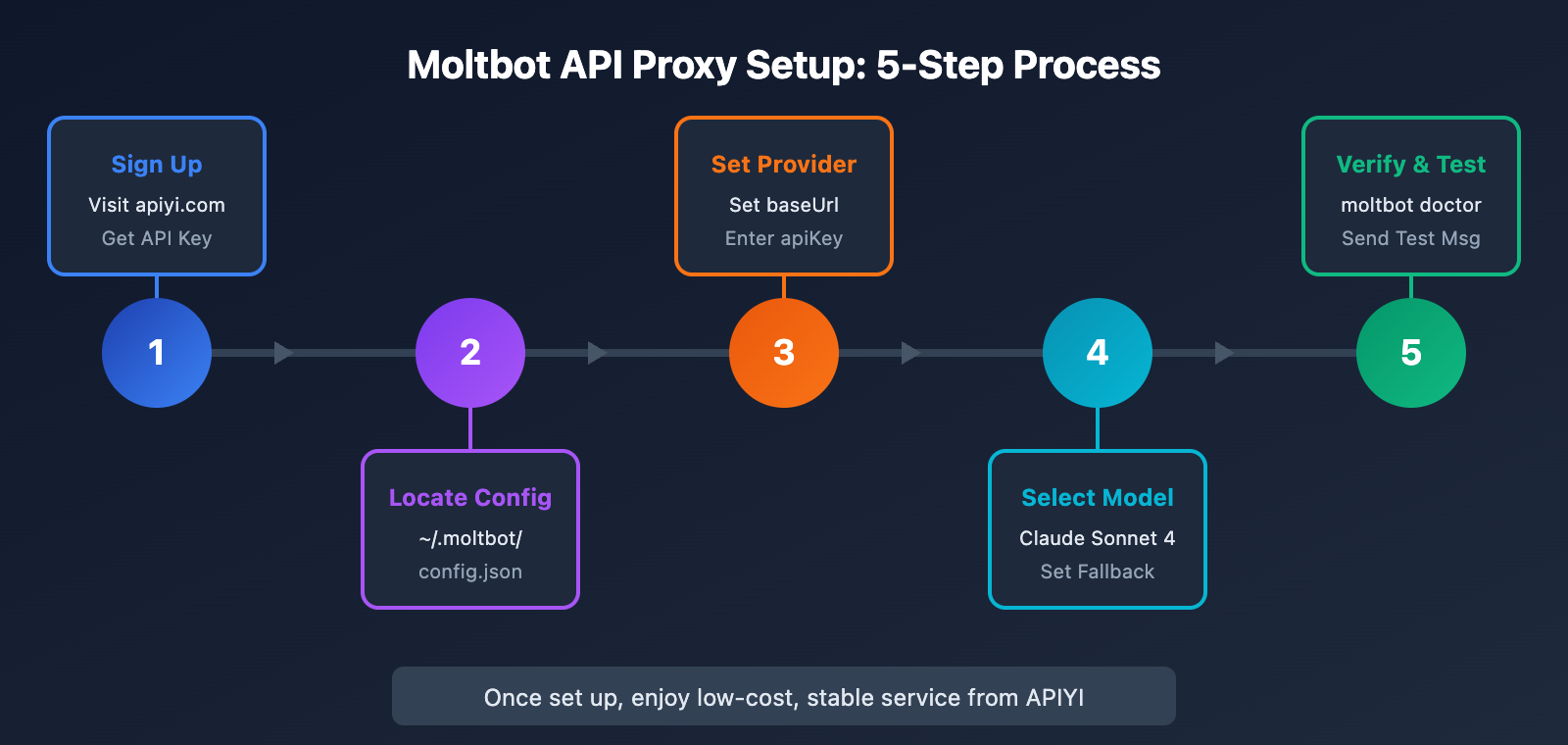
Step 1: Confirm Moltbot is installed
First, make sure you've got Moltbot installed on your machine:
# Check your Moltbot version
moltbot --version

# If it's not installed, run the installation
npm install -g moltbot@latest
System Requirements: Node.js >= 22
Step 2: Get your API Proxy Key
You'll need to grab an API Key from an API proxy provider.
🚀 Quick Start: We recommend using APIYI (apiyi.com) to get your API keys. You'll get free credits just for signing up. It supports all the heavy hitters like Claude Sonnet 4, Claude Opus 4.5, and GPT-4o, with prices typically 40-60% lower than official rates.
Once you have your key, jot down these details:
| Config Item | Example Value | Description |
|---|---|---|
| API Key | sk-xxxxxxxxxxxxxxxx |
Your personal secret key |
| Base URL | https://api.apiyi.com/v1 |
The API endpoint address |
| Model Name | claude-sonnet-4-20250514 |
The specific model you want to use |
Method 1: Configuring via config.json
This is the recommended way to go—configure it once, and you're set for good.
Finding the Moltbot Config File
The config file usually lives in one of these spots:
| Operating System | Config File Path |
|---|---|
| macOS | ~/.clawdbot/config.json or ~/.moltbot/config.json |
| Linux | ~/.clawdbot/config.json or ~/.moltbot/config.json |
| Windows | %USERPROFILE%\.clawdbot\config.json |
You can also find it using the command line:
# See your current config
moltbot config list

# Get the exact path to your config file
moltbot config path
Editing config.json for the API Proxy
Open up your config file and add or update the models.providers section like this:
{
  "models": {
    "providers": {
      "apiyi": {
        "baseUrl": "https://api.apiyi.com/v1",
        "apiKey": "sk-your-api-key-here",
        "api": "openai-completions",
        "authHeader": true,
        "models": [
          {
            "id": "claude-sonnet-4-20250514",
            "name": "Claude Sonnet 4",
            "contextWindow": 200000,
            "maxTokens": 64000
          },
          {
            "id": "claude-opus-4-5-20251101",
            "name": "Claude Opus 4.5",
            "contextWindow": 200000,
            "maxTokens": 32000
          },
          {
            "id": "gpt-4o",
            "name": "GPT-4o",
            "contextWindow": 128000,
            "maxTokens": 16384
          }
        ]
      }
    }
  },
  "agent": {
    "model": {
      "primary": "apiyi/claude-sonnet-4-20250514",
      "fallbacks": ["apiyi/claude-opus-4-5-20251101", "apiyi/gpt-4o"]
    }
  }
}
Configuration Parameters Explained
| Parameter | Type | Description | Example |
|---|---|---|---|
baseUrl |
string | The API endpoint address | https://api.apiyi.com/v1 |
apiKey |
string | Your API Key | sk-xxxxxxxx |
api |
string | API protocol type | openai-completions or openai-responses |
authHeader |
boolean | Whether to use the Authorization header | true |
models |
array | List of available models | See example above |
contextWindow |
number | Context window size | 200000 |
maxTokens |
number | Max output tokens | 64000 |
Moltbot API Proxy Configuration Method 2: YAML Format
If you prefer the YAML format, Moltbot also supports config.yaml:
# ~/.moltbot/config.yaml
models:
  providers:
    apiyi:
      baseUrl: "https://api.apiyi.com/v1"
      apiKey: "sk-your-api-key-here"
      api: openai-completions
      authHeader: true
      models:
        - id: claude-sonnet-4-20250514
          name: Claude Sonnet 4
          contextWindow: 200000
          maxTokens: 64000
        - id: claude-opus-4-5-20251101
          name: Claude Opus 4.5
          contextWindow: 200000
          maxTokens: 32000

agent:
  model:
    primary: apiyi/claude-sonnet-4-20250514
    fallbacks:
      - apiyi/claude-opus-4-5-20251101
      - apiyi/gpt-4o
Simplified YAML Configuration
If you only need to use a single model, you can use a more streamlined configuration:
# ~/.moltbot/config.yaml - 极简版
llm:
  provider: openai-compatible
  model: claude-sonnet-4-20250514
  apiKey: sk-your-api-key-here
  baseUrl: https://api.apiyi.com/v1
🎯 Technical Tip: We recommend using the full configuration. This way, you can set up multiple models and fallback strategies to improve service stability. Through APIYI (apiyi.com), you can simultaneously access various models like Claude, GPT, and Gemini.
Moltbot API Proxy Configuration Method 3: Environment Variables
This method is ideal for temporary testing or CI/CD environments:
# 设置环境变量
export MOLTBOT_LLM_PROVIDER="openai-compatible"
export MOLTBOT_LLM_MODEL="claude-sonnet-4-20250514"
export MOLTBOT_LLM_API_KEY="sk-your-api-key-here"
export MOLTBOT_LLM_BASE_URL="https://api.apiyi.com/v1"

# 启动 Moltbot
moltbot gateway start
Alternatively, you can configure them in a .env file:
# ~/.moltbot/.env
MOLTBOT_LLM_PROVIDER=openai-compatible
MOLTBOT_LLM_MODEL=claude-sonnet-4-20250514
MOLTBOT_LLM_API_KEY=sk-your-api-key-here
MOLTBOT_LLM_BASE_URL=https://api.apiyi.com/v1
Moltbot API Proxy Configuration Method 4: CLI Configuration
You can quickly configure everything using the moltbot config set command:
# Configure API proxy
moltbot config set models.providers.apiyi.baseUrl "https://api.apiyi.com/v1"
moltbot config set models.providers.apiyi.apiKey "sk-your-api-key-here"
moltbot config set models.providers.apiyi.api "openai-completions"

# Set default model
moltbot config set agent.model.primary "apiyi/claude-sonnet-4-20250514"

# Verify configuration
moltbot config list
Batch Configuration Script
If you'd rather do it all at once, create a configuration script to handle the setup in one click:
#!/bin/bash
# setup-apiyi.sh - Moltbot APIYI Proxy Configuration Script

API_KEY="sk-your-api-key-here"
BASE_URL="https://api.apiyi.com/v1"

echo "Configuring Moltbot API Proxy..."

# Set up provider
moltbot config set models.providers.apiyi.baseUrl "$BASE_URL"
moltbot config set models.providers.apiyi.apiKey "$API_KEY"
moltbot config set models.providers.apiyi.api "openai-completions"
moltbot config set models.providers.apiyi.authHeader true

# Set default model
moltbot config set agent.model.primary "apiyi/claude-sonnet-4-20250514"

# Restart gateway
moltbot gateway restart

echo "Configuration complete! Use 'moltbot doctor' to verify your settings."
Verifying Your Moltbot API Proxy Configuration
After you've finished the setup, you'll want to make sure everything is running correctly.
Check with moltbot doctor
# Run diagnostics
moltbot doctor

# Automatically fix issues
moltbot doctor --fix
Here's what a healthy output looks like:
✓ Gateway running on port 18789
✓ Model provider 'apiyi' configured
✓ API key validated
✓ Model 'claude-sonnet-4-20250514' available
✓ Connection test passed
Send a Test Message
# Test API connection
moltbot test-llm --provider apiyi --model claude-sonnet-4-20250514

# Send a test chat message
moltbot chat "Hello, please introduce yourself."
Check API Call Logs
If something isn't working right, you can dive into the logs:
# View real-time logs
moltbot logs --follow

# View the last 10 API calls
moltbot logs --filter api-call --last 10
Models Supported by the Moltbot APIYI Proxy
Through the APIYI proxy, you can use the following models in Moltbot:
Claude Series Models
| Model ID | Name | Context Window | Features | Available Platforms |
|---|---|---|---|---|
claude-opus-4-5-20251101 |
Claude Opus 4.5 | 200K | Strongest reasoning capabilities | APIYI apiyi.com |
claude-sonnet-4-20250514 |
Claude Sonnet 4 | 200K | Best value choice | APIYI apiyi.com |
claude-3-5-sonnet-20241022 |
Claude 3.5 Sonnet | 200K | Stable and reliable | APIYI apiyi.com |
claude-3-5-haiku-20241022 |
Claude 3.5 Haiku | 200K | Fast response | APIYI apiyi.com |
OpenAI Series Models
| Model ID | Name | Context Window | Features |
|---|---|---|---|
gpt-4o |
GPT-4o | 128K | Multimodal capabilities |
gpt-4o-mini |
GPT-4o Mini | 128K | Lightweight and fast |
o1-preview |
o1 Preview | 128K | Deep reasoning |
o1-mini |
o1 Mini | 128K | Reasoning value |
Google Series Models
| Model ID | Name | Context Window | Features |
|---|---|---|---|
gemini-2.0-flash |
Gemini 2.0 Flash | 1M | Ultra-long context |
gemini-2.0-pro |
Gemini 2.0 Pro | 1M | Professional version |
💡 Recommendation: For daily Moltbot use, we recommend Claude Sonnet 4. It strikes a great balance between performance and cost. You can get the full model list and real-time pricing via APIYI at apiyi.com.
Moltbot API Proxy Advanced Configuration
Configuring Fallback Strategies
Automatically switch to a backup model when the primary model is unavailable:
{
  "agent": {
    "model": {
      "primary": "apiyi/claude-sonnet-4-20250514",
      "fallbacks": [
        "apiyi/claude-3-5-sonnet-20241022",
        "apiyi/gpt-4o"
      ],
      "fallbackStrategy": "sequential"
    }
  }
}
Configuring Model Routing Rules
Automatically select the best model based on the task type:
{
  "agent": {
    "modelRouting": {
      "coding": "apiyi/claude-sonnet-4-20250514",
      "reasoning": "apiyi/claude-opus-4-5-20251101",
      "quick": "apiyi/claude-3-5-haiku-20241022",
      "default": "apiyi/claude-sonnet-4-20250514"
    }
  }
}
Configuring Cost Limits
Prevent unexpected high spending:
{
  "agent": {
    "limits": {
      "maxTokensPerRequest": 32000,
      "maxRequestsPerHour": 100,
      "maxCostPerDay": 10.00
    }
  }
}
Moltbot API Proxy FAQs
Q1: What should I do if I see “API Key Invalid” after configuration?
Please check the following:
- API Key Format: Ensure the key starts with
sk-. - Complete Copy: Check that you've copied the entire key without missing any characters.
- Account Status: Log in to APIYI (apiyi.com) to check your account balance and status.
- Configuration Location: Confirm that the
apiKeyis configured at the correct hierarchy level.
# Verify API Key
curl -H "Authorization: Bearer sk-your-key" https://api.apiyi.com/v1/models
Q2: How do I switch between different models?
There are two ways to do this:
Option 1: Modify the configuration file
moltbot config set agent.model.primary "apiyi/claude-opus-4-5-20251101"
moltbot gateway restart
Option 2: Specify it at runtime
moltbot chat --model apiyi/gpt-4o "Hello"
API keys obtained through APIYI (apiyi.com) support all mainstream Large Language Models, so you don't need to apply for them individually.
Q3: What should I enter for the baseUrl?
The baseUrl formats for different API proxies are as follows:
| Provider | baseUrl |
|---|---|
| APIYI | https://api.apiyi.com/v1 |
| OpenRouter | https://openrouter.ai/api/v1 |
| Local Ollama | http://127.0.0.1:11434/v1 |
Note: The /v1 at the end of the URL is required; don't leave it out.
Q4: How do I choose between multiple providers once they’re configured?
Specify it in the model ID using the provider/model format:
{
  "agent": {
    "model": {
      "primary": "apiyi/claude-sonnet-4-20250514",
      "fallbacks": ["openrouter/anthropic/claude-3.5-sonnet"]
    }
  }
}
Q5: How can I view API usage and costs?
# View local statistics
moltbot stats --period today

# View detailed usage
moltbot stats --detailed --period week
We also recommend logging into the APIYI (apiyi.com) console to view more detailed usage statistics and billing.
Moltbot API Proxy Troubleshooting
Common Errors & Solutions
| Error Message | Cause | Solution |
|---|---|---|
Connection refused |
Incorrect baseUrl or service unreachable | Check the URL format and your network connection |
401 Unauthorized |
Invalid API Key | Double-check if the key is correct |
404 Model not found |
Incorrect model ID | Verify the model name spelling |
429 Rate limited |
Request frequency is too high | Reduce request frequency or upgrade your plan |
500 Internal error |
Server-side issue | Try again later or contact support |
Debug Mode
Enable detailed logging to help pinpoint issues:
# Enable debug mode
export MOLTBOT_DEBUG=true
moltbot gateway start

# Or use command line arguments
moltbot gateway start --debug --log-level verbose
Configuration Validation Commands
# Validate config syntax
moltbot config validate

# Test API connection
moltbot test-connection --provider apiyi

# Full health check
moltbot doctor --verbose
Moltbot API Proxy vs. Official API
| Comparison | Official Anthropic API | APIYI Proxy | Winner |
|---|---|---|---|
| Pricing | $15/M tokens (Opus) | As low as $6/M tokens | Proxy |
| Stability | Restricted in some regions | Globally accessible | Proxy |
| Model Coverage | Claude series only | Claude + GPT + Gemini | Proxy |
| Billing | Pay-as-you-go (Post-paid) | Prepaid, flexible | Both have pros |
| Support | English documentation | Chinese support | Proxy |
| API Compatibility | Native format | OpenAI compatible | Proxy |
🎯 Recommendation: For users in mainland China or those who need multi-model support, we recommend connecting to Moltbot via APIYI (apiyi.com). You'll get better pricing, more stable service, and dedicated technical support in Chinese.
Summary: Recapping Key Moltbot API Proxy Configuration Points
By following this tutorial, you've learned how to fully configure Moltbot to work with an API proxy:
- Preparation: Install Moltbot and get your API Key from APIYI (apiyi.com).
- Configuration Files: Edit
config.jsonorconfig.yamlto add your provider settings. - Key Parameters:
baseUrl,apiKey,apitype, and the list of models. - Verification & Testing: Use
moltbot doctorand test commands to confirm everything's working correctly. - Advanced Features: Fallback strategies, model routing, and cost limits.
We recommend getting your API keys through APIYI (apiyi.com) to enjoy lower prices and more stable service, helping you get the most out of your Moltbot assistant.
References
-
Official Moltbot Config Docs: Gateway configuration reference
- Link:
docs.molt.bot/gateway/configuration
- Link:
-
Moltbot Configuration Examples: Templates for various scenarios
- Link:
docs.molt.bot/gateway/configuration-examples
- Link:
-
Moltbot Model Providers: Detailed provider configuration guide
- Link:
docs.molt.bot/concepts/model-providers
- Link:
-
Moltbot GitHub: Source code and issues
- Link:
github.com/moltbot/moltbot
- Link:
-
Moltbot Getting Started Guide: Quick start tutorial
- Link:
docs.molt.bot/start/getting-started
- Link:
📝 Author: APIYI Team
🔗 Technical Support: If you need API keys or technical help, feel free to visit APIYI (apiyi.com).