Author’s note: This article breaks down input, output, cache, and reasoning tokens, along with multimodal billing, in Large Language Model API bills. It also covers practical ways to reconcile usage against request logs, investigate sudden cost changes, and respond to pricing updates.
You open your bill at the end of the month and notice that one model costs considerably more than it did last month, even though the number of requests has barely changed. Many teams running Large Language Model APIs in production have encountered this. This article explains how to break down billing items and reconcile them against request logs, so you can understand and verify your bill.
This isn’t a price roundup. Providers change their prices frequently, so we won’t list specific rates. Instead, we’ll focus on billing concepts and reconciliation methods that remain useful over time.
One industry signal worth noting: in November 2026, an AI infrastructure company was hiring for a Large Language Model platform operations role. Its responsibilities explicitly included “cost and billing verification”: checking how input/output tokens, cache tokens, reasoning tokens, images, audio, and video were billed, and promptly identifying billing anomalies, price changes, and discrepancies. The fact that a platform provider needs someone dedicated to this work shows just how complex billing can be. As an API customer, you need your own reconciliation habits, too.
What you’ll get: By the end of this article, you’ll understand where each type of charge on a Large Language Model API bill comes from, how to verify usage against request logs, and how to quickly pinpoint why the cost of the same request has suddenly changed.
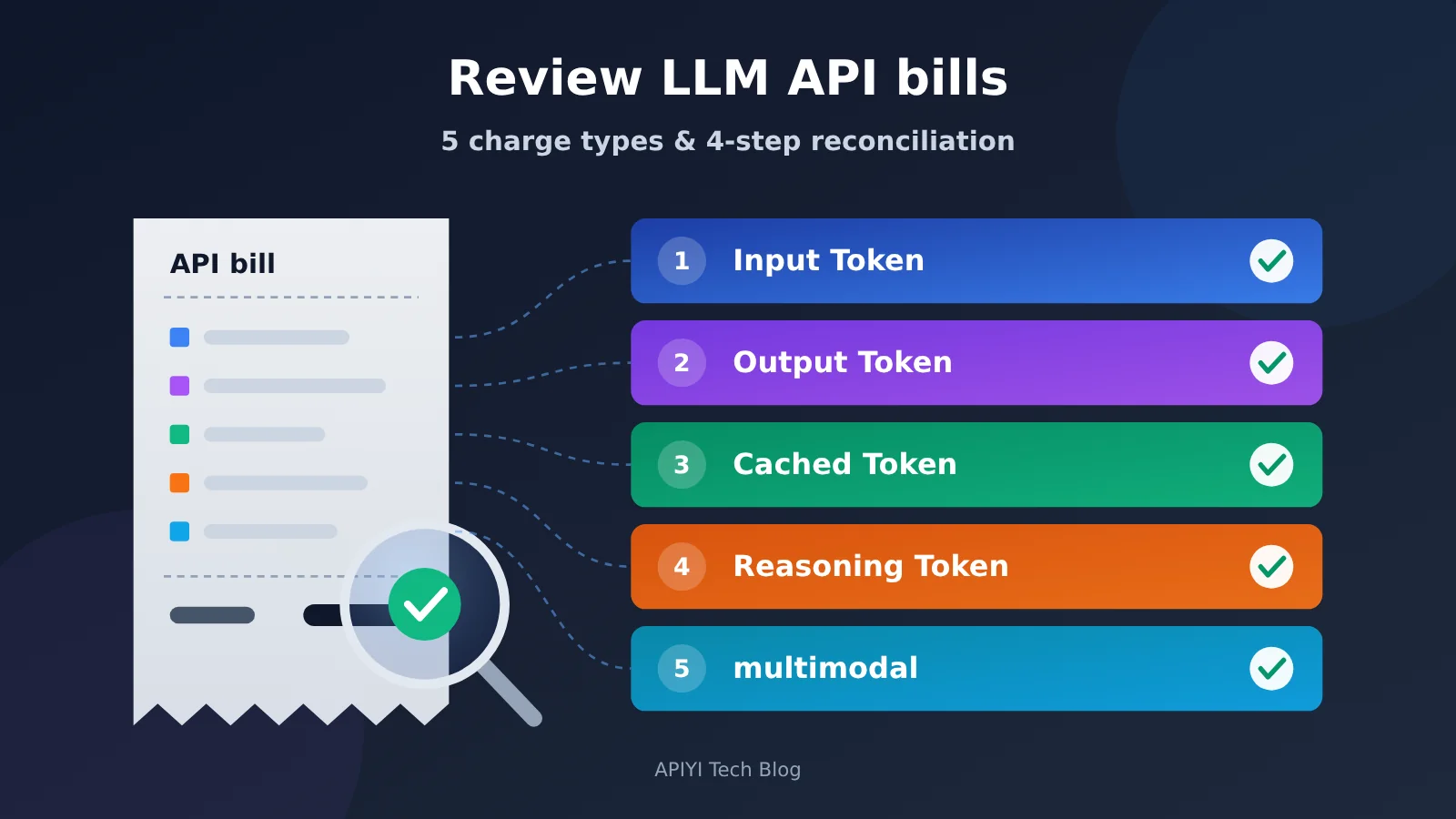
Large Language Model API Billing Essentials: 5 Charge Categories
The cost of a model invocation usually isn’t as simple as “number of calls × price per call.” Different charge categories have different rates and sources. If you lump them together, it’s easy to misread your cost breakdown.
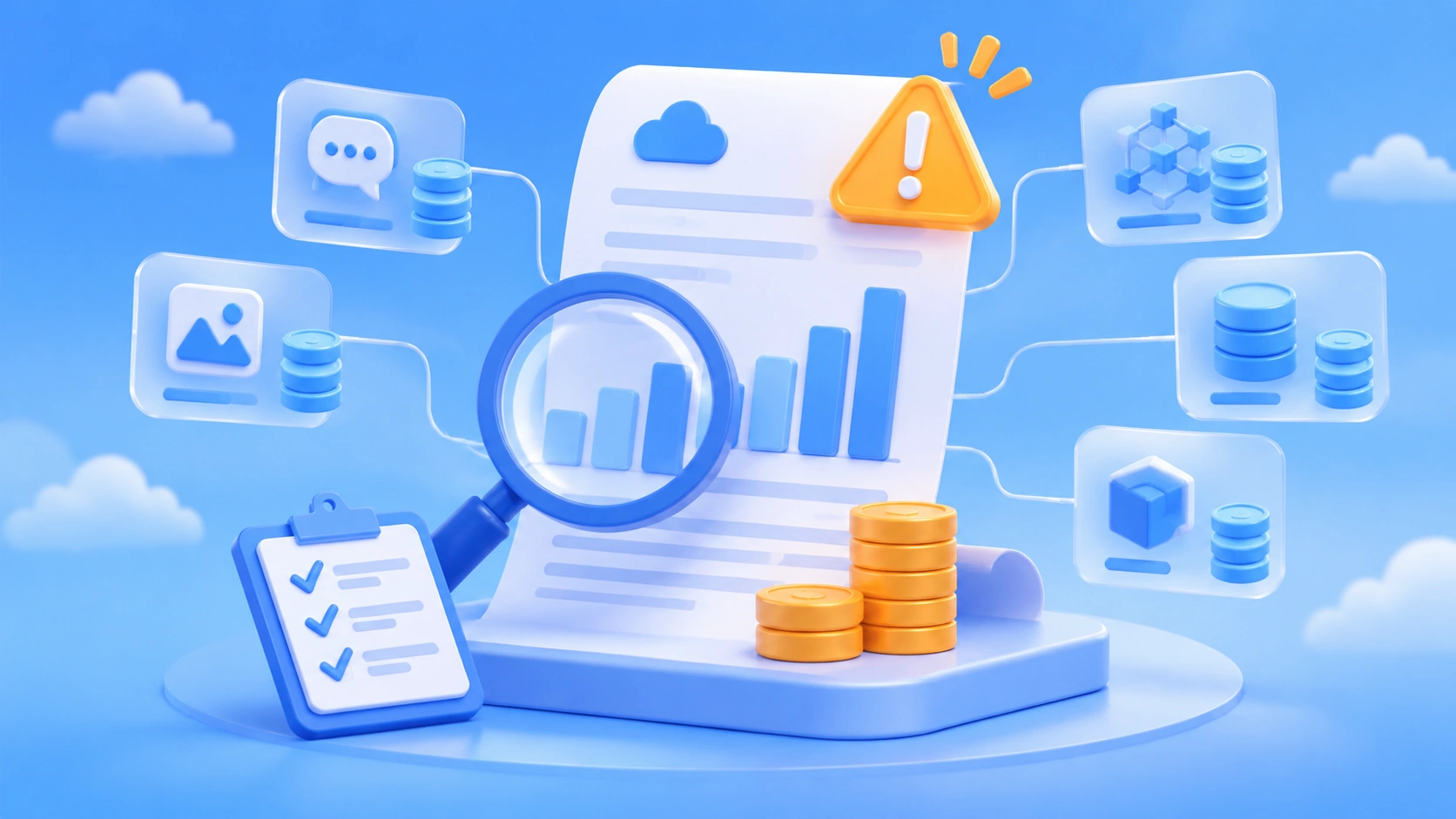
| Charge category | Where it comes from | Common pricing | What to check |
|---|---|---|---|
| Input tokens | System prompts, conversation history, tool definitions, retrieved documents, user input | Priced per token, usually cheaper than output | Whether the context is quietly growing |
| Output tokens | Visible responses generated by the model | Priced per token, usually at a higher rate than input | Response length and max_tokens settings |
| Cached tokens | Input prefixes served from cache | Cache hits are often discounted; some providers charge separately for writes | Whether the hit rate is falling |
| Reasoning tokens | A reasoning model’s internal thought process | Usually billed at output rates, but may not appear in the response | Whether reasoning length is increasing |
| Multimodal charges | Image, audio, and video input or generation | Priced per image, per second, by resolution, or converted to tokens | Whether specification parameters have changed |
Why Large Language Model API Bills Are Hard to Reconcile
The first reason is invisible tokens. You might write just one user question in your code, but the actual request could include thousands of tokens from the system prompt, conversation history, and tool schemas. Reasoning models can also generate many thinking tokens that users never see. All of these can appear on your bill without appearing in the interface.
The second reason is inconsistent pricing methods. For image input, some providers charge per image, while others convert resolution into tokens. For caching, some providers cache automatically, while others require you to declare it explicitly. Some discount only cache reads, while others also charge extra for writes. Before comparing models or providers, you need to align the units and pricing methods.
The third reason is shifting variables. A model alias might start pointing to a new version, a small change to a prompt prefix could invalidate the entire cache, or a reasoning model might spend longer thinking about a harder problem. Your bill can change even when the unit prices don’t.
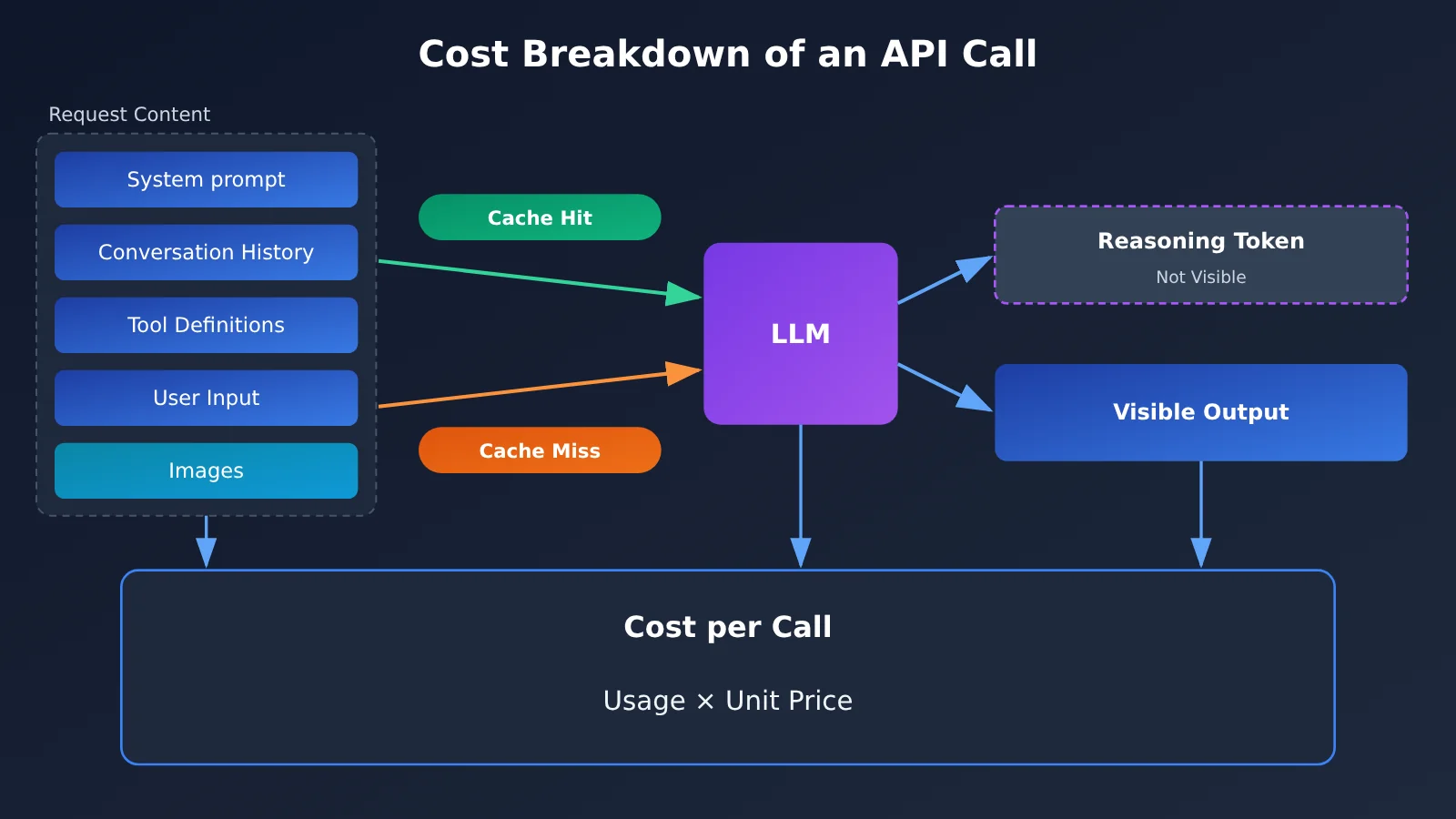
Large Language Model API Billing Items Explained
Input Tokens: The Most Underestimated Cost
Input tokens cover everything the model “reads” in a request, not just the user’s latest message. In a multi-turn conversation, the previous conversation history is sent again with each turn. The longer the conversation, the higher the input cost per turn—and the total cost can grow approximately with the square of the number of turns.
RAG applications also consume a lot of input tokens. Both the number and length of retrieved document snippets directly affect input costs. With Function Calling, the JSON Schema for tool definitions counts toward input tokens on every request. The more tools you have, the greater the fixed overhead.
Also, different models use different tokenizers. The same Chinese text can produce noticeably different token counts across models, so don’t use one model’s token count to estimate another model’s cost.
Output Tokens: Higher Prices, Directly Controlled by Parameters
Output tokens are the content generated in the model’s response. Most providers charge significantly more for output than input, so getting the model to be concise often saves more money than compressing the input.
max_tokens sets an upper limit on output costs, but it doesn’t guarantee a particular cost. If a response is truncated, you’re still charged for the portion already generated. When a streaming response is interrupted, providers may also handle generated tokens differently, so check their official documentation.
Cached Tokens: Savings Depend on Cache Hits
Prompt caching works by letting providers reuse previously processed content when multiple requests share the same prefix, such as a system prompt or a long document. That portion of the input is then billed at a discount.
There are several common caching rules worth checking:
- Whether it’s enabled automatically: Some providers enable it by default; others require you to explicitly mark cache locations in the request.
- Prefix matching requirements: Usually, the prefix must match exactly from the beginning. A change anywhere in it invalidates everything after that point.
- Minimum length and expiration: Prefixes that are too short may not be cached, and expired entries must be written again.
- Cache write charges: Some providers charge more than the standard input rate for the initial cache write; only subsequent reads are cheaper.
When reconciling bills, track “cache read tokens” and “standard input tokens” separately. Otherwise, you might mistake a drop in cache hit rate for an increase in usage.
Reasoning Tokens: Invisible, but Not Free
Reasoning models think through a problem internally before answering, and those tokens are usually billed at the output token rate. Often, the full reasoning isn’t returned to you; you can only see the token count in the usage fields.
The number of reasoning tokens varies with the difficulty of the question and the reasoning effort setting. Even with the same API, your bill can rise as users ask harder questions. If your application only needs simple classification or format conversion, using a reasoning model often means paying for thinking you don’t need.
Multimodal Pricing: First, Check What You’re Paying For
Multimodal pricing varies widely, so it’s especially important to check each model’s official pricing page. The table below covers common pricing methods; always refer to each provider’s current published rates for the specific rules.
| Type | Common pricing method | Key cost factors | What to check |
|---|---|---|---|
| Image input (understanding) | Resolution converted to tokens, or charged per image | Image dimensions, detail level setting | Record the actual resolution before and after upload |
| Image generation | Charged per image or per output token | Size, quality tier, number of images | Record the specification parameters for each request |
| Audio input/output | Charged by duration or converted to audio tokens | Audio duration, sampling and processing method | Record the actual audio duration |
| Speech synthesis | Charged per character or per token | Text length, voice tier | Record the length of the text synthesized |
| Video generation/understanding | Charged per second, per frame, or by resolution tier | Duration, resolution, frame rate | Record the duration and resolution for each request |
| Embedding | Charged per input token | Text length, batch size | Track separately from standard input token pricing |
🎯 Technical tip: For multimodal applications, it’s best to route requests through a single entry point so you can manage different pricing methods in one place. APIYI’s official introduction at apiyi.com says that models on the platform share a single balance, with usage statistics and invocation logs available. Start by checking which fields the logs show in the console, then decide which additional parameters your reconciliation sheet needs to capture.
Large Language Model API Billing: A 4-Step Reconciliation Guide
The core idea is simple: multiply your recorded usage by your recorded price snapshot to calculate the expected cost, then compare it with the platform’s bill. If the difference exceeds your tolerance, investigate each item.
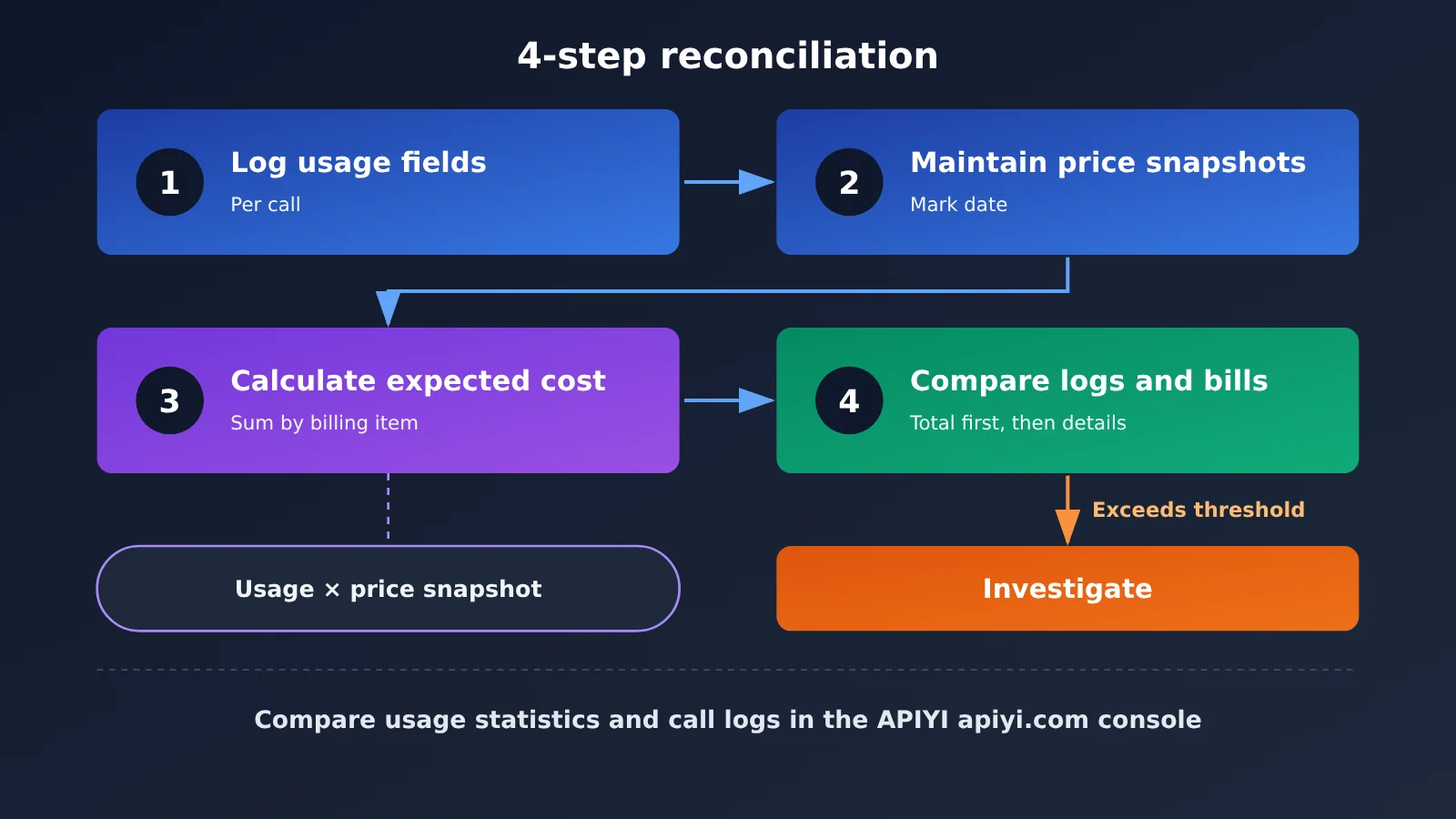
Step 1: Record usage fields after each call
OpenAI-compatible APIs typically return a usage object in the response. The following table lists common fields and what they mean. Responses can vary by model and platform, so make a test request to confirm what’s returned before integrating.
| Field (common OpenAI-compatible format) | Meaning | Billing category |
|---|---|---|
prompt_tokens |
Total input tokens for the request | Input (including cached tokens) |
prompt_tokens_details.cached_tokens |
Input tokens served from cache | Cache reads |
completion_tokens |
Total output tokens | Output (may include reasoning tokens) |
completion_tokens_details.reasoning_tokens |
Reasoning tokens included in the output | Reasoning |
model |
Model name returned in the response | Used to identify version changes |
For each call, store at least the following:
- Request time, request ID, and business scenario identifier;
- The model name specified in the request and the
modelreturned in the response; - All usage fields in the table above, recording missing fields as null rather than 0;
- Parameters for multimodal requests, such as image size, audio duration, and generation count;
- Whether the response was streamed, retried, or truncated (
finish_reason).
Note that prompt_tokens and completion_tokens are often totals, with cached and reasoning tokens reported as breakdowns within them. When calculating costs, subtract those breakdowns from the totals first, then multiply each category by its corresponding unit price. Otherwise, you could double-charge or miss a discount.
Step 2: Maintain dated pricing snapshots
Don’t hardcode unit prices in your code. Instead, maintain a pricing snapshot table with one row for each model, billing item, unit price, currency, effective date, and source (the official pricing page or a platform announcement).
When prices change, add a new row rather than overwriting the old value. That way, you can recalculate any day’s bill using the prices that applied at the time. If you access models through an aggregation platform like APIYI, use the platform’s currently published prices and record the date you checked them.
Step 3: Calculate expected costs
You can calculate the expected cost of a single request by adding up:
- Uncached input tokens × input unit price;
- Cache-read tokens × cache-read unit price (plus cache-write charges, if applicable);
- Visible output tokens × output unit price;
- Reasoning tokens × the applicable reasoning unit price (usually the same as output pricing, but check the official documentation);
- Multimodal usage, calculated separately according to each pricing scheme.
Once you’ve grouped these costs by day, model, and business use case, you’ll have a ledger of what you expect to have spent.
Step 4: Compare Your Records with Platform Logs and Bills
Compare your own ledger with the platform’s usage statistics and invocation logs. Start with the total, then compare costs by model, and finally drill down to individual requests.
Set a tolerance threshold. Small differences are common because of exchange rates, billing precision, and reporting time zones. You only need to investigate discrepancies that exceed the threshold.
🚀 Quick start: If you’re already invoking models through APIYI at apiyi.com, export your invocation logs for a given period and match them against the
usagefields you’ve recorded, request by request. Whether the logs distinguish cache tokens and reasoning tokens depends on the fields the platform currently provides. If they aren’t listed separately, use the response fields you’ve recorded locally for the breakdown.
Large Language Model API Billing Anomalies: How to Investigate Sudden Cost Changes
A sudden change in the cost of the same type of request is a signal worth investigating. The table below lists common causes and where to look.
| Anomaly | Possible Cause | How to Investigate |
|---|---|---|
| Cost per request rises while request volume stays the same | A model alias now points to a new version with different pricing or token consumption | Compare the model field in responses before and after the change |
| Input costs rise while total input tokens stay the same | Cache hit rate has dropped | Check the proportion of cached_tokens and whether the prompt prefix has changed |
| Output costs rise while visible response length stays the same | Reasoning tokens have increased | Check the reasoning_tokens trend and reasoning effort parameters |
| Input tokens steadily creep up | Conversation history isn’t truncated, more retrieved passages are included, or tool definitions have grown | Sample complete request bodies |
| Request count exceeds business volume | Client retries or resends after timeouts | Deduplicate counts by request ID and business ID |
| Image or video costs spike | Resolution, quality tier, or generation count has increased | Compare specification parameters in the requests |
| Billed unit prices don’t match the price snapshot | The provider or platform has changed its prices | Check pricing pages and announcements, then update the price snapshot |
Cache Misses: The Most Subtle Cost Increase
Cache misses often result from a change that looks harmless. For example, you might add the current date to the beginning of a system prompt or insert a user ID into the prefix. That makes every request’s prefix different, causing all cache hits to disappear and input costs to return to full price.
Put fixed content first and variable content last. After changing a prompt template, check the cache hit rate the next day to see if it’s changed.
Reasoning Length Drift: Question Difficulty Affects Your Bill Too
Reasoning model costs depend on question difficulty. If users suddenly submit a batch of complex questions on a given day, reasoning tokens may rise noticeably—that’s normal. But if reasoning tokens keep increasing while request types stay the same, check whether the model version or reasoning parameters have changed.
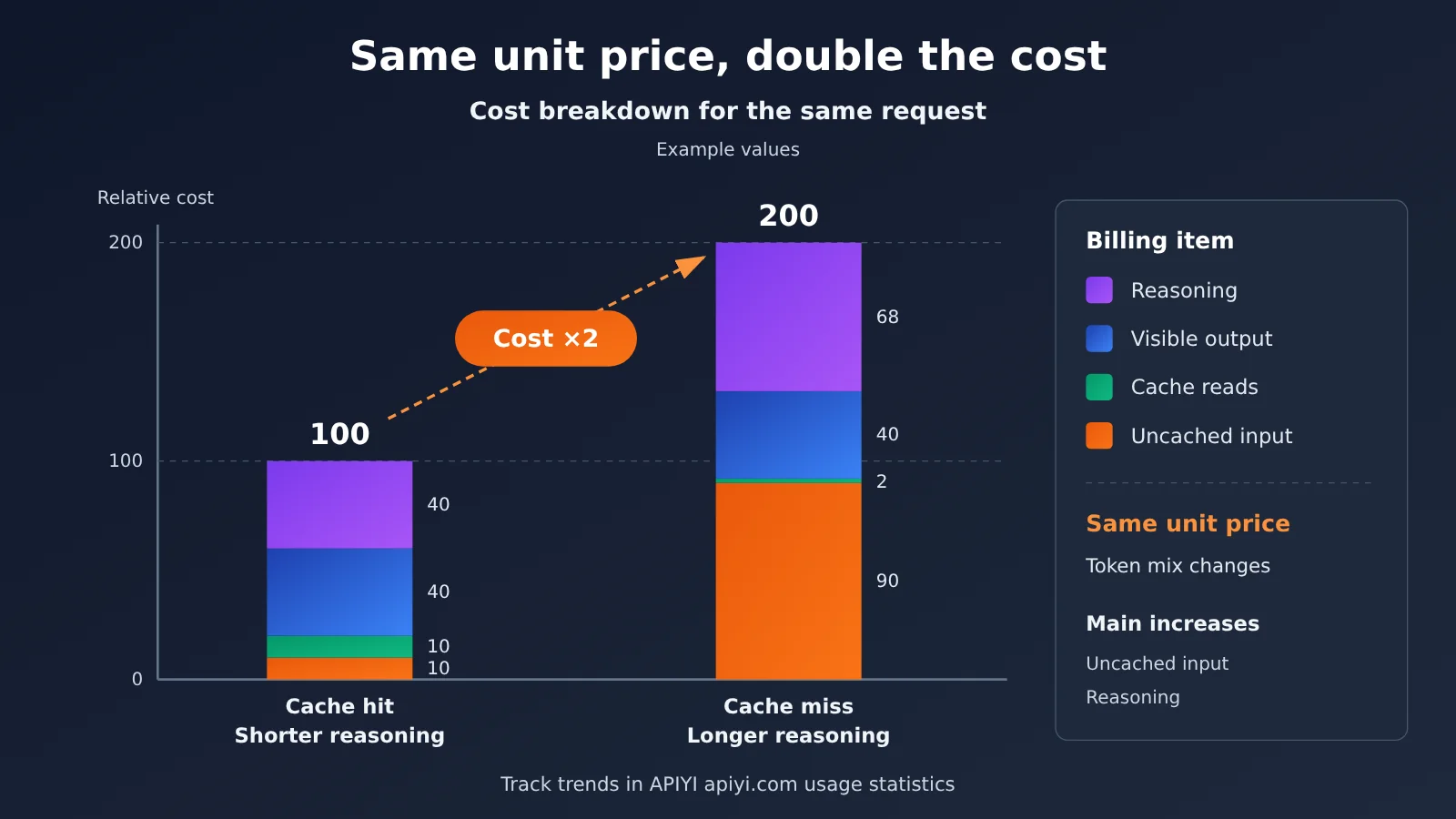
Checking Large Language Model API Bills for Price Changes
You can’t control price changes, but you can control how quickly you spot them. Here’s a checking routine you can stick with over the long term:
- Weekly: Review cost trends by model and average cost per request, looking for sudden changes.
- Monthly: Reconcile your bills in full, investigating each discrepancy that exceeds your threshold.
- After every prompt template change: Monitor the cache hit rate for 1-2 days.
- Before switching or upgrading models: Compare token usage and costs for the old and new models using a small amount of traffic.
- Follow announcements: Subscribe to pricing and model update announcements from your providers or platforms, and update your pricing snapshot as soon as you receive them.
- Pin versions: In production, use model names with specific version numbers where possible to avoid surprises from automatically updated aliases.
💡 Choosing a setup: If your business uses models from multiple providers, reconciling bills across separate accounts can take a lot of time. With unified access through APIYI apiyi.com, you can view usage across models under one balance and in one set of logs, making it easier to compare cost per request. Check the console first to confirm which breakdowns are available.
Frequently Asked Questions
Q1: What is a Token on a Large Language Model API bill?
A Token is a basic unit a model uses to process text. You can think of it as a segment of text produced by tokenization. A single Chinese character may correspond to one or more Tokens, depending on the model’s tokenizer. Bills typically charge separately for different categories of Tokens, such as input, output, cache, and reasoning.
Q2: What’s the difference between cached Tokens and regular input Tokens?
Both are input Tokens, but cached Tokens are the portion that matches a previously cached prefix and are usually discounted. Regular input Tokens are billed at the standard rate. Some providers also charge separately for the initial cache write, so track all three separately when reconciling your bill.
Q3: Why can’t I see reasoning Tokens in the response?
Reasoning Tokens are generated during the model’s internal reasoning. Many models don’t return the full reasoning process to the caller; they only report the count in the usage field. These Tokens are usually billed at the output rate, so even a short response can be relatively expensive.
Q4: Why can the cost of the same request suddenly change?
The three most common reasons are a model alias pointing to a new version, a change in the prompt prefix causing a cache miss, and an increase in reasoning length. Other causes include duplicate charges from retries and higher multimodal specification settings. Check each item in the anomaly signals table in this article to pinpoint the cause.
Q5: How can I use platform logs to check my Large Language Model API bill?
First, record the `usage` field and request ID for each response in your own system. Then export the platform’s invocation logs and match them request by request. For example, with APIYI apiyi.com, you can view usage statistics and invocation logs in the console. First confirm which fields the logs contain, then merge them with your local records to reconcile the bill.
Q6: How should I estimate multimodal model costs?
First, check the official pricing page to see how usage is billed: per image, per second, or by converting resolution into Tokens. Then record the relevant specification parameters in your request logs, such as image dimensions, audio duration, and video resolution and duration. Use these parameters and the unit prices to estimate costs.
Q7: Where should I look first if I find a discrepancy during reconciliation?
First, make sure your pricing snapshot is up to date to rule out price changes. Then compare the number of invocations to rule out retries and duplicate requests. Finally, break down the discrepancy by model and billing category to see whether it comes from input, cache, reasoning, or multimodal usage.
Q8: What are the limitations of this reconciliation method?
It depends on the usage fields returned in responses. If certain models or APIs don’t return cache or reasoning details, you’ll have to rely on the platform’s bill. Exchange rates, billing precision, and reporting time zones can also cause small differences, so set a reasonable threshold rather than expecting an exact match.
Large Language Model API Billing: Key Takeaways
- Bills include several types of charges: Input, output, cache, reasoning, and multimodal usage have different rates and should be tracked separately.
- Input tokens include much more than the user’s question: System prompts, conversation history, retrieved documents, and tool definitions all count as input.
- Cache hits depend on matching prefixes: Put fixed content first and variables last. Check the hit rate after changing a template.
- Reasoning tokens are billed even though you can’t see them: Avoid reasoning models for simple tasks, and monitor trends in reasoning length.
- For multimodal usage, first ask “What’s the billing unit?”: Charges may be based on images, seconds, or resolution. Check the official pricing page.
- Reconcile in four steps: Record usage, maintain price snapshots, calculate expected costs, and compare them with logs and bills.
- A unified entry point simplifies reconciliation: APIYI apiyi.com offers a unified balance and invocation logs for checking usage across multiple models in one place.
Summary
Understanding and reconciling Large Language Model API bills comes down to three things:
- Break it down: Split each invocation’s cost into input, cache, output, reasoning, and multimodal components, and identify where each comes from;
- Keep your own records: Store usage fields and specification parameters for every invocation, and maintain dated price snapshots;
- Compare regularly: Review trends weekly and reconcile the overall bill monthly. When costs change suddenly, check the model version, cache hit rate, reasoning length, retries, and specification parameters one by one.
Platform operators verify these billing rules, and it’s just as important for API users to build their own reconciliation habits. If your business uses models from multiple providers, you can use APIYI apiyi.com as a unified entry point to view usage and invocation logs in one console, then apply the methods in this article to reconcile your costs.
📚 References
- V2EX job posting: Large Language Model platform operations role at an AI Agent infrastructure company: Lists “cost and billing verification” among the responsibilities
- Link:
v2ex.com/t/1254263 -
Notes: Published on 2026-11-03. The role involves verifying billing rules for input/output tokens, cached tokens, reasoning tokens, images, audio, and video, as well as identifying unusual bills, price changes, and billing discrepancies.
-
Official model provider pricing pages: The only authoritative source for specific rates and billing rules
- Link: Check the pricing or documentation section of your provider’s official website.
- Notes: Prices change frequently, so always record the date you checked them.
Author: APIYI Technical Team
Technical discussion: Have questions about reconciling Large Language Model API bills? Contact us through the APIYI homepage at apiyi.com. For more integration resources, visit the documentation center at docs.apiyi.com.