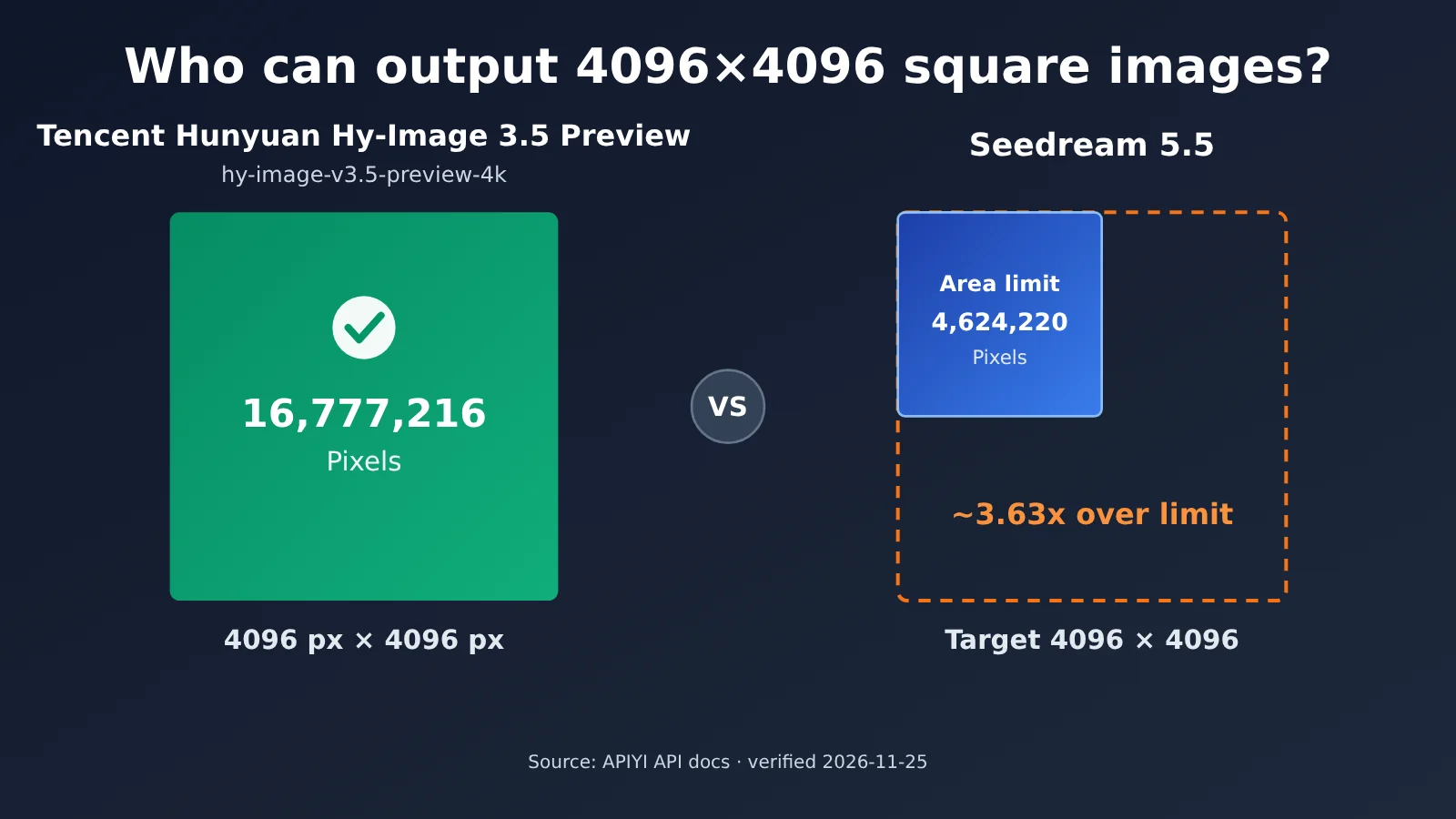
Only Tencent Hunyuan Hy-Image 3.5 Preview’s 4K-tier model hy-image-v3.5-preview-4k can output a 4096×4096 square image directly — Seedream 5.5 can’t. On APIYI, the area cap for Hunyuan’s 4K tier is exactly 16,777,216 pixels, and when you omit size it also defaults to returning 4096×4096. Both the overseas and the domestic versions of Seedream 5.5 set the area cap for custom sizes at 4,624,220 pixels. A 4096×4096 output has a 1:1 aspect ratio, which is perfectly legal, but its area is roughly 3.63× the cap, so the request gets rejected at the parameter layer. This conclusion comes from the parameter boundaries laid out in the API documentation — it doesn’t depend on subjective image-quality reviews, and this article doesn’t include any hands-on testing either.
What will you learn from reading this?
- What default output size each of Hunyuan Hy-Image 3.5 Preview’s two tiers (2K and 4K) produces, and what error you get when the 2K tier is asked for 4096×4096.
- The preset tiers, defaults, area limits, and aspect-ratio constraints of Seedream 5.5’s two integration channels — and why neither
"4K"nor"4096x4096"passes. - A comparison table covering sizes like 3840×2160, 8192×2048, 8592×537, and 2150×2150, clearly marking which entries are platform records and which are derived from the rules.
- Runnable Python invocation code plus original-file acceptance-check code, and which fields you should record on the delivery sheet.
Index: “To Know” explains terms like size notation and area caps; “Impact at a Glance” covers what each role should pay attention to. “Objective Facts” walks through the size rules of both model families, the concrete width/height comparisons, the official entry-point wording, and the invocation code. “Analysis and Judgment” discusses how to interpret the “4K” tier name, when Seedream 5.5 is still a good fit, and how to verify the original image file.
Key Concepts: Tencent Hunyuan Hy-Image 3.5 Preview and Seedream 5.5 Size Terminology
| Concept | Brief explanation |
|---|---|
size width x height |
The size field in the image generation API. The first number is the width, the second is the height, in pixels, for example "4096x4096". |
| Total pixels per image (area) | Width × height. 4096×4096 = 16,777,216. This is the key metric in this article for determining whether an image can be generated. |
| Long side | The larger of width and height. “Long side 4096” does not mean “a 4096×4096 square image.” |
| Preset tier | Seedream 5.5 accepts the three strings 1K, 1.5K, and 2K, and the model chooses the specific frame size based on the prompt. |
| Custom area limit | The maximum total pixels allowed when passing exact width and height. For Seedream 5.5, it is 4,624,220; for Hunyuan’s 4K tier, it is 16,777,216. |
| Aspect ratio constraint | For Seedream 5.5 exact sizes, the aspect ratio must be between 1/16 and 16. |
400 invalid_size |
The invalid-size response specified in APIYI’s Hunyuan documentation, for example when a 2K-tier model requests 4096×4096. |
generate_max_pixels |
A parameter in Tencent Cloud TokenHub’s native API that controls the target area for automatic sizing when size is omitted. |
data.size |
The field in Volcano Ark responses that records the width and height of the generated image; it can be used for initial programmatic verification. |
4096×4096 Square Image Needs: Impact at a Glance
- Teams that need fixed square images for e-commerce, print, or asset libraries: When delivery specs call for 4096×4096, go straight to
hy-image-v3.5-preview-4k. Seedream 5.5’s API responses top out at roughly 2150×2150 for square images. - Developers: On the same
POST /v1/images/generationsendpoint, the model suffix sets the size cap. With Hunyuan, you have to switch from-2kto-4kto request 4096×4096. With Seedream 5.5, passing"4K"falls outside the preset enum, while passing"4096x4096"exceeds the area limit—so the two failures have different causes. - Current Seedream 5.5 users: Up to 4.62 megapixels, Seedream 5.5 supports ultra-wide aspect ratios as extreme as 16:1. For example, the platform has logged 8592×537, and that width goes beyond Hunyuan’s 8192 per-side limit. Before switching models, figure out whether you actually need a large total pixel area or an extreme aspect ratio.
- Acceptance and QA: Check the pixel width and height of the downloaded original image—not the filename, preview width, or file size. Keep dimensions from external cropping or upscaling separate from the dimensions the API originally returned.
Objective Facts: The Size Rules for Tencent Hunyuan Hy-Image 3.5 Preview and Seedream 5.5
The facts below come primarily from APIYI documentation, verified on 2026-11-25 (Beijing time). The unit of comparison is a single generated image returned by the standard image generation endpoint, with text-only generation of one image as the reference scenario.
Size and Defaults for the Two Hunyuan Hy-Image 3.5 Preview Tiers
With Hunyuan, you pick the tier through model in POST /v1/images/generations, and size takes a widthxheight value made of integer pixels. APIYI’s text-to-image and reference-image-to-image parameter docs list the same two area tiers and the same default square image. The generic example on the parameter page shows 2048x2048, but the description for that field gives two actual defaults depending on the model — so when reading it, go by the model’s actual behavior.
| Model | Default when size is omitted |
Max area (pixels) | Per-side range | Explicit 4096×4096 request |
|---|---|---|---|---|
hy-image-v3.5-preview-4k |
4096×4096 | 16,777,216 | 256–8192 | Supported |
hy-image-v3.5-preview-2k |
2048×2048 | 4,194,304 | Not listed separately in the docs | Returns 400 invalid_size |
Going from 2048×2048 to 4096×4096 doubles each side, which makes the total canvas four times larger. In its 4K size examples, APIYI lists a 3840×2160 landscape image (8,294,400 pixels) and a 4096×4096 square image (16,777,216 pixels) — the square’s area is a bit more than twice the landscape’s. Under standard edit mode, the Hunyuan reference image docs likewise define size as the width and height of the output image.
Seedream 5.5 Size Rules Across Both Channels
Seedream 5.5 also goes through POST /v1/images/generations on APIYI, split into an overseas channel and a mainland China channel. Both follow the same size rules for standard output.
| Channel | APIYI model | Upstream node | Available presets | When size is omitted |
Exact-size constraints |
|---|---|---|---|---|---|
| Overseas | seedream-5-5-261028 |
BytePlus Singapore | 1K / 1.5K / 2K |
2K |
Area 921,600–4,624,220, aspect ratio 1/16–16 |
| Mainland China | doubao-seedream-5-5-261028 |
Volcano Engine Beijing | 1K / 1.5K / 2K |
2K |
Area 921,600–4,624,220, aspect ratio 1/16–16 |
The 2K preset lets the model pick a frame based on the prompt’s aspect ratio or intended use. In the vendor’s mapping table, squares are usually 2048×2048, 3:2 landscape is 2496×1664, and 16:9 landscape is 2816×1584. In the test table APIYI published, one 2K text-to-image run on the overseas version returned 2048×2048, while another 2K text-to-image run on the mainland China version returned 2496×1664 — good evidence that a single tier can yield several width/height pairs. If you need both dimensions pinned, just write an exact size within the allowed range, for example "2048x2048".
The two notations also follow different validation paths. "4K" isn’t in Seedream 5.5’s preset enum, and while "4096x4096" is a legal format, its product exceeds the custom cap. "1280x720" lands exactly on the 921,600-pixel lower bound, and its aspect ratio is compliant too. Standard editing on Seedream 5.5 uses the same tiers and custom range as text-to-image. auto is the default tier for the layer-splitting scenario and has its own output size rules, so it’s outside the standard generation discussed here.
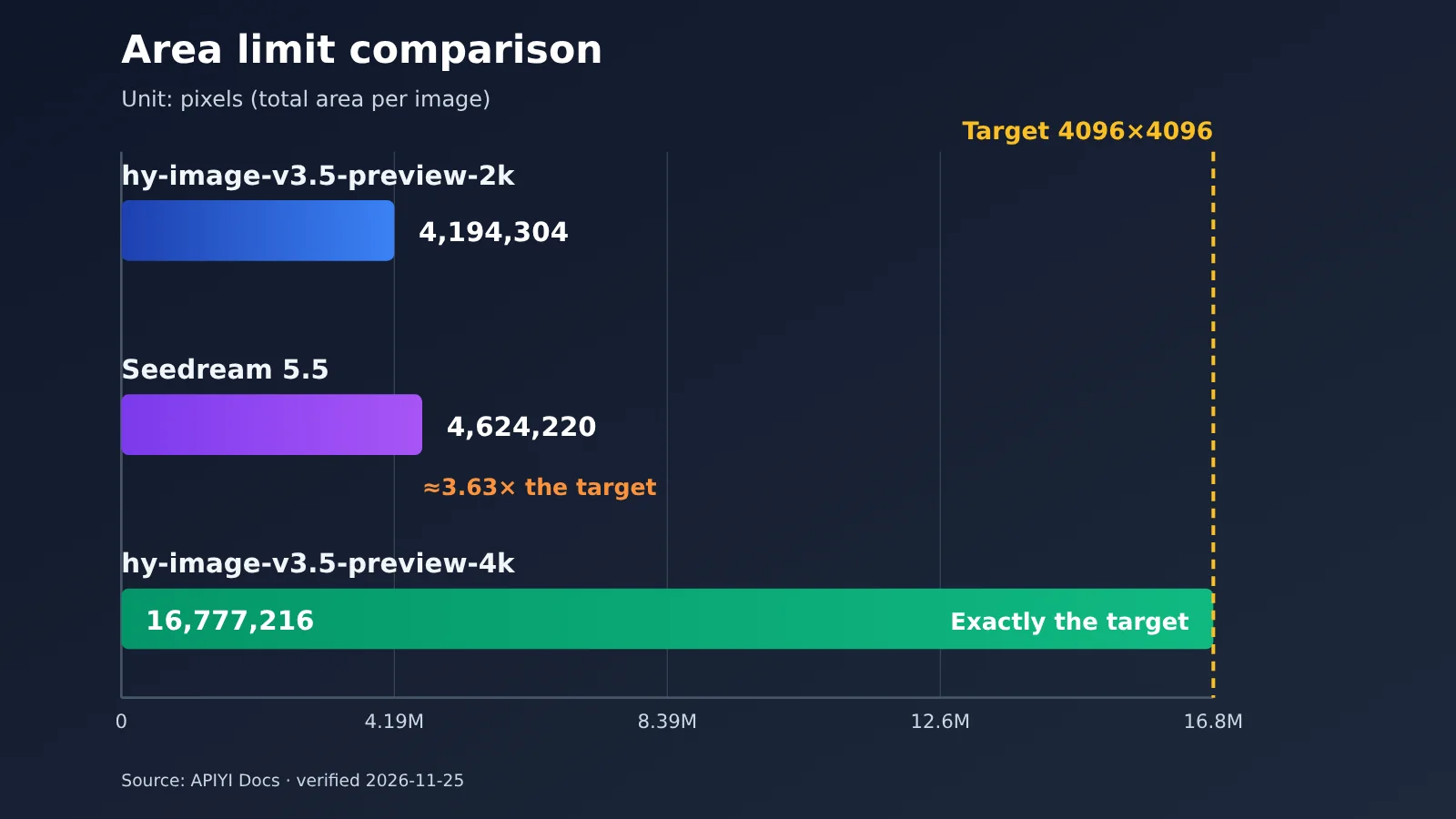
The key difference in the chart above: Seedream 5.5’s cap is roughly 10.25% higher than the Hunyuan 2K tier, but an order of magnitude below the 4K tier. The vendor describes this cap as the standard 2K square area multiplied by 1.1025 — effectively about 5% growth on each side. All of these numbers come from the parameter pages published in the APIYI documentation center, and you can double-check them by calling both models with the same key in the APIYI apiyi.com console.
Comparing the Two Model Variants with Concrete Widths and Heights
Phrases like “4K” and “long side 4096” can be confusing. The safest approach is to plug concrete widths and heights into the rules one by one. The “Basis” column in the table below distinguishes three sources: public platform records, values listed in the documentation, and calculations based on documented conditions. Calculated results are not empirical measurements.
| Width × Height | Total pixels | Aspect ratio | Hunyuan 4K tier | Seedream 5.5 | Basis |
|---|---|---|---|---|---|
| 4096×4096 | 16,777,216 | 1:1 | ✓ (default) | ✗ area too large | Listed in documentation |
| 3840×2160 | 8,294,400 | 16:9 | ✓ | ✗ area too large | Listed in documentation |
| 4096×2304 | 9,437,184 | 16:9 | ✓ | ✗ area too large | Calculated from rules |
| 8192×2048 | 16,777,216 | 4:1 | ✓ (exactly at the area limit) | ✗ area too large | Calculated from rules |
| 4096×1128 | 4,620,288 | about 3.63:1 | ✓ | ✓ (largest integer height at width 4096) | Calculated from rules |
| 4096×1129 | 4,624,384 | about 3.63:1 | ✓ | ✗ area too large | Calculated from rules |
| 2240×2064 | 4,623,360 | about 1.09:1 | ✓ | ✓ returned successfully | Platform record (November 13) |
| 2240×2065 | 4,625,600 | about 1.08:1 | ✓ | ✗ returns 400, area too large | Platform record |
| 8592×537 | 4,613,904 | 16:1 | ✗ width exceeds 8192 | ✓ returned successfully | Platform record |
| 8593×537 | 4,614,441 | slightly over 16:1 | ✗ width exceeds 8192 | ✗ returns 400, aspect ratio out of range | Platform record |
| 2150×2150 | 4,622,500 | 1:1 | ✓ | ✓ (upper bound for square-image side length) | Calculated from rules |
| 2864×1611 | 4,613,904 | 16:9 | ✓ | ✓ (largest exact 16:9 size) | Calculated from rules |
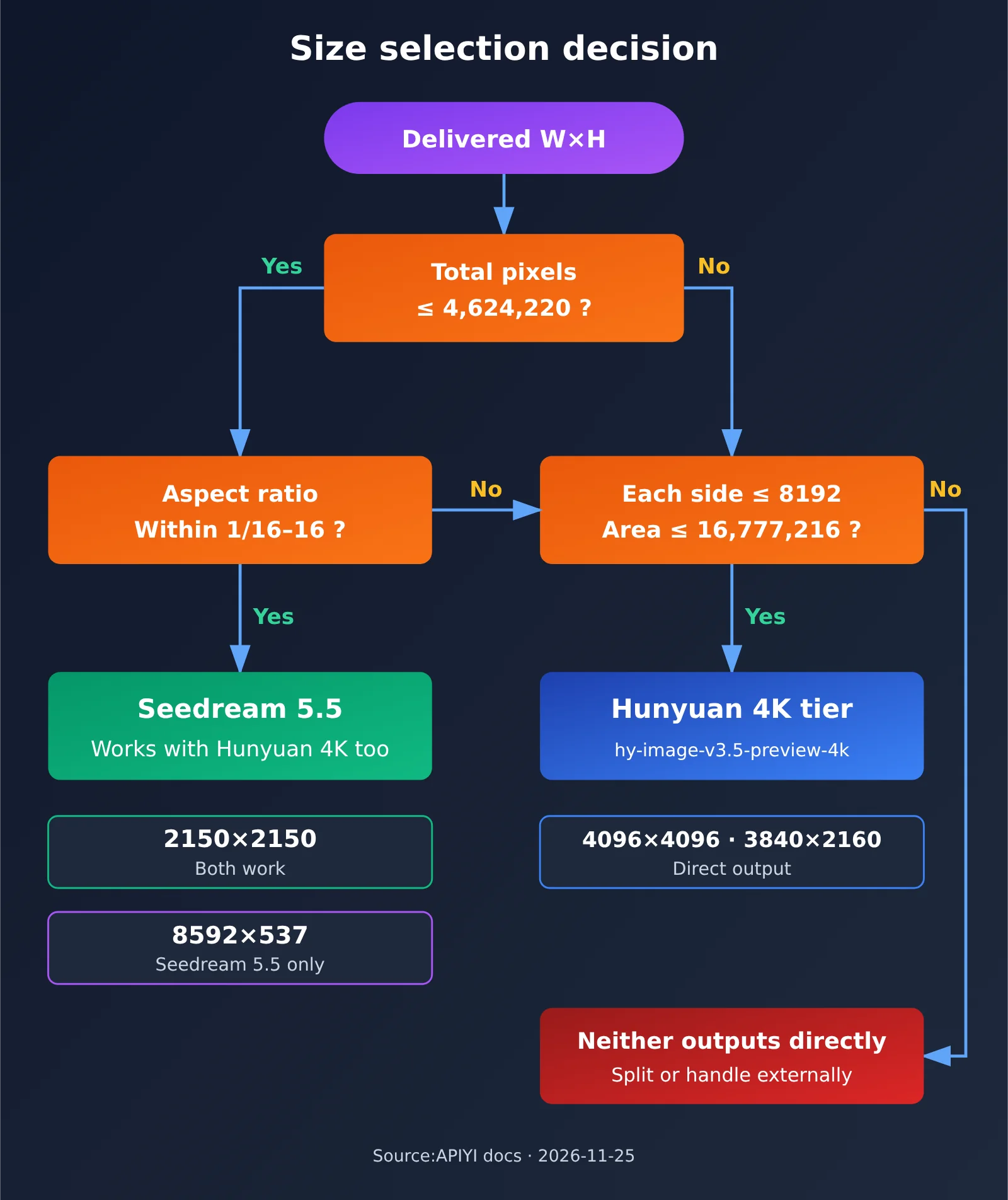
A few sets of numbers deserve a closer look. The pass/fail pairs 2240×2064 versus 2240×2065 and 8592×537 versus 8593×537 correspond to two independent constraints: area and aspect ratio. An exact 16:9 size can be written as 16k×9k, with an area of k² × 144. Based on Seedream 5.5’s upper limit, the largest integer multiple is k = 179, corresponding to 2864×1611. The vendor’s common 2K preset, 2816×1584, also falls within this range. In addition, 2240×2064 exceeds Hunyuan’s 2K tier limit of 4,194,304 but is within the Hunyuan 4K tier. So when checking intermediate sizes, be explicit about which model suffix you’re comparing against.
Official Endpoint and Size Conventions for Different Versions
On the Tencent Cloud TokenHub China site, the model name is hy-image-v3.5-preview, and the path is /v1/wand/hunyuan-image/v35-generation; input is passed through messages. The official 4K square-image example explicitly sets size: "4096x4096". When size is omitted, automatic sizing depends on the semantics and generate_max_pixels. The default target area is 2,359,296 (the 1.5K tier), with a maximum of 4,194,304 (the 2K tier). In other words, if you don’t specify a size on the official API, you won’t automatically get a 4096 square image. By contrast, APIYI’s -4k model defaults to 4096×4096 when size is omitted, so you can’t conflate the default behaviors on the two sides.
For Seedream 5.5, the official overseas tutorial lists the model as dola-seedream-5-5-261028, while the China site uses doubao-seedream-5-5-261028. Both list three preset tiers and the same custom area and aspect ratio options, and the Volcano Ark API documentation lists 2K as the default tier for standard generation. APIYI’s Seedream series text-to-image reference does mention 4K, but it belongs to the two models seedream-4-5-251128 and seedream-4-0-250828, not to 5.5. BytePlus also gives an upper limit of 36,000,000 pixels (equivalent to a 6000×6000 square image of the same area), but that’s the input area limit for a single reference image in standard generation, not the output image size.
Calling Tencent Hunyuan Hy-Image 3.5 Preview to Generate 4096×4096 Square Images
Here’s a minimal example that uses the OpenAI-compatible SDK to call the 4K-tier model, spelling out the size explicitly so the delivery spec is captured in your request logs.
from openai import OpenAI

client = OpenAI(
    api_key="YOUR_API_KEY",
    base_url="https://api.apiyi.com/v1"  # APIYI OpenAI-compatible endpoint
)

resp = client.images.generate(
    model="hy-image-v3.5-preview-4k",
    prompt="极简白色背景上的陶瓷茶杯,柔和侧光,产品摄影",
    size="4096x4096",  # when omitted, this model also defaults to 4096x4096
)
item = resp.data[0]
print(item.url or "已返回 Base64 图像")
View the full code: save the file to disk after generation and verify pixel width and height
import base64
import io
import json
import urllib.request

from openai import OpenAI
from PIL import Image

client = OpenAI(
    api_key="YOUR_API_KEY",
    base_url="https://api.apiyi.com/v1"  # APIYI unified gateway
)


def generate_and_verify(model: str, prompt: str, size: str | None,
                        expect_w: int, expect_h: int,
                        out_path: str = "output.png") -> dict:
    params = {"model": model, "prompt": prompt}
    if size:
        params["size"] = size

    resp = client.images.generate(**params)
    item = resp.data[0]

    # The response may be a CDN URL or Base64; either way, write it to disk first, then read the pixels
    if getattr(item, "b64_json", None):
        raw = base64.b64decode(item.b64_json)
    else:
        with urllib.request.urlopen(item.url) as r:
            raw = r.read()

    with open(out_path, "wb") as f:
        f.write(raw)

    w, h = Image.open(io.BytesIO(raw)).size
    record = {
        "model": model,
        "requested_size": size or "(省略,使用型号默认)",
        "file_width": w,
        "file_height": h,
        "total_pixels": w * h,
        "pass": (w, h) == (expect_w, expect_h),
    }
    print(json.dumps(record, ensure_ascii=False, indent=2))
    return record


if __name__ == "__main__":
    # Hunyuan 4K tier: deliver a 4096x4096 square image
    generate_and_verify(
        model="hy-image-v3.5-preview-4k",
        prompt="极简白色背景上的陶瓷茶杯,柔和侧光,产品摄影",
        size="4096x4096",
        expect_w=4096, expect_h=4096,
        out_path="hy_4096.png",
    )

    # Seedream 5.5: a square-image request should stay within the area cap, e.g. 2048x2048
    generate_and_verify(
        model="seedream-5-5-261028",
        prompt="极简白色背景上的陶瓷茶杯,柔和侧光,产品摄影",
        size="2048x2048",
        expect_w=2048, expect_h=2048,
        out_path="seedream_2048.png",
    )
🚀 Quick start: Both models sit behind the same OpenAI-compatible endpoint at APIYI apiyi.com — to switch models you only change
modelandsize. New users can run the verification script above with their free trial credits, then archive the model, the size you passed in, and the actual file width and height together.
Analysis: Choosing Between Tencent Hunyuan Hy-Image 3.5 Preview and Seedream 5.5 on APIYI
Why Seedream 5.5 can’t produce a 4096×4096 square image by “turning up the parameters”
Seedream 5.5’s limit comes from API parameter validation, not from the prompt or preset selection. The preset tops out at 2K, and exact width and height are also capped at 4,624,220 pixels. For a square image, the maximum integer side length works out to just 2150. So for Seedream 5.5, “requesting 4096×4096” has no valid form through either of these paths. You can determine the conclusion directly from the parameters; you don’t need to run generation tests to verify it.
If Seedream later releases a new version or adjusts the area cap, this conclusion could change. That’s speculation, and it would depend on how the model behaves at that time. The 4K examples for models like seedream-4-5-251128 in the APIYI documentation are a reminder: after you see “4K” on a family overview page, always go back to the specific model row and confirm what it actually applies to.
The “4K” label doesn’t mean 4096×4096
The Hunyuan 4K tier can produce 3840×2160, 4096×4096, and 8192×2048 — all with different areas and shapes. If a work order only says “4K” or “longest side at least 4096,” checking the longest side is enough. Once the shortest side or square composition is also specified, there’s an extra independent condition. Only by writing the requirement as width=4096, height=4096 can you directly tell whether it qualifies. A better approach is to record both the tier name and the exact width and height, so team members don’t each interpret it their own way.
Scenarios Where Seedream 5.5 Still Works Well
Just because it can’t produce 4096×4096 square images doesn’t mean Seedream 5.5 is behind on dimensions across the board. It supports aspect ratios from 1/16 to 16 within 4.62 megapixels. There are platform return records for ultra-wide banners like 8592×537 at 16:1, while the Hunyuan 4K tier would hit the 8192 single-side cap first. For 2K-level square images, standard landscape and portrait images, and extreme elongated images, Seedream 5.5 is a viable option. Image quality, style, and unit price are outside the scope of this article’s verification. I recommend using the same prompt to call both models on APIYI apiyi.com and comparing them with your own assets.
Cropping and Upscaling Can’t Replace the API’s Original Dimensions
If you crop a 3840×2160 landscape image to a square, you can keep at most 2160×2160. From a 8592×537 image, you can crop at most a 537×537 square. To reach 4096×4096, you’d still need external upscaling, and at that point the width and height of the delivered file are no longer the same thing as the width and height returned by the API. What public documentation can confirm is the pixel width and height delivered by the API. The underlying sampling resolution and whether an upscaling step exists are not disclosed in those specifications, so it’s not appropriate to infer “native” status from them.
Fields to record in the delivery ticket
| Field | Example | Purpose |
|---|---|---|
| Model (including suffix) | hy-image-v3.5-preview-4k |
Distinguish 2K/4K tiers and avoid misjudging intermediate sizes |
| Gateway and channel | APIYI; for Seedream, note overseas/China | Makes it easy for colleagues to reproduce through the same path |
size passed in |
"4096x4096" or “omitted” |
If omitted, record the model default |
| Width and height returned by the API | 4096 × 4096 | Use the downloaded original image pixels, not preview width, DPI, or file size |
| Delivered width and height after post-processing | Fill in separately if cropped or upscaled | Keep separate from the API’s original dimensions to preserve provenance |
| Reference image input dimensions (editing scenario) | Width and height of the imported asset | Input limits and output limits follow different rules |
Volcano Ark’s response provides a data.size field, which you can use for programmatic preliminary validation. APIYI’s Hunyuan text-to-image response returns either a CDN URL or Base64; both forms can be written to disk first and then read for width and height. The full code earlier covers both cases. During acceptance, only when both the width and height columns of the file show 4096 does it meet the specification for this task.
🎯 Technical tip: If a project has both 4096 square-image and ultra-wide banner requirements, you can use a single API key on APIYI apiyi.com to access both the Hunyuan 4K tier and Seedream 5.5, then route automatically in code based on size rules. That saves you from maintaining two sets of vendor authentication.
Back to the question in the title: to get a 4096×4096 square image directly at the API layer, the only answer is Tencent Hunyuan Hy-Image 3.5 Preview’s hy-image-v3.5-preview-4k; Seedream 5.5’s value lies in flexible frame sizes and extreme aspect ratios within 4.62 million pixels. Write your requirements as specific width and height, then check the model’s three rules—area, side length, and ratio. Most selection questions can be settled before you send the request.
References
-
APIYI Documentation Center: Hunyuan Image Generation and Seedream Image Capabilities
- Link:
docs.apiyi.com/api-capabilities/ - Description: Covers the Hunyuan Image Generation overview, text-to-image, and reference-image-to-image pages, along with the Seedream overview, text-to-image, image editing, and the Seedream 5.5 billing and response records pages.
- Link:
-
Tencent Cloud TokenHub Hy Image Generation Guide
- Link:
cloud.tencent.com/document/product/1823/135745 - Description: Original model types, paths, explicit dimension examples, and the
generate_max_pixelsexplanation.
- Link:
-
BytePlus Seedream 5.5 Tutorial
- Link:
docs.byteplus.com/en/docs/modelark/seedream-5-5 - Description: Overseas original model types and preset tiers.
- Link:
-
BytePlus Image Generation API
- Link:
docs.byteplus.com/en/docs/ModelArk/image-generation-api - Description: Input reference image area limits and output dimension details.
- Link:
-
Volcano Ark Image Generation Tutorial and API
- Link:
docs.volcengine.com/docs/ark/image-generation-tutorial - Description: Preset dimension mapping, exact width and height rules, and the
data.sizeresponse field.
- Link:
Author: APIYI Technical Team
Technical Discussion: Feel free to reach out to us through the APIYI official website homepage, and for more API parameters, check the docs.apiyi.com documentation center.