Author’s note: Tencent Hunyuan Hy-Image 3.5 Preview is now live on APIYI. This article breaks down how to pick between the 2K and 4K variants, hands you a call path you can actually get working, and flags four categories of pitfalls that can quietly waste your money.
Tencent Hunyuan released Hy-Image 3.5 Preview on 2026-09-22, built for professional creators. On 2026-11-25, APIYI (apiyi.com) added its two fixed-size variants to the lineup: hy-image-v3.5-preview-2k and hy-image-v3.5-preview-4k. The loudest line in the launch notes: “Accurate Chinese text rendering — built for posters, e-commerce hero images, and film/TV assets.”
This is not a “crushes everything” hype piece. On third-party leaderboards, its text-to-image scores land in the mid-to-lower range, while its image-editing rank sits near the top. For creators making posters, e-commerce hero images, and social media graphics, it works more like a dedicated tool: solid at getting Chinese headlines right, and solid at revising drafts from a reference image.
Core takeaway: By the end of this article, you’ll know how to choose between the 2K and 4K variants, have a working call path that doesn’t require wrestling with Tencent Cloud’s native protocol, and be ready to dodge the pitfalls around legacy fields, response payload size, timeouts, and the square-image restriction.
Tencent Hunyuan Hy-Image 3.5 Preview: Key Facts at a Glance
Let’s run through the essentials in one table first. The data below is dated 2026-11-25; model names and prices are subject to the platform’s model list.
| Item | Details |
|---|---|
| Official model ID | hy-image-v3.5-preview, released by Tencent Hunyuan on 2026-09-22 |
| APIYI model variants | hy-image-v3.5-preview-2k (2048×2048), hy-image-v3.5-preview-4k (4096×4096) |
| APIYI pricing | 0.022 USD/image for -2k, 0.03 USD/image for -4k, billed per image, no surcharge for the number of reference images |
| Official pricing | 1K, 1.5K, and 2K are all 0.15 CNY/image; 4K is 0.20 CNY/image |
| Endpoint | POST /v1/images/generations (JSON, OpenAI Images compatible) |
| Supported capabilities | text-to-image, reference image-to-image (reference images passed via the images array) |
| Channel and groups | Tencent Cloud official channel (official relay), available in Default and SVIP groups, multiplier 1.0x |
What Hy-Image 3.5 Preview Is Good At: Chinese Text and Reference-Image Editing
According to the official release page, this version mainly improved three things: text rendering and layout, realism and style, and editing consistency. The official team says it invited over a hundred professional designers to run GSB blind tests, and compared with the previous generation, the overall win rate improved by more than 30%. Note that this is an official internal evaluation, not third-party data.
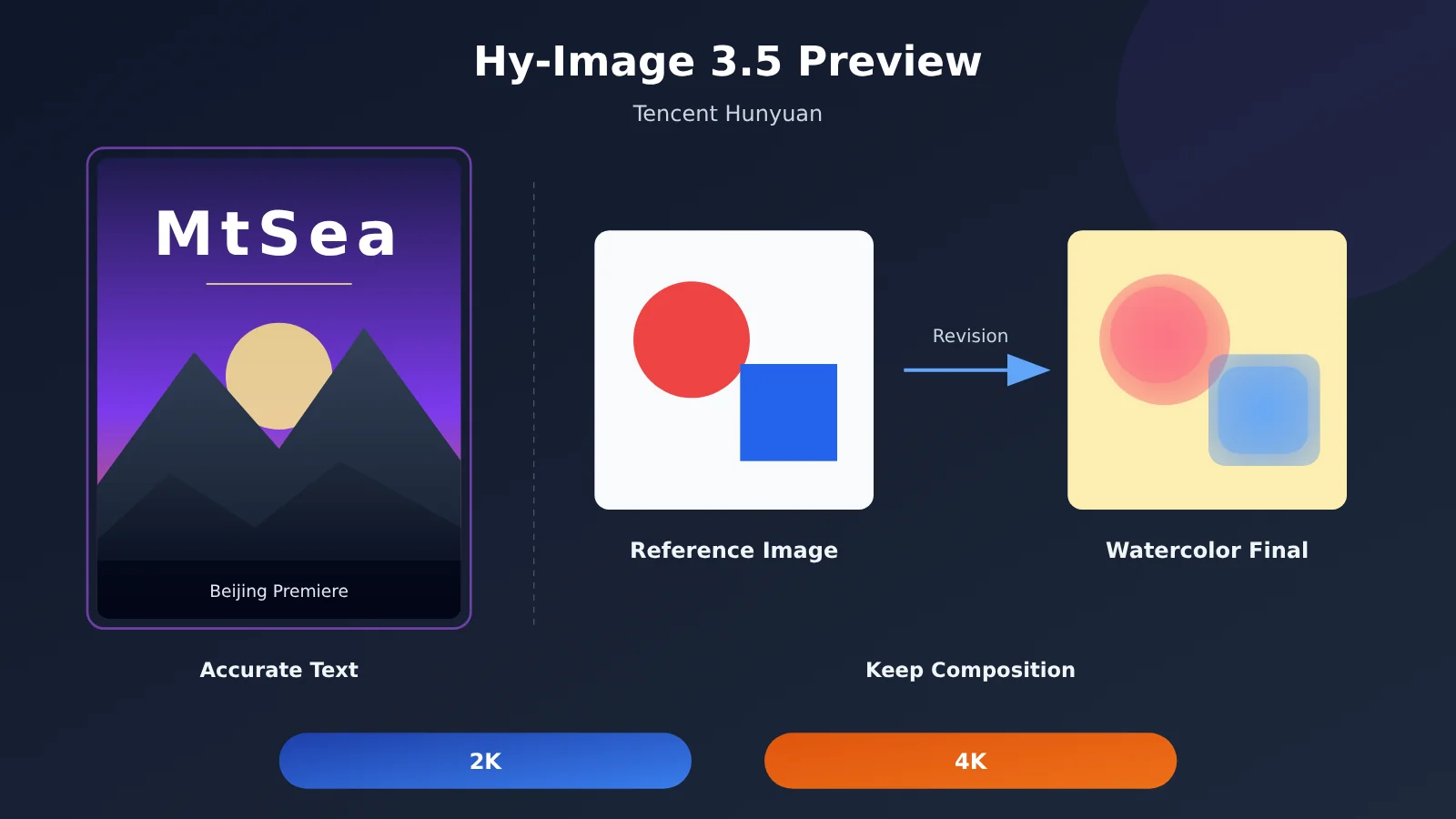
APIYI ran a round of platform self-testing before listing the model: 31 test cases total, with 26 images successfully generated. The test used a Chinese movie poster, and the main title “山海之间” (Between Mountains and Seas) and subtitle “2026年11月24日 北京首映” (Beijing premiere, November 24, 2026) were both rendered letter-perfect, with no mistakes in the dates either. Another test case changed a reference image of “a red circle plus a blue square” into a watercolor style, and the composition, positions, and colors were all preserved. Reference images passed via URL, data URI, or two at once all worked.
For content creators, these two points map neatly onto two high-frequency needs: first, Chinese text on posters and hero images can be used directly, without going back into PS to retype it; second, when you get a client’s reference draft, you can “edit according to it” instead of generating from scratch.
Three Different Sets of Claims for Hy-Image 3.5 Preview — Keep Them Separate
When you’re researching, you’ll find that questions like “what’s the maximum resolution” and “how many reference images at most” get different answers from three documents. They describe the official product, the Tencent Cloud API, and the APIYI compatibility layer respectively — you can’t merge them into a single number.
| Source | Date | Resolution claims | Reference image claims | Other |
|---|---|---|---|---|
| Official release page | 2026-09-22 | up to 2K output, supports various size ratios | up to 5 per request | supports multi-turn creation and continuous editing |
| Tencent Cloud TokenHub API docs | 2026-10-12 | size up to 4096×4096, width and height 256–8192, area no more than 16777216 |
no equivalent limit | input limit 100k tokens |
| APIYI docs | 2026-11-25 | fixed at 2048×2048 or 4096×4096 | single image no more than 20MB, 20 images max in total | compatibility layer doesn’t expose multi-turn editing |
In plain terms: the official release page describes the product experience, the Tencent Cloud docs describe the API capability ceiling, and the APIYI docs describe what you can actually pass through the compatible interface. When writing code, go by the APIYI docs. If you want to stay strictly in line with the official product experience, keeping reference images to 5 or fewer is the safer bet.
How to Choose Between the Hy-Image 3.5 Preview 2K and 4K Models
On APIYI, this model comes in only two fixed variants—there’s no “pass in a size and adjust it yourself” option. So choosing is simply a two-way decision, and the criterion is straightforward: where will the final image be displayed?
| Model | Output Size | APIYI Price | Official Equivalent Price | Best For | Available Platforms |
|---|---|---|---|---|---|
hy-image-v3.5-preview-2k |
2048×2048 | 0.022 USD/image | 0.15 CNY/image | Web graphics, social media, e-commerce main image drafts, proposal drafts | APIYI (Default / SVIP) |
hy-image-v3.5-preview-4k |
4096×4096 | 0.03 USD/image | 0.20 CNY/image | Print materials, large-format posters, images that require heavy cropping | APIYI (Default / SVIP) |
For everyday web pages, WeChat official accounts, Xiaohongshu, and e-commerce product detail pages, 2K is enough. A 2048-pixel square image is more than sufficient when scaled down to a phone screen, and it generates faster too: in our platform tests, 2K text-to-image took about 18–35 seconds, while 4K took about 45–58 seconds. For printed materials, display stands, film and TV promotional materials, or when you plan to crop vertical or horizontal versions out of a square image, go with 4K to leave enough cropping headroom.
As for pricing, APIYI’s listed prices are converted at a fixed 1:7 exchange rate, consistent with the official site; when you factor in top-up bonuses, the effective price is about 83–91% of the official site price. The number of reference images doesn’t add to the price—uploading one or multiple costs the same. In our platform tests, we generated a total of 20 2K images and 6 4K images, and the total charge was 62 cents, which matches the per-image rates of 0.022 and 0.03 USD; failed requests were not charged.
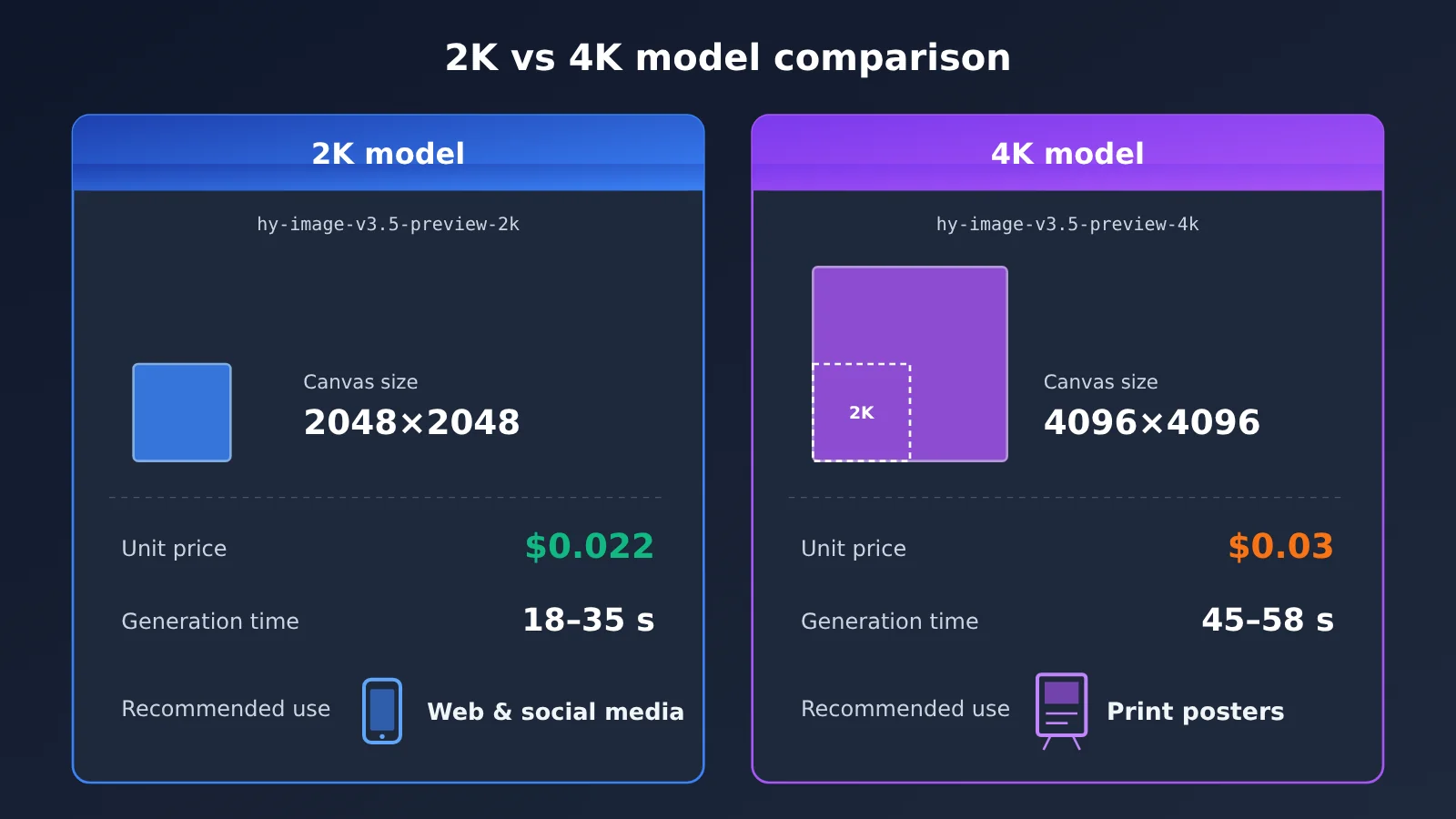
The prices and time ranges in the chart above come from APIYI apiyi.com’s launch notes and platform testing; the data date is 2026-11-25.
💡 Recommendation: When you’re not sure, start with 2K to produce a few versions and settle on the composition direction, then use 4K for the final delivery image. With APIYI apiyi.com, one API key can call image, video, and text models at the same time, and billing is per image—so you can handle copywriting, image generation, and revisions through the same set of APIs.
How to Call Hy-Image 3.5 Preview: One Path That Actually Works
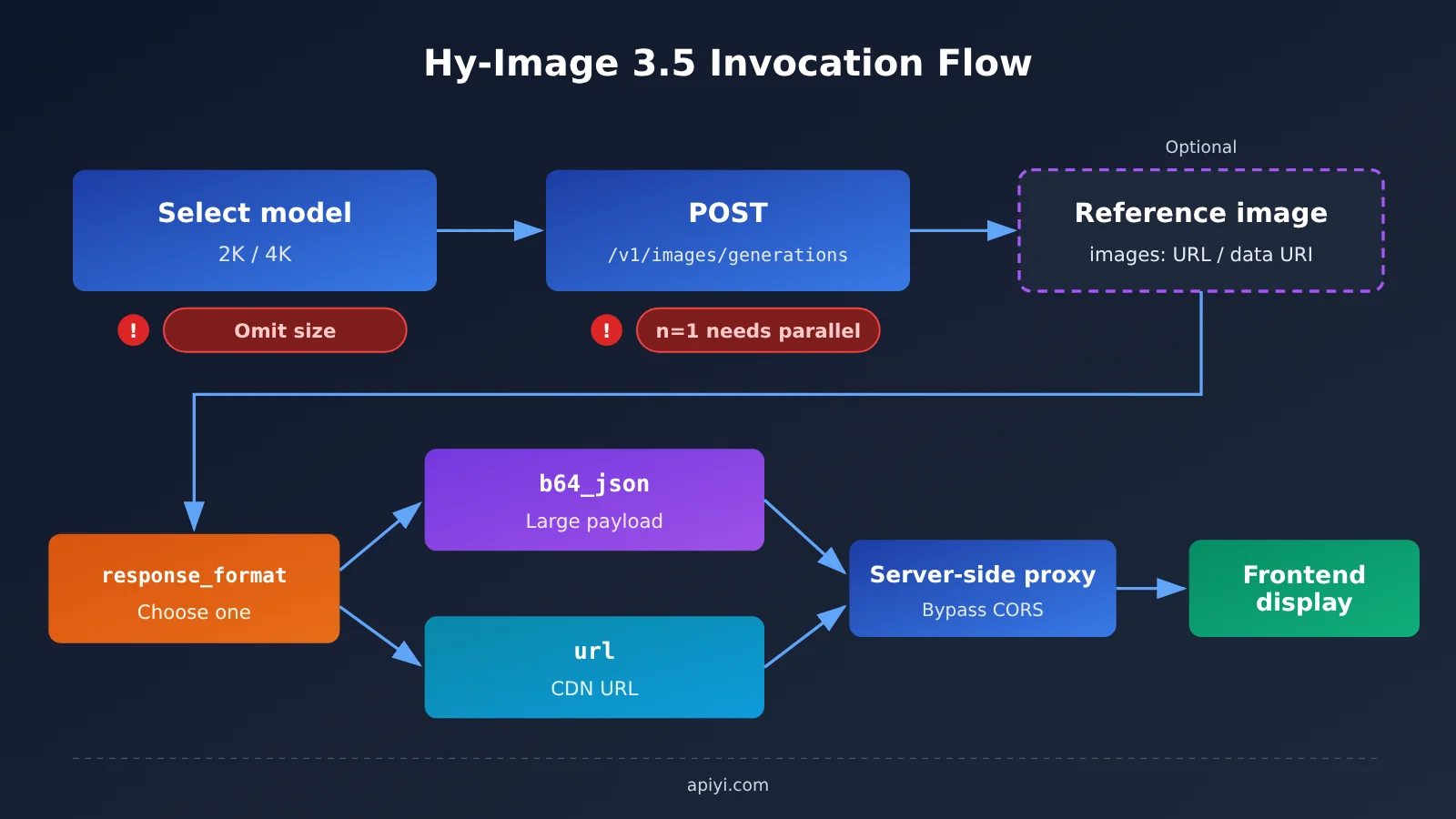
Tencent Cloud’s native API speaks the Chat/Messages protocol. APIYI wraps it into an OpenAI Images-compatible interface, so there’s really only one path to remember.
- One endpoint, nothing else:
POST /v1/images/generations, JSON request body, and setbase_urltohttps://api.apiyi.com/v1. - Pick one of two models: either
hy-image-v3.5-preview-2korhy-image-v3.5-preview-4k. - Don’t pass
size: -2k is locked to 2048×2048 and -4k to 4096×4096, so any value you send gets overwritten. - Reference images always go in the
imagesarray: put image URLs or data URIs in there. Leave it out and you get text-to-image. - Decide the response format:
b64_jsonis the default; if you want a link, explicitly setresponse_formattourl.
A minimal text-to-image request body looks roughly like this: {"model": "hy-image-v3.5-preview-2k", "prompt": "电影海报,主标题 山海之间,副标题 北京首映", "response_format": "url"}. To revise a draft, just add "images": ["https://your-reference-image-url"] to the same request body. If you’re using the OpenAI SDK, swap base_url for APIYI’s address, put your key in the request headers, and everything else works the same as calling OpenAI’s image endpoint.
The table below shows how each field actually behaves in the compatibility layer. Fields that don’t take effect can simply be deleted so they don’t mislead you during debugging.
| Field | How to pass it | Actual behavior |
|---|---|---|
model |
Required, 2k or 4k variant | Determines the output dimensions |
prompt |
Required | Chinese prompts work fine — just write the title text straight in |
images |
Optional, array of URLs or data URIs | The recommended way to supply reference images |
size |
Don’t pass | Overridden by the model’s fixed dimensions |
n |
No need to pass | Fixed at 1; send concurrent requests if you need multiple images |
response_format |
b64_json or url |
Only these two values are accepted, default is b64_json |
quality / style / output_format |
No need to pass | Not currently in effect |
🚀 Quick Start: Claim the new-user free trial credits at APIYI apiyi.com first, then run the whole chain with the 2K model plus one reference image. Once you’ve confirmed the response format and timeout settings are fine, wire it into your production workflow.
The Four Pitfalls of Hy-Image 3.5 Preview: Which Ones Waste Your Money
This is the part worth reading closely. Each of the cases below either gets you the wrong output spec or bills you for a request that failed anyway — real money, straight out of your pocket.
| Pitfall | Symptom | How to avoid it |
|---|---|---|
| Legacy field and the edits endpoint | Passing a reference image via the legacy image field without a size, or going through the multipart /v1/images/edits route, outputs only 1536×1536 |
On the main path, use only /v1/images/generations with the images array |
| Large default b64 payloads | ~6–10 MB at 2K, ~20–26 MB at 4K; slow responses, easy to exhaust memory | For batch generation, explicitly set response_format to url |
| 4K timeouts | The synchronous endpoint returns no task ID, so if the connection drops the result is gone — and you’re usually still billed | Set client timeouts to at least 120 s for 2K, at least 240 s for 4K, and 360 s recommended for 4K with b64 |
| Square-only output and capability limits | Square images only; multi-turn editing and seed reproducibility aren’t available | Crop from 4K for portrait or landscape; switch workflows when you need iterative revisions |
Pitfalls 1 and 2: reference image field and response format
The legacy image field is the easiest one to trip over: the request goes through, the image comes out, but the size is 1536×1536 — you’re still billed, and the spec isn’t the model version you picked. The multipart approach on /v1/images/edits likewise only produces 1536×1536, which is why the docs explicitly advise against using it as the primary path. Standardize on the images array and you sidestep both problems.
As for response format, url mode returns an address on the hdcdn.agisuitepro.com domain that you can drop straight into an <img> tag. But its CORS preflight returns 403, so if your frontend needs to read the image via fetch or canvas — adding a watermark, stitching images together — you’ll have to route it through a server-side proxy first.
Pitfalls 3 and 4: timeouts, moderation, and square output
Timeouts are the most insidious cost: the client disconnects early, the server has actually finished generating the image and billed you, and you end up with nothing. Separately, content moderation blocks return HTTP 400 with code content_safety_violation. That’s a deterministic error — retrying just fails again, so adjust your prompt instead.
The square constraint directly affects layout. The official product supports multiple aspect ratios, but APIYI’s compatibility layer fixes output to square. For a 9:16 mobile poster or a 3:4 hero image, either generate at 4K and crop, or keep the subject and text concentrated in the center of the frame so you have room to crop later.
Hy-Image 3.5 Preview Impact Analysis
Impact on content creators and designers on small teams
- Shorter pipeline for Chinese-language assets: titles, subtitles, and dates come out correct in one pass, so posters and e-commerce hero images no longer need heavy post-production text touch-ups.
- Revisions now have an API-driven option: take a client’s reference image, apply stylization or swap textures, and keep the composition and color palette intact — perfect for “give me another version with this same feel.”
- Costs are predictable: per-image billing, no surcharge for reference images, and fixed sizes mean you can calculate the cost of a single image upfront, which makes quoting clients easier.
- Low integration barrier: no need to dig into Tencent Cloud’s native Chat/Messages protocol — just swap the model in your existing OpenAI image invocation code and it works.
When not to use Hy-Image 3.5 Preview
There are a few cases where it’s better not to rely on it as your primary model. First, if you need multi-turn conversational iterative revisions, or want to reproduce the exact same image with a seed, the compatibility layer doesn’t expose multi-turn editing, sessions, or seed reproducibility. Second, if you’re chasing the upper ceiling of pure text-to-image quality and don’t need Chinese text, third-party leaderboards show that its text-to-image performance isn’t standout — it’s worth comparing a few other options. Third, scenarios that require direct output in non-square aspect ratios without cropping aren’t a good fit either.
In addition, native capabilities like chain-of-thought rewriting, search augmentation (use_search_tool), footnote watermarks, and generate_max_pixels aren’t currently exposed in the compatibility layer either. If your workflow depends on these, you’ll need to integrate directly with Tencent Cloud’s native API.
Impact on the industry
This release shifts the competitive focus for domestic image models from “does it look good” to “can Chinese text be delivered as-is” and “are revisions consistent.” According to third-party aggregator data cited in APIYI’s announcement, on Artificial Analysis Image Arena its text-to-image score is roughly 970–976 Elo, putting it in the mid-to-lower tier, while image editing sits around 1087–1092 Elo, near the top. The official internal GSB blind test, meanwhile, claims an improvement of about 30% over the previous generation and roughly on par with Seedream 5.0 Pro.
These two sets of numbers come from different sources and use different methodologies, so they can’t cross-validate each other, nor can they be stitched into a single conclusion. A more practical takeaway is to treat it as a model that excels at reference-image revisions and Chinese-language assets when choosing what to use — not as an all-around champion.
Frequently Asked Questions (FAQ)
Q1: What is Tencent Hunyuan Hy-Image 3.5 Preview?
It’s an image generation model released by Tencent Hunyuan on 2026-09-22, with the official ID `hy-image-v3.5-preview`. It’s aimed at professional creation, and its strengths are text rendering and layout, plus editing consistency. On APIYI (apiyi.com), it’s available in two fixed-size variants, 2K and 4K, and can be called through the OpenAI-compatible API.
Q2: How do I quickly call Hy-Image 3.5 Preview on APIYI?
Sign up for APIYI and get an API key; new users get free test credits. Set `base_url` to the platform URL, send requests to `/v1/images/generations`, set model to 2k or 4k, don’t pass size, and put reference images in the `images` array. We recommend starting with small batches using the url response format.
Q3: Is the maximum resolution 2K or 4K?
It depends on the source. The official announcement page says up to 2K output; the Tencent Cloud API docs say size up to 4096×4096; APIYI offers two fixed tiers, 2048×2048 and 4096×4096. For actual calls, go by the APIYI model variant.
Q4: How many reference images can I upload at most?
Again, it depends on the source: the official announcement page says up to 5 per request; the APIYI documentation says a single image must not exceed 20MB, and the total must not exceed 20 images. The platform’s own testing confirms that two reference images work. To stay close to the official experience, we recommend keeping it to 5 or fewer.
Q5: What are the limitations of Hy-Image 3.5 Preview?
It can only output square images; `n` is fixed at 1; quality, style, and output_format have no effect; multi-turn editing and seed reproduction aren’t available. Also, it’s a synchronous endpoint; if the connection times out, you’ll usually still be billed, so set your client timeout high enough.
Hy-Image 3.5 Preview Key Takeaways
- Clear positioning: Accurate Chinese text and strong reference image revisions, but not an all-around text-to-image champion.
- Simple model selection: Use 2K for everyday web and social media, 4K for print and large-format crops.
- Transparent pricing: -2k is $0.022 per image, -4k is $0.03 per image, with no extra charge for reference images.
- One invocation path:
/v1/images/generationswith animagesarray, no size passed. - Four pitfalls to avoid first: Legacy fields only output 1536, b64 is bulky, 4K times out, and square images and multi-turn editing have limitations.
- Getting started: Use a single APIYI Key with free quota to first get the 2K reference image revision flow working.
Summary
The core takeaways of Tencent Hunyuan Hy-Image 3.5 Preview:
- Choose the model by use case: 2K covers the vast majority of online materials, while 4K is for print and scenarios that need cropping.
- Write requests according to the docs: Use only
/v1/images/generations, useimagesfor reference images, use url return for batch generation, and start with a timeout of at least 120 seconds. - Use the model for its strengths: Chinese posters, e-commerce hero images, and reference image revisions are its home turf; when you need multi-turn editing, seed reproduction, or non-square direct output, switch to another solution.
If your workflow often involves Chinese headlines and client reference drafts, it’s worth spending a few cents to run it once. I recommend using APIYI apiyi.com with free quota to validate the results first, and once you’ve confirmed that the Chinese text and revision consistency meet your needs, then integrate it into production.
📚 References
-
APIYI Hunyuan Image Model documentation: model variants, field behavior, timeouts, and limits
- Link:
docs.apiyi.com/api-capabilities/hunyuan-image/overview.md - Note: treat this as the source of truth when writing code — it covers how
size,images, andresponse_formatactually behave
- Link:
-
APIYI Hunyuan Hy-Image 3.5 Preview launch announcement: pricing, tiers, and billing rules
- Link:
docs.apiyi.com/live/2026-11/hunyuan-image-v35 - Note: data is dated 2026-11-25; model variants and pricing are subject to the platform’s model list
- Link:
-
Tencent Hunyuan official release page: Hy Image 3.5 preview product overview
- Link:
hunyuan.tencent.com/research/hy-image35-preview - Note: official capability description, GSB blind test results, and Tencent Cloud pricing
- Link:
-
Tencent Cloud TokenHub invocation documentation: native API parameters and size limits
- Link:
cloud.tencent.com.cn/document/product/1823/135745 - Note: refer to this when you need to integrate with the native protocol or use features like multi-turn editing
- Link:
Author: APIYI Technical Team
Technical discussion: reach out to us via the APIYI homepage to get more image model integration resources