Summary: This article helps you pinpoint where the money in your API bill is going and gives cost-saving tips for each billing item.
The Bottom Line: Using API More Economically
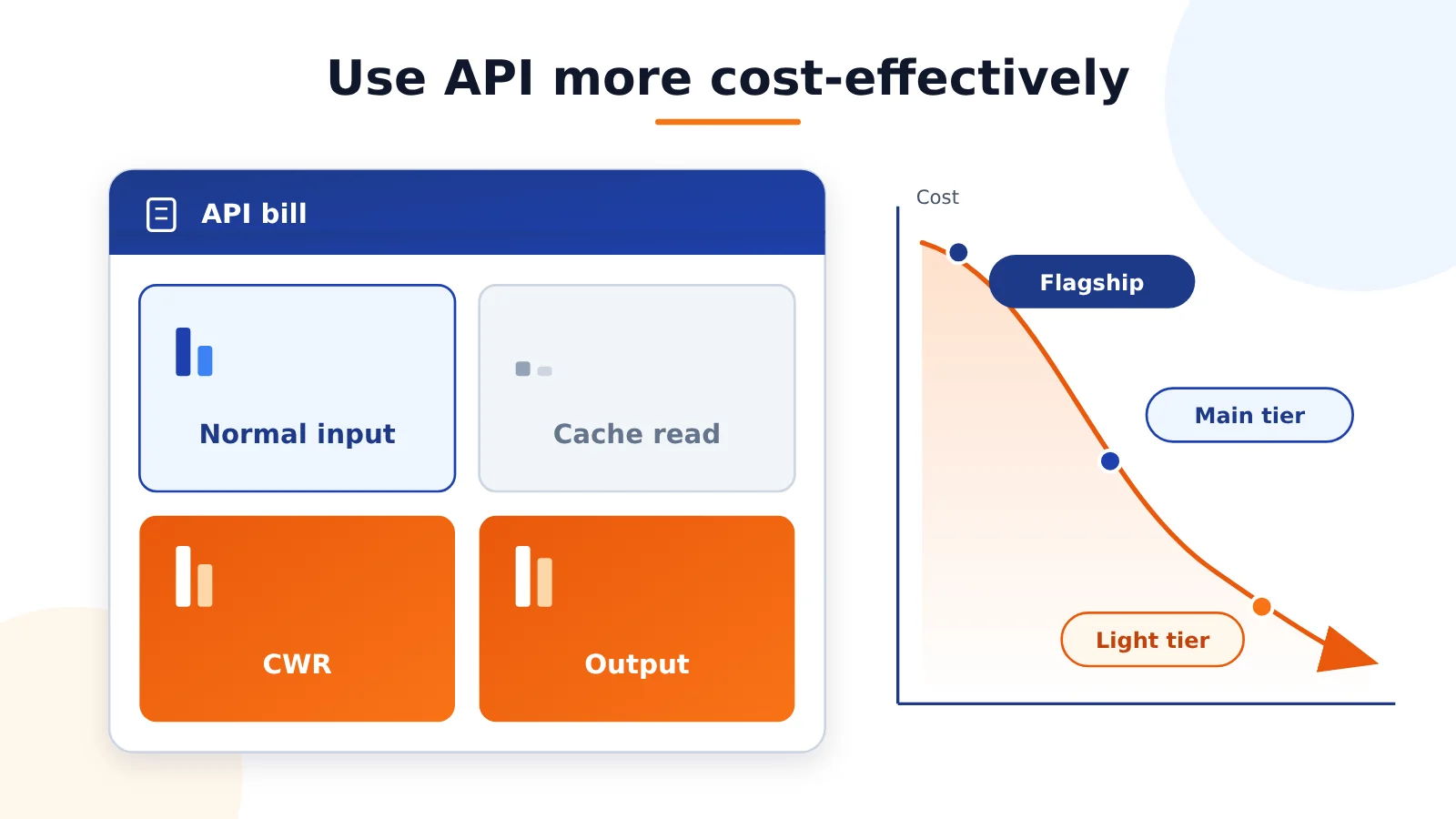
To use API more economically, the key isn’t finding a lower unit price. It’s seeing which of the four bill items (regular input, cache read, cache write, output) is rising, then addressing that specific line. In Agent scenarios, the three most common kinds of waste are: using a flagship model for trial and error, restarting the same task repeatedly and causing cache rebuilds, and letting a text model figure out the image API on the fly.
You can prioritize improvements like this: use a cheaper tier for trial and error, then move to the flagship tier once the approach is settled; finish the same task in one continuous session, and start a new conversation only when switching tasks; use prompts to limit the Agent’s read scope and tool calls; generate images through the image API or a Skill; finally, use logs to confirm which column the money is actually going into. This conclusion holds if your usage volume is large enough and you have Agent or multi-turn conversation scenarios; if you’re only making occasional one-off requests, picking the right model tier will usually solve most of the problem.
A Knowledge Map for Using APIs Economically
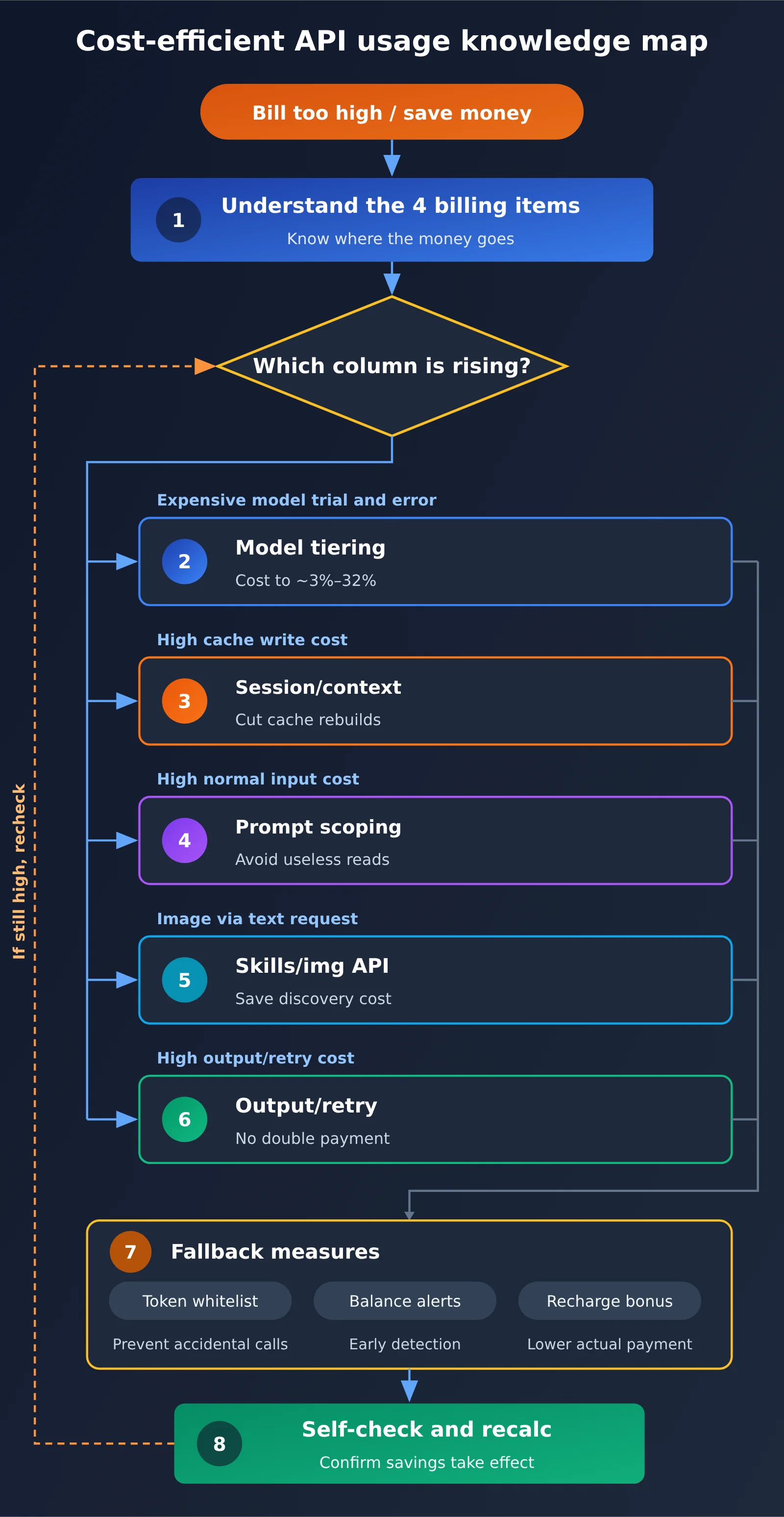
Figure description: Start with section 1 to understand the four billing items, then figure out which column of your bill is rising. Expensive-model trial and error maps to section 2, high cache writes to section 3, high ordinary input to section 4, image generation mistakenly going through text requests to section 5, and high output or retries to section 6. Section 7 covers safety-net measures that apply to every scenario, and section 8 uses log recalculation to verify the results; if the bill is still high, go back to the diagnostic step and re-locate the problem.
Article Index: Reading Order for Cost-Effective API Usage
This article follows a “diagnose first, prescribe next, fallback last” structure. Section 1 is the prerequisite for every method and must be read first. Sections 2 through 6 are five parallel prescriptions—check the one that matches the line item actually rising on your bill. Section 7 applies to everyone. Save Section 8 for last: it helps you verify whether your changes are working.
- 1 Understand how API invocation costs break down: four billing components and a real bill walkthrough, giving you a basis for later decisions.
- 2 Model tiering: lower unit price; useful when costs are too high during the experimentation phase.
- 3 Session and context management: reduce cache writes; useful for Agent scenarios.
- 4 Bound your prompts: reduce useless input.
- 5 Skills and image APIs: reduce exploration cost for image generation tasks.
- 6 Control output and retries: reduce output costs and duplicate charges.
- 7 Token and top-up safeguards: prevent accidental calls, catch issues early, and lower what you actually pay.
- 8 Self-check and recalculation: confirm where the money went and whether your changes took effect.
To Know: API Billing Terms
| Term | Brief explanation |
|---|---|
| token | The basic unit of model billing; both input and output are priced by token count |
| Regular input | The part of the prompt that doesn’t hit the cache, billed at the full input price |
| Prefix cache | Content at the start of multiple requests (system prompt, tool definitions, etc.) that can be cached and reused |
| Cache read | Input that hits the prefix cache, at a much lower unit price than regular input |
| Cache write | The prefix written to cache for the first time, at a higher unit price than regular input |
| Cache key | The basis for deciding whether cache can be reused; a new session may change the key, causing the cache to be written from scratch |
| Agent | Tools like Codex and Claude Code that read files, run commands, and call models over multiple turns |
| Skill | A way to solidify the invocation method for a certain type of task into a doc plus scripts, so an Agent can execute it directly |
1 Understanding What Makes Up API Call Costs
1.1 The Four Billing Items in a Single API Request
A text request bill usually consists of four items; for per-request models (such as some image models), you just look at the price per call. Take the flagship-tier gpt-6.2-astra as an example — the typical unit prices for each item look like this:
| Billing item | How it’s generated | Typical unit price (gpt-6.2-astra) | Relative to normal input |
|---|---|---|---|
| Normal input | Prompt that misses the cache | $8 / 1M tokens | 1x |
| Cache read | The portion that hits the prefix cache | $0.4 / 1M tokens | 5% |
| Cache write | The prefix newly written into the cache | $10 / 1M tokens | 1.25x |
| Output | The completion the model generates | $40 / 1M tokens | 5x |
This table reveals something that’s easy to overlook: cache reads are dirt cheap, while cache writes and output are the expensive items. So when you’re sizing up costs, you can’t just look at how large the “input tokens” column is.
1.2 A Real Bill, Broken Down: Big Input Doesn’t Mean High Cost
On 2026-11-27 at 10:08 (UTC+8), a user was doing image composition in Codex. A single gpt-6.2-astra request had about 58K input tokens and about 300 output tokens. Roughly 56K of the input hit the cache — a hit rate of about 96.5% — and the final charge was around $0.055. Broken down:
- Cache read: ~56,000 × $0.4/M ≈ $0.022
- Cache write: ~2,000 × $10/M ≈ $0.020
- Output: ~300 × $40/M ≈ $0.012
- Normal input actually billed at $8/M was only single-digit tokens
As you can see, 56K tokens of cache reads cost only about two cents, while just 2,000 tokens of cache write nearly matches that, and 300 output tokens account for more than a fifth of the bill. When you read a bill, you have to look at all four columns separately to find where the money is really going.
2 The First Step to Using APIs Economically: Model Tiering
2.1 Price Comparison Across API Model Tiers
For the same task, run the flow and prompt on a cheap tier first, then upgrade to the flagship tier for the final output. The table below shows the list price per 1M tokens:
| Model | Tier | Input | Cached read | Output | Available platform |
|---|---|---|---|---|---|
| gpt-5.6-luna | 5.6 lightweight tier | $0.2 | $0.02 | $1.2 | APIYI apiyi.com |
| gpt-6.2-sol | 6.2 main tier | $2 | $0.1 | $10 | APIYI |
| gpt-5.6-terra | 5.6 main tier | $2 | $0.2 | $12 | APIYI |
| gpt-6.2-astra | 6.2 flagship tier | $8 | $0.4 | $40 | APIYI |
Worth noting: the 6.2 generation only has two tiers, gpt-6.2-astra and gpt-6.2-sol — there’s no 6.2-luna or 6.2-terra. If you want something cheaper, pick gpt-5.6-luna or gpt-5.6-terra from the 5.6 generation, or just use gpt-6.2-sol directly. Model prices are aligned with the official site and may change along with it; check the “Model Pricing” section in the console’s top navigation for the current figures.
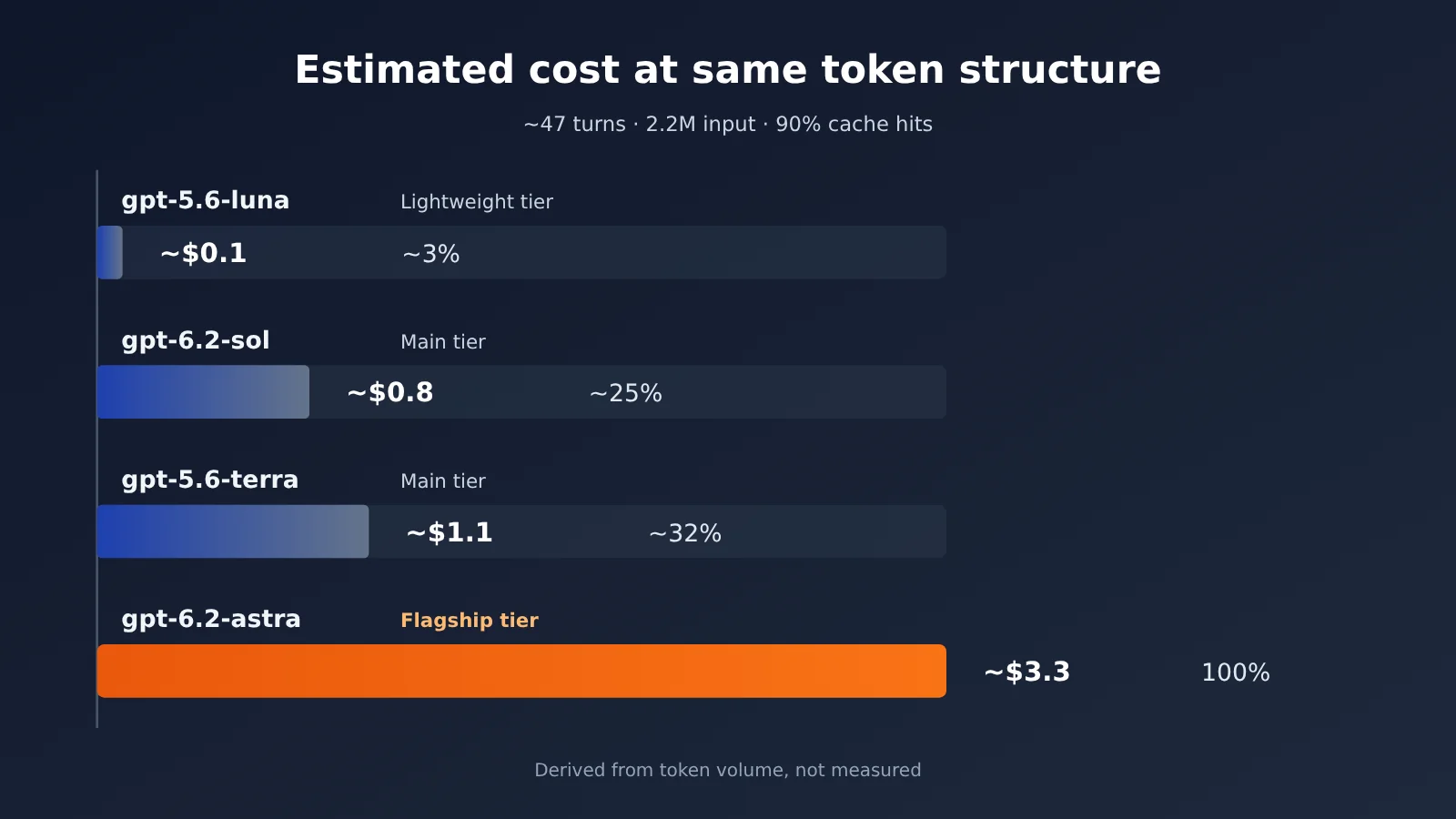
Estimated with the same token structure (about 47 turns, 2.2M input tokens, 90% cache hit rate), the cost gap across the four models looks like this:
| Model | Estimated cost | Relative to astra |
|---|---|---|
| gpt-5.6-luna | about $0.1 | about 3% |
| gpt-6.2-sol | about $0.8 | about 25% |
| gpt-5.6-terra | about $1.1 | about 32% |
| gpt-6.2-astra | about $3.3 | 100% |
📊 Chart note: The figures above are projections normalized to the same token volume, not a measured comparison of completion rates. You can switch models with the same key on APIYI apiyi.com and run your own real task to calibrate these ratios.
2.2 The Cheap-First, Flagship-Later API Call Flow
The estimate above only tells you the price for “the same number of tokens” — it doesn’t mean a cheap model can do the same job. The right division of labor is: the cheap tier handles trial and error, prompt tuning, and getting the pipeline working; the flagship tier only handles the final output. Here’s the simplest layered invocation example:
import openai

client = openai.OpenAI(
    api_key="YOUR_API_KEY",
    base_url="https://api.apiyi.com/v1"  # APIYI OpenAI-compatible endpoint
)

# Trial phase: use the lightweight tier to validate the prompt, and cap output length
response = client.chat.completions.create(
    model="gpt-5.6-luna",
    messages=[{"role": "user", "content": "用三句话总结这段需求:..."}],
    max_tokens=300
)
print(response.choices[0].message.content)
print(response.usage)  # Log token usage so you can recalculate later
Once you’ve confirmed the prompt and the flow are stable, all you have to do is change model to gpt-6.2-sol or gpt-6.2-astra — the rest of the code stays the same.
🚀 Quick-start tip: After registering at APIYI apiyi.com you get free test credits. We recommend getting the pipeline working with the lightweight tier first, then deciding whether you actually need the flagship tier. The unified OpenAI-compatible interface means switching models is just a one-parameter change.
3 Using APIs Economically in Agents: Control Context, but Don’t Restart Too Often
3.1 The Fixed Costs You Can’t Clear by Starting a New Conversation
In agents like Codex and Claude Code, “starting a new conversation” only clears the message history. The following fixed content still gets carried along every turn:
- System prompt and tool definitions
- Project rule files (AGENTS.md, CLAUDE.md)
- Current project context and directory information
In the case above, the first request of each new session already carried 29,000 to 34,000 input tokens. These prefixes have to be written to cache again — at $10/1M for gpt-6.2-astra, that’s about $0.3 each time. That’s why the first request after opening a new conversation often costs far more than the ones that follow.
3.2 Why Cache Rebuilds Eat Up Thirty Percent of the Cost
What matters more is the number of rebuilds. This task had 4 “cache writes from zero” within 59 minutes: 1 first-turn cold start plus 3 rebuilds, with gaps ranging from 1 minute to 25 minutes. Together the 4 events cost about $1.23, of which the last 3 rebuilds came to about $0.95 — roughly thirty percent of astra’s total cost.
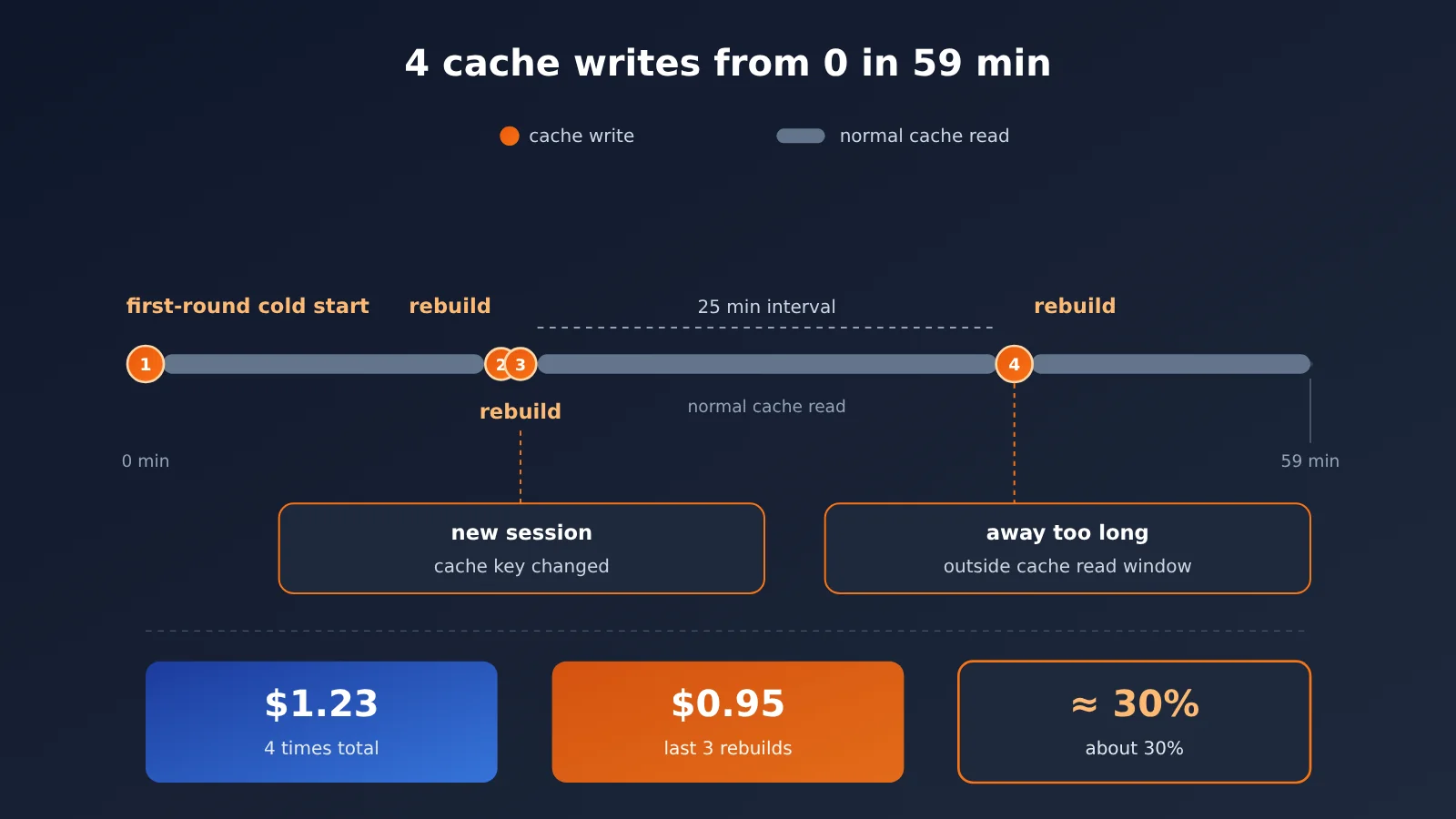
There are two main reasons for rebuilds: one is being away too long, beyond the cache’s readable window; the other is a new session changing the cache key, so the existing cache can’t be reused. Given these two causes, here’s what I’d suggest:
- Only start a new conversation when you switch tasks: this keeps the previous task’s context from bleeding in, but don’t reopen just because you “want things a bit cleaner” within the same task.
- Finish one task in one stretch: try not to interrupt and restart repeatedly — each restart can trigger a cache write of about $0.3.
- A short break is fine with one rebuild: if you step away for a few minutes and come back, accepting one rebuild cost is fine, but don’t restart several times in a row.
Also, AGENTS.md and Codex’s local memory are billed as input every turn, so the longer the file, the higher your fixed cost per turn.
4 Use prompts to draw boundaries for the Agent and cut useless API input
4.1 A constraint prompt template for a single task
An Agent decides on its own which files to read and which commands to run. With no boundaries set, it’ll generate a lot of useless reads. Writing the boundaries explicitly into the prompt directly reduces input tokens. Take an image-editing task as an example — you could write it like this:
Task: composite the person in /path/a.png into the scene in /path/b.png, keeping b.png's lighting and color tone.
Interface: call /v1/images/edits directly, model gpt-image-2.6-sunburst, write the result to /path/out.png.
Scope: only process the two images above; do not run directory scans like ls, find, grep; do not read other files; do not modify code.
Parameters: if a path is missing from the message, ask me first; for any other uncertain parameter, use the default value and keep going.
Reply: do not restate the request, do not compare approaches, do not output intermediate reasoning; only report the result path, the cost, and the failure reason (if any).
This prompt constrains three things at once: the read scope, tool invocation, and output length. The first two cut regular input and cache writes; the last one directly shrinks the high-priced output.
4.2 Put your recurring constraints into AGENTS.md
For constraints you repeat often, writing them into AGENTS.md at the project root is more reliable than dictating them every time. But remember: AGENTS.md itself gets read in every round, so it’s part of the fixed cost too. Keep it to a few dozen lines, put only genuinely general rules in it, and don’t stuff an entire development spec in there.
5 How to Use the API Economically for Image Generation Tasks
5.1 Let the Agent Use Skills Instead of Figuring Things Out on the Fly
Without a Skill, when an Agent gets a request like “help me composite these images,” it often starts a long exploration: locating files, reading code, checking API docs, writing sample scripts, and trying parameters over and over. All of that is billed by text token, and it may run for a long time without ever actually calling the image API.
APIYI’s GPT-Image Skills package codifies “how to call the API” into SKILL.md plus scripts. Key features include:
- The default model is gpt-image-2.6-all, billed at $0.025 per image per request, so trial-and-error costs stay low.
- One set of scripts covers 11 models and 1 alias, and supports text-to-image, multi-image fusion, and inpainting.
- Multi-image fusion supports up to 16 input images.
Once installed, the Agent just runs the scripts directly—no need to look up docs or write scaffolding first. To be clear, a Skill doesn’t make costs zero: images are still billed per image or per image token, and the Agent’s text turns are still billed as usual. What it saves is the “exploration cost.”
5.2 Route Image Generation Through the Image API, Not a Text Model Fallback
Image generation uses dedicated endpoints: /v1/images/generations for text-to-image, and /v1/images/edits for image editing and multi-image fusion. Image models bill per image or per image token, which is usually much cheaper than making a text model take a long detour.
If you don’t need an Agent for image generation, you can use AI Image Master (imagen.apiyi.com) directly. It uses the same APIYI API key and the same image API endpoints, and only incurs image API costs—no text model costs. It’s good for validating prompts, comparing models, and small-batch image generation. It’s a web-based test console, not another cheaper channel: images are still billed at the selected model’s price. For production batches, you should still use the API so you can monitor, retry, and reconcile billing.
6 Keep Output and Retries Under Control so You Don’t Pay Twice
6.1 Trim Output with max_tokens and Prompt Wording
gpt-6.2-astra bills output at $40/1M — five times the $8/1M it charges for input. That’s why telling the agent to “skip the explanation and just execute” usually pays off more than shaving input. There are two ways to do it: cap a single response with max_tokens, and state in the prompt that it should “return only the result plus the essentials.”
The helper function below bundles output limiting, usage logging, and cost estimation together, so you can keep an eye on spend while you’re developing:
import openai

PRICES = {  # Unit: USD / 1M tokens; refer to the console's model pricing
    "gpt-5.6-luna":  {"input": 0.2, "cache_read": 0.02, "output": 1.2},
    "gpt-6.2-sol":   {"input": 2,   "cache_read": 0.1,  "output": 10},
    "gpt-6.2-astra": {"input": 8,   "cache_read": 0.4,  "output": 40},
}

client = openai.OpenAI(
    api_key="YOUR_API_KEY",
    base_url="https://api.apiyi.com/v1"
)

def call_and_estimate(prompt: str, model: str = "gpt-6.2-sol", max_tokens: int = 500):
    resp = client.chat.completions.create(
        model=model,
        messages=[
            {"role": "system", "content": "Return only the result and necessary notes; don't explain the process."},
            {"role": "user", "content": prompt},
        ],
        max_tokens=max_tokens,
    )
    u = resp.usage
    details = getattr(u, "prompt_tokens_details", None)
    cached = getattr(details, "cached_tokens", 0) or 0
    p = PRICES[model]
    # Rough estimate: excludes cache writes; rely on the logs for actual amounts
    cost = ((u.prompt_tokens - cached) * p["input"]
            + cached * p["cache_read"]
            + u.completion_tokens * p["output"]) / 1_000_000
    return resp.choices[0].message.content, round(cost, 6)
Field names inside usage can vary by model and endpoint, so the code uses getattr to stay tolerant; for cache-write charges, trust the console logs.
6.2 Check the Logs Before You Retry
A client-side timeout doesn’t mean the request failed. If the gateway already completed it successfully, that request gets billed too — retry blindly and you might pay twice for the same piece of work. When you hit a timeout or get no response, go to the console logs first to confirm the request’s status and billing, then decide whether a retry is actually needed.
7 Fallback Measures for Economical API Usage
7.1 Token Allowlists and Balance Alerts
The previous sections covered “how to spend less.” This section covers “how to avoid accidentally spending more.” I recommend turning on all three of the following settings:
- Token model allowlist: Restrict test tokens to the cheaper tiers only, so nobody accidentally calls a flagship model.
- Balance alerts: Get notified the moment consumption looks abnormal.
- Separate production and test tokens: Makes it easy to track usage separately and disable one without touching the other if something goes wrong.
7.2 Top-Up Bonuses: Same List Price, Lower Actual Cost
APIYI’s model pricing is aligned line by line with the official pricing, converted at a fixed exchange rate of 1:7. Note that this fixed rate isn’t a discounted rate — the platform’s discounts come from top-up bonuses, not from the per-model unit price. Top-up bonuses come in four tiers — 10%, 12%, 15%, and 20% — which work out to roughly 9%, 11%, 13%, and 17% below list price.
💰 Cost tip: If your monthly usage is fairly stable, you can plan your budget around APIYI’s top-up bonus tiers at apiyi.com. Check the platform’s top-up campaign details for the exact tiers, validity periods, and stacking rules; some model groups have additional discounts, and availability depends on the token group configured in your console.
8. Self-Check and Recalculation Process When Your API Bill Is Too High
When you notice your bill is higher than expected, investigate in the following order—each step maps to a decision in the knowledge map:
- Check the four columns: In the console logs, review input, output, cache read, and cache write separately to find the item with the largest share.
- Export by dimension: Export by model, by day, and by token to confirm which item and which token is driving the increase.
- Check the request path:
/v1/responseshandles text requests, while/v1/images/*handles image generation requests. If image generation tasks contain a large number of text requests, the Agent is exploring (back to section 5). - Recalculate a single request: Multiply the usage returned by the API by the unit price and confirm it matches the logged amount. If they don’t match, check cache write and model grouping again.
After making changes, recalculate once more using the same method. The standard for judging whether cost savings are working is simple: the corresponding column’s amount drops while task completion quality doesn’t noticeably degrade. You can compare before-and-after data directly in the APIYI apiyi.com console logs.
Finally, here’s a decision you can act on directly: if cache write share is high, reduce restarts; if output share is high, compress replies; if regular input share is high, tighten the reading scope; if unit price is high, delegate trial and error to cheaper tiers. Work through each item according to this mapping, and verify by switching between tiers through the APIYI apiyi.com unified interface—that’s how you spend every cent where it actually produces results.
Author: APIYI Technical Team
Technical discussion: Feel free to contact us on the APIYI apiyi.com homepage; more resources are available at the docs.apiyi.com documentation center.