
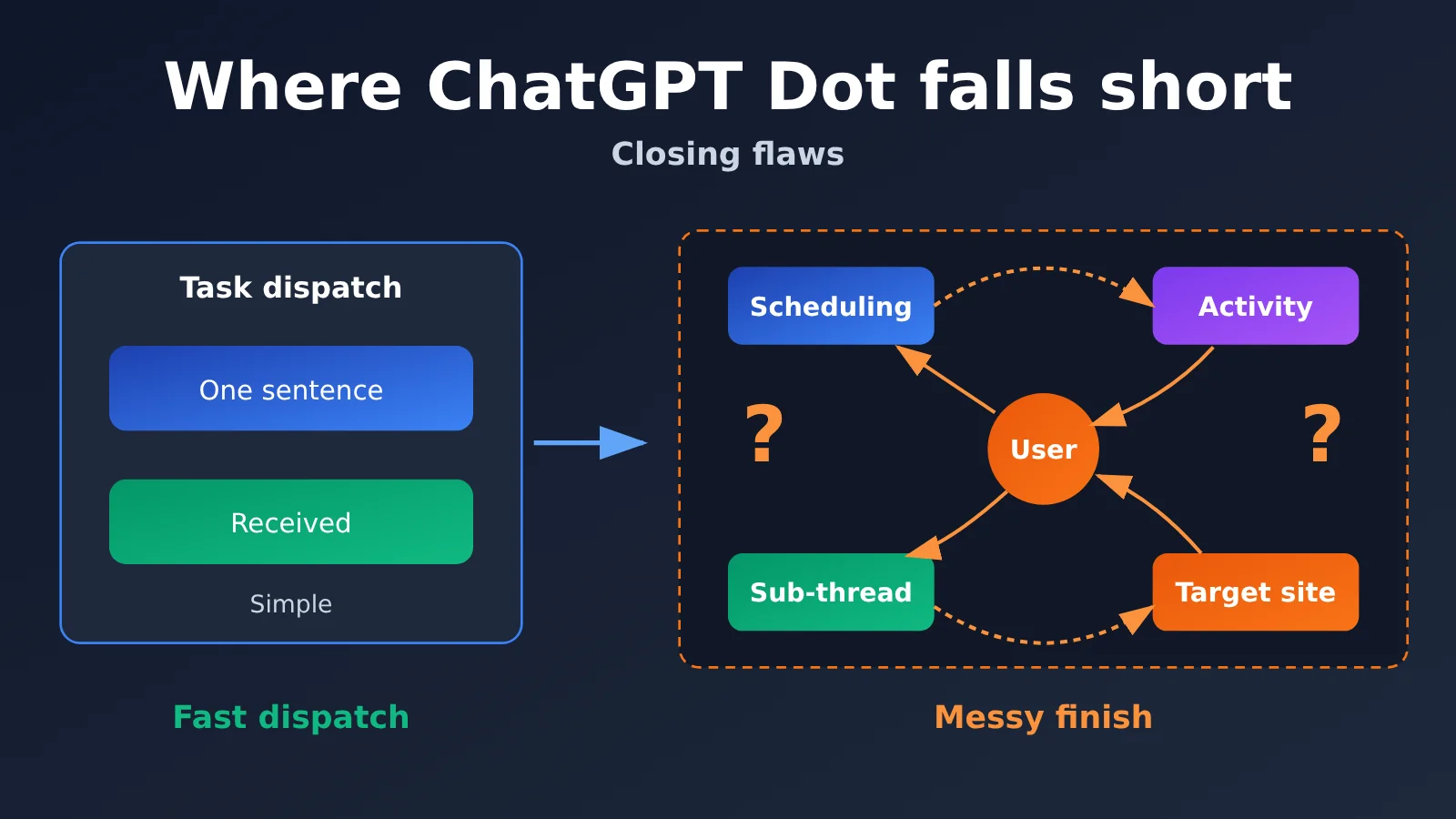
The worst thing about ChatGPT Dot is the wrap-up. Handing off a task takes a single sentence; chasing down the result can mean digging through schedules, spinning up sub-threads, and then going to the target site to check the records. How far along the task has gotten, whether the thing actually got delivered, whether it’s safe to retry — the user has to stitch all of that together from scattered clues. What you’re paying for is an agent that follows up on your behalf, and when it drops the ball, you end up following up on its behalf.
What you’ll get from this article
- Dot’s official positioning, availability, and operating boundaries, plus how its pricing is described as of November 24, 2026.
- The four places where work gets handed back to you: the “Completed” status, the pause button, the Codex handoff, and group-chat stand-in duty — and exactly where each one breaks down.
- What public tests and incident logs actually confirm, and which items are just single-account anecdotes.
- Easier ways to handle three kinds of work — recurring reminders, one-off research, and dev tasks — plus a code example built around “receipt first.”
Contents: We start with two tables covering the essential concepts and how different groups of people are affected. The “Hard facts” section lays out traceable information in three blocks: official docs, public tests, and pricing. The “Analysis” section takes apart the four wrap-up gaps one by one, with alternatives and code to go with each. We close with an FAQ on a few of the most common questions.
What you need to know first about ChatGPT Dot
| Concept | Quick explanation |
|---|---|
| Dot | A persistent personal agent OpenAI launched inside ChatGPT. It can take on long-running tasks and keep them moving between conversations. |
| Cloud computer / cloud browser | Dot’s own separate execution environment. It logs into each website independently and doesn’t share login state with your local machine. |
| Work | ChatGPT’s work mode focused on research, analysis, and document delivery. Dot can delegate tasks to it. |
| Codex | The product built around development and technical work. Dot can start new Codex threads or follow up on existing ones. |
| Scheduled | Where you view schedules and their run results. |
| Activity | Where you check delegation progress, output files, and pending requests. |
| Subthread | A separate conversation created after Dot hands off to Work or Codex. It starts with only the instructions and context passed along in that handoff. |
| Idempotent retry | Running the same operation multiple times still takes effect only once. This is exactly what you rely on to decide whether it’s safe to resend. |
ChatGPT Dot at a glance
| Audience | Practical impact |
|---|---|
| Individual Pro / Plus users | Scheduled reminders and recurring check-ins are useful, but for anything published or submitted externally, you still need to verify the result on the target site yourself. |
| Developers | The Dot-to-Codex handoff path has had official outages and single-account anomalies. For critical development work, starting Codex directly is more reliable. |
| Enterprise admins | Starting November 18, eligible workspaces are enabled by default. Starting January 14, 2027, billing will be tiered. For audits, rely on the records from the service that receives the work. |
| Team collaborators | Standing in for you in group chats requires three steps: reading, authorization to reply, and actually sending. In practice, it usually comes down to Dot drafting and the person approving. |
The Objective Facts About ChatGPT Dot: What the Official Sources Say
How ChatGPT Dot Is Positioned and Where It’s Available
OpenAI released dots on September 29, 2026, defining it as a personal agent inside ChatGPT that can take on long-running tasks. It has its own cloud computer and cloud browser, can push work forward between conversations, and reaches users through ChatGPT, Slack, and Teams. The launch model driving it is GPT‑6 Astra. A November 3 announcement added GPT‑6.1 Terra and made clear that different parts of the work can be handled by different models.
The personal edition is aimed at Pro users aged 18 and over plus select Plus accounts; the European Economic Area, the UK, and Switzerland are excluded. Business Standard and Premium open up in supported regions based on workspace eligibility. Eligible Enterprise, Edu, and Healthcare workspaces open by default starting November 18, with admins able to opt out — except for workspaces that have UAE data or inference residency enabled.
ChatGPT Dot: scheduling, “Completed” status, and stopping work
Dot can run cloud schedules while the user is offline—timed reminders, periodic checks—and, once authorized, execute actions inside recurring tasks. When a step needs an account reconnect or human approval, the task pauses and waits for the user. The official “proactive research” goes through a different background path and can only read connected materials. Sending external messages, modifying app data, or operating a computer all require separately authorized execution.
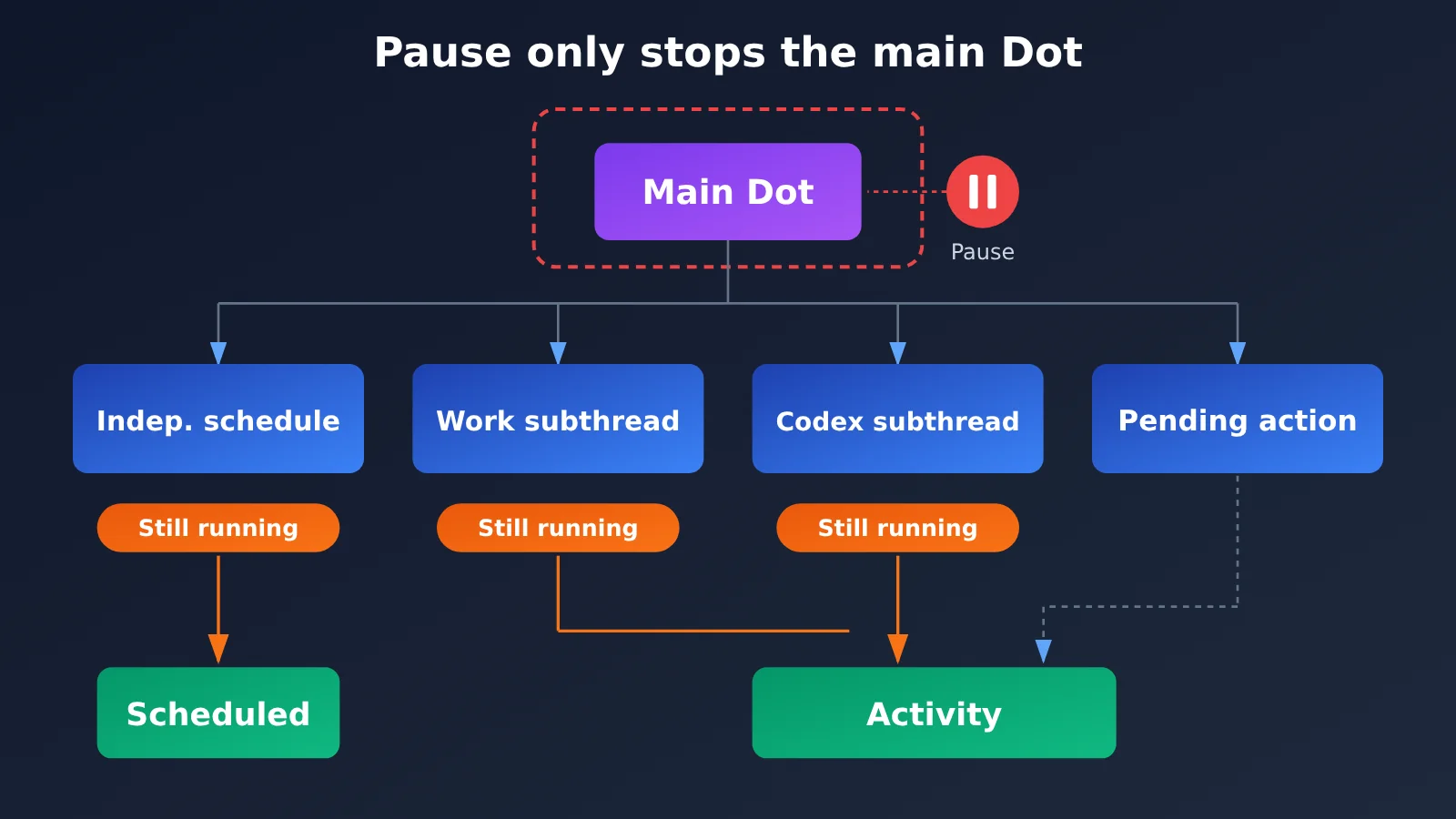
A few key sentences are spelled out plainly in the official docs. Even if a run shows Completed, you still need to open the actual output and error logs and check them. The enterprise security documentation gives an example too: a cloud browser’s tool event may be recorded as finished while lacking detailed output, so during audits you should verify results against the records of the receiving service. After pausing the main Dot, independent schedules and already-dispatched Work and Codex tasks may still be running—you have to stop them separately in Scheduled and Activity.
ChatGPT Dot’s cloud browser, Codex handoff, and group-chat stand-in duties
The cloud browser logs in separately. When a site requires login or verification, the user may have to take over first, handle it, then hand it back. When a site outright blocks the cloud browser, you can switch to an authorized local machine—but that may spin up a separate local task, and the cloud login session won’t migrate over. Running locally means the computer has to stay online and the desktop ChatGPT app has to be open. After switching the selected computer, existing tasks stay in their original execution environment.
The official updates from October 5–9 confirm that Dot can open new Codex threads, follow up on existing threads, and view and modify Work schedules. Cloud tasks that need a specified repo, file tree, and configuration require a Codex cloud environment to be set up first. GPT‑6.2 Astra and Sol, released November 17, are available to eligible users in the Work and Codex model selectors. Starting with desktop build 26.812.10818, eligible Enterprise and Edu workspaces can see model, reasoning effort, and speed in supported threads. The official notes also flag that usage estimates on the main thread may miss independent tasks or background activity.
On group chats, take a personal Dot joining Slack as an example. By default it responds only to its owner, and interacts with others only when the owner tells it to. After joining a channel, you still have to specify watch conditions and notification rules before it counts as a monitoring task. Reading a channel, being allowed to reply, and actually sending a message are three separate steps. If you only want it to draft, grant only drafting permission. iMessage and RCS entry points support one-on-one conversations only.
ChatGPT Dot Public Tests and Incident Log
| Date | Source | Details | Scope |
|---|---|---|---|
| October 4 (announced October 8) | Future Stack Reviews independent test | Japanese Pro 200 account, macOS desktop app 26.930.31730. Paused the main Dot, missed a one-time reminder that should have fired at 19:02, resumed at 19:39, and at 19:54 the list showed Completed. The screenshots from that night had no record of that run, and the message still hadn’t arrived the next morning. | Single account; tested the pause scenario only once |
| October 7 | OpenAI status page | Dot might be unable to open new Codex threads. 95 minutes from the first public investigation to being marked recovered, including post-mitigation monitoring time. | Officially confirmed service outage |
| October 27 | WIRED reporter test | Researching tech news and drafting headlines took up most of Dot’s roughly half hour, and the topic choices skewed evergreen. Score: 2/5. Finding the conflict between an email and a calendar event both at 2 p.m. was quick. Score: 5/5. | One person, one day; six-agent comparison |
| November 7 | Public GitHub issue | Cloud Chromium crashed multiple times, the browser interface reported unavailable, the computer panel showed offline, but the environment reported connected and terminal commands still ran. After resetting the session and restarting, the desktop was still unavailable. | Single-user case |
| November 23 | Developer forum report | On the same Mac, a manually opened old thread could receive instructions appended by Dot. A newly opened Astra (High) thread could read but didn’t receive appended instructions, and the issue reproduced after a restart. Codex Desktop 26.1117.41037, macOS 26. | Single-account case |
An anonymous user also shared an experience: a cloud browser publishing task timed out after a long wait, so they had to go back to the target side to check whether it had actually been posted, just to avoid publishing twice. This user valued Dot’s scheduled follow-ups and would rather hand research and writing to Codex. The workflow they wanted—having Dot handle group chat replies long-term—eventually narrowed to Dot drafting and the user approving. These are all single experiences and don’t represent all users.
ChatGPT Dot Pricing and Quota
| Plan | Monthly Price (USD) | Dot-related details |
|---|---|---|
| Plus | 20 | Dot has already rolled out to some accounts |
| Pro | 100 / 200 / 500 | The $100 threshold that early reports kept mentioning was the individual Pro requirement at the time; conversations with Dot don’t count against ChatGPT usage limits, while separately launched Work and Codex are metered under their own quotas |
| Enterprise Standard | 50 | Free until January 13, 2027, billed starting the 14th; the default tier |
| Enterprise Advanced | 200 | Adjustable by admins |
| Enterprise Expert | 500 | The top tier, ten times the lowest tier |
The dedicated Enterprise page explains the tier differences in terms of workload scale and concurrency. When capacity is full and the job hasn’t started yet, the official guidance is: tell the user to try again later.
Where ChatGPT Dot Falls Short: Four Gaps in the Wrap-Up
Vulnerability 1: ChatGPT Dot’s “Completed” Is No Receipt at All
The official docs themselves warn that “after Completed, you still need to check the output and errors”—which is essentially an admission that this status tells you nothing. The enterprise documentation puts it even more plainly: a tool event can be marked complete while lacking detailed output, and auditing means digging through the receiving party’s records. At that point, Dot’s status panel is purely decorative.
A hands-on test by Future Stack Reviews laid the problem out in concrete detail. A reminder that was missed during a pause got marked Completed after resuming, yet it wasn’t anywhere in the run log, and the message never arrived. That’s just one account and one pause, but it landed exactly where users most need to trust the status. One delivery record is worth more than ten progress messages: if it posts, it should hand you the post link; if it fills out a form, it should hand you the record ID; if it delegates a subtask, it should say whether the target thread actually received the instruction. Handing you a timeout notice and leaving you to guess whether to resend turns whatever clicks were saved into pure acceptance work.
Vulnerability 2: ChatGPT Dot’s Pause Button Can’t Stop the Whole Pipeline
Pause the main Dot, and independent schedules plus already-dispatched Work and Codex tasks may keep right on running. To actually shut everything down, you have to go stop things once in Scheduled and then again in Activity. Having a stop-everything entry point scattered across three places in an agent product is a design that breeds incidents.
The sensible approach is simple: the interface should directly list the delegations still running, the next schedule that will fire, and the operations awaiting approval—and give users a single stop-everything control that clears it all in one click. The current design just hands users the question, “How much of my work is still running in the background?”
Vulnerability 3: ChatGPT Dot’s group-chat stand-in turns users into approval-desk support
Reading a channel, getting clearance to reply, and actually sending the message are split into three separate steps — the permission design is granular enough that it holds up on security grounds. The problem shows up when things get stuck. All the user sees is a “please approve” prompt, and they still have to go dig up the target channel and the pending content themselves before they can judge whether to let it through.
Every time it gets stuck, Dot should spell out three things: which permission is blocking it, where the message will land if approved, and whose identity it goes out under. Miss that, and the user ends up doing customer support for their own approval workflow. The anonymous user who ultimately fell back to “Dot drafts, I approve” says it all: after all that standing in, the human never actually got a break.
Vulnerability 4: ChatGPT Dot can’t explain its models or its bill
The announcement lists model families: Astra, Terra, Sol, one generation stacked on the next. But the work log can’t tell you which tier this run used, how much quota it burned, or what came back. The official docs themselves admit that usage estimates on the main thread may miss standalone tasks and background activity. The numbers users see are already incomplete — so what exactly are they supposed to audit against?
The top enterprise tier costs ten times the lowest tier per month, and that price gap should at least buy transparency around queuing, blocking, and retries. Instead, when capacity fills up, the official remedy is to ask again in a little while. Even “watch the progress” — a job the agent was supposed to own — gets handed back to the human.
Then there’s the Codex handoff problem: the October 7 outage ran for 95 minutes, and on November 23 there was another case of a new thread not receiving follow-up instructions. The handoff hop is itself a failure point. WIRED’s hands-on test offered another reminder: for tasks with a clear answer, like scheduling conflicts, Dot does a great job; for tasks that require judging timeliness, like picking news topics, it spent a ton of time and delivered something stale.
Alternative Approaches to Sidestepping ChatGPT Dot’s Wrap-Up Problem
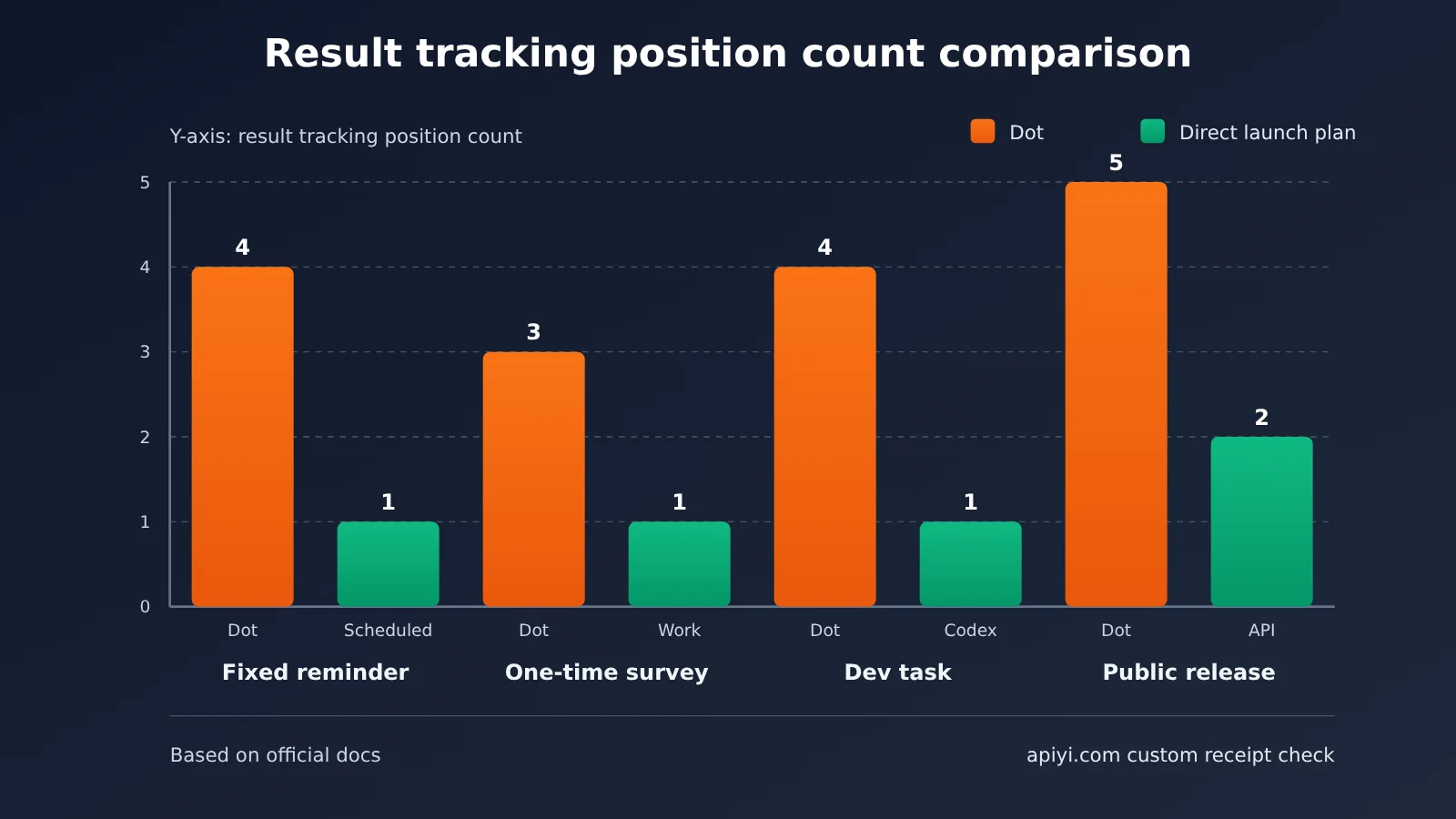
Every delegation step a fixed workflow skips is one less place to hunt for results and one less thing to chase down and stop. Based on what the official features offer today, here’s how to route the work:
| Task type | Lower-effort approach | Key condition |
|---|---|---|
| Recurring reminders, scheduled lookups | ChatGPT’s Scheduled | Eligible free accounts get at most one run per day; paid accounts can loop hourly |
| Watching for incoming email or new messages | Eligible Work setups can monitor Gmail, Slack, and GitHub pull requests | The Slack channel must include @ChatGPT |
| One-off research, drafting documents | Open a thread directly in Work | One less Dot relay |
| Repo and terminal work | Hand it straight to Codex | Set up the cloud environment first |
| Building your own external publishing pipeline | Orchestrate it yourself with the API and enforce “check the receipt first, then decide whether to retry” | The target service must let you look up records by idempotency key |
That last row is exactly where Dot should shine — and where it falls short. If your business needs automated publishing or automated submissions, writing “receipt first” into your code is far more dependable than betting on an agent dashboard.
A Minimal Receipt-First Example
The example below uses a model to draft the content, then checks whether that record already exists on the target side before publishing:
import openai

client = openai.OpenAI(
    api_key="YOUR_API_KEY",
    base_url="https://api.apiyi.com/v1"  # APIYI OpenAI-compatible endpoint
)

draft = client.chat.completions.create(
    model="gpt-4o-mini",
    messages=[{"role": "user", "content": "把本周发布说明压缩成 3 句话"}]
).choices[0].message.content

print(draft)
See the full receipt-verification implementation
import hashlib
import requests
import openai

client = openai.OpenAI(
    api_key="YOUR_API_KEY",
    base_url="https://api.apiyi.com/v1"  # APIYI unified endpoint, switch between multiple models
)

TARGET = "https://your-service.example.com/api/posts"  # Your target service

def make_key(task_id: str, content: str) -> str:
    """Generate a stable idempotency key for the same task and the same content"""
    return hashlib.sha256(f"{task_id}:{content}".encode()).hexdigest()[:32]

def find_record(key: str):
    """Ask the receiver for the record: this is the real receipt"""
    r = requests.get(TARGET, params={"idempotency_key": key}, timeout=10)
    r.raise_for_status()
    items = r.json().get("items", [])
    return items[0] if items else None

def publish(task_id: str, prompt: str, max_retry: int = 3) -> dict:
    content = client.chat.completions.create(
        model="gpt-4o-mini",
        messages=[{"role": "user", "content": prompt}]
    ).choices[0].message.content
    key = make_key(task_id, content)

    for attempt in range(1, max_retry + 1):
        existing = find_record(key)
        if existing:
            # Already delivered: return the link or ID directly, never resend
            return {"status": "delivered", "url": existing.get("url")}
        try:
            resp = requests.post(
                TARGET,
                json={"content": content},
                headers={"Idempotency-Key": key},
                timeout=30,
            )
            resp.raise_for_status()
        except requests.Timeout:
            # A timeout isn't a failure: check the record first next round, then decide
            continue
        record = find_record(key)
        if record:
            return {"status": "delivered", "url": record.get("url")}
    return {"status": "unknown", "action": "人工核对目标端记录", "key": key}

if __name__ == "__main__":
    print(publish("weekly-note-1124", "把本周发布说明压缩成 3 句话"))
The whole point of this code comes down to one rule: after a timeout, ask the receiver first — if the record is there, return the link; if it isn’t, resend; if it’s still unclear after three attempts, hand it to a human explicitly, along with the idempotency key. Dot eliminates the step where users are left guessing with nothing but a timeout message.
Tip: When you build workflows like this yourself, you can grab a free trial quota at APIYI apiyi.com first. A single API key lets you call OpenAI, Claude, Gemini, and other models, so you can switch drafting models anytime and compare them.
ChatGPT Dot FAQ
Q1: ChatGPT Dot shows Completed — can I just treat that as the task being done?
No. The official guidance is to open the actual output and check for errors, and enterprise audits go by the records of the receiving service. For anything published externally or submitted, always go check the link or ID on the destination end.
Q2: If I pause ChatGPT Dot, will all background tasks stop?
No. Independent schedules have to be stopped in Scheduled, and dispatched Work and Codex tasks have to be stopped in Activity. Just hitting pause on the main Dot won’t stop everything cleanly.
Q3: Is handing off from ChatGPT Dot to Codex reliable?
There was a 95-minute official outage on October 7, and on November 23 there was also a single-account report: a newly opened thread wasn’t receiving follow-up instructions. For critical development tasks, it’s better to open a Codex thread directly.
Q4: What kind of work suits ChatGPT Dot?
Scheduled follow-ups and verification work with clear-cut answers — like the calendar conflict in WIRED’s hands-on test — it handles those well. Topic research that requires judging timeliness, and long-term group-chat auto-replies, perform noticeably worse.
Q5: I don’t want to be dragged down by ChatGPT Dot’s wrap-up problems — how do I build my own flow?
Just orchestrate the loop of “draft — publish — check receipt — decide whether to retry” yourself with the API, as in the code above. Register at APIYI apiyi.com to get test credits; set base_url to `https://api.apiyi.com/v1`, and you don’t need to change any other code in the OpenAI SDK.
Q6: When does enterprise ChatGPT Dot start charging?
The Dot itself is free until January 13, 2027. From the 14th, Dots enabled from that date are billed at monthly prices of $50 for Standard, $200 for Advanced, and $500 for Expert. If you’re only trying to control model invocation costs, you can also move some fixed workflows to APIYI apiyi.com for pay-as-you-go billing.
Dot makes “starting” extremely lightweight and leaves “finishing” to the user: where to check results, how to stop things cleanly, whether to resend, where the money went — you have to piece all of that together yourself. Until it can hand back a genuine receipt, use Scheduled for fixed reminders, Work for research, Codex for development, and your own receipt validation for external publishing — all of these are less hassle than handing the whole chain to Dot. If you want to get receipt validation working first, you can try several models with the same key at APIYI apiyi.com and see which one drafts in a way that best fits your workflow.
References
- OpenAI announcement: dots release and the November 3 update
- Link:
openai.com/index/introducing-dots
- Link:
- Dot official guide to tasks and pausing: Completed verification and per-entry-point pause instructions
- Link:
learn.chatgpt.com/docs/dots/tasks-and-memory
- Link:
- Enterprise security and billing docs: tool event logging and tier pricing
- Link:
learn.chatgpt.com/docs/enterprise/dots-security
- Link:
- OpenAI status page: October 7 Codex thread incident record
- Link:
status.openai.com
- Link:
- WIRED hands-on test: a one-day side-by-side review of six AI agents
- Link:
wired.com/story/i-tested-every-major-ai-agent-for-a-day-heres-the-best-one
- Link:
Author: APIYI Technical Team
Technical discussion: Feel free to reach us through the APIYI homepage — for more integration resources, visit the docs.apiyi.com documentation center