Author’s note: Seedance 2.5 Flash is about 34% cheaper, but the trade-offs are a resolution cap at 720p, reference material dropping from 50 items to 20, and no sample mode. This article gives you a six-item capability comparison table, three decision lines, and the math on a single 30-second 720p job to help you decide which tier to use for batch generation.
On November 15, 2026, the official Dreamina account announced that Seedance 2.5 Flash was live, with the tagline “Faster generation, fewer credits.” The official positioning is high-frequency creation, multi-version testing, batch generation, and repeated revision. BytePlus had already published pricing on November 12: $0.152 per second for 720p text-to-video and image-to-video, roughly 34% lower than the flagship Seedance 2.5. The API opened on ModelArk on November 15.
If your team is already shipping videos with Seedance 2.5 and crunching batch costs, your first reaction might be “a third cheaper—just switch everything over.” This isn’t a “Flash replaces the flagship across the board” recommendation. The money Flash saves comes with clear trade-offs: resolution capped at 720p, the reference material limit dropping from 50 to 20, and no sample mode. In some workflows those three things don’t matter; in others they’ll block delivery outright.
The core value: By the end of this article you’ll have a six-item capability comparison table, three decision lines, the cost math for a single 30-second 720p job, and a set of practical in-platform real-price references—enough to judge whether your workflow should stay on the flagship or move to Flash.
What’s the Relationship Between Seedance 2.5 Flash and Seedance 2.5?
Let’s start with the positioning: Seedance 2.5 Flash is a lower-tier model from the same generation, not a next-generation model. The two belong to the same series and appear as two separate SKUs in BytePlus’s official model list. The flagship model ID is dreamina-seedance-2-5-260628, and Flash’s model ID is dreamina-seedance-2-5-flash-261115.
Their capability sets are the same. The official model list shows that both support six task types: text-to-video, first-frame-to-video, first-and-last-frame-to-video, reference-to-video, video editing, and video extension. Their output formats are .mp4 and .mov, both run at 24 fps, and both support clip durations of 4–30 seconds. Their rate limit rules are also identical: enterprise accounts get 600 RPM and 10 concurrent requests, while individual accounts get 180 RPM and 3 concurrent requests. The support for 11 languages mentioned in the official tutorial, and the restriction against directly uploading reference assets that contain real human faces, are also rules shared by both.
The real differences come down to four areas: maximum resolution, number of reference assets, draft mode, and unit price. As for visual quality, BytePlus’s official wording is that Flash’s results are “results close to flagship Seedance 2.5,” while generation speed is nearly twice as fast. To be clear, this is the vendor’s own claim. There is no public quantitative comparison showing exactly how close “close” really is. So this article won’t make unsupported conclusions like “the flagship has better image quality” or “the two have the same image quality.” It will only discuss the hard differences that are documented.
Seedance 2.5 Flash: Six-Capability Comparison Table
All numbers in the table below come from BytePlus’s official model list, official tutorial, and official pricing (in USD).
| Comparison Dimension | Seedance 2.5 Flash | Seedance 2.5 Flagship |
|---|---|---|
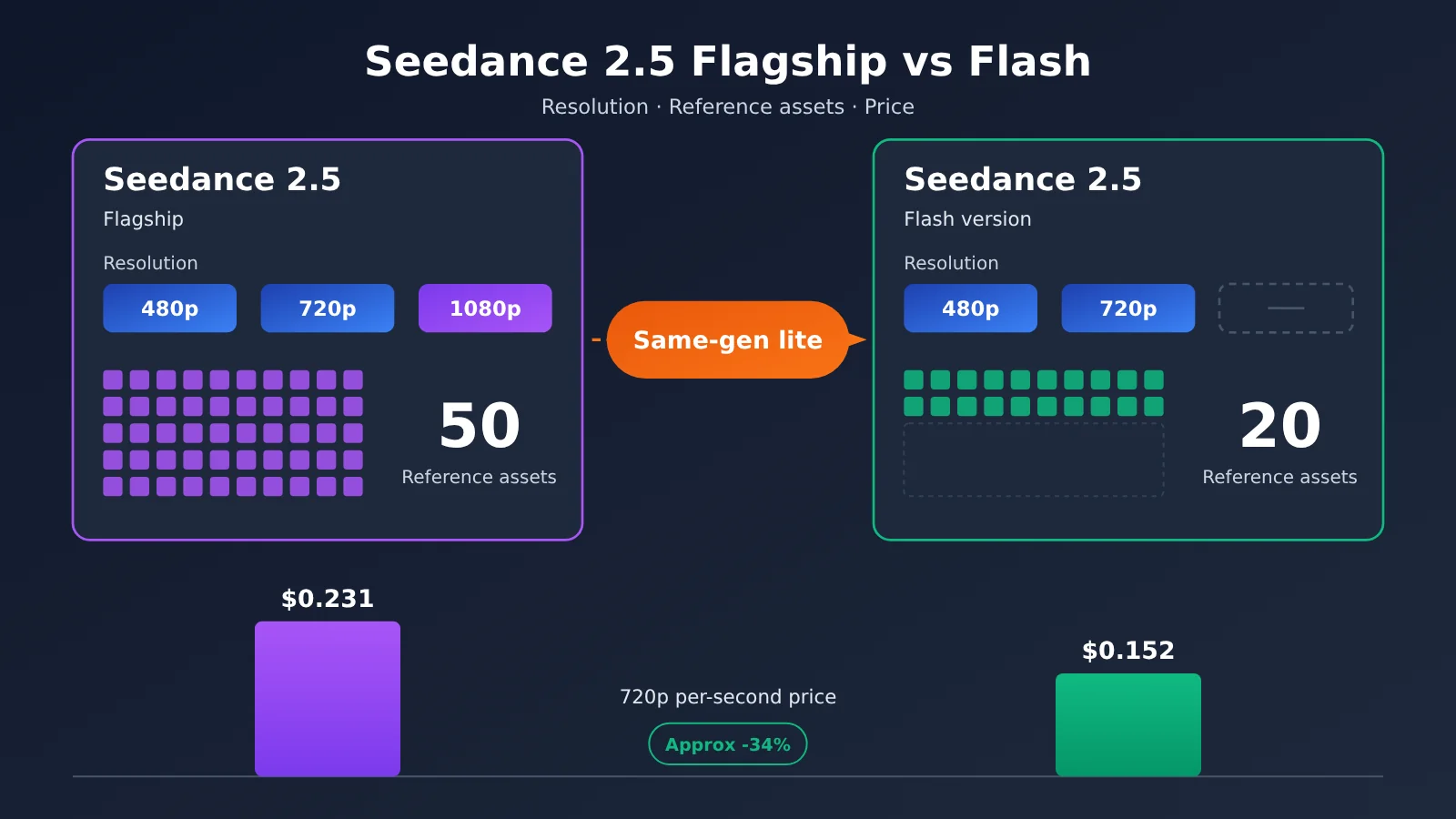
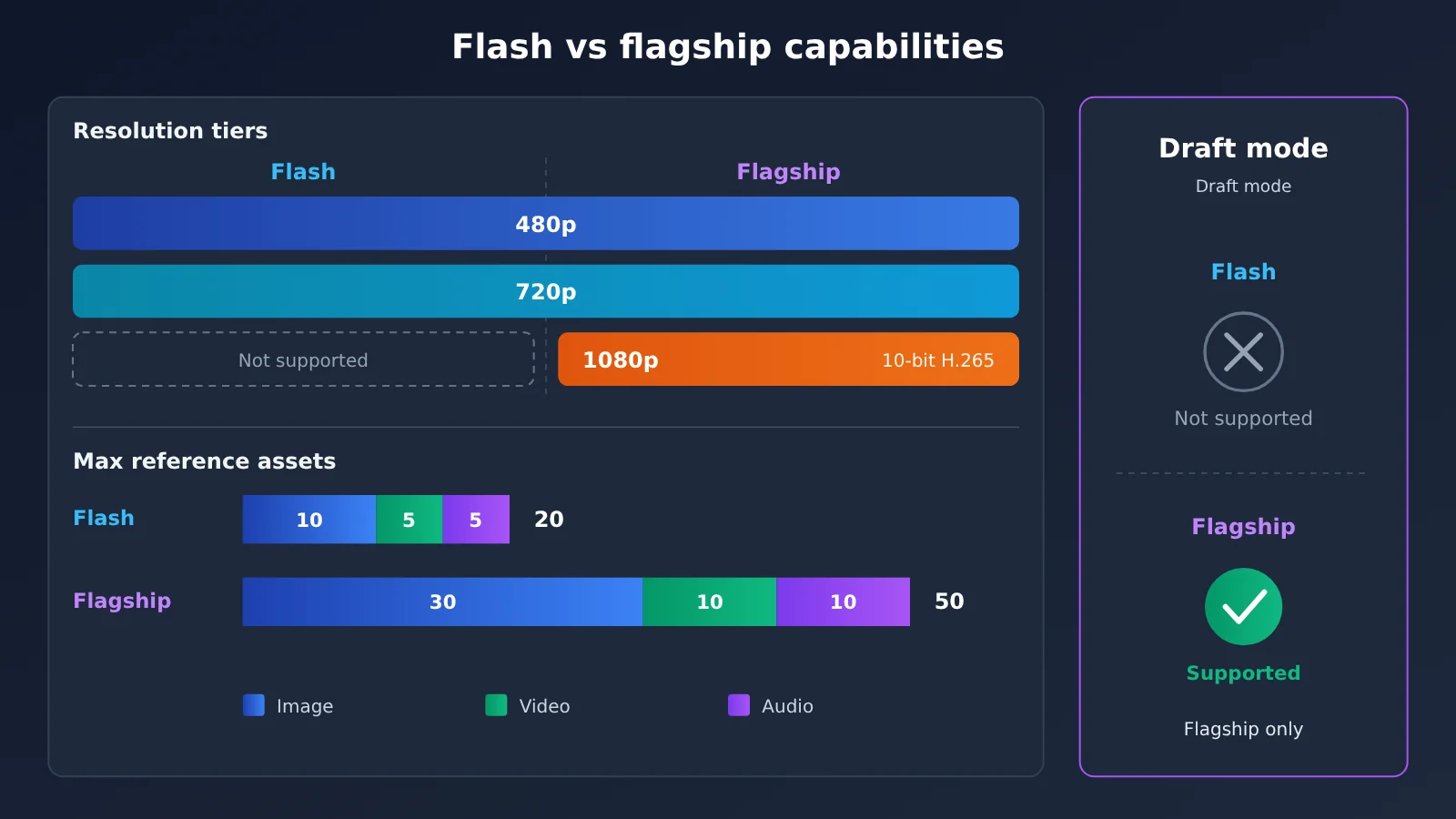
| Output resolution | 480p, 720p (both 8-bit) | 480p, 720p, 1080p (1080p is 10-bit H.265) |
| Duration per clip | 4–30 seconds | 4–30 seconds |
| Max reference assets | 20 (10 images + 5 videos + 5 audio) | 50 (30 images + 10 videos + 10 audio) |
| Draft mode | Not supported | Supported (generates a 480p draft first, then uses the draft task ID to generate the final video) |
| Official token unit price (excluding video input) | $7.0 / million tokens (480p, 720p) | $10.70 / million tokens (480p, 720p); 1080p is $11.7 |
| Per-second price at 720p | $0.152 | $0.231 |
One row in this table is easy to overlook: the clip duration is exactly the same on both sides. Many people assume that “Flash is the lightweight version, so it can only produce short shots,” but Flash can actually generate 30 seconds in a single pass. Duration isn’t a dimension that distinguishes the two, but it does amplify the unit-price gap, as you’ll see when we run the numbers later.
Seedance 2.5 Flash vs Seedance 2.5 Pricing: The Math on One 30-Second 720p Job
Price is the most direct reason most teams consider switching tiers, so let’s lay out the official pricing first. The table below shows USD prices from BytePlus’s overseas site, calculated for 16:9 frames.
| Resolution tier | Flash per-second price | Flagship per-second price | Flash 5-second example | Flagship 5-second example |
|---|---|---|---|---|
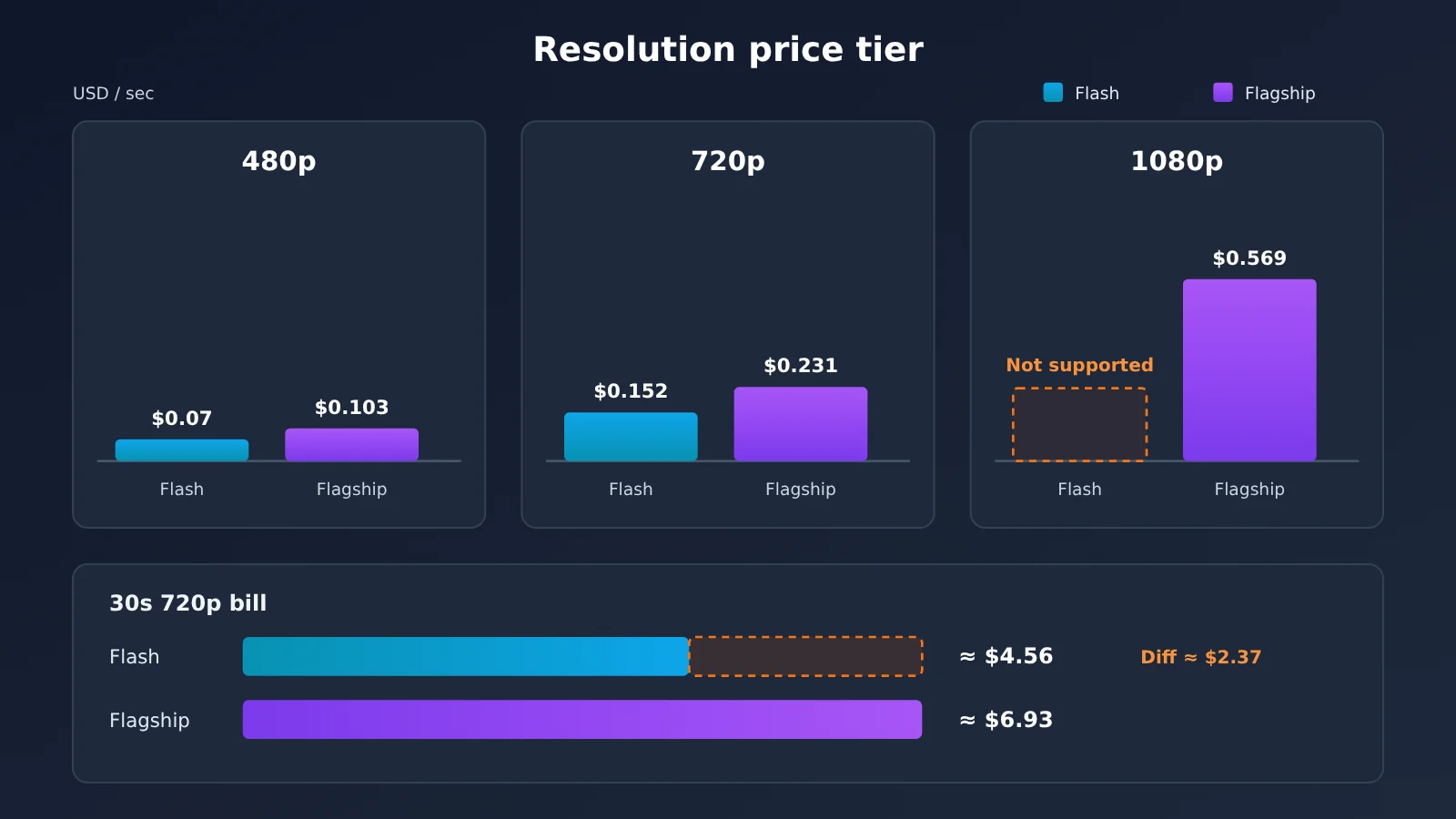
| 480p | $0.07 | $0.103 | $0.34 | $0.514 |
| 720p | $0.152 | $0.231 | $0.76 | $1.156 |
| 1080p | Not supported | $0.569 | Not supported | $2.843 |
If the input includes video, the token unit price drops: Flash is $4.3 per million tokens, and Flagship is $6.40 per million tokens. That matters for video-input tasks like “video editing” and “video extension,” but the per-second prices above are calculated for text-to-image and image-to-image scenarios without video input.
Now let’s do the math for that single 30-second 720p job. At the official per-second rates, Flash is 0.152 × 30, or about $4.56; Flagship is 0.231 × 30, or about $6.93. The difference per clip is about $2.37, which is roughly the 34% the official materials mention.
At the single-clip level, the gap isn’t huge, but Flash’s official positioning is exactly “multi-version testing” and “batch generation.” If you try five versions of a shot, or run a hundred clips at once, the difference scales linearly with clip count. For example, 100 30-second 720p clips would cost about $456 with Flash and about $693 with Flagship. For teams that keep revising prompts and generating many takes for a single shot, that’s where Flash’s real value lies.
On the flip side, keep in mind: this math only holds at 720p and 480p. If the final deliverable needs 1080p, Flash isn’t an option, so there’s no cost saving to talk about.
Seedance 2.5 Flash: When It’ll Hold You Back — Three Decision Lines
The capability comparison table tells you where the gaps are. The decision lines answer a different question: do those gaps actually matter in your workflow? The three below are ordered roughly by how often they trip people up.
Decision Line 1: Final Delivery Resolution
This is the hardest line of the three. Flash caps out at 720p — and 8-bit at that. The flagship’s 1080p is 10-bit H.265. If your delivery spec says 1080p — brand ads, footage meant to play on large screens, or anything headed for color grading in post with bit-depth requirements — Flash is simply out. There’s no “save a few bucks and make do with Flash” option here.
Conversely, if your final output is headed for vertical short-video platforms, feed ad slots, or is just a rough cut for internal review, 720p is usually plenty. In that case, the resolution ceiling isn’t a real constraint.
Decision Line 2: Reference Material Count
The second line is how much material you can feed into reference-based video generation. Flash caps at 20 items total: 10 images, 5 videos, 5 audio clips. The flagship caps at 50: 30 images, 10 videos, 10 audio clips. For comparison, the 2.0 series only supports 15.
This line trips people in subtler ways. For a short piece with one character and one scene, 10 reference images is usually enough. But if you’re producing a series — where you need to lock in multiple characters from multiple angles, multiple outfits, multiple scenes, plus a few motion-reference videos and soundtrack audio — you’ll blow past Flash’s ceiling pretty easily. At that point you either trim references or split the task, and both can hurt consistency. If your typical asset pack runs more than 10 images, stick with the flagship.
Decision Line 3: Draft Mode and Per-Shot Length
The third line involves draft mode, and it’s tied to shot length. The flagship’s draft mode workflow goes like this: first generate a 480p draft to confirm composition and motion, then once you’re happy, use that draft’s task ID to render the final cut. Flash and the 2.0 series don’t support this mode.
The value of draft mode scales with shot length. For a 5-second shot, rendering the final cut directly and redoing it if you don’t like it is an acceptable cost. But for a 30-second long take, rendering straight to 720p every time pushes the cost of trial and error up noticeably. The flagship lets you nail the direction at 480p first ($0.103/sec), then render the final. Flash can also generate at 480p directly ($0.07/sec), but that’s just a standalone 480p video — you can’t “upgrade it into the final via task ID.”
So you need to figure out whether your process is “confirm first, then finalize” or “generate a bunch and pick the best.” The former suits the flagship’s draft mode; the latter is exactly where Flash belongs. One more thing: draft task IDs stay valid for 7 days, and the generated video URLs only last 24 hours — when you’re running the draft workflow, remember to download promptly and record the IDs.
Seedance 2.5 Flash vs. Seedance 2.5: Scenario Recommendations
Here’s how the three decision criteria play out in specific scenarios, summarized in the table below.
| Use case | Recommended tier | Primary reason |
|---|---|---|
| Brand advertising, final cuts that need to be delivered in 1080p | Seedance 2.5 flagship | Flash doesn’t support 1080p |
| Multi-character series content, where reference images often exceed 10 | Seedance 2.5 flagship | The flagship supports up to 30 reference images |
| Long takes where you need to confirm composition before rendering the final video | Seedance 2.5 flagship | Only the flagship supports sample mode |
| Short-video platform campaigns where a 720p final cut is enough | Seedance 2.5 Flash | The 720p per-second price is about 34% lower |
| Testing multiple versions of the same shot and cherry-picking the best one | Seedance 2.5 Flash | Officially positioned for multi-version testing, with lower cost per run |
| Batch asset generation and repeated prompt revisions | Seedance 2.5 Flash | The price difference scales linearly in batch scenarios |
When to choose Seedance 2.5 flagship
- Delivery specs require 1080p: This is the one non-negotiable condition.
- Large reference asset pack: You need 30 reference images, or more than 5 video references and 5 audio references.
- Reliance on sample mode: You’re used to generating a 480p sample for review first, then using the task ID to produce the final cut.
When to choose Seedance 2.5 Flash
- Final output only needs 720p: The distribution channel itself doesn’t require a higher resolution.
- Bulk version testing: You need to run many variants of one creative idea, trading unit price for volume.
- Generation speed sensitivity: The vendor says generation speed is nearly twice that of the flagship (vendor-reported; no public quantitative data yet).
The two tiers can be mixed, and that’s actually how many teams operate: use Flash early on to explore directions in bulk, then once the direction is set, hand shots that need 1080p to the flagship for final output. Since both have the same feature set and the same rate limits, switching at the code level usually just means changing one model ID. However, the official documentation doesn’t say whether outputs from the two models can be cut together seamlessly, so it’s worth running a small-scale test before mixing them.
A Practical Guide to Calling Seedance 2.5 via APIYI
If your team uses multiple video models at the same time, every time you switch channels you have to revisit the docs and check pricing again—and that time cost is often underestimated. APIYI (apiyi.com) lets you manage multiple video models with a single token, and the API base URL is the same across all of them: https://api.apiyi.com/v1. That saves you a layer of doc-diving when comparing prices or switching channels.
The flagship model currently available on the platform is doubao-seedance-2-5-260628. Its resources come from the official Volcano Engine domestic edition, it runs through the SeeDance2 group, and the multiplier is 0.18x. The $70 shown in the model list is the base price per million tokens before the multiplier; the table below shows the actual price after applying 0.18x.
| Platform billing item (doubao-seedance-2-5-260628) | Actual price (USD) |
|---|---|
| Input without video (same price for 480p / 720p / 1080p) | $12.60 / million tokens |
| Input with video | $7.56 / million tokens |
| 480p / 4 seconds | $0.4893 |
| 720p / 5 seconds | $1.3721 |
| 720p / 10 seconds | $2.7329 |
| 720p / 30 seconds | $8.1761 |
| 1080p / 5 seconds | $3.0873 |
This table differs from the earlier BytePlus official price list in both source and basis: the earlier list uses USD pricing from the BytePlus overseas site, while this table reflects on-platform actual pricing converted from Volcano Engine domestic-edition resources using the group multiplier. That’s why we list them in two separate tables and don’t recommend comparing them row by row. When budgeting, use the channel you actually call as the source of truth.
There are a few details you should know before you integrate:
- Token group: When creating a token, you need to check the SeeDance2 group and choose “Usage-first” or “Usage-based billing” for the billing mode; otherwise you’ll get the error “No available channel for this model.”
- Pre-deduction mechanism: The system pre-deducts $0.135 per second, then refunds the difference or charges the shortfall after the task completes.
- Non-billed cases: Requests blocked by moderation and requests that return 400 are not billed.
🚀 Integration tip: If you’re already running 1080p or large-asset-package tasks on the flagship model, you can start by connecting the flagship channel through APIYI (apiyi.com), then use the free trial credit for new users to run a 5-second 720p clip and check whether billing and output meet expectations.
About Seedance 2.5 Flash: As of November 16, 2026, dreamina-seedance-2-5-flash-261115 is not yet in APIYI’s model list or the response list from the pricing API, so it hasn’t been listed yet. We’ll list this model as soon as possible; refer to the platform’s model list for the exact model name and pricing.
Seedance 2.5 Flash vs Seedance 2.5: Decision Guidance
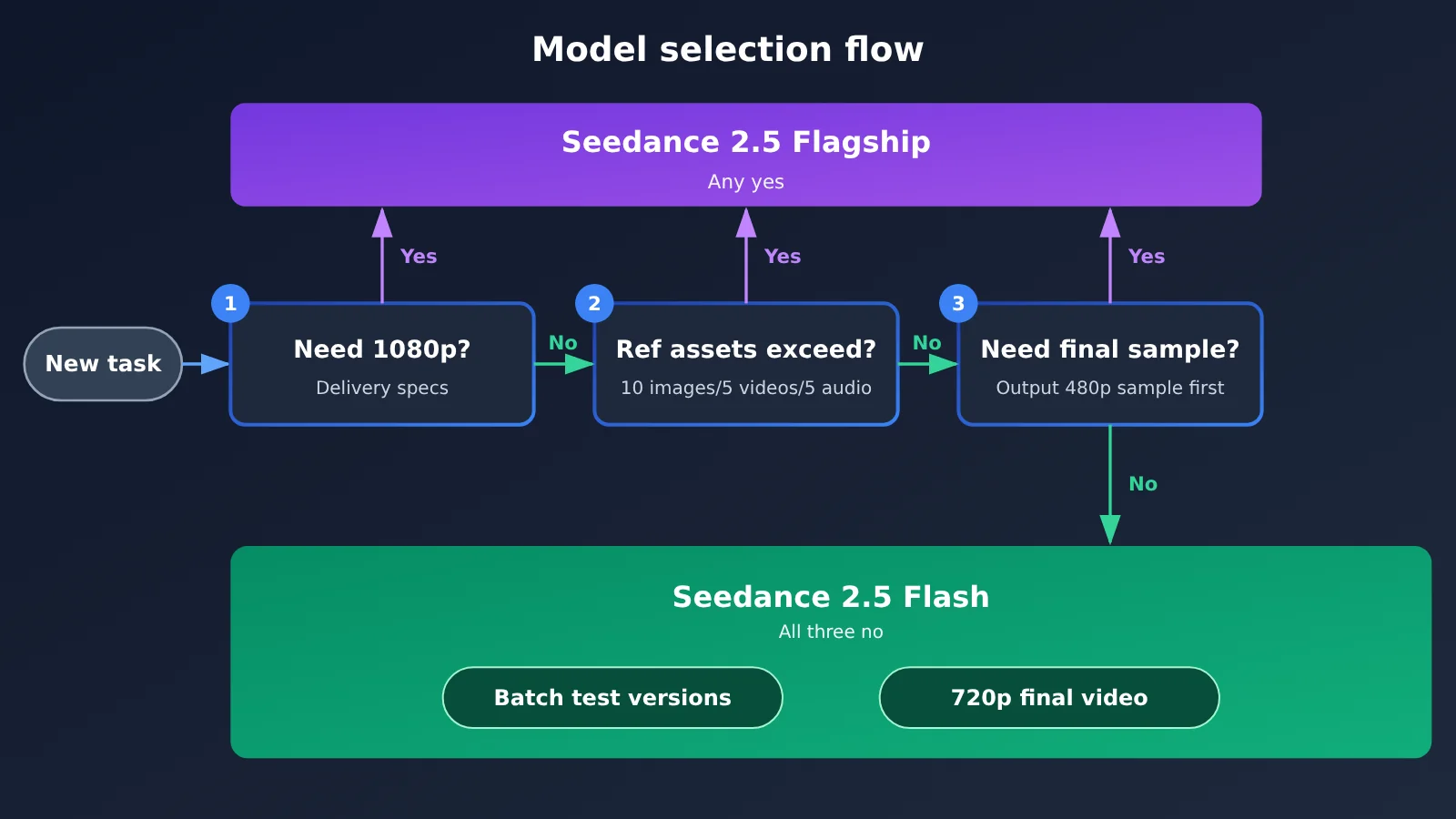
Here’s the whole thing in one sentence: If you need 1080p delivery, 30 reference images, or preview/sample mode, stick with the flagship. If 720p output and rapid batch testing of versions is all you need, switch to Flash.
To get more concrete, walk through these three questions in order. First, does any shot in this batch need to be delivered in 1080p? If yes, keep that part on the flagship. Second, do your reference materials routinely exceed 10 images, 5 videos, or 5 audio clips? If yes, stay on the flagship. Third, does your team’s workflow depend on “confirm a 480p preview first, then render the final cut”? If yes, stay on the flagship. When the answer to all three is “no,” you can confidently pocket Flash’s roughly 34% price gap.
That said, don’t turn this into an all-or-nothing decision. Within the same project, the exploration phase and the delivery phase often have different needs — tiering by task usually pays off better than switching everything at once.
💡 Recommendation: Running a few clips of the same footage through both tiers will tell you more than any spec sheet. Once Flash is live, you can switch between the two models with the same token on APIYI at apiyi.com — no need to maintain two separate integration codebases.
FAQ
Q1: Is Seedance 2.5 Flash a next-generation model in the Seedance line?
No. It belongs to the same generation and the same family as the flagship Seedance 2.5, but the two are separate SKUs. Both support the same six task types, duration range, frame rate, output formats, and rate-limit rules. The differences come down to the resolution ceiling, the number of reference assets, sample preview mode, and unit price.
Q2: How much worse is Seedance 2.5 Flash’s image quality compared to the flagship?
The official wording is “results close to flagship Seedance 2.5” — and that’s self-reported. There’s no public quantitative comparison yet showing exactly how big the gap is. What you can count on as a hard difference: Flash tops out at 720p 8-bit, while the flagship goes up to 1080p 10-bit H.265.
Q3: When was Seedance 2.5 Flash released, and when did the API become available?
BytePlus announced Flash’s pricing and positioning on November 12, 2026, and the API went live on ModelArk on November 15. Dreamina’s official account also announced the launch on November 15.
Q4: Can Seedance 2.5 Flash generate 30-second videos?
Yes. Both Flash and the flagship support 4–30 seconds per clip. At official list prices, a 30-second 720p clip on Flash costs about $4.56, versus roughly $6.93 on the flagship.
Q5: How do I call Seedance 2.5 through the API?
You can sign up at APIYI apiyi.com, create a token, check the SeeDance2 group, and set the billing mode to “usage-first” or “usage-based billing”. Use `https://api.apiyi.com/v1` as the endpoint and `doubao-seedance-2-5-260628` as the model. New users get free trial credits, so you can run one short clip first to verify the billing.
Q6: Can APIYI invoke Seedance 2.5 Flash right now?
As of November 16, 2026, it’s not listed yet. We’ll get this model up as soon as we can — the model name and pricing at that point will follow the platform model list on APIYI apiyi.com.
Q7: What are the known limitations of Seedance 2.5 Flash?
Three main ones: no 1080p or 4K support; reference assets are capped at 20 (10 images + 5 videos + 5 audio); and no sample preview mode. Also, like the flagship, it doesn’t support uploading reference assets that contain real human faces directly. Task IDs stay valid for 7 days, and video URLs are kept for only 24 hours, so download them promptly.
Seedance 2.5 Flash vs. Seedance 2.5: Key Takeaways
- Same generation, lower tier: Flash and the flagship are two SKUs in the same series — the six task types and the 4–30 second duration range are identical.
- Price gap of roughly 34%: At 720p it’s $0.152 per second vs. $0.231, or about $4.56 vs. $6.93 for 30 seconds.
- Resolution is the hard limit: Flash tops out at 720p 8-bit; if you need 1080p delivery, the flagship is your only option.
- A big gap in reference assets: Flash takes 20, the flagship takes 50 — multi-character series content leans much more on the flagship.
- Preview mode is flagship-only: Render a 480p preview first, then lock in the final cut with the task ID — much cheaper trial and error on long shots.
- “Close image quality” is vendor self-reported: “results close to” comes with no public, quantitative comparison, so it’s worth running a small test of your own.
- Practical notes: The flagship is already available on APIYI; Flash isn’t listed yet — check the platform’s model list for exact names.
Summary
The core takeaways from Seedance 2.5 Flash vs. Seedance 2.5:
- Positioning: Flash is a lower tier of the same generation, not a new generation. The capability set is the same; what differs is resolution, reference assets, preview mode, and unit price.
- When the savings are safe: 720p final output, 20 or fewer reference assets, and no reliance on preview mode — when all three hold, you can bank that ~34% price difference with confidence.
- Why you’d stay on the flagship: 1080p delivery, 30 reference images, preview mode — if any one of these applies, keep using the flagship.
For most teams, the more practical approach is to tier by task rather than switch everything over: hand exploration and batch version testing to Flash, and reserve final cuts and high-resolution delivery for the flagship. The flagship’s actual on-platform pricing is listed above; we recommend connecting through APIYI (apiyi.com) to get the flagship channel working end to end first, then switching with the same token to compare once Flash is listed.
📚 References
- Dreamina official release post: Seedance 2.5 Flash launch announcement
- Link:
x.com/dreamina_ai/status/2121921158928851126 -
Description: Officially positioned for high-frequency creation, multi-version testing, batch generation, and repeated revision
-
BytePlus official release post: Flash pricing, speed, and API availability timing
- Link:
x.com/BytePlusGlobal/status/2120760891344036304 -
Description: Includes the official “results close to flagship” wording and per-second 720p pricing
-
BytePlus ModelArk model list: Resolution, duration, task types, and rate limits for both models
- Link:
docs.byteplus.com/docs/en/modelark/model-list.md -
Description: Source of the specification data in the six-item capability comparison table
-
BytePlus Seedance 2.5 official tutorial: Reference asset limits and sample video mode explanation
- Link:
docs.byteplus.com/docs/en/modelark/seedance-2-5.md - Description: Reference asset breakdown, Draft mode workflow, task ID and video URL validity periods
Author: APIYI Technical Team
Technical contact: Feel free to reach us through the APIYI website homepage. The model list and integration guide are available in the docs.apiyi.com documentation center.