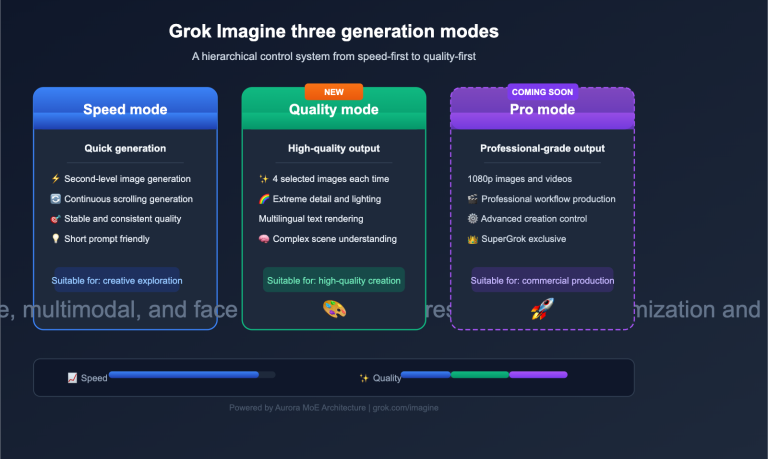
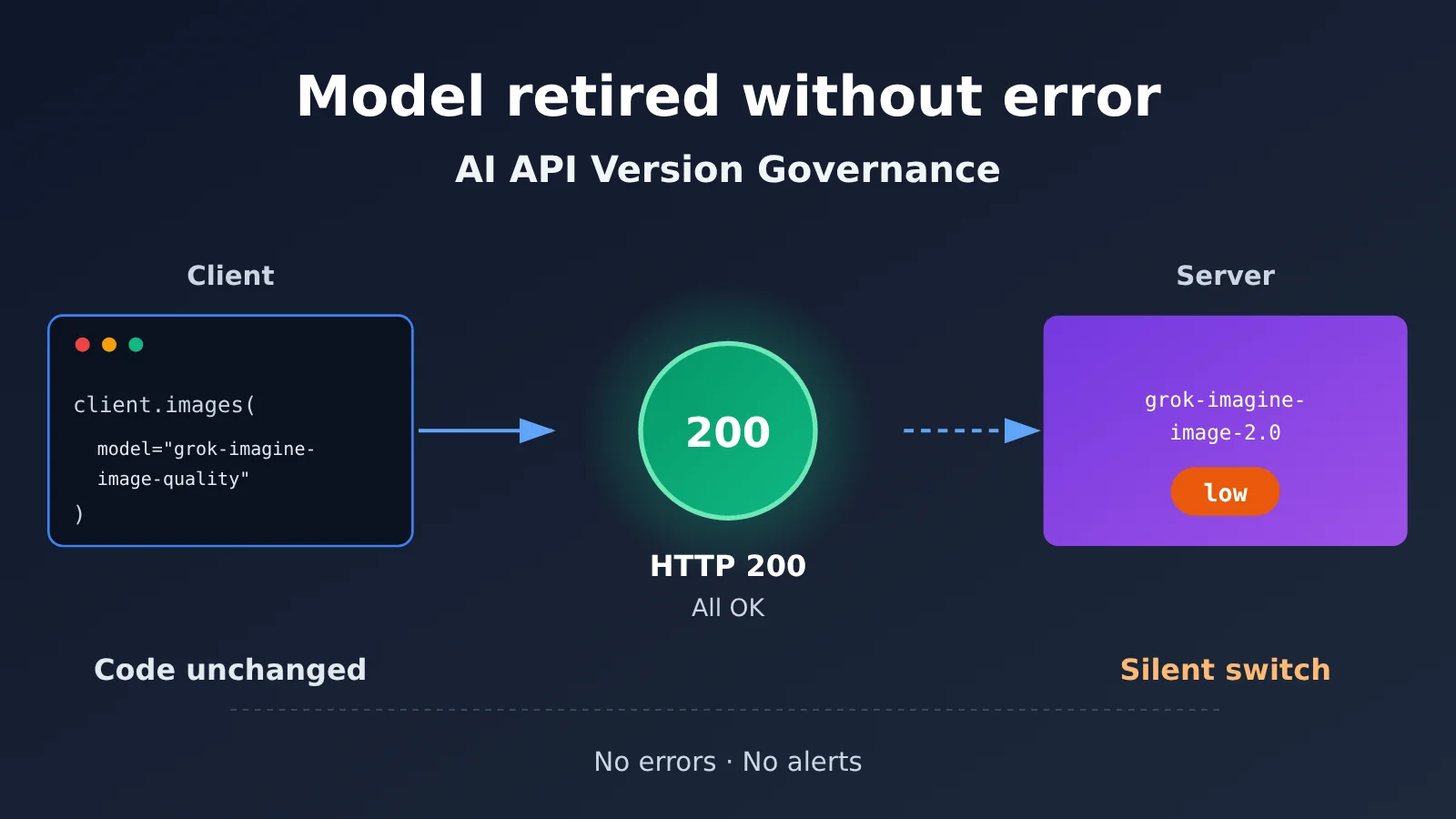
Author’s note: On November 2, 2026, xAI officially retired the grok-imagine-image-quality identifier. Requests using the old identifier still succeed, but the underlying model has switched to Image 2.0 Low. This article uses the Grok Imagine migration to explore the risks of AI API version management and how to address them.
Today, November 2, 2026, xAI officially carried out its previously announced image model migration. The old identifier grok-imagine-image-quality still works, but the model actually handling requests is now grok-imagine-image-2.0, with the quality setting fixed at low. For most applications, not a single line of code has changed, requests are returning as usual, and monitoring dashboards aren’t showing any red alerts.
This isn’t an incident report. The migration rules came from xAI’s official migration notice published on September 2, giving users 60 days’ notice. There’s currently no evidence of widespread user issues. What’s worth discussing is the engineering problem this reveals: API compatibility and successful requests don’t necessarily mean the model, output quality, or costs have stayed the same.
What you’ll take away: By the end of this article, you’ll know exactly what changed in the Grok Imagine migration, why AI APIs need version management separate from ordinary availability monitoring, and how to run an immediate system self-check.
Grok Imagine Model Retirement: Key Facts
Let’s start with the facts confirmed in the official documentation. One important distinction: November 2 is not the launch date for Image 2.0, which was released on August 7. It’s the effective retirement date for a specific legacy API identifier.
| Item | Details |
|---|---|
| Effective date | November 2, 2026 (announced September 2, with 60 days’ notice) |
| Source | xAI’s official migration guide |
| Retired identifier | grok-imagine-image-quality |
| Replacement model | grok-imagine-image-2.0, with quality fixed at low |
| Affected endpoints | /v1/images/generations and /v1/images/edits |
| Compatibility | The old identifier still resolves; request and response structures remain compatible |
| Not affected | grok-imagine-image (1.0) is explicitly unaffected, according to xAI |
| How to verify | The model field in the response reports the model that actually served the request |
The Chain of Redirects for Legacy Grok Imagine Identifiers
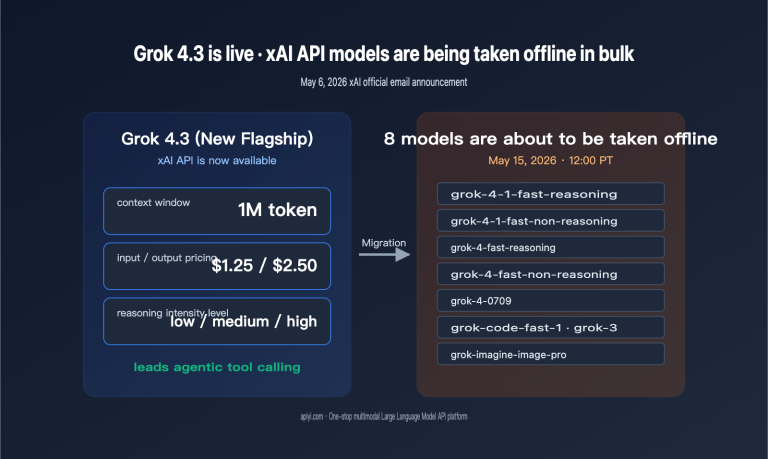
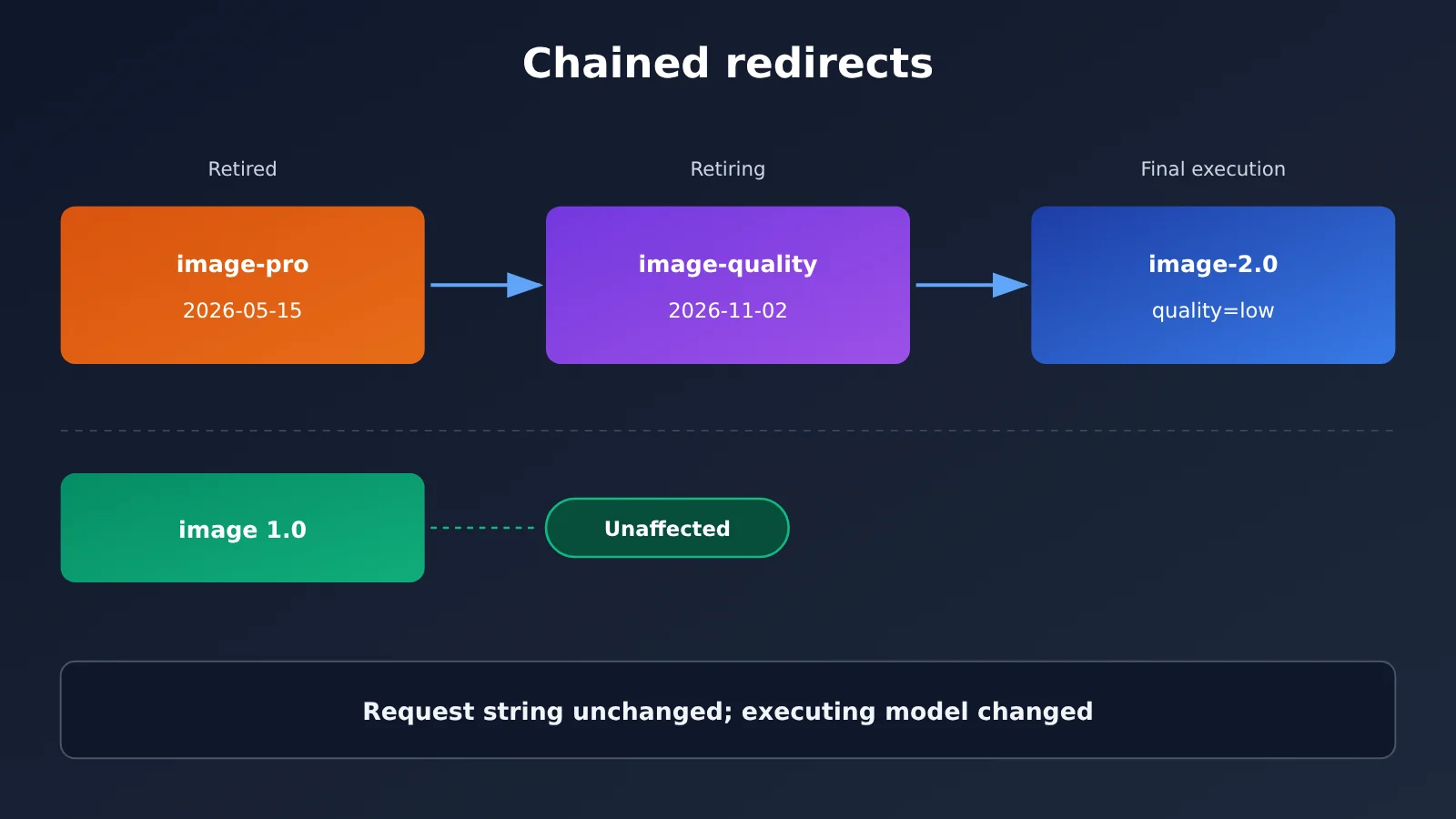
One easily overlooked part of this migration is the chain of redirects. Back on May 15, 2026, xAI retired the even older grok-imagine-image-pro identifier and redirected its requests to grok-imagine-image-quality. After November 2, that chain extends one step further.
In other words, an application that has never updated its configuration and still uses the pro identifier now runs on Image 2.0 Low. Checking the model string in a configuration file is no longer enough to determine which model is actually running.
| Identifier configured in the application | Status | Actual path after November 2 |
|---|---|---|
grok-imagine-image-pro |
Retired May 15 | pro → quality → 2.0 (low) |
grok-imagine-image-quality |
Retired November 2 | quality → 2.0 (low) |
grok-imagine-image-2.0 |
Generally available | 2.0, with low / medium / auto options |
grok-imagine-image |
1.0, still available | Unaffected by this change |
4 AI API Version Governance Risks from the Grok Imagine Migration
The following analysis derives engineering risks from xAI’s documented behavior; it isn’t a count of incidents that have happened at xAI. These risks fall into four categories: model identity, output quality, billing, and monitoring.
Risk 1: Changes to model identity
The client’s request string stays the same, but the model running on the server changes. The good news is that xAI’s response model field reports the model actually used—but that only helps if your system records and checks it. Many applications hard-code the model name in the request and never read the model information in the response.
Risk 2: Changes to output quality and style
xAI has confirmed that the “request structure is compatible,” not that the “output images will be identical.” When xAI released Image 2.0, it emphasized capabilities such as following prompts with multiple conditions, rendering small text and complex layouts, and editing with multiple reference images. Meanwhile, a few users on Reddit’s r/grok reported that 2.0 didn’t work as well for them as the previous version when it came to skin details, natural lighting and shadows, and preserving the original image.
These community reports are subjective and mostly concern the consumer product, so they don’t establish that 2.0 is worse across the board. But they illustrate an important point: the same prompt can produce different compositions, styles, or localized edits after a model change. You need regression tests to check for those differences rather than assuming “compatible” means nothing will change.
Risk 3: Changes to pricing and quality tiers
This migration happens to involve a price decrease, but that makes the importance of tier configuration even clearer. The following are xAI’s official prices per output image in US dollars, excluding reference image input fees:
| Resolution | Legacy Quality | 2.0 Low | 2.0 Medium |
|---|---|---|---|
| 1K | $0.05 | $0.04 | $0.06 |
| 1.5K | $0.06 | $0.05 | $0.07 |
| 2K | $0.07 | $0.06 | $0.08 |
For 10,000 1K images per month, the estimated output cost is about $400 if you keep using the legacy identifier, which automatically routes to 2.0 Low. That’s $100 less than the $500 cost of legacy Quality. If you explicitly switch to 2.0 Medium, the cost is $600—$100 more than the legacy version. Image editing also incurs an input fee of $0.01 per reference image. For example, one reference image plus one 1K output costs $0.06 with legacy Quality, $0.05 with 2.0 Low, and $0.07 with 2.0 Medium.
A less obvious issue is the difference in defaults. Starting August 28, 2.0 defaults to auto when quality isn’t specified. Auto currently selects low for text-to-image and medium for image editing. xAI uses the word “currently,” so these selections aren’t permanently fixed. That means “keeping the legacy identifier” and “switching to 2.0 without specifying quality” aren’t equivalent for editing workloads, and their costs differ too. Also, while the pricing table lists 1.5K, the generation parameter documentation currently lists only 1k and 2k for resolution. You’ll need to test whether 1.5K can be specified.
Risk 4: Monitoring blind spots
If your application monitors only HTTP status codes, success rates, and response times, a model switch is nearly invisible in those metrics. xAI’s asynchronous image generation mode, called deferred mode, provides another example: pending returns HTTP 202, done returns HTTP 200, and failed also returns HTTP 200 with error details in the response. HTTP 200 never guarantees business-level success.
Comparing Model Version Management Across Providers
xAI’s approach—keeping old identifiers valid while replacing the model server-side—is just one strategy. It isn’t a universal rule across providers. A look at their official documentation reveals some clear differences.
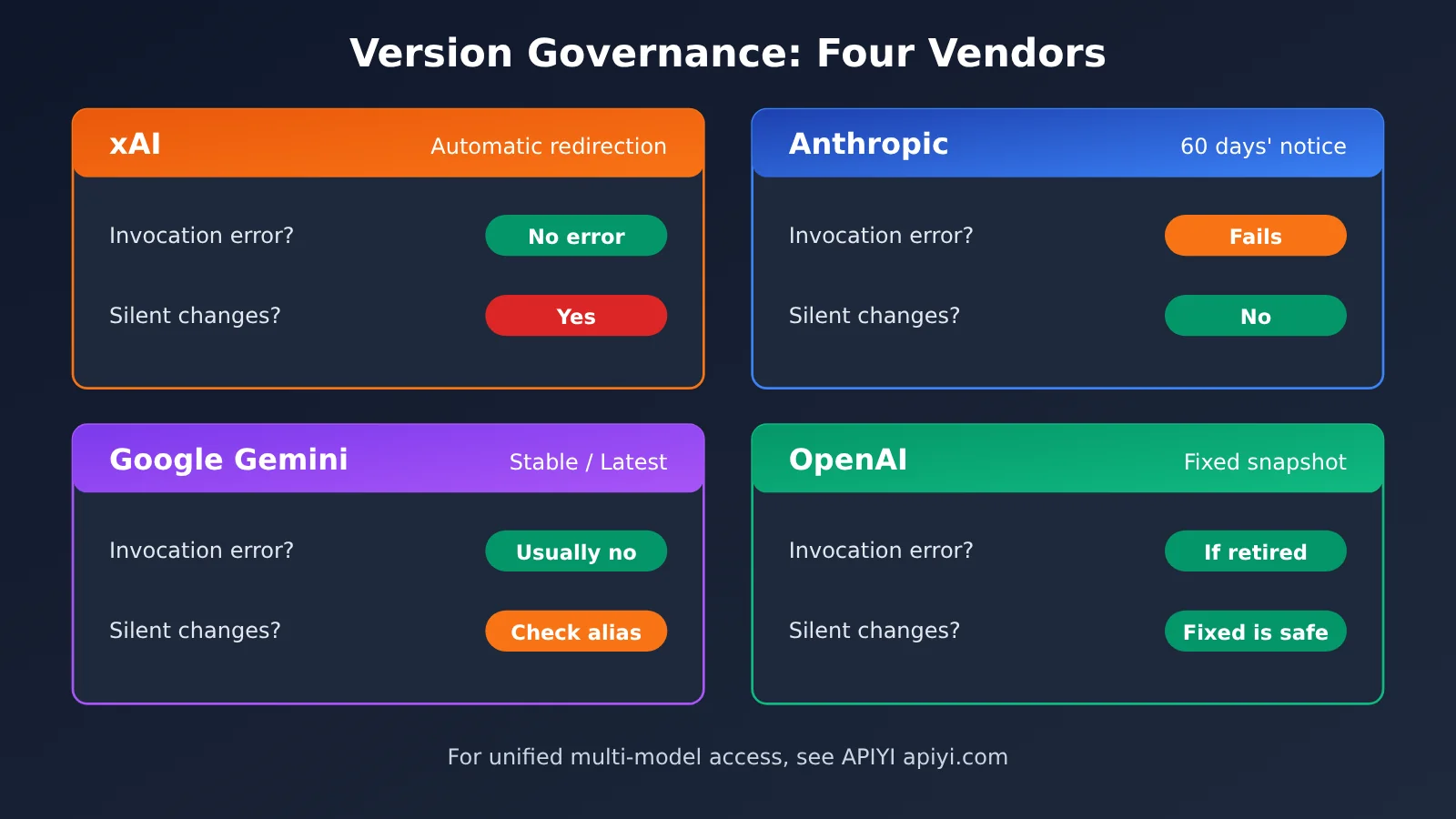
| Provider | Official version strategy | What happens after retirement or changes | What it means for developers |
|---|---|---|---|
| xAI | Retired identifiers remain valid and redirect server-side | No error, but the actual model changes | Check the model field in the response |
| Anthropic | Four stages: Active / Legacy / Deprecated / Retired | Requests fail after retirement; public models get at least 60 days’ notice | Failures are visible, so track deprecation announcements |
| Google Gemini | Stable / Preview / Latest / Experimental | The Latest alias automatically switches to new versions; breaking changes are announced in advance | Stable is recommended for production; use Latest with caution |
| OpenAI | Recommends pinning production to model snapshots | Backward compatibility of the API structure doesn’t guarantee consistent outputs | Pin snapshots and maintain an evaluation set, but still watch retirement dates |
xAI comparison: xAI offers the smoothest client-side compatibility: old code won’t suddenly stop working. The trade-off is that a model change won’t surface as an error. Anthropic’s approach of failing requests to retired models is “noisier,” but it makes the issue visible sooner.
Google and OpenAI comparison: Google explicitly builds “same identifier, different version” into its Latest alias, showing that this kind of mechanism is both public and common. OpenAI approaches the issue from the other end, recommending pinned snapshots and evaluation sets for production. Together, they show that version management isn’t unique to one provider—it’s an engineering challenge you’ll face with any AI API.
💡 Recommendation: Version semantics vary widely across providers. When integrating multiple models, it’s best to consistently record both the “requested model” and the “executed model.” If you use APIYI apiyi.com to connect to multiple providers through a single OpenAI-compatible interface, keep both fields at the application layer to make cross-provider comparisons easier.
How to Set Up AI API Version Governance: Logging, Costs, and Gradual Rollouts
Step 1: Distinguish the Requested Model from the Model That Served It
The OpenTelemetry semantic conventions for generative AI define two key attributes: gen_ai.request.model identifies the model requested by the client, while gen_ai.response.model identifies the model that actually generated the response. xAI doesn’t automatically provide all telemetry fields, so your application needs to collect and map them. The following business log fields are recommended engineering practices, not official requirements:
| Field | Purpose | Notes |
|---|---|---|
requested_model / served_model |
Detect silent redirects | Get the served model from the response’s model field |
quality_requested / quality_effective |
Track quality tiers | If the effective tier can only be inferred from documentation, label it as inferred |
response_status / business_status |
Distinguish HTTP results from business outcomes | An asynchronous failure can still return HTTP 200 |
cost_usd |
Actual cost per request | For xAI, calculate this from cost_in_usd_ticks |
reference_image_count / resolution |
Cost attribution | Include input charges for editing workflows |
prompt_template_version / evaluation_result |
Regression comparison | Don’t log sensitive prompts or user images by default |
Step 2: Record the Actual Model and Cost in Your Code
xAI’s official Cost Tracking documentation (updated October 10, 2026) says the response’s usage object can include cost_in_usd_ticks. Convert it using cost_usd = cost_in_usd_ticks / 10000000000. In the official example, 400000000 ticks equals $0.04. This field is specific to xAI, so check whether it’s passed through unchanged when calling via an SDK or third-party platform.
The minimal example below shows how to compare the requested and served models with each request:
import requests

BASE_URL = "https://api.apiyi.com/v1"  # APIYI OpenAI-compatible endpoint
REQUESTED_MODEL = "grok-imagine-image-2.0"  # Example name; check the platform's model list

resp = requests.post(
    f"{BASE_URL}/images/generations",
    headers={"Authorization": "Bearer YOUR_API_KEY"},
    json={"model": REQUESTED_MODEL, "prompt": "A tech magazine cover",
          "quality": "low", "resolution": "1k", "n": 1},
    timeout=180,
).json()

served = resp.get("model")
if served and served != REQUESTED_MODEL:
    print(f"[版本告警] 请求 {REQUESTED_MODEL},实际执行 {served}")
See the full implementation with cost and business-status checks
import time
import logging
import requests
from typing import Optional

logging.basicConfig(level=logging.INFO)
log = logging.getLogger("model_governance")

BASE_URL = "https://api.apiyi.com/v1"  # Use APIYI's unified endpoint
TICKS_PER_USD = 10_000_000_000  # Official xAI conversion: 1 USD = 10^10 ticks


def generate_image(
    prompt: str,
    model: str,
    quality: str = "low",          # Set explicitly to avoid upstream changes to the auto default
    resolution: str = "1k",
    api_key: str = "YOUR_API_KEY",
    expected_unit_cost: Optional[float] = None,
) -> dict:
    start = time.time()
    r = requests.post(
        f"{BASE_URL}/images/generations",
        headers={"Authorization": f"Bearer {api_key}"},
        json={"model": model, "prompt": prompt, "quality": quality,
              "resolution": resolution, "n": 1},
        timeout=180,
    )
    latency_ms = int((time.time() - start) * 1000)
    body = r.json() if r.content else {}

    # 1. Check the served model
    served_model = body.get("model")

    # 2. Check the business result: HTTP 200 doesn't guarantee a usable image
    data = body.get("data") or []
    has_image = bool(data and (data[0].get("url") or data[0].get("b64_json")))
    business_ok = r.status_code == 200 and has_image and not body.get("error")

    # 3. Cost: the field may not be passed through; record None, not 0, if missing
    ticks = (body.get("usage") or {}).get("cost_in_usd_ticks")
    cost_usd = ticks / TICKS_PER_USD if ticks is not None else None

    record = {
        "requested_model": model,
        "served_model": served_model,
        "quality_requested": quality,
        "resolution": resolution,
        "response_status": r.status_code,
        "business_status": "ok" if business_ok else "failed",
        "latency_ms": latency_ms,
        "cost_usd": cost_usd,
    }

    if served_model and served_model != model:
        log.warning("模型重定向: %s -> %s", model, served_model)
    if cost_usd is not None and expected_unit_cost is not None \
            and abs(cost_usd - expected_unit_cost) > 1e-6:
        log.warning("单价偏离预期: 预期 %.4f 实际 %.4f", expected_unit_cost, cost_usd)

    log.info("generation record: %s", record)
    return record


if __name__ == "__main__":
    generate_image(
        prompt="A clean product shot on white background",
        model="grok-imagine-image-2.0",  # Check the platform's model list
        quality="low",
        expected_unit_cost=0.04,
    )
🚀 Quick start: To try out this logging approach, sign up at APIYI apiyi.com for test credits and run a few prompts from your own workflow to check the log fields. Check the platform’s model list and pricing page for available image models, supported quality parameters, and actual prices. Third-party platform prices aren’t the same as xAI’s official prices.
Step 3: Set Up a Fixed Test Set and Canary Validation
Drawing on Google SRE’s Canary Release approach and OpenAI’s evaluation set recommendations, you can migrate an image model like this: first, prepare a fixed sample set covering text posters, product images, portrait editing, multi-subject compositions, and local edits. Then lock down the prompt, input images, resolution, quality, aspect ratio, and number of images generated. Compare instruction following, subject preservation, text accuracy, changes outside the edited area, human acceptance rate, and cost per accepted image. Finally, if you can control request routing, switch a small portion of traffic and monitor the metrics before expanding.
One important caveat: xAI is enforcing this retirement upstream, so developers can’t assume they can switch back to the retired Quality model. Here, “rollback” means switching to a validated alternative model that’s still available, pausing the affected feature, or adjusting the quality parameter—not restoring an old version that’s no longer accessible.
How the Grok Imagine Migration Affects Developers and API Platforms
Impact on Developers
- Broaden your search: Look for older aliases such as
grok-imagine-image-pro, not justgrok-imagine-image-quality. - Set parameters explicitly: When migrating directly to 2.0, specify low or medium rather than letting auto decide the tier and cost for editing workloads.
- Update your cost calculations: The official claim of “$0.01 less per image” compares output prices. The total cost reduction for editing workloads with reference images will differ.
- Validate independently: Beyond invocation success rates, add business-level acceptance checks and cost-per-accepted-image metrics.
Impact on API Aggregation Platforms
For platforms that provide access to multiple models, version governance is becoming a real customer need. Customers need to know which upstream model handled a request, when retirements and redirects happen, and how prices change. They also need key parameters like quality passed through correctly, along with traceable model and billing information. These are areas aggregation platforms should consider developing.
🎯 Technical tip: If you use an aggregation platform like APIYI apiyi.com to access models from multiple providers, check three things during migration: whether the
modelfield in the response reflects the actual upstream model, whether thequalityparameter is passed through, and whether billing matches the expected unit price. If you find a discrepancy, keep the request ID and contact the platform’s technical support—it’s much more efficient than digging through bills after the fact.
Frequently Asked Questions
Q1: What exactly is being retired in Grok Imagine?
Starting November 2, 2026, xAI is retiring the `grok-imagine-image-quality` identifier in its API. You can still use it, but the server will forward requests to `grok-imagine-image-2.0` with the quality tier fixed at low. Both the generation and editing endpoints are affected. The 1.0 model, `grok-imagine-image`, is not affected.
Q2: Will old code return a 404 or fail outright?
No. According to xAI, the old identifier will still resolve and redirect automatically, and the request and response structures will remain compatible. That’s exactly why you need to be careful: no error doesn’t mean the output quality or price hasn’t changed. This differs from Anthropic’s approach, where requests fail after a model enters the Retired state.
Q3: If I switch directly to grok-imagine-image-2.0, will everything work exactly as before?
Not quite. If you switch to 2.0 without specifying quality, it defaults to auto: text-to-image currently uses low, while image editing uses medium. Keeping the old identifier, on the other hand, fixes quality at low. For editing workflows using medium, a 1K output costs $0.06, more than the old Quality model’s $0.05. We recommend explicitly setting the tier and checking the results against a fixed test set.
Q4: How can I tell which model my system is actually running?
Read and log the `model` field in the response, then compare it with the requested model. Also log the actual cost calculated from `cost_in_usd_ticks`, if available. When calling through a third-party platform such as APIYI at apiyi.com, check whether these fields are passed through unchanged. Refer to the platform’s official pages for model availability and pricing.
Q5: If I’m unhappy with the new model’s results, can I roll back to the old Quality model?
You can’t assume that’s possible. The retirement is enforced upstream, so access to the old Quality model can’t be guaranteed. Instead, you can adjust the quality parameter, switch to an alternative model validated for your use case, or temporarily disable the affected feature. Having a tested fallback ready—and using APIYI at apiyi.com to switch between and test models through a unified interface—will leave you better prepared than scrambling for a fix.
Q6: Is Image 2.0 better than the previous version?
There’s no universal answer. At launch, xAI said it ranked second on Arena’s text-to-image and image-editing leaderboards at the time, based on results from August 7. An Arena snapshot from late October showed it ranked fifth overall for single-image editing and sixth overall for text-to-image. Some community users have also expressed dissatisfaction with its photorealistic rendering and preservation of the original image. Official capabilities, independent tests, and subjective preferences are different things. Your own use-case test set is the most reliable basis for a decision.
Key Takeaways for AI API Version Governance
- A successful call doesn’t mean the model hasn’t changed: Old Grok Imagine identifiers still work, but they’ve been silently redirected to 2.0 Low.
- Aliases can redirect through a chain: pro → quality → 2.0 Low. Checking the configured model string alone isn’t enough.
- Defaults can change too: auto currently selects low for generation and medium for editing. Specify your preferred setting explicitly.
- Check actual billing for costs: Editing includes reference image input fees, so the overall cost reduction differs from the output price reduction.
- HTTP 200 doesn’t mean the operation succeeded: An asynchronous task can return 200 even when its status is failed.
- Provider policies vary: Redirects, failures, Latest hot swaps, and pinned snapshots each need a different approach.
- Start with logging: Use the test credits at APIYI apiyi.com to set up logging for both the requested model and the model that actually ran.
Summary
The main lessons from the Grok Imagine migration:
- Compatibility measures can hide changes: xAI chose a seamless redirection approach for clients, so changes to the model, tier, and unit price won’t appear as errors.
- Version governance needs its own mechanisms: Logging both requested and executed models, tracking actual costs, and validating business outcomes go beyond ordinary availability monitoring.
- Plan your fallback in advance: You can’t reverse an upstream provider’s forced retirement. Your best option is to have alternative models and parameter configurations tested and ready.
Run a quick check today: search your code for old model identifiers, compare them with the response’s model field, explicitly set the quality parameter for editing and generation, and prepare a fixed set of test samples. You can use APIYI apiyi.com to build a multi-model comparison environment through a unified interface and improve version observability before the next upstream change.
📚 References
- xAI November 2, 2026 Image Model Migration Guide: Retirement and redirection rules
- Link:
docs.x.ai/developers/migration/imagine-image-quality-nov-2 -
Details: Primary source for retired model IDs, replacement models, quality tiers, and affected services
-
xAI May 15, 2026 Retirement History: Migration record for the pro model ID
- Link:
docs.x.ai/developers/migration/may-15-retirement -
Details: Key resource for understanding chained redirects
-
xAI Official Pricing and Image 2.0 Model Pages: Pricing by resolution and tier
- Link:
docs.x.ai/developers/pricing -
Details: Basis for calculating output and reference image input costs
-
xAI Image Generation Parameters: Default quality value and asynchronous status
- Link:
docs.x.ai/developers/model-capabilities/images/generation -
Details: Explains auto behavior and HTTP status codes for deferred mode
-
xAI Cost Tracking: Actual cost fields at the request level
- Link:
docs.x.ai/developers/cost-tracking -
Details: Meaning of cost_in_usd_ticks and how to convert it
-
Anthropic Model Deprecations: Four stages of the model lifecycle
- Link:
docs.anthropic.com/en/docs/about-claude/model-deprecations -
Details: Comparison of the policy for failing requests after a model is retired
-
Google Gemini Model Versions: Stable vs. Latest
- Link:
ai.google.dev/gemini-api/docs/models -
Details: How aliases automatically switch to updated models
-
OpenAI Prompt Engineering and API Overview: Snapshot pinning and evaluation recommendations
- Link:
developers.openai.com/api/docs/guides/prompt-engineering -
Details: Official recommendations for pinning snapshots and building evaluation sets in production
-
Google SRE Canary Release: Canary deployment practices
- Link:
sre.google/workbook/canarying-releases/ -
Details: Validating changes with a small share of traffic to limit their impact
-
OpenTelemetry Generative AI Semantic Conventions: Request and response model attributes
- Link:
opentelemetry.io/docs/specs/semconv/registry/attributes/gen-ai/ - Details: Definitions of gen_ai.request.model and gen_ai.response.model
- Link:
Author: APIYI Technical Team
Technical discussions: Contact us through the APIYI homepage. For more integration resources, visit the documentation center at docs.apiyi.com.