
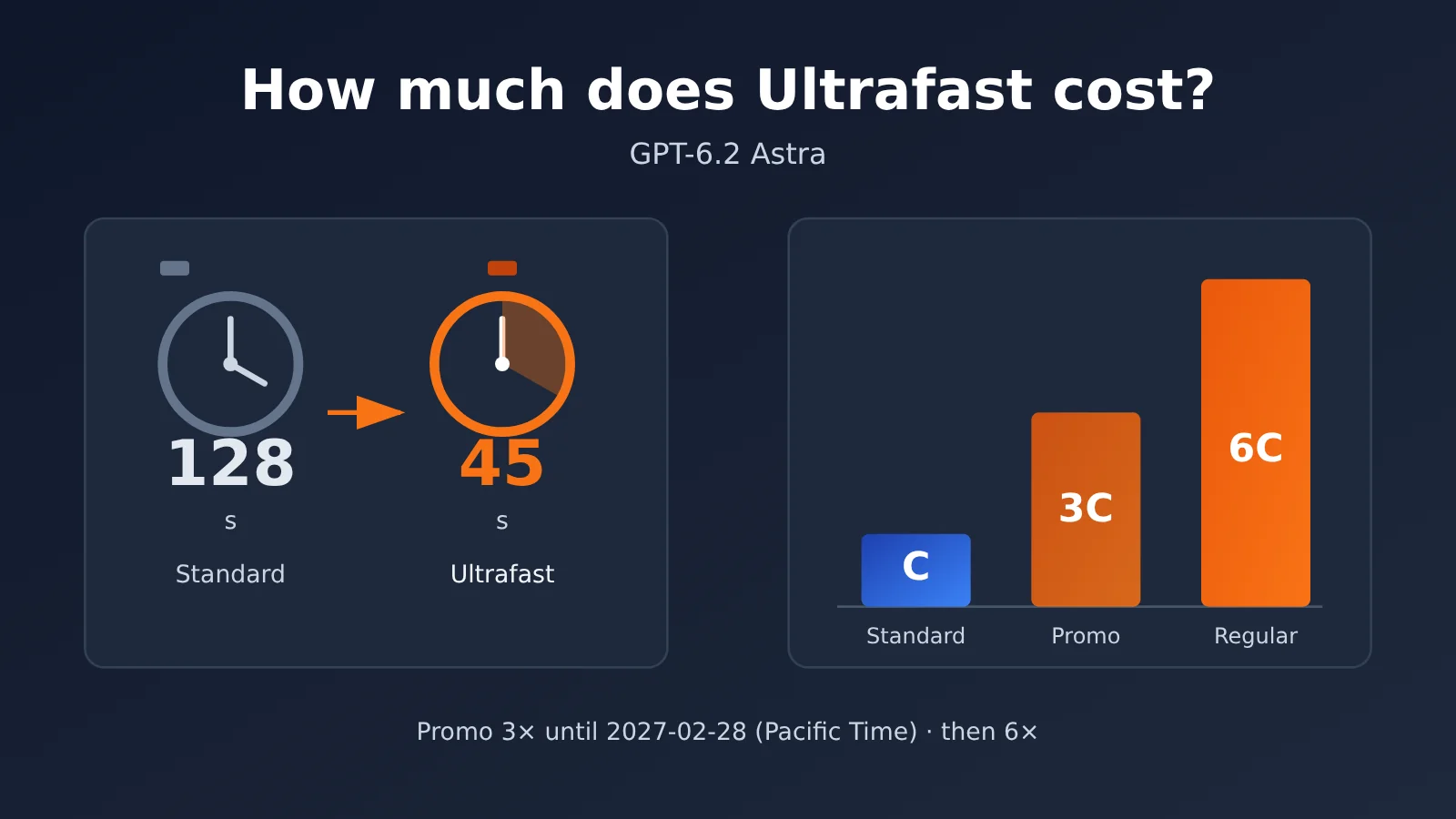
Author’s note: This article uses a fixed set of request volumes to work out exactly how much more GPT-6.2 Astra costs when Ultrafast is enabled, how much less time you wait, and the price of each minute saved.
Once request volume and billing conditions are fixed, the Ultrafast bill for GPT-6.2 Astra equals 3× Standard (promotional period, through February 28, 2027, inclusive) or 6× (from March 1, 2027), with the switch calculated in Pacific Time. Let C be Standard’s model token cost. With Ultrafast enabled, you pay an extra 2C or 5C, and input, cache, and output are all billed at that tier. Whether it’s worth turning on depends on whether the saved wait time sits on a user-blocking path, and whether the price per minute saved is below the ceiling your business is willing to pay.
Using the request setup in this article (10,000 regular input tokens, 40,000 cached reads, 4,000 billed output tokens), each minute saved costs about $0.37 during the promotional period and about $0.93 at regular rates. These times and usage figures are assumptions; unit prices come from the official price list, and no billed requests were sent for this article.
GPT-6.2 Astra Ultrafast Cost Estimation Knowledge Map
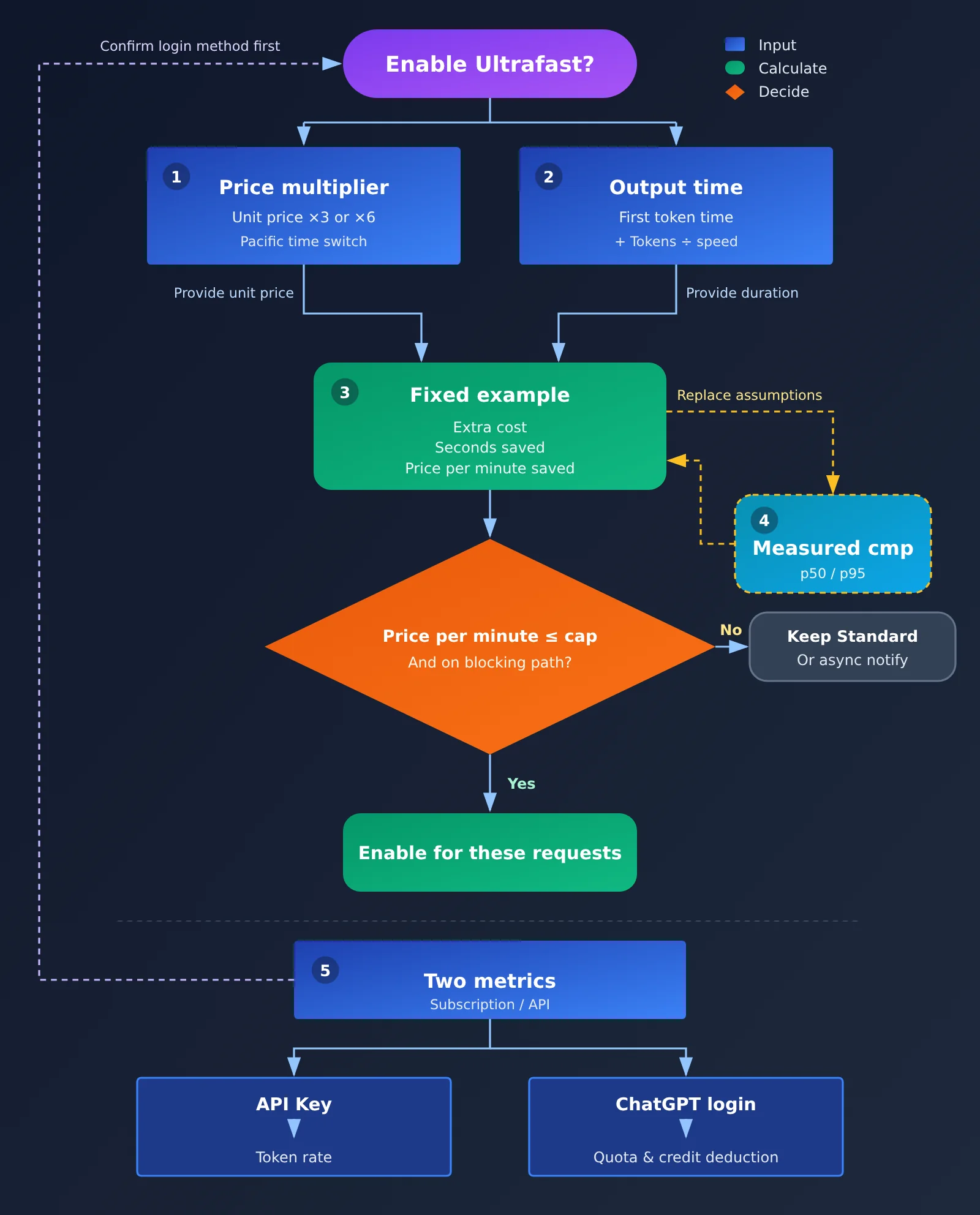
Figure note: Section 1 and Section 2 give you the unit price and the duration, respectively; Section 3 combines them into a price per minute saved. Section 4 swaps the assumptions in Section 3 for your measured data. Section 5 determines whether you’re looking at an API bill or subscription credit usage, so confirm that before you start calculating.
Index: I recommend reading in the order 1 → 2 → 3. Get the unit price and time formula first, then look at the combined worked example and the decision threshold. Use Section 4 before launch to replace the assumptions in the example with your own measurements. Section 5 is there when you need it — only if you also use subscription products like Work or Codex.
To Know: GPT-6.2 Astra Ultrafast Terms
| Term | Brief explanation |
|---|---|
| service_tier | A request-level tier parameter for the Responses API. Set it to "ultrafast" to request the accelerated tier; the return value reflects the actual service tier and may differ from the requested value. |
| Time to first token (TTFT) | The time from sending the API request to receiving the first non-empty response.output_text.delta. |
| Visible tokens / billed output tokens | Visible tokens are the text the user sees; billing is based on usage.output_tokens, which may include reasoning tokens. |
| Cache read / cache write | When cached context is hit, billing uses the cache-read rate; new writes to the cache are billed at the 30-minute or 12-hour write rate. |
| p50 / p95 | The median and 95th percentile of latency samples, used to observe normal experience and tail slow requests, respectively. |
| TPM limit | An organization-level cap on tokens per minute. It measures overall traffic capacity and is a different thing from per-response speed. |
1 GPT-6.2 Astra Ultrafast Price Multipliers and Promotional Dates
Ultrafast is an accelerated service tier for the same gpt-6.2-astra model. The model’s capabilities don’t change — what changes is the generation speed and the billing multiplier. The publicly announced promotional rate is 3× Standard, valid through February 28, 2027 (inclusive), and reverts to 6× starting March 1, 2027.
1.1 GPT-6.2 Astra Short-Input Price Comparison by Tier
The table below lists the published USD rates for the short-input tier (single input of no more than 272K tokens), in units of per million tokens.
| Billing item (USD / million tokens) | Standard | Ultrafast promo (3×) | Ultrafast regular (6×) |
|---|---|---|---|
| Regular input | 8 | 24 | 48 |
| Cache read | 0.40 | 1.20 | 2.40 |
| 30-minute cache write | 10 | 30 | 60 |
| 12-hour cache write | 20 | 60 | 120 |
| Output | 40 | 120 | 240 |
Table note: Source is the OpenAI API price list, verified 2026-11-27. Tool fees and regional surcharges are calculated separately on top of model pricing; the examples in this article estimate base model tokens only.
The key point here is that the multiplier applies to every billing item. You’re paying a premium to shorten output time, but input and cache events are also billed at the accelerated tier — so for long-context, short-output requests, the markup percentage is the same as for long-output requests, while the time saved may be minimal.
If a single input exceeds 272K tokens, both speeds first apply the whole-request long tier: input and cache rates are 2× their short-tier counterparts, output is 1.5×, and then the Ultrafast tier multiplier is stacked on top. When budgeting long-document tasks, first determine whether you’ll cross 272K, then apply this table.
1.2 Ultrafast Promo Cutoff and Pacific Time Conversion
The switch happens on Pacific Time. On March 1, 2027, the US hasn’t entered daylight saving time yet, so Pacific Time is UTC-8 — which means the 6× rate begins around 16:00 Beijing time on March 1, 2027. Requests sent during the daytime of March 1 Beijing time still fall on February 28 Pacific Time and are billed at 3×.
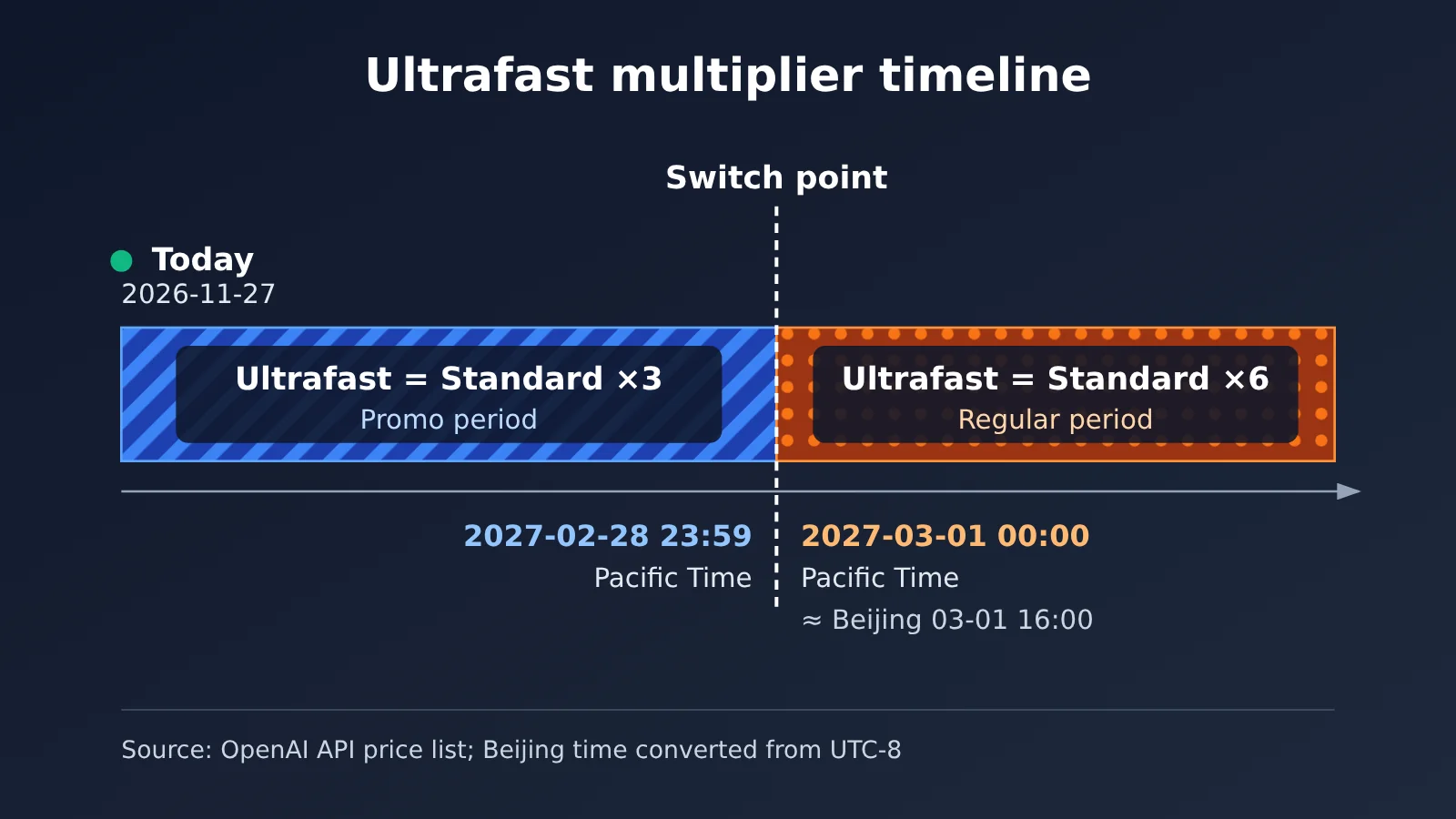
Budgets that span the promo cutoff should be calculated in two segments: usage before February 28 (Pacific Time) multiplied by 3, and usage after multiplied by 6. If your logs are recorded in Beijing time or UTC, convert to Pacific Time first before splitting when you aggregate monthly.
2 How to Break Down GPT-6.2 Astra Ultrafast Output Time
In the Work and Codex scenarios, the official statement is that Ultrafast generates tokens up to 4.5 times faster than Standard for the same model. The denominator here is the generation speed of the standard tier for that same model — that is, the generation phase only. The full wait also includes other stages.
2.1 The Split Between Time to First Token and Completion Time
A single request may pass through client-side preparation, queuing, context processing, model inference, tool calls, and the return trip. Time to first token (TTFT) runs from sending the request to receiving the first non-empty text delta; end-to-end wait runs from the user’s trigger to the interface displaying the complete delivery. What Ultrafast mainly compresses is the continuous generation phase after the first token.
For requests dominated by continuous text generation, you can estimate with an approximation:
Completion time ≈ TTFT + visible tokens after first token ÷ visible tokens per second
If there’s tool waiting or post-processing in the middle, add the waiting that actually occurred within the same measurement segment, and make sure the segments don’t overlap. A single streaming event may contain multiple tokens, so when calculating output per second, count the actual text tokens, not the number of events.
2.2 The Gap Between Billing Tokens and Visible Tokens
Billing is settled on usage.output_tokens, which may include reasoning tokens; time estimation, on the other hand, should use visible text tokens. If you take the output tokens from your bill and divide by the per-second speed of visible text, the duration will come out inflated. Requests whose output was truncated by a limit or interrupted by an error should still be kept in the latency sample, with their status noted.
Tool waiting noticeably drags down the overall speedup. An OpenAI developer blog post (2026-11-20) gave an example: the author had GPT-6.2 Sol modify an Android app at the Medium reasoning level, including incremental builds and 18 tests, running each of the three tiers three times. The averages were 16.7 seconds for Standard, 16.0 seconds for Fast, and 15.7 seconds for Ultrafast, with the test phase taking about 13 seconds in every tier. This is a Sol model case, used here to show that when tool time dominates, the speedup gains are limited; the main worked example in this article still uses Astra’s pricing scenario.
3 GPT-6.2 Astra Ultrafast Fixed-Usage Worked Example
Set up a request: the document is already in context, and the ask is to generate a long summary. Usage is 10,000 regular input tokens, 40,000 cached read tokens, and 4,000 billed output tokens (about 3,600 visible + 400 reasoning), with no new cache writes and no extra tools, all priced at the short tier.
3.1 Speedup cost and time saved for the same request
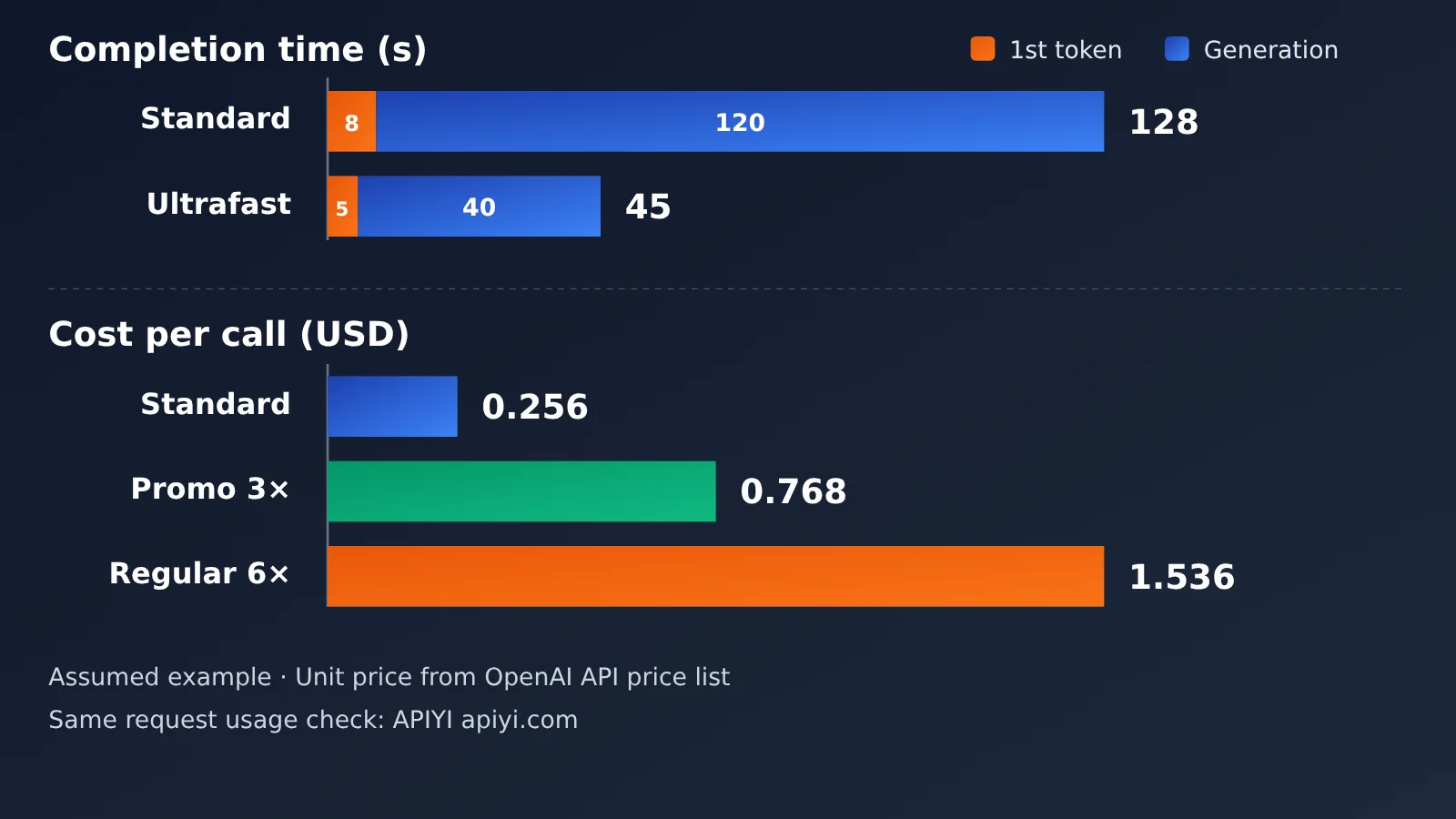
The Standard cost is (10,000 × 8 + 40,000 × 0.40 + 4,000 × 40) ÷ 1,000,000 = $0.256. For timing, assume Standard has an 8-second time to first token and 30 visible tokens/s, while Ultrafast has a 5-second time to first token and 90 visible tokens/s, ignoring the effect of the first text chunk on the count.
| Metric | Standard | Ultrafast promotional (3×) | Ultrafast regular (6×) |
|---|---|---|---|
| Cost per request | $0.256 | $0.768 | $1.536 |
| Extra over Standard | — | $0.512 | $1.28 |
| Estimated completion time | 8 + 3,600 ÷ 30 = 128 s | 5 + 3,600 ÷ 90 = 45 s | 45 s |
| Time saved | — | about 83 s | about 83 s |
| Price per minute saved | — | 0.512 ÷ (83 ÷ 60) ≈ $0.37 | 1.28 ÷ (83 ÷ 60) ≈ $0.93 |
Table note: Token usage, time to first token, and generation speed are assumed values; unit prices come from the official price list, and no real billable request was sent.
Of the 83-second gap, about 3 seconds comes from the earlier time to first token, and about 80 seconds from the shorter span from first token to completion. In other words, almost all the benefit for this request comes from the long-text generation phase; if your business output is very short, the time saved shrinks a lot while the markup multiplier stays the same.
3.2 Working backward from willingness to pay per minute to the activation threshold
Flip the question: if the business is willing to pay $0.50 for every minute saved, then during the promo period it needs to save at least 0.512 ÷ 0.50 × 60 = 61.44 seconds for Ultrafast to be worth it, and at the regular rate at least 153.6 seconds. This example’s 83 seconds clears the first threshold but not the second. If the business also has a hard time-to-first-token target, check that metric separately.
3.3 Monthly scenario with task-based routing
Assume a month has 50 requests exactly like the example above, all serial, with people actually waiting on them. If all are enabled, the promo price costs an extra 50 × 0.512 = $25.60, the regular price an extra $64, and cumulative waiting time drops by about 69.2 minutes. If only 10 of them are on the user-blocking path and the rest can just finish and send a notification, then enable Ultrafast only for those 10, and the incremental cost drops to $5.12 or $12.80.
You can’t simply add up the minutes saved across parallel requests; calculate along the path the user actually waits on. In practice, first identify which categories of requests need an immediate result, then sample and time only those categories.
4 GPT-6.2 Astra Ultrafast Real-World Comparison Method
Before you roll this out, you should replace the assumptions from Section 3 with actual measurements. At the request level, set service_tier: "ultrafast" and use the model gpt-6.2-astra; to measure time to first token, set stream: true in the HTTP request.
4.1 A Minimal Ultrafast Example: Timing and Cost Accounting
The code below makes a single streaming request, records time-to-first-token and completion time, and reads back the actual tier and usage.
import time
from openai import OpenAI

client = OpenAI(
    api_key="YOUR_API_KEY",
    base_url="https://api.apiyi.com/v1"  # APIYI OpenAI-compatible interface
)

t0 = time.perf_counter()
ttft = None
stream = client.responses.create(
    model="gpt-6.2-astra",
    input="请为上文文档生成一份长摘要",
    service_tier="ultrafast",
    stream=True,
)
for event in stream:
    if event.type == "response.output_text.delta" and event.delta and ttft is None:
        ttft = time.perf_counter() - t0
    if event.type == "response.completed":
        r = event.response
        print("实际档位:", r.service_tier, "用量:", r.usage)
print(f"首字 {ttft:.2f}s, 完成 {time.perf_counter() - t0:.2f}s")
View the full implementation (paired measurements and date-based cost accounting)
import time
from datetime import datetime
from zoneinfo import ZoneInfo
from openai import OpenAI

client = OpenAI(
    api_key="YOUR_API_KEY",
    base_url="https://api.apiyi.com/v1"  # Call through the unified APIYI interface
)

# Short-input tier pricing (USD per million tokens), source: OpenAI API price sheet
STANDARD = {"input": 8, "cache_read": 0.40, "output": 40}
PROMO_END_PT = datetime(2027, 3, 1, tzinfo=ZoneInfo("America/Los_Angeles"))


def tier_multiplier(tier: str, at: datetime) -> int:
    """Determine the Ultrafast multiplier based on Pacific time"""
    if tier != "ultrafast":
        return 1
    return 3 if at.astimezone(ZoneInfo("America/Los_Angeles")) < PROMO_END_PT else 6


def cost_usd(usage, tier: str, at: datetime) -> float:
    cached = usage.input_tokens_details.cached_tokens or 0
    normal_in = usage.input_tokens - cached
    base = (normal_in * STANDARD["input"]
            + cached * STANDARD["cache_read"]
            + usage.output_tokens * STANDARD["output"]) / 1_000_000
    return base * tier_multiplier(tier, at)


def run_once(prompt: str, tier: str) -> dict:
    t0 = time.perf_counter()
    ttft = last_text = None
    result = {}
    stream = client.responses.create(
        model="gpt-6.2-astra",
        input=prompt,
        service_tier=tier,
        stream=True,
    )
    for event in stream:
        now = time.perf_counter() - t0
        if event.type == "response.output_text.delta" and event.delta:
            ttft = ttft if ttft is not None else now
            last_text = now
        elif event.type in ("response.completed", "response.incomplete"):
            r = event.response
            result = {
                "requested": tier,
                "actual_tier": r.service_tier,   # Use the returned value as the source of truth
                "status": r.status,              # Keep incomplete samples
                "usage": r.usage,
                "ttft": ttft,
                "last_text": last_text,
                "done": now,
            }
    result["cost"] = cost_usd(result["usage"], result["actual_tier"], datetime.now(ZoneInfo("UTC")))
    return result


def paired_test(prompt: str, pairs: int = 10) -> list:
    """Run the same input through both tiers, alternating order"""
    rows = []
    for i in range(pairs):
        order = ["default", "ultrafast"] if i % 2 == 0 else ["ultrafast", "default"]
        for tier in order:
            rows.append(run_once(prompt, tier))
    return rows


if __name__ == "__main__":
    for row in paired_test("请为上文文档生成一份长摘要", pairs=4):
        print(row["actual_tier"], row["status"], f'{row["ttft"]:.2f}s',
              f'{row["done"]:.2f}s', f'${row["cost"]:.4f}')
Quick-start tip: You can start by running a few paired requests on APIYI apiyi.com using the free trial quota for new users, just to get a feel for the order of magnitude of usage and latency. For gpt-6.2-astra availability, whether
service_tieris passed through, and the corresponding billing multiplier, refer to the current descriptions in the APIYI console and documentation.
4.2 Control Conditions for Ultrafast Comparison Experiments
The credibility of a comparison depends on whether the variables line up. Here’s a checklist to follow:
- Same setup: Same API organization, same task, reasoning tier, tool set, and similar output length; keep the stable instructions and streaming configuration consistent.
- Paired alternation: Run each input once on both tiers, alternating the order, and collect multiple paired samples under similar load.
- Three timestamps: Record the first token, the last visible text chunk, and the completion event separately; if the interface also has to wait for file generation or database writes, record the deliverable-ready time in the UI as well.
- Usage and tier: Log the returned service_tier, input read/write volume, reasoning tokens, and total output; compute cost separately for each tier based on its actual tier and its own usage, then take the difference.
- Distribution, not average: Look at p50 and p95 for first-token and completion times separately, and count cache-hit samples apart from cold-start samples.
When you need to call tools consecutively over the same connection, the official Ultrafast guide recommends using WebSocket and including the target tier in each response.create event to reduce repeated handshakes. The Ultrafast quota for the new Astra is governed by the organization console; if you need regional residency, this tier is limited to U.S. data residency. After changes to the cloud region, concurrency, or connection method, the time distributions for both tiers may shift, so you’ll need to resample.
5 GPT-6.2 Astra Ultrafast: Subscription Acceleration vs API Billing
Both go by the name Ultrafast, but subscriptions and the API use two different usage-deduction rules. When you sign in to Codex with an API key, you’re billed at API token rates under the price list in Section 1. When you sign in with a ChatGPT account and select Ultrafast in the Work or Codex input box—assuming your plan and workspace support it—usage is deducted according to the ChatGPT product’s included allowance and credit rules.
| Comparison | API (including Codex sign-in with an API key) | ChatGPT subscription included usage | Purchased-credit overage / Enterprise pay-as-you-go |
|---|---|---|---|
| Metering | Billed in USD per token | Deducted from included allowance | Charged by credits or pay-as-you-go |
| Astra Ultrafast multiplier | 3× (through 2027-02-28), then 6× | 6× (no promotion) | 3× (same calendar promotion), then 6× |
| Eligibility | Organization console limits apply; regional data residency is limited to the US | Available on Pro 500; Enterprise and Edu must meet workspace billing and permission requirements | Must meet purchased-credit or enterprise billing requirements |
Table note: Product usage-deduction rules are based on the product pricing page verified on 2026-11-27. Eligibility is subject to the current documentation. All USD examples in this article use publicly listed API prices.
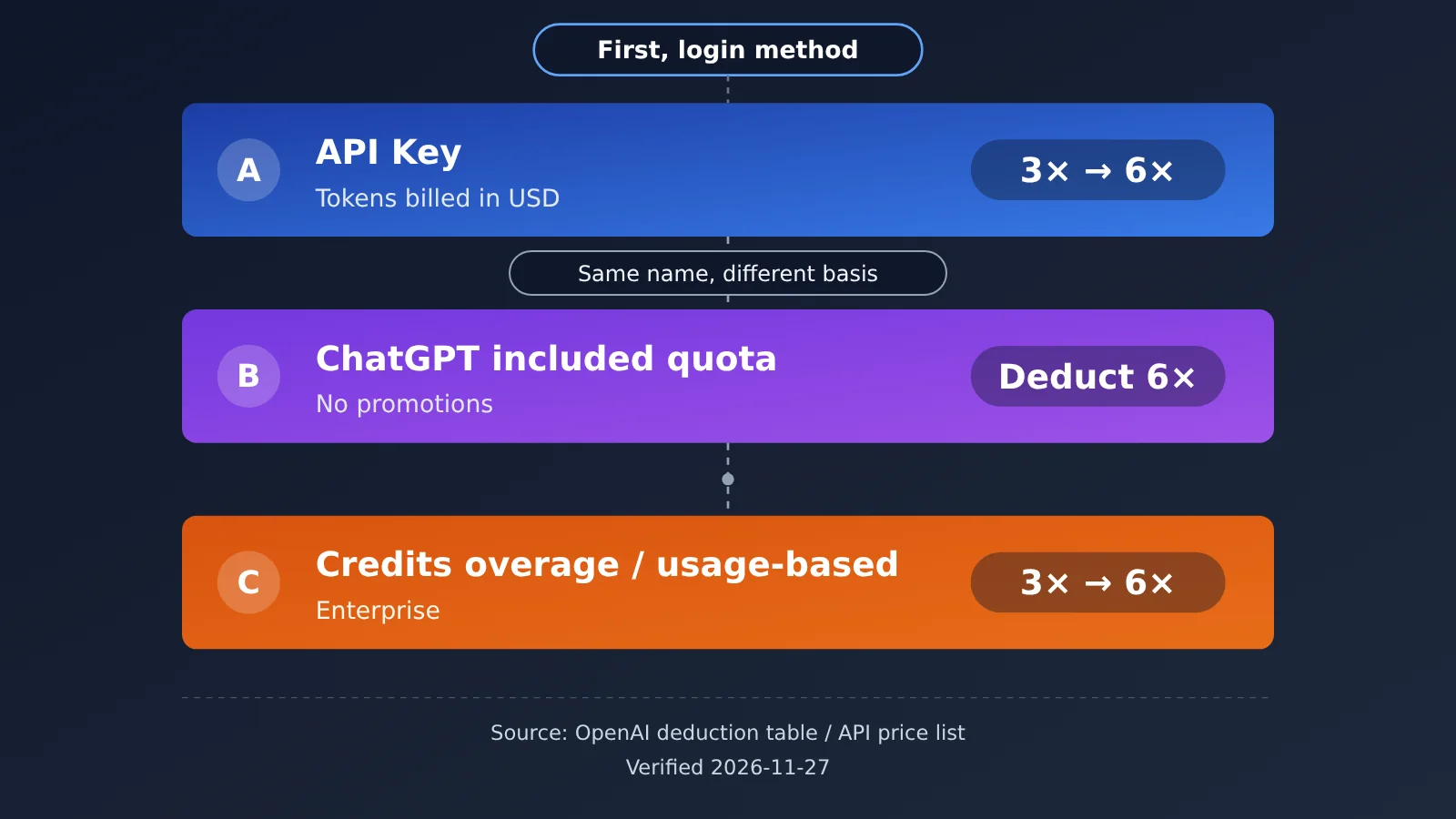
The most common pitfall is mistaking the 6× deduction in the subscription for the API billing multiplier—or doing the reverse and using the API promotional rate to estimate subscription allowance consumption. If your team uses both entry points, it’s a good idea to split the stats by sign-in method on your internal dashboard.
GPT-6.2 Astra Ultrafast FAQ
Q1: What is GPT-6.2 Astra’s Ultrafast?
It’s an accelerated service tier for the same gpt-6.2-astra model, enabled through the Responses API with `service_tier: “ultrafast”`. Model capabilities are unchanged, generation is faster, and every billing line item is charged at a multiplier of Standard.
Q2: How much more does Ultrafast cost than Standard?
For the same usage, the bill comes to 3x Standard during the promo period, and 6x starting March 1, 2027 (Pacific Time). Let Standard cost be C — that’s 2C or 5C extra. Above 272K input, the long-context rate applies first, then the tier multiplier.
Q3: When exactly does the 3x promo end?
It runs through the end of the day on February 28, 2027 Pacific Time, which works out to roughly 16:00 Beijing time on March 1 after converting from UTC-8. If your budget spans the cutoff date, multiply the usage in each period by 3 and by 6 respectively.
Q4: Which requests are most worth running on Ultrafast?
Requests with long outputs, where most of the time goes into continuous text generation and the user is sitting there waiting for the result. Chains dominated by tool calls, compilation, and tests — or background jobs that only need to fire off a notification when they finish — rarely save enough time to justify the surcharge.
Q5: How can I quickly verify the per-minute speedup cost for my own workload?
Point `base_url` in the Section 4 code at `https://api.apiyi.com/v1`, run paired measurements on your typical tasks using APIYI apiyi.com’s free quota, then plug the actual usage and p50 timings into the Section 3 formula. Tier availability and billing are governed by the platform’s documentation.
Q6: What limitations should I watch out for with Ultrafast?
The tier returned may differ from the value you requested, so bill against the actual tier; rate limits follow your organization console; regional residency is US-only; the official 4.5x is a ceiling on generation speed, so end-to-end speedup is usually smaller. If you want to compare speed and cost across several models, you can switch between them and test using the same OpenAI-compatible code via APIYI apiyi.com.
Is GPT-6.2 Astra Ultrafast Worth Enabling: A Practical Decision Method
Turn the “should I enable it” question into a checkable rule: for each request type, use the measured p50 completion time difference and actual usage to compute “incremental cost ÷ minutes saved.” Enable it when the result is below the limit your business is willing to pay and the request sits on the user’s blocking path; otherwise, keep Standard. Run the calculation once for the promo period and once for the regular period — after March 1, the threshold roughly shifts to 2.5 times its original value (in this article’s example, from 61.44 seconds to 153.6 seconds).
If you want to run through this measurement workflow before doing a full rollout, you can use the OpenAI-compatible endpoint from APIYI at apiyi.com to complete calls and comparisons with a single API key. Start by collecting your own data per task type, then decide which routes should go through Ultrafast.
References
-
GPT-6.2 Astra model card: model documentation and long-input rules
- Link:
developers.openai.com/api/docs/models/gpt-6.2-astra - Notes: Basis for the 272K long-tier determination and multipliers
- Link:
-
OpenAI API pricing: per-token unit prices for each tier and promo dates
- Link:
developers.openai.com/api/docs/pricing - Notes: Source of all USD examples in this article
- Link:
-
Ultrafast guide: service_tier usage, WebSocket recommendations, and limitations
- Link:
developers.openai.com/api/docs/guides/ultrafast-mode - Notes: Request settings, data residency, and quota details
- Link:
-
API latency optimization guide: how first-token time and end-to-end time are measured
- Link:
developers.openai.com/api/docs/guides/latency-optimization - Notes: Latency breakdown and measurement methods
- Link:
-
Work and Codex speed documentation / product credit schedule: acceleration and credit rules for subscription scenarios
- Links:
learn.chatgpt.com/docs/agent-configuration/speed,learn.chatgpt.com/docs/pricing - Notes: 4.5x speed baseline and subscription credit multipliers
- Links:
-
OpenAI developer blog (2026-11-20): case study on how tool waiting affects acceleration gains
- Link:
developers.openai.com/blog/how-i-stay-in-the-flow-with-ultrafast - Notes: Example timings for the three tiers of GPT-6.2 Sol
- Link:
Author: APIYI Technical Team
Technical discussion: Feel free to reach us through the APIYI website homepage — more integration materials are available in the docs.apiyi.com documentation center