
Summary: This article explains which kinds of tasks each of the four current model tiers — GPT-6.2 Astra, GPT-6.2 Sol, GPT-6.1 Terra, and GPT-6 Luna — is suited for, and under what conditions you should upgrade to a pricier tier.
Bottom line first: Figure out the hardest step in the task, then decide which tier to use. When there’s a lot of material, conclusions depend on each other, and the deliverable needs to be something a human can review directly, start with GPT-6.2 Astra. When goals and acceptance criteria are clear and you need to work across apps or test as you build inside a codebase, start with GPT-6.2 Sol. When the hard part is understanding screenshots, drawings, charts, and precisely operating a UI, start with GPT-6.1 Terra. When the fields are well-defined, tasks are short, and call volume is high, start with GPT-6 Luna.
OpenAI officially sets GPT-6.2 Sol’s Medium reasoning tier as the starting point for most API workflows, and in Work and Codex it also recommends starting most tasks with Sol. The division of labor below is just a starting point for use cases. Whether to keep a given model should be decided by your own samples and pass rates, not just by the model’s positioning description.
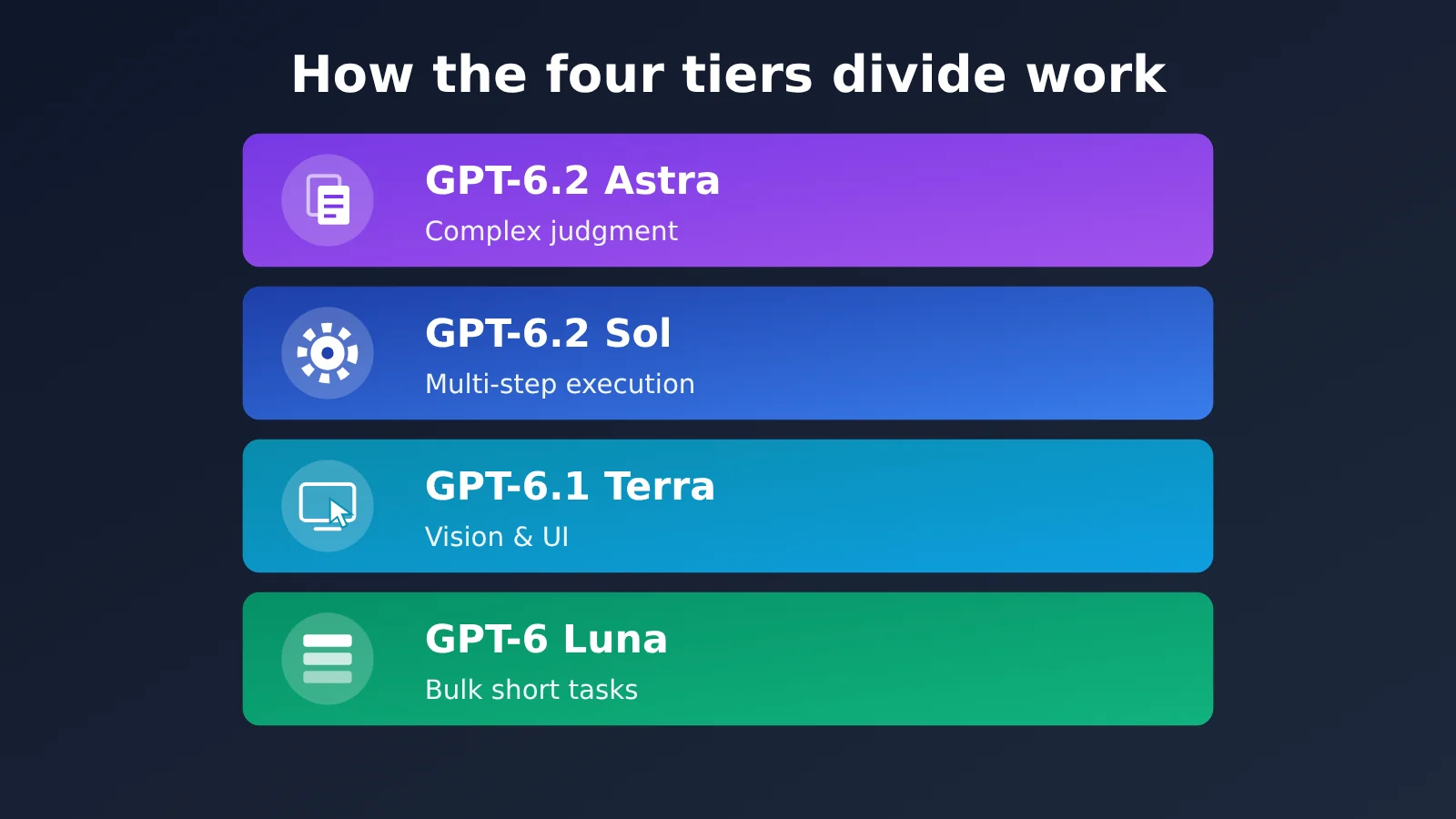
GPT-6.2 Astra, Sol, Terra, Luna: Knowledge Map of Model Responsibilities
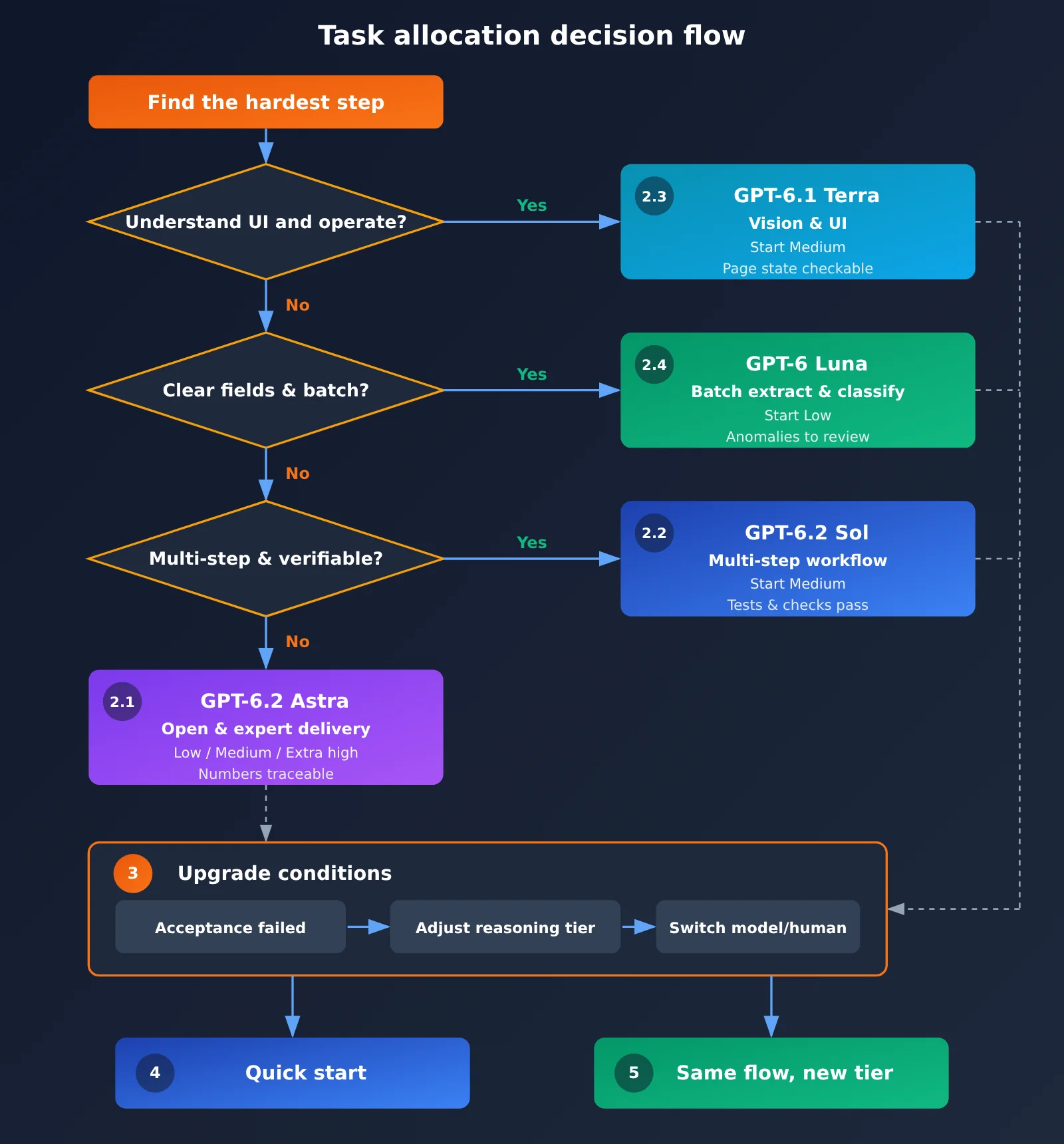
Figure note: The diagram starts at the task entry point and uses three decision questions to route tasks to four tiers of models. Each node from 2.1 to 2.4 lists a starting reasoning level and an output you can check against acceptance criteria. All four branches converge on the escalation rules in Section 3: when something fails acceptance, first raise the reasoning level on the same model; if that still doesn’t work, switch models or hand it to a human.
GPT-6.2 Astra, Sol, Terra, Luna Reading Guide
The main text is split into five parts, and each one gives you what you need to judge the next:
- Section 1 — Where the division of labor starts: lays out the selection rules, model IDs, and prices on a like-for-like basis. This is the baseline for every comparison that follows.
- Section 2 — Four typical work orders: sections 2.1 through 2.4 can be read side by side, or you can skip straight to the tier closest to your own task.
- Section 3 — Upgrade conditions: explains when to raise the reasoning effort tier and when to switch models, with a cost worked example showing why routing work to the right tier pays off.
- Section 4 — Quick start: gives runnable code plus a method for recording trial runs across three sample sets, so you can check the judgments from Sections 2 and 3 for yourself.
- Section 5 — Switching tiers inside one workflow: strings all four tiers together into a single pipeline, which you can use to validate your own workflow stage by stage.
To Know: Terms for Understanding How the Four Tiers Divide the Work
| Term | Plain explanation |
|---|---|
| Reasoning effort | The parameter that controls how much thinking the model invests; in the Responses API it’s written as reasoning.effort. Higher tiers usually mean more usage and longer waits |
| Standard short context | OpenAI’s standard processing tier on the direct API — the base rate that applies when input stays at or under 272K tokens |
| Cache read | The portion of input that hits the prompt cache, billed at a lower rate. Writing to the cache is priced separately |
| Structured output | Constraining the fields, types, and enum values of the model’s output with a JSON Schema, so programs can validate it |
| Computer use | The computer-operations tool offered by the Responses API; the model can click and type inside an authorized environment |
| First-pass rate | The share of a sample set whose very first output meets the acceptance criteria; the denominator is the number of samples in that set |
1 GPT-6.2 Astra, Sol, Terra, and Luna: Where the Division of Labor Starts
1.1 Choose the GPT-6 Series Model by the Hardest Step
A task often includes both easy and hard steps, so model selection should be based on the hardest one. Take a weekly report: 80% of the work may be organizing fields, but if one section requires resolving definitional conflicts across multiple materials, that section determines the difficulty of the whole job. Conversely, if the hardest step is just identifying a button in a screenshot, paying premium prices for a reasoning model isn’t worth it.
| The hardest step in the task | Preferred model | Officially recommended starting level | How to validate |
|---|---|---|---|
| Judging across multiple materials, interdependent conclusions, deliverables that need direct review | GPT-6.2 Astra | Low for a clear brief, Medium for complex projects, Extra high can be tried for open-ended plans | Key numbers can be traced back to the source table, and recommendations address conflicts in the materials |
| Clear-goal multi-step execution, across apps, or testing while working in a codebase | GPT-6.2 Sol | Medium to establish a baseline | Functional tests, regression tests, information coverage, and fact-checking |
| Reading screens, drawings, and charts and operating the interface precisely | GPT-6.1 Terra | Start UI operations at Medium | Compare against labeled samples and check page state and field values |
| Short tasks with well-defined fields, high-volume repeated calls | GPT-6 Luna | Start at Low for small edits and field extraction | Programmatic validation of format, null values, required fields, and enums |
1.2 Model values and comparable pricing for the four model tiers
The table below shows the Standard short-context text pricing for OpenAI’s direct API, verified on November 27, 2026. Prices are in USD per 1 million tokens. Regular input means uncached input; cache read means input that hits the cache. Cache writes are priced separately and are not listed in the table.
| Model | API model value |
Regular input | Cache read | Output |
|---|---|---|---|---|
| GPT-6.2 Astra | gpt-6.2-astra |
8.00 | 0.40 | 40.00 |
| GPT-6.2 Sol | gpt-6.2-sol |
2.00 | 0.10 | 10.00 |
| GPT-6.1 Terra | gpt-6.1-terra |
1.00 | 0.05 | 5.00 |
| GPT-6 Luna | gpt-6-luna |
0.10 | 0.01 | 0.50 |
Table note: Source is the OpenAI API pricing page. Work and Codex usage depends on subscriptions and seats and is not billed according to this table. When calling through APIYI apiyi.com, use the platform’s price for the day as the basis; don’t apply this table directly for billing.
The price gaps between adjacent tiers aren’t uniform. Astra’s rate for each line item is 4 times Sol’s, Sol’s is 2 times Terra’s, and Terra’s is 10 times Luna’s. So moving batch tasks from Terra down to Luna gives the largest savings; moving from Sol up to Astra is only worthwhile if the quality gain is large enough.
1.3 Identical Specs — Long Requests Need Their Own Math
All four model cards list the same specs: a 1,050,000-token context window, a 128,000-token maximum output, text and image as input modalities, and text as the output modality. Astra and Sol go further and explicitly list a maximum input of 922,000 tokens. So the difference between the four tiers comes down to reasoning capability and specialized strengths — not how much material they can hold.
Watch out for how ultra-long contexts are billed: once input exceeds the 272K tokens stated on the model card, Standard’s input and caching rates double and output is charged at 1.5×, applied to the entire request. When picking a model, start by running short requests through the unified basis from section 1.2, then estimate long requests separately. Processing tier, region, and paid tooling can also affect the final bill.
2 How four typical work orders map to Astra, Sol, Terra, and Luna
2.1 GPT-6.2 Astra: open-ended problems with high delivery standards
A typical work order here is consolidating several project retrospectives, metric tables, and a management template: first reconcile the metric definitions across the materials, then make trade-off recommendations, and finally deliver an editable presentation deck. There are three acceptance criteria: every key number traces back to a source table, the charts use consistent definitions, and the decision recommendations address the conflicts between materials.
Choose the reasoning level based on task difficulty. For turning a clear brief into a fairly polished output, you can start with Low. For complex projects where new information surfaces mid-way and the plan needs adjusting, use Medium. When you need to weigh open-ended options and test hypotheses, try Extra high. Higher reasoning levels increase usage and wait time, so whether to step up should be decided by the completion criteria — don’t default to maximum.
2.2 GPT-6.2 Sol: multi-step execution with clear goals and checks
There are two typical work orders. One is adding an export entry point to an existing application while updating the related documentation and running the existing tests; the other is compiling a weekly report from multiple sources and generating a draft for human review. The former is accepted based on functional and regression tests, the latter based on information coverage and fact-checking.
It’s recommended to establish a baseline with Medium first. When a particular step needs repeated revision and retesting, bump Sol to Extra high first while keeping the inputs and check items unchanged — that way you can tell whether the improvement comes from the reasoning level or from other variables. If the problem itself requires cross-material judgment — for example, several materials define the same metric differently and that affects the approval conclusion — then set up a separate Astra run with the same evidence as a control.
2.3 GPT-6.1 Terra: information hidden in visual details
Typical work orders include: identifying the corresponding SKU from a product photo and catalog card, marking the annotated region on a technical drawing, and locating a record in a desktop system and filling in given fields per the process. The official examples suggest starting such interface operations with Medium. Photo recognition is accepted using labeled samples; for clicking and data entry, verify the page state, target record, and field values item by item.
All four model cards list image input and support for the Computer use tool in the Responses API, and Terra is the starting point specifically geared toward vision and computer operation. Distinguish the two capabilities: reading a screenshot only requires image input, while actually clicking on a desktop requires the tool to be connected. Real operations must be performed in an environment the user has authorized.
2.4 GPT-6 Luna: turning simple steps into batch workflows
Typical work orders include: classifying tickets by four fixed tags every day, extracting order numbers and dates from the body text, modifying files according to deterministic rules, and generating short summaries in a fixed format. Small, clear changes and field extraction can start with Low. Only raise the reasoning level when the task’s own constraints require it.
For Luna’s output, it’s best to constrain field types and enums with structured output, then check the format, empty values, and required fields programmatically, handing anomalous samples to a more suitable model or to human review. Include records that should be rejected from classification in the test set — that’s how you measure the misclassification rate, as well as the proportion of cases that should have gone to human review but were forcibly classified by the model.
3 Upgrade Conditions Across Astra, Sol, Terra, and Luna
3.1 Adjust the Tier Within the Same Model First, Then Consider Switching Models
Upgrades should happen in sequence, changing only one variable at a time. When acceptance fails, the first step is to raise the reasoning tier on the same model while keeping the inputs, tool permissions, and checks unchanged. If it passes after the tier adjustment, the model’s capability is sufficient—it just wasn’t given enough thinking effort. If it still fails, and the failure is because the task’s nature goes beyond what that tier is meant to handle, then move up to the next model tier.
To decide whether a model switch is needed, look at what kind of failure you’re dealing with:
- Luna to Sol: edge cases (missing fields, duplicate values, unfamiliar formats) repeatedly fail and can’t be stopped by schemas and rules.
- Terra stays or moves to Sol: visual recognition is accurate, but multi-step workflows run out of order—this is an execution orchestration problem, so Sol can handle orchestration while Terra continues to handle the visual steps.
- Sol to Astra: tests pass, but the conclusion needs to reconcile conflicting materials, affect approvals, or drive decisions.
- Escalate to a human: when the same input can’t pass reliably on either tier, or the cost of errors is higher than the cost of review.
3.2 Align the tool environment and reasoning.effort first
For workflows that require web search, file retrieval, or computer use, run the comparison in the same available tool environment with the Responses API. Otherwise, the differences you measure may come from the tools rather than the model. The available reasoning effort ranges also differ, so confirm them before writing code:
| Model | Accepts none |
Default reasoning effort | Source |
|---|---|---|---|
| GPT-6.2 Astra | API rejects none |
Not listed separately in the materials | GPT-6.2 API Usage Guide |
| GPT-6.2 Sol | API rejects none |
Not listed separately in the materials; official guidance recommends starting at Medium | GPT-6.2 API Usage Guide, Model Selection Guide |
| GPT-6.1 Terra | Model card lists none |
Medium | Terra model card |
| GPT-6 Luna | Model card lists none |
Medium | Luna model card |
You can run the comparison in two rounds. In the first round, use the same reasoning effort for all models to observe capability differences; in the second round, let each model use its own suitable level to observe actual performance. Each time, record the model ID, billed input and output usage, tool calls, revision time, and first-pass and final-pass outcomes. Which models you can select in Work and Codex depends on your plan, seat, and workspace settings, so refer to the relevant product documentation.
3.3 Cost Example: Run Luna First, Upgrade a Small Share to Sol
The following is a pricing example, not an actual call. Assume each request has 20,000 uncached input tokens and 4,000 billable output tokens, calculated at Standard short-context rates, ignoring cache writes, paid tools, and other processing fees. The formula is 0.02 × input rate + 0.004 × output rate.
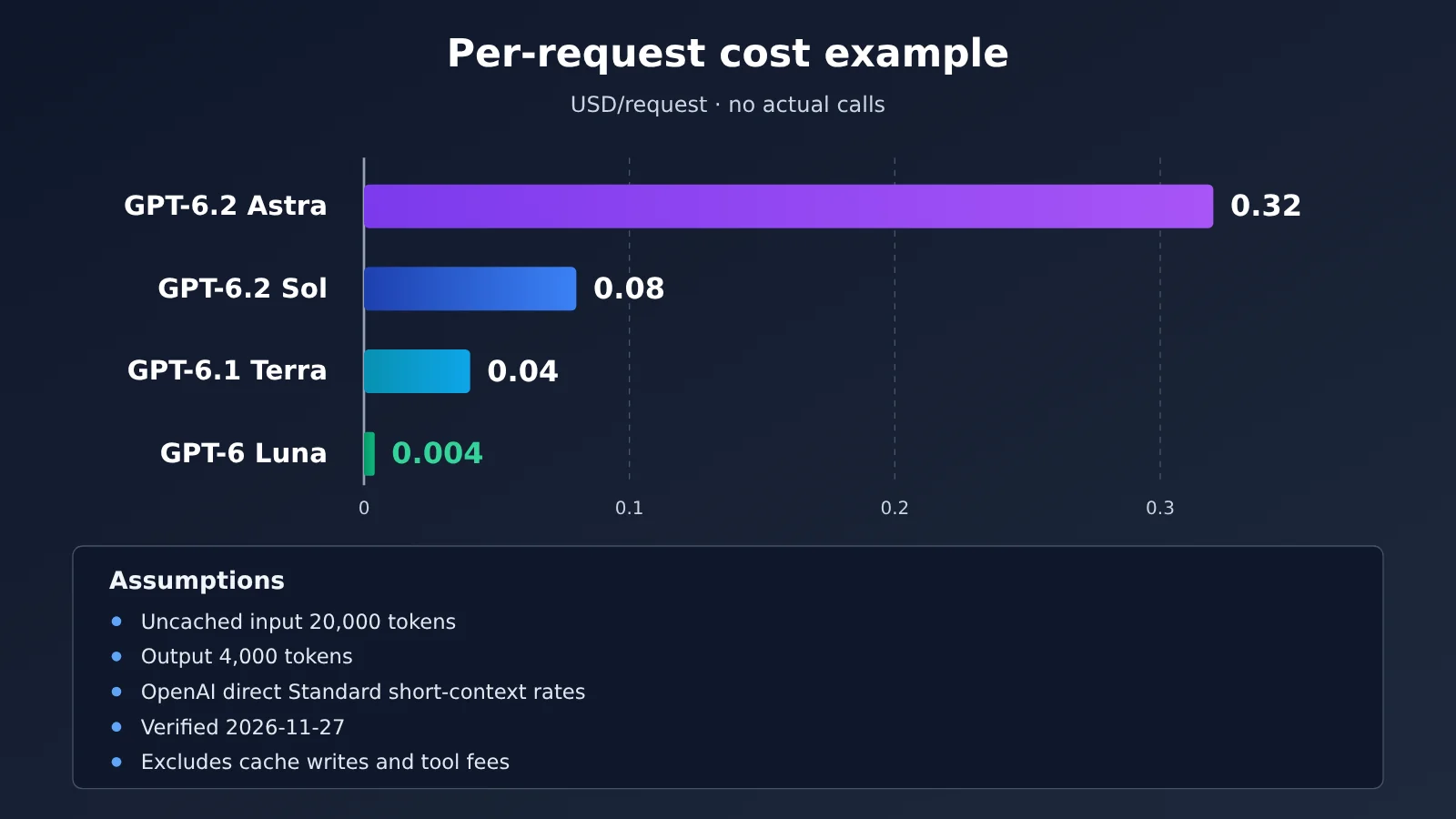
The per-request costs for the four tiers in the chart are 0.32, 0.08, 0.04, and 0.004 USD, with each adjacent tier differing by 2x to 10x. The numbers in the chart are estimates based on OpenAI direct rates and do not represent the actual settlement prices of any aggregation platform.
| Plan (10,000 field extractions) | Calculation | Total (USD) |
|---|---|---|
| All on Sol | 10,000 × 0.08 | 800 |
| All start with Luna, 500 reruns to Sol | 10,000 × 0.004 + 500 × 0.08 | 80 |
| All on Astra (comparison) | 10,000 × 0.32 | 3,200 |
The 5% rerun rate in the table is only a calculation assumption. In actual deployment, you’ll need to recalculate using real output accuracy, manual review costs, and actual usage for each model. Paid tool fees and manual rework should also be included. In the end, you’re comparing the total cost per qualified result, not the price of a single call.
4 Quick Start: Comparing Astra, Sol, Terra, and Luna Through One Interface
4.1 A Minimal Example
Here’s how to send the same prompt to all four model tiers in sequence using the OpenAI-compatible Responses API, so you can get a rough sense of the differences:
from openai import OpenAI

client = OpenAI(
    api_key="YOUR_API_KEY",
    base_url="https://api.apiyi.com/v1"  # APIYI unified interface
)

prompt = "从下文提取订单号和下单日期:订单 A-1029 于 2026-11-20 创建。"
for model in ["gpt-6-luna", "gpt-6.1-terra", "gpt-6.2-sol", "gpt-6.2-astra"]:
    resp = client.responses.create(
        model=model,
        input=prompt,
        reasoning={"effort": "medium"},  # Astra/Sol don't accept none
    )
    print(model, "→", resp.output_text)
4.2 Luna Structured Extraction, with Escalation to Sol on Failure
View the full implementation code
import json
from openai import OpenAI

client = OpenAI(
    api_key="YOUR_API_KEY",
    base_url="https://api.apiyi.com/v1"  # APIYI unified endpoint
)

SCHEMA = {
    "type": "object",
    "properties": {
        "label": {"type": "string",
                  "enum": ["账单", "物流", "售后", "其他", "转人工"]},
        "order_id": {"type": ["string", "null"]},
        "order_date": {"type": ["string", "null"]},
    },
    "required": ["label", "order_id", "order_date"],
    "additionalProperties": False,
}

def extract(text: str, model: str, effort: str) -> dict:
    resp = client.responses.create(
        model=model,
        input=[
            {"role": "system",
             "content": "按固定标签分类工单并提取字段,无法确定时 label 填转人工。"},
            {"role": "user", "content": text},
        ],
        reasoning={"effort": effort},
        text={"format": {"type": "json_schema", "name": "ticket",
                         "schema": SCHEMA, "strict": True}},
    )
    return json.loads(resp.output_text)

def passes(r: dict) -> bool:
    """Programmatic validation: items labeled for human handoff go straight to the human queue; all other labels require non-empty fields."""
    if r["label"] == "转人工":
        return True
    return bool(r["order_id"]) and bool(r["order_date"])

def run(text: str) -> dict:
    r = extract(text, "gpt-6-luna", "low")          # Try Luna first
    if passes(r):
        return {"model": "gpt-6-luna", **r}
    r = extract(text, "gpt-6.2-sol", "medium")      # Escalate to Sol if it fails
    if passes(r):
        return {"model": "gpt-6.2-sol", **r}
    return {"model": "human_review", "label": "转人工",
            "order_id": None, "order_date": None}

print(run("客户反馈订单 A-1029(2026-11-20 下单)未收到发票。"))
This code follows the escalation rules from Section 3.1: it first runs Luna at the Low effort level, and if the programmatic validation doesn’t pass, it hands the task to Sol. If neither tier passes, the ticket lands in the human queue. The parameters for the Responses API follow the official OpenAI documentation, so it’s worth confirming interface compatibility with a small sample before you deploy.
🚀 Quick start: If you want to compare all four tiers with a single key, you can sign up at APIYI apiyi.com and claim free testing credits. Just swap the base_url and you’ll be able to switch the
modelvalue within the same code, which makes it easy to record pass rates for each sample group using the method in Section 4.3.
4.3 Trial Records for the Three Sample Groups
For small-scale model selection, you can split real traffic into three sample groups and predefine the acceptable results and human-handoff conditions for each group:
- Simple group: standard text with complete fields, used to confirm whether the cheapest tier is sufficient.
- Boundary group: missing fields, duplicate values, unfamiliar formats. For example, classification accepts only the four predefined labels, otherwise it hands off to a human; data-entry scenarios require first confirming that records with the same name really belong to the same order.
- Hard-case group: requires cross-page explanation or consistency judgment, such as professional deliverables where every number and every claim must be traceable to a source.
When reporting first-pass rates, use each group’s sample size as the denominator, and also record the time spent revising to an acceptable result. If both models ultimately meet the bar, then compare throughput, review hours, and long-tail latency. For scenarios where you need an editable draft as quickly as possible, focus on the total time from task submission to completion of human review; for tasks repeated daily, compare total cost per thousand items and the number of manual reviews. When inputting multiple screenshots, keep the same resolution and the same initial app state, and log tool errors separately. The groupings and thresholds above are example designs; teams need to run them on their own traffic.
5 Switching Between Astra, Sol, Terra, and Luna Within a Single Workflow
The four model tiers don’t need to replace one another; they can be used in segments within a single workflow. Take the weekly product operations workflow as an example: Luna extracts fixed fields, Terra checks screenshots to confirm upload status, Sol assembles the weekly update for the team to review, and Astra handles only the occasional exception events and conducts cross-source retrospectives.
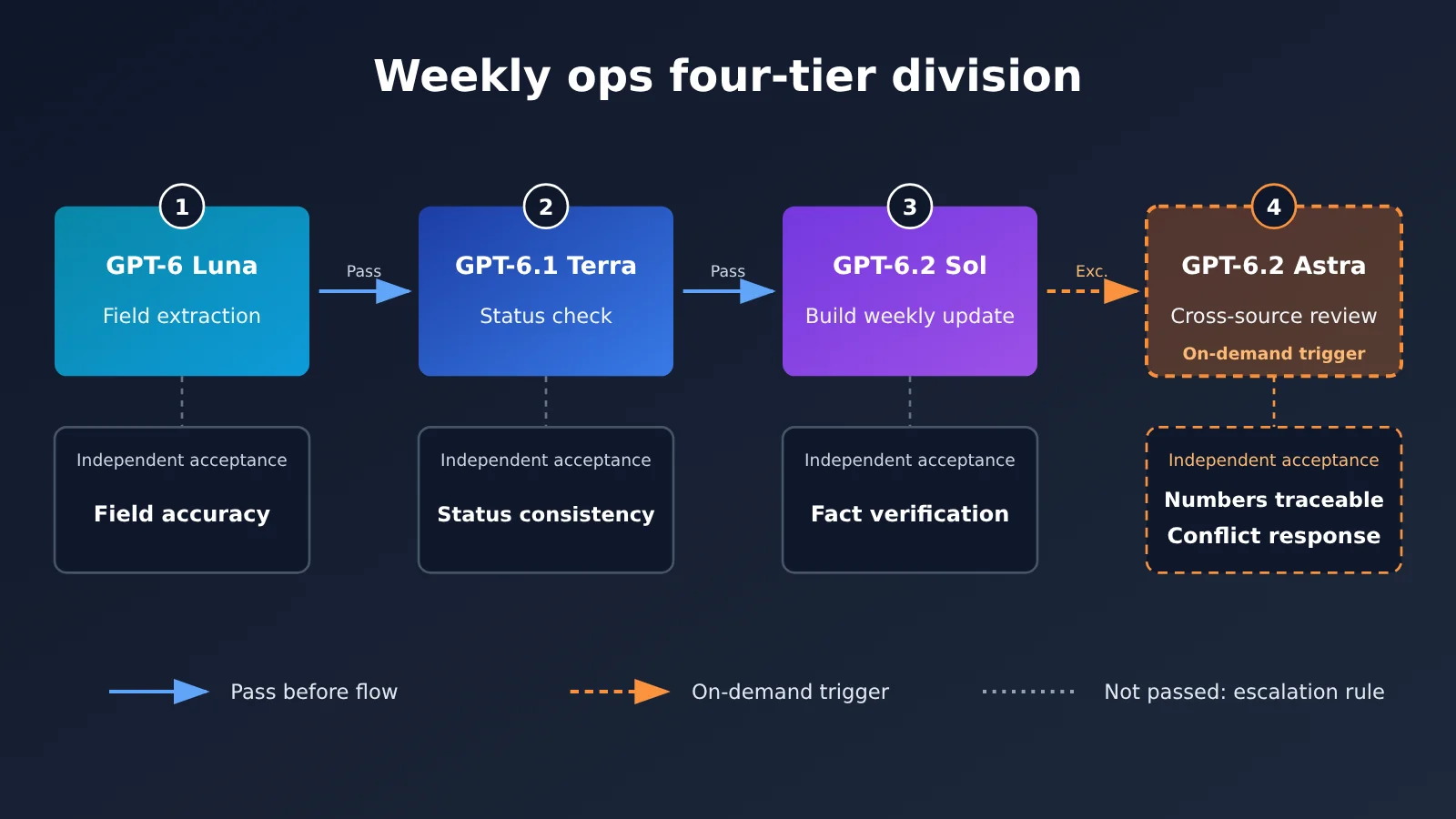
Each stage gets its own acceptance check: extraction is judged on accuracy, page operations on whether the status is consistent, the weekly report on factual accuracy, and complex judgments on traceability. The advantage of staged acceptance is that when rework happens, you can pinpoint the cause and determine whether the issue is the model, the source material, or the tool environment. To compare whether a particular segment is worth upgrading, give candidate models the same raw input, the same execution permissions, and the same acceptance rubric; have each model complete the full task independently, then compare the results.
Finally, a note on pricing basis. The legacy matrix in the APIYI Help Center is a historical snapshot of APIYI’s default pricing as of November 16, 2026. The four-tier pricing in this article comes from OpenAI model cards, the selection guide, and direct rates. When citing any price, please note which price list it comes from.
FAQ
Q1: What’s the relationship between GPT-6.2 Astra, Sol, GPT-6.1 Terra, and GPT-6 Luna?
They’re OpenAI’s current four-tier models, and they share the same specs: a 1,050,000-token context window, a maximum output of 128,000 tokens, and support for both text and image input. The difference is in their positioning: Astra handles complex judgment and professional deliverables, Sol handles verifiable multi-step workflows, Terra handles vision and interface operations, and Luna handles high-volume short tasks.
Q2: If I don’t know which tier to choose, where should I start?
Start with GPT-6.2 Sol on Medium—that’s the official starting point for most API workflows. Once you have a baseline, use the rules in Section 3 to decide: if the hard part is visual, switch to Terra; if the tasks are simple and high-volume, move down to Luna; if you need judgment across materials, move up to Astra.
Q3: If Sol’s results aren’t good enough, should I switch straight to Astra?
We don’t recommend switching right away. First keep the inputs and checks unchanged, and set Sol to Extra high. Only when the failure comes from needing to reconcile conflicting materials and affects the decision outcome should you run a separate Astra comparison using the same evidence.
Q4: Can Terra directly control my computer?
It can read screenshots, but that doesn’t mean it can click on your desktop. Actual operations require connecting the Computer use tool in the Responses API and executing in an environment authorized by the user. During acceptance, verify the page state, target records, and field values.
Q5: How can I quickly compare the four-tier models on my own business use case?
You can use APIYI apiyi.com to call multiple models with one API key. Set the `base_url` in the Section 4.1 code to `https://api.apiyi.com/v1`, then prepare three sample sets as described in Section 4.3 and record the first-pass rate and revision time for each.
Q6: Can the prices in this article be used directly for budgeting?
They’re only for relative comparison. The prices here are OpenAI direct Standard short-context rates; requests with input over 272K tokens have a separate multiplier, and tools and processing tiers can also affect the bill. For actual budgeting, recalculate based on the current day’s prices for the channel you use; when calling through APIYI apiyi.com, use the price shown in the console.
The simplest way to test this division of labor is to pick a real workflow, prepare three sample sets as described in Section 4.3, first run a baseline with Luna or Sol, then upgrade step by step in the order given in Section 3.1, and finally keep the tier with the highest pass rate and lowest qualified cost for each stage. If you want to switch all four model values in the same code for this comparison, you can start with the free quota on APIYI apiyi.com using a small sample, confirm the conclusions, and then scale up traffic.
📚 References
-
OpenAI Model Selection Guide: Four-tier division of labor starting points and reasoning-tier recommendations
- Link:
developers.openai.com/api/docs/guides/model-selection - Note: Sol’s Medium as the default starting point, plus the starting tier for each type of ticket
- Link:
-
OpenAI API Pricing: Standard short-context rates and long-request multipliers
- Link:
developers.openai.com/api/docs/pricing - Note: The source of this article’s price table and worked examples
- Link:
-
GPT-6.1 Terra and GPT-6 Luna Model Cards: Specs, reasoning tiers, and tool support
- Link:
developers.openai.com/api/docs/models/gpt-6.1-terra,developers.openai.com/api/docs/models/gpt-6-luna - Note: Where the
nonetier and the default Medium come from
- Link:
-
GPT-6.2 API Usage Guide: Reasoning parameter constraints for Astra and Sol
- Link:
developers.openai.com/api/docs/guides/latest-model - Note: How to use
reasoning.effortand the explanation for rejectingnone
- Link:
-
Structured Outputs and Computer use Tool Documentation
- Link:
developers.openai.com/api/docs/guides/structured-outputs,developers.openai.com/api/docs/guides/tools-computer-use - Note: The basis for Luna’s field constraints and Terra’s interface operations
- Link:
-
APIYI Legacy Model Matrix: A historical snapshot of default pricing from November 16, 2026
- Link:
help.apiyi.com/gpt-6-available-model-ids-no-6-2-rumor.html - Note: When citing, keep in mind that the pricing basis differs from the direct rates used in this article
- Link:
Author: APIYI Technical Team
Technical discussion: Feel free to reach us through the APIYI website homepage; for more integration resources, visit the docs.apiyi.com documentation center