
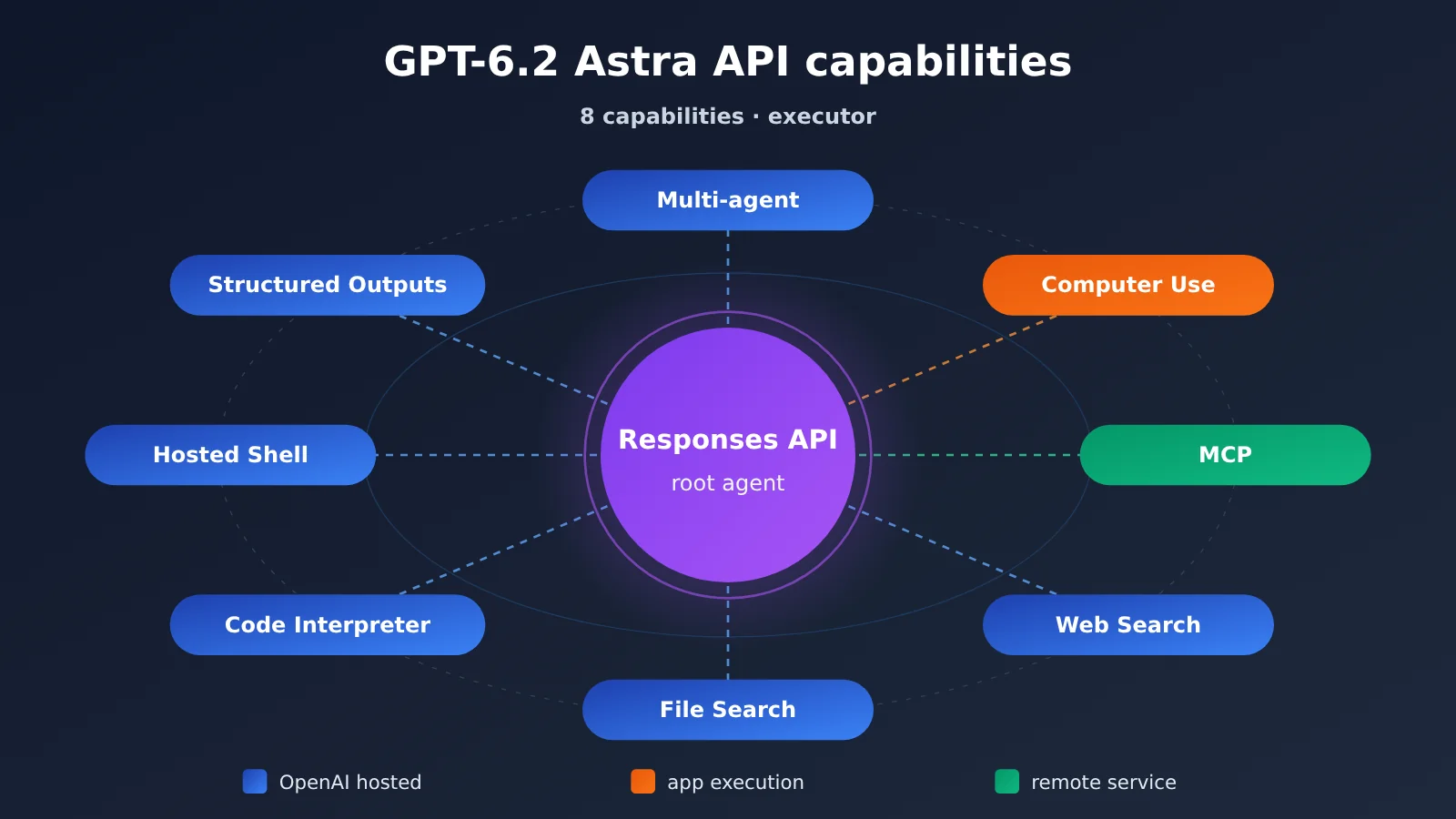
Short answer: In the Responses API, GPT-6.2 Astra can delegate subtasks in parallel (Multi-agent), can use screenshots to operate a browser or desktop interface (Computer Use), and can connect to remote MCP services to call your team’s business tools. The catch is that each of these three capabilities has a different executor: delegation is hosted by the API, the runtime for interface operations is provided by your app, and the target of MCP calls is the remote service you configure.
Key takeaway: The hard part in engineering is orchestration, not the model’s capabilities. A business agent that actually ships needs three things settled up front: who executes each tool, how far the data authorization extends, and who validates the final result.
What you’ll learn from this article:
- The six types of built-in tools plus Structured Outputs that GPT-6.2 Astra supports in the Responses API, and the executor and prerequisites for each one;
- How to enable the Multi-agent beta, the default concurrency, and which tasks are suited to parallel execution versus which must run in sequence;
- The difference between the two execution paths — Computer Use and remote MCP — including approval, permission scope, and where responsibility lies;
- How to chain retrieval, computation, and structured output to deliver a verifiable procurement verification result.
Index: The main text first summarizes the model identity, specs, and pricing that OpenAI announced on November 17. It then uses a single table to compare the executors of the 8 capabilities, and follows a “read-only procurement verification” design example to walk through the parallel boundaries of Multi-agent, the execution paths of Computer Use and MCP, and how the handoff from retrieval to structured output works. The analysis at the end answers one question: what should developers and product owners do first, right now?
GPT-6.2 Astra: Concepts to Know
| Concept | Brief explanation |
|---|---|
| Responses API | OpenAI’s interface for model responses and tool calls; the built-in tools and Multi-agent features discussed here build on it |
| Multi-agent | A beta feature that enables multiple collaborating agents within a single supported Responses request |
| Sub-agent | A unit of work that handles delegated tasks in its own context and reports back to the root agent when finished |
| Computer Use | The model’s ability to locate UI elements from screenshots and request browser or desktop actions |
| MCP | A protocol that defines how model clients discover and invoke external service tools |
| Web Search | A tool that retrieves information from the public internet and can return source citations in the response |
| File Search | A tool that retrieves uploaded files from a specified vector store |
| Code Interpreter | A hosted sandbox that runs Python to analyze data and generate files |
| Hosted Shell | An isolated environment hosted by OpenAI that can execute terminal commands |
| Structured Outputs | An output capability that constrains response format via JSON Schema |
| Tool call ID | An identifier that maps a call request to its execution result, such as call_id |
GPT-6.2 Astra: Impact at a Glance
- Business agent engineers: You can combine delegation, retrieval, remote tools, and structured outputs in a single request, which means less orchestration code. But function result return, the Computer Use runtime environment, and MCP approvals still have to be implemented on the application side.
- Product leads: “Agents can operate systems themselves” now has official API support behind it. Permission scope, write confirmation, and human review responsibilities need to be baked into the process at the product design stage.
- Cost-sensitive teams: Official pricing is lower than the previous generation. But Multi-agent parallelism may increase token usage, so budgets need to be re-estimated based on task structure.
GPT-6.2 Astra: The Objective Facts on Release, Specs, and Tool Inventory
GPT-6.2 Astra’s Release and Model Identity
On November 17, 2026, OpenAI released GPT-6.2 Astra and GPT-6.2 Sol at the same time. Officially, Astra is positioned as a model built for complex reasoning, coding, and professional work. Its API model ID is gpt-6.2-astra, with the previous generation being GPT-6 Astra (gpt-6-astra). The API changelog recorded both the model release and backend completion window entries on the same day.
The model card lists these specs: a 1,050,000-token context window, a 922,000-token maximum input, and a 128,000-token maximum output. The model accepts text and image inputs and outputs text, and it supports both the Responses API and the Chat Completions API. One thing worth flagging: the model card states that requests with reasoning.effort set to none will be rejected, so check this parameter if you’re migrating older code.
On pricing, OpenAI’s published standard short-context, text-only rates per million tokens are $8 for regular input, $0.40 for cached input, and $40 for output. Compared with the previous generation, the official announcement says regular input and output prices dropped by 20%, while cached input dropped by 60%. These figures only apply to estimates from the official direct API. Per-question costs used in third-party evaluations rely on a different pricing basis and can’t be compared directly.
🚀 Quick start: If you want to first validate how GPT-6.2 Astra performs on your own business data, you can make an OpenAI-compatible call with a single API key through APIYI apiyi.com. New users get free test credits, which makes it a good fit for small-scale validation before full integration. Availability of beta tools depends on what the platform actually supports.
GPT-6.2 Astra API Capabilities Overview
The model card lists Web Search, File Search, Code Interpreter, Hosted Shell, Computer Use, and MCP as the tools Astra supports in the Responses API. Structured Outputs is listed as an output capability, while Multi-agent is a beta feature of Responses. Developers declare the available tools in the request, and the model decides whether to invoke them based on the task. Responses can contain tool requests, approval requests, execution results, or final text; which output items the client needs to handle depends on who executes each tool.
| Capability | Executor | Prerequisites / Configuration | Good for |
|---|---|---|---|
| Multi-agent | Responses hosted delegation | Explicitly enable beta | Process independent subtasks in parallel and aggregate results |
| Computer Use | Browser or desktop provided by the app | App manages the environment and login state | View or interact with interfaces that require interaction |
| MCP | OpenAI calls a remote service you configure | Service URL, authentication, allowed_tools | Query business systems or request writes |
| Web Search | OpenAI-hosted | Just declare the tool | Look up public information that changes quickly |
| File Search | OpenAI-hosted | Pre-upload and index into a vector store | Search internal documents by semantics and keywords |
| Code Interpreter | Python container managed by OpenAI | Manage file input and retrieval | Reconciliation, statistics, chart generation |
| Hosted Shell | Terminal container managed by OpenAI | Can be configured with container_auto | Multi-step command line and multi-file processing |
| Structured Outputs | Response format constraints | Declare JSON Schema in text.format | Produce verifiable business data |
How to enable Multi-agent in GPT-6.2 Astra and what it shares
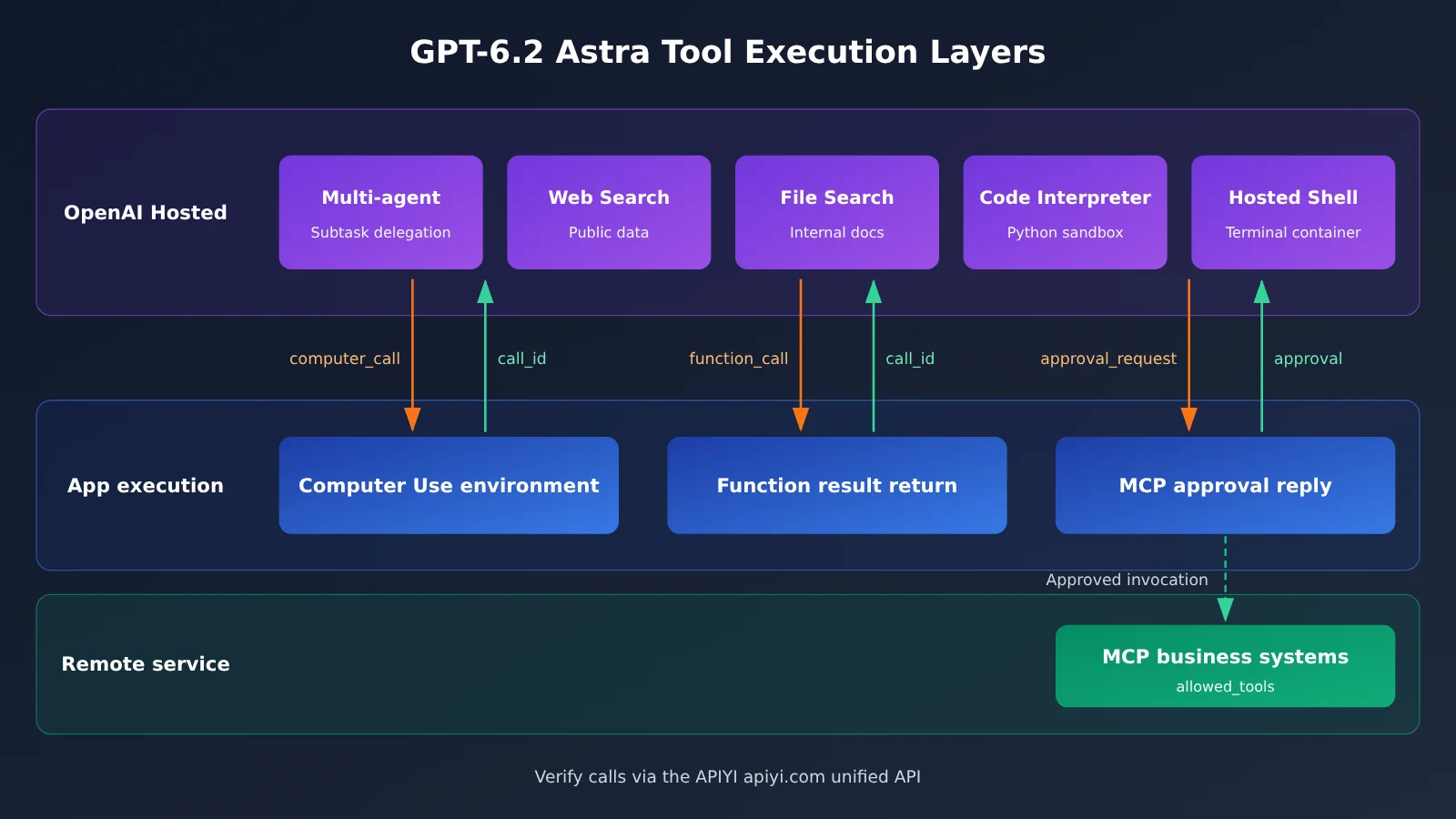
To enable Multi-agent, set multi_agent.enabled in the Responses request. If you’re using raw HTTP or WebSocket, also include the request header OpenAI-Beta: responses_multi_agent=v1; when using an SDK, call the corresponding beta interface. The root agent can create subagents, communicate with them, wait for them to finish, and handle the final aggregation.
Each subagent has its own context, but shares the request’s model and available tools. max_concurrent_subagents defaults to 3 and limits the number of concurrently active subagent turns across the entire agent tree. The delegation action multi_agent_call is hosted by the API. If a subagent calls a developer-defined function, the app needs to return the execution result using the corresponding call ID. OpenAI also notes that parallelism is best suited to independent investigation tasks and may increase token usage; steps that depend on earlier results and shared writes require you to manage execution order yourself.
Execution boundaries for GPT-6.2 Astra Computer Use and MCP
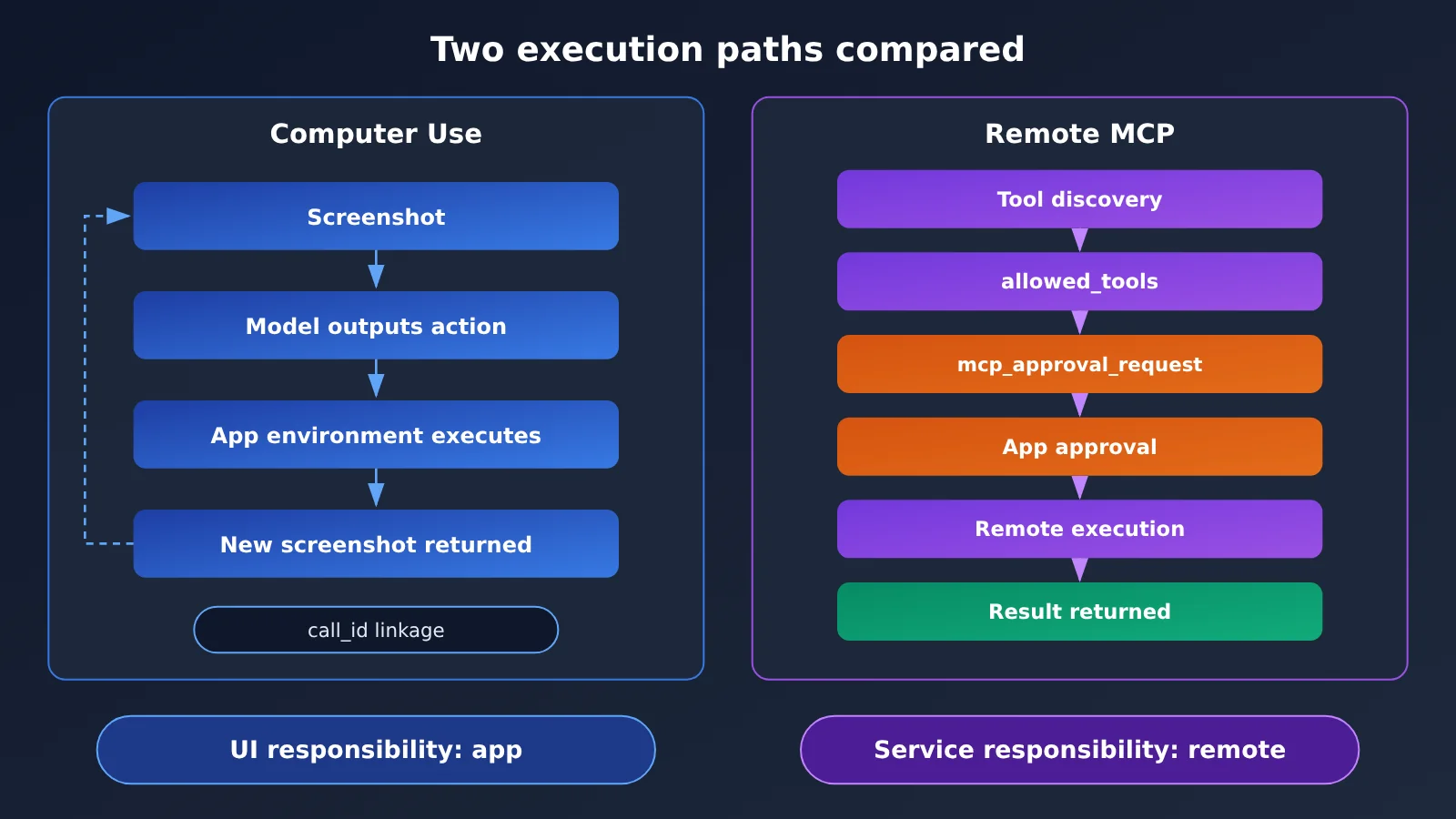
Computer Use’s runtime environment is provided by the app. When using the native computer tool, the model emits a computer_call; your runtime executes the click, typing, and other actions in it, then sends a new screenshot back to the model via computer_call_output with the matching call_id, looping until the task is complete. The official guide also presents another approach: have the model generate a script, and the app executes it in an isolated environment. Either way, the app is responsible for the environment itself, the login state, the pages that can be accessed, and confirmation before critical writes.
Remote MCP works differently. The API connects to the service address you specify, imports the tools exposed by the server, and executes approved calls. Remote authentication is configured according to the service’s requirements, and allowed_tools can limit which tools are imported. By default, approval is requested before data is sent to a connector or remote service: the app can read the tool name and arguments in mcp_approval_request, then send back an mcp_approval_response for each request.
GPT-6.2 Astra Rules for Retrieval, Computation, and Structured Output
Web Search targets the public internet, and apps can use url_citation to link conclusions to their sources. File Search retrieves uploaded files from a specified vector store, making it a good fit for internal materials that have already been archived. Code Interpreter provides a Python sandbox and can produce files. Hosted Shell can configure a cloud terminal through container_auto; the Shell guide also covers ways for an app to host the runtime itself. Files in either compute environment need to be actively managed and retrieved when they’re used.
Structured Outputs declares a JSON Schema through text.format, and it constrains responses that are complete and not refused. The documentation explicitly states that the receiver still has to handle refusals, incomplete responses, API errors, and business rules that the schema can’t express.
GPT-6.2 Astra Analysis: Tying All the Capabilities Together with a Single Procurement Verification
The flow below is a design example inferred from combinations of capabilities in the reference material; it isn’t an official case study. Each request needs its tools configured for the actual situation, and which combinations you can ultimately enable depends on your account, tool configuration, and runtime environment.
When Should You Run GPT-6.2 Astra Multi-agent in Parallel?
The task is to verify that a contract’s terms, the order record in the procurement system, and public information on the supplier’s website all agree—with read-only access throughout. These three queries don’t depend on one another, which lines up neatly with the default concurrency of 3: the contract group uses File Search to look up clauses, the procurement group uses a read-only MCP server to look up the order, and the web group uses Web Search to look up public information. The root agent waits for all three groups to report back, and only then merges the results.
A simple test for whether tasks can run in parallel: does one subtask need another subtask’s output as input? Take “first get the order number, then use that order number to look up the invoice”—that has to run sequentially. If you force it into parallel execution, the subagents just end up guessing, and the results become harder to verify. Also keep in mind that while the API hosts the delegation action, if a subagent calls a function you defined, your application still needs to send the function result back using the call ID. Skip that step and the entire agent tree will just sit there waiting.
from openai import OpenAI

client = OpenAI(
    api_key="YOUR_API_KEY",
    base_url="https://api.apiyi.com/v1"  # APIYI OpenAI-compatible endpoint
)

# Example code: refer to the latest OpenAI guide for parameter structure
resp = client.responses.create(
    model="gpt-6.2-astra",
    reasoning={"effort": "medium"},  # Setting it to none will be rejected
    input="只读核验:合同 C-102 条款、订单 PO-881 记录、供应商官网公示信息是否一致",
    tools=[
        {"type": "file_search", "vector_store_ids": ["vs_contracts"]},
        {"type": "web_search"},
        {
            "type": "mcp",
            "server_label": "procurement",
            "server_url": "https://mcp.example.com/procurement",
            "allowed_tools": ["get_purchase_order"],  # Expose only one read-only tool
            "require_approval": "always",
        },
    ],
    extra_headers={"OpenAI-Beta": "responses_multi_agent=v1"},
    extra_body={"multi_agent": {"enabled": True, "max_concurrent_subagents": 3}},
)
💡 Recommendation: Parallel delegation adds token overhead, so it’s worth running a small sample first to measure actual usage per verification before you pick a concurrency level. With pay-as-you-go access through APIYI at apiyi.com, you can quickly compare costs across different concurrency configurations.
GPT-6.2 Astra Computer Use and MCP: Deciding the Division of Labor
Suppose a supplier’s official website only shows the validity period of a qualification certificate after you open a “Qualification Certificate” modal. Web Search can’t capture that field, so you need Computer Use. The process has three steps: the app opens the page in an isolated browser and takes a screenshot; the model returns click coordinates or action instructions; after the app executes them, it sends the new screenshot back to the model along with call_id. Since the app controls the login state and accessible scope, read-only tasks should ideally block form submission at the environment level, rather than relying only on prompt constraints.
Order lookups go through MCP. During tool discovery, use allowed_tools to import only one read-only tool, get_purchase_order; authenticate with a least-privilege read-only credential. Before each call, the app reads the parameters in mcp_approval_request, confirms that the order number falls within the scope of this verification, and then sends back an approval. The responsibility split between the two paths can be defined like this: the app is responsible for what happens in the UI, the service provider is responsible for what the remote system returns, and the model is only responsible for making the request.
| Dimension | Computer Use | Remote MCP |
|---|---|---|
| Execution environment | Browser/desktop provided by the app | Remote service you configure |
| Correlation identifiers | computer_call and call_id | mcp_approval_request / response |
| Permission control points | Environment isolation, login state, page allowlist | Service authentication, allowed_tools, per-call approval |
| Suitable fields | Public information that only appears after interaction | Structured records in business systems |
| Main risks | Misclicks, page redesigns | Unauthorized calls, out-of-bounds parameters |
GPT-6.2 Astra: From Gathering Materials to Usable Output
Pick your retrieval tool based on where the documents live: for public, frequently changing information, use Web Search and keep the url_citation; for archived contracts, use File Search. Pick your compute environment based on the shape of the task: for money reconciliation and aggregate statistics, the Code Interpreter’s Python sandbox is enough; when you need to batch-unzip, convert multiple files, or chain command-line tools, then consider Hosted Shell. And don’t forget to build the file-retrieval step into the workflow.
Once the root agent finishes merging, it’s best to generate the structured result in a separate follow-up Responses request initiated by the application, rather than mixing it into the same request as retrieval. That keeps the schema simpler and makes retries easier when something fails.
View the example code for approval round-trips and structured output
from openai import OpenAI

client = OpenAI(
    api_key="YOUR_API_KEY",
    base_url="https://api.apiyi.com/v1"
)

ALLOWED_PO = {"PO-881"}

def handle_approvals(resp):
    """Approve MCP calls one by one: only allow order IDs within the scope of this verification"""
    replies = []
    for item in resp.output:
        if item.type == "mcp_approval_request":
            ok = item.name == "get_purchase_order" and \
                 item.arguments and any(po in item.arguments for po in ALLOWED_PO)
            replies.append({
                "type": "mcp_approval_response",
                "approval_request_id": item.id,
                "approve": bool(ok),
            })
    return replies

schema = {
    "type": "object",
    "properties": {
        "records": {
            "type": "array",
            "items": {
                "type": "object",
                "properties": {
                    "record_id": {"type": "string"},
                    "evidence": {"type": "array", "items": {"type": "string"}},
                    "status": {"type": "string",
                               "enum": ["match", "mismatch", "needs_review"]},
                },
                "required": ["record_id", "evidence", "status"],
                "additionalProperties": False,
            },
        }
    },
    "required": ["records"],
    "additionalProperties": False,
}

def to_structured(prev_id):
    final = client.responses.create(
        model="gpt-6.2-astra",
        previous_response_id=prev_id,
        input="Organize the verification conclusions into structured records; evidence should only contain traceable sources",
        text={"format": {"type": "json_schema", "name": "procurement_check",
                         "schema": schema, "strict": True}},
    )
    if final.status != "completed":
        raise RuntimeError(f"Incomplete: {final.status}")  # refusals and incomplete runs need separate handling
    return final.output_text
Format constraints are only the first line of defense — field logic still needs to be checked by programs and by people. Here’s a sample output, along with who’s responsible for validating each field:
| Field | Example value | Format guarantee | What still needs checking | Owner |
|---|---|---|---|---|
| record_id | PO-881 | Schema constrains it to a string | Whether it actually exists in the procurement system | Program lookup |
| evidence | Contract clause 5.2; official website qualifications page | Must be an array | Whether the source opens and the citation matches | Program + spot checks |
| status | mismatch | Can only take enum values | Whether the judgment matches business definitions | Human review |
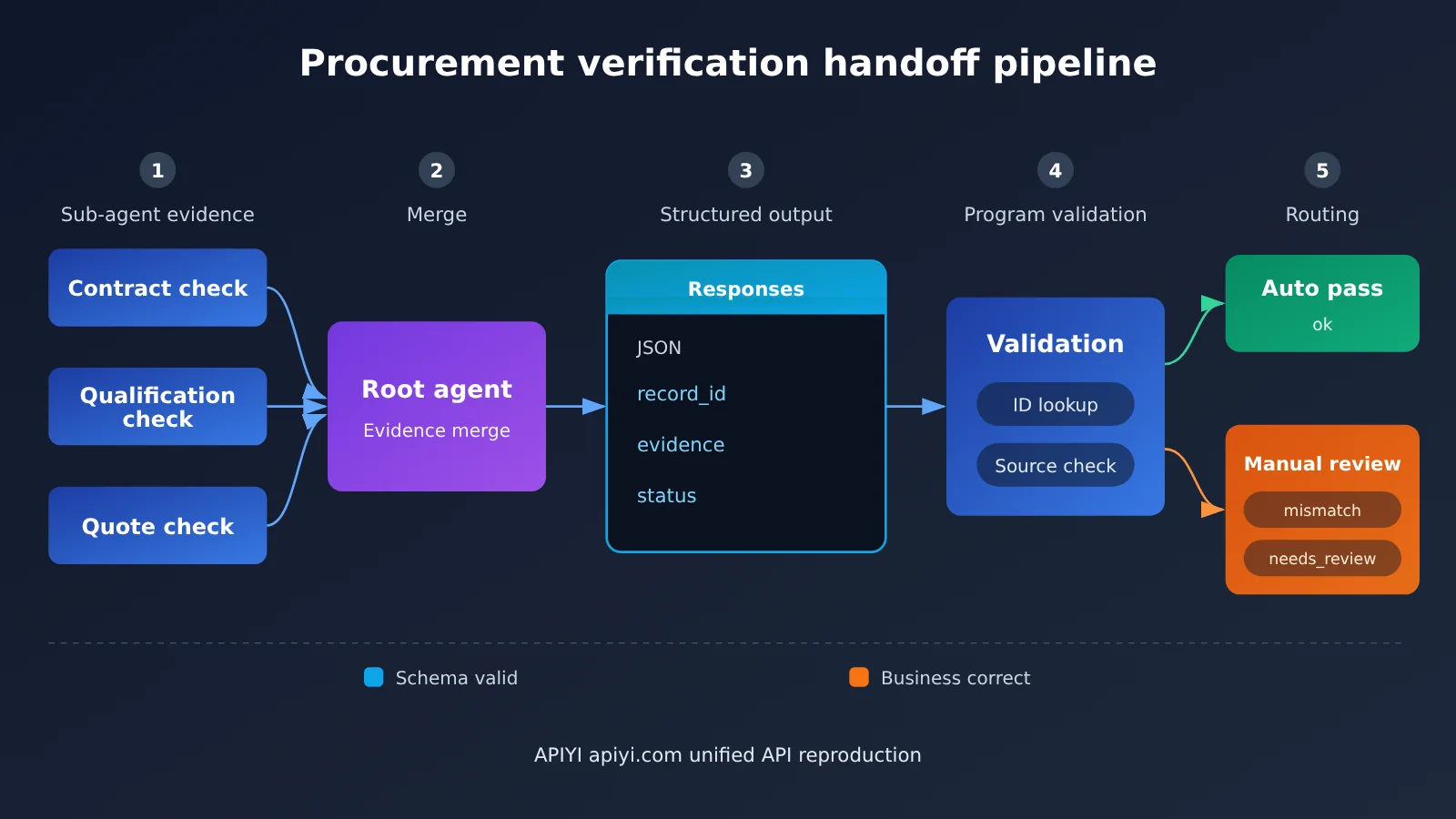
🎯 Technical recommendation: Split “schema-valid” and “business-correct” into two independent check steps, and route every record with
statusset tomismatchorneeds_reviewinto the human queue. Before going live, you can replay the whole flow on APIYI apiyi.com using historical purchase orders, measure the misjudgment rate, and then decide which statuses can be auto-approved.
Deciding the Rollout Order for GPT-6.2 Astra
Based on the facts above, here’s our take on the integration order: get Structured Outputs and File Search working first, then connect read-only MCP, and finally bring in Multi-agent and Computer Use. The first two are hosted by OpenAI and have the lowest chance of errors. MCP’s approval callback is a state machine that needs to be tested on its own. Multi-agent is still beta, and Computer Use’s stability depends on the quality of the environment you build yourself—so these two are best layered on after the main workflow is stable.
This judgment rests on two premises: that the beta interfaces won’t ship breaking changes anytime soon, and that your account can enable the corresponding tools. Both require keeping an eye on OpenAI’s API changelog. Also, “read-only” in the example is a design constraint. Once the business needs write access, the approval policy, write order, and rollback plan all have to be redesigned—you can’t just reuse the configuration from this article.
💰 Cost optimization: When you’re repeatedly retrieving long contracts, the unit price for cached input hits is far lower than for regular input. Putting fixed system instructions and schemas at the front of the request helps improve the cache hit rate. Small and medium teams can also use APIYI apiyi.com for pay-as-you-go invocation and gradually expand the scope of verification.
The tool list keeps getting longer, but what really determines whether an agent can go into production still comes down to those plain boundaries: who executes, who authorizes, who reviews. As Lu You wrote in Reading with Ziyu on a Winter Night:
What you get from books is shallow; to truly know a thing, you must do it yourself.
Author: APIYI Technical Team
Technical exchange: Feel free to contact us through the APIYI apiyi.com homepage for more practical materials on integrating GPT-6.2 Astra.