
Summary: This article shows how to connect GPT-6.2 Astra through the Responses endpoint on APIYI, and explains the difference in group information between the launch announcement and the model registry.
Bottom line up front: To access GPT-6.2 Astra on APIYI, you need four pieces of configuration: a model token starting with sk-, the Base URL https://api.apiyi.com/v1, the request path POST /v1/responses, and the model ID gpt-6.2-astra in the request body (all lowercase, with two hyphens). The group isn’t written into the request body — it’s bound to the token. The launch announcement lists three groups: Default, SVIP, and CodexResponses. The registry snapshot from November 26 lists four strings: CodexResponses, CodexReverse, default, and svip. The registry is a catalog entry at the model layer; it doesn’t mean every endpoint is enabled for every group. Whether a particular token can make a call depends on the group and configuration that token actually has in the console.
One thing to make clear: the code examples in this article are adapted from APIYI’s public documentation and have not been run with a real key. Treat them as a template for your first call, not as verified test results.
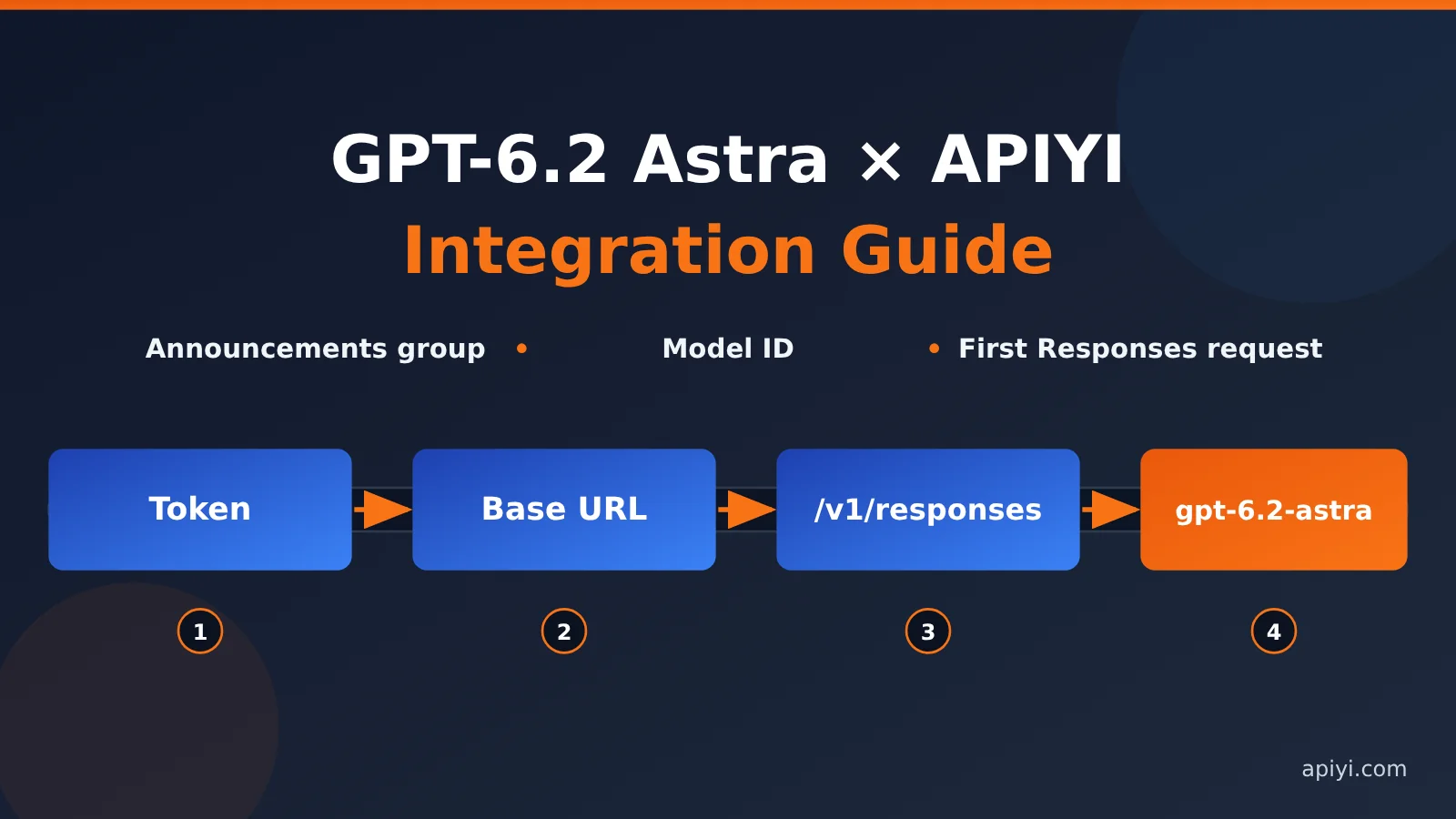
🚀 Quick start: First create a model token on the token management page at APIYI apiyi.com, write it into the environment variable
APIYI_API_KEY, then send your first request following Section 3. New users get free test credit — enough to run the whole first-call acceptance check.
Knowledge Map: Decision Flow for Connecting GPT-6.2 Astra to APIYI
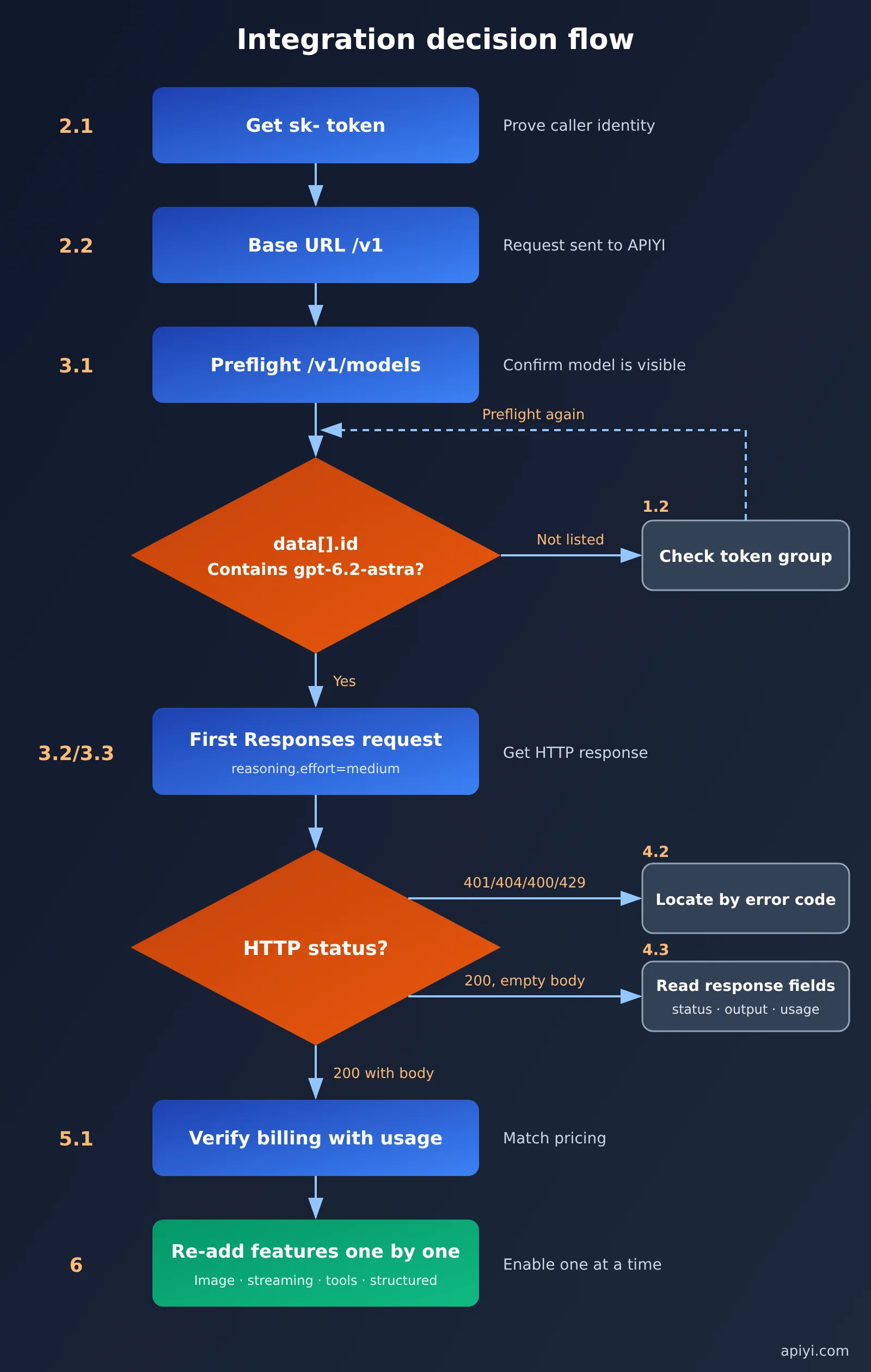
Figure note: The main path has six steps, and each step has a checkable result. If the token can list gpt-6.2-astra, the catalog endpoint works; if the generation request returns 200 with a body, the generation endpoint works; if usage matches the listed price, the billing reconciliation is clear; only then do you add business features one by one. Every failure has a clear destination: if the catalog doesn’t show it, go back to 1.2 to check the group; for an HTTP error, see 4.2; for a 200 with no body, see 4.3.
Index: How to Read This GPT-6.2 Astra Tutorial
- 1 Announcement and registry: First, sort out what each of the two documents actually covers. Every later judgment about groups and endpoints depends on this section.
- 2 The four configuration fields: Break apart the token, Base URL, path, and model ID to supply the parameters for the code in section 3.
- 3 Your first Responses request: Pre-check first, then send the SDK or HTTP request, then read the result. This is the hands-on core of the whole article.
- 4 Parameter migration and troubleshooting: Consult this when a request fails. Readers migrating from Chat Completions should also read this section first.
- 5 Usage and feature scope: Convert
usageinto cost with a worked example, and draw a clear line between the first request and later capability extensions. - 6 A reusable acceptance checklist: Turn the steps above into a three-layer acceptance test your team can adopt directly.
Sections 4 and 5 can be read on demand; the other sections are best read in order.
To Know: Terms You Need Before Connecting to GPT-6.2 Astra
| Term | Plain-language explanation |
|---|---|
| Model token | A Key created on the APIYI token management page, usually starting with sk-, used to call models via the Bearer header |
| Personal access token | Starts with nap_, used for account-level APIs such as balance, logs, and token management — not for calling models |
| Group | The routing and billing configuration bound to a token; the group field does not appear in the request body |
| Model registry | The machine-readable JSON catalog published by APIYI, which records endpoint, group, and pricing fields for each model |
| Responses | OpenAI’s new-generation generation interface, where the prompt goes in input and the reasoning level goes in reasoning.effort |
recommended_endpoint |
The recommended endpoint the registry marks for a given model; for Astra the value is responses |
1 GPT-6.2 Astra Announcement vs Registry: Know Which Document You’re Reading
1.1 GPT-6.2 Astra’s launch timeline
OpenAI released GPT-6.2 Astra and Sol on November 17, 2026. APIYI’s Chinese launch announcement states that the platform integrated both models on November 18. You need to keep both dates: the 17th is the model release date, the 18th is APIYI’s integration date — don’t collapse them into one when you cite them.
The announcement gives the Astra model ID as gpt-6.2-astra and includes a Responses call example. The original example in the announcement uses Sol, with a code note saying it can be swapped for Astra. The example in Section 3 of this article is adapted from that.
1.2 GPT-6.2 Astra groups: three in the announcement, four strings in the registry
The two documents list different groups because they’re different kinds of material. The launch announcement is a release note written for readers; the registry is a machine-readable snapshot generated from the public pricing API. The registry snapshot cited in this article was generated on November 26, 2026 at 04:01:49.020 UTC.
| Item | Launch announcement (Nov 18) | Model registry snapshot (Nov 26) |
|---|---|---|
| Nature of the document | Chinese release note, written for readers | Machine-readable JSON, sourced from the public pricing API |
| Groups listed | Default, SVIP, CodexResponses |
CodexResponses, CodexReverse, default, svip |
| Letter case | Capitalized first letter | default and svip are lowercase |
| Endpoint info | Shows the Responses call method | chat and responses, with responses recommended |
| Pricing info | Four listed prices for Standard short input | tiered: true, listing input, cache read, and output |
| Where to find it | The news section of the APIYI apiyi.com docs center | model-registry.json in the docs center |
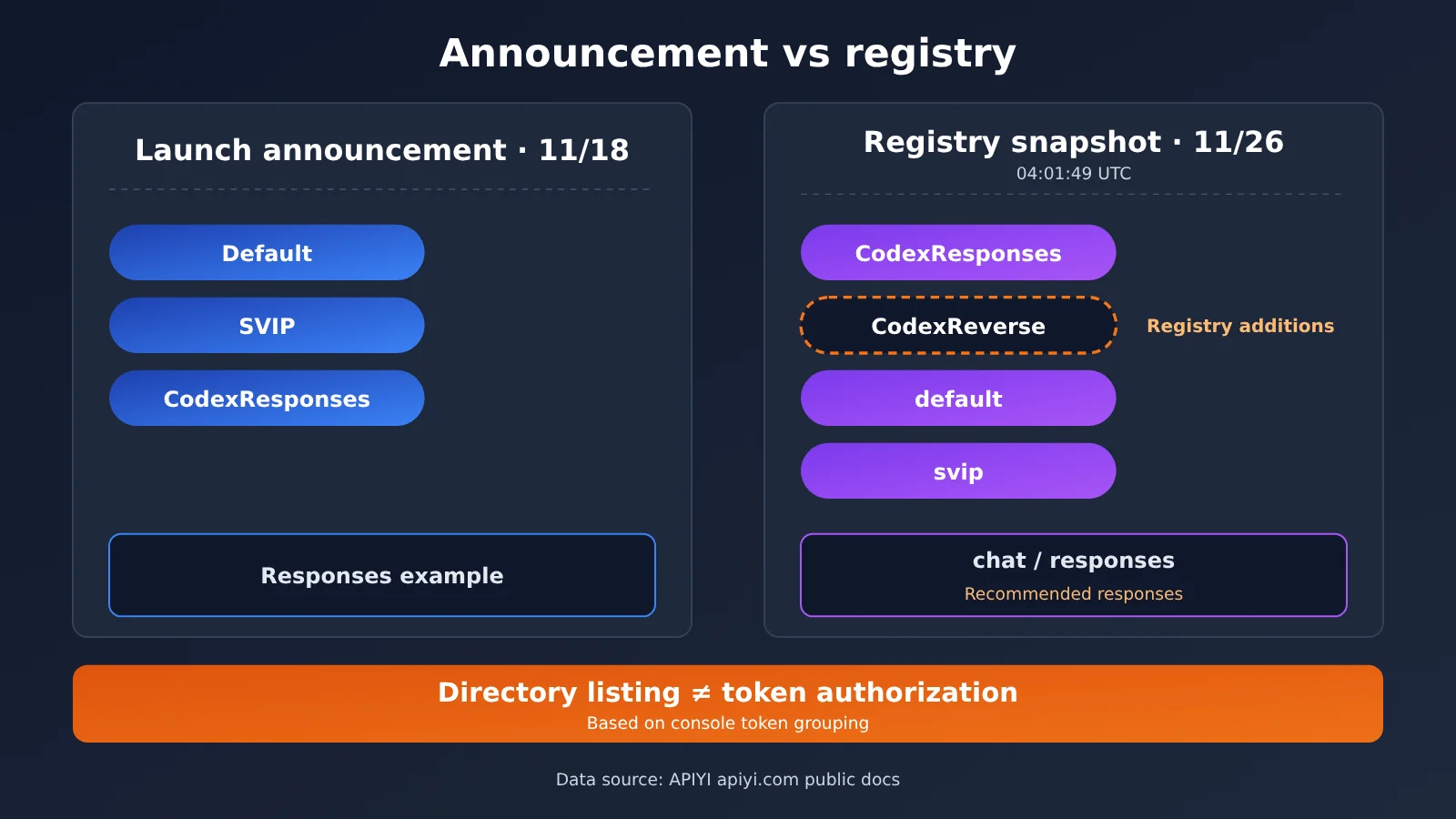
When citing, you can put it this way: “The launch announcement listed three groups; the November 26 registry also lists CodexReverse.” Keep each group name in the original case used by its own document — don’t normalize everything to uppercase or lowercase.
1.3 What the GPT-6.2 Astra registry tells you — and what it doesn’t
The registry records, at the model level, which endpoints and groups Astra supports. It does not walk through each group to say whether every endpoint is open. So “the registry lists both chat and svip” does not mean “the svip group can use chat.” What actually decides whether a call succeeds is the real group and configuration of the token in the console.
The registry is worth checking before you even have an account: confirm the model ID spelling, the recommended endpoint, and the pricing fields. Once you have a token, switch your basis for judgment to the catalog precheck in Section 3.1 plus one real generation request.
2 GPT-6.2 Astra’s Four Configuration Fields
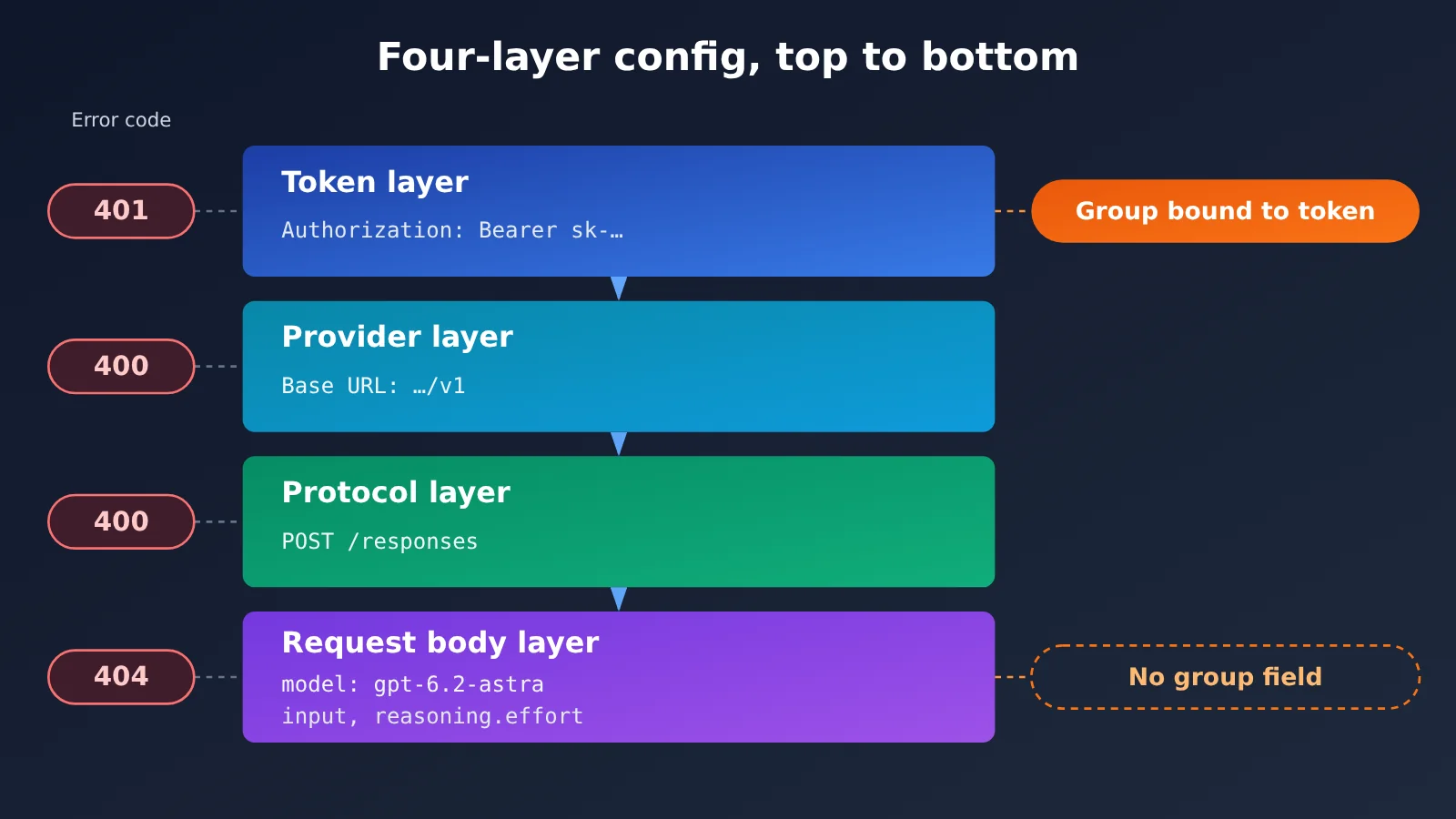
Each field handles one layer. When integration fails, troubleshooting layer by layer is faster than just retrying the whole request.
| Field | Purpose | Value for GPT-6.2 Astra | Typical symptom when something goes wrong |
|---|---|---|---|
| Token | Proves the caller’s identity | Model token starting with sk- |
401 invalid_api_key |
| Base URL | Determines where the request is sent | https://api.apiyi.com/v1 |
Duplicate path, 400 |
| Request path | Selects the API protocol | POST /v1/responses |
400 invalid_request_error |
| Model ID | Tells routing which model to use | gpt-6.2-astra |
404 model_not_found |
2.1 Token Selection for GPT-6.2 Astra
The APIYI developer docs list two types of tokens separately. Model tokens usually start with sk-, are created on the token management page, and use a Bearer header to call models. Personal access tokens start with nap_ and are used for account-related APIs such as balance, usage logs, and token management; their permissions are determined by the checkboxes selected at creation. When your integration calls a model, it must use the former type.
If you’re migrating from another provider, it’s a good idea to set up a separate environment variable for APIYI (for example, APIYI_API_KEY) and note the actual Base URL in use. That way, when troubleshooting, you can directly compare the app configuration with the outgoing request, and you won’t mix it up with your old provider’s key.
2.2 Base URL and Request Path for GPT-6.2 Astra
The SDK and direct HTTP approaches are written differently, and this is where mistakes are most likely. With the OpenAI SDK, the Base URL should only go up to /v1; responses.create will automatically append /responses. If you put the full endpoint into the SDK’s Base URL, the path becomes a duplicated /responses/responses. If you’re using an HTTP client directly, you need to write the full https://api.apiyi.com/v1/responses at once, with the method set to POST.
2.3 Model ID and Its Relationship to Groups for GPT-6.2 Astra
The model ID must exactly equal gpt-6.2-astra: all lowercase, two hyphens, with a decimal point in the middle. The group is determined by the token; there is no group field in the request body. If you need to switch groups, you should switch to a different token or adjust the token configuration in the console—not add a field to the JSON.
3 How to Send the First Responses Request for GPT-6.2 Astra
3.1 GPT-6.2 Astra Token Preflight Check
Before you actually generate anything, you can use the same model token to request the model catalog and confirm that both the token and the model are visible:
# This example hasn't been tested with a key and is based on APIYI's public documentation
curl -s https://api.apiyi.com/v1/models \
  -H "Authorization: Bearer $APIYI_API_KEY" \
  | grep -o '"id":"gpt-6.2-astra"'
Look for the complete string gpt-6.2-astra in the returned data[].id; don’t match only the prefix, or you might mistake Sol or another variant for a match. Being able to list this model only means the token works on the catalog endpoint. Whether the generation endpoint is available still needs to be verified with the minimal request in the next step.
If you don’t have a token yet, you can check the public registry: find the entry in models[] whose id is exactly gpt-6.2-astra. The registry’s schema_version is 1, the top-level endpoints.responses gives the path and method, and each model entry’s endpoints and groups provide catalog-level information.
3.2 Calling GPT-6.2 Astra with the Python SDK
The example below is adapted from APIYI’s launch announcement: the model is switched to Astra, the API key is read from an environment variable, and the input is changed to a fixed test sentence that doesn’t depend on external materials.
import os
from openai import OpenAI

client = OpenAI(
    api_key=os.environ["APIYI_API_KEY"],
    base_url="https://api.apiyi.com/v1",  # APIYI OpenAI-compatible endpoint; use only /v1
)

response = client.responses.create(
    model="gpt-6.2-astra",
    reasoning={"effort": "medium"},
    input="本周完成三项检查,其中两项通过。请用一句中文复述结果。",
)

print(response.status)
print(response.output_text)
print(response.usage)
Using a fixed short sentence for the first round of testing makes it easy to check the result: you just need to see whether the output preserves the two facts that three checks were completed and two passed. It doesn’t need to match a specific pre-set sentence word for word. The reasoning.effort value follows the medium setting from the announcement. The announcement explicitly warns that Astra rejects none, which turns off reasoning.
View the full version with acceptance logs
import os
import json
from openai import OpenAI, APIStatusError

MODEL_ID = "gpt-6.2-astra"
PROMPT = "本周完成三项检查,其中两项通过。请用一句中文复述结果。"

def first_call() -> dict:
    client = OpenAI(
        api_key=os.environ["APIYI_API_KEY"],
        base_url="https://api.apiyi.com/v1",  # Called through APIYI; the SDK automatically appends /responses
    )
    record = {"request_model": MODEL_ID}
    try:
        resp = client.responses.create(
            model=MODEL_ID,
            reasoning={"effort": "medium"},
            input=PROMPT,
        )
    except APIStatusError as e:
        record["http_status"] = e.status_code
        record["error"] = getattr(e, "body", None)
        return record

    record.update({
        "http_status": 200,
        "response_id": resp.id,
        "response_status": resp.status,
        "visible_text": resp.output_text,
        "output_types": [item.type for item in resp.output],
        "usage": resp.usage.model_dump() if resp.usage else None,
    })
    text = resp.output_text or ""
    record["facts_kept"] = ("三" in text) and ("两" in text)
    return record

if __name__ == "__main__":
    # Do not output the API key in the logs
    print(json.dumps(first_call(), ensure_ascii=False, indent=2))
3.3 Calling GPT-6.2 Astra via Direct HTTP
If you’re not using the SDK, you’ll need to write out the full path, include the token in a Bearer header, and send a JSON request body:
# Example not tested with a key
curl -s https://api.apiyi.com/v1/responses \
  -H "Authorization: Bearer $APIYI_API_KEY" \
  -H "Content-Type: application/json" \
  -d '{
    "model": "gpt-6.2-astra",
    "reasoning": {"effort": "medium"},
    "input": "本周完成三项检查,其中两项通过。请用一句中文复述结果。"
  }'
🎯 Technical tip: For the first request, stick to the minimal combination of “plain text + fixed prompt + non-streaming.” Get that working first with the same token on APIYI apiyi.com, then add features one at a time. If something goes wrong, you’ll be able to pinpoint exactly which newly added field caused it.
3.4 Reading the GPT-6.2 Astra Response
The SDK’s output_text is a convenience property that aggregates the visible text for you. When reading raw HTTP JSON directly, the body text is located in entries of type message within the output array; reasoning items and tool-call items may also appear in that array. So look up message content by the type field instead of hardcoding an index like output[0].
For the acceptance record of a first call, include the requested model, HTTP status, response status, visible text, usage, and the request or response ID if available. Never output keys in production logs. Whether to retain business content should be decided according to your internal data classification.
4 GPT-6.2 Astra Parameter Migration and Troubleshooting
4.1 Migrating from Chat Completions to GPT-6.2 Astra Responses
In Responses, the prompt goes in input and the reasoning level goes in the nested reasoning.effort. Older Chat Completions clients typically pass the conversation in messages and write the reasoning parameter as a top-level reasoning_effort. Although the registry lists both chat and responses, the request structure has to match the protocol you choose — you can’t mix the two styles in a single request.
If your original request carries sampling parameters or output-control fields from the old model, don’t migrate everything at once. Start with the minimal request from Section 3.2 to establish a baseline, then add back only the parameters your workload actually needs, one at a time, checking the response after each addition.
4.2 GPT-6.2 Astra Error Code Reference
| HTTP Status | Error Code | Check First |
|---|---|---|
| 401 | invalid_api_key |
Whether the key comes from APIYI, whether it’s valid, and whether the process can read the environment variable |
| 404 | model_not_found |
ID spelling, plus the token’s group and the console model list |
| 400 | invalid_request_error |
Whether the Base URL is duplicated, the request body structure, and the reasoning.effort value |
| 429 | insufficient_quota |
Account quota is insufficient |
| 429 | rate_limit_exceeded |
Request rate limit exceeded |
Both 429s share the same HTTP status but require completely different handling: insufficient quota means you need to top up, while rate limiting means you need to slow down or queue requests. Your code must handle them separately based on the specific error code.
4.3 GPT-6.2 Astra Returns 200 but an Empty Body
When you get HTTP 200 with an empty body, read three things in order: the response status, the type of each item in output, and usage. If your application also sets an output limit, check whether the reasoning process has already used up the output budget. Astra bills reasoning as part of the output, so even when the visible text is very short or empty, the output token count in usage can still be substantial.
5 GPT-6.2 Astra Usage and Feature Scope
5.1 GPT-6.2 Astra First-Call Usage Calculation
In its November 18 announcement, APIYI published Astra Standard short-input pricing, quoted per million tokens: $8 for uncached input, $0.40 for cache reads, $10 for 30-minute cache writes, and $40 for output (output includes reasoning). The November 26 registry marks Astra with tiered: true and lists input, cache read, and output figures on the same basis. The announcement also notes that when a single input exceeds 272K tokens, the entire request is billed at the long-context tier, and actual rates follow the platform’s real-time model pricing.
Here’s a worked example used purely to demonstrate the conversion method. Suppose a request has 2,000 uncached input tokens and 500 billed output tokens, ignoring cache writes, tool calls, and discounts:
(2000 × 8 + 500 × 40) / 1,000,000 = 0.036 USD
This number is a projection under assumed conditions, not a measured bill. Billed output for a real request can be noticeably larger than the visible text length, so go by the usage field in the response and the platform billing. Server teams can save a successful response as an audit sample, recording total input and output tokens, cache hit volume, and the model’s billing configuration. Later, when switching groups or endpoints, run the same short example again and you’ll see whether the billing fields have changed. The top-up bonus mentioned in the announcement applies at the account level; the unit price in logs is still recorded per model pricing.
💰 Cost tip: During the first-call phase, keep input at the short-sentence level — the cost is basically negligible, and you still get the full
usagestructure. The usage logs in the APIYI apiyi.com console can be compared entry by entry against your local records.
5.2 GPT-6.2 Astra Specs and Expansion Boundaries
OpenAI’s model card gives Astra the following specs: a 1,050,000-token context window, 922,000-token maximum input, and 128,000-token maximum output; input supports text and images, while output is text. The APIYI announcement relays this set of first-party specs and also lists the tools supported by the first-party Responses API. These are vendor-published specs, so don’t treat them as platform-level measured data.
The first text request, image input, streaming output, structured output, and external tools are five separate items that each need their own validation. Getting the first request working only proves the text path is available. Other capabilities should be enabled and verified one by one, according to what your application needs.
6 GPT-6.2 Astra Reusable Acceptance Checklist
| Layer | Verification Target | Pass Criteria | When You Can Stop |
|---|---|---|---|
| Layer 1: Connection | Domain, API key, token | Find gpt-6.2-astra exactly in the GET /v1/models response |
You can’t stop at this layer |
| Layer 2: Single Generation | Path, model, reasoning fields, return type | 200, the body retains two facts, usage and response ID logged in the same entry |
Can stop here if the prototype only needs plain text |
| Layer 3: Business Extension | Images, streaming, tools, structured constraints | Add only one item at a time and record the differences; for fixed JSON, validate field names, types, and missing values | Every business field has been verified individually |
All three layers of acceptance should be performed under the same model and the same group. If you change both the group and the endpoint at the same time, you won’t be able to tell which change caused any difference that appears.
You can use the following check to determine whether integration is complete: compare your logs against this table. If every column in Layer 2 has a corresponding field (request model, HTTP status, response status, visible text, usage, response ID), then GPT-6.2 Astra is truly connected under your token and group.
Frequently Asked Questions (FAQ)
Q1: What’s the model ID for GPT-6.2 Astra on APIYI?
It’s `gpt-6.2-astra` — all lowercase, with two hyphens and one decimal point. If you get the casing or separators wrong, you’ll usually get a 404 `model_not_found`.
Q2: The announcement and the registry disagree on groups — which one is authoritative?
They serve different purposes, and you need to keep both. The announcement lists `Default`, `SVIP`, and `CodexResponses`, while the registry snapshot lists `CodexResponses`, `CodexReverse`, `default`, and `svip`. The registry is a model-layer catalog, not an authorization list. Whether a given token can make a call depends on the actual group and configuration of that token in the APIYI apiyi.com console.
Q3: When did GPT-6.2 Astra become available on APIYI?
OpenAI released this model on November 17, 2026, and APIYI completed integration on November 18. The registry snapshot cited in this article was generated on November 26.
Q4: Do I need to include a group field in the request body?
No. Groups are bound to tokens, and the sample request body has no `group` field. To switch groups, switch tokens or adjust the token configuration.
Q5: What’s the fastest way to send my first GPT-6.2 Astra request?
1. Create a model token starting with `sk-` on the token management page at APIYI apiyi.com;
2. Set the environment variable `APIYI_API_KEY`;
3. Run the code from Section 3.2, with the Base URL set to just `https://api.apiyi.com/v1`.
The free trial credits for new users are enough to complete the first two layers of the three-layer acceptance check.
Q6: What are the known limitations of GPT-6.2 Astra integration?
– Reasoning can’t be turned off — setting `reasoning.effort` to `none` will be rejected;
– If a single input exceeds 272K tokens, the entire request is billed at the long-context tier;
– Billed output includes the reasoning portion, so short visible text doesn’t mean a low cost;
– The examples in this article haven’t been tested with a real key, so please validate with your own token before going live.
The complete integration sequence for GPT-6.2 Astra is: confirm the token type, set the Base URL to just /v1, pre-check with GET /v1/models, send a minimal Responses request, and finally reconcile with usage. Follow this order, and when something goes wrong you can pinpoint exactly which layer it’s on. We recommend completing this first-call acceptance check on APIYI apiyi.com with a single token, then hooking up your production traffic.
References
- APIYI GPT-6.2 Astra and Sol Launch Announcement: onboarding dates, model IDs, announcement groups, and list prices
- Link:
docs.apiyi.com/news/gpt-6-2-astra-sol-launch
- Link:
- APIYI Model Registry: a machine-readable catalog including endpoints, groups,
tiered, and other fields- Link:
docs.apiyi.com/model-registry.json
- Link:
- APIYI API Manual: Base URL, request paths, and error code table
- Link:
docs.apiyi.com/api-manual
- Link:
- APIYI Responses Support Notes: Responses fields and response structure
- Link:
docs.apiyi.com/api-capabilities/openai-responses
- Link:
- APIYI Reasoning Model Empty Response Notes: how to troubleshoot a 200 response with an empty body
- Link:
docs.apiyi.com/faq/reasoning-model-empty-response
- Link:
- OpenAI GPT-6.2 Astra Model Card: context and input/output specifications
- Link:
developers.openai.com/api/docs/models/gpt-6.2-astra
- Link:
- OpenAI Responses API Reference:
responses.createparameter definitions- Link:
developers.openai.com/api/reference/resources/responses/methods/create
- Link:
Author: APIYI Technical Team
Technical discussion: If you hit any snags during integration, feel free to reach out through the APIYI apiyi.com homepage. For more resources, check out the docs.apiyi.com documentation center.