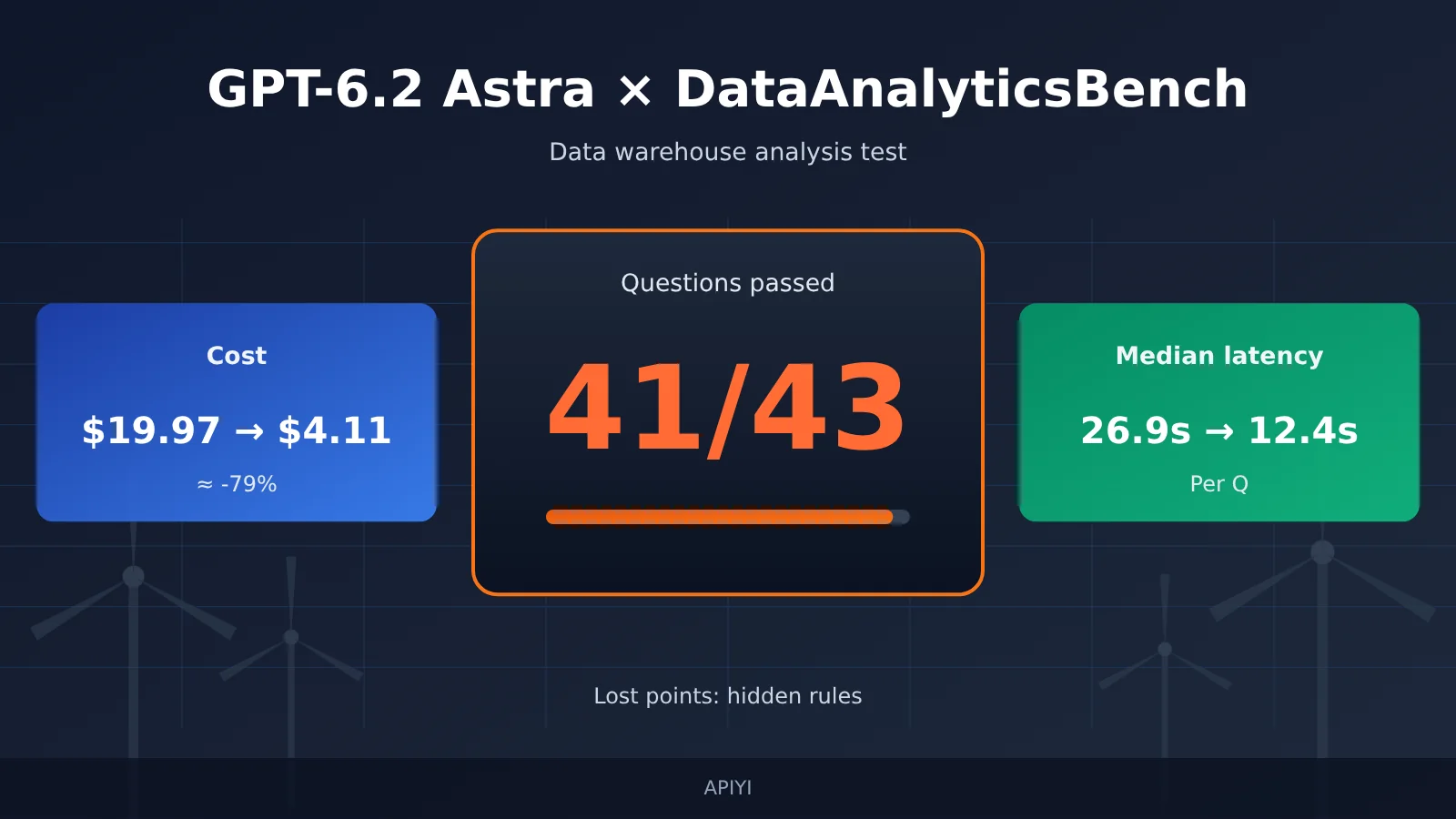
Bottom line: In a real-world DataAnalyticsBench run from Plotly, GPT-6.2 Astra passed 41 of 43 data analysis questions. The previous generation, GPT-6 Astra, scored 43/43. Both misses came from the “hidden patterns” category; the other five categories passed completely. At the same time, full-run cost dropped from $19.97 to $4.11, and median time per question fell from 26.9 seconds to 12.4 seconds. The new Astra traded two questions for less than a quarter of the previous generation’s cost and less than half the wait time—but whether it has actually regressed in proactively investigating anomalies is based on only one run so far, and you’ll need to retest with your own data.
What you’ll learn from this article
- What DataAnalyticsBench measures, how it scores, and where the boundaries of a 41/43 score lie.
- The per-category scores for the six question types, and how each of the two missed questions failed.
- The two sources of the roughly 79% cost drop—lower rates and reduced workload—and how much each contributed.
- The trade-offs among GPT-6.2 Astra, GPT-6 Astra, GPT-6.1 Sol, and GPT-6.2 Sol in score, cost, and latency.
- A retesting method and Python code you can adapt directly to validate the conclusions on your own data warehouse.
Index: The To Know table explains the specialized concepts in the evaluation, and the Impact at a Glance section summarizes what this news means for different audiences. The “Objective Facts” section walks through the test environment and scoring rules, the six-category scores, cost and latency data, and OpenAI’s official model identity and pricing basis. The “Analysis and Judgment” section interprets what 41/43 means, offers hypotheses to explain the hidden-pattern misses, breaks down the sources of the cost drop, and provides model-selection advice plus retesting code.
Concepts to Know First for GPT-6.2 Astra DataAnalyticsBench
| Concept | Brief explanation |
|---|---|
| DataAnalyticsBench | A 43-task data warehouse analytics benchmark designed by researchers at Plotly and Mila, testing models’ analytical ability on simulated wind power operations data |
| Test environment | An evaluation system that gives each model the same data warehouse plus read-only tools for querying, plotting, and displaying tables |
| Scoring rules | Per-task rules defining what counts as a fully satisfactory answer; pass/fail only, with no partial credit |
| Data quality issues | Input problems such as missing, duplicate, or anomalous records that can affect analytical conclusions, deliberately planted in the tasks |
| Statistical traps | Tasks where an intuitive algorithm or aggregation approach can lead to the wrong conclusion |
| Hidden patterns | Anomalous patterns or causes not spelled out in the prompt that the model must proactively investigate |
| Median time per task | The middle value after sorting actual elapsed time across all 43 tasks; this leaderboard includes tool query time |
| Full-run cost | Cumulative model invocation cost for the same model to complete all 43 tasks |
| Cache hits | Input tokens billed at a lower rate after repeated input prefixes are cached server-side |
Quick Look at How GPT-6.2 Astra DataAnalyticsBench Scores Affect Different Groups
- API decision-makers: GPT-6.2 Astra’s unit cost and response speed have improved noticeably, so tasks like routine reporting and metric-definition clarification are good candidates to prioritize. For anomaly troubleshooting tasks, it’s not yet advisable to directly apply the benchmark conclusions.
- Data product developers: When building products like natural-language data querying and BI assistants, halving median latency makes a big difference to the interactive experience. That said, you’ll need to separately evaluate the model’s “patience” for multi-turn exploration and, when necessary, force additional verification steps into prompts or workflows.
- Analytics teams: You can treat the model as a faster first-draft analyst, but root-cause investigation conclusions still need human review. With an OpenAI-compatible aggregation endpoint like APIYI apiyi.com, you can switch among the four models in the same codebase for side-by-side testing.
GPT-6.2 Astra DataAnalyticsBench: Objective Facts
GPT-6.2 Astra Test Scenarios and Scoring Rules
DataAnalyticsBench was designed by researchers at Plotly and Mila and uses a simulated wind power operations data warehouse. The warehouse contains 44 tables, about 19.9 million rows, and 554 columns, covering equipment telemetry, alerts, work orders, inspections, and weather data. Each question runs in Plotly Studio Embedded, with the model invoked through OpenRouter. The model has only four read-only tools available: list datasets, execute SQL, create charts, and display tables.
The model decides its own query path and when to answer; the testers won’t plan steps for it. That means the evaluation tests more than SQL writing—it also tests the judgment of “how far to query before it’s enough.”
For scoring, each question is judged pass/fail against an answer key and scoring rules, with no partial credit. The judge model is Claude Sonnet 5 at temperature 0. The organizers generated answers independently using SQL, pandas, and Polars and cross-checked them; they manually reviewed failed trajectories and also audited full-score results. Two types of special questions have clear passing criteria:
- Ambiguous questions: The model passes if it asks for clarification, or states its assumptions and provides an alternative solution.
- Questions with unanswerable data: The model passes if it accurately points out the limitations of the available data.
The question bank also has clear boundaries: a single business domain (wind power operations), English, the same test environment, and each model runs only one round. The questions, data, and answer keys are kept by the organizers and not made public.
Source: Plotly, Introducing DataAnalyticsBench, published 2026-10-14, updated 2026-11-19, plotly.com/blog/introducing-dataanalyticsbench/
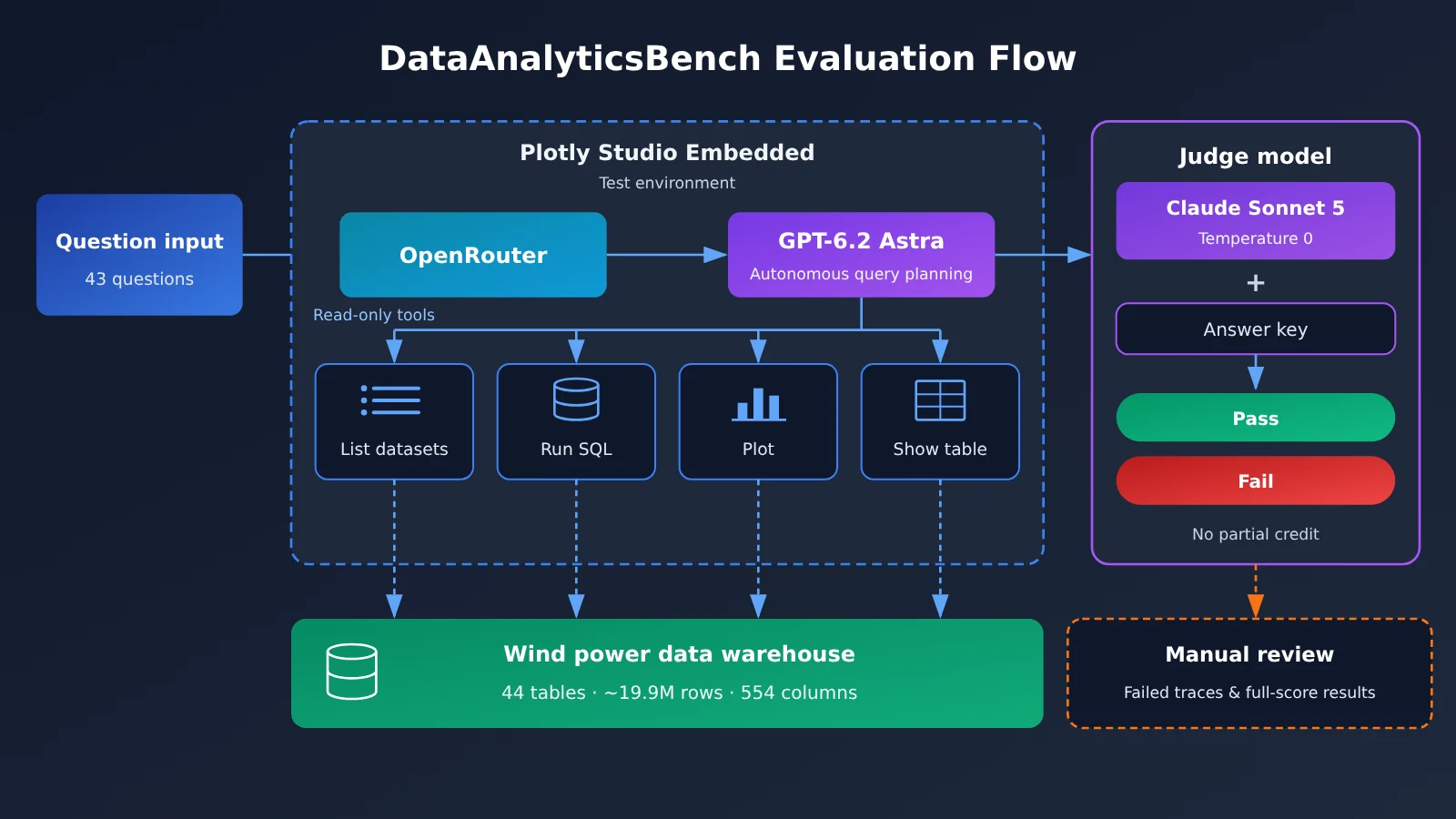
Diagram note: You can roughly reproduce this structure—model autonomously planning queries + read-only tools + per-question pass/fail—in your own environment using the OpenAI-compatible API at APIYI apiyi.com for internal comparison testing.
GPT-6.2 Astra Scores Across Six Question Categories: Losses Concentrate in Hidden Patterns
Plotly’s Astra-specific report, published on November 17, 2026, breaks down the scores by category:
| Category | GPT-6.2 Astra | GPT-6 Astra | What it tests |
|---|---|---|---|
| Standard analysis | 20/20 | 20/20 | Multi-step SQL, table joins, and time ranges |
| Ambiguity resolution | 5/5 | 5/5 | Clarifying definitions or stating reasonable assumptions |
| Unanswerable questions | 5/5 | 5/5 | Recognizing questions the available data can’t answer |
| Data quality | 3/3 | 3/3 | Detecting planted quality issues |
| Statistical traps | 5/5 | 5/5 | Spotting where an intuitive approach could mislead |
| Hidden patterns | 3/5 | 5/5 | Proactively investigating anomalies that weren’t called out |
| Total | 41/43 | 43/43 | All questions weighted equally, pass/fail per question |
The first five categories add up to 38/38, with both generations performing identically. The entire gap comes from the hidden-pattern questions: 3/5 for the new generation versus 5/5 for its predecessor.
Both failed questions went through manual review by Plotly, and they failed in different ways:
- In one, the model never managed to locate the planted pattern.
- In the other, the model found the right place to investigate but ruled out the actual cause.
The report also shares one process-level datapoint: on hidden-pattern questions, GPT-6.2 Astra ran an average of about 9 database queries per question, while GPT-6 Astra ran about 15.
Source: Plotly, GPT-6.2 Astra Benchmark Results for Data Analysis, 2026-11-17, plotly.com/blog/gpt-6-2-astra-plotly-data-analytics-bench/
GPT-6.2 Astra Cost and Time: Cross-Generation and Same-Vendor Comparison
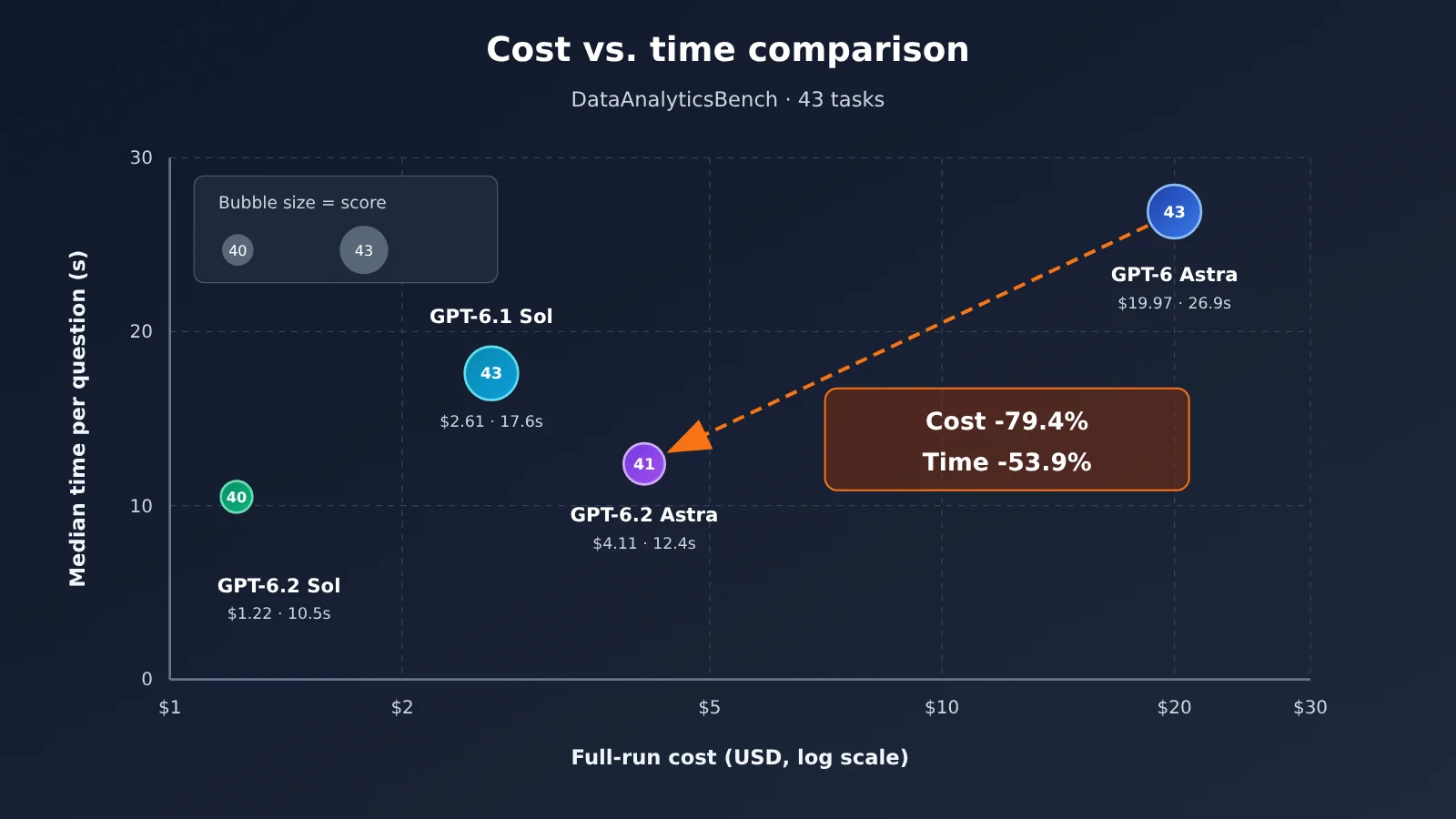
| Model | Score | Full-run cost | Median time per question |
|---|---|---|---|
| GPT-6.2 Astra | 41/43 | $4.11 | 12.4 seconds |
| GPT-6 Astra | 43/43 | $19.97 | 26.9 seconds |
| GPT-6.1 Sol | 43/43 | $2.61 | 17.6 seconds |
| GPT-6.2 Sol | 40/43 | $1.22 | 10.5 seconds |
Based on the original table, GPT-6.2 Astra cuts the full-run cost by about 79.4% versus the previous generation, and shortens the median time per question by about 53.9%. In the author’s own runs, 6.2 Astra took about 13 minutes end to end, compared with about 32 minutes for the previous generation. The times here are actual wall-clock time including tool queries, not pure model inference time.
There are two ways of measuring per-question cost, and they need to be kept separate: $4.11 ÷ 43 gives an average of about $0.096 per question, while the updated overall leaderboard lists $0.066 as the median per-question cost for this run. The average is higher than the median, which means a handful of questions were noticeably more expensive and pulled the average up.
Plotly also provides a workload breakdown for the original runs of both generations:
| Workload metric | GPT-6 Astra (previous generation) | GPT-6.2 Astra |
|---|---|---|
| Tool calls | 266 | 148 |
| Model calls | 249 | 171 |
| Input tokens | ~9.1 million | ~4.4 million |
| Output tokens | ~78,000 | ~34,000 |
| Input cache hit rate | 93% | 98% |
Recalculating the previous generation’s exact usage at the new rates, Plotly estimates roughly $11. Note that these costs come from OpenRouter pricing at the time of Plotly’s tests, not a direct conversion from OpenAI’s official price list.
Sources: the Plotly Astra special report plotly.com/blog/gpt-6-2-astra-plotly-data-analytics-bench/; the Plotly overall leaderboard plotly.com/blog/introducing-dataanalyticsbench/#full-results
GPT-6.2 Astra: Model Identity and Official Pricing
OpenAI released GPT-6.2 Astra and GPT-6.2 Sol on November 17, 2026. Astra targets complex reasoning, coding, and professional work, and its API model ID is gpt-6.2-astra. The evaluations in OpenAI’s announcement reflect the vendor’s own benchmarks; Plotly’s DataAnalyticsBench is a separate third-party evaluation, so the two shouldn’t be compared as if they were the same.
According to the model card, Astra accepts text and image inputs and outputs text, with a context window of 1,050,000 tokens, a maximum input of 922,000 tokens, and a maximum output of 128,000 tokens. It supports both the Responses API and the Chat Completions API; the Responses API is the source of truth for capabilities such as built-in tools, Multi-agent, and background completion windows. The model card also notes that requests with reasoning.effort set to none will be rejected.
OpenAI’s standard short-context text-only pricing (per million tokens) is: regular input $8, cached input $0.40, and output $40. OpenAI says that, compared with the previous generation, regular input and output prices are 20% lower, and cached input is 60% lower.
Sources: OpenAI release announcement openai.com/index/introducing-gpt-6-2-astra-sol/; model card developers.openai.com/api/docs/models/gpt-6.2-astra; API changelog developers.openai.com/api/docs/changelog; pricing page developers.openai.com/api/docs/pricing
GPT-6.2 Astra DataAnalyticsBench: Analysis and Assessment
How to Read 41/43: It’s Not “Overall Weakening”
Breaking down 41/43, GPT-6.2 Astra didn’t lose any points across the five categories: routine analysis, ambiguity, unanswerable questions, data quality, and statistical traps. These five categories cover most everyday reporting and metric-alignment scenarios. If that’s the bulk of your business, then based on this round of data, the new Astra’s quality is on par with the previous generation—while cost and speed are clearly better.
The two-question gap still needs to be viewed within the fluctuation range. Plotly’s report notes that reruns on other models showed swings of up to three questions. So 41 versus 43 is better treated as “this round’s observation” rather than a stable capability difference. A more accurate way to put it: the hidden-pattern category is showing a signal worth tracking, but a single round of data isn’t enough to confirm a regression.
Why Hidden-Pattern Questions Are Worth Retesting: An Explanatory Hypothesis About Exploration Depth
The following is an explanatory hypothesis based on data in the report, not a conclusion from Plotly. On hidden-pattern questions, the new generation averaged about 9 queries per question, versus about 15 for the previous generation. The two failed questions show two different patterns: one was “didn’t find it,” and the other was “found the location but ruled out the true cause.” Both look like cases of stopping before exploring deeply enough: the first didn’t explore widely enough, while the second reached a negative conclusion too early during verification.
This may stem from the same behavioral change behind the drop in cost and latency: the model is more inclined to answer after fewer queries. On routine questions, that tendency translates directly into efficiency. On root-cause questions that require repeated hypothesizing and verification, it can become a risk. To test this hypothesis, you need to compare the relationship between query count and pass rate on your own data, rather than just looking at the overall score.
Why GPT-6.2 Astra’s Cost and Speed Fell Together
The drop from $19.97 to $4.11 can be split into two parts, based on Plotly’s recalculated data:
- Rate factor: Recomputing the previous generation’s exact usage at the new rates comes to about $11. That is, just from the price cut, cost falls from about $19.97 to $11, a drop of roughly 45%. The official cached-input unit price is 60% lower, and this matters especially in scenarios where cache hit rates are as high as 93% to 98%.
- Workload factor: The move from about $11 to $4.11 comes from reduced workload. Tool calls fell from 266 to 148, input tokens dropped from about 9.1 million to about 4.4 million, output tokens fell by more than half, and the cache hit share rose from 93% to 98%.
Roughly calculating the new generation’s usage with official unit prices also puts it in the same ballpark as $4.11: of roughly 4.4 million input tokens, 98% are billed at the cached rate, the rest at the regular input rate, plus about 34,000 output tokens. This suggests that in scenarios like data analysis with long contexts and multiple rounds of tool calls, cache hit rate and number of call rounds may have a bigger impact on cost than unit price itself. The speedup follows the same logic: fewer queries, fewer model invocations, and naturally shorter elapsed time.
💰 Cost tip: When evaluating the cost of Agent-style tasks like these, track cached-hit tokens and tool-call rounds; don’t just look at the unit price table. When calling on a pay-as-you-go basis through APIYI apiyi.com, you can cross-check the usage field in billing and logs to verify whether caching is taking effect.
Choosing Between GPT-6.2 Astra, GPT-6.1 Sol, and GPT-6.2 Sol
These four models each occupy a different spot:
- GPT-6.1 Sol: Under this setup, it scores 43/43 at $2.61, making it the cheapest full-score option this round. The trade-off is a median latency of 17.6 seconds, slower than 6.2 Astra.
- GPT-6.2 Astra: 41/43, $4.11, 12.4 seconds. Its advantage shows up when you compare score and speed together. If you look only at cost and score, it doesn’t come out ahead.
- GPT-6.2 Sol: $1.22, 10.5 seconds. It’s the cheapest and fastest, but its score of 40/43 is the lowest.
- GPT-6 Astra: Full score, but both cost and latency are clearly on the high side. In this comparison set, it’s hard to find a reason to pick it first.
The score gaps among them all fall within the up-to-three-question fluctuation range noted by Plotly. That means total scores alone don’t provide a reliable ranking. The genuinely reliable differentiators are cost and latency. In practice, interactive data Q&A products are latency-sensitive, so it makes sense to compare 6.2 Astra and 6.2 Sol first. Offline batch analysis isn’t latency-sensitive, so 6.1 Sol’s price-performance is worth more attention.
How to Retest GPT-6.2 Astra with Your Own Data
The retest methods below are editorial recommendations. DataAnalyticsBench only covers wind power operations, English, and a single environment, which is a far cry from most teams’ actual data warehouses. The safer approach is to build a small question set from your own data, lock down the data, tools, and prompts, and run it over several rounds — tracking performance separately for each task type.
| Subset | Suggested number of questions | What to record | What it tells you |
|---|---|---|---|
| Routine reports | 15-20 questions | Pass rate, median latency | Whether you can trust the model with everyday data questions |
| Ambiguous definitions | ~5 questions | Whether it proactively clarifies or states its assumptions | Guards against silently picking one definition |
| Statistical bias | ~5 questions | Whether it catches traps like Simpson’s paradox | How credible the conclusions are |
| Anomaly root cause | 5-8 questions | Pass rate, number of queries, P90 latency | Validates the failure signal on hidden-pattern questions |
| All questions | — | Total cost per round, cache hit rate | Cost budgeting |
It’s worth running each model at least 3 rounds and recording the mean and variance. Record tail latency (P90) separately: a pretty median doesn’t mean the slowest few questions are acceptable.
Here’s the minimal invocation example. The model ID is OpenAI’s published gpt-6.2-astra; the available models are subject to the platform’s list:
from openai import OpenAI

client = OpenAI(
    api_key="YOUR_API_KEY",
    base_url="https://api.apiyi.com/v1"
)

resp = client.chat.completions.create(
    model="gpt-6.2-astra",
    reasoning_effort="medium",  # The model card says requests with effort set to none will be rejected
    messages=[{"role": "user", "content": "上月各风场故障工单数环比变化最大的是哪个?请说明计算口径。"}],
)
print(resp.choices[0].message.content)
View the full retest script: pass rate, cost, and P50/P90 latency by subset
import time
import statistics
from openai import OpenAI

client = OpenAI(
    api_key="YOUR_API_KEY",
    base_url="https://api.apiyi.com/v1"
)

MODELS = ["gpt-6.2-astra", "gpt-6-astra", "gpt-6.1-sol", "gpt-6.2-sol"]

# Custom task set: category maps to the subsets in the retest table; implement checkers against your answer key
TASKS = [
    {"id": "r01", "category": "常规报表", "prompt": "...", "checker": lambda a: "..." in a},
    {"id": "h01", "category": "异常根因", "prompt": "...", "checker": lambda a: "..." in a},
]

# Official direct pricing (USD per million tokens), for rough estimates only; actual platform billing takes precedence
PRICE = {"input": 8.0, "cached": 0.40, "output": 40.0}

def estimate_cost(usage):
    cached = getattr(getattr(usage, "prompt_tokens_details", None), "cached_tokens", 0) or 0
    fresh = usage.prompt_tokens - cached
    return (fresh * PRICE["input"] + cached * PRICE["cached"]
            + usage.completion_tokens * PRICE["output"]) / 1_000_000

def p90(values):
    values = sorted(values)
    return values[max(0, int(len(values) * 0.9) - 1)]

def run(model, rounds=3):
    stats = {}
    for _ in range(rounds):
        for t in TASKS:
            start = time.perf_counter()
            resp = client.chat.completions.create(
                model=model,
                reasoning_effort="medium",
                messages=[{"role": "user", "content": t["prompt"]}],
            )
            elapsed = time.perf_counter() - start
            answer = resp.choices[0].message.content or ""
            s = stats.setdefault(t["category"], {"pass": 0, "n": 0, "lat": [], "cost": 0.0})
            s["n"] += 1
            s["pass"] += int(t["checker"](answer))
            s["lat"].append(elapsed)
            s["cost"] += estimate_cost(resp.usage)
    for cat, s in stats.items():
        print(f"{model} | {cat} | 通过率 {s['pass']}/{s['n']} | "
              f"P50 {statistics.median(s['lat']):.1f}s | P90 {p90(s['lat']):.1f}s | "
              f"估算费用 ${s['cost']:.3f}")

for m in MODELS:
    run(m)
This script only handles single-turn Q&A. If you want to get closer to how DataAnalyticsBench is set up, you’ll also need to hook in a read-only SQL tool, let the model run multiple queries on its own, and log the number of tool calls per question — that’s how you actually test the earlier hypothesis about “query count and score loss.”
🎯 Retest tip: All four models speak the OpenAI-compatible protocol, so you can switch between them with a single API key through APIYI apiyi.com. New users get free trial credits — enough to run one round on a small task set before deciding whether to scale up.
A leaderboard tells you which direction to look. But when it comes down to your own data warehouse and your own types of anomalies, the answer is something only you can produce by running it yourself. Lu You put it well in Reading Books with My Son Ziyu on a Winter Night: “What you get from books always feels shallow; to truly understand a thing, you must put it into practice yourself.”
Author: APIYI Technical Team
Technical inquiries: Feel free to reach us through the homepage of APIYI apiyi.com. More integration documentation is available at docs.apiyi.com.