
Short answer: GPT-6.2 Astra can put 3D modeling, Python solver scripts, and Blender animation into a single task, which makes it a good fit for engineering communication and training visualizations. The evidence comes from the chassis-simulation and parts-assembly demos OpenAI showed when it released GPT-6.2 Astra on November 17, 2026. But those demos prove that “the pipeline can be strung together” — not that the simulation is precise or manufacturing-grade. Solver accuracy, part clearances, and whether the output can guide production still depend on engineering teams validating independently against their own load cases and drawings.
What you’ll get from this article
- In the chassis simulation case, what each of the three stages — modeling, solving, animating — actually did, and which details OpenAI didn’t disclose.
- How the acceptance criteria for the parts-assembly case differ from the chassis case.
- How the work really splits between the model, the software environment, and the engineer.
- A “simulation result → Blender timeline” mapping example you can recompute yourself, plus the calling code that goes with it.
- Which files to keep when you deliver editable engineering work, and how to reproduce it on another machine.
How to read this: the “To Know” table up front explains the concepts the article touches on, then an at-a-glance impact section says what this means for different audiences. “The facts” covers only what the official demos and documentation actually support. “Quick start” gives you a workflow and code you can verify yourself. “Analysis and judgment” digs into acceptance methods, division of labor, and the delivery checklist. FAQ last. One caveat: this isn’t a hands-on test report — we didn’t re-run OpenAI’s Blender project, and every parameter below is an assumption chosen to make the math easy to reproduce.
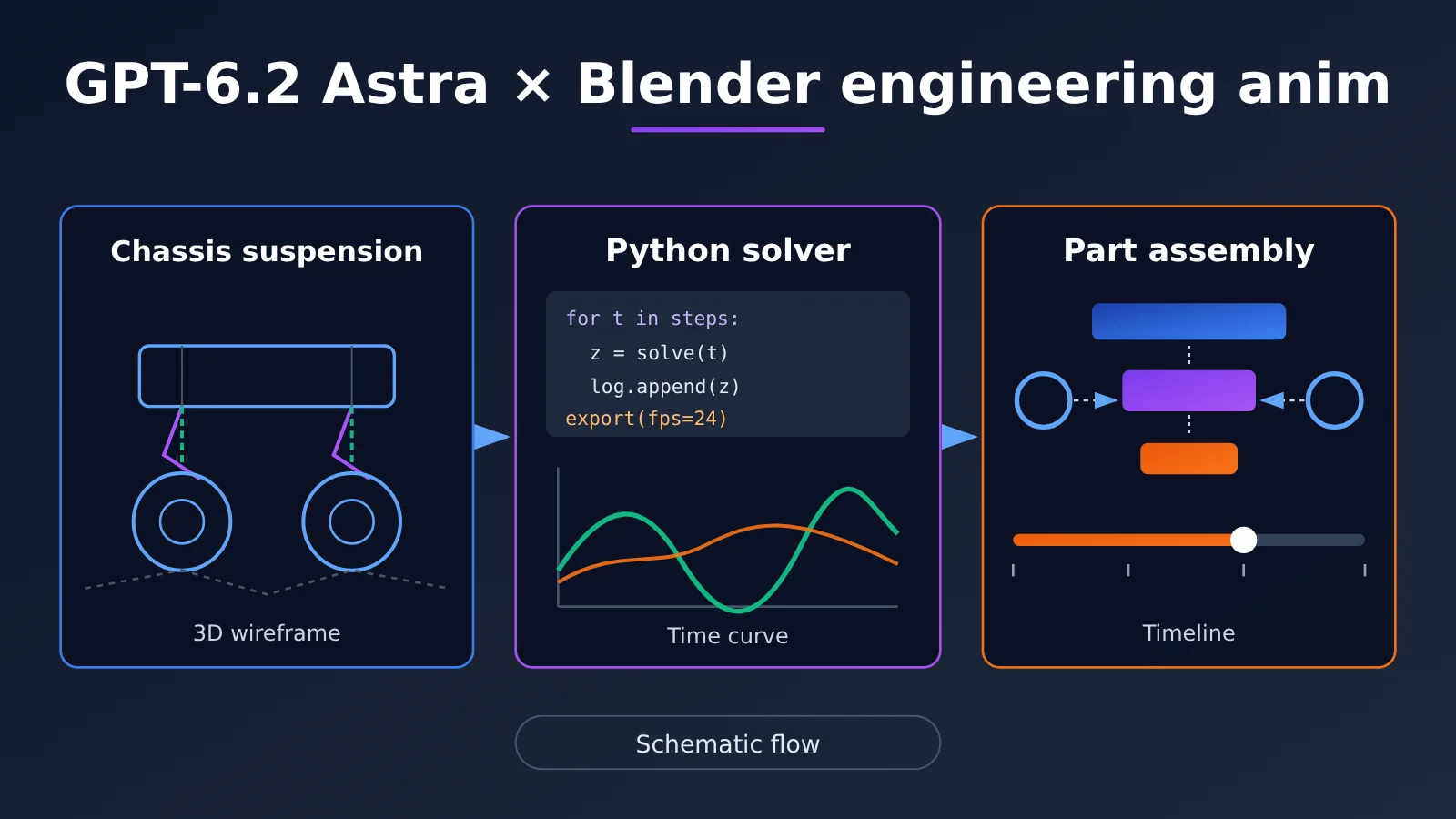
GPT-6.2 Astra and Blender Engineering Animation: To Know Quick Reference
| Concept | Brief explanation |
|---|---|
| GPT-6.2 Astra | A model released by OpenAI on November 17, 2026; its model card lists native inputs as text and images, with output as text |
| Python solver | A computation program written in Python that outputs motion quantities such as displacement and angles at each time step |
| Chassis dynamics | The motion relationships among tires, suspension, and body while a vehicle is driving — for example, suspension travel and body pitch |
| Keyframe | In Blender, recording properties such as an object’s position and rotation at a specified frame; the software interpolates between frames to generate animation |
| Frame rate (fps) | The number of image frames per second, which determines how simulation samples map to animation frames |
| Background rendering | A way to render a saved project in Blender through the command line without opening the graphical interface |
| Computer Use | The model’s ability to operate desktop applications and files in an approved environment; a tool within Responses |
| Interference check | Checking whether parts overlap in volume or have insufficient clearance — an animation that “looks like it fits” doesn’t mean there’s no interference |
| Resource packing | Packing external assets such as textures into the .blend file so they aren’t lost when you switch machines |
Impact at a Glance: Who Benefits from GPT-6.2 Astra’s Blender Capabilities
| Audience | Practical impact | What to watch out for |
|---|---|---|
| Engineers / simulation specialists | Can have the model draft solver scripts, data formats, and scene scripts, cutting down on repetitive wiring work | Units, boundary conditions, and physical assumptions must still be verified by you |
| Technical training and after-sales documentation teams | Assembly guide animations and illustrated parts catalogs can be first-drafted within a single task | Part numbers and fastening sequences need review by someone familiar with the structure |
| Developers | When using only the text API, the deliverable is scripts and operating instructions, not direct video output | File and video generation depend on an approved tool environment |
| Content creators | Lowers the barrier to producing engineering explainer animations | Illustrative animations should be labeled “non-quantitative simulation” |
GPT-6.2 Astra Chassis Simulation Demo: Objective Facts
The Three Stages of the Chassis Case
In the Driving simulation section, OpenAI presents a mountain-road driving task that requires visualizing the vehicle’s chassis dynamics. According to the vendor’s disclosure, Astra creates a 3D model, writes a Python solver to simulate the dynamics between tires and suspension, and then turns the results into a Blender animation. The official material explicitly attributes the solver to Python code written by Astra and names Blender as the animation software.
| Stage | Corresponding artifact | What public materials can support | Not disclosed / beyond scope |
|---|---|---|---|
| Modeling | 3D objects such as chassis and wheels | Astra created the 3D model | Geometric accuracy, modeling method |
| Computation | Python solver | Simulates tire and suspension dynamics, outputs motion quantities over time | Numerical model, tire parameters, solver step size |
| Presentation | Blender animation | Uses animation to show chassis dynamics | Software invocation path, render settings |
| Validation | — | None | Magnitude of deviation from real-vehicle data |
Assembly Cases: RC Off-Road Vehicle and Inline-Six Engine
The same release page’s Mechanical design and assembly section lists two topics: RC buggy assembly and Inline-six engine design. OpenAI says Astra modeled both based on publicly available photos and assembly manuals, and the demo includes building components one by one, creating animated assembly guides, and producing an illustrated parts catalog.
Notably, the release copy explicitly ties Blender to the chassis simulation animation; the assembly section only lists the artifacts themselves. Photos and manuals are visual modeling references, not engineering drawings, so manufacturing-grade accuracy of the assembly models is not demonstrated.
Model Card and Runtime Environment
Astra’s API model card lists native inputs as text and images, with output as text, and also lists tools in Responses such as computer operation, code interpreter, and hosted Shell. Actually generating 3D engineering files and videos depends on an authorized tool environment. Desktop Work can access local files and applications within the permitted scope, subject to account, desktop settings, and workspace permissions. Blender’s official manual, meanwhile, documents a command-line rendering method that requires no graphical interface.
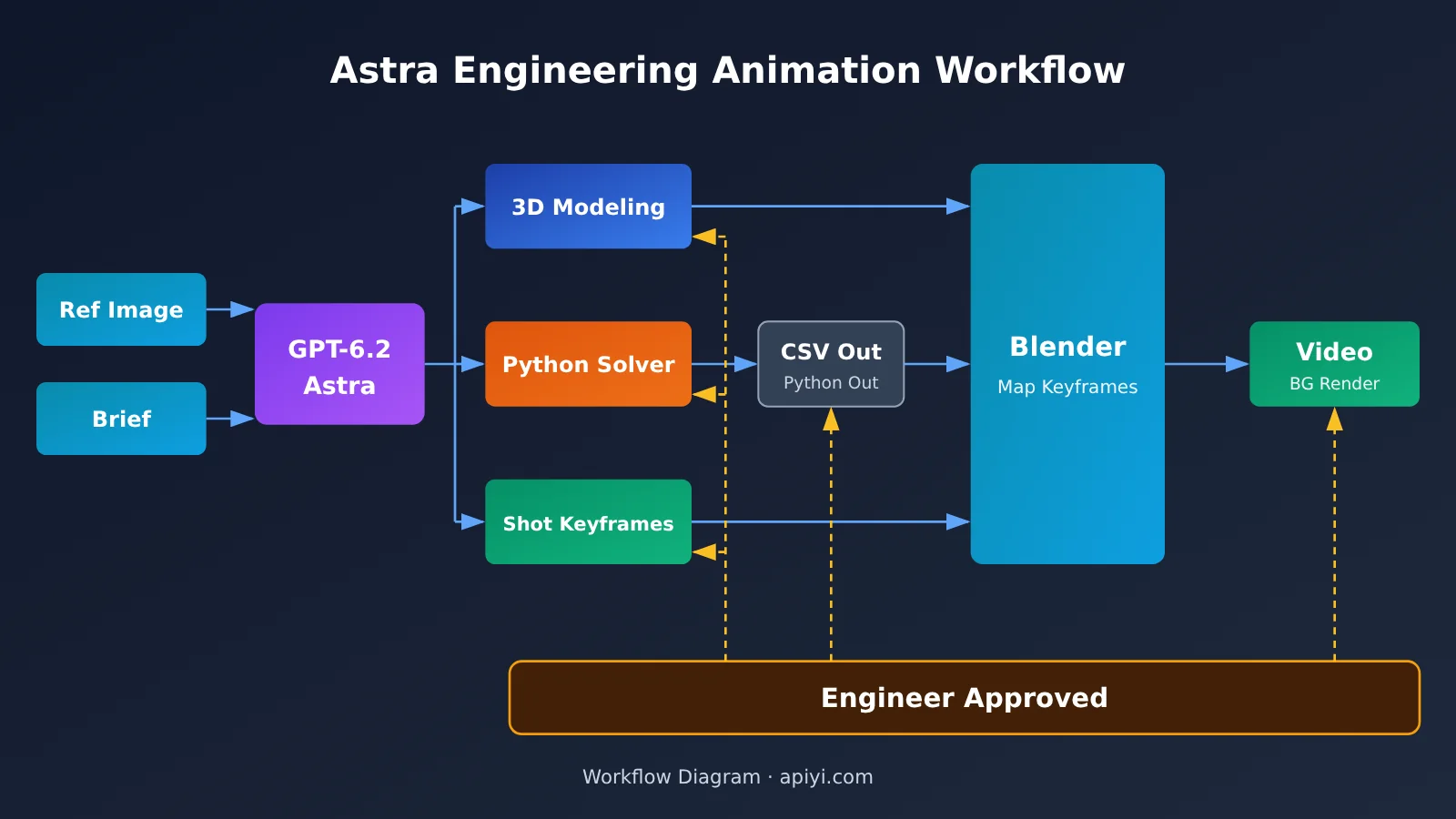
How to Use GPT-6.2 Astra to Generate Blender Engineering Animation Scripts: Quick Start
If you’re only calling the model through a text API, the most realistic deliverable is a “solver script + Blender scene script + operating instructions,” which you then run locally in Python and Blender. The example below centers on one key question: how do you correctly place simulation results on the Blender timeline?
A Reproducible Time-Mapping Example
The parameters below are self-defined assumptions. They’re not from a published demo, and no simulation was run. Assume the results file has 120 samples per second, with time starting at 0; the Blender scene is 24 fps, and frame 1 corresponds to 0 seconds. That means each frame covers 5 sample intervals.
Take frame 49 as an example: it’s 48 frame intervals away from frame 1, which corresponds to 48 ÷ 24 = 2 seconds; when the results file is zero-indexed, you should read index 2 × 120 = 240. If a single frame both draws suspension travel and renders body attitude, both must take values from the same time index; otherwise, the visuals and curves will be misaligned. When the sample rate and frame rate aren’t evenly divisible, record the interpolation method you used and cross-check a few timestamps.
Minimal Example: Having Astra Draft the Mapping Script
from openai import OpenAI

client = OpenAI(
    api_key="YOUR_API_KEY",
    base_url="https://api.apiyi.com/v1"  # APIYI OpenAI-compatible endpoint
)

resp = client.chat.completions.create(
    model="gpt-6.2-astra",  # the actual model name is defined by the platform's model list
    messages=[
        {"role": "system", "content": "You are a Blender engineering animation assistant. Output a reviewable Python script, and state all assumptions."},
        {"role": "user", "content": "The columns in result.csv are t_s, body_heave_m, body_pitch_deg, sampled at 120 Hz. "
                                    "Please write a Blender script: 24 fps, frame 1 corresponds to 0 seconds, and write the data as keyframes on the object Body."}
    ]
)
print(resp.choices[0].message.content)
View the full workflow code (script generation + local validation + Blender mapping example)
# step1_generate.py — call the model to generate a script, then validate the time mapping locally
from openai import OpenAI

SAMPLE_HZ = 120
FPS = 24

def frame_to_index(frame: int, sample_hz: int = SAMPLE_HZ, fps: int = FPS) -> int:
    """Frame 1 corresponds to 0 seconds; returns the 0-based index of the result row (exact division only)"""
    assert sample_hz % fps == 0, "Sample rate is not divisible by frame rate; interpolation is required and the method must be documented"
    return (frame - 1) * (sample_hz // fps)

# Recompute spot checks: frame 1 → 0, frame 49 → 240 (2 seconds)
for f, expected in [(1, 0), (49, 240)]:
    assert frame_to_index(f) == expected, f"Frame {f} is mapped incorrectly"

client = OpenAI(
    api_key="YOUR_API_KEY",
    base_url="https://api.apiyi.com/v1"
)

task = (
    "Generate a Blender bpy script: read //result.csv (columns t_s, body_heave_m, body_pitch_deg), "
    f"sampled at {SAMPLE_HZ} Hz, scene at {FPS} fps, frame 1 corresponds to 0 seconds; "
    "write body heave to Body.location.z and pitch to Body.rotation_euler.x; "
    "all objects must read from the same time index; list units and assumptions in a comment at the top of the script."
)

resp = client.chat.completions.create(
    model="gpt-6.2-astra",
    messages=[{"role": "user", "content": task}],
)

with open("map_to_blender.py", "w", encoding="utf-8") as fp:
    fp.write(resp.choices[0].message.content)
print("Script draft saved — review it manually before running")
# Reference implementation of map_to_blender.py (workflow example, not run on the OpenAI demo project)
import bpy, csv, math

SAMPLE_HZ, FPS = 120, 24
STEP = SAMPLE_HZ // FPS

scene = bpy.context.scene
scene.render.fps = FPS

with open(bpy.path.abspath("//result.csv"), newline="") as f:
    rows = list(csv.DictReader(f))

body = bpy.data.objects["Body"]
n_frames = (len(rows) - 1) // STEP + 1

for i in range(n_frames):
    frame = i + 1
    row = rows[i * STEP]          # every object on the same frame shares this index
    body.location.z = float(row["body_heave_m"])
    body.rotation_euler.x = math.radians(float(row["body_pitch_deg"]))
    body.keyframe_insert(data_path="location", index=2, frame=frame)
    body.keyframe_insert(data_path="rotation_euler", index=0, frame=frame)

scene.frame_start, scene.frame_end = 1, n_frames
Once you’ve saved the project, you can render in the background using Blender’s command-line mode, for example `blender -b chassis.blend -a`.
🚀 Getting started tip: First use APIYI apiyi.com’s free trial quota to have the model draft the script, then run it in Blender locally and spot-check frames. The platform provides an OpenAI-compatible interface, so a single key lets you compare script quality across different models.
GPT-6.2 Astra Blender Engineering Animation: Analysis and Assessment
Chassis animation and assembly animation have different acceptance priorities
These two cases answer different acceptance questions. Visual form, geometric constraints, and quantitative dynamics are three separate acceptance criteria—you can’t replace all of them with “the picture looks right.”
| Dimension | Chassis simulation animation | Part assembly animation |
|---|---|---|
| Core question | How each physical quantity changes on a unified timeline | How objects move from exploded positions into final positions |
| Key checks | Whether tires, suspension, and body are synchronized; whether the curves match the visuals | Component hierarchy, assembly order, centerlines, and fastener consistency |
| Main risks | Timeline indexing errors, unit errors, physical assumptions that don’t apply | The animation fits together, but actual clearances are too small or parts interfere |
| Acceptance basis | Bench test data, measured results, or a validated simulation baseline | Clear drawings and dimensional data |
| Best fit | Engineering communication, concept demos; quantitative use needs separate validation | Training, after-sales instructions, first drafts of parts catalogs |
Per-part editability is where assembly deliverables really pay off: engineers can easily change cameras, occlusion relationships, material names, or actions. But that convenience doesn’t replace interference checking.
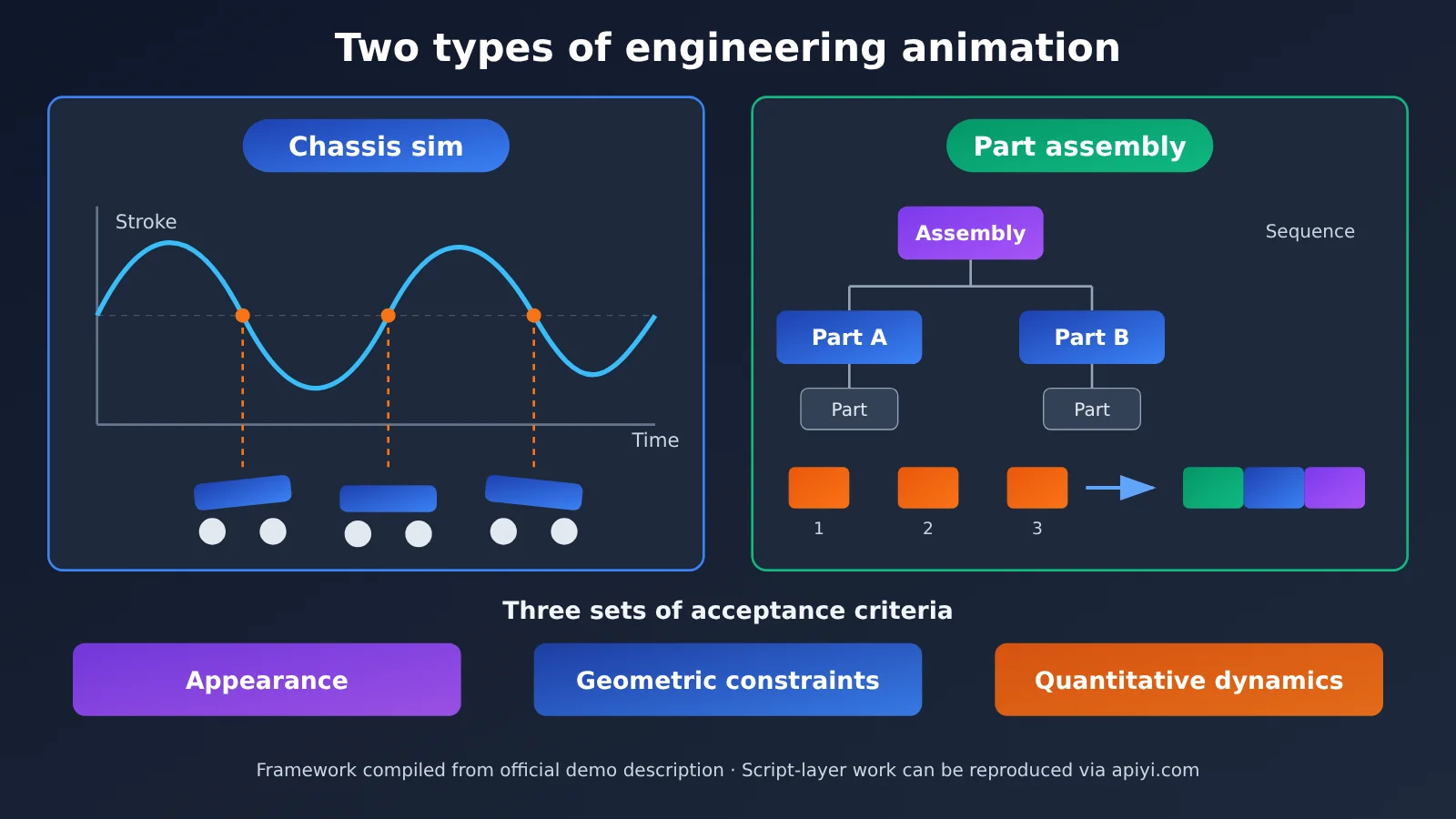
Division of Labor Between Models, Software, and People
Based on public information, a reasonable division of labor has three layers:
- Astra handles preparation: Given reference images, assembly sequence, and output format, it organizes part mappings, generates solving or scene-processing scripts, defines the CSV structure, and proposes camera and keyframe plans. If the purpose is only training or communication, it can directly provide the designed motion paths and label them as illustrative.
- Software handles execution: The Python environment runs the solver and writes out state data, and Blender maps the results onto object motion and renders them. When spot-checking positions, occlusions, and text frame by frame, you open the project in the GUI. Whether it can directly operate desktop Blender depends on whether the software is installed in an approved environment and whether computer operation permissions have been enabled.
- People handle approval: Engineers review dimensional baselines, parameter sources, units, and boundary conditions, and spot-check state files at a few timestamps before watching the video; assembly instructions are confirmed by someone familiar with the structure—part numbers, orientation, fastening sequence, and safety clearances.
This also explains why the same model can come in two delivery forms: when a tool environment is available, it can run the full Blender workflow; in API calls that only accept text and image inputs, what’s delivered is scripts plus operating instructions.
Editable Deliverables and Reproducing the Work on Another Machine
| Project type | Suggested deliverables | How to reproduce and check |
|---|---|---|
| Chassis | Blender scene, solver script, parameter table, result file with a time column and units, preview video, notes on version and run order | Re-run with the same parameters and spot-check the starting state, the points where road conditions change, and the end state; save a few keyframes as static evidence |
| Assembly | Individually named part objects, assembly relationships, both exploded and assembled states, camera timeline, parts list, source pages, preview video | Confirm that part numbers match the list one-to-one; move a representative part out and put it back to verify the hierarchy; pack whatever resources can be packed |
| General | Blender and Python versions, render engine, frame range, record of input file names | Whoever takes over opens a copy in another directory and regenerates one specified frame |
A handy practice for chassis projects: after you change the road surface or suspension parameters, have the same animation read the new results and view them side by side. That tells you whether the scene can support repeatable comparisons. If the release version uses an image sequence, keep the naming convention and compositing settings. Then, when a handful of bad frames turn up, you only need to re-render the corresponding range. This way the project file, the result records, and the video always trace back to the same version.
💡 Recommendation: If your team wants to compare the quality of solver scripts and bpy scripts generated by different models, you can use APIYI (apiyi.com) to batch-generate them with the same set of prompts while switching models, then run the frame-mapping assertions described above as a uniform check.
What to Watch Next (Predictive Assessment)
The following points are speculative and still need to be verified: first, whether third parties can reproduce the full pipeline of the chassis demo in a public environment; second, how large the deviation is between Astra-generated solvers and baseline simulations under known operating conditions; third, whether the assembly model can move from photorealistic modeling to drawing-based constraint modeling. Until public data is available for these questions, it’s safer to position Astra as a “workflow accelerator for engineering animation” than as a “simulation tool.”
GPT-6.2 Astra Blender Engineering Animation FAQ
Q1: What exactly does GPT-6.2 Astra’s Blender chassis demo show?
It shows a pipeline: Astra creates a 3D chassis model, writes a Python solver to simulate tire and suspension dynamics, and then turns the results into a Blender animation. It proves that modeling, computation, and presentation can be chained together in a single task, but it does not disclose the numerical model, parameters, or deviation from real vehicle data.
Q2: What’s the difference between the chassis simulation case and the part assembly case?
The chassis case includes a solver description, and acceptance checks whether physical quantities stay synchronized on the timeline; the assembly case is modeled from public photos and manuals, and acceptance checks component hierarchy, assembly order, and fastener consistency. Official copy explicitly attributes Blender only to the chassis animation.
Q3: When was GPT-6.2 Astra released?
OpenAI released GPT-6.2 Astra on November 17, 2026; both the chassis simulation and part assembly come from the engineering demo section of the same release page.
Q4: What scenarios are these Blender engineering animations best suited for?
– **Design communication**: Explain the relationship between suspension travel and body attitude to colleagues without a simulation background.
– **Assembly training**: Generate animated assembly guides and first drafts of parts catalogs.
– **Parameter comparison demos**: Use the same animation set to read results from different parameters and compare them side by side.
Q5: How can I call GPT-6.2 Astra via API to generate Blender scripts?
1. Sign up at APIYI apiyi.com and get an API key and free trial credits;
2. Set base_url to `https://api.apiyi.com/v1`; use the model name from the platform’s list;
3. Use the code in this article to have the model draft a bpy script, run it locally in Blender, and spot-check frames.
A plain-text API call delivers scripts and instructions; rendering must be done in your own environment.
Q6: What are the known limitations of GPT-6.2 Astra for engineering animation?
– **Accuracy not proven**: The demo cannot prove solver accuracy or manufacturing-grade dimensional accuracy.
– **Environment dependency**: Directly generating engineering files and videos requires approved tool environments and permissions.
– **Geometry risk**: Parts that fit in the animation still require separate clearance and interference checks.
For quantitative use, rely on your own test-bench data, measurement results, or a validated simulation baseline; scripts generated with APIYI apiyi.com should also be reviewed through the same process.
GPT-6.2 Astra Blender Project Animation Key Takeaways
- The pipeline chains together: The official demo shows that modeling, Python solving, and Blender animation can all live inside a single task.
- Precision has to prove itself: Solving accuracy and manufacturing readiness go beyond what a demo can demonstrate.
- Two acceptance tracks: For the chassis, it’s time synchronization. For assembly, it’s hierarchy, ordering, and interference.
- One time index for everything: Every object in the same frame must read from the same result row.
- Deliverables must be reproducible: Keep scripts, parameters, and version records so specified frames can be re-rendered on a different machine.
- Getting started: Draft the script with APIYI apiyi.com first, then run and verify it locally.
If you want to apply this workflow to your own projects, the safest starting point is a small scene: lock down the sampling rate and frame rate, get the frame-mapping assertions passing first, then gradually add objects like the suspension and wheels. During the script drafting phase, you can use APIYI apiyi.com to compare outputs from different models, leaving the time you save for parameter validation and frame-by-frame spot checks.
📚 References
-
OpenAI GPT-6.2 Astra release page: Driving simulation and Mechanical design and assembly demos
- Link:
openai.com/index/introducing-gpt-6-2-astra-sol - Notes: Original descriptions of the chassis simulation and parts assembly cases
- Link:
-
GPT-6.2 Astra model card: Input/output modalities and available tools
- Link:
developers.openai.com/api/docs/models/gpt-6.2-astra - Notes: Text and image inputs, plus the Responses tool list
- Link:
-
OpenAI computer use docs: Computer Use permissions and environment
- Link:
developers.openai.com/codex/computer-use - Notes: Prerequisites for accessing desktop applications
- Link:
-
Blender command-line rendering manual: Background rendering methods
- Link:
docs.blender.org/manual/en/latest/advanced/command_line/render.html - Notes: Rendering a saved project without a UI
- Link:
-
Blender frame rate and frame range manual: Timeline settings
- Link:
docs.blender.org/manual/en/latest/render/output/properties/frame_range.html - Notes: The basis for frame-mapping calculations
- Link:
-
Blender asset packing manual: Packing external assets
- Link:
docs.blender.org/manual/en/latest/files/blend/packed_data.html - Notes: Avoid losing assets when handing off to another machine
- Link:
Author: APIYI Technical Team
Technical support: Reach us via the APIYI apiyi.com homepage — more integration docs are available at the docs.apiyi.com documentation center.