Summary: When Google Antigravity’s /swarm status bar sits on “Waiting for subagent” for a long time, this article explains how to tell whether the task has already finished, is still running, is stuck waiting on an approval, or has paused because of a quota limit — and what recovery action to take in each case.
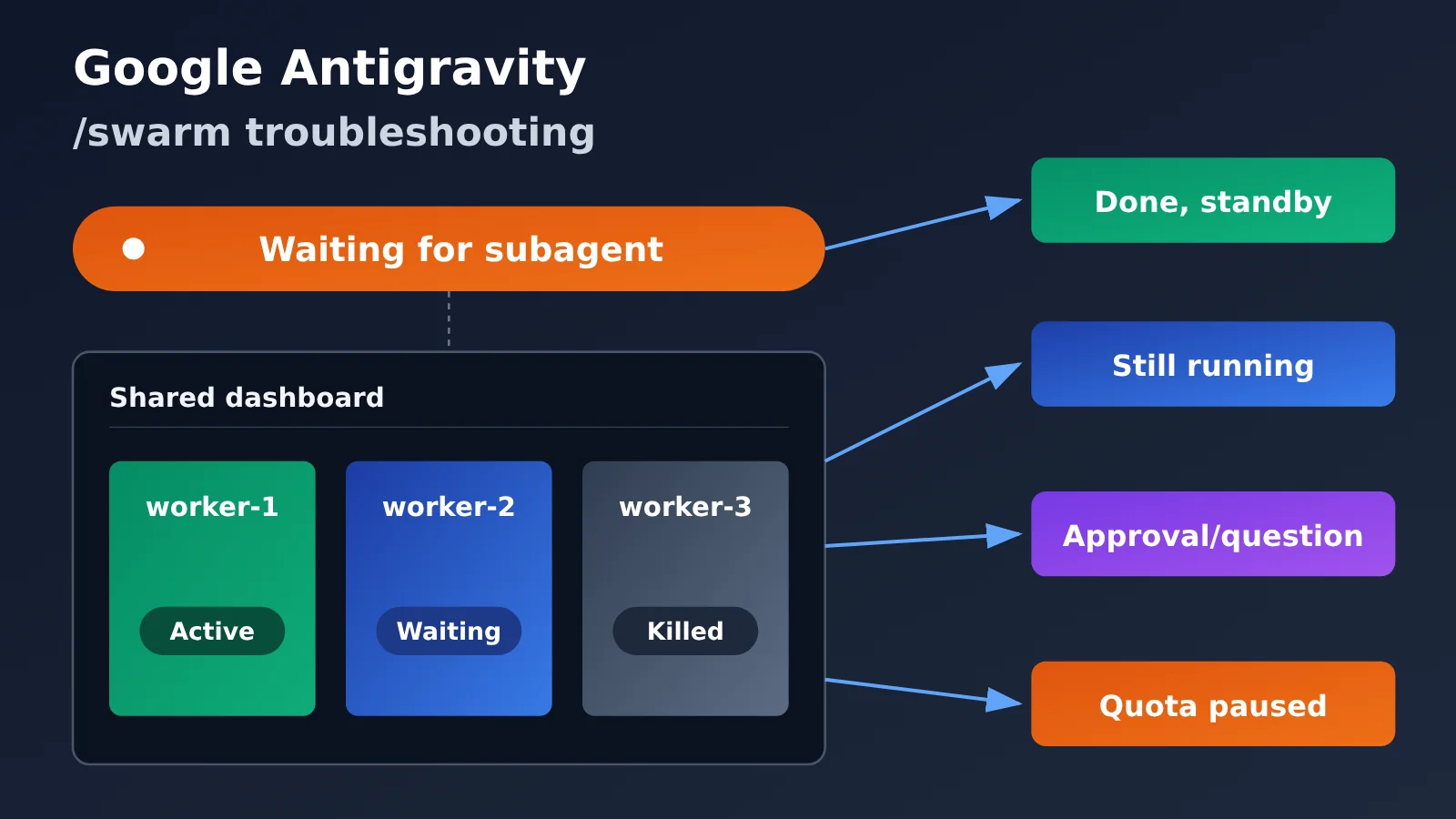
Bottom line up front: The “Waiting for subagent” line is just a status hint for the main session — on its own it doesn’t prove the task is stuck. To troubleshoot, open the Swarm board and judge from member states, recent posts, pending approvals, specific errors, and existing artifacts, then sort it into one of 4 cases.
- It’s finished — the members are just standing by on the board.
- Some worker is still running.
- A tool approval or business question is waiting for an answer.
- A quota-exhausted error is clearly reported and the members have paused.
The first two usually need no intervention; the last two need you to act. The public sources referenced below were verified on 2026-11-25 Beijing time, and apply to the native Swarm in the Google Antigravity App and CLI. The two products have different entry points and interfaces, so they’re covered separately below.
Knowledge Map: Troubleshooting Workflow for “Waiting for subagent”
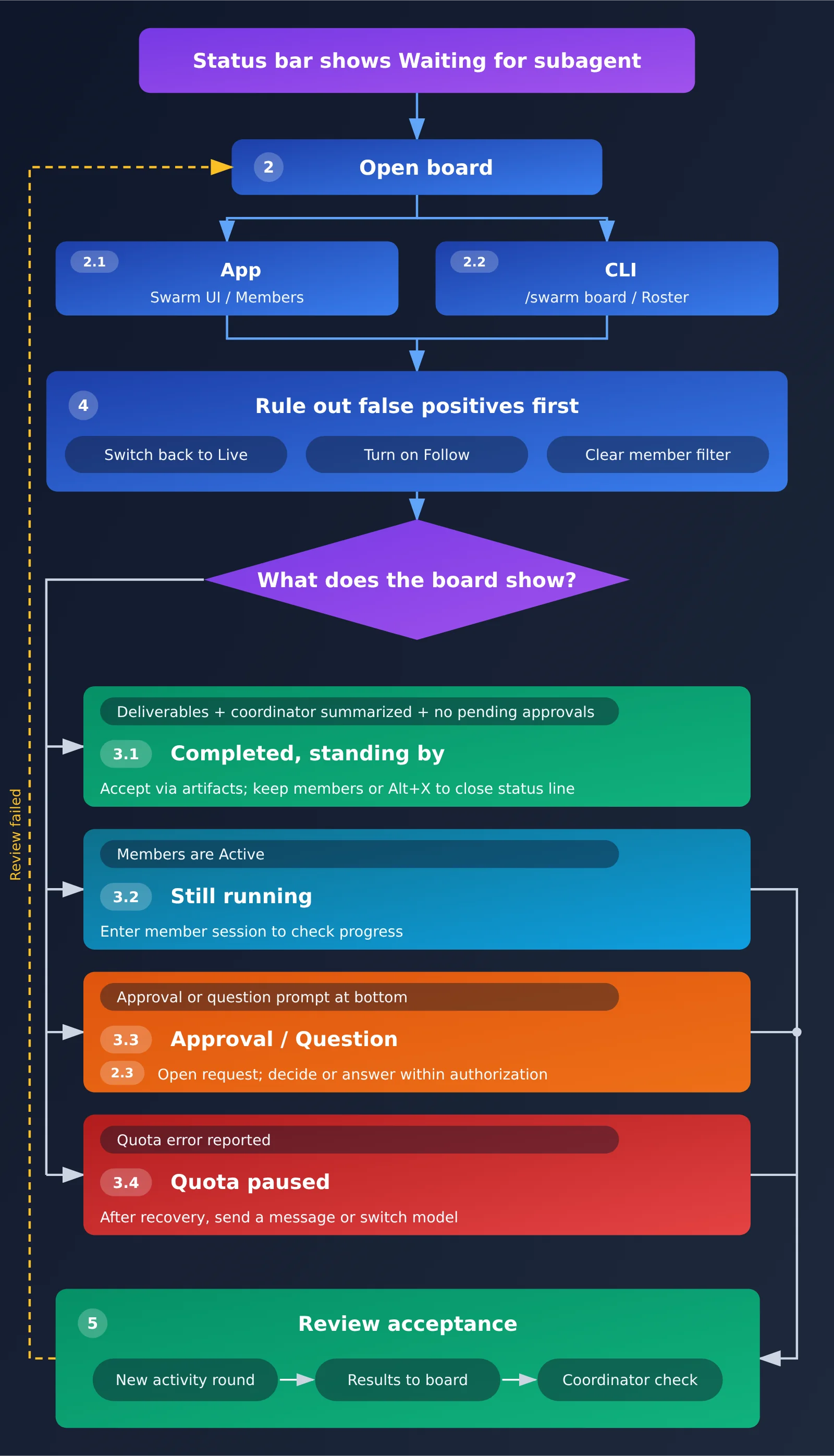
Figure note: Read in top-to-bottom order. First open the correct board in Section 2, then use Section 4 to rule out false alarms such as “the board is stuck at a historical position”, and finally follow one of the branches in Section 3 based on what the board shows. Except for “Completed and on standby”, the other three branches all require returning to Section 5 for verification once handled.
Index: How to Read Each Section on Waiting for subagent
| No. | Section short name | Purpose | Relation to adjacent sections |
|---|---|---|---|
| 1 | Meaning of states | Clarify the official definitions of Active, Waiting, and Killed | Foundation for every judgment that follows |
| 2 | Diagnostic entry points | Open the board, member sessions, and approvals in the App and CLI | Provides evidence for Section 3 |
| 3 | The four triage paths | Classify by evidence and carry out the matching recovery action | Core operational section |
| 4 | Easy-to-misjudge observations | Rule out historical replays, handoff misalignment, and popups that aren’t on the current page | Recommended to skim before Section 3 |
| 5 | Acceptance and records | Use examples to explain the order of judgment, plus a failure-record template | Wrap-up, for review and feedback |
Sections 1 and 2 are best read in order. The four subsections in Section 3 are parallel to one another — just look at the one that matches your situation.
To Know: Terms You Need to Understand Waiting for subagent
| Term | Brief explanation |
|---|---|
| Coordinator | The current session running /swarm, responsible for dividing up the work, relaying messages, and summarizing results |
| worker (member) | Named sub-agents, each executing its task in an independent conversation |
| Board | The team’s shared handoff area, recording the poster, recipient, time, and post number |
| Working copy | The member’s independent workspace copy, which is deleted along with the member when they’re removed |
| Status bar / status line | The status bar is the indicator in the App’s main session; the status line is the corresponding display in the CLI. Record the two separately |
1. The “Waiting for subagent” Status Bar vs. Member Reality
1.1 How Swarm Works and the Limits of the Preview
/swarm makes the current session the coordinator, with several named workers running tasks in their own separate conversations; the team hands off work through a shared dashboard. Google’s official documentation labels Swarm as a preview feature. Multiple working agents each consume usage separately, and business and enterprise accounts are further constrained by whatever the org admin has set. So when you’re troubleshooting, the models and quota available to you depend on your account’s existing plan.
1.2 The Official Line on the Three Member States
| State | Official meaning | Consumes tokens? | What it means for troubleshooting |
|---|---|---|---|
| Active | Running a turn — possibly reasoning, calling tools, or waiting on the model | Yes | A single snapshot only tells you which phase it’s in right now |
| Waiting | Dormant on the dashboard until a post mentions it | No consumption while dormant | It may have already delivered, or it may be waiting on someone else’s output |
| Killed | The member has been removed | No | The original member can’t be restored — you can only add a new worker |
Keep one thing in mind: a single member’s state and whether the whole task is done are two different questions, and the latter needs to be judged by acceptance. A worker can send its result and then stand by while other members are still running tests. So “some member is Waiting” and “the task is stuck” aren’t the same thing at all.
1.3 User Report: Even Completed Tasks May Keep Showing Waiting for subagent
There’s a first-hand developer report on the Google AI Developers Forum dated 2026-11-18. It concerns Native Swarm on desktop, on macOS, running Gemini 3.8 Flash (High). The reporter observed that a worker had already sent its completion message and the coordinator had already given the final answer, yet the member still showed idle or waiting, with the status bar stuck on Waiting for subagent. In his environment, the status bar only cleared after he removed the idle members one at a time.
This is just a user observation, not an officially confirmed defect description. It supports the conclusion that the same status string can correspond to an already-finished task — but you can’t infer from it that every version, or the CLI, will behave the same way.
2. Opening the Right Diagnostic Entry Point for Waiting for subagent
2.1 App: Swarm UI and the Members panel
The desktop App has two entry points: click Open the Swarm UI in the coordinator’s reply, or go to Overview → Plugins → Swarm in the conversation header. The Board shows the poster, recipient, time, and post number, and supports search and filtering by member.
The Members panel splits members into three groups: Active, Standing by, and a collapsible Retired. Each row shows status, model identifier, and recent activity. Click a member to open its own conversation and see which tool it used in the last step and what question it asked. If the board was previously in replay mode, switch back to Live first so you’re looking at the current record.
2.2 CLI: /swarm board and key bindings
In the CLI, typing /swarm board opens the board; you can also press Alt+S, or select the status line and hit Enter. On macOS terminals, you’ll need to map the Option key to Alt/Meta before Alt+S will work. If your terminal doesn’t have that mapping, just type the command.
/swarm board        # Open the live board
Tab                 # Switch between Roster / Posts / Message panels
o                   # Open the selected member's or poster's conversation
q                   # Return to the main prompt
/agents             # Open a member by name in the main session
Alt+J               # Jump to the next member waiting for tool approval
Ctrl+K              # Handle pending requests in the main session
Alt+X               # Close the status line after the coordinator finishes this round
The Roster panel shows whether each member is working, waiting, or killed, along with the last post time and the model in use. The Posts panel shows recent handoffs, and the Message panel shows the full body. If the bottom of the board indicates tool approvals or questions, note the count and the corresponding members first, then go back to the prompt to deal with them.
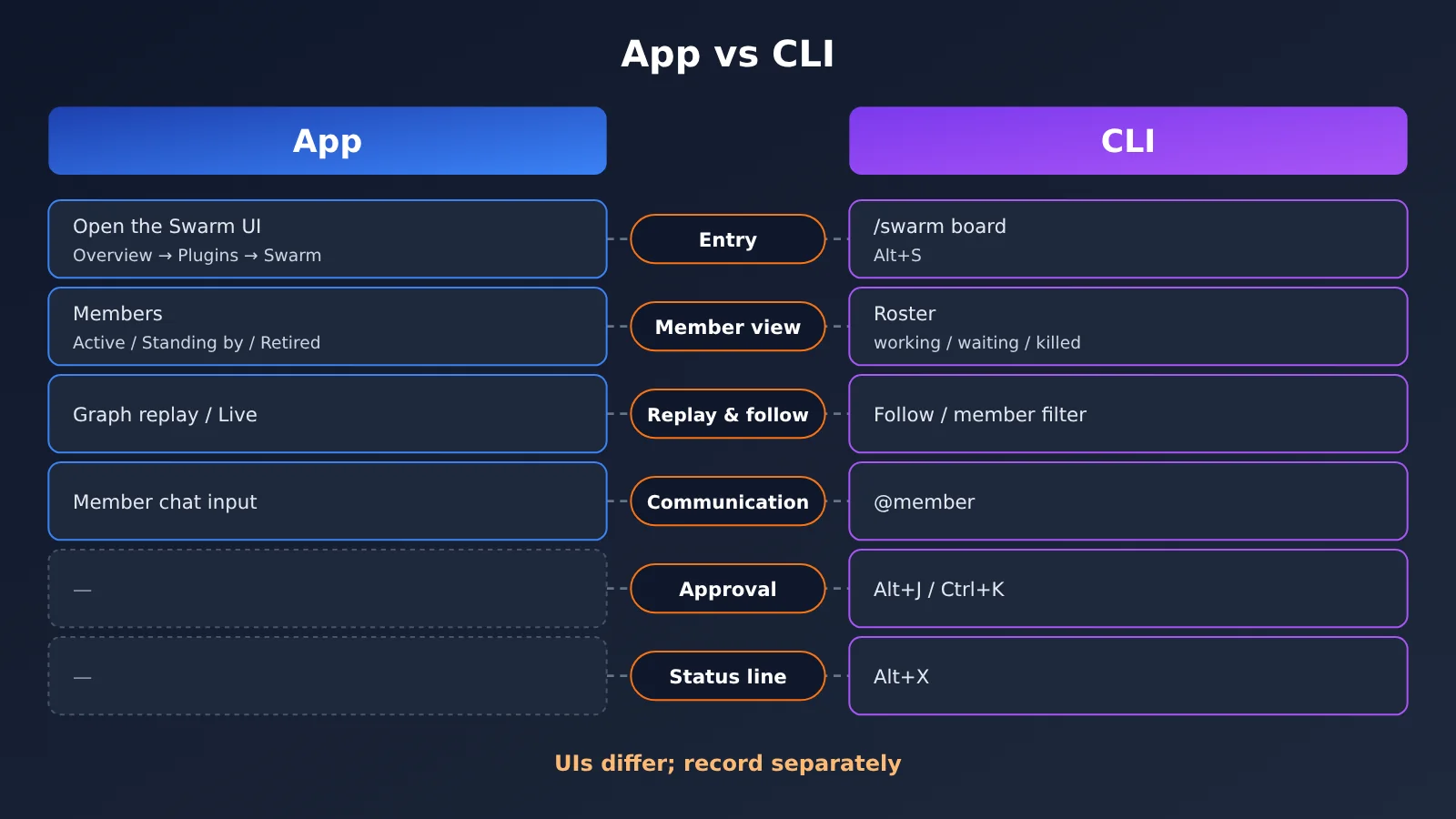
2.3 Approvals and targeted communication under Waiting for subagent
In the CLI main session, /agents opens a member by name, Alt+J jumps to the next member waiting for tool approval, and Ctrl+K lets you handle pending requests directly in the main session. Once you open the request details, check the specific operation, what it acts on, and its scope first, then decide whether to approve based on the existing permission boundaries.
If the member isn’t waiting on an approval but on a question like testing criteria, send a clear answer. In the App, use the input box in that member’s session; in the CLI, you can start the message with @member-name. Information that concerns only one member goes straight to it; if it’s a priority adjustment affecting several members, hand it to the coordinator to relay uniformly.
3. Four triage branches and recovery actions for “Waiting for subagent”
| Scenario | Evidence on the board | Recovery action | How to verify |
|---|---|---|---|
| 3.1 Done, standing by | Deliverables, verification results, and a coordinator summary, with nothing pending approval | Accept based on the artifacts; you can keep the member | Check the artifacts against the summary |
| 3.2 Still executing | A member shows Active, with the last status being tests or a model request | Open the member’s session and ask what step it’s on | Whether a new round or a new post shows up |
| 3.3 Approval / question | An approval or question prompt at the bottom | Approve within the granted scope, or give a clear acceptance answer | Whether the original member keeps moving forward |
| 3.4 Quota pause | A clear quota error (shown only once) | Message it after quota is restored, or switch to an available model | The member’s latest round or new post |
3.1 Already done: Waiting for subagent when the member is standing by
If the board already shows the worker’s deliverables, the verifier’s results, and the final summary the coordinator handed back — with nothing pending approval — treat the artifacts and status as your basis for acceptance. A worker in Waiting can stay in place so you can hand it follow-up tasks later, and it doesn’t consume tokens while it’s dormant.
In the CLI, once the coordinator finishes this round, you can press Alt+X to dismiss the status line; it’ll reappear when there’s a new post. If you plan to remove a member, first make sure its changes in the separate copy have been handed back — the docs state that removing a member also deletes its working copy.
3.2 Still executing: checking progress on an Active member
If a test worker is Active and its last status shows it running tests or making a model request, open its session to see the actual progress. Compare against the task brief the coordinator gave it, confirm the exit criteria, and ask which step it’s currently waiting on. Since Active also covers waiting for a model response, a single snapshot only reflects the current stage.
When you send a worker additional information, be explicit about which artifact it should verify and what it needs to report back. That keeps several parallel members from re-running the same test suite and burning through quota.
3.3 Approvals or business questions: unblocking a waiting member
Approval requests live in a specific member’s conversation. Which command you approve, and whether to swap the command for a local read-only check, should depend on what the request actually does and what authorization the user has already granted — don’t widen permissions just to keep the task moving.
A business question can be settled with one clear acceptance instruction, for example: “Validate parsing using only local tests with fixed input, and report the passing and failing cases.” After you reply, watch whether the original member resumes execution, and confirm there are no other separate pending requests.
3.4 Quota exhausted: how to recover a paused member
Google’s docs say that when quota runs out, the member pauses, the error is surfaced only once, and it won’t restart automatically after quota is restored. There are three ways to bring it back:
- Wait for a new post to appear on the board and push it forward again.
- Message the member directly.
- Have the coordinator switch it to a model that’s actually available in the model selector.
The docs note that when you change models, the waiting member keeps its original session and continues working. Once it’s back, verify using the member’s latest round of activity or a new post. Throughout, you’re bound by the account’s existing plan and the models it’s allowed to use.
4. Three Easy-to-Misread Observations When Waiting for a Subagent
4.1 The Board Is Stuck at a Past State
The App’s Graph can replay posts one by one, and the CLI board also lets you turn off auto-follow or enable member filtering. Switch back to Live or turn Follow back on, clear member filtering, and then check the coordinator’s latest post and the real to-do items. Otherwise, an old error may obscure a later recovery result, or a worker’s report may have been filtered out. In your troubleshooting notes, writing down the ID of the most recent post is more useful for later review than simply capturing the status text.
4.2 You’re Waiting on Another Member’s Artifact
For example, the fixed sample is supposed to be prepared by the test member, but the validation member only gets an empty directory that has already been created. In this case, use the post’s recipients and to-dos to check whether the handoff actually reached the validation member. Telling the coordinator “the test fixture hasn’t been submitted to the verifier yet” is more accurate than making all members start over. Only when both the workspace handoff and the board handoff are complete is the handoff truly done; this also helps avoid duplicate consumption and duplicate changes.
4.3 The Approval Pop-up Isn’t on the Current Page
For example, a member is waiting for permission to run local tests, while the main session only shows a generic Waiting. You can jump back to the prompt from the bottom of the CLI board to handle it, or open that member’s own conversation in the App. After filling in the missing authorization or giving an acceptance response, use three steps to judge whether it has recovered: the member shows a new round of activity, the result appears on the board, and the coordinator completes the acceptance check.
5. Acceptance Examples and Failure Records for Waiting for Subagent
5.1 A decision example with no network tests
The following is an illustrative case, not measured data. Suppose you assign “API client data parsing” and “local fixed-sample testing” to two members, and the coordinator aggregates both sets of results, listing the local assertions and the final artifact.
- The parsing worker has finished writing, and the verification worker is waiting to confirm which sample set to use: give the verification worker the test cases and expected output directly (this corresponds to 3.3).
- Both have delivered, and the coordinator has already aggregated the results: you can treat the status bar as a visual hint and ignore it (this corresponds to 3.1).
- The test worker hits a quota error: record the current acceptance progress first, then wake it separately once the quota recovers (this corresponds to 3.4).
5.2 Failure record template
When reporting an issue or doing an internal retrospective, record the App status bar and the CLI status line separately, and note the reproduction environment for each:
platform: App            # or CLI; record the two separately
version: ""              # the actual version shown in the product
occurred_at: ""          # when it occurred
last_member_states: []   # e.g. parser: waiting, tester: active
latest_post_id: ""       # the latest post ID, not a screenshot of the status text
pending_approvals: 0     # number of pending approvals and the corresponding members
quota_error: none        # none / an explicit quota error
final_report_received: false
One last criterion to keep in mind: only when the artifact has been handed back, the coordinator has checked acceptance, and there are no pending approvals or quota errors can “Waiting for subagent” be treated as a harmless standby hint. If any one of these is missing, go back to the corresponding branch in Section 3 and keep working through it.
References
-
Google Antigravity Swarm Official Documentation: member states, kanban board, approvals, models, and working copy descriptions
- Link:
antigravity.google/docs/swarm/ - Note: The state definitions, key bindings, and recovery behaviors in this article follow this source
- Link:
-
Google AI Developers Forum User Report: the status pill persistently displays “Waiting for subagent” when swarm workers are parked in the idle state
- Link:
discuss.ai.google.dev/t/bug-status-pill-persistently-displays-waiting-for-subagent-when-swarm-workers-are-parked-in-idle-state/202189 - Note: A user observation from a single environment, provided only as a reference for the phenomenon
- Link:
Author: APIYI Technical Team