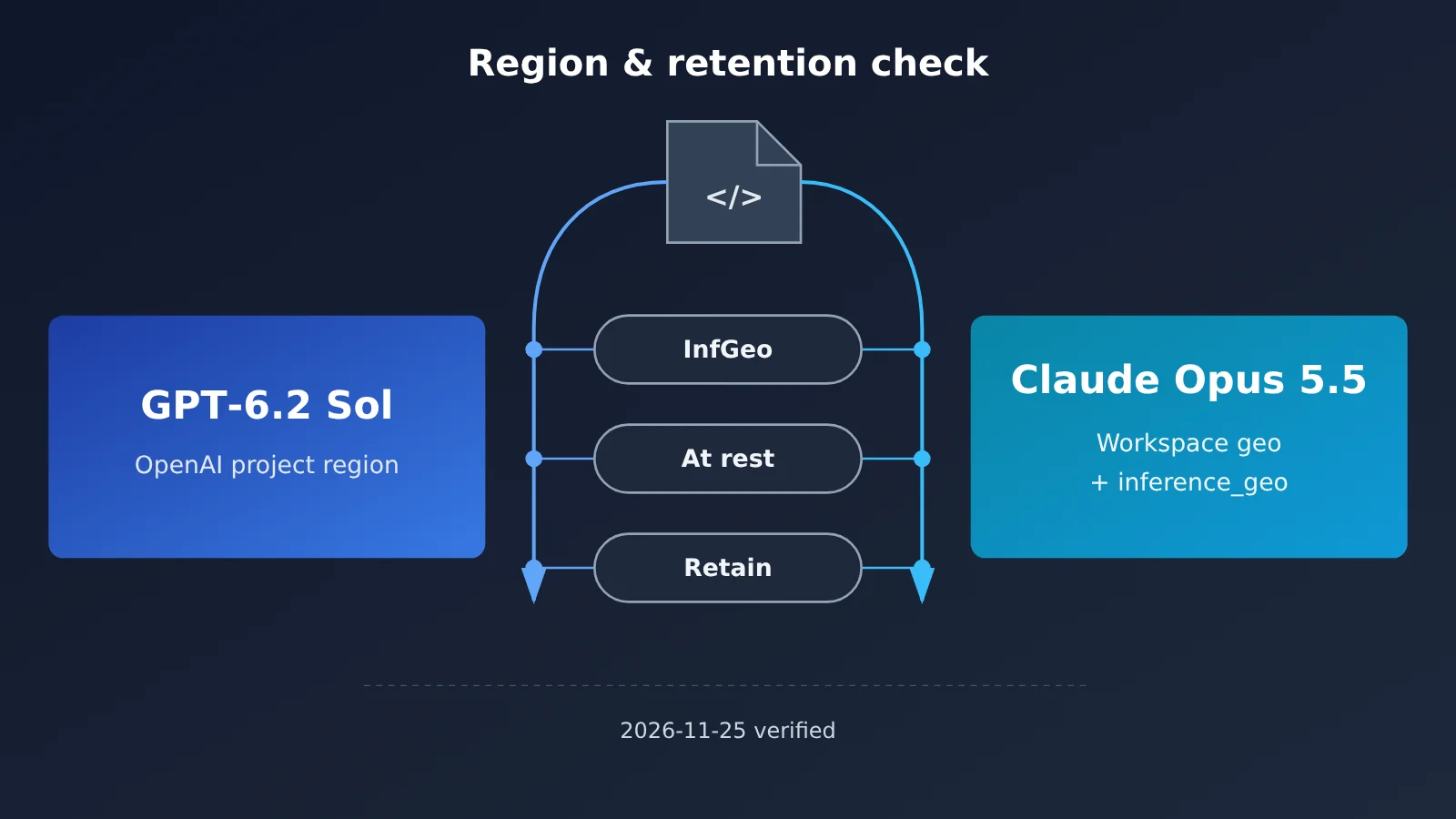
Summary: When an enterprise code assistant sends code through the first-party APIs, how do you separately verify the inference region, static storage region, and data retention rules for GPT‑6.2 Sol and Claude Opus 5.5?
Bottom line first: You can’t settle this at either vendor by looking at a single “region” switch, but the two break it down differently. OpenAI’s region is selected when you create the API project; after that, you check the model + service tier + endpoint row by row to see whether static storage and regional inference are supported. The Claude API splits it into two settings: the Workspace geo, which can’t be changed after creation, and the per-request inference_geo. Retention rules vary by endpoint at both vendors, and ordinary synchronous requests, files, batch processing, and code execution containers need to be documented separately. If your hard requirement is “inference restricted to Europe,” according to public documentation as of 2026-11-25, OpenAI’s European projects list residency support for GPT‑6.2 Sol under Standard, Fast, and Batch. Claude’s first-party Messages API currently exposes only "global" and "us"; you cannot infer Europe-only from global.
This article was verified on 2026-11-25 Beijing time. Its scope is limited to the publicly documented product controls for enterprises calling the OpenAI API and Anthropic Claude API directly. The service contract and the actual configuration in the console are what ultimately govern your team’s deployment.
Knowledge Map: GPT‑6.2 Sol vs Claude Opus 5.5 — Checking Regions and Data Retention
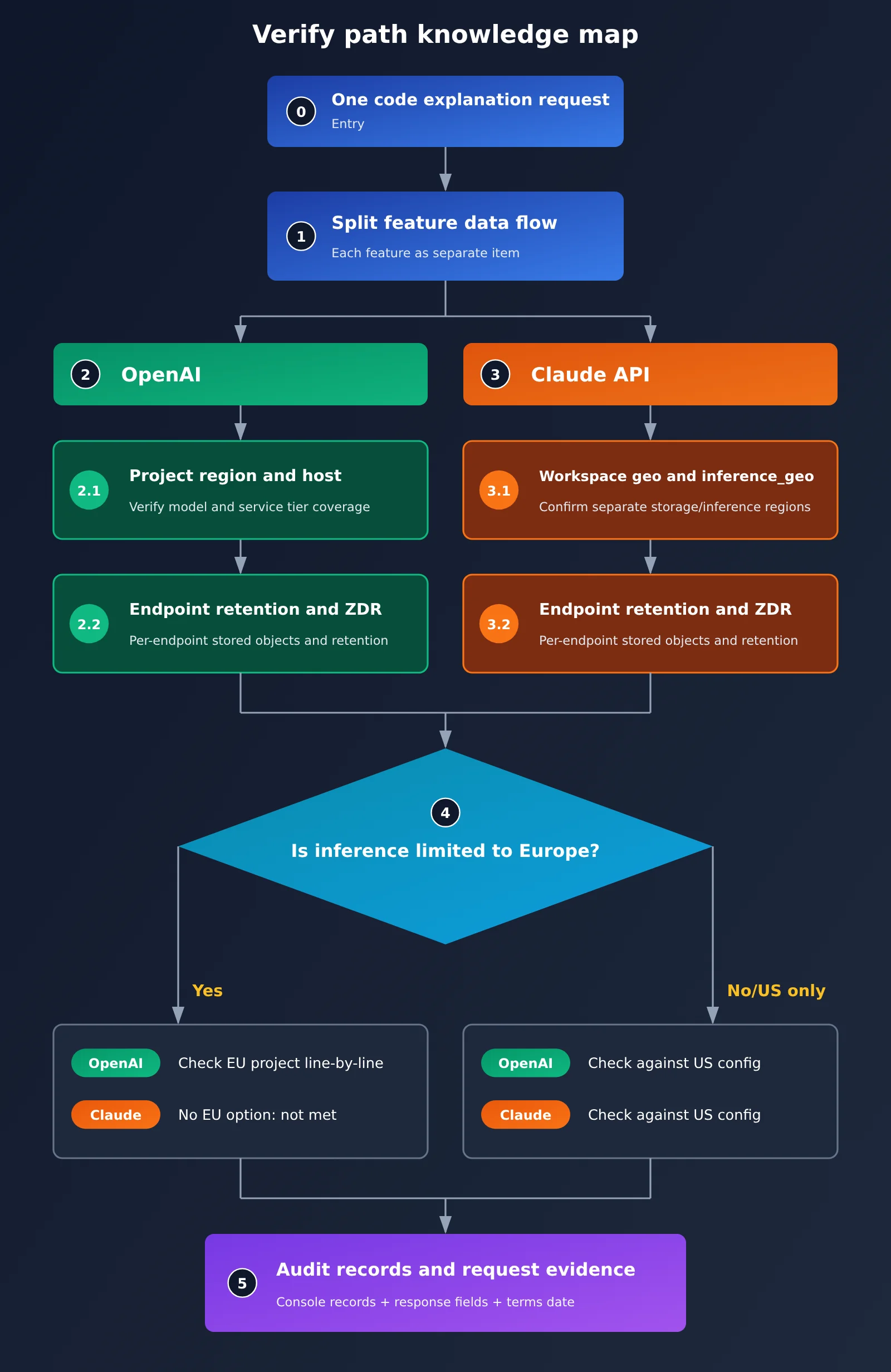
How to read the diagram: first break the code assistant’s functionality apart in Section 1, then follow the two lines separately — Section 2 (OpenAI) and Section 3 (Claude) — and in Section 4 put both lines side by side in a concrete scenario. Section 5 turns the results into an audit record. In the diagram, “Is European inference required?” is the condition that most often changes the conclusion, so it gets its own decision node.
Index: reading order
- Section 1, Splitting the data flows is the starting point. Every check that follows uses the feature list produced in this step as its unit of work.
- Section 2, OpenAI and Section 3, Claude are parallel sections. If you only use one vendor, you can read just the matching section.
- Section 4, the comparison scenario depends on the conclusions from the previous two sections; it uses “European inference + temporarily uploaded code files” to show where the two vendors differ.
- Section 5, records and evidence turns the configurations, response signals, and policy dates gathered above into a record you can re-verify.
To Know: terms you’ll need to understand this article
| Term | Plain-language explanation |
|---|---|
| Data residency | Product controls that confine the storage or processing of specified data to a geographic region |
| At rest | Where customer content that must be persisted is written to disk — separate from where inference itself runs |
| Regional inference / inference geo | The region where a single model invocation actually executes |
| ZDR (Zero Data Retention) | A zero data retention arrangement; requires prior approval and covers only eligible endpoints and features |
| Abuse monitoring logs | Prompts, responses, and derived metadata the provider retains for security review |
| Application state | Data stored to keep features working, such as files, batch results, and session responses |
| Workspace geo | Workspace-level storage region and, for some endpoints, processing region in the Claude API; it can’t be changed after creation |
1 Breaking Down an Enterprise Code Assistant’s Data Flows: Where GPT‑6.2 Sol and Claude Opus 5.5 Both Start
A code assistant usually doesn’t just fire off one plain-text request. It might call online retrieval, upload code files, run offline batch jobs, execute code inside a container, or hook into third-party tools like remote MCP—all at once. Each feature type has its own endpoints, its own retention rules, and its own regional coverage. Lumping them all together in a compliance write-up is where mistakes happen most easily.
Start by making a feature inventory, filling in these fields for each item: the categories of data sent, the actual production endpoint, regional controls, persistent objects, deletion channels, and the date of the supporting evidence. When you verify, begin with the narrowest pathway—the synchronous, plain-text-only call—and then add the vector store, upload endpoints, and tools one at a time. That way, each capability you add makes it obvious what extra storage and retention it brings in.
Your enterprise’s own systems are separate data flows too. OpenAI’s data residency documentation spells out that System Data, cross-region transfers caused by where user or customer infrastructure sits, and content and services provided by third parties are all exceptions. So self-hosted retrieval, logging, developer terminals, and external tools need to be registered separately from first-party API requests. Receiving code through a single regional host only covers what that host and that service capability explicitly list.
2 On the OpenAI Side: How to Check GPT‑6.2 Sol’s Processing Region and Data Retention
2.1 GPT‑6.2 Sol’s Project Region and Regional Hosts
OpenAI’s data residency is chosen by eligible organizations at the time an API project is created, and eligibility has to be confirmed through the sales channel. Region covers two capabilities. For supported endpoints, models, and snapshots, Customer Content that needs to be persisted can be stored at rest in the selected region. If the same entry also supports regional processing, inference runs in that region too. So when you read through the region list, evaluate it line by line — does this line describe static storage, model inference, or service-level support?
| Item to check | What the public docs say (verified 2026-11-25) |
|---|---|
| European region scope | European Economic Area plus Switzerland |
| Regional host examples | Europe eu.api.openai.com, US us.api.openai.com |
| GPT‑6.2 Sol residency support | US and Europe support Standard, Fast, Batch |
| Ultrafast residency | Listed for US only |
| Residency endpoint surcharge | Models launched on or after March 5, 2026 that are eligible pay a 10% surcharge when using data residency endpoints |
| When the region is chosen | Selected when the API project is created, eligibility confirmed through sales |
Managers can capture the following in a single record: the project’s selected region, the actual request host, the model name gpt-6.2-sol, the specific service tier, and whether that endpoint appears under the same capability entry. Only when all four line up can you say the request is covered by the residency capability. Data egress from downstream services such as remote MCP isn’t governed by this record — it’s still subject to the other party’s service policy and the actual business boundaries.
2.2 GPT‑6.2 Sol Endpoint Retention and ZDR Eligibility
By default, the OpenAI API does not use API content to train models; cases such as opting in to sharing have separate applicable conditions. OpenAI divides retention into two categories: abuse monitoring logs and application state. By default, abuse monitoring logs may include prompts, responses, and derived metadata, and are typically retained for up to 30 days; exceptions such as legal requirements or protecting the service may extend this period. Both Zero Data Retention and Modified Abuse Monitoring require prior approval and additional requirements, and can be used at the organization or project level.
The store parameter on the Responses endpoint deserves its own note. When store is omitted or set to store: true, standard response content is retained for at least 30 days. Once ZDR is approved and enabled, this parameter is treated as false. Background tasks and cache have their own separate short-term state retention conditions, so compliance documentation should not describe every Responses call as having the same storage behavior.
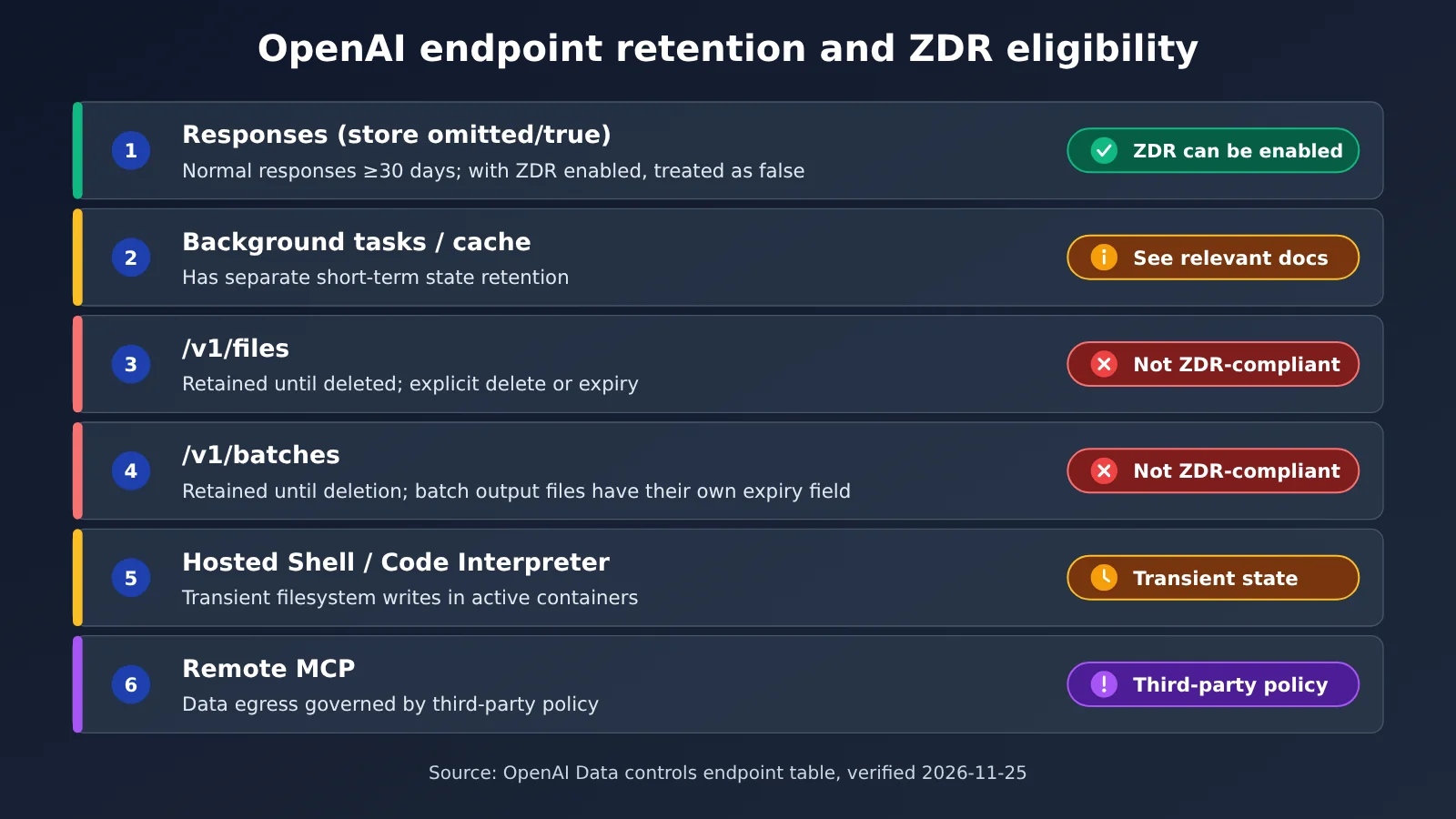
The key point the graphic above is meant to convey: the same model and the same code string can fall under different retention rules depending on the endpoint. The official endpoint table lists the application state for both /v1/files and /v1/batches as “retained until deletion,” and neither qualifies for ZDR. Files can be explicitly deleted or set to expire depending on the applicable endpoint, and batch output files also have their own expiration field. So these two object types need their deletion method and lifecycle recorded separately. Hosted Shell and Code Interpreter write state to the ephemeral filesystem of active containers, while data received by remote MCP is governed by third-party policies. Including “does this feature need access to raw code” in your service inventory can help you determine which tools should be turned off.
3 Claude Side: How to Verify Processing Regions and Data Retention for Claude Opus 5.5
3.1 Workspace geo and inference_geo for Claude Opus 5.5
The native Claude API splits region control into two separately named settings. Workspace geo determines where static storage lives, along with endpoint processing for things like image transcoding and code execution. It’s set when you create a workspace and can’t be changed afterward, and the public docs currently list only "us". Inference geo constrains a single model inference request. On the native POST /v1/messages endpoint, you can set inference_geo: "us" for claude-opus-5-5.
| Check item | What the public docs say (verified 2026-11-25) |
|---|---|
| Workspace geo allowed values | Currently lists only "us"; can’t be changed after creation |
| inference_geo default | "global", can run in any available region |
| Allowed values for standard native Messages | Currently lists only "global" and "us" |
| Routing verification signal | usage.inference_geo in the response |
| Workspace-level constraints | allowed_inference_geos and default_inference_geo |
| US inference pricing | 1.1x across token categories |
| Batch | You can set this parameter per request; retention follows Batch rules |
You need to look at both workspace-level fields together. If your organization requires this workspace’s inference to be pinned to the US, set allowed_inference_geos to allow only the US, and also set default_inference_geo to the US. If you change only the default while leaving multiple allowed regions in place, callers can still explicitly choose another allowed value. You can modify these settings on the Data residency page in Console, or configure them through the data_residency object in the Admin API by someone with org admin permissions. Fields you omit during an update keep their current values.
3.2 Endpoint retention and ZDR eligibility for Claude Opus 5.5
Standard commercial retention for the Claude API means deletion within 30 days after receiving inputs or generating outputs. The public terms list exceptions such as user-controlled features like Files, separate agreements, enforcing usage policy, and legal requirements. For ZDR, you need to check the contractual terms, the workspace’s actual mode, and the feature’s scope together.
| Feature | Retention | ZDR status |
|---|---|---|
/v1/messages with inference_geo |
Standard commercial retention, deleted within 30 days | Officially marked as Legacy ZDR compliant |
| Batch | Must store async inputs and outputs for up to 29 days | Not ZDR eligible |
| Files | Retained until deleted or configured expiry | Check separately under the Files feature |
| Code Execution containers | Separate retention period | Check separately against the feature table |
| Other arrangements | Docs list options such as EFS ZDR separately | Defer to the option actually approved |
Two things are easy to misjudge. First, capabilities marked as ineligible in the Legacy ZDR feature list can have their own independent retention rules. It’s just that some workspaces—such as those with Anthropic Human Review turned off—will refuse to create new Batches. Second, a successful request doesn’t mean the capability is ZDR-compliant. When documenting, spell out the option that was actually approved and the endpoint it applies to. Don’t infer from a region field that some data control is already enabled.
4 GPT‑6.2 Sol vs Claude Opus 5.5 Comparison Scenario: European Inference + Temporary Uploaded Code Files
Let’s put the two tracks side by side with one concrete scenario: a coding assistant requires inference to be limited to Europe and also needs to temporarily upload code files for a request. This scenario triggers both “region” and “retention” issues at once, and it neatly exposes the differences between the two vendors.
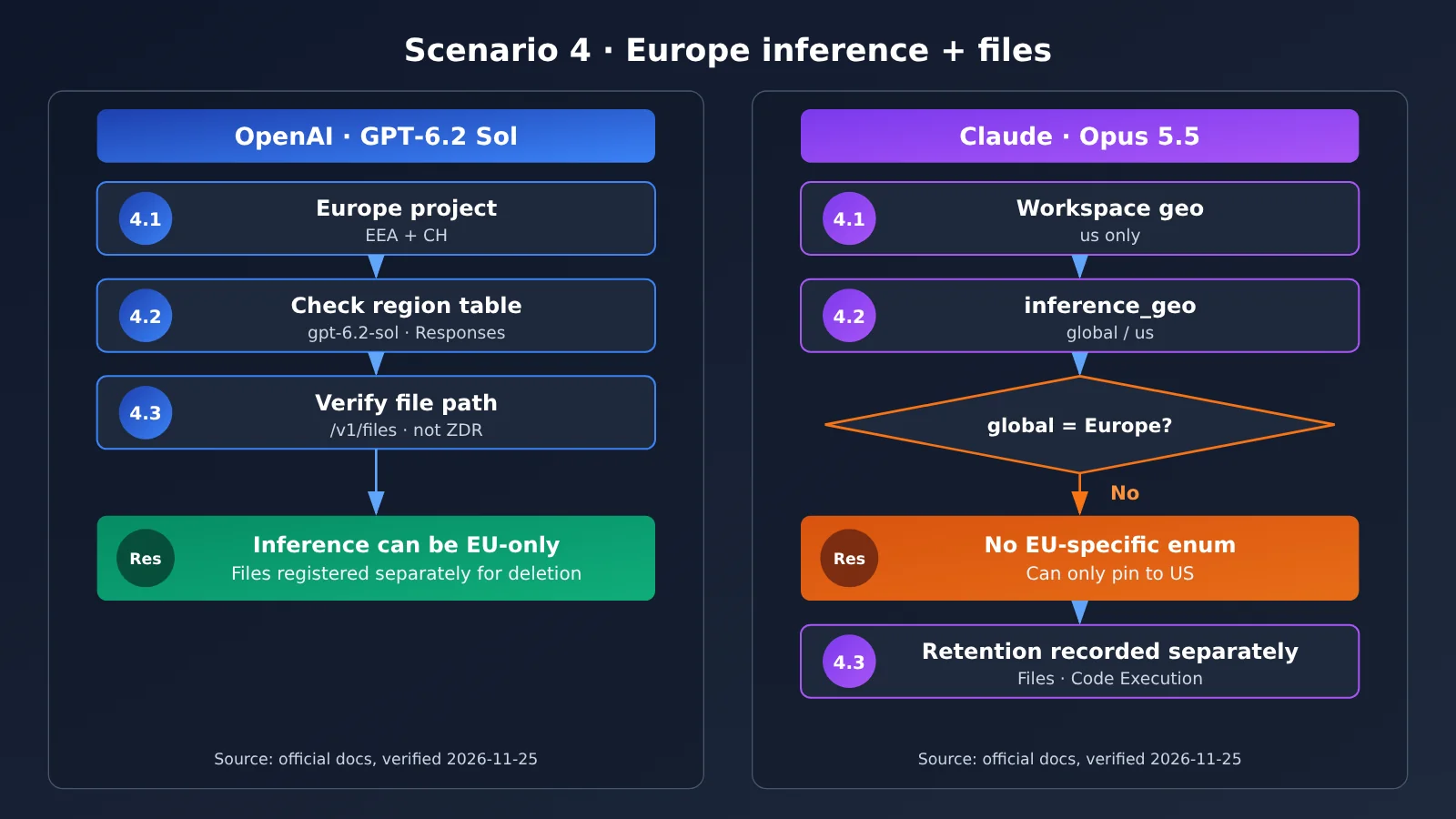
For OpenAI, first find the entry for gpt-6.2-sol and Responses in the official region table for the European project, and confirm that the service tier you’re using has residency support in Europe. If you’re on Ultrafast, note that its residency is listed only for the United States. Then check the file path separately: the application state for /v1/files is retained until deletion and is not ZDR-compliant, so uploaded code files need to have an expiration set or be explicitly deleted.
For Claude, check the Workspace geo and Messages enum values separately. The vendor’s current public options provide only fixed United States inference; "global" means it can run in any available region, and it should not be read as Europe-specific. So in this scenario, Claude’s first-party API, based on the public documentation, cannot satisfy “Europe-limited inference.” If you relax the requirement to “United States-limited,” you need to configure both allowed_inference_geos and default_inference_geo. One thing both vendors have in common: when a task depends on code uploads or persistent helper tools, that part has to be checked as a separate item, and you need to record the project or workspace that owns the credentials, along with the tool’s own retention period.
5 GPT‑6.2 Sol and Claude Opus 5.5 Audit Records and Request Evidence
5.1 Technical Acceptance Requests Using Synthetic Inputs
For technical acceptance, you can use synthetic inputs that contain no sensitive content and document evidence across three areas: endpoint configuration, response statistics fields, and functional behavior. The example code below is for use in an authorized project to check where requests actually go and which region parameters they carry. The request URLs are the vendor’s public hosts, and the field names come from the vendor documentation. For parameters such as service tier, check your project’s actual documentation.
import os
import httpx

SYNTHETIC_PROMPT = "解释这段示例函数的作用:def add(a, b): return a + b"

# OpenAI: Use the European regional host for European projects and disable server-side storage
openai_resp = httpx.post(
    "https://eu.api.openai.com/v1/responses",
    headers={"Authorization": f"Bearer {os.environ['OPENAI_API_KEY']}"},
    json={"model": "gpt-6.2-sol", "input": SYNTHETIC_PROMPT, "store": False},
    timeout=60,
)
print("OpenAI host:", openai_resp.request.url.host, "status:", openai_resp.status_code)

# Claude: Explicitly specify US inference and read the routing signal from the response
claude_resp = httpx.post(
    "https://api.anthropic.com/v1/messages",
    headers={
        "x-api-key": os.environ["ANTHROPIC_API_KEY"],
        "anthropic-version": "2023-06-01",
    },
    json={
        "model": "claude-opus-5-5",
        "max_tokens": 256,
        "inference_geo": "us",
        "messages": [{"role": "user", "content": SYNTHETIC_PROMPT}],
    },
    timeout=60,
)
usage = claude_resp.json().get("usage", {})
print("Claude inference_geo:", usage.get("inference_geo"))
This code only prints the host, status code, and region signal; it doesn’t output the request or response body. Production logging should follow the same approach: keep only service region configuration, request identifiers, and non-content status, and avoid writing raw code and credentials into your self-built observability system. If requests are sent through a company-owned intermediary layer, you’ll also need to check the actual outbound host and final parameters during acceptance, because the region selected in the UI may not reach the vendor exactly as shown.
5.2 GPT‑6.2 Sol vs Claude Opus 5.5 Audit Record Fields
An audit record should include the following fields. Both providers can use the same table and fill in their respective columns.
| Field | What to record for OpenAI | What to record for Claude |
|---|---|---|
| Deployment name and date | Deployment identifier, verification date | Same as OpenAI column |
| Provider host | Actual regional host receiving the request | Actual host receiving the request |
| Project / workspace configuration | Project region selection | Workspace geo, allowed_inference_geos, default_inference_geo |
| Model and endpoint | gpt-6.2-sol + specific endpoint |
claude-opus-5-5 + specific endpoint |
| Inference selection and response signal | Service tier, corresponding row in the region table | inference_geo parameter and usage.inference_geo |
| Output tier | Standard / Fast / Batch / Ultrafast | Messages or Batch |
| Stored objects and retention period | store setting, file and batch output expiration settings |
File retention period, Batch up to 29 days, container lifetime |
| Enabled exceptions and data controls | ZDR / MAM approval status | Approved options such as Legacy ZDR and EFS ZDR |
| Supporting evidence | Terms and documentation dates, console screenshots | Same as OpenAI column |
Console screenshots can preserve version numbers and configuration entry points, but strip organization identifiers, keys, and code snippets before putting them in shared files. For Claude, verify both the Console page and the data_residency object returned by the Admin API, because even if the default looks correct, some requests may still be allowed to go to other approved regions. For OpenAI, be sure to note whether the request permits server-side storage, whether there is a background task window, and whether files are persisted separately.
It should be noted that inference regions, static storage, and the initial conditions for retention must be supported by the provider’s feature list and approved terms. Synthetic requests can only prove that “this request was sent according to the configuration and returned the corresponding signal”; they cannot by themselves prove retention behavior. Latency, reasoning capability, and code quality fall under product validation and are not evaluated in this article.
References
- OpenAI Data residency: project regions, regional hosts, residency support for models and service tiers, and exceptions
- Link:
developers.openai.com/api/docs/guides/data-residency
- Link:
- OpenAI Data controls: abuse-monitoring logs, ZDR, the
storeoption for Responses, and the endpoint retention table- Link:
developers.openai.com/api/docs/guides/your-data
- Link:
- OpenAI Batch: batch input/output files and expiration fields
- Link:
developers.openai.com/api/docs/guides/batch
- Link:
- Claude Data residency: Workspace geo,
inference_geo, workspace allowed regions, and default region configuration- Link:
platform.claude.com/docs/en/manage-claude/data-residency
- Link:
- Claude API and data retention: feature-level ZDR eligibility and retention Q&A
- Link:
platform.claude.com/docs/en/manage-claude/api-and-data-retention
- Link:
- Anthropic commercial retention notes: standard commercial retention periods and exceptions
- Link:
privacy.claude.com/en/articles/7996866-how-long-do-you-store-my-organization-s-data
- Link:
- Claude Batch processing: asynchronous storage and region parameters for Batch
- Link:
platform.claude.com/docs/en/build-with-claude/batch-processing
- Link:
There are three criteria for marking verification as complete. First, every item in the capability list maps to a specific entry in the vendor’s documentation. Second, the configuration screenshots, the response signals from synthetic requests, and the terms dates corroborate one another. Third, for any hard requirement like “needs European inference” or “needs ZDR,” you can point to exactly which project or workspace and which endpoint satisfies it. If any one of these doesn’t line up, that capability is recorded as “to be confirmed” for now and doesn’t go into the compliance conclusion.
Author: APIYI Technical Team