
Note from the author: This comparison of Codex, Claude Code, and DeepSeek Harness covers model access, tool extensibility, and execution scheduling. It explains what it takes to swap models, connect APIs, and build automation, so you can make a clear choice.
Many developers lump Codex, Claude Code, and DeepSeek Harness together when picking a tool, but these three aren’t actually the same category of product. This article compares them across four dimensions — freedom to switch models, API access methods, business tool extensibility, and execution and automation — and ends with clear, scenario-based recommendations.
This isn’t a wishy-washy “they each have their strengths” analysis, and it won’t throw made-up benchmark scores at you. Every capability description here is based on official vendor materials (verification date: November 12, 2026), and explicitly separates “official claims,” “reasonable inference,” and “verify it yourself.”
The core value: after reading this, you’ll be able to answer three questions — who to pick if you want a mature coding agent out of the box, who gives you more freedom if you want to switch models, and who fits better if you want to build your own automation system.
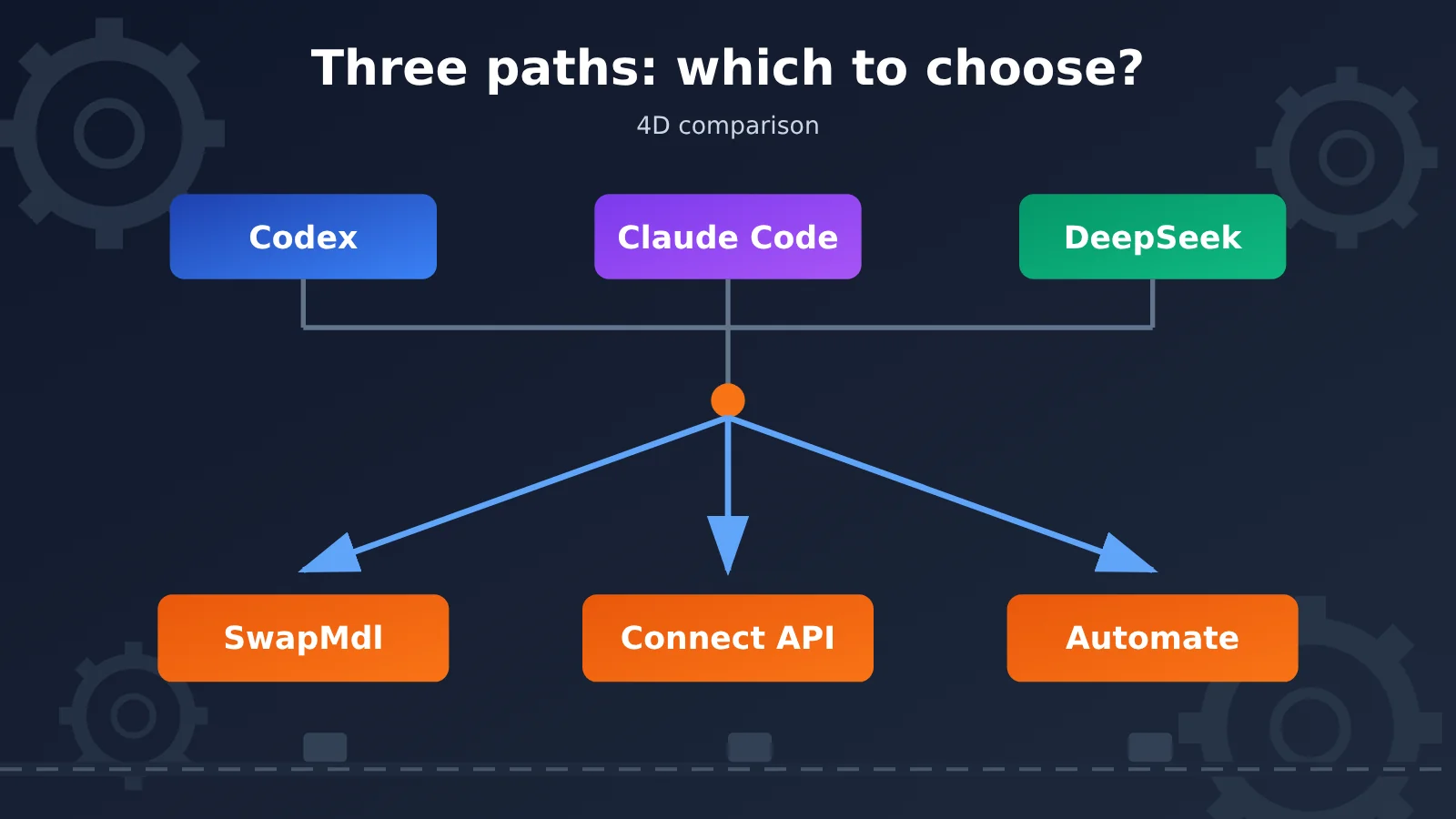
Why Codex, Claude Code, and DeepSeek Harness Can’t Simply Be Treated as the Same Kind of Product
To make this easier to grasp, let’s give all three products the same task: every morning at 9 a.m., automatically gather the latest AI news, pick out the topics worth writing about, generate a research packet and an article plan, then enter the results into the company’s content management backend and save them — and do it all again automatically the next day. This task has five stages — gathering information, generating content, filling in the backend, scheduled execution, and model inference — and together they happen to cover every capability we’ll be comparing later.
Codex and Claude Code are mature coding agents. They come in official product forms, with account systems and usage quotas; they can read code repositories, execute commands, run tests, and also operate a browser. Codex additionally offers Codex Cloud, which lets tasks run in a remote compute environment. Using them is like “hiring an engineer the vendor has already trained” — the capability boundaries and available models are essentially decided by the vendor.
DeepSeek Harness is a different story. It’s an open-source project under the MIT license, and its official architecture docs describe it with the phrase “Everything is a Plugin”: model adapters, the tool registry, session records, the Agent Loop (the execution loop where the model and tools interact back and forth), filesystem and command execution, sandbox approval policies, background tasks, and Webhooks can all be swapped out through plugins and configuration. It’s currently in Developer Preview — closer to a chassis you can modify yourself than a finished, out-of-the-box product.
One more thing worth adding: Codex also has a platform side. OpenAI has published Codex Harness and offers three programmatic access methods — SDK, App Server, and codex exec; but the official documentation clearly treats the open-source runtime code and model access and hosted cloud services as separate layers, and they shouldn’t be conflated.
| Comparison Dimension | Codex | Claude Code | DeepSeek Harness |
|---|---|---|---|
| Product positioning | Mature coding agent, covering local CLI and cloud tasks | Mature coding agent, deeply integrated into the development workflow | Open-source, customizable agent runtime system |
| Openness | CLI and Harness are open source (Apache-2.0); hosted cloud services are a separate layer | Commercial product with official extension interfaces; core source code is not open | MIT open source, currently in Developer Preview |
| Extension approach | MCP, Plugins, SDK, App Server | MCP, Hooks, Subagents, Agent SDK | Everything is a plugin, and even the Agent Loop can be replaced |
| Maintenance responsibility | The official product and cloud services shoulder more of it | The official product and cloud services shoulder more of it | Users configure and maintain it themselves and bear the security responsibility |
Terminology at a Glance: Common Ground for the Codex, Claude Code, and DeepSeek Harness Comparison Table
The “daily news digest” task from earlier will keep coming up later, so let’s first get the key terms straight using the same scenario—that way, we’re all on the same page.
- API: The agreed-upon “ordering format” between a program and a model service. Every step in the daily digest task depends on it.
- API key: The credential that proves “who you are”—like a pickup code, so keep it safe.
- Base URL: The service address requests are sent to. A configurable address doesn’t necessarily mean the protocol is compatible.
- Model adapter: The component inside the Agent that connects to the model service and handles request and response formats.
- Tool calling: The mechanism by which the model says “search this for me” instead of just making up an answer.
- MCP: The protocol that connects an Agent to external tools and data services. Both Codex and Claude Code support it.
- SDK: The developer toolkit for embedding Agent capabilities into your own program.
- Webhook: An interface that lets external events proactively “ring the doorbell” of your app.
- Agent Loop: The execution loop in which the model and tools interact back and forth until the task is complete.
- Cloud task: A task that runs in a remote environment. Permissions and file availability depend on how that environment is configured.
Want to Switch Models? Codex vs Claude Code vs DeepSeek Harness — Which One Gives You the Most Freedom
“Wanting to switch models” is the most direct reason many teams start paying attention to agent frameworks, and these three products take very different approaches here.
Codex supports two ways to connect: logging in with a ChatGPT account, or using your own API key (which needs extra configuration). Note that the former draws on the Codex usage included in your ChatGPT plan, while the latter is billed through the API — the two quotas don’t overlap, and you shouldn’t conflate the open-source Codex CLI with subscription credits.
Claude Code officially offers subscription login plus connections through Anthropic Console, Amazon Bedrock, Google Vertex AI, Microsoft Foundry, and others; developer surfaces like the Terminal CLI, VS Code, and JetBrains also support third-party provider configuration. But it’s worth stressing: this doesn’t mean every Claude product entry point can be swapped to any model — check the official docs for the version you’re using to see exactly what’s supported.
DeepSeek Harness offers the most freedom, and also the most responsibility. Its model adapters are plugins themselves, and the developer docs use two environment variables, DEEPSEEK_API_KEY and DEEPSEEK_BASE_URL, as an example: the API key handles authentication, and the Base URL specifies a custom API address — if unset, it defaults to the official DeepSeek API. One important caveat: a custom Base URL is just a sample configuration for the DeepSeek adapter. Whether other model services actually work depends on the real request protocol and tool-calling compatibility — a configurable address doesn’t mean it works out of the box.
If you already plan to switch frequently between GPT, Claude, DeepSeek, and other models for comparison, putting the model layer behind a unified interface will significantly cut your switching costs. Publicly available information from APIYI apiyi.com shows the platform provides an OpenAI-compatible interface, where a single API key can call multiple mainstream models, billed by usage, with free test credits for new users (the above is the platform’s public description — for specific model compatibility, test it yourself).
| Comparison | Codex | Claude Code | DeepSeek Harness |
|---|---|---|---|
| Default connection | ChatGPT account login, using plan-included usage | Claude subscription login | Connects to the official DeepSeek API by default |
| Own API key | Supported, requires extra configuration, billed via API | Supports official channels such as Anthropic Console, Bedrock, Vertex AI, Foundry | Configured via environment variables like DEEPSEEK_API_KEY |
| Custom model address | Not officially opened up to arbitrary third-party model addresses | CLI and IDE support third-party providers, but not every product entry point | DEEPSEEK_BASE_URL can point to a custom address |
| Switching freedom | Constrained by the official account system and billing rules | Medium-to-high, with some conditions | Highest, but you must verify protocol and tool-calling compatibility yourself |
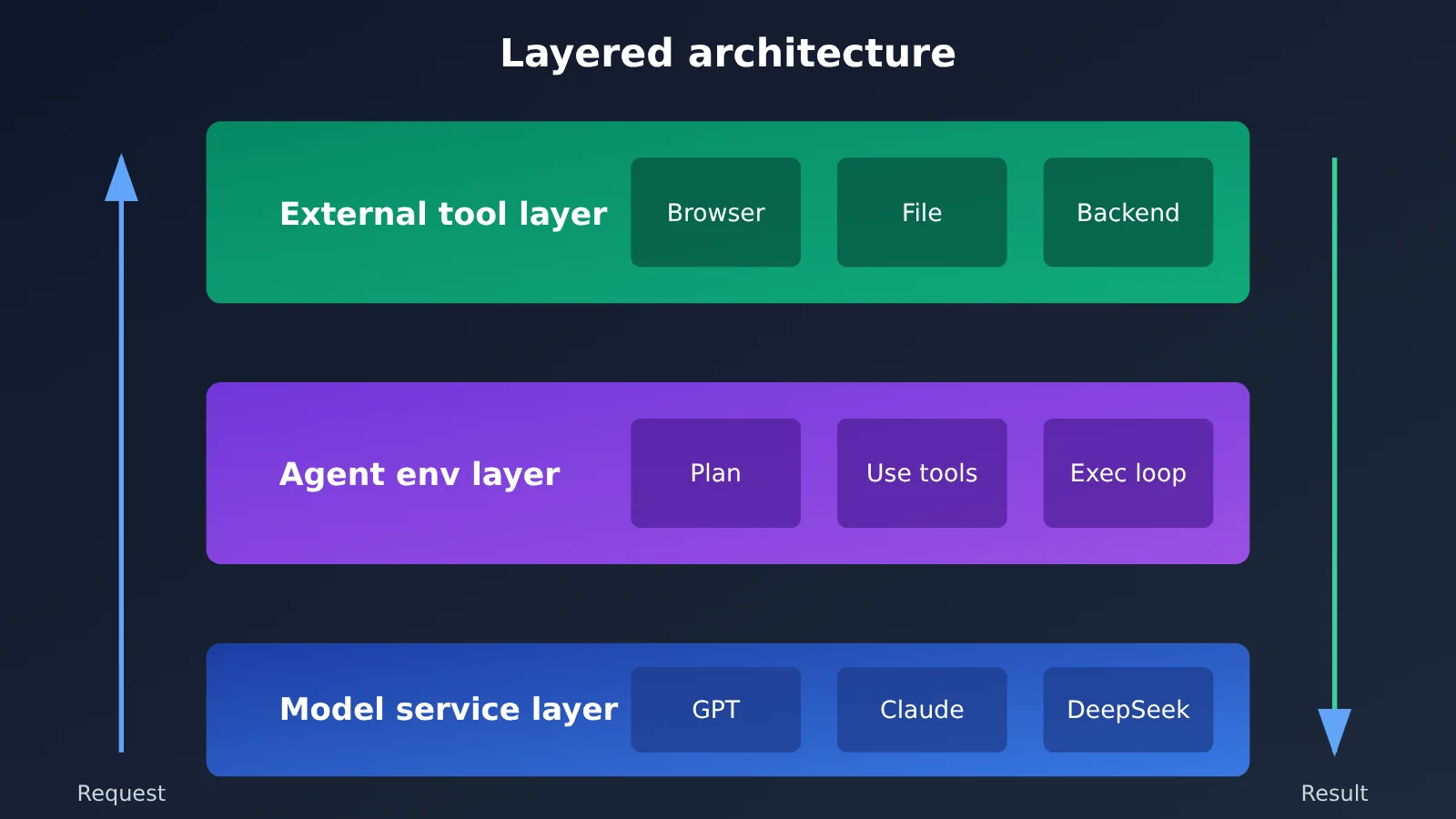
The layering in the diagram above is key to understanding this article: the model service layer only provides reasoning capability, the agent environment layer decides how tasks are planned and executed, and the external tool layer is what actually reaches the browser, files, and enterprise back office. Switching models addresses the bottom layer; building automation addresses the middle and top layers — the two can’t replace each other.
Connecting to Business Tools: Codex, Claude Code, or DeepSeek Harness — Which Extension Approach Is More Flexible?
Back to the third step of the daily report task — “filling it into the company backend” — this step tests a tool’s extensibility.
Codex connects to external tools through MCP and starts and manages Agent tasks inside your own programs through the SDK. App Server lets other applications plug into its sessions, events, tool calls, and approval workflows. codex exec targets scripts and CI scenarios, making it easy to build repeatable automated tasks. The overall philosophy is “official product plus standardized programming interfaces.”
Claude Code’s extension system revolves around MCP, Hooks, and Subagents. Official MCP examples include reading design docs from Google Drive, pulling tasks from Jira, querying PostgreSQL, creating Gmail drafts, and even sending messages to an Agent session via external events or Webhooks. Subagents can have their own independent context, system prompt, tool permissions, and model selection, and work in parallel in the background. Hooks can run custom scripts before and after tool calls, during permission requests, and at session start and end, making them well suited to adding “checkpoints” to a workflow.
DeepSeek Harness takes extensibility further: the tool registry, Agent Loop, and sandbox approval policy can all be replaced. That means you can not only “add tools” but also change “how the model decides which tool to call and how execution continues.” The trade-off is clear, too — you’ll need to configure and maintain everything yourself, and the official security note explicitly states that the project has not yet completed a security audit and should not be treated as security software suitable for production.
| Extension capability | Codex | Claude Code | DeepSeek Harness |
|---|---|---|---|
| External tool integration | MCP, Plugins | MCP (official examples include Drive, Jira, PostgreSQL, Gmail, etc.) | Plugin system and tool registry |
| Execution flow intervention | SDK, App Server, Hooks | Hooks can run scripts before and after tool calls, during permission requests, etc. | Agent Loop itself can be replaced |
| Multi-Agent collaboration | Orchestrate multiple tasks via the cloud and SDK | Subagents have independent context and permissions and can run in parallel in the background | Compose them yourself through plugins |
| Business system integration | SDK, App Server, codex exec | MCP and Webhook can send messages to a session | Background Jobs, Webhook, SDK run templates |
Building Automation: Comparing Codex, Claude Code, and DeepSeek Harness Execution Modes
The hardest part of a daily report workflow is this: “keep running automatically tomorrow, ideally without my computer being on.” That’s really a test of execution and scheduling capabilities, and you first need to separate three different things: local process execution, managed cloud tasks, and continuous scheduling.
Codex Cloud gives you an OpenAI-managed remote compute environment. Each task gets its own workspace, and cloud tasks can keep running after your computer goes to sleep. According to OpenAI’s help docs, saved VM state can generally be restored for up to 7 days after the task was last started or resumed (official description). For the “run scheduled tasks after shutdown” scenario, Codex Cloud is a pretty direct official option.
Claude Code is mainly built around local execution. Background agents and cross-session Subagents depend on how you run it. Whether it can keep going after your computer shuts down depends on where you deploy the execution environment—officially, it isn’t positioned as a cloud task product that keeps running after shutdown.
DeepSeek Harness offers Background Jobs and Webhooks, so it can plug into other automation systems. But its official local job backend relies on a running process—if you want it to run around the clock, you’ll need to deploy it yourself on an always-on server or container. For browser operations, it requires installing dsh-browser-use and explicitly enabling experimental providers like Playwright MCP, Chrome DevTools MCP, and Stagehand. Login state also won’t be automatically restored from session logs. These are the costs that come with all that flexibility.
| Execution mode | Codex | Claude Code | DeepSeek Harness |
|---|---|---|---|
| Local execution | CLI runs in a local terminal | Terminal CLI and IDE integration | Web, Headless, SDK, and other runtime templates |
| Cloud execution | Codex Cloud remote environment; keeps running after your computer sleeps | Depends on execution mode and deployment conditions | You’ll need your own always-on server or container |
| Background tasks and scheduling | Cloud tasks; codex exec for scripts and CI | Background Agent, cross-session Subagents | Background Jobs, Webhook (depends on a running process) |
| Browser operations | Browser and Computer Use-related capabilities | Chrome extension and Computer Use (with conditions) | Requires installing dsh-browser-use and other experimental providers |
One reminder: browser search, browser automation, and desktop control are three different levels of capability—don’t mix them up when evaluating. And local scheduled execution and continuous cloud execution are two different things as well.
Codex, Claude Code, DeepSeek Harness Quick Start: Get the Model-Layer API Working First
Whichever one you end up choosing, the first step is always to get the model layer running. Take the OpenAI-compatible interface as an example — a dozen lines of code is all it takes for your first call:
import openai

client = openai.OpenAI(
    api_key="YOUR_API_KEY",
    base_url="https://api.apiyi.com/v1"  # APIYI unified interface, OpenAI-compatible
)

response = client.chat.completions.create(
    model="gpt-4o-mini",
    messages=[{"role": "user", "content": "用一句话总结今天的 AI 新闻要点"}],
)
print(response.choices[0].message.content)
View the full implementation: understanding the Agent Loop through tool calls
import json
import openai

client = openai.OpenAI(
    api_key="YOUR_API_KEY",
    base_url="https://api.apiyi.com/v1"  # APIYI unified interface
)

tools = [
    {
        "type": "function",
        "function": {
            "name": "search_news",
            "description": "搜索今天的 AI 新闻",
            "parameters": {
                "type": "object",
                "properties": {"keyword": {"type": "string"}},
            },
        },
    }
]

def search_news(keyword):
    # In a real project, replace this with your own search API or business system API
    return "关于 " + keyword + " 的示例新闻"

messages = [{"role": "user", "content": "搜索今天的 AI 新闻, 总结成一段日报"}]

for _ in range(5):
    # Agent Loop: the model and tools keep interacting until the task is done
    response = client.chat.completions.create(
        model="gpt-4o-mini", messages=messages, tools=tools
    )
    msg = response.choices[0].message
    if msg.tool_calls:
        messages.append(msg)
        for call in msg.tool_calls:
            args = json.loads(call.function.arguments or "{}")
            result = search_news(args.get("keyword", "AI"))
            messages.append({"role": "tool", "tool_call_id": call.id, "content": result})
    else:
        print(msg.content)
        break
This code explains perfectly why “a model API is not an Agent environment”: the model only decides whether to call a tool and which one, while search_news is the execution layer you provide yourself, and the for loop is the simplest possible Agent Loop. Swap the tool function for your own business API, then wrap it in the Codex SDK, Claude Code’s MCP, or DeepSeek Harness’s plugin system, and you have the seed of each one’s automation. For the exact parameter format and available scope of tool calls, refer to the documentation of the model and API you’re using.
🚀 Quick start: We recommend getting the model layer working first through APIYI at apiyi.com — grab an API key and the free trial quota for new users, then layer on tools and orchestration via the unified interface. The platform supports unified API access to a range of mainstream models, which makes it easy to compare and switch within the same environment (per the platform’s public description).
⚠️ Note: An API aggregation service helps you connect to and switch between models, but it doesn’t automatically give you browser control, file permissions, cloud compute, or task scheduling. Calling a model API and owning a Codex or Claude product subscription are two different things.
Scenario Recommendations: Choosing Between Switching Models, Integrating APIs, and Building Automation
| Your Need | Prioritize | Main Reason |
|---|---|---|
| Want a ready-to-use, mature coding agent | Codex or Claude Code | Complete official product form, low maintenance cost |
| Want to freely swap in GPT, Claude, DeepSeek, and other models | DeepSeek Harness | Adapters are swappable and support a custom Base URL |
| Want to integrate the agent into your own business software | Codex SDK/App Server, Claude Agent SDK, DeepSeek Harness SDK | All three offer programmatic access |
| Want scheduled tasks to keep running after your computer shuts down | Codex Cloud or a self-deployed Harness service | Official cloud tasks vs. a self-hosted always-on environment |
| Want to modify the agent’s execution logic itself | DeepSeek Harness | MIT open source, Agent Loop is replaceable |
Decision Tips: First Ask Yourself How Much Freedom You Need
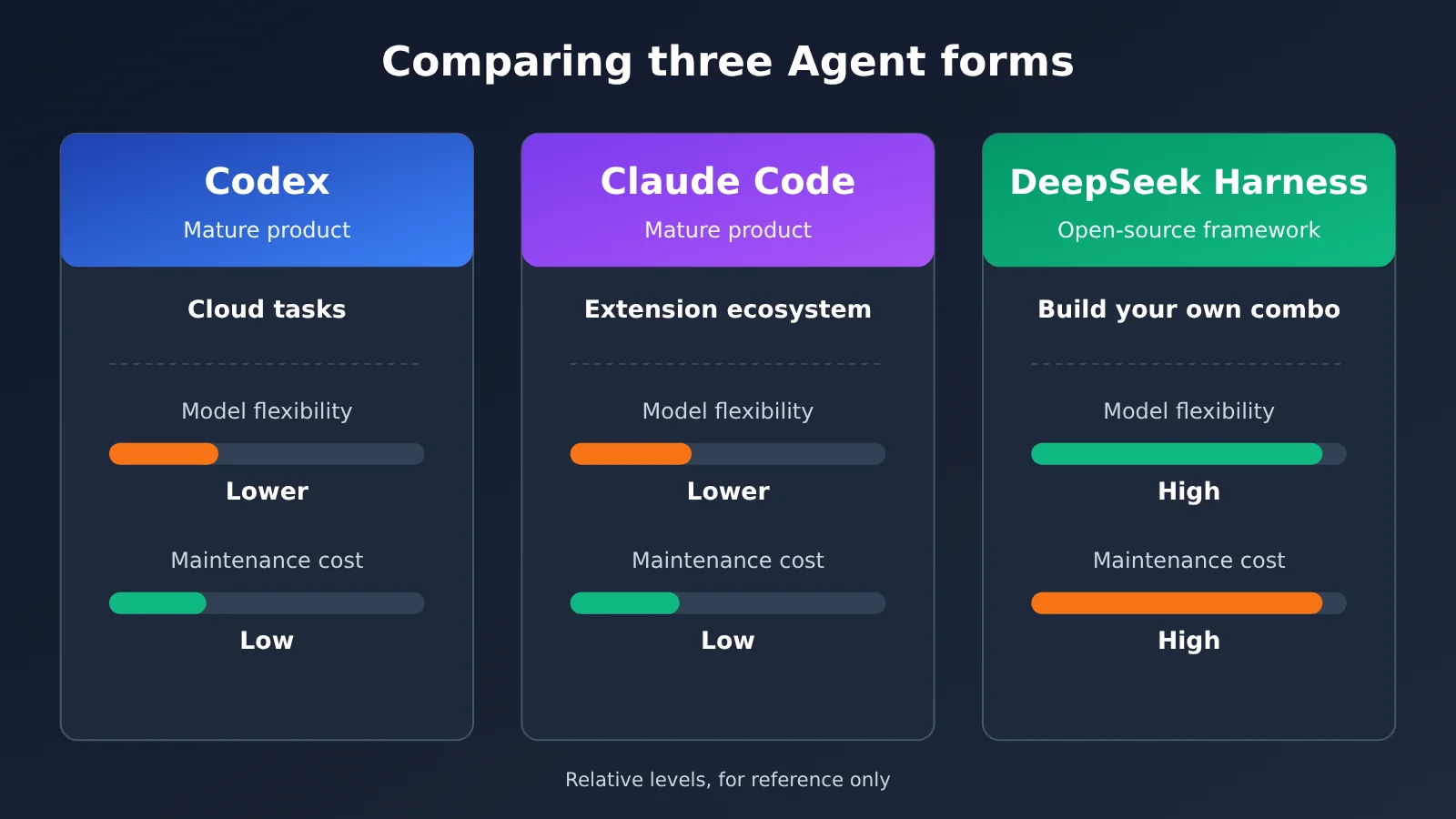
- Want to use a mature coding agent right away: Choose Codex or Claude Code. Both have complete development workflows and the official vendor handles most of the maintenance — great for teams that want to hand off tasks and ship results fast. The trade-off: model selection and usage rules are decided by the official product.
- Want to freely swap models and execution mechanisms: Choose DeepSeek Harness. Its plugin architecture gives you the most room to customize, but you’ll need to accept its Developer Preview status, the warning that it hasn’t completed a security audit, and full responsibility for deployment and fallback.
- Want to integrate the agent into your own business software: Look first at the three programmatic paths — Codex SDK/App Server, Claude Agent SDK, and DeepSeek Harness SDK — and combine them based on your existing tech stack and how much model freedom you want.
💡 Selection Tip: Which one you pick depends on how much freedom you want and how much maintenance cost you’re willing to bear. Before deciding, we recommend running each of the models you plan to use through a unified interface like APIYI at apiyi.com to validate model-layer performance, then deciding which agent form to wrap around it.
Frequently Asked Questions
Q1: What’s the essential difference between Codex, Claude Code, and DeepSeek Harness?
Codex and Claude Code are mature coding Agent products from OpenAI and Anthropic respectively, each with official accounts, usage quotas, and extension interfaces. DeepSeek Harness is an MIT open-source Agent runtime framework where the model, tools, and execution loop are all swappable plugins, and it’s currently in Developer Preview. The first two are “ready-to-use finished products,” while the latter is more like “a chassis you can modify.”
Q2: How is DeepSeek Harness different from calling the DeepSeek API directly?
Calling the DeepSeek API directly only gives you the model’s reasoning and generation capabilities. DeepSeek Harness is a complete runtime environment wrapped around the model, handling tool invocation, session recording, sandboxing, and background tasks. Think of it this way: the API is the engine, and the Harness is a whole vehicle you can customize yourself. If you want to switch to a model other than DeepSeek, you’ll need to configure an adapter and Base URL, and verify protocol and tool-calling compatibility. You can also start by doing a horizontal comparison at the model layer through a unified interface like APIYI apiyi.com.
Q3: Does Codex require a ChatGPT subscription, or can I use my own API Key?
Not necessarily. The official repository states that it supports logging in with a ChatGPT account, and also supports using your own API Key (which requires extra configuration). The former uses the Codex quota included in your ChatGPT plan, while the latter is billed by API, and the two quotas don’t interoperate. The open-source Codex CLI also shouldn’t be equated directly with subscription quota.
Q4: Can Claude Code switch to a non-Claude model?
The official docs list access methods such as Anthropic Console, Amazon Bedrock, Google Vertex AI, and Microsoft Foundry, and the Terminal CLI along with development interfaces like VS Code and JetBrains support third-party Provider configuration. But that doesn’t mean every Claude product entry point can be swapped to any arbitrary model—the specific support scope depends on the official documentation for the version you’re using.
Q5: How can I quickly connect to a model API and validate these three Agents?
I’d recommend getting the model layer working first, then gradually adding tools and orchestration:
1. Visit APIYI apiyi.com to register an account, and get an API Key plus free trial quota for new users;
2. Replace the `base_url` in this article’s code examples with `https://api.apiyi.com/v1` to complete your first call;
3. After confirming the model output and tool-calling format work properly, connect them to the Codex SDK, Claude Code’s MCP, or DeepSeek Harness’s plugins respectively.
The platform provides an OpenAI-compatible interface and multi-model access (as publicly described by the platform), making it easy to compare different models within the same codebase.
Q6: Can DeepSeek Harness be used directly in production?
It’s not recommended to put it straight into production. The official security notes clearly state that the project hasn’t completed a security audit and shouldn’t be treated as security software suitable for production environments. It can run model-generated code and commands and may access files, networks, processes, and credentials granted to it. The official recommendation is to use least privilege and to prioritize running it in disposable VMs, containers, or dedicated environments.
Q7: If a model API supports tool calling, does that guarantee an Agent can run?
Not necessarily. Whether an Agent can run also depends on the execution environment, tool registration, permissions, and orchestration. A configurable Base URL doesn’t mean the protocol is automatically compatible. Even if the model layer connects, browser operations, file access, and scheduled tasks still need their respective components. Before integrating, it’s best to validate layer by layer: “model layer → tool layer → orchestration layer.”
Codex, Claude Code, and DeepSeek Harness Key Takeaways
- Positioning differences: Codex and Claude Code are mature coding agents, while DeepSeek Harness is an open-source agent runtime framework.
- Model freedom: Harness’s adapters are replaceable and support custom Base URLs; the first two are constrained by official access channels.
- Extension methods: MCP and SDK are the shared language; Hooks and Subagents are Claude Code’s specialties; Harness can even swap out the Agent Loop.
- Execution differences: Codex Cloud keeps running after your computer goes to sleep; Harness’s scheduled tasks require you to provide your own always-on environment.
- Security boundaries: DeepSeek Harness is a Developer Preview and hasn’t completed a security audit—if you build your own, stick to least privilege.
- Rollout order: Get the model-layer API working first, then connect tools and scheduling layer by layer—avoid chasing full automation all at once.
Summary
Put the three products back in their respective places, and the conclusion becomes clear:
- Codex: A mature coding agent, plus Codex Cloud’s cloud tasks—suited for teams that want to “hand the task off.”
- Claude Code: A mature coding agent where MCP, Hooks, and Subagents form a flexible extension ecosystem—suited for deep customization within existing development workflows.
- DeepSeek Harness: An MIT-licensed, modifiable open-source foundation where both the model and execution mechanism can be swapped—suited for developers willing to build their own automation systems and shoulder the maintenance and security responsibilities.
Finally, back to that most important boundary: the model API determines reasoning capability, while the Agent environment determines what the model can call, how it executes, and how it delivers results to users. Swapping models, integrating APIs, and building automation are three things at different levels. Verifying layer by layer in the order of “model layer → tool layer → scheduling layer” is more reliable than trying to do it all at once. We recommend using APIYI apiyi.com to quickly validate model-layer performance—the platform offers OpenAI-compatible interfaces, unified multi-model access, and free credits for new users.
Reference Materials
- GitHub – Codex: OpenAI’s official open-source repository
- Link:
github.com/openai/codex -
Notes: CLI source code, plus guidance on account and API key integration
-
Codex as a platform: OpenAI developer blog
- Link:
developers.openai.com/blog/codex-as-a-platform -
Notes: A layered breakdown of the open-source harness, SDK, app server, and hosted service
-
Using Codex Cloud: OpenAI official help docs
- Link:
help.openai.com/en/articles/20001545-using-codex-cloud -
Notes: Remote compute environments, isolated workspaces, and how VM state gets restored
-
Claude Code Docs: Anthropic official documentation
- Link:
code.claude.com/docs/en/overview -
Notes: Integration methods, plus what you can do with MCP, subagents, and hooks
-
GitHub – DeepSeek Harness: DeepSeek official repository
- Link:
github.com/deepseek-ai/deepseek-harness -
Notes: Plugin architecture, model adapter configuration, the browser subsystem, and security notes
-
APIYI Developer Guide: Public platform overview
- Link:
help.apiyi.com/apiyi-wentuozhongxin-shangxian-kaifazhe-zhinan.html - Notes: OpenAI-compatible endpoints, a unified API key, and multi-model integration details
Author: APIYI technical team
Technical discussion: You’re welcome to reach out to us through the APIYI website homepage. For more model integration resources, visit the docs.apiyi.com documentation center.


