
Author’s note: Using Volcano Ark’s RMB standard pricing as of 2026-11-12, this article breaks down the real cost of three types of Seedream 5.5 tasks—image generation, iterative image editing, and layer separation—and compares them item by item with 5.0 Pro and Flash.
ByteDance Seed released Seedream 5.5 on November 9, 2026. In its “Model Pricing” update on November 12, Volcano Ark gave the RMB standard quote: input image ¥0.05/image, low-pixel-tier output ¥0.13/image, high-pixel-tier output ¥0.23/image. A 2K square-image edit with a single reference image costs about ¥0.28, while the same type of task on the previous-generation 5.0 Pro costs ¥0.60.
This isn’t just a restatement of prices based on per-image rates. Editing continuously for 100 rounds, or splitting out 99 layers in one go—the bills for these new capabilities all add up per image. Remembering only “¥0.23 per image” makes it easy to seriously underestimate your budget. This article calculates the three typical operations separately. Each case spells out the number of input images, number of output images, pixel tier, and billing formula.
Core value: After reading this article, you’ll be able to estimate the full task cost of Seedream 5.5 based on your own business workflow, and judge which scenarios should use 5.5 and which are better value with 5.0 Pro or Flash.
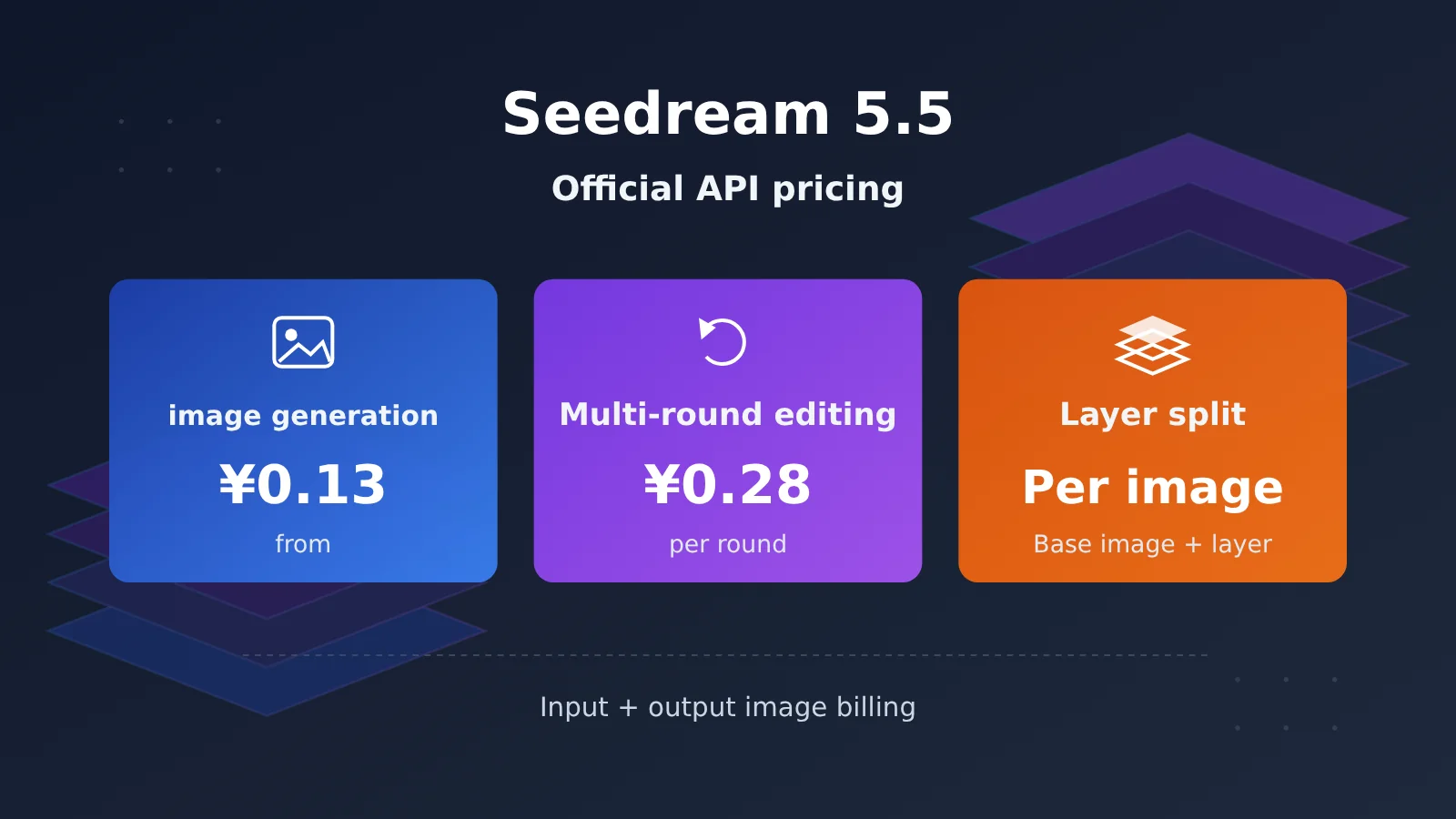
One-sentence summary: Seedream 5.5’s cost is determined jointly by the number of input images, the number of actual output images, and the pixel tier of each output image. Continuous editing accumulates per round, while layer separation is calculated image by image from the base image plus all layers.
To know: 5 terms you need to understand this article
- Pixel tier: A billing bracket divided by the total pixels (width × height) of a single output image. Up to 2.61 megapixels is the low tier; above 2.61 megapixels and up to 4.63 megapixels is the high tier.
- Multi-round editing: Using the image generated in the previous round as the input image for the next round, modifying it step by step. Each round is a new billable call.
- Layer separation: Splitting a complete image into one base image and multiple element layers that can be used separately, such as people, objects, and text.
- IPM: Images Per Minute, a rate-limit metric for the number of images output per minute. It’s separate from RMB billing.
- API: An interface that lets programs call a service. All prices in this article refer to Volcano Ark API’s standard pay-as-you-go pricing and do not include BytePlus promotional packages or third-party platforms’ USD quotes.
Seedream 5.5 Official API Pricing: How Much Does One Image Actually Cost?
According to the official Volcano Ark price list (updated 2026-11-12, model doubao-seedream-5-5), Seedream 5.5 uses an “input image + output image” image-based billing model. Under the published rules, tokens for text prompts are not billed separately.
| Billing item | Condition | CNY unit price | Notes |
|---|---|---|---|
| Input image | Images passed in for editing, multiple reference images, or splitting | ¥0.05/image | Billed from the first image |
| Low-tier output | Total pixels per image ≤ 2.61 million | ¥0.13/image | For example, a 1.5K square image at 1536×1536 |
| High-tier output | 2.61 million < total pixels per image ≤ 4.63 million | ¥0.23/image | For example, 2048×2048 or 2560×1440 |
| Text prompt | — | Not billed separately | Image-based billing model |
The general formula for a single request is:
Cost per request = number of input images × 0.05 + sum of the unit prices for the tier corresponding to each actual output image
There’s one thing to pay special attention to: “2K” is the name of a size tier, not a fixed 2048×2048. When you specify width and height, the lower limit for total pixels is 921600, the upper limit is about 4624220, and the aspect ratio is limited to between 1:16 and 16:1. To determine the billing tier, look at the actual total number of output pixels, not the tier name written in the request.
Seedream 5.5 image generation costs: from a single image to batch generation
Standard image generation falls into three cases: pure text-to-image, single reference image editing, and multi-reference image fusion (up to 10 reference images). The only difference among them is the input cost — the output cost is set by the pixel tier.
| Scenario | Input images | 1.5K output (low tier) | 2K square output (high tier) |
|---|---|---|---|
| Text-to-image, no reference image | 0 | 0 + 0.13 = ¥0.13 | 0 + 0.23 = ¥0.23 |
| Single reference image editing | 1 | 0.05 + 0.13 = ¥0.18 | 0.05 + 0.23 = ¥0.28 |
| 3-reference-image fusion | 3 | 0.15 + 0.13 = ¥0.28 | 0.15 + 0.23 = ¥0.38 |
| 10-reference-image fusion | 10 | 0.50 + 0.13 = ¥0.63 | 0.50 + 0.23 = ¥0.73 |
All of the above assume one image is successfully output per request. As you can see, the more reference images there are, the bigger the share of input cost. In a 2K job with 10 reference images, the input cost of ¥0.50 is already more than double the ¥0.23 output cost.
Batch scenarios are easy to extrapolate too. 100 text-to-image runs at 2K with no reference images would theoretically cost 100 × 0.23 = ¥23. 100 single-reference-image 2K edits would theoretically cost 100 × 0.28 = ¥28. Neither figure includes retries after failures, nor the extra fees charged by third-party platforms.
Real-world reference points for Seedream 5.5 image generation costs
On November 11, the third-party platform Segmind published a bill covering 36 billed generations, totaling roughly $1.70. But that’s Segmind’s USD pricing, which can’t be directly converted or compared against Volcano Ark’s RMB standard rates — it’s only useful for understanding the trend that more reference images and larger sizes mean a higher per-run cost.
Seedream 5.5 Continuous Editing Costs: How Much Does Each Extra Round Cost?
One of Seedream 5.5’s headline selling points is that the official demo edits the same image for 100 rounds in a row. To be clear, 100 rounds doesn’t mean a single API request performs 100 modifications. In practice, you take the previous round’s output as the next round’s input — and every round is a separately billed call.
Assumptions: 1 image as input and 1 successful 2K square output (high tier) per round, so a single round costs 0.05 + 0.23 = ¥0.28.
| Edit rounds | Starting from an existing original image (cumulative) | Text-to-image from scratch, then edit (cumulative, +¥0.23) |
|---|---|---|
| 1 round | ¥0.28 | ¥0.51 |
| 3 rounds | ¥0.84 | ¥1.07 |
| 5 rounds | ¥1.40 | ¥1.63 |
| 10 rounds | ¥2.80 | ¥3.03 |
| 20 rounds | ¥5.60 | ¥5.83 |
| 50 rounds | ¥14.00 | ¥14.23 |
| 100 rounds | ¥28.00 | ¥28.23 |
The only difference between the two columns is whether you need to generate the initial image with 5.5 first. If you switch to 1.5K low-tier output, the per-round cost drops to ¥0.18, or ¥1.80 cumulative over 10 rounds.
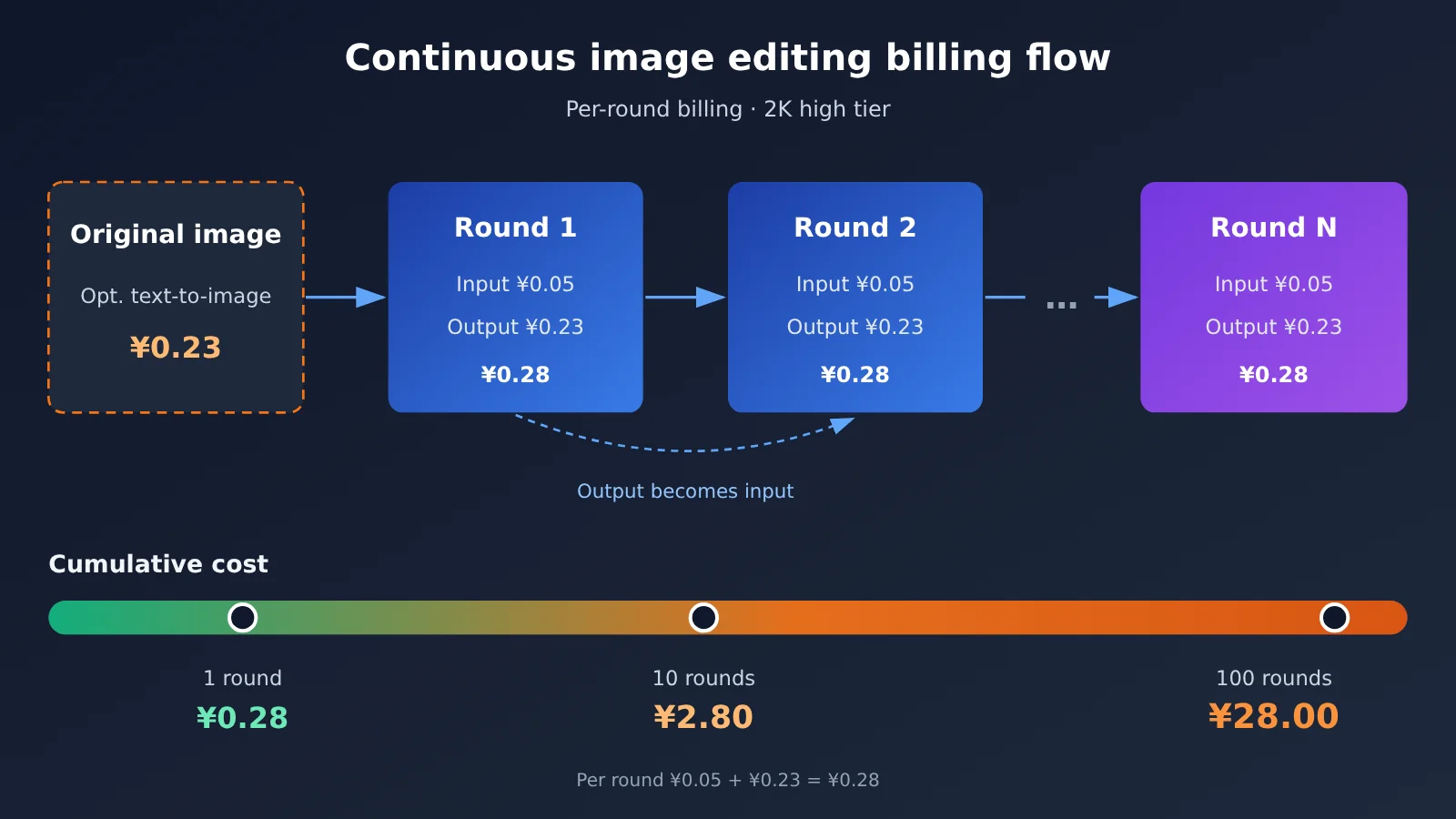
The quality gains from long editing sessions need to be weighed against the cumulative cost. Segmind ran 12 consecutive edits on a single product image: the background area showed no noticeable pixel changes, but the image as a whole gradually darkened, with round 12 deviating from round 2 by about 5.1 color levels on average. That means more rounds isn’t always better — at a certain point, regenerating the base image may be both cheaper and more stable than piling on more edits.
Seedream 5.5 Layer Decomposition Costs: Why Isn’t It the Price of a Single Image?
Layer decomposition is the most easily underestimated item. When Seedream 5.5 decomposes layers, the base image and every layer are billed per image, and the original input image is charged an additional ¥0.05. “Up to 99 layers” absolutely does not mean “99 layers decomposed for ¥0.23.”
Formula: Decomposition cost = 0.05 × 1 + the sum of the tier unit prices for each actual output image (including the base image).
| Actual returned result | Total outputs | All low-tier cost | All high-tier cost |
|---|---|---|---|
| 1 base image + 4 layers | 5 | ¥0.70 | ¥1.20 |
| 1 base image + 8 layers | 9 | ¥1.22 | ¥2.12 |
| 1 base image + 12 layers | 13 | ¥1.74 | ¥3.04 |
| 1 base image + 16 layers | 17 | ¥2.26 | ¥3.96 |
| 1 base image + 32 layers | 33 | ¥4.34 | ¥7.64 |
| 1 base image + 99 layers | 100 | ¥13.05 | ¥23.05 |
These two columns represent edge-case scenarios where all outputs fall into the same tier. The official documentation explicitly states that, within the same decomposition request, different layers can fall into different pixel tiers—so the real bill needs to be summed image by image.
The Difference Between max_images and the Actual Billed Quantity
layer_decomposition_options.max_images is the upper limit on the number of outputs, ranging from 2 to 100, with a default of 30 (including the base image). It doesn’t mean the model will definitely return that many images; billing is settled only based on the number of images actually generated successfully.
The official docs provide two examples that clearly show this difference:
- Mountain forest animal illustration:
max_imagesset to 40; actual return is 1 base image + 32 transparent animal layers, 33 images total. - Poster layer decomposition:
max_imagesset to 15; actual return is 13 images (1 base image + 12 layers), with OCR results returned for 9 text layers.
Let’s use the poster example for a mixed-tier calculation. Suppose 8 of the 13 images are low-tier and 5 are high-tier: the cost is 0.05 + 8 × 0.13 + 5 × 0.23 = ¥2.24. This is a calculation example constructed by the editor based on the official returned counts; the actual size allocation of each layer is not official billing data.
In addition, max_images affects the pre-deducted quota for IPM rate limiting; after the request completes, the over-deducted portion is returned based on the actual number of images generated. Rate-limit quota and RMB cost are two independent concepts—don’t mix them up.
Seedream 5.5 vs 5.0 Pro and Flash: Which Version Is More Cost-Effective?
The Volcano Ark price list shows that 5.0 Pro charges different output prices for standard image generation and layer separation, while 5.0 Flash uses a flat per-image output rate. The table below puts both task types side by side.
| Item | Seedream 5.5 | 5.0 Pro | 5.0 Flash |
|---|---|---|---|
| Standard image generation input | ¥0.05/image | First image free, ¥0.02 from the 2nd image | See the official price list |
| Standard image generation output (low/high tier) | ¥0.13 / ¥0.23 | ¥0.30 / ¥0.60 | Flat rate |
| Separation input | ¥0.05 | First image free | Free |
| Separation output per image (low/high tier) | ¥0.13 / ¥0.23 | ¥0.15 / ¥0.30 | ¥0.12 |
| Splitting 13 images (low tier / high tier) | ¥1.74 / ¥3.04 | ¥1.95 / ¥3.90 | ¥1.56 / ¥1.56 |
| Max layers | Base image + 99 layers | Base image + 16 layers | Base image + 16 layers |
| Rich-text OCR | Supported | Not supported | Not supported |
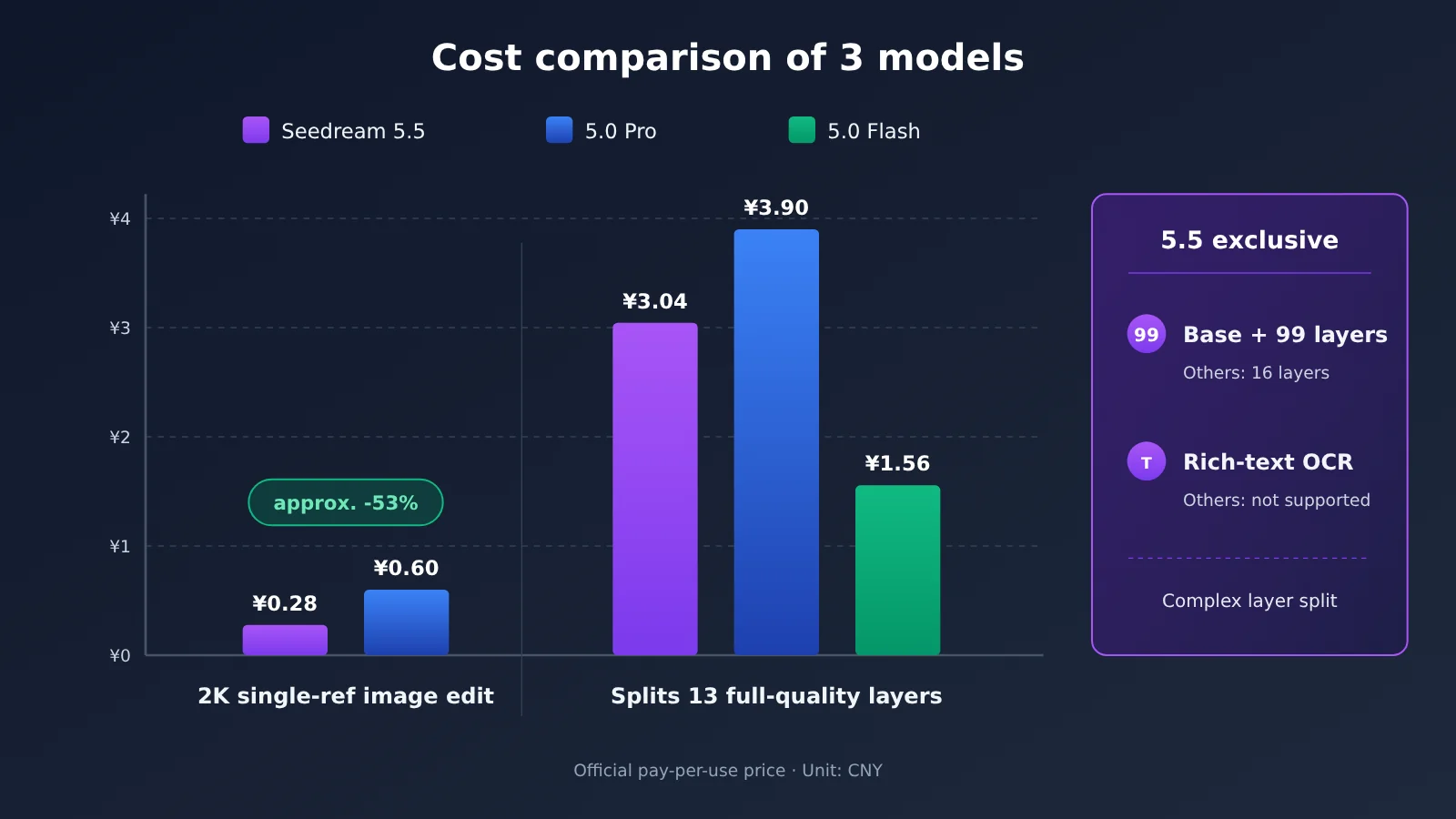
How 5.0 Pro compares: For standard single-image generation, 5.5 has a clear edge. A 2K single-reference-image edit drops from ¥0.60 to ¥0.28, a cut of about 53.3%. But the two generations bill inputs differently, so the gap narrows as you add reference images: for a 2K task with 10 reference images, Pro costs 0.18 + 0.60 = ¥0.78, while 5.5 costs ¥0.73 — essentially a tie. It’s worth noting that Pro’s layer separation rate (0.15/0.30) is lower than its own standard generation rate, but still higher than 5.5’s.
How 5.0 Flash compares: Flash is the cheapest option for layer separation tasks with up to 17 images, especially at high resolution, where everything settles at ¥0.12. But it can split at most 16 layers, and it has no OCR. If your poster needs text content, colors, and similar fonts recognized, or if the artwork has more than 16 elements, 5.5 is your only choice.
💡 Recommendations: For simple layer separation with fewer than 16 elements, go with Flash; for standard generation and editing, go with 5.5; for complex separation or OCR, 5.5 is the only option. If you’re also evaluating other image models, you can use an aggregation platform like APIYI apiyi.com to run side-by-side tests through a single set of APIs — check the platform console for the models and prices actually available.
How Do You Control Budget for Seedream 5.5 Batch Generation?
A Unified Cost Formula
This applies to 5.5 official usage-based pricing and excludes storage, labor, and third-party service costs:
C = 0.05 × N_in + 0.13 × N_low + 0.23 × N_high
Here, N_in is the number of billed input images, while N_low and N_high are the number of successful outputs at the low and high tiers, respectively. For example, if 100 products each need 3 successful rounds of 2K single-reference image editing, that’s 300 billed calls total, costing 300 × 0.28 = 84 yuan.
Using the usage field for real billing
According to Volcano Ark, you’re only charged for images that are successfully generated. Several fields in the API response can be used directly for accounting:
usage.input_images: the number of input images in this request.usage.generated_images: the number of successfully generated images.data[].size: the actual dimensions of each output, used to determine the pixel tier.data[].z_index: distinguishes the base image from the layers in layer separation.usage.output_tokens: the token count corresponding to the image. Don’t multiply this by the text model’s unit price to calculate billing.
Here’s a minimal invocation example that shows how to send a request through the OpenAI-compatible interface and read usage:
from openai import OpenAI

client = OpenAI(
    api_key="YOUR_API_KEY",
    base_url="https://api.apiyi.com/v1"  # APIYI unified endpoint
)

resp = client.images.generate(
    model="YOUR_IMAGE_MODEL",  # Use the actual model name available in the console
    prompt="一只坐在窗边的橘猫,柔和午后光线",
    size="2048x2048"
)
print(getattr(resp, "usage", None))
View the full cost estimation code
from openai import OpenAI

INPUT_PRICE = 0.05
LOW_PRICE, HIGH_PRICE = 0.13, 0.23
LOW_LIMIT, HIGH_LIMIT = 2_610_000, 4_630_000

def tier_price(width: int, height: int) -> float:
    """Return the official Seedream 5.5 tier price (CNY) based on total pixels per output"""
    pixels = width * height
    if pixels <= LOW_LIMIT:
        return LOW_PRICE
    if pixels <= HIGH_LIMIT:
        return HIGH_PRICE
    raise ValueError("超出 Seedream 5.5 支持的输出像素范围")

def estimate_cost(input_images: int, output_sizes: list[str]) -> float:
    """input_images: number of input images; output_sizes: e.g. ["2048x2048", "1024x768"]"""
    cost = input_images * INPUT_PRICE
    for s in output_sizes:
        w, h = map(int, s.lower().split("x"))
        cost += tier_price(w, h)
    return round(cost, 2)

client = OpenAI(
    api_key="YOUR_API_KEY",
    base_url="https://api.apiyi.com/v1"  # APIYI OpenAI-compatible endpoint
)

resp = client.images.generate(
    model="YOUR_IMAGE_MODEL",
    prompt="电商白底商品图,一双白色运动鞋",
    size="2048x2048"
)

sizes = [getattr(d, "size", "2048x2048") for d in resp.data]
print("本次估算费用(元):", estimate_cost(0, sizes))

# Poster layer-splitting mixed-tier example: 1 input, 8 low-tier + 5 high-tier
demo = ["1024x1024"] * 8 + ["2048x2048"] * 5
print("拆层示例(元):", estimate_cost(1, demo))  # 2.24
🚀 Quick start: If you want to get the billing logic working before integrating it into production, you can sign up at APIYI apiyi.com to get free test credits, then use the estimation function above to compare the actual returned dimensions and check your bill. Note that model names and unit prices may differ across channels and from Volcano Ark; refer to what the platform lists.
Four Ways to Save Money
- Set
max_imagesbased on actual need: Before splitting layers, judge how many real elements the image actually contains, so the default 30-image cap doesn’t leave you with a pile of fragmented little layers. - Skip the high tier when you don’t need it: For social media images and drafts, use the 1.5K low tier — that alone saves CNY 0.10 per image.
- Cut down on wasted retries: Write “what must be preserved” into the prompt. Segmind’s hands-on testing found that the model may alter the product’s structure to satisfy new requirements — and rework is a cost.
- Track cost per deliverable: Measure both “cost per invocation” and “cost per final deliverable image” — the latter has to account for retries and manual edits.
FAQ
Q1: What is the official API price for Seedream 5.5?
Volcano Ark’s standard RMB pricing: CNY 0.05 per input image; CNY 0.13 per output image up to 2.61 million pixels; CNY 0.23 per output image from 2.61 to 4.63 million pixels; text isn’t billed separately.
Q2: How much cheaper is Seedream 5.5 than 5.0 Pro?
A 2K single-reference-image edit drops from CNY 0.60 to CNY 0.28 — about a 53.3% decrease. But the more reference images you add, the smaller the gap gets: at 10 reference images the two are only about CNY 0.05 apart.
Q3: Why is layer splitting so much more expensive than a single image?
Because the base image and every layer are billed separately. Split out 1 base image + 12 layers and that’s 13 outputs — at the high tier, CNY 3.04 instead of CNY 0.23.
Q4: If I set max_images to 40, will I be charged for 40 images?
No. It’s only an upper limit, and it affects the IPM reserved quota. Charges are settled by the number actually generated successfully — the official example set it to 40 and got back 33.
Q5: How can I quickly test Seedream 5.5’s cost?
Start with the estimation function in this article against the official unit prices to build a budget, then run a small batch of real calls and check the `usage` field. Through APIYI apiyi.com you can get free test credits and quickly validate the flow with the OpenAI-compatible interface; model availability and pricing are subject to the console.
Q6: What are the easy-to-miss pitfalls in Seedream 5.5 billing?
First, “2K” doesn’t mean a fixed 2048×2048 — the tier is calculated by actual pixels. Second, generated URLs are only kept for 24 hours, so regenerating after they expire means paying twice. Third, BytePlus plan prices and third-party USD prices can’t be treated as official pay-as-you-go unit prices. When comparing channels, you can also run the same test set for a billing comparison on APIYI apiyi.com.
Seedream 5.5 Pricing: Key Takeaways
- Base unit price: ¥0.05 per input image; ¥0.13 per output image on the low tier, ¥0.23 on the high tier.
- Image generation cost: 2K text-to-image is ¥0.23, single-reference-image editing is ¥0.28, and 10 reference images comes to ¥0.73.
- Iterative editing: 2K costs ¥0.28 per round; generating from scratch and then running 10 editing rounds totals ¥3.03.
- Layer separation: the base image and each individual layer are billed per image, so splitting a full 100 images runs up to about ¥23.05.
- max_images: it’s only an upper bound and the basis for rate-limit pre-authorization — you’re charged for the actual number of outputs.
- Choosing a version: go with Flash for a small number of layers, and 5.5 for complex layer splitting and OCR.
- Testing tip: use the free quota on APIYI apiyi.com to verify your bill on a small batch before scaling up.
Summary: Turning Seedream 5.5’s per-image price into a per-task price
The pricing story for Seedream 5.5 boils down to three sentences:
- Ordinary image generation is easy to calculate: multiply the number of input images by 0.05, then add the unit price for your output tier.
- Iterative editing depends on the number of rounds: every round is a full input-plus-output cycle, so 100 rounds means ¥28.
- Layer separation depends on the actual output count and tier: add up the base image and all layers one by one — this is where budgets blow out most easily.
For developers, when comparing models, don’t just look at the per-image quote — budget for the whole workflow: how much does a single product image cost from generation, through 3 editing rounds, to layer-split delivery? Compare 5.5, 5.0 Pro, and Flash on that basis and the choice becomes much clearer.
I’d recommend running a set of your own business samples through the free quota on APIYI apiyi.com, matching your estimate formula against real usage data, and only then deciding on your production model mix.
📚 References
- Volcano Ark Model Pricing: Seedream 5.5 and the previous generation’s RMB API billing (updated 2026-11-12)
- Link:
console.volcengine.com/ark/region:cn-beijing/docs/model-pricing -
Notes: Source for all unit prices and pricing tiers in this article
-
Volcano Ark Seedream 5.5 Official Tutorial: Multi-round editing, layer separation, OCR, and max_images examples
- Link:
console.volcengine.com/ark/region:cn-beijing/docs/seedream-5-5 -
Notes: Source for the 13-image poster and 33-image illustration layer-splitting cases
-
Volcano Ark Image Generation API: Request fields, size constraints, and usage return fields
- Link:
console.volcengine.com/ark/region:cn-beijing/docs/image-generation-api -
Notes: Documentation of cost-accounting fields
-
ByteDance Seed Release Announcement: Seedream 5.5 core upgrades and official benchmarks
- Link:
seed.bytedance.com/zh/blog/more-realistic-images-more-stable-editing-across-100-rounds-introducing-seedream-5-5 -
Notes: Official source for the 100-round editing and 99-layer capabilities
-
Segmind Technical Blog: Real-world test of 36 billed generations and 12 rounds of editing
- Link:
blog.segmind.com/seedream-5-5-is-here-edit-in-rounds-transparent-pngs-and-layers - Notes: Third-party platform USD billing and color drift observations, for trend reference only
Author: APIYI Technical Team
Technical Discussion: Feel free to reach out to us on the homepage of the APIYI apiyi.com website. For more resources, visit the docs.apiyi.com documentation center.