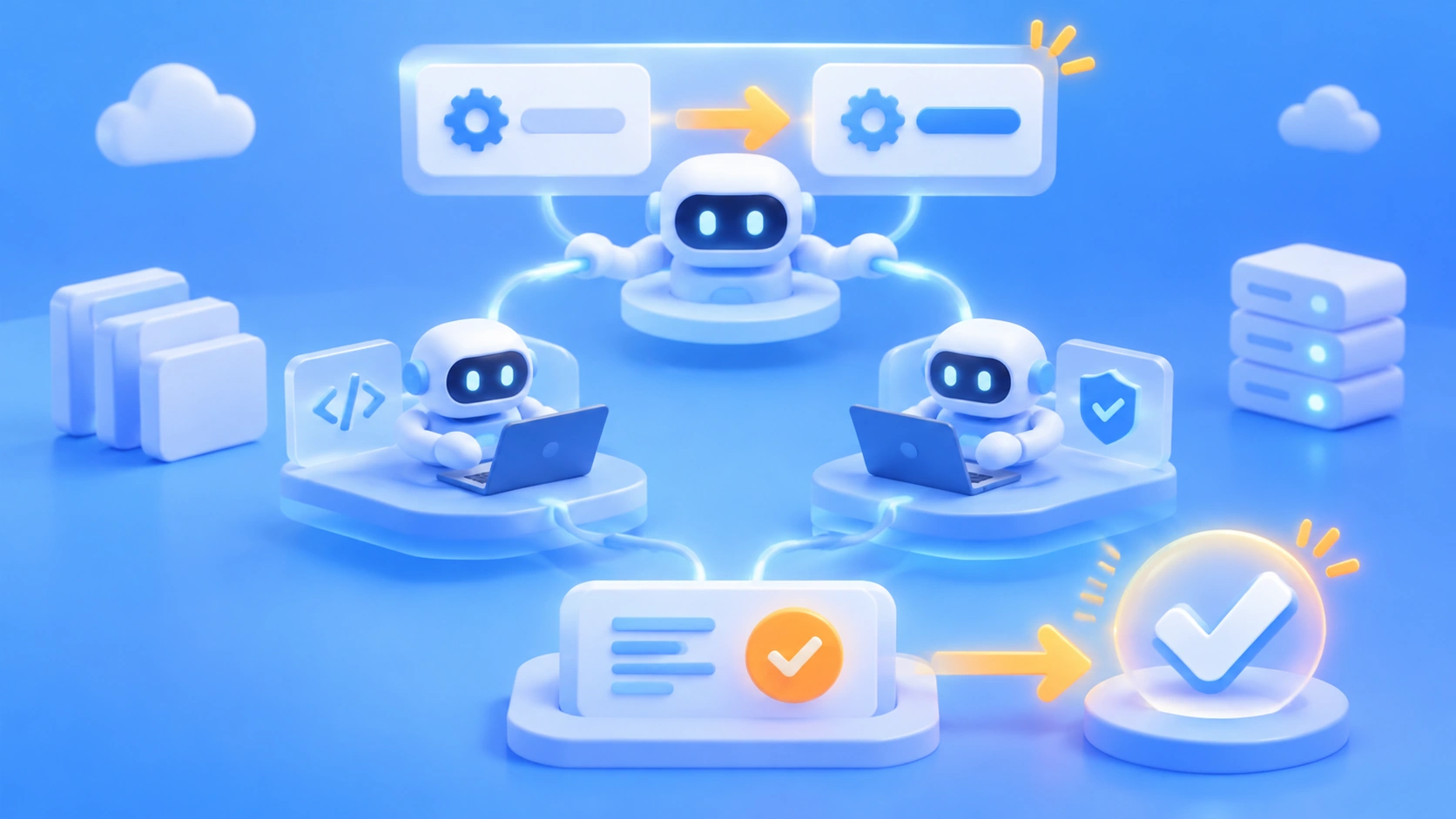
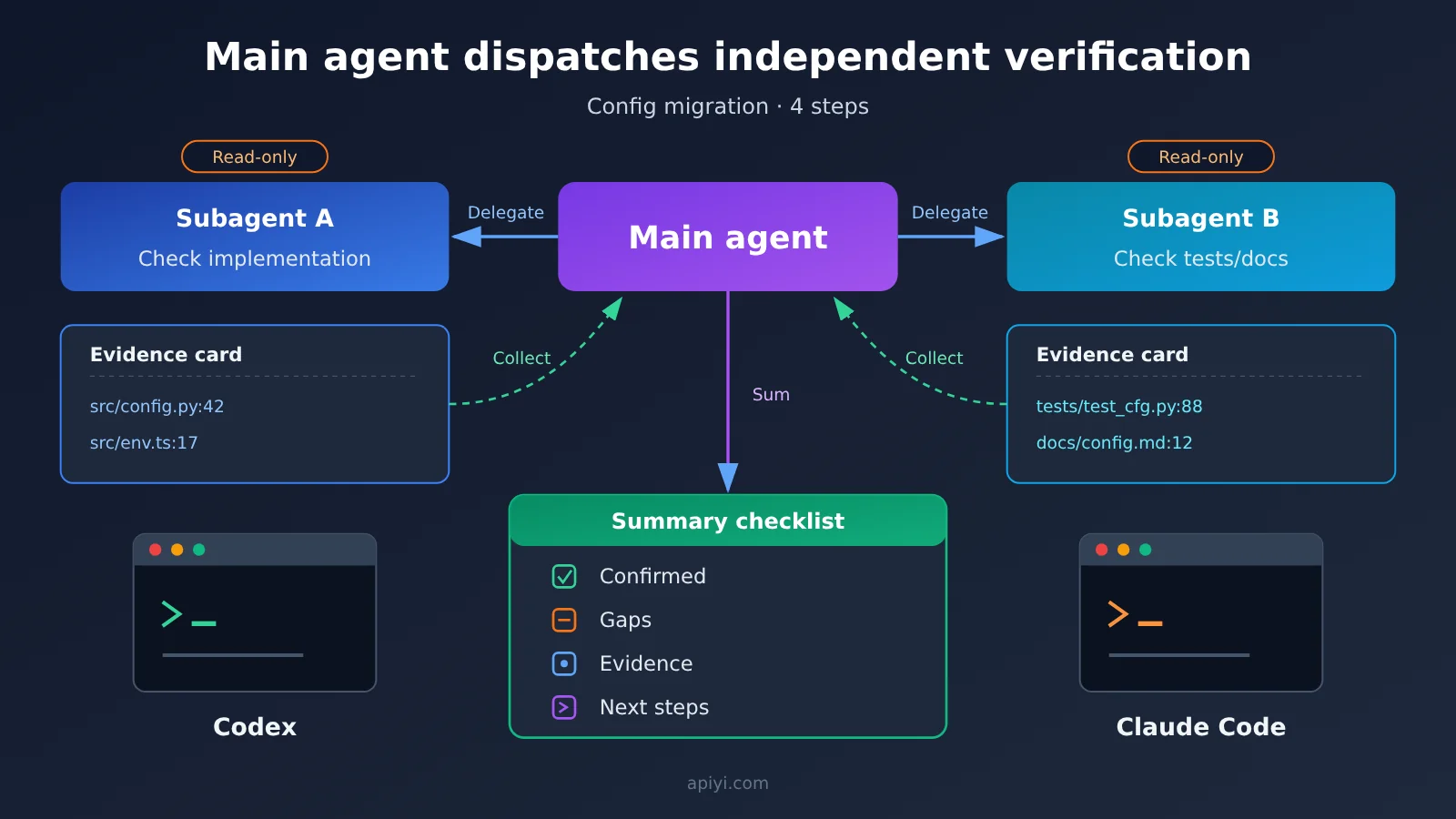
Direct answer: First split a single check into two read-only verifications that don’t wait on each other and return findings in the same format, then hand them to the main agent with one clear delegation prompt. In both the Codex local CLI and Claude Code, you can just ask in natural language: “assign one subagent to each task, collect the results, then summarize”. The main agent owns the unified scope, goes back to the original evidence, and decides what happens next; the two subagents only submit findings that include file paths and line numbers. The read-only guarantee can’t live only in the prompt—you have to constrain it in the host’s permission settings.
What you’ll learn from this article
- As of November 23, 2026, the official Codex and Claude Code docs cover how to enable subagents, where to view them, and the permission inheritance rules.
- A configuration migration inspection case you can copy directly, including four illustrative files, a main-agent prompt, and expected output.
- When the two subagents disagree, how the main agent should go back to the source to verify and write a traceable conclusion.
- Which tasks aren’t suitable for parallelization, and how usage should be accounted for when using the official API, a subscription, or a gateway like APIYI apiyi.com for the main agent and subagents.
Index: “To Know” first explains concepts such as main agent, subagent, and read-only permissions; “Impact at a Glance” explains what this means for different readers. “Objective Facts” collects the current official wording and billing basis for the two tools. “Analysis and Judgment” walks through the APP_TIMEOUT rename case in four steps: split the task, send the delegation, run it in both tools, and handle disagreements. Finally, it discusses the boundaries of parallelism and how to account for usage.
Things to Know: Key Concepts Behind Main-Agent Delegated Verification in Codex and Claude Code
| Concept | Quick explanation |
|---|---|
| Main agent | The session that receives the overall goal and handles splitting, dispatching, accepting, and summarizing results |
| Subagent | Delegated by the main agent to read materials and call tools in an isolated context, then report back after completing a scoped task |
| Subagent delegation | A collaboration pattern where the main agent assigns work and then consolidates results; it’s a form of multi-agent collaboration, and parallelism isn’t required |
| Independent verification | Checking work that doesn’t require waiting on the other party’s intermediate results, so it can be scheduled at the same time |
| Read-only permission | Restricting the execution scope to inspecting materials to avoid side effects like file modifications; must be configured in the host |
| Acceptance evidence | File paths, line numbers, and content that let you trace back to the original source locally for verification |
| Regression testing | Checking whether previously supported behavior still matches expectations after a change |
| Agent Teams | An experimental multi-session collaboration mode in Claude Code, off by default, different from regular subagents |
| Gateway usage logs | Model, group, request, and actual billing data recorded by third-party gateways |
Impact at a Glance: Who Main-Agent Delegated Independent Verification Affects
- Developers using subagents for the first time: You don’t need to learn a new API—just delegate in natural language within a local CLI conversation. What you actually need to learn is how to split tasks and how to validate them: mutually exclusive scopes, consistent delivery formats, and evidence you can look up again.
- Code review and content editing: The “one person checks the implementation, one person checks the promise” structure works well for confirming that docs, tests, and code agree. The main agent cross-checks, which reduces misjudgments caused by one side missing something.
- Pay-as-you-go API users: Each subagent generates its own model calls and tool calls, and the main agent also has to write tasks, read responses, and re-check. When calling through gateways such as APIYI apiyi.com, you should aggregate all real requests within the same time window—you can’t just look at the main session.
- Subscription users: Usage counts toward the corresponding plan’s quota and extra allowance; you can’t directly convert it from a single-call cost on an external gateway.
The Facts: Official Status of Main-Agent Delegation in Codex and Claude Code
The following is based on public documentation from OpenAI and Anthropic, verified on November 23, 2026. Client interfaces change with each version, so refer to the version you’re using.
The Basic Structure of Sub-Agent Delegation
In sub-agent delegation, the main agent is responsible for breaking down goals, dispatching tasks, collecting results, and handling conflicts. Each sub-agent reads materials and calls tools in its own context, then sends deliverables back to the main agent. Parallelism isn’t a prerequisite for this structure; when two tasks have dependencies, they can be executed in batches. Opening several independent terminals or Worktrees can also run in parallel, but you’ll need to arrange separately who divides the work and how results are merged.
One distinction to make: the multi-agent interface in the OpenAI API and the local Codex agent are two different product entry points. This article only discusses sub-agents in local Codex and Claude Code.
How to enable, view, and limit subagents in Codex
OpenAI’s current public guidance states that Codex enables subagents by default. In supported local CLI conversations, you can ask directly for “one subagent per independent question, then collect the results and consolidate them,” and use /subagents to view or switch agent threads. The official docs note that the desktop app, CLI, and IDE extensions can all display subagent activity, though the exact interface details need to be verified against each version.
At the configuration level, agents.enabled controls whether subagents are turned on, and agents.max_concurrent_threads_per_session controls concurrency within a single session; the old name agents.max_threads remains as an alias. The current version also lets you set the default model and reasoning effort for subagents. On permissions: after you select Read Only via /permissions in the parent session, subagents inherit the parent’s sandbox and approval settings. The role description text itself doesn’t impose an extra sandbox layer on subagents.
Claude Code: regular subagents vs. Agent Teams
Claude Code’s subagents can hand off search, analysis, and acceptance checks to an isolated context. There are two ways to trigger them: ask for delegation in natural language, or type @ to select a loaded subagent. Subagent definitions support specifying the model, tools, and permissions. Their requests execute separately, but they count toward the same usage limits or API bill. The built-in Explore is a read-only subagent. If a project has a custom role with the same name, it may override the built-in definition, so you’ll want to check that yourself.
At runtime, you can view tasks in the subagent panel or via /tasks, and see the corresponding transcript in the task details. In the current official docs, /agents mainly points users to manage definitions through .claude/agents/, a personal directory, or the session. Only older versions turned this command into a wizard for runtime and library management, so the old interface shouldn’t be treated as the general way to view things. In current versions, named regular subagents can also message each other, so to tell them apart from Teams you should look at the work structure, not at whether they can communicate.
Agent Teams is an experimental multi-session collaboration mode in which the lead and teammates can communicate directly, and teammates equipped with the Task tool can also claim work in a shared task list. It’s off by default and requires setting CLAUDE_CODE_EXPERIMENTAL_AGENT_TEAMS=1 to enable it. The official docs also state that claude -p and the Agent SDK won’t spin up Teams teammates.
Official Rules for Usage and Billing
| Channel | Usage attribution | Verification basis | Notes |
|---|---|---|---|
| Codex subscription (ChatGPT login) | Plan quota and additional usage | Account usage page | Codex Cloud requires a ChatGPT login |
| Codex + official API Key | OpenAI API bill | Official usage dashboard | Only works with local entry points that support API Key authentication |
| Claude Code subscription / API | The same usage limit or API bill | /usage and backend billing |
The dollar amount shown by /usage is a client-side estimate based on list price |
| APIYI apiyi.com gateway Key | Gateway quota deduction | Invocation logs and balance changes | Logs already include group multipliers; the equivalent discount from recharge bonuses is calculated separately |
The “roughly 7x usage” claim in Anthropic’s documentation has a clear prerequisite: using Agent Teams and having teammates run in plan mode. That multiplier doesn’t apply to regular subagents, and it can’t be treated as each person’s dollar cost.
Analysis: How to Have the Main Agent Delegate Two Independent Checks
This section offers practical recommendations based on the facts above. The line numbers in the example only correspond to this minimal illustration; the whole process doesn’t modify files, and it doesn’t claim to have run tests that don’t exist.
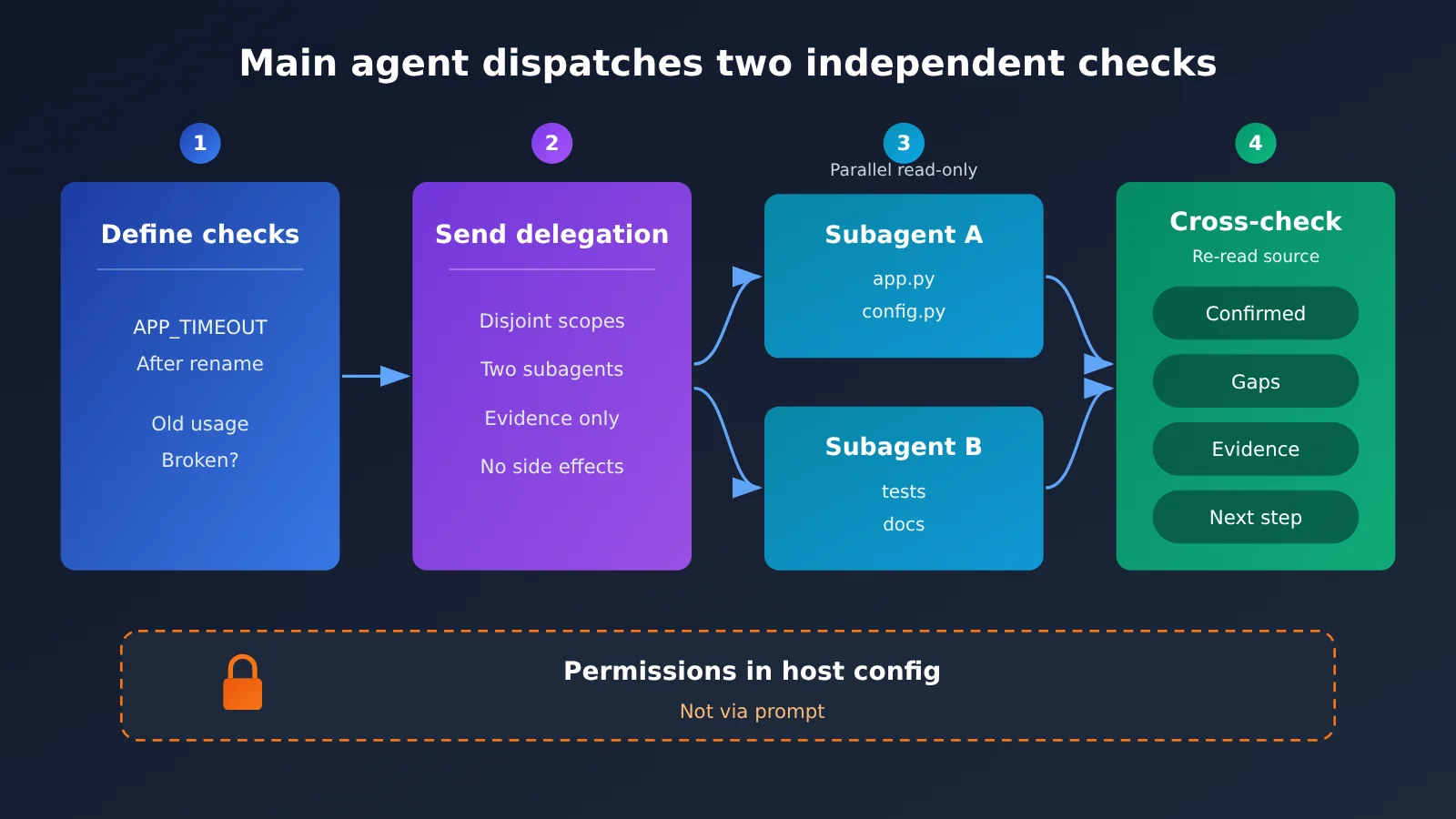
Step 1: Split the configuration migration check into two independent checks
The acceptance question is: after the application renames the timeout config to APP_TIMEOUT, is usage of the old name APP_REQUEST_TIMEOUT broken? Below are 4 plain-text sample files that you can place in an empty repository to reproduce this directly.
# app.py
from config import get_timeout

request_timeout = get_timeout()

# config.py
import os

def get_timeout(env=None):
    mapping = os.environ if env is None else env
    return int(mapping.get("APP_TIMEOUT", "30"))

# tests/test_config.py
from config import get_timeout

def test_default_timeout():
    assert get_timeout({}) == 30

def test_explicit_timeout():
    assert get_timeout({"APP_TIMEOUT": "45"}) == 45
Lines 1–2 of docs/migration.md say: “New config name: APP_TIMEOUT. The previous version’s APP_REQUEST_TIMEOUT should remain available during the transition period.”
This check is a good candidate for splitting because the implementation and the promise live in different files. Both sides can be read at the same time, and neither needs the other’s intermediate results. The split is as follows:
| Sub-agent | Check scope | Question to answer | Output format |
|---|---|---|---|
| A: Check runtime configuration | app.py, config.py |
Actual entry point, default value, whether there is a fallback for the old name | Findings + file:line; write “Not found” if none |
| B: Check tests and commitments | tests/test_config.py, docs/migration.md |
Which conditions the tests cover, and what the migration doc promises | Findings + file:line; write “Not found” if none |
| Main agent | Two responses + exact excerpts of open questions | Does the implementation satisfy the promise, and are there test gaps? | Confirmed / Gap / Evidence / Next step |
Step 2: Give the main agent a copy-paste delegation prompt
The prompt needs to make four things clear: mutually exclusive scopes, a cap on the number of subagents, delivery of findings and evidence only, and no side effects. You can paste the following directly:
You are responsible for this read-only configuration migration verification. In the current repository, assign only two subagents.
A should only inspect app.py and config.py, explain the invocation entry points, default values, and support for old and new environment variables, and list the files and line numbers that can be checked.
B should only inspect tests/test_config.py and docs/migration.md, explain the coverage and requirements, and list the files and line numbers that can be checked.
Neither A nor B may modify files, write logs, make network requests, or start tests. For anything you have not seen, write "Not found."
Wait for both results to come back, then read the original text related to the open questions yourself.
Output four items: "Confirmed, gaps, evidence, next steps." Do not submit changes.
The “read-only” instruction in the prompt is only a task convention; you also need to restrict it at the tool level. In Codex, first select Read Only in the parent session with /permissions, and the subagents will inherit it. In Claude Code, you can ask for the built-in read-only Explore subagent, and check whether the project has a custom definition with the same name; if necessary, grant only read and search tools.
Step 3: Run the same verification in Codex and Claude Code
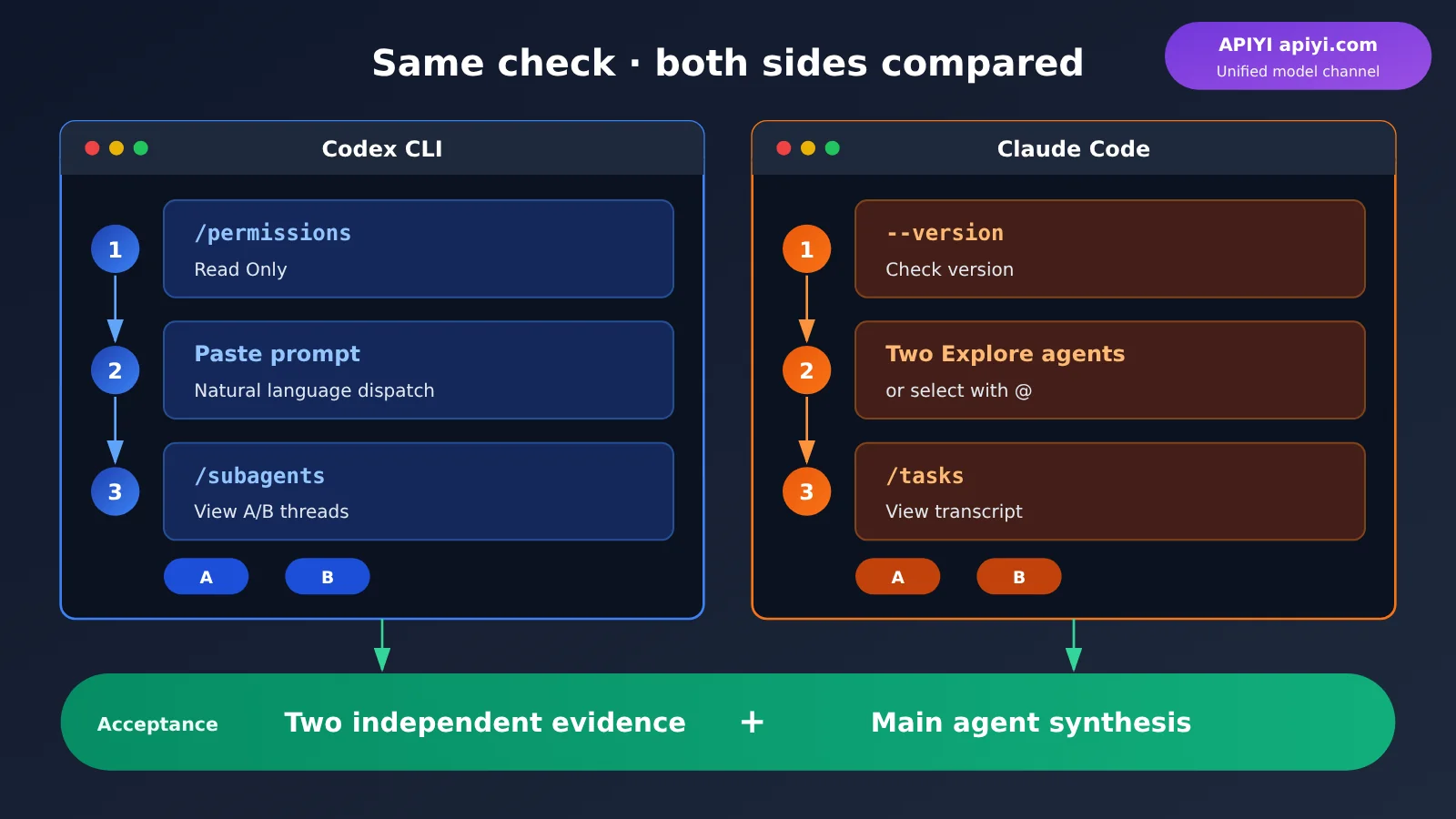
Use the same prompt on both sides, and apply the same acceptance criteria: two distinct tasks were actually produced, each with its own evidence. There’s no fixed API for the wording that triggers the delegation.
| Stage | Codex local CLI | Claude Code local CLI |
|---|---|---|
| Before starting | Start in the repository root; in the parent session, set /permissions to Read Only |
First check the version with --version |
| Kick off delegation | Paste the prompt and ask for delegation in natural language | Delegate to two Explore agents in natural language, or use @ to select a loaded subagent |
| Check status | Use /subagents to view or switch agent threads |
Use the subagent panel or /tasks; check the transcript in task details |
| Manage definitions | agents.* config items |
.claude/agents/, personal directory, or in-session definitions |
| Does it require Teams? | Not applicable | No; standard subagents are sufficient |
If you want Codex’s concurrency to match this task, you can set the per-session concurrency limit to 2 in the config. Use the official page for the exact key name; the older agents.max_threads still works as an alias. If you switch to APIYI as the model channel, APIYI’s Codex guide is to point the custom provider to https://api.apiyi.com/v1 and verify it in a Responses-compatible way. The Chat Completions fallback wording mentioned in its older docs is no longer used in the current version.
# ~/.codex/config.toml (example; fields depend on the docs for the version you use)
model_provider = "apiyi"

[model_providers.apiyi]
name = "APIYI"
base_url = "https://api.apiyi.com/v1"
env_key = "APIYI_API_KEY"
wire_api = "responses"

[agents]
enabled = true
max_concurrent_threads_per_session = 2
Claude Code uses the Anthropic Messages route. You only need to enter the root domain as the base URL; the client automatically appends the Messages path:
export ANTHROPIC_BASE_URL="https://api.apiyi.com"
export ANTHROPIC_AUTH_TOKEN="YOUR_API_KEY"
claude --version
claude
Once connected, first confirm which models the token can see, then start running subagents. In APIYI’s model catalog dated November 23, 2026, you can see gpt-6.2-sol (marked responses/chat) and claude-opus-5-5 (marked messages/chat). The catalog only proves that the models are listed and which protocols they support; subagent model mapping, fallback, and billing still need to be validated in the target environment.
from openai import OpenAI

client = OpenAI(
    api_key="YOUR_API_KEY",
    base_url="https://api.apiyi.com/v1",  # APIYI OpenAI-compatible endpoint
)

visible = {m.id for m in client.models.list().data}
for name in ["gpt-6.2-sol", "claude-opus-5-5"]:
    print(name, "可见" if name in visible else "未找到")
Recommendation: Before letting subagents work in batches for real, first use a dedicated test token on APIYI apiyi.com to complete this read-only verification. That way, the call logs contain only requests from this task, and you can clearly see the actual charges for the main agent and the two subagents separately.
If repository policy restricts subagents, or the UI doesn’t show that two tasks were actually created, report honestly that “this run only completed a direct verification,” or switch to an environment where this is allowed and run it again. Don’t present a single-agent result as cross-validation by two subagents.
Step 4: How the main agent handles disagreement between the two checks
In the example repository, the expected responses from the sub-agents and how the main agent handles them are as follows:
| Source | Finding | Evidence | Main agent’s handling |
|---|---|---|---|
| A | The entry point reads APP_TIMEOUT through get_timeout(), with a default of 30; the old name isn’t visible |
app.py:1,3, config.py:3–5 |
Re-read config.py:5 and confirm there’s only one key |
| B | Tests cover the default 30 and an explicit value for the new name, but not the old-name fallback | tests/test_config.py:3–7 |
Confirm neither assertion touches the old name |
| B | The docs promise the old name will remain usable during the transition period | docs/migration.md:1–2 |
Record it as a “promise” and don’t conflate it with the implementation |
| Main agent | The implementation doesn’t meet the doc promise, and the tests don’t cover it | Cross-reference the three locations above | Flag it as a gap and leave the decision to the maintainer |
From this, you can write the conclusion: “The current read path has no APP_REQUEST_TIMEOUT fallback, while the docs require compatibility during the transition period; the existing tests cover the 30-second default and an explicit value under the new name.” Here, “what the docs require” and “what the code implements” are two different objects. The main agent should keep both side by side and must not drop one just to make the conclusion cleaner.
A more worthwhile case to practice is when the findings conflict. For example, A reports “compatible”, while B reports “not covered”. The main agent should first check whether A cites config.py or docs/migration.md, because sub-agents often mistake a documentation promise for an implementation. Then check whether B’s sampling scope is complete.
When the evidence is insufficient, spell out the next steps: add a test that verifies the old name works on its own, then a test for which name takes priority when both the old and new names are present, and finally have the maintainer decide whether to add a fallback. Since the tests weren’t run this time, the report can only say “I checked the test source code”; it can’t present the assertions’ expected values as actual run results.
When It’s Not Worth Having the Main Agent Dispatch Parallel Checks
Parallelism works well in situations like multiple independent directories, separate fact-checking tasks, or keeping coding and review separate. The following three cases, however, amplify the costs of startup, duplicate reads, and merging:
- Interdependencies: B can’t start until it has A’s conclusion. In that case, switch to batch execution: the main agent validates the first batch first, then dispatches the second.
- Small changes: For a one-off short config check like the one in this article, the main agent might save more by reading the four files itself. The example is meant to demonstrate the workflow, not to suggest that this scale is always worthwhile.
- Shared-file conflicts: Multiple subagents repeatedly modify the same file. If parallel writes are truly necessary, agree on file ownership in advance or use separate worktrees, then validate everything with the same test suite.
In Claude Code, for a one-off short task or when the same file needs to be edited sequentially, a single agent or a regular subagent is usually easier to manage than enabling the experimental Agent Teams.
How Pay-As-You-Go Users Can Allocate Costs Between the Main Agent and Sub-Agents
Every sub-agent runs its own model invocations and tool calls, and the main agent’s dispatching, reading back responses, reviewing, and merging also cost money. Caching can lower actual spend, while repeated context, overly long reports, repeated tool calls, and fallbacks all drive up usage. A sensible approach is to lock to the same model, billing tier, and discount basis, then aggregate the actual requests from the main agent and all subtasks within a fixed time window, including failed and retried requests that have already been charged.
When calculating, classify each request’s uncached input, cache reads, applicable cache writes, and output into mutually exclusive categories according to platform definitions, multiply each by the corresponding rate, and add applicable standalone tool fees. If reasoning tokens are already included in total output, don’t add them again. Below is an example of aggregating from logs; the rates are just hypothetical examples for the same channel (input $2 per million tokens, output $10). Actual charges should be based on your bill:
RATE = {"input": 2.0, "cache_read": 0.0, "output": 10.0}  # Example rates, USD per million tokens

def cost(req):
    return sum(req.get(k, 0) / 1e6 * v for k, v in RATE.items()) + req.get("tool_fee", 0)

logs = [  # Export all requests within the same time window from the gateway logs
    {"agent": "main", "input": 12000, "output": 1500},
    {"agent": "A", "input": 6000, "output": 800},
    {"agent": "B", "input": 7000, "output": 900},
]
print("本任务合计 $%.4f" % sum(cost(r) for r in logs))
For a single task, just look at the total. To compare a batch of tasks, divide total cost by the number of tasks that passed, and list zero-pass tasks separately. Also record wait time, pass rate, amount of auditable evidence, and manual time, then compare against running the same task with a single agent. When using APIYI, rely on credit deductions in the invocation logs: the logs already include the group multiplier, and equivalent discounts from top-up bonuses need to be calculated separately. See the invocation log cost documentation at docs.apiyi.com for exact definitions.
Subscription users should check against their plan’s usage and quotas. Don’t apply the “roughly 7x” claim about Agent Teams to ordinary delegation, and don’t convert per-request fees from external gateways into subscription costs.
A properly conducted two-sub-agent check doesn’t just deliver a “is there a problem?” verdict; it also includes a list where every judgment can be traced back to a file and line number. Tool interfaces change from version to version, but the four principles—mutually exclusive scopes, read-only access, evidence re-checking, and main-agent adjudication—carry over between Codex and Claude Code. If you want to validate the model channels on both sides with a single key, start with test credits on APIYI at apiyi.com, run this article’s small example first, and then decide whether to use delegation for larger tasks.
References
- OpenAI Codex Subagents: Codex subagent support surfaces, CLI commands, concurrency, and permission inheritance
- Link:
learn.chatgpt.com/docs/agent-configuration/subagents
- Link:
- Anthropic Claude Code Subagents: triggering, definition, Explore, and usage for regular subagents
- Link:
code.claude.com/docs/en/sub-agents
- Link:
- Anthropic Claude Code Agent Teams: experimental switch, session structure, and limitations
- Link:
code.claude.com/docs/en/agent-teams
- Link:
- Anthropic Claude Code Usage and Costs: subscription and API usage, and the assumptions behind the roughly 7x claim
- Link:
code.claude.com/docs/en/costs
- Link:
- OpenAI Gateway compatibility: Responses compatibility requirements
- Link:
learn.chatgpt.com/docs/enterprise/gateway-compatibility
- Link:
- OpenAI Codex authentication: authentication paths for subscriptions and API keys
- Link:
learn.chatgpt.com/docs/auth?surface=cli
- Link:
- APIYI Codex CLI and Claude Code integration, invocation log costs: gateway configuration and billing rules
- Link:
docs.apiyi.com/scenarios/programming/codex-cli
- Link:
Author: APIYI Technical Team
Technical contact: For integration or billing questions, contact us via the APIYI apiyi.com homepage. For more configuration details, see the documentation center.