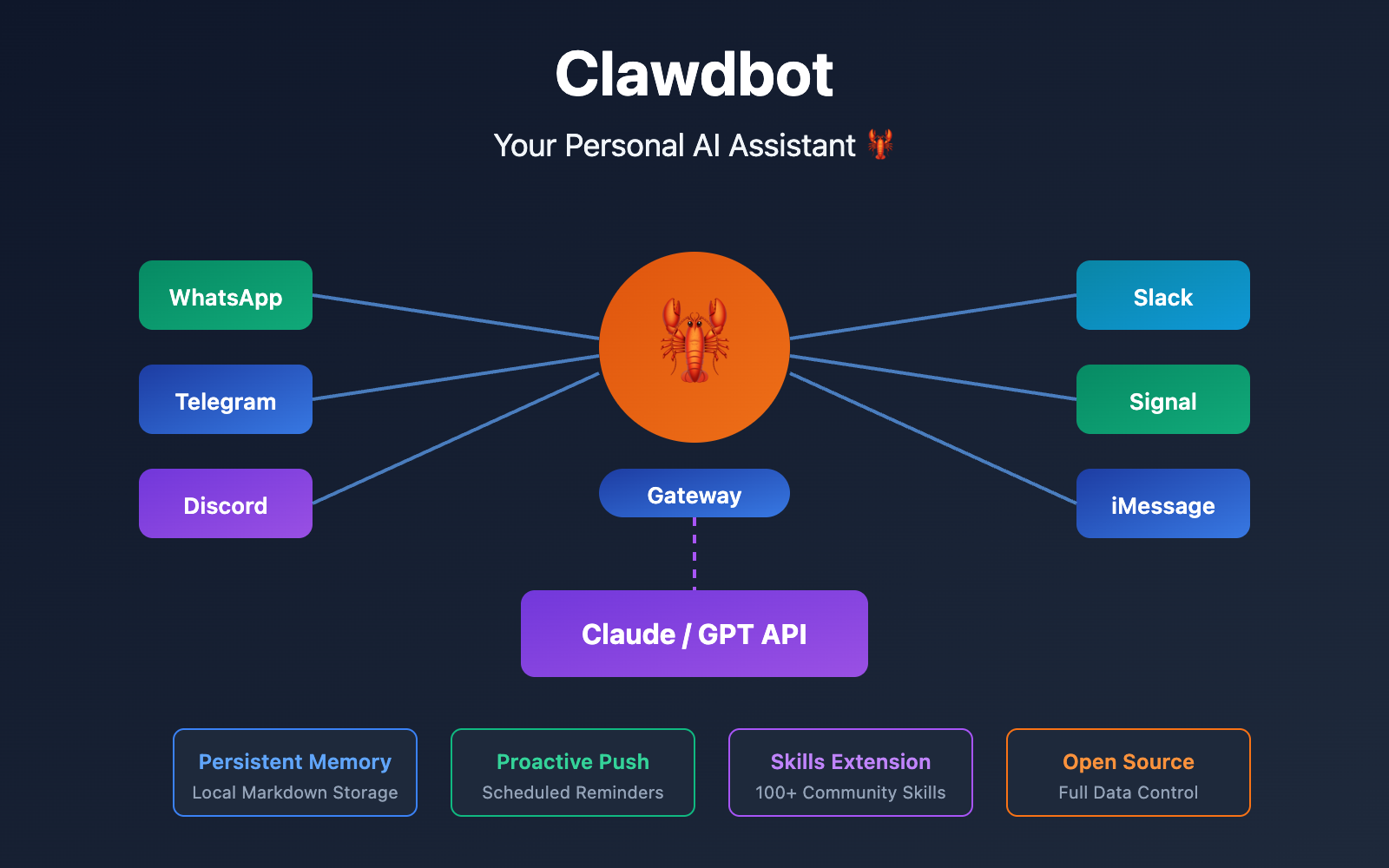
Want a personal AI assistant you can use across all your chat apps—one that remembers what you've said and can even proactively send you reminders? Clawdbot is exactly that kind of revolutionary open-source project, turning Claude AI into your very own dedicated assistant.
Core Value: By the end of this article, you'll master Clawdbot's core concepts, setup process, and how to use APIs to get it running on 8+ platforms like Discord, Telegram, and WhatsApp.
What is Clawdbot? A Quick Breakdown
Clawdbot is an open-source personal AI assistant project developed by Peter Steinberger (founder of PSPDFKit). Unlike traditional web-based versions of ChatGPT or Claude, Clawdbot runs directly within your favorite chat apps. Message it on WhatsApp, and it replies on WhatsApp; ask a question on Discord, and it answers on Discord.
| Feature | Clawdbot | Standard AI Chat |
|---|---|---|
| Usage | Use within everyday chat apps | Requires opening a dedicated website |
| Conversation Memory | Cross-platform persistent memory | Sessions are usually independent |
| Proactive Messaging | Supports scheduled reminders and notifications | Passive response only |
| Data Storage | Local Markdown files | Stored in the cloud |
| Customization | Fully programmable Skills system | Limited custom options |
🎯 Key Understanding: Clawdbot isn't an AI model itself; it's an "AI Gateway." It connects your chat apps with Large Language Model APIs, seamlessly integrating AI capabilities into your daily communication tools.
Clawdbot's Core Architecture: A 3-Layer Design
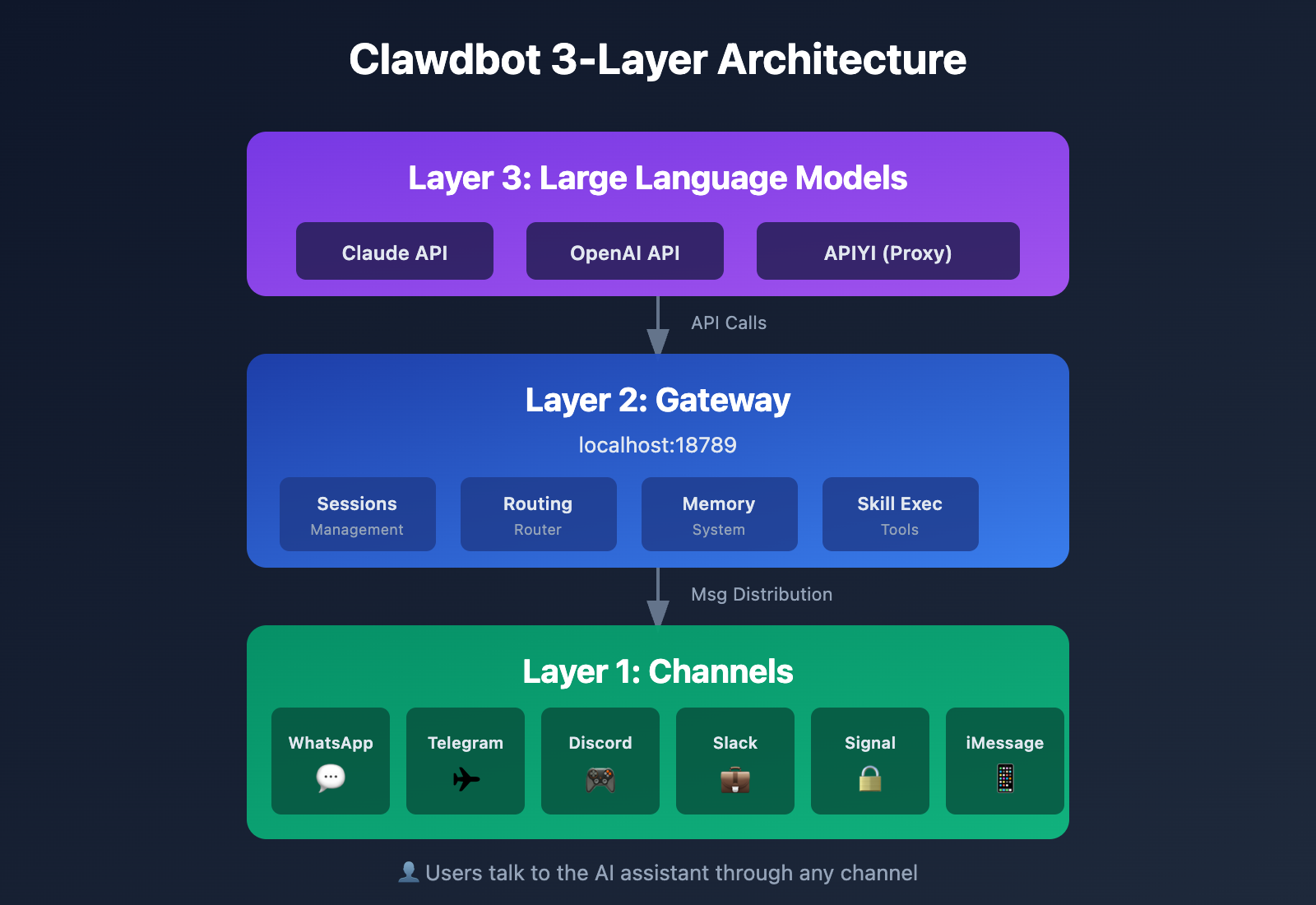
Understanding Clawdbot's architecture helps a lot when you're configuring or troubleshooting. It uses a clean, three-layer design:
Layer 1: The Gateway
The Gateway is Clawdbot's core control plane. By default, it listens on localhost:18789:
- It manages all your message sessions.
- It routes messages across different channels.
- It handles tool calls and skill execution.
- It maintains the conversation history and memory system.
Layer 2: Channels
Channels are responsible for connecting to various chat platforms:
| Channel Type | Supported Platforms | Connection Method |
|---|---|---|
| Instant Messaging | WhatsApp, Telegram, Signal | Bot API / Web Protocol |
| Collaboration | Discord, Slack, Teams | Bot API |
| Apple Ecosystem | iMessage, macOS | imsg CLI / Native integration |
| Open Protocols | Matrix, WebChat | Standard protocol integration |
| Regional Apps | Zalo, BlueBubbles | Community plugins |
Layer 3: Large Language Models (LLMs)
Clawdbot supports several AI model backends:
| Model Provider | Auth Method | Best For… |
|---|---|---|
| Anthropic Claude | API Key / OAuth | The recommended choice; Clawdbot is natively optimized for it. |
| OpenAI GPT | API Key / OAuth | General use cases. |
| 3rd-Party API Proxy | API Key | Cost optimization and easier access. |
🎯 Technical Tip: For calling Claude models, we recommend getting an API key through the APIYI (apiyi.com) platform. It supports the entire Claude 4 model series, provides a unified OpenAI-compatible interface, is more affordable, and doesn't require international payment methods.
A Detailed Breakdown of Clawdbot's 4 Core Advantages
Advantage 1: Seamless Omni-Channel Access
Clawdbot's "omni-channel" philosophy means:
- One assistant, multiple entry points: You can ask a question on WhatsApp via your phone and follow up on Discord from your computer.
- Automatic context synchronization: No matter which channel the conversation takes place in, the assistant remembers your previous interactions.
- Intelligent message routing: You can configure specific types of messages to be routed through specific channels.
Advantage 2: Persistent Memory System
Traditional AI chats usually start in a state of "amnesia" with every new session. Clawdbot, however:
- Stores memories as Markdown files, similar to Obsidian notes.
- Supports semantic retrieval, so it can link back to information you've mentioned before.
- Is entirely locally stored, meaning your data isn't uploaded to the cloud.
~/clawd/
├── memories/           # 对话记忆
│   ├── 2026-01-26.md  # 按日期组织
│   └── topics/        # 按主题分类
├── skills/            # 自定义技能
└── config.yaml        # 配置文件
Advantage 3: Proactive Push Capabilities
This is Clawdbot's killer feature that sets it apart from other AI assistants:
| Proactive Push Scenarios | Example |
|---|---|
| Morning Briefing | Pushes your schedule and weather every morning at 8:00 AM. |
| Task Reminders | Reminds you before the deadlines you've mentioned. |
| Monitoring Alerts | Actively notifies you if a monitored website goes down. |
| Scheduled Execution | Periodically runs scripts and reports the results. |
Advantage 4: Skills System
Skills are Clawdbot's "add-on" system, defined through Markdown or TypeScript files:
# skill: web-search
使用 Brave Search API 搜索网络内容


## 触发条件
当用户询问需要实时信息的问题时
Execution Steps
- Call the Brave Search API
- Parse the search results
- Generate a summary response
The community has already contributed 100+ ready-to-use Skills, covering:
- Web browsing and screenshots
- File read/write operations
- Calendar management integration
- Code execution environments
- Smart home control
Clawdbot Installation & Configuration: 3 Quick Steps to Get Started
Environment Requirements
| Item | Requirement |
|---|---|
| Node.js | ≥ 22.x |
| Operating System | macOS / Linux / Windows (WSL2) |
| Memory | ≥ 2GB available |
| AI API | Claude or OpenAI API Key |
Step 1: Global Installation
# Install via npm (recommended)
npm install -g clawdbot@latest

# Or use pnpm
pnpm add -g clawdbot@latest
Step 2: Run the Configuration Wizard
# Start the interactive configuration wizard
clawdbot onboard --install-daemon
The wizard will walk you through:
- AI Model Configuration – Enter your Claude or OpenAI API Key
- Working Directory Setup – Defaults to
~/clawd - Channel Enablement – Select the chat platforms you want to connect
- Daemon Installation – Keeps the Gateway running in the background
🚀 Quick Start: If you don't have a Claude API Key yet, we recommend using the APIYI (apiyi.com) platform to get one quickly. It provides out-of-the-box API access, offers free test credits upon registration, and you'll be finished with the configuration in just 5 minutes.
Step 3: Verify Installation
# Check service status
clawdbot status

# Perform a deep health check
clawdbot health

# Diagnose configuration issues
clawdbot doctor
Expected output:
Gateway: ✓ Running on localhost:18789
Channels: ✓ Discord, Telegram connected
LLM: ✓ Claude API configured
Memory: ✓ 42 memories indexed
Clawdbot Discord Integration Guide
Discord is one of Clawdbot's most popular channels. Here are the configuration steps:
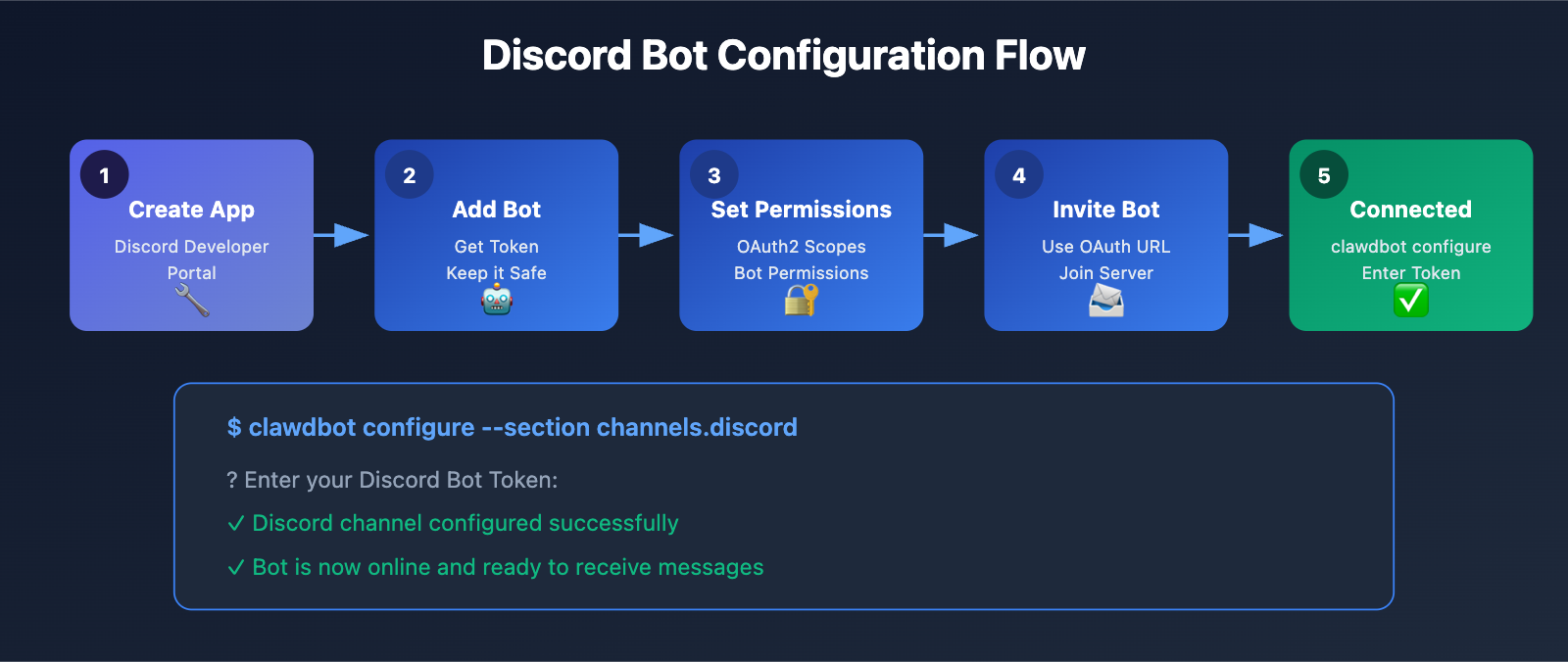
Step 1: Create a Discord Bot
- Head over to the Discord Developer Portal:
discord.com/developers/applications - Click "New Application" to create your app.
- Go to the "Bot" page and click "Add Bot".
- Copy and save your Bot Token (click "Reset Token" to generate it).
Step 2: Configure Bot Permissions
In "OAuth2 → URL Generator", check the following options:
| Permission Category | Specific Permissions |
|---|---|
| Scopes | bot, applications.commands |
| Bot Permissions | Send Messages, Read Message History, Embed Links |
Step 3: Invite the Bot to Your Server
Use the generated OAuth2 URL to invite the bot to your Discord server.
Step 4: Configure Clawdbot
# Interactively configure the Discord channel
clawdbot configure --section channels.discord
Once you enter the Bot Token, Clawdbot will handle the connection automatically.
Step 5: Test the Chat
Mention (@) your bot in a Discord server or send it a direct message:
@ClawdBot Hi, tell me a bit about yourself.
The bot will use the Claude API to generate a response and send it back to Discord.
Deep Dive: Clawdbot API Configuration
Clawdbot's intelligence comes from the underlying Large Language Model. Getting your API configuration right is crucial.
Official Anthropic API
# ~/clawd/config.yaml
llm:
  provider: anthropic
  model: claude-sonnet-4-20250514
  apiKey: sk-ant-xxxxx
Pros:
- Direct connection to the source with the lowest latency.
- Supports the very latest models.
Limitations:
- Requires an international credit card for payment.
- Access may be restricted in some regions.
Third-party API Proxy (Recommended)
# ~/clawd/config.yaml
llm:
  provider: openai-compatible
  model: claude-sonnet-4-20250514
  apiKey: sk-xxxxx
  baseUrl: https://api.apiyi.com/v1  # Using APIYI unified interface
💰 Cost Optimization: For users in China, using APIYI (apiyi.com) as an API proxy is a much better choice. The platform offers an OpenAI-compatible interface, supports the full Claude series, is more affordable than official pricing, and supports local payment methods like Alipay and WeChat—no international card needed.
OAuth Subscription Authentication
If you already have a Claude Pro/Max subscription:
clawdbot configure --section llm.oauth
The advantage here is that it uses your existing subscription quota, so you don't have to pay extra for API usage.
Common Clawdbot Skill Configs
Web Search Skill
# Configure Brave Search API
clawdbot configure --section web

# Enter your Brave Search API Key
Once configured, Clawdbot can search the web in real-time to answer your questions.
File Operation Skill
Clawdbot comes with built-in file read/write capabilities:
Me: Help me read the content of ~/Documents/notes.md
Bot: Reading file... [File content]

Me: Add a line "Today's Todo: Finish report" to the end of the file
Bot: Added content to the file
Browser Skill
Me: Help me visit example.com and take a screenshot
Bot: [Launching browser] → [Loading page] → [Generating screenshot] → [Returning image]
Custom Skills
Just create a Markdown file in the ~/clawd/skills/ directory:
# skill: daily-report
Daily Work Report Generator

## Description
Generates a daily work report based on today's chat logs.
Trigger Keywords
Generate daily report, Today's summary
Execution Logic
- Read all of today's conversation history
- Extract work-related content
- Generate a structured daily report
Clawdbot Cost Estimation & Comparison
| Expense Item | Monthly Cost | Description |
|---|---|---|
| VPS Server | ¥35-70 | Optional; free if run locally |
| Claude API | ¥70-140 | Depends on usage |
| Claude Pro Subscription | ¥140 | Save on API costs with OAuth authentication |
| Claude Max Subscription | ¥1400 | For power users; unlimited Opus access |
Cost Optimization Tips
- Run Locally: Use your home computer or a Mac mini to run the bot and eliminate VPS costs.
- API Proxy: Use APIYI (apiyi.com) to call the Claude API for better pricing.
- Model Choice: Use
claude-haikufor daily chats and switch toclaude-sonnetonly for complex tasks. - Memory Management: Regularly clean up unnecessary memory to reduce token consumption.
Clawdbot vs. Other Solutions
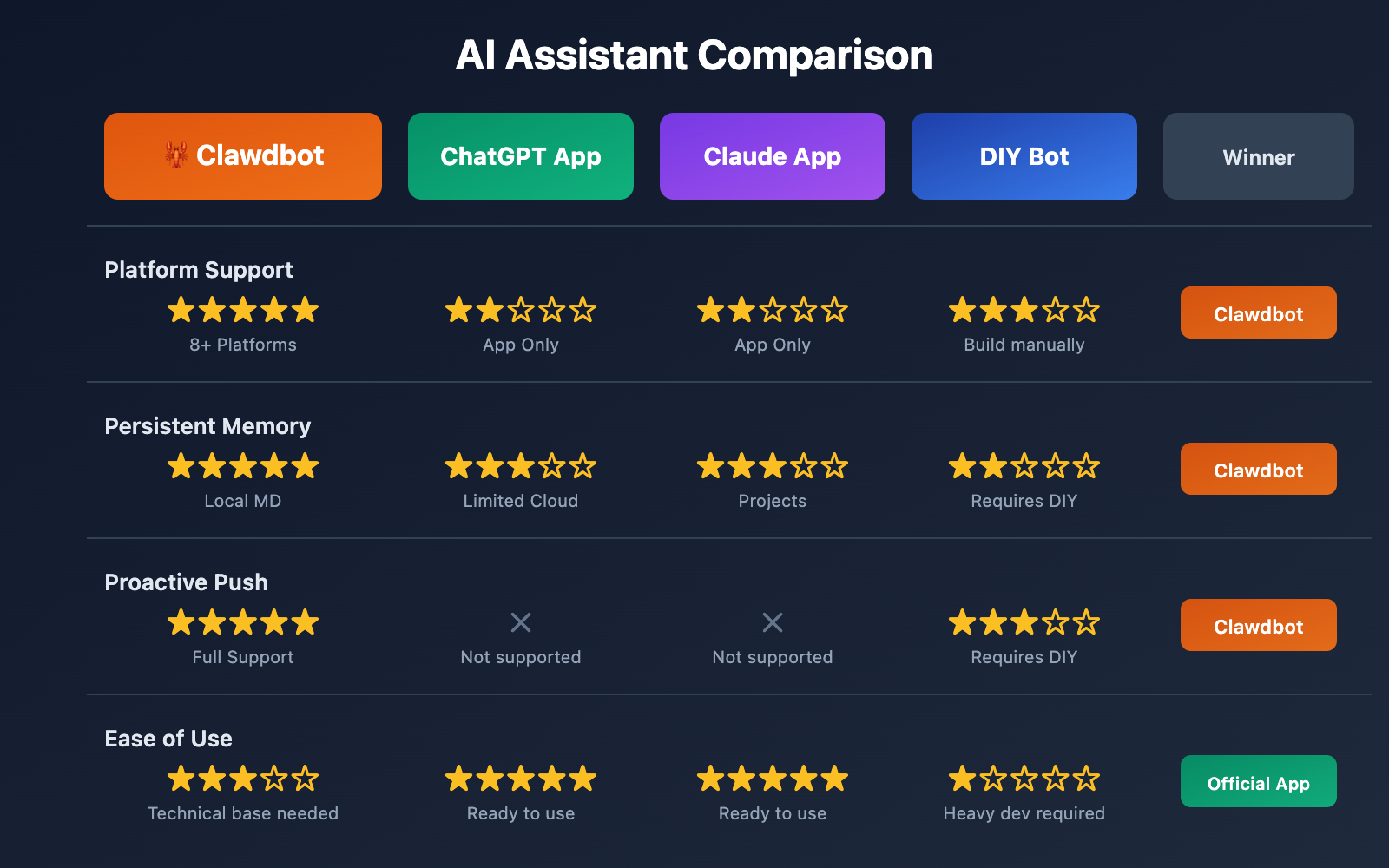
| Comparison Dimension | Clawdbot | ChatGPT App | Claude App | DIY Bot |
|---|---|---|---|---|
| Multi-platform Support | ⭐⭐⭐⭐⭐ 8+ Platforms | ⭐⭐ App only | ⭐⭐ App only | ⭐⭐⭐ Requires individual dev |
| Conversation Memory | ⭐⭐⭐⭐⭐ Persistent Local Storage | ⭐⭐⭐ Limited Cloud | ⭐⭐⭐ Limited Cloud | ⭐⭐ Requires DIY |
| Proactive Push | ⭐⭐⭐⭐⭐ Full Support | ❌ Not supported | ❌ Not supported | ⭐⭐⭐ Requires DIY |
| Privacy Protection | ⭐⭐⭐⭐⭐ Local Storage | ⭐⭐ Cloud Storage | ⭐⭐ Cloud Storage | ⭐⭐⭐⭐ Depends on implementation |
| Customization | ⭐⭐⭐⭐⭐ Skills System | ⭐⭐ Limited GPTs | ⭐⭐ Projects | ⭐⭐⭐⭐⭐ Fully Customizable |
| Ease of Setup | ⭐⭐⭐ Needs technical background | ⭐⭐⭐⭐⭐ Out of the box | ⭐⭐⭐⭐⭐ Out of the box | ⭐ Heavy development required |
💡 Recommendation: Clawdbot is perfect for users with a technical background who prioritize privacy and deep customization. If you just need simple AI chats, the official apps are plenty; but if you want AI to truly integrate into your daily workflow, Clawdbot is well worth the learning curve.
FAQ
Q1: Do I need a VPS for Clawdbot?
It's not strictly required. You can run Clawdbot on your personal computer as long as it's powered on. However, if you want it online 24/7, we recommend using:
- An always-on home computer (like a Mac mini)
- A cloud server (VPS, roughly $5-$10/month)
- A local NAS device
Q2: How can I get the Claude API without an international credit card?
You can access the Claude API through the APIYI (apiyi.com) platform. This platform supports Alipay and WeChat Pay, providing an API interface identical to the official one but with more flexible pricing. Once you register, just grab your API Key, configure it in Clawdbot, and you're ready to go.
Q3: Does Clawdbot support Chinese?
Absolutely. Clawdbot itself is just a gateway; the AI's capabilities come from the underlying Large Language Models (Claude/GPT). These models have excellent support for Chinese, so you can handle all your interactions with Clawdbot in Chinese.
Q4: How is conversation privacy guaranteed?
Clawdbot follows a "local-first" design philosophy:
- Conversation history is stored on your own device (as Markdown files).
- The Gateway runs on
localhostand isn't exposed to the public internet. - You can access it securely via SSH tunnels or Tailscale.
- Only the AI model calls require an internet connection (API requests).
Q5: Where can I get help if I run into issues?
Clawdbot has a vibrant community:
- Discord Server: Join to chat directly with two Clawdbot instances and ask questions.
- GitHub Issues:
github.com/clawdbot/clawdbot - Official Docs:
docs.clawd.bot
Bug reports usually get a quick response, and sometimes the author even fixes things in real-time during a chat.
Q6: How do Windows users install it?
We strongly recommend that Windows users use WSL2:
- Install WSL2 (the Ubuntu distribution is recommended).
- Install Node.js 22+ inside WSL2.
- Follow the Linux installation steps for Clawdbot.
Native Windows support isn't quite there yet, and you'll likely run into various issues if you try it.
Clawdbot Advanced Usage
1. Multi-Agent Collaboration
Clawdbot lets you create multiple Sessions that can communicate with one another:
Session A (Research Assistant): Research market data
Session B (Writing Assistant): Receive data from A and generate a report
Session C (Review Assistant): Check B's report and suggest edits
2. Automated Workflows
Combine it with Cron scheduled tasks:
- 8:00 AM daily: Summarize important emails.
- 9:00 AM every Monday: Generate a summary of last week's work.
- 1st of every month: Tally up this month's API usage.
3. Smart Home Integration
Connect to smart devices via Home Assistant or MQTT:
Me: Dim the living room lights a bit.
Bot: [Calling Home Assistant API] Living room brightness set to 50%.
4. Coding Assistance
Clawdbot can:
- Read and explain code files.
- Execute shell commands.
- Browse GitHub repositories.
- Generate code and save it directly to files.
Summary and Next Steps
Clawdbot represents a new paradigm for personal AI assistants:
| Core Value | Description |
|---|---|
| Everywhere | Use AI right inside the chat apps you use every day |
| Never Forgets | Persistent memory that truly gets to know you |
| Proactive Service | No more passive waiting; it proactively pushes reminders to you |
| Fully Controllable | Open-source and self-hosted—your data always stays yours |
| Infinitely Extensible | The Skills system means there's no ceiling on its capabilities |
Next Steps:
- Install Clawdbot:
npm install -g clawdbot@latest - Get your Claude API: We recommend using APIYI (apiyi.com) for quick access
- Run the setup wizard:
clawdbot onboard --install-daemon - Connect your first channel (we recommend starting with Discord)
- Join the Clawdbot Discord community to swap tips and experiences
References
-
Clawdbot Official Website: Product intro and quick start
- Link:
clawd.bot
- Link:
-
Clawdbot Documentation: Complete configuration guide
- Link:
docs.clawd.bot
- Link:
-
GitHub Repository: Open-source code and issues
- Link:
github.com/clawdbot/clawdbot
- Link:
-
MacStories In-depth Review: Shared user experience
- Link:
macstories.net/stories/clawdbot-showed-me-what-the-future-of-personal-ai-assistants-looks-like/
- Link:
-
Peter Steinberger's Personal Site: Author's blog
- Link:
steipete.me
- Link:
📝 Author: APIYI Team
🔗 Tech Exchange: Visit apiyi.com for more tips on using Large Language Model APIs
📅 Updated: January 2026