
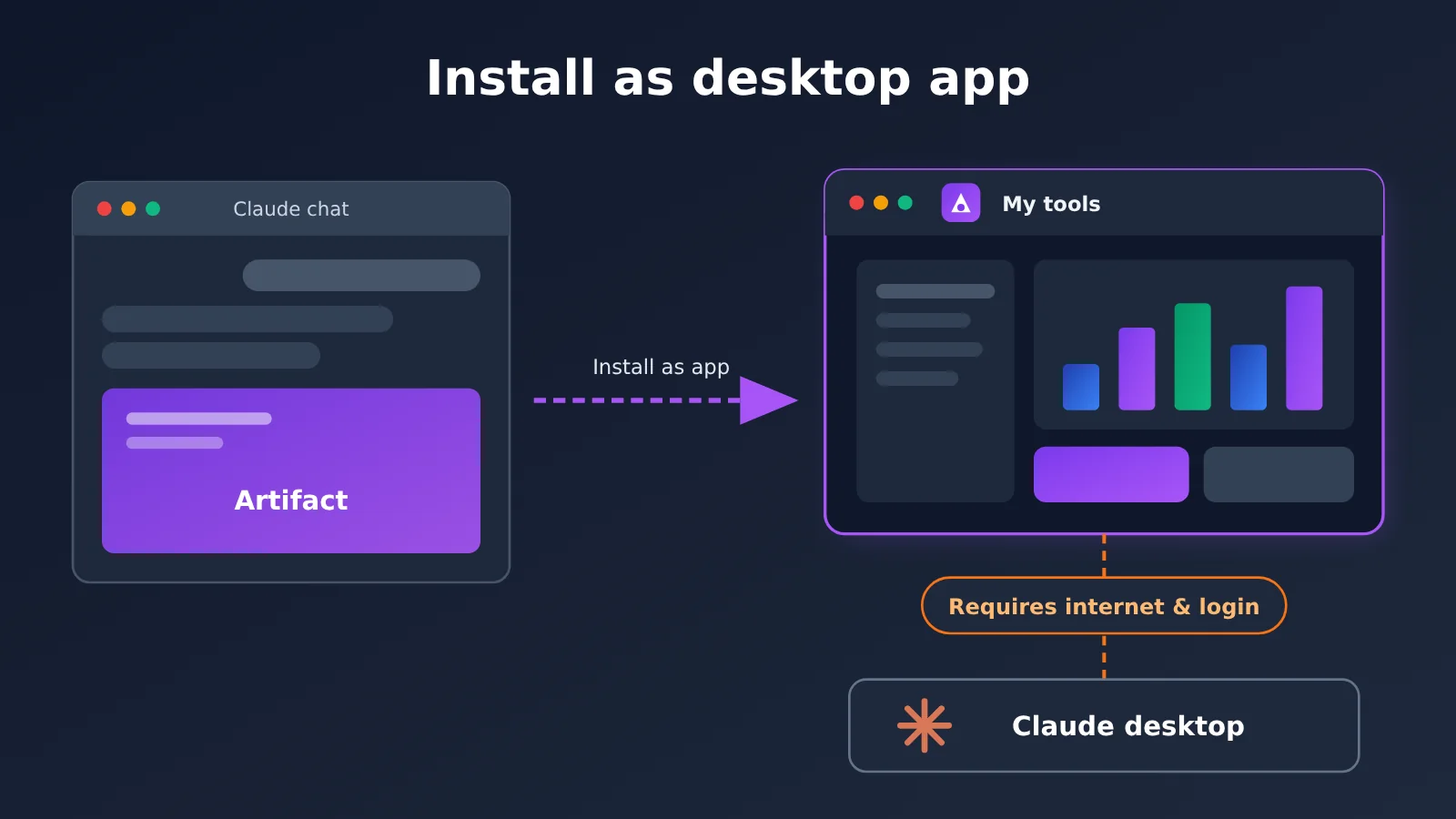
The little tools you make in Claude (artifacts) can now be installed with Install as app as a desktop app with its own icon and window. But it still runs inside the Claude desktop app — if you’re offline or not signed in to the Claude desktop app, it won’t open. To use it, you’ll need to update the client to 6.28899.0 or later, until the button shows up in the menu.
According to Anthropic’s official announcement, the feature is rolling out in beta on Claude for Mac and Claude for Windows starting November 24, 2026, and the release notes from that day list this item as well. It isn’t standalone software packaged in the traditional sense, so before you install it, get clear on quotas, permissions, and platform restrictions.
Core value: After reading this article, you’ll be able to install it in four steps and verify it as you go, understand its limitations, and use a simple formula to decide whether to install it directly or call the API yourself instead.
Claude Desktop App: Four Things to Understand First
The table below answers the four questions you should ask before installing. It’s based on the official announcement and the Help Center documentation.
| Point | Official statement | What it means for you |
|---|---|---|
| What it does | Artifacts now get their own icon and window, using your Claude account | No packaging or signing, no API key, no separate login |
| Cost | Both the creation process and the app’s requests to Claude count toward your plan usage | The more you use it, the less quota you have left for everyday conversations |
| Hard limits | Requires an internet connection and a signed-in Claude desktop app; Mac and Windows only | Unusable on Linux, the web, or mobile |
| Permissions | Three tiers, and authorization covers only the current version | You have to re-approve after every update |
What the Claude desktop app does: the same artifact, in a new window shell
Here’s one way to think about it: Install as app doesn’t compile a separate program for you. It takes the same artifact out of the chat interface and opens it in its own window. It can use Claude and the connectors you’ve already connected, and it can be shared with other people. When the underlying artifact is edited, the installed app updates along with it automatically.
That also explains why it’s so low-effort: since it uses your Claude account, there’s no key to safeguard and no login page to build. The trade-off is that it can’t exist without that account and the desktop app — you can’t treat it as an installer you can run anywhere.
Cost of the Claude desktop app: deducted from your plan usage
The official docs spell out two kinds of consumption: having Claude create the app counts toward usage, and the app’s subsequent requests to Claude count toward the usage limit of your plan. So no separate bill doesn’t mean no cost — a frequently used little tool is eating exactly the quota you’d otherwise spend on conversations.
When designing, it’s worth separating “ordinary operations” from “requests to Claude.” Actions you can complete in the UI — filtering, sorting, checkboxes — can be built as local logic; actions that genuinely need the model, like summarizing, classifying, or rewriting, can be triggered manually with a button. That’s much easier to keep under control than auto-refreshing and auto-summarizing the moment the window opens.
Hard limits of the Claude desktop app: rule out what you can’t install
There’s currently no Linux, web, or mobile version. Template artifacts like Claude Docs, Slides, and Sheets can’t be installed, and neither can legacy artifacts or Claude Cowork’s live artifacts; HIPAA configurations and hybrid deployments don’t work either.
As for plans, the Help Center lists Free, Pro, Max, Ultra, Team, and Enterprise, all in beta. As for the media take: The Decoder reported that Anthropic’s Felix Rieseberg said on X that a Claude account and the desktop app are all you need — a free account is enough. The Verge, meanwhile, compared it to a browser-based web app.
Permissions of the Claude desktop app: authorization follows the version
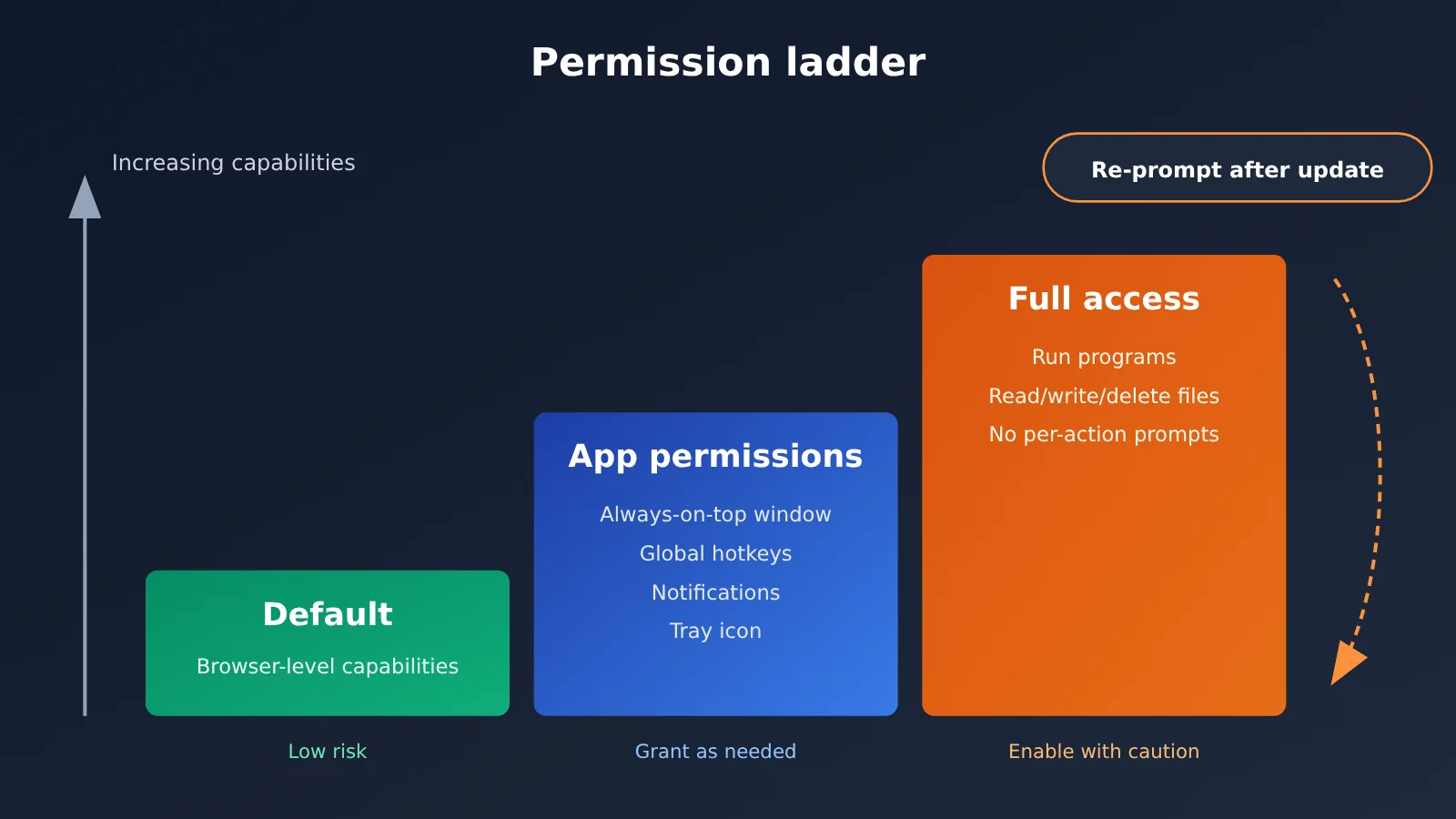
Default permissions, app permissions, and full access are three distinct tiers, and the authorization you grant applies only to the current version. Even if all you did was change a single button yourself, the app will ask again after it updates. Note that Anthropic doesn’t review the app before installation, and full access means the program can read, write, and delete files without asking you each time.
Claude Desktop App Quick Start: Four-Step Installation and Acceptance Checks
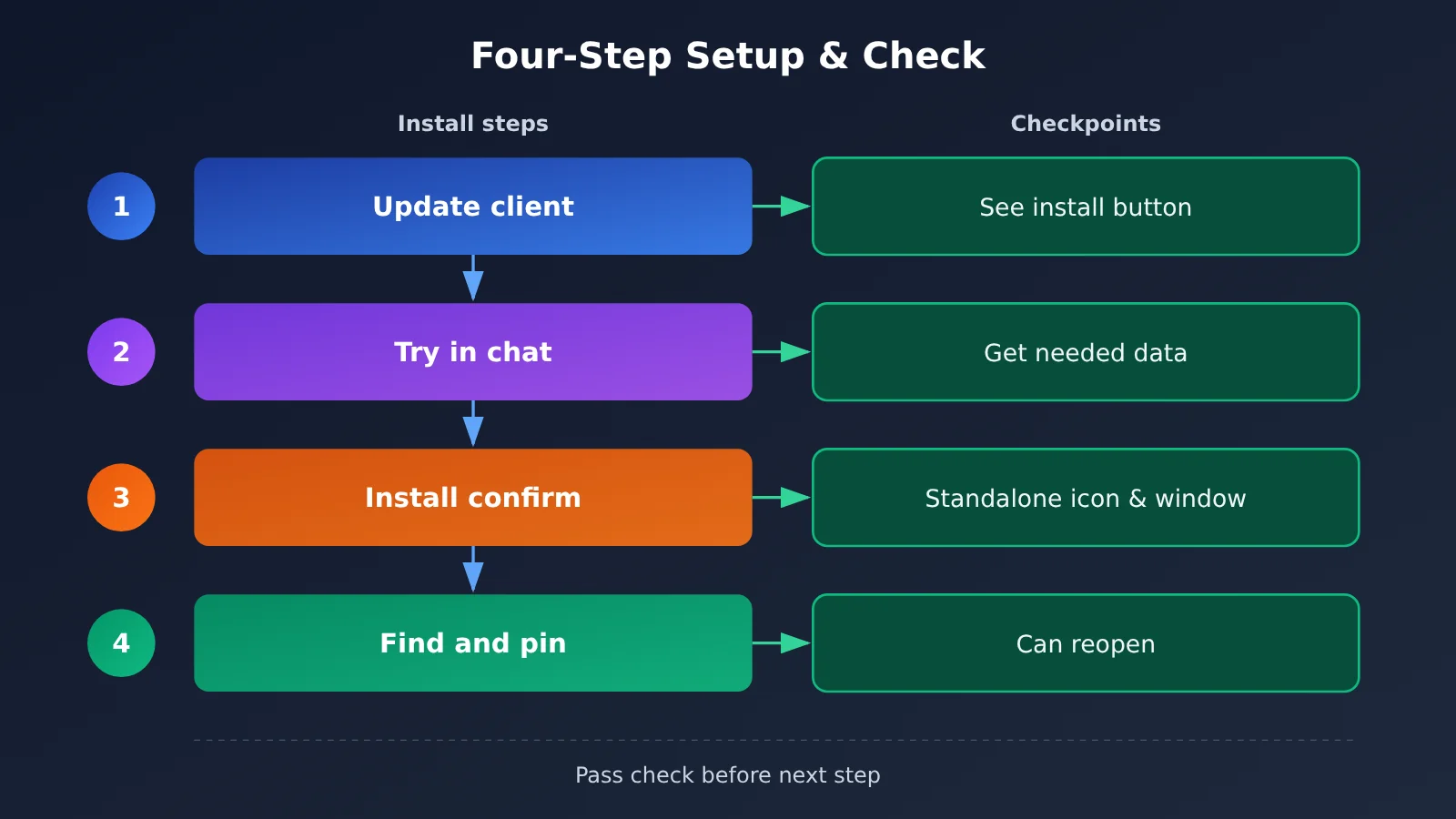
Follow these steps in order, and don’t move on to the next one until each step passes its acceptance check. That way, if something goes wrong, you can immediately tell whether the problem is in the client, the artifact itself, or the installation step.
Step 1: Update the Claude desktop app client
The client version needs to be 6.28899.0 or higher. On macOS, go to Claude > Check for Updates; on Windows, use Help > Check for Updates from the menu button. For Team and Enterprise users, if you still don’t see it after updating, the issue may be in the administrator settings.
Acceptance check: Open an eligible artifact in the main window, and you should see Install as app in its menu.
Step 2: Build a small Claude tool and use it in the conversation first
Start by narrowing the requirement: be clear about where the data comes from, what goes in the UI, and when Claude should be called. The official docs give two examples: a meeting prep page that pulls content from the calendar and email on a schedule, and a tracker for orders shipping that day. If you work in content operations, you can use the following requirement description as a reference:
Create a topic-organizing artifact: after I paste in a set of headlines, display them grouped by theme, with checkboxes and search. Checking, searching, and sorting all happen inside the UI; Claude is only called when I click “Generate summary.” Don’t request file read/write permissions.
Don’t aim for a fully featured first version—just get one action working end to end. If you need to read calendar, email, or other data, first make sure the relevant connector is connected, then check whether the returned content is actually the scope you want.
Acceptance check: When used as an artifact in the conversation, the buttons work and you get the data you need. If this doesn’t work, don’t rush to install.
Step 3: Install the Claude desktop app with Install as app
Open the artifact in the main window, then choose Install as app from the title menu, the right-click menu, or the Share menu, and click Install to confirm. Artifacts can also include their own install button, but no matter where you start, Claude will ask you to confirm once.
Acceptance check: A standalone icon appears, and clicking it opens a standalone window instead of showing it back in the conversation.
Step 4: Find and pin the Claude desktop app in the system
Once installed, there are three common entry points:
- macOS: In the
Claude Appsfolder underApplicationsin your home directory; right-click and chooseOptions > Keep in Dockto pin it to the Dock. - Windows: In the
Claude Appsfolder in the Start menu, or use the desktop shortcut. - Claude desktop app: Go to
File > Apps; you can also find and uninstall apps here.
Acceptance check: After closing the window, you can reopen it from any of the entry points above.
🚀 Prototyping tip: At this stage, you’re only validating whether the tool is worth using every day. If you’ve already decided to deploy it on a server, or you want to compare different models, you can also use APIYI apiyi.com’s free testing credits to validate the API approach—so you don’t build the desktop version and then have to start over.
Claude Desktop App Troubleshooting: Can’t See It, Can’t Install It, Can’t Open It
First figure out which problem you’re hitting — the button’s missing, installation won’t work, or it installs but won’t open — then work through the matching fix.
| Symptom | Likely cause | What to do |
|---|---|---|
Install as app isn’t visible |
Client version is too old, or the organization hasn’t enabled it | Update the client first; for Team and Enterprise, check with your admin |
| Won’t work on Enterprise | The organization hasn’t turned on the feature | Have an owner enable it under Organization settings > Artifacts |
| A specific artifact can’t be installed | It’s a Docs, Slides, or Sheets template-type artifact, a legacy artifact, or a Cowork live artifact | Not supported right now — rebuild it as a regular artifact |
| Won’t open after switching computers, going offline, or logging out | Missing desktop app, network, or login state | Confirm the desktop app is installed, you’re online, and you’re signed in |
| Authorization prompt pops up again after edits | Authorization only covers the current version | Review this round of changes, then decide whether to approve |
| Prompts you to uninstall when opening | The artifact was deleted, taken down, or is no longer shared with you | Contact whoever shared it, or uninstall it under File > Apps |
Some organizational restrictions can’t be solved by updating the client. HIPAA organizations can’t use this. Claude for Teachers and K-12 organizations don’t have full access, and installation may be switched off. Zero data retention organizations need an admin to enable Artifacts and Install as app first — and these apps aren’t covered by zero data retention.
Claude Desktop App Permissions and Risks: What’s Worth Worrying About
An icon and a standalone window make it easy to mistake an app for something that went through review, but the official docs are clear: Anthropic doesn’t review apps before installation. Whether to trust the author, the code source, and the permissions being requested is a judgment call you have to make yourself.
| Permission level | What it can do | Recommendation |
|---|---|---|
| Default | Anything a browser can do | Most query and organization tools should stay at this level for now |
| App permissions | Always-on-top windows, global shortcuts, notifications, menu bar or tray icons | Only grant these when you genuinely need persistent reminders |
| Full access | Run programs, read/write/delete files, no per-action prompts | Understand the purpose and code source; don’t turn it on just for convenience |
Full Access in the Claude Desktop App: Only for Apps You Built Yourself
The official rule is that full access is only available for apps you built yourself. On Team and Enterprise plans, it can also be an app built by someone in the same organization. On Team, app installation is on by default, but full access is off by default. Even if you had Claude build the app yourself, check which directories it touches — the consequences of deleting the wrong file don’t get any lighter just because you’re the author.
There’s also a gap in version authorization: if an app loads code from another website, that code can change without prompting you again. For tools that need higher permissions, prefer ones that don’t load code from external sources. Also, once you’ve chosen Don't allow, that choice sticks until you change it yourself.
The Claude Desktop App May Keep Running in the Background After You Close the Window
Apps with a menu bar or tray icon keep running in the background after their window is closed. On macOS, quit from the Dock or press Cmd+Q; on Windows, choose Exit from the tray menu. If the tool periodically sends requests to Claude, this also affects your usage quota — don’t judge by whether the window is closed alone.
To uninstall, go to File > Apps, select the app, and click Uninstall. This clears the permissions you granted, but it doesn’t delete the artifact. After permissions are revoked, programs the app launched stop after about 20 minutes at most, so revoking access doesn’t necessarily shut everything down immediately.
Also, don’t mistake the browser’s Add to Dock or Add browser shortcut for this feature. They’re just shortcuts and don’t have the desktop capabilities described here.
When to Switch the Claude Desktop App to the API: Decision Checklist and Cost Math
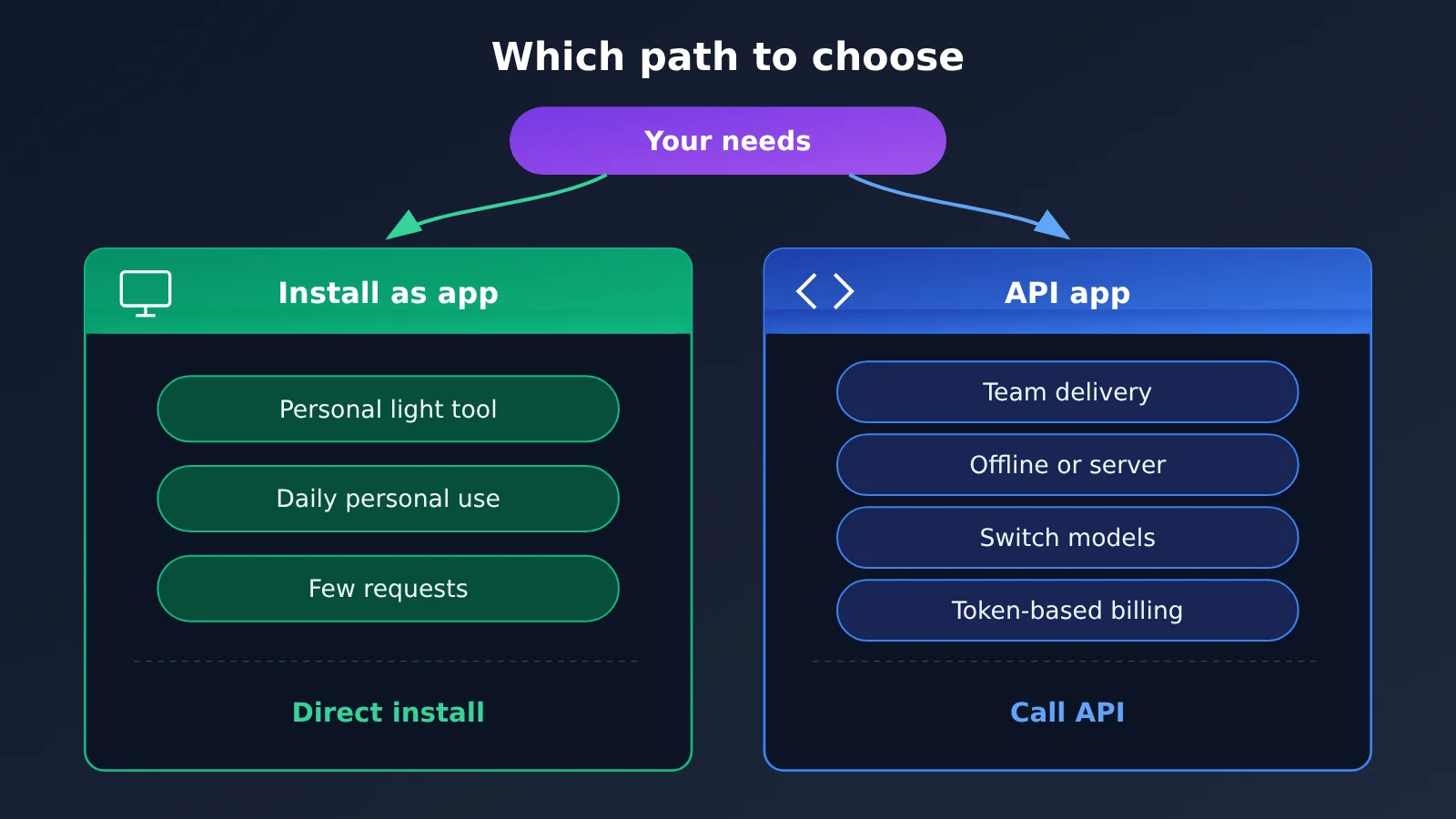
For a lightweight tool you use every day, installing it directly is the least effort. If you’re handing it to a team, first check whether they can accept the prerequisites: a Claude account, the desktop app, and your organization settings. It supports sharing, but that doesn’t mean you’ve delivered standalone software.
| Your need | Better approach | Why |
|---|---|---|
| You use it yourself every day, with few requests | Install as app |
No packaging, login, or key management |
| Hand it to a team for long-term use | A small app that calls the API | You control accounts, deployment, and updates |
| Run it on a server | A small app that calls the API | It doesn’t depend on a desktop login session |
| Switch to models other than Claude | A small app that calls the API | You can switch with a single key through APIYI apiyi.com |
| Break down costs by token | A small app that calls the API | Input and output can be accounted separately |
“Offline” needs a separate note: a self-built app can keep its interface and local features available offline, but as long as it calls a cloud model, that step still needs an internet connection. If the whole workflow must be completed without a network, neither path can directly satisfy that requirement.
How Much Does It Cost per Day After Switching the Claude Desktop App to an API?
Let’s say a small tool runs 200 times a day, with 2,000 input tokens and 400 output tokens per run. Daily usage is 200 × 2,000 = 400,000 input tokens, plus 200 × 400 = 80,000 output tokens.
At claude-opus-5-5: input 0.4 × 4 = $1.60, output 0.08 × 20 = $1.60, for a total of $3.20 per day. Running the same usage on other currently available models gives the following results. Prices come from docs.apiyi.com/models and were read on November 25, 2026.
| Model ID | Input / Output / Cache Read (USD per 1M tokens) | Daily calculation | Daily total |
|---|---|---|---|
claude-opus-5-5 |
4 / 20 / 0.2 | 1.6 + 1.6 | $3.20 |
claude-sonnet-5-5 |
2 / 10 / 0.1 | 0.8 + 0.8 | $1.60 |
claude-haiku-5-5 |
0.1 / 0.5 / 0.01 | 0.04 + 0.04 | $0.08 |
claude-haiku-5-5 has tiered input pricing: 0 to 100,000 tokens costs $0.10, and beyond that it’s $0.50 per 1M tokens. The table assumes each request has only 2,000 input tokens and falls into the lower tier, which suits lightweight requests that only do classification and reminders. None of the above includes cache discounts; claude-opus-5-5 doesn’t have a separate documentation page in the overall table, so pricing follows the model summary table.
How Do Claude Desktop App Quota Deductions Compare to API Billing?
Running continuously for 30 days, the Opus plan comes out to roughly 3.2 × 30 = 96 dollars, Sonnet is 48 dollars, and Haiku is 2.4 dollars. When everything runs inside the desktop app, there’s no per-token bill, but those same 200 requests a day still get deducted from your plan quota.
So what you actually need to compare is this: after your plan absorbs these requests, is the remaining quota still enough for everyday conversation? If it’s more than enough, installing directly is the better deal. If you’re constantly getting cut off by rate limits, or you need to justify every expense to your team, then itemize the API cost separately. The reference materials don’t provide a conversion rate between plan quota and tokens, so you can’t simply declare which path is guaranteed to be cheaper.
The Minimal Steps to Switch the Claude Desktop App Over to API Calls
APIYI apiyi.com offers a unified API, and Claude family models support both /v1/messages and /v1/chat/completions. When migrating, keep the artifact’s UI approach and just swap out the request layer:
- Create an API Key on the platform, store it in a server-side environment variable, and don’t hardcode it into the frontend page.
- Set
base_urltohttps://api.apiyi.com/v1. If you already have OpenAI-compatible code, use/chat/completions; when integrating the Messages format, be careful not to double up the/v1prefix. - Start with
claude-haiku-5-5for classification and reminders, then switch toclaude-sonnet-5-5orclaude-opus-5-5for more complex rewrites. - Record the input and output usage returned on each call, then after running for a day, plug the numbers into the formula above.
Acceptance criteria: You can still complete requests without the Claude desktop app, and you can look up the token usage for each individual call. Hit both of these and you’ve solved the desktop solution’s dependency and cost-accounting problems.
Claude Desktop App FAQ
Q1: Is the Claude desktop app really standalone software?
It has its own icon and window, but opening it requires an internet connection and signing in to Claude desktop, so it’s closer to a standalone window for artifacts. There’s also a media angle: The Decoder reported that with an Apple developer account, you can also have Claude turn it into a standalone app.
Q2: Does the Claude desktop app count against plan quota?
Yes. Building an app and the requests the app sends to Claude both count toward usage. If you don’t want high-frequency tasks to eat into your chat quota, you can use APIYI apiyi.com for pay-as-you-go calls and track the costs separately.
Q3: Can free accounts install the Claude desktop app?
The Help Center’s beta coverage includes Free. The claim that “a free account is enough” comes from The Decoder’s report on remarks by Felix Rieseberg and is a media claim; actual use is still subject to plan usage limits.
Q4: Do I need to reinstall after modifying an artifact?
The official docs say the app updates automatically with the underlying artifact, but the existing authorization covers only the old version, so it will ask for permission again after the update.
Q5: Can Claude operate the desktop apps I’ve already installed for me?
The Help Center says that on macOS, when Claude uses computer control, it can see installed apps but can’t click or type in them.
Q6: How can I quickly test the API without Claude desktop?
Create an API key in APIYI, change the compatible client’s `base_url` to `https://api.apiyi.com/v1`, set the model to `claude-haiku-5-5`, send a short request first to confirm it responds, then estimate batch costs.
Summary: Claude Desktop App Key Takeaways and Next Steps
- What it is: The same artifact, now with its own icon and window — but it still depends on Claude Desktop.
- How to install it: Update the client to
6.28899.0or later, get it working in a conversation first, then chooseInstall as app. - What it costs: No separate API Key bill, but both creation and requests count toward your plan’s usage.
- Where the limits are: You have to be online and logged in, it’s Mac and Windows only, and some artifacts and organizations aren’t supported.
- How to grant permissions: Prefer the default; be cautious about enabling full access, and every update requires re-confirmation.
- When to switch to the API: It’s a better fit for team delivery, running on a server, swapping models, or token-based accounting.
For a next step, pick one small task you repeat every day, install it following the four steps, and watch how it affects your daily quota. If an explicit bill of $3.2/day for Opus and $1.6/day for Sonnet suits your situation better, then create a Key at APIYI apiyi.com and recalculate once with your real request volume.
References
- Anthropic official announcement: Turn artifacts into Mac and Windows apps
- Link:
claude.com/resources/articles/install-as-app - Covers: Feature definition, usage, permissions, and availability
- Link:
- Claude Help Center: Install an artifact as an app
- Link:
support.claude.com/en/articles/18516354-install-an-artifact-as-an-app - Covers: Version requirements, installation steps, limitations, and uninstalling
- Link:
- Claude release notes: November 24, 2026 update
- Link:
support.claude.com/en/articles/12138966-release-notes - Covers: Confirms the feature is listed in the update as beta
- Link:
- The Decoder (media coverage): Claims about free accounts and standalone apps
- Link:
the-decoder.com/anthropic-turns-claude-artifacts-into-standalone-desktop-apps-for-macos-and-windows - Covers: Paraphrases Felix Rieseberg’s remarks
- Link:
- The Verge (media coverage): Desktop app feature report
- Link:
theverge.com/ai-artificial-intelligence/1041882/anthropic-artifact-desktop-apps-mac-windows - Covers: The browser-based web app analogy
- Link:
- APIYI model pricing: Full model list
- Link:
docs.apiyi.com/models - Covers: Unit prices used in this article’s calculations, read on November 25, 2026
- Link:
Author: APIYI Technical Team
Technical discussion: For questions about API integration and model selection, feel free to reach us through the APIYI apiyi.com homepage.