Author’s note: Browser Use 1.0 changed the shape of its tools, so the way you choose backend models has to change with it. This article clarifies three things: the backend must reliably support streaming Responses, and you need to leave enough timeout headroom; the cheap model handles clicking and reading pages, while the flagship only comes in when things get stuck or planning is needed; and the web_search, secrets, domain allowlist, and retry-count switches directly affect your bill.
After upgrading to Browser Use 1.0, many developers find that all their familiar actions are gone, and the Agent now writes its own Python. The easiest mistake to make here is to hook up the flagship model and let it run end-to-end—you burn money fast, and the timeout isn’t configured to match either. This article explains how to configure the backend in tiers by task stage, so you can run Browser Use on 1.0 reliably and cost-effectively.
This isn’t a promotional piece claiming 1.0 is definitely better than 0.x. The vendor’s improvement figures come from its own benchmarks; you’ll need to verify the results on your own tasks. This article only covers how to configure the backend, which tier to use at which step, and which switches can send your bill out of control.
Core value: After reading this article, you’ll be able to follow the steps to install 1.0.0, get your first task running with the cheap model, switch to the flagship as needed, and know how to set timeouts, retries, and billing switches.
Browser Use 1.0 Backend Configuration Essentials
Let’s start with the bottom line. The backend requirements in 1.0 aren’t the same as in 0.x, and the table below covers the points worth remembering before you configure anything.
| Point | Details | What it means for you |
|---|---|---|
| The tool shape changed | Per the official notes: 1.0 replaces 0.x’s 24 browser actions with a single Python tool — the model writes Python in a persistent REPL that runs directly on CDP | Your backend needs to handle code generation, not just action selection |
| Protocol requirements | All OpenAI Responses requests are streamed | The backend must reliably support streaming Responses, or sit behind a gateway that can proxy it |
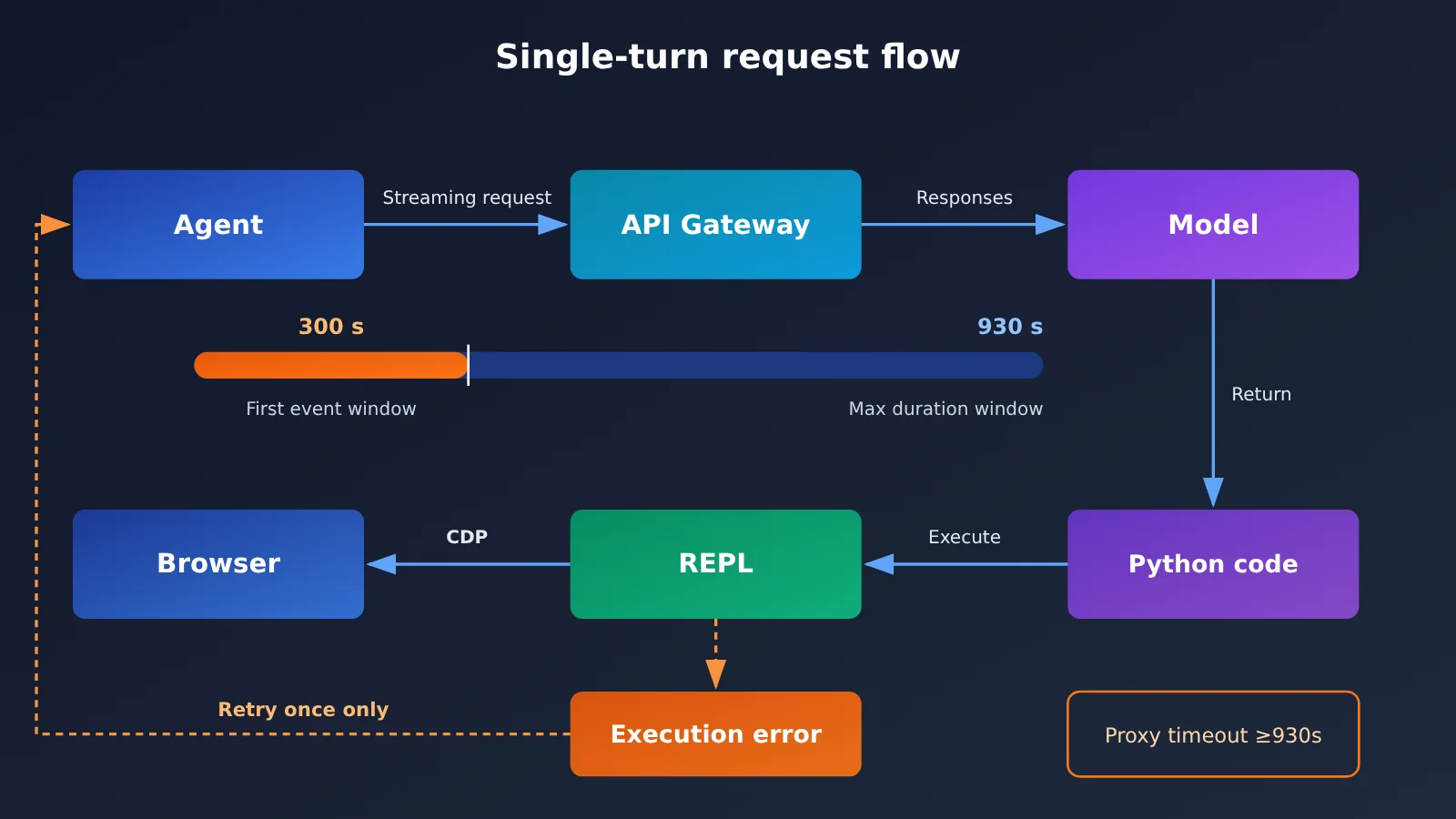
| Timeout window | A streaming turn must emit its first event within 300 seconds, and can then run for up to 930 seconds | Client, proxy, and gateway timeouts must all be at least that long |
| Retry policy | Stream errors, server_error, overloaded, and similar cases get only one retry per run |
An unstable backend fails the task outright — there’s no endless safety net |
| Tiered usage | You switch models by changing the model name on the same key |
APIYI apiyi.com gives you one unified interface to switch tiers at the business layer |
Why Browser Use 1.0 Is More Sensitive to the Backend
In 0.x, the page DOM was serialized and handed to the model, which then picked one action from a fixed action schema and executed it. According to the GitHub release, 1.0 deletes roughly 80% of the library (136,866 lines), drops DOM serialization and the action schema, and lets the model write Python to drive the browser directly. That removes a middle layer, but it also means each turn the model has to emit runnable code — longer output, and potentially longer per-turn latency.
That’s why the 300-seconds-to-first-event and 930-second-maximum numbers should be treated as hard requirements when you pick a backend. If you have a reverse proxy in the middle that drops connections at its 60-second default, the task gets cut off before the model even finishes writing code. It looks like a model capability problem, but it’s really a timeout that wasn’t configured correctly. With only one retry, that class of error is hard to catch automatically.
How to Read the Official Performance Numbers
Both the official release and the 2026-11-20 blog post mention that the same set of models scores up to 33 points higher on 1.0 (the blog says three models are 14 to 33 points higher), costs 2.7x to 5.2x less, and runs 2x to 3x faster. Those numbers come from Browser Use’s own BU Bench v2.1, with each model run only once — they aren’t a third-party reproduction. The official blog itself notes that this is a comparison of the whole release, so the gains can’t all be attributed to the tool change.
So a reasonable read is: the 1.0 architecture leaves room to reduce token consumption per task, but how much you actually save on your sites and your tasks is something you’ll only know by running your own workflows. Especially on complex sites — don’t expect it to run reliably unattended.
Browser Use 1.0: Three Model Tiers and Price Comparison
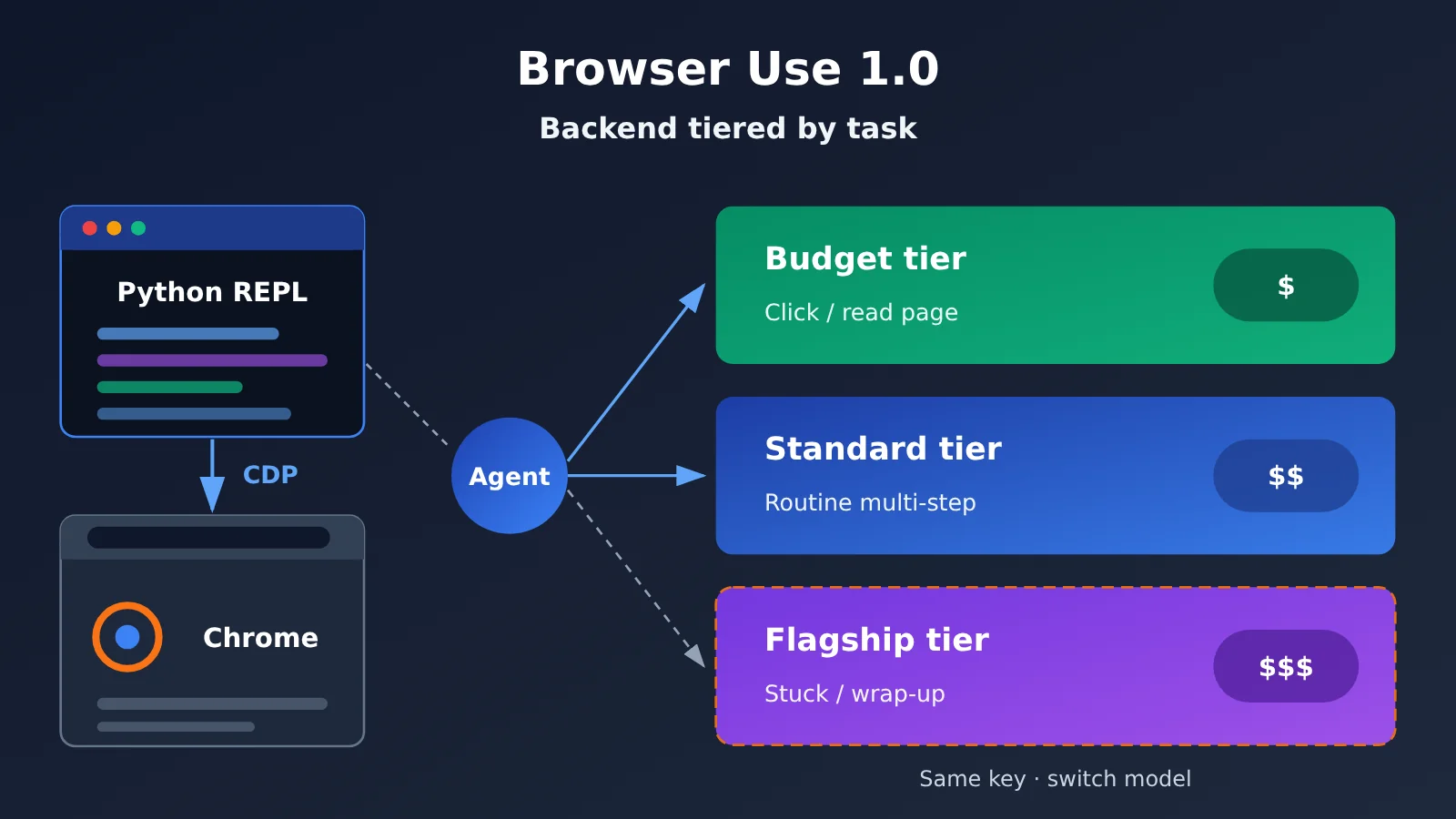
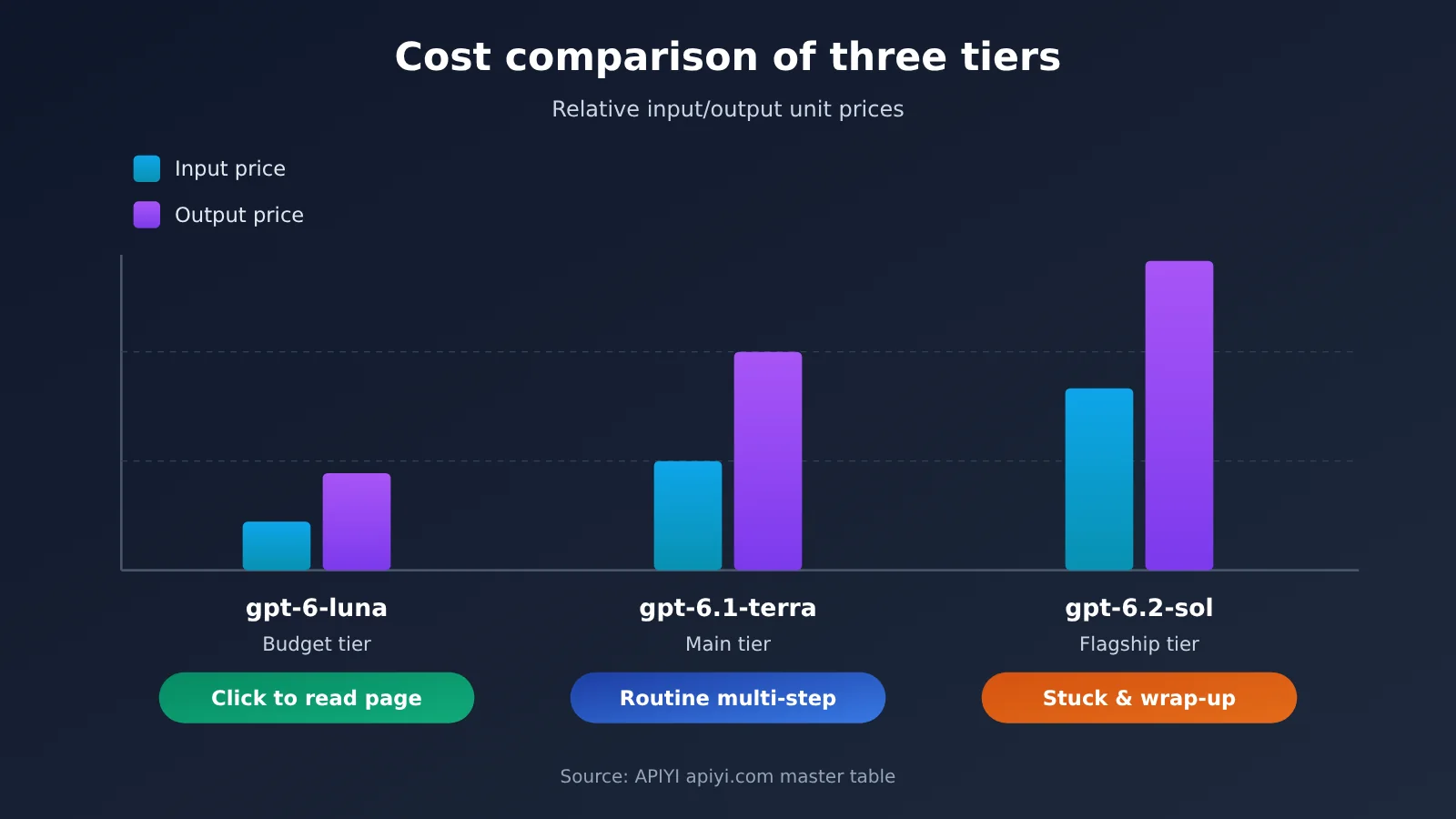
Before you pick a tier, you need to know what each tier costs. Below are the three tiers that fit Browser Use, taken from the APIYI master table (2026-11-22 09:58 UTC+8), priced in USD per million tokens.
| Tier | Model ID | Input | Output | Cache Read | Endpoint | Available Platform |
|---|---|---|---|---|---|---|
| Budget tier | gpt-6-luna |
0.1 | 0.5 | 0.01 | gpt-6 series, responses recommended | APIYI apiyi.com |
| Budget tier | deepseek-v4-flash |
0.44 | 1.32 | 0.01408 | chat, messages | APIYI |
| Budget tier | deepseek-v4.1-flash |
0.3 | 1.2 | 0.006 | Per the label in the console | APIYI |
| Main tier | gpt-6.1-terra |
1 | 5 | 0.05 | responses (recommended), chat | APIYI |
| Main tier | qwen4-max |
1.5 | 4.5 | Not listed | chat, responses, messages | APIYI |
| Flagship tier | gpt-6.2-sol |
2 | 10 | 0.1 | responses (recommended), chat | APIYI |
| Flagship tier | claude-opus-5-5 |
4 | 20 | Not listed | chat, messages | APIYI |
The endpoint column matters more than the price. Browser Use 1.0’s OpenAI requests go through streaming Responses, so prioritize models labeled responses. claude-opus-5-5 and deepseek-v4-flash don’t have /v1/responses — whether they can plug into 1.0 depends on how well browser-use supports the chat or messages protocol. The reference materials don’t confirm this, so check MIGRATING.md and the official docs before integrating. Don’t assume it’ll just work.
Which tier to use at each step
Comparing the budget tier with the flagship tier makes the gap obvious. Based on the rough estimates from the pricing table above, for a turn with 20k input tokens and 1k output tokens, gpt-6-luna costs about $0.0025 and gpt-6.2-sol about $0.05—roughly a 20x difference. This is just an estimate based on unit prices, not runtime data, but it’s enough to show why you shouldn’t use the flagship for every click.
| Task stage | Typical actions | Recommended tier | Rationale |
|---|---|---|---|
| Targeting and clicking | Find elements, click buttons, fill forms | Budget tier gpt-6-luna |
Many turns, each step simple; unit price drives the total bill |
| Reading pages | Read titles, extract lists, read status | Budget tier | Reading tasks have low reasoning requirements |
| Routine multi-step | Page through a few pages after login, filter by conditions | Main tier gpt-6.1-terra |
Needs some planning, but not worth using the flagship |
| Stuck recovery | Repeated failures, abnormal page structure | Flagship tier gpt-6.2-sol |
Needs to re-understand the page and change approach |
| Writing complex scripts and wrap-up | Plan a multi-step flow, rewrite a large Python block, organize structured results | Flagship tier | Getting it right in one go is cheaper than repeated retries |
🎯 Tier selection tip: Put tier switching in your business layer, rather than letting the Agent decide on its own. For example, if two consecutive steps fail, switch the
modelfor the next turn to the flagship, then switch back to the budget tier after success. Through APIYI apiyi.com, you can use the same API key to call all three tiers; when switching, you only change the model name, with no need to maintain multiple sets of credentials.
Browser Use 1.0 Quick Start
The steps below go in order: first get a minimal task working with a cheap model, then switch to the flagship. To make copying easy, every command and config snippet is written as inline code.
Step 1: Install and set up the key
- Install a pinned version with uv:
uv add browser-use==1.0.0. The oldbuand browser console scripts have been removed — usebrowser-useorbrowseruseon the command line instead. - Grab a Browser Use key from
cloud.browser-use.com, then runexport BROWSER_USE_API_KEY=bu_.... This key covers Browser Use’s own gateway and billing items, like theweb_searchwe’ll get to later. - If you prefer container deployment, the official image
browseruse/browseruse:1.0.0works too.
Step 2: Point the model backend at the unified gateway
In the 1.0 model config, set the OpenAI-compatible client’s base_url to https://api.apiyi.com/v1, put the key you created in the APIYI console into the API key field, and start with gpt-6-luna as the model name. The exact parameter names follow the 1.0 docs and MIGRATING.md — this article won’t invent fields on the official spec’s behalf.
While you’re at it, check every layer of timeout along the call chain. The client read timeout, the reverse proxy, and the load balancer all need to cover at least 930 seconds, and the wait for the first event can’t drop below 300 seconds. Miss one layer and long-running tasks get cut off partway through.
Step 3: Run an “open a page and read the title” task
- In your code,
from browser_use import Agent. - Create the Agent with the task “open example.com and read the page title”, and use
Agent(task, output_model_schema=...)to define a structured output with just atitlefield. - After it runs, read the result from
result.structured_outputand check what the run cost fromresult.cost_usd.
This task only involves opening a page and reading it, so the cheap tier is more than enough. Once it works, you’ve confirmed three things: the key is valid, the base_url is reachable, and streaming Responses isn’t being truncated by a middle layer.
Step 4: Switch to the flagship for a comparison
Keep the task the same, change only the model name to gpt-6.2-sol, and run it again — then compare result.cost_usd and elapsed time. For a task like reading a title, both tiers usually produce the same result; the difference shows up on the bill. That’s exactly how you build the intuition for when it isn’t worth going flagship. Next, switch to a task that needs multi-step planning and watch which step the cheap tier starts to stall on — that’s the point in your application where you should be switching tiers.
🚀 Quick start: If you don’t have a usable model key yet, sign up at APIYI apiyi.com to claim free trial credits — a single key covers all three model tiers and lets you run the comparison experiments above.
Browser Use 1.0 Billing Switches and Security Configuration
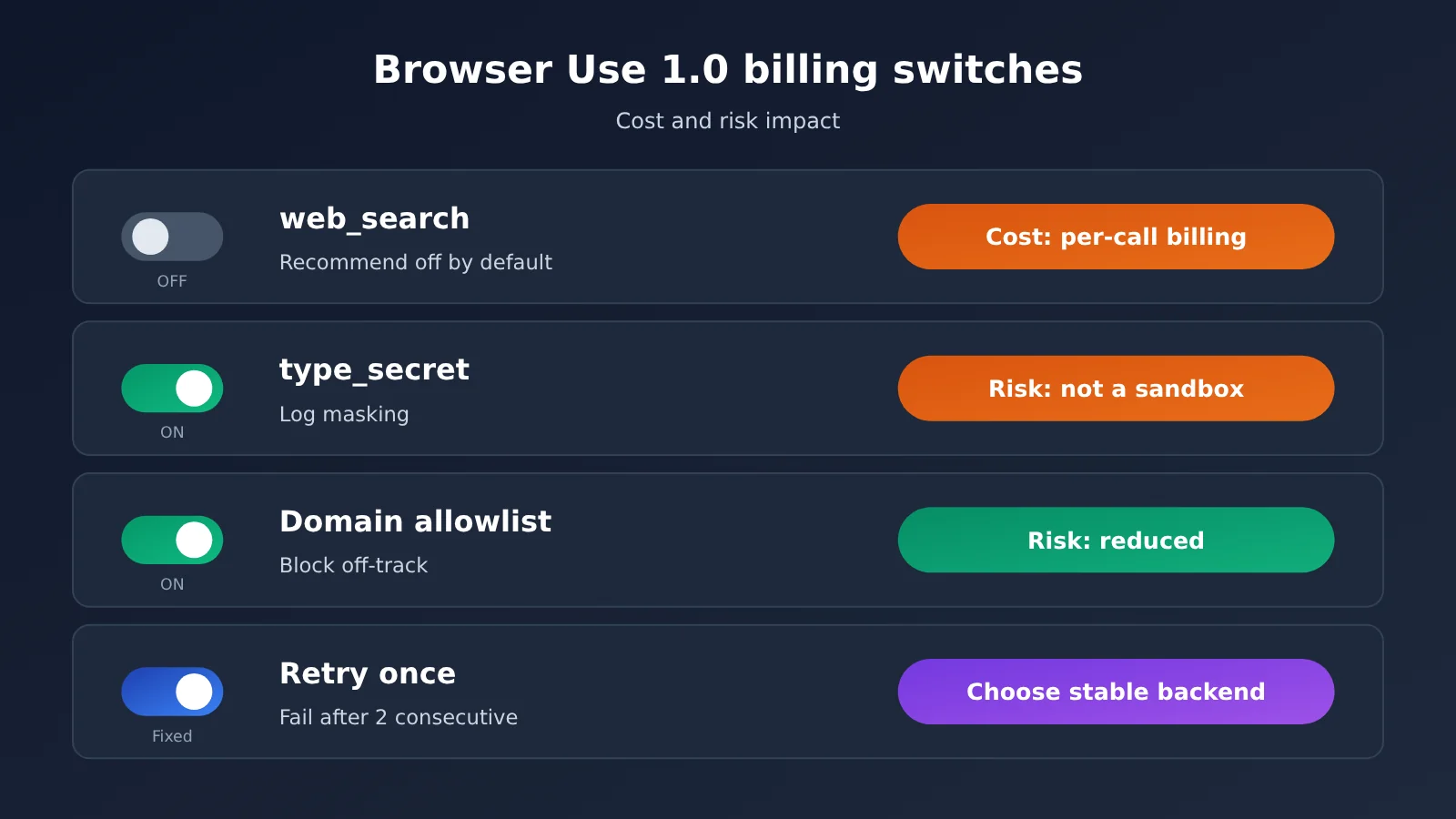
Choosing the right model only solves half the problem — the other half lives in the switches. A handful of config options directly affect what you spend and what you risk.
| Config option | What it does | Billing or risk impact | Recommendation |
|---|---|---|---|
web_search=True |
Lets the Agent search the web | Charged per search against the Browser Use key, counted into result.cost_usd |
Turn it on only for tasks that genuinely need outside information |
type_secret() |
Marks passwords and other sensitive values | Redacts them from cell output, checkpoints, tool results, and final results | Always use it — but it isn’t a sandbox |
allowed_domains / prohibited_domains |
Restricts which domains can be visited | Keeps the Agent from wandering off to irrelevant sites and cuts wasted turns | Always set an allowlist for production tasks |
block_ip_addresses |
Blocks direct access to IP addresses | Lowers the risk of accidentally hitting the internal network | Worth enabling if you have an intranet environment |
| Retries | Stream anomalies handled the same as 429 and 5xx | Only one retry per run | Don’t stack unlimited retries on top of it |
web_search is the one people overlook most. Its cost doesn’t run through model tokens — it’s billed per search against the Browser Use key. Once the Agent picks up a “let me search first” habit, that count climbs fast. I’d keep it off by default and enable it task by task when you actually need it.
You also need to understand where secrets redaction stops. The official docs say plainly that this isn’t a sandbox: redaction only guarantees sensitive values don’t show up in outputs and logs. The model and the execution environment can still reach those values. For deciding whether to trust the model, see the official MIGRATING.md, and don’t hand high-sensitivity accounts to an Agent for unattended operation.
What “retry only once” actually means
Per the release notes, an HTTP 200 that carries server_error, overloaded, request_timeout, or upstream_stream_failed, or a stream that ends before the final event, gets handled just like a 429 or 5xx — one retry per run. In other words, if the backend hiccups twice in a row, that run is a failure.
So backend stability matters more than saving a few cents. Also keep in mind that the gateway passes upstream rate limits and failures straight through. When you see a 429, first check whether you’ve tripped a frequency limit — don’t misread it as weak model capability and blindly upgrade to a flagship model.
Frequently Asked Questions (FAQ)
Q1: What’s the biggest difference between Browser Use 1.0 and 0.x?
According to the official claims, 1.0 replaces 0.x’s 24 browser actions with a single Python tool. The model writes Python in a persistent REPL that runs directly on the Chrome DevTools Protocol — no DOM serialization, no action schema. That means the backend model needs to be able to write code, and it has to reliably support streaming output.
Q2: The official numbers say it’s 2.7 to 5.2 times cheaper — will my tasks save that much too?
Not necessarily. Those numbers come from Browser Use’s own BU Bench v2.1, with one run per model. They aren’t third-party reproduced, and the team itself notes that not all the credit belongs to the tooling changes. Your site structure and task length will both affect the results, so it’s best to run your own typical tasks on both the old and new versions and compare `result.cost_usd`.
Q3: When was Browser Use 1.0 released?
The 1.0.0 release on GitHub went out on 2026-11-10, and the official blog added details on the tool’s form factor and benchmark comparisons on 2026-11-20. When installing, we recommend pinning the version with `browser-use==1.0.0` so later minor releases don’t change behavior on you.
Q4: Can Claude models serve as the backend for Browser Use 1.0?
Check the protocol first. `claude-opus-5-5` only offers the chat and messages endpoints on APIYI — there’s no `/v1/responses`. Whether 1.0 supports hooking in via those two protocols isn’t confirmed in the reference material, so go by the official docs. If you only want the Responses route, the flagship tier is worth considering first: `gpt-6.2-sol`.
Q5: How do I switch between the three tiers with one key?
Set the model backend’s base_url to `https://api.apiyi.com/v1`, use an APIYI key, and change only the `model` field when you switch tiers — say, `gpt-6-luna` to `gpt-6.2-sol`. Put the switching logic in your business layer, deciding which tier to use for the next turn based on failure counts or task stage.
Q6: If a task hits a 429 or times out halfway through, should I switch to a stronger model?
Don’t switch yet. A 429 is almost always rate limiting — the gateway passes upstream throttling and failures straight through, and it has nothing to do with model capability. For timeouts, first check whether any layer in the call chain falls short of the 300-second time-to-first-event and 930-second total duration requirements. Only once you’ve ruled those out should you consider changing tiers — you can also review request logs in the APIYI apiyi.com console to help pinpoint the cause.
Q7: With the domain allowlist and secrets redaction turned on, is unattended operation safe?
No. The domain allowlist keeps the agent from wandering off, and `type_secret()` keeps sensitive values out of logs, but the official docs explicitly state this isn’t a sandbox. Logins, verifications, and unexpected pop-ups on complex sites can still make tasks fail, so in production you should keep human review and failure alerts in place.
Browser Use 1.0 Backend Configuration Key Takeaways
- A change in form: 1.0 has the model write Python that runs directly over CDP, so the backend needs to be able to write code.
- Protocol and timeouts: You must reliably support streaming Responses, with a 300-second timeout for the first event and 930 seconds total.
- Retry only once: If the backend keeps flapping, it will fail—stability matters more than unit price.
- Tiered division of labor: The budget tier clicks and reads pages, the main tier handles routine multi-step work, and the flagship tier handles getting unstuck and wrapping up.
- Tier switching happens in the business layer: Switch the
modelname based on failure count or stage; don’t leave that judgment to the Agent. - Billing controls:
web_searchis billed per call;secretsredaction isn’t a sandbox, and an allowlist is mandatory. - Getting started path: Use
https://api.apiyi.com/v1with a single key to run the budget tier first, then compare against the flagship.
Summary
The core points of Browser Use 1.0 backend configuration:
- Meet the hard requirements first: Streaming Responses must be stable, and timeouts must cover 300 seconds for the first event and 930 seconds total—otherwise even the strongest model will get cut off midway.
- Then tier by stage: Give most turns to a budget tier like
gpt-6-luna, use the main tier for routine multi-step work, and bring in the flagshipgpt-6.2-solonly when you’re stuck, planning, or writing complex scripts. - Finally, control the switches:
web_searchis off by default, mark sensitive values withtype_secret()but don’t treat it as a sandbox, configure the domain allowlist, and don’t stack infinite retries on the outside.
The official improvement numbers can serve as directional reference, but how much you actually save needs to be validated with your own tasks. We recommend first running the “read the title” task via the quick start, then gradually increasing task complexity, finding the point where the budget tier starts to struggle, and writing tier-switching rules into your business code. You can view and invoke all three tiers’ prices and endpoints in one place via APIYI apiyi.com, making comparison experiments very cheap.
📚 References
-
Browser Use GitHub Release 1.0.0: Release notes and reliability details
- Link:
github.com/browser-use/browser-use/releases - Description: Includes installation instructions, the list of new capabilities, streaming timeouts, and retry rules
- Link:
-
Browser Use Official Blog: 1.0 release notes
- Link:
browser-use.com/posts/browser-use-1-0 - Description: Explains how 24 actions were replaced with a single Python tool, and the comparison methodology for BU Bench v2.1
- Link:
-
Browser Use Cloud: Get
BROWSER_USE_API_KEY- Link:
cloud.browser-use.com - Description: Key management and billing items such as
web_search
- Link:
-
MIGRATING.md: 0.x migration and trust model notes
- Link:
github.com/browser-use/browser-use - Description: Migration caveats and the security boundaries of
secrets
- Link:
Author: APIYI Technical Team
Technical Contact: Feel free to contact us via the APIYI website homepage. For more integration resources, visit the documentation center at docs.apiyi.com.