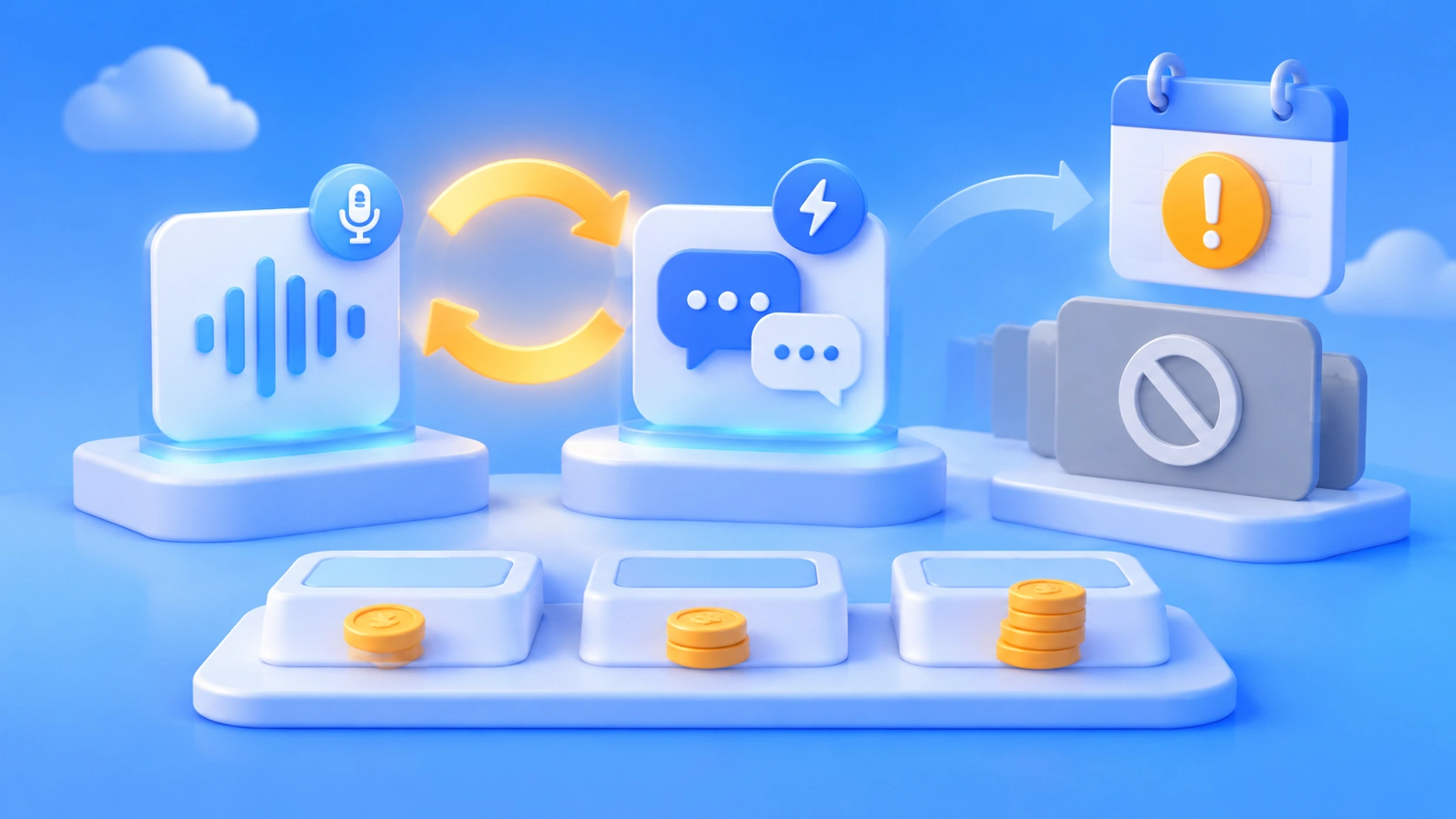
Author’s note: Breaking down the three things in the November 2026 ChatGPT voice update—Live Dictation, real-time conversation with GPT-Live, and the December 11 retirement of Advanced and Standard—plus three budget structures for building your own voice app.
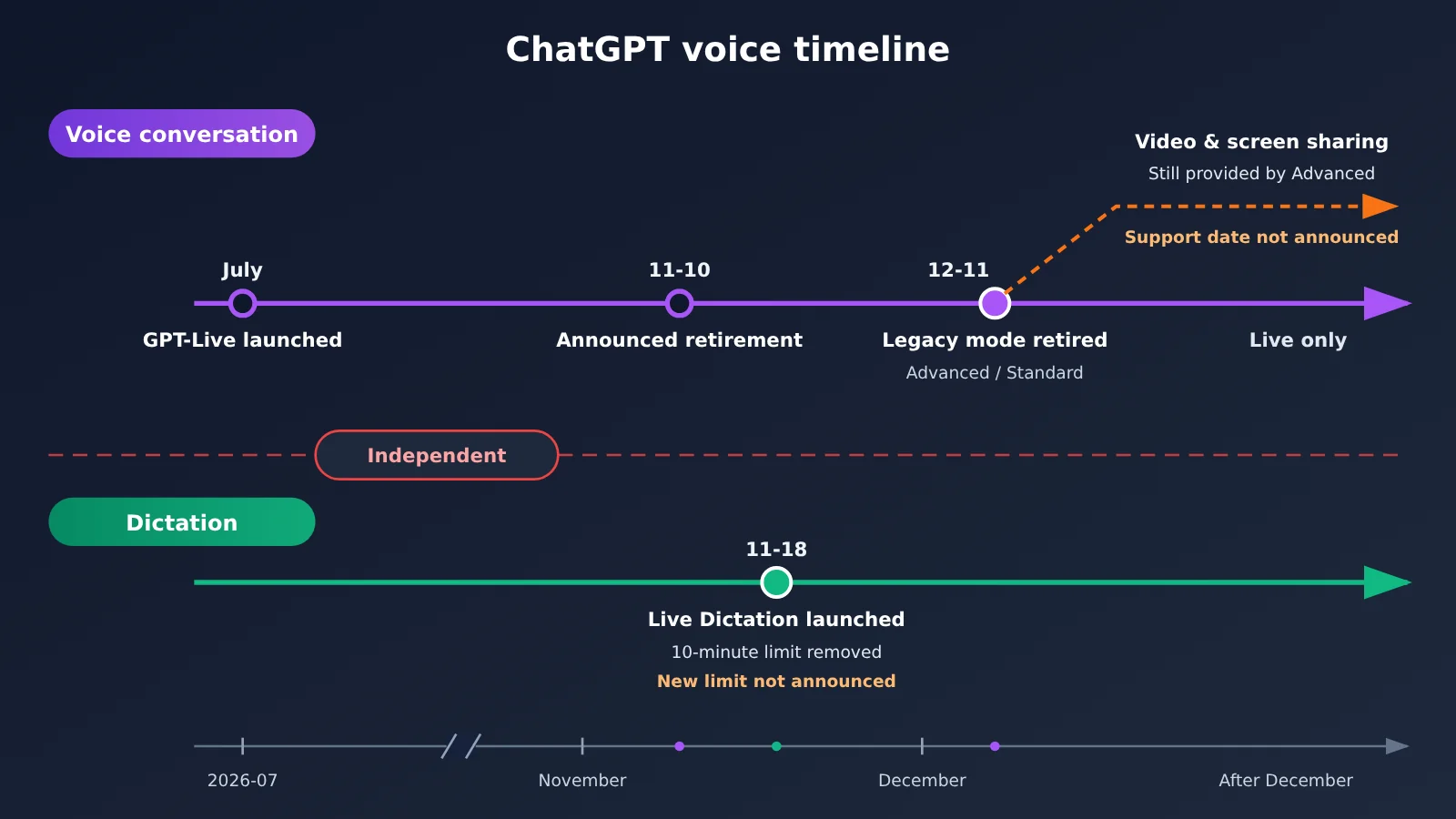
Let’s start with the conclusion: dictation and voice conversation are two separate features—don’t use one to benchmark the other. The November 2026 ChatGPT voice update covers three different things. Live Dictation, launched on November 18, only turns what you say into editable text in the input box. Voice conversation is now consolidated into GPT-Live. The old Advanced and Standard voices will be retired on December 11.
If you’re building a voice-based AI app and want to use the ChatGPT experience as a reference for your own product, the easiest mistake to make is treating these three tracks as a single upgrade. Wire a dictation need into real-time conversation, and your bill can be several times higher. Build a real-time conversation need like dictation, and users will find the product sluggish.
This isn’t hearsay. The following information comes from OpenAI release notes, the Help Center, and official posts on X; The Verge, 9to5Mac, and MLQ.ai also followed up with coverage. Wherever the statement comes from OpenAI itself, it’s marked below as “official company statement.”
Core value: After reading this, you’ll be able to tell what each of these three changes actually changed, understand that the two timelines shouldn’t be mixed, and choose an API based on three budget structures: one-off transcription, real-time conversation, and speech-only playback.
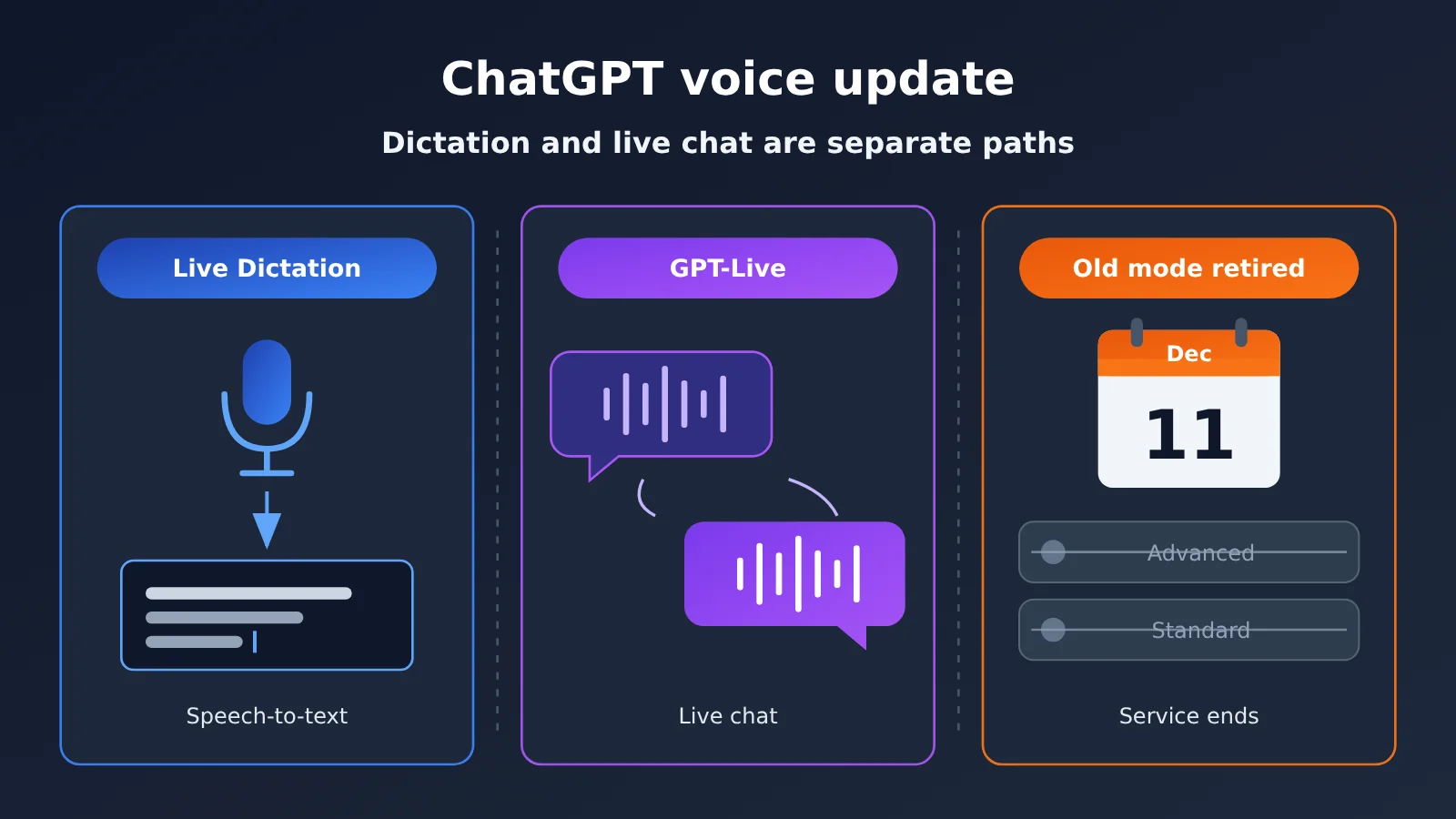
ChatGPT Voice Update: Key Facts at a Glance
Let’s start with a table of the key information from this round of ChatGPT voice updates. Each row covers a separate item—don’t merge them together when reading.
| Item | Live Dictation | Voice real-time conversation (GPT-Live) | Advanced and Standard retirement |
|---|---|---|---|
| Timing | Announced 2026-11-18 | GPT-Live launched in 2026-07 | Announced 2026-11-10, executed 2026-12-11 |
| What it does | Turns speech into editable text and puts it into the input field | A voice conversation where you can listen and speak at the same time and interrupt | Removes two older voice modes |
| Coverage | All plans (including Free), iOS, Android, web, desktop, rolling out globally in stages | Default mode within ChatGPT Voice | After retirement, Voice keeps only Live |
| OpenAI-reported highlights | Faster and more reliable, text appears as you speak, removes the old 10-minute recording cap | Voice usage has nearly doubled since July | Live video and screen sharing are still provided by Advanced for now |
| What wasn’t disclosed | New duration cap, accuracy, latency figures | — | When Live will support video and screen sharing |
ChatGPT Voice Update #1: Live Dictation Is Only About “Speaking into the Text Box”
According to OpenAI on X and in its release notes (company-reported), Dictation is now faster and more reliable. Live Dictation shows text as you speak, and you can tap or click the waveform to show or hide this live text. The original 10-minute recording cap is also gone. The update is available to all ChatGPT plans, including Free, across iOS, Android, web, and desktop clients, rolling out in batches worldwide. The Verge (2026-11-19), 9to5Mac (2026-11-18), and MLQ.ai (2026-11-19) all covered it along those lines.
Two points deserve special mention. First, after removing the 10-minute cap, OpenAI did not disclose a new cap, nor did it provide accuracy or latency figures; MLQ.ai explicitly noted this in its report. So don’t put “ChatGPT dictation can run for unlimited duration” in product docs. Second, Atty Eleti, who leads voice, said on X that removing the 10-minute limit was part of this streaming upgrade—an incidental engineering improvement, not a standalone new feature.
The most important boundary is this: The output of dictation is text you can edit; it won’t hold a conversation for you. OpenAI’s Help Center ChatGPT Voice page says it plainly: if you just want to turn a recording into editable text, you should use Dictation. Dictation is not the same feature as Voice mode, and it’s also not the same as meeting recording (record mode, currently in beta).
ChatGPT Voice Update Part 2: Voice Conversation Has Consolidated into GPT-Live
The voice conversation track has nothing to do with dictation. According to the ChatGPT Voice page in the Help Center (updated in mid-November), Voice runs inside the chat interface — you can listen and read the text at the same time, and you can type when speaking isn’t convenient. Voice currently has three modes, all switched from Settings > Voice:
| Mode | Interaction | Officially described capabilities | Status |
|---|---|---|---|
| Live | Real-time, two-way, interruptible | Web search, use of memory, visualizing results through supported widgets | Retained, and now the only mode |
| Advanced | Previous-generation real-time experience | Used when you need mobile capabilities such as video or screen sharing | Retired on December 11, though video and screen sharing stay for now |
| Standard | Turn-by-turn, transcribe first and then answer | The traditional “record, recognize, generate, read aloud” pipeline | Retired on December 11 |
The desktop side has updates too. In the ChatGPT desktop app, Chat, Work, and Codex can all use Voice, and it’s available on the Plus, Pro, Business, Edu, and Enterprise plans — with Enterprise and Edu getting a two-week early access period. Once your phone is paired with the desktop host, you can also use voice in Codex on iOS.
ChatGPT Voice Update #3: Retiring on December 11, with One Exception
In its release notes dated 2026-11-10, OpenAI says (per its own announcement) that the Advanced and Standard voices in ChatGPT Voice will be retired on 2026-12-11, leaving only Live afterward. The stated reason: voice usage has nearly doubled since July, and almost everyone using voice is on GPT-Live.
The same note also spells out one exception: until GPT-Live has Live video and screen sharing, those two features will still be provided by Advanced voice. In other words, December 11 doesn’t mean Advanced vanishes completely. It’ll keep powering video and screen sharing until Live catches up with those two capabilities — and OpenAI hasn’t said when that will be.
One clarification while we’re here: some folks online have lumped “dots” into this round of voice updates. Across the OpenAI release notes and help center articles we checked for this piece, there’s no voice update by that name. dots is a separate product line that expanded to Plus and Business standard seats on November 20 — nothing to do with voice, so don’t merge the two into one story.
ChatGPT Voice Update Impact Analysis: Three Reminders for Developers
Reminder 1: Evaluate dictation and real-time conversation as separate needs
A lot of teams write a single line in their project brief: “we want ChatGPT-style voice.” In reality, what users want might be a “speak first, edit later” input experience like Live Dictation, or a “you can cut in anytime” conversation experience like GPT-Live. The APIs behind these two needs are completely different.
Here’s a simple way to tell them apart: look at where the voice ends. If the endpoint is an editable block of text — notes, tickets, email drafts, a search box — that’s a dictation need. If the endpoint is AI responding with voice and letting the user interrupt at any time, that’s a real-time conversation need. And if you’re just reading existing text aloud — announcements, audio content, navigation prompts — that’s a pure text-to-speech need.
Reminder 2: Don’t mix up the two timelines
If your product copy or competitor analysis references ChatGPT’s voice capabilities, you’ll need to update the description after December 11. Statements like “ChatGPT has a Standard voice mode” will be out of date. At the same time, don’t write “ChatGPT has fully switched to GPT-Live,” because video and screen sharing still run on Advanced.
The correct phrasing is: voice conversations all use Live, while video and screen sharing are temporarily provided by Advanced. As for dictation, it’s unrelated to this retirement — Live Dictation updates ship independently.
Reminder 3: When building your own, pick the route first, then the model
This is the most direct takeaway for developers from this news. The three routes bill completely differently, and if you pick the wrong route, no amount of model shopping will save you money.
| Route | Corresponding ChatGPT feature | Billing characteristics | Where the budget mainly goes | Products it fits |
|---|---|---|---|---|
| One-shot transcription (STT) | Live Dictation | Billed by audio volume processed, completed in one pass | Audio duration | Voice input methods, notes, customer service QA |
| Real-time conversation (Realtime) | Voice’s Live | Continuous billing on input plus output tokens, the longer the session the more expensive | Output tokens (usually far pricier than input) | Voice assistants, practice partners, live customer support |
| Pure text-to-speech (TTS) | The voice playback part of Voice | Billed by characters | Text length | Announcements, audio content, notification sounds |
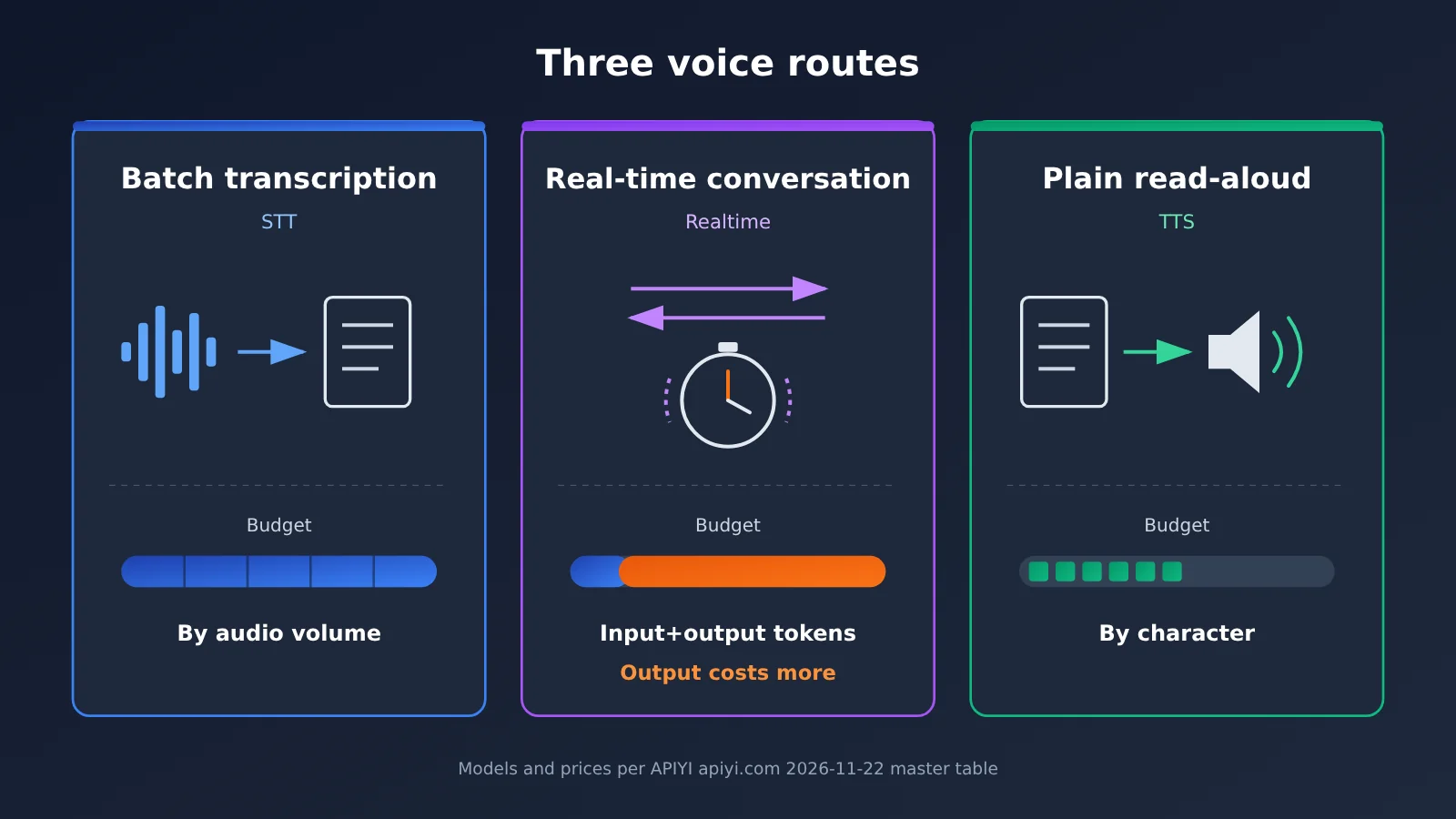
🎯 Technical tip: When choosing a route, you can first call the real-time conversation model and the text-to-speech model on APIYI apiyi.com with the same key, run through both cost and quality, and then decide. The pricing basis in the chart above also follows the platform’s master table.
After the ChatGPT Voice Update: Models You Can Self-Host and Their Prices
Let’s be clear up front: GPT-Live is a voice model inside the ChatGPT product. It’s not in the APIYI master price table dated 2026-11-22, so this article doesn’t quote a price for it. What you can use to build your own real-time conversations is the realtime family of models. The prices below come from the APIYI apiyi.com master table (2026-11-22 09:58 UTC+8), in USD per million tokens, with TTS billed per character:
| Model | Route | Input | Output | Cache read | Available platform |
|---|---|---|---|---|---|
gpt-realtime-2.1 |
Real-time conversation | 4 | 24 | 0.4 | APIYI apiyi.com (chat endpoint) |
gpt-realtime-2.1-mini |
Real-time conversation | 0.6 | 2.4 | 0.06 | APIYI apiyi.com |
qwen3.5-omni-plus-realtime |
Real-time conversation | 1.38 | 8.25 | — | APIYI apiyi.com |
qwen3.5-omni-flash-realtime |
Real-time conversation | 0.45 | 2.75 | — | APIYI apiyi.com |
tts-1 |
Plain read-aloud | 30 USD per million characters (the page labels it 30/30 on a token basis) | — | — | APIYI apiyi.com |
tts-1-hd |
Plain read-aloud | 60 USD per million characters | — | — | APIYI apiyi.com |
A few patterns stand out from this table:
- The cost of real-time conversation lives mainly on the output side.
gpt-realtime-2.1charges 6x for output compared with input. If users tend to ask one short question and then listen to a long answer, output will drag your bill up. Capping response length saves you more money than squeezing the input. - Mini and flash are a good fit for high-concurrency scenarios.
gpt-realtime-2.1-miniandqwen3.5-omni-flash-realtimecost an order of magnitude less per unit than the flagship models—ideal for things like language practice partners or shopping assistants, where there are many turns but each turn is undemanding. - Cache reads are cheap. Cache reads on
gpt-realtime-2.1cost just 0.4. If your system prompt is long and gets resent every turn, hitting the cache can cut costs noticeably. - Plain read-aloud doesn’t need a realtime model. If all you’re doing is reading text out loud,
tts-1ortts-1-hdbilled by character count will save you a lot compared with opening a realtime session. - One-off transcription: this master table doesn’t list a dedicated transcription model, so check the console for specifics. Don’t estimate dictation costs using the per-unit prices of the realtime models above.
Integration is simple. In an OpenAI-compatible SDK, set base_url to https://api.apiyi.com/v1, put your APIYI key in api_key, and switch the model field between gpt-realtime-2.1-mini and tts-1 to run real-time conversation and read-aloud from the same codebase. For A/B comparisons, the only parameter you need to change is model—no protocol-level changes required.
One thing to keep in mind: APIYI is a gateway, so the upstream rate limits and usage policies pass through unchanged. If a call returns 429 or a similar rate-limit error, check the upstream quota first rather than troubleshooting only on the gateway side.
💰 Cost tip: Budget-conscious small teams can prototype with
gpt-realtime-2.1-miniorqwen3.5-omni-flash-realtimefirst, confirm the conversation experience feels right, and only then decide whether to move to a flagship model. You can complete this round of validation on APIYI apiyi.com using the free trial credit for new users.
ChatGPT Voice Update FAQ
Q1: Are Live Dictation and Voice the same thing?
No, they’re not. Live Dictation turns speech into editable text in the input box, and you decide whether to send it. Voice is a voice conversation, and the AI responds to you with audio. OpenAI’s Help Center also recommends using Dictation if all you want to do is turn a recording into text.
Q2: Now that Live Dictation has dropped the 10-minute cap, how long can it record?
There’s no official new limit, and no accuracy or latency figures have been published (MLQ.ai’s report explicitly notes this). Don’t assume in your product design that there’s no time limit.
Q3: Can ChatGPT still do video and screen sharing after December 11?
According to the official documentation, yes. Until GPT-Live supports Live video and screen sharing, Advanced voice will continue to provide these two features. What’s being retired is the part where Advanced and Standard serve as voice conversation modes. Video and screen sharing are being kept for now.
Q4: Can a custom app call GPT-Live directly?
GPT-Live isn’t currently in APIYI’s 2026-11-22 master list, so this article doesn’t quote pricing for it. If you’re building your own realtime conversation app, you can call `gpt-realtime-2.1` or `gpt-realtime-2.1-mini` through APIYI at apiyi.com, and compare them with the realtime series from qwen3.5-omni.
Q5: Does a voice assistant that can “listen and speak” have to use a realtime model?
Not necessarily. If you don’t need interruption, you can use a turn-by-turn pipeline like Standard’s: transcribe first, then generate, and finally read the result aloud with `tts-1`. This approach costs less but has higher latency. If you need to cut in at any time, you’ll need a realtime model. You can try both approaches on APIYI at apiyi.com with the same API key and compare the difference.
Q6: Is dots part of this voice update?
No. In the OpenAI release notes and Help Center materials reviewed for this article, there isn’t any voice update called dots. dots is a separate product line that expanded to Plus and Business standard seats on November 20.
ChatGPT Voice Update: Key Takeaways
- Dictation isn’t for conversations: Live Dictation only turns speech into editable text. It’s a different feature from Voice and from meeting recording.
- Dictation rolls out to everyone: All plans, four platforms, rolling out globally. The 10-minute cap is gone, but no new cap has been announced.
- Voice conversations all move to Live: Advanced and Standard retire on December 11, leaving Live as the only Voice option.
- Video and screen sharing are exceptions: Until Live adds these two capabilities, Advanced keeps providing them.
- dots has nothing to do with voice: That voice update isn’t in the release notes, so don’t conflate the two.
- Pick the route before the model: One-off transcription, real-time conversation, and plain speech playback are three different budget structures.
- One key switches models: Through APIYI (apiyi.com)’s OpenAI-compatible API, you can switch between realtime and TTS models.
Summary: How to Integrate After the ChatGPT Voice Update
The key points of this round of ChatGPT voice updates:
- Live Dictation: Solves the single step of “getting speech into the text box” — faster, more reliable, no more 10-minute cap, and available to all users.
- GPT-Live: Voice conversations unify on Live. Advanced and Standard retire on December 11, but video and screen sharing are still provided by Advanced for now.
- Build-your-own route: Transcription is billed by audio, real-time conversation by input plus output tokens, and speech playback by characters.
When building voice products, first figure out where the user’s voice ultimately needs to land, then decide which type of interface to connect. If the need is dictation, don’t open a real-time session. If the need is conversation, don’t stitch together turn-by-turn transcription to fake a real-time experience.
I recommend running gpt-realtime-2.1-mini, qwen3.5-omni-flash-realtime, and tts-1 through the same codebase via APIYI apiyi.com, then deciding on your route based on the actual bill.
📚 References
-
OpenAI ChatGPT release notes: Retirement announcement for Live Dictation, Advanced, and Standard
- Link:
help.openai.com - Details: Official notes from 2026-11-10 and 2026-11-18, including retirement dates and the exception clause for Live video
- Link:
-
OpenAI Help Center ChatGPT Voice page: Explanation of the three modes — Live, Advanced, and Standard
- Link:
help.openai.com - Details: Where Dictation ends and Voice begins, plus how to switch under
Settings > Voice
- Link:
-
The Verge: Live Dictation coverage (2026-11-19)
- Link:
theverge.com - Details: Third-party confirmation of the rollout scope
- Link:
-
9to5Mac: Live Dictation coverage (2026-11-18)
- Link:
9to5mac.com - Details: Rollout information for iOS and desktop
- Link:
-
MLQ.ai: Live Dictation coverage (2026-11-19)
- Link:
mlq.ai - Details: Explicitly notes that the official announcement did not publish any new duration limits, accuracy figures, or latency numbers
- Link:
Author: APIYI technical team
Technical discussion: For questions about voice API selection or billing, feel free to reach out to us via the homepage of the APIYI apiyi.com website. More integration materials are available in the docs.apiyi.com documentation center.