A major Antigravity update is likely on the way, but as of November 3, 2026, it hasn’t been officially released. Two team members have teased it publicly on X, but the latest version in the official changelog is still v2.28.2 (October 29, 2026). There’s no new version number or feature list yet.
What we really need isn’t to wait for new features—it’s to switch models now. According to Google and Magpie’s documentation, both the Antigravity App and CLI support enterprise gateway mode. Connect Magpie to APIYI at apiyi.com, and you can use both Gemini 4 Argon and Claude Opus 5.5 with a single Key.
This isn’t a recap of a product launch. By the end, you’ll have an evidence table, a look at the practical value of four changes, and a complete path for connecting and disconnecting. That path has limitations around feature availability and data routing, which we’ll cover separately below.
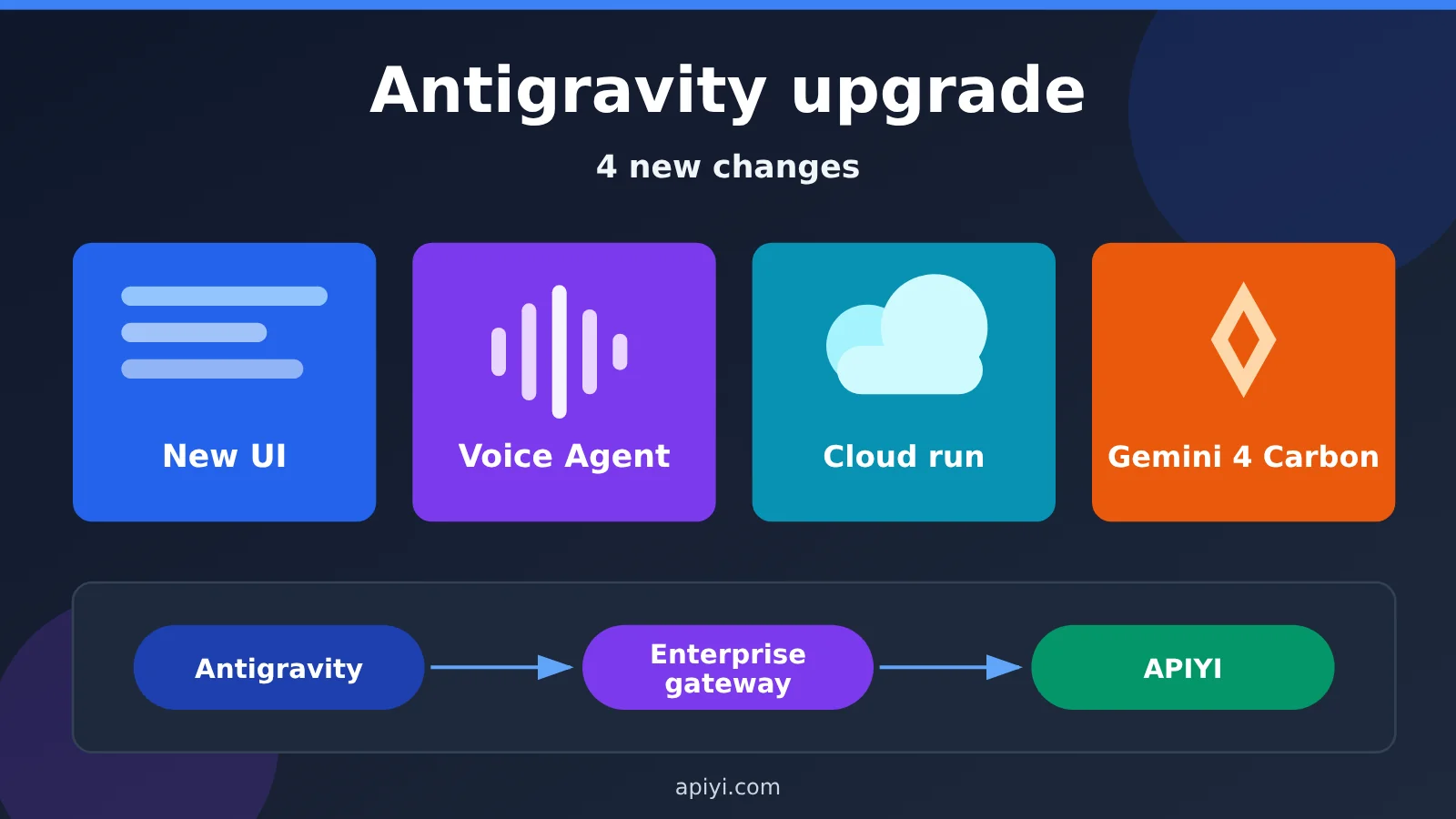
What’s actually changing in the major Antigravity update?
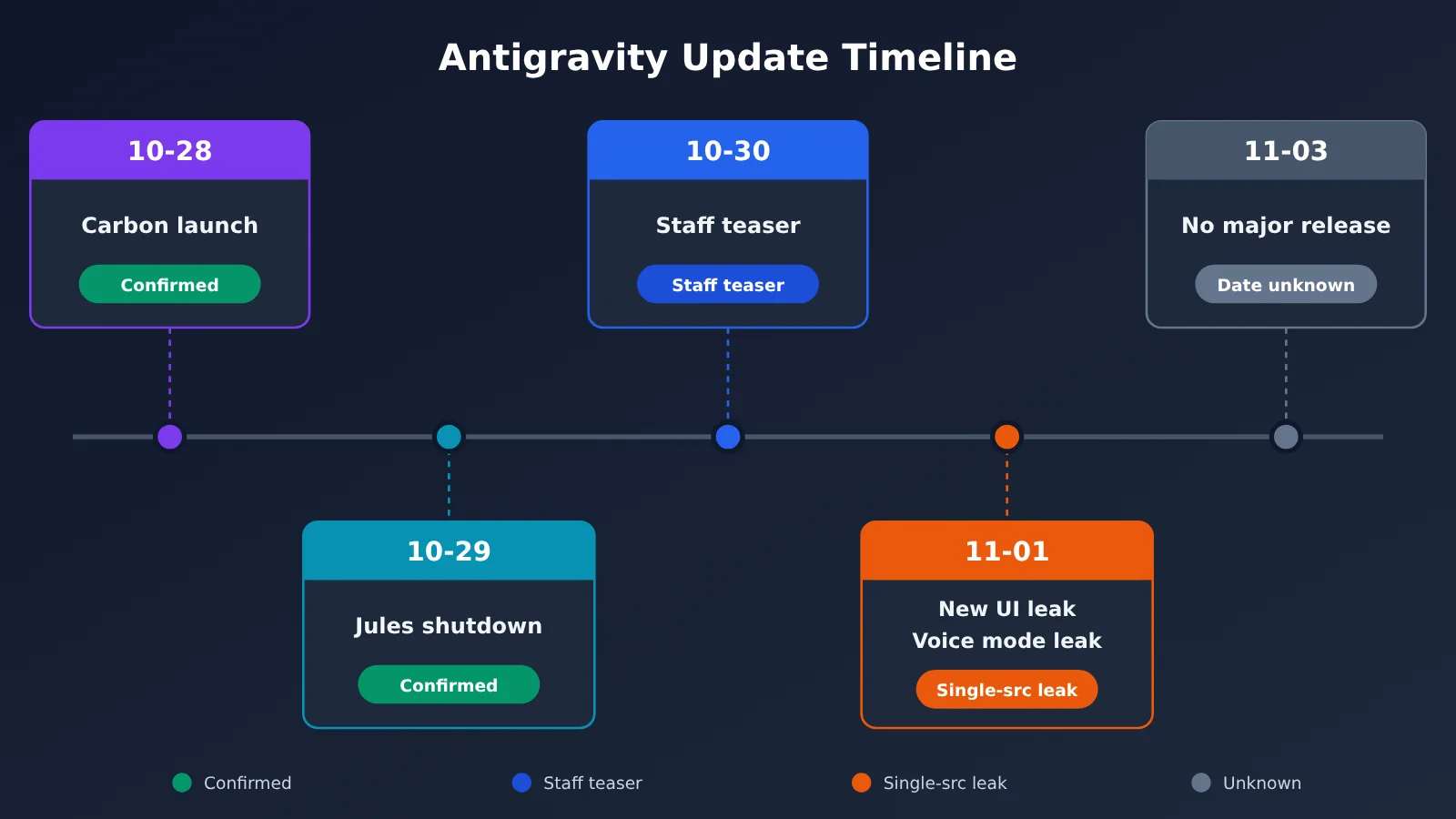
First, let’s look at the evidence. Most of the widely shared information comes from leaks and teasers, which aren’t the same as an official release.
| Evidence level | What we know | How to interpret it |
|---|---|---|
| Officially confirmed | v2.28.2 is the latest version in the changelog; Carbon launched on October 28; Jules announced it will shut down on December 31; the plugin marketplace is live | These can be treated as facts |
| Teased by employees | Varun Mohan said there would be a lot of releases “next week”; Kevin Hou said “coming soon” | The teasers are real, but there’s no version number or feature list |
| Leaks or single-source reports | Screenshots of a new UI; Chief of Staff voice mode; local/cloud switching | These could be renamed, redesigned, or delayed |
| Rumors or community speculation | Kevin Hou’s teaser refers to Carbon | It hasn’t been named officially, so we can’t draw that conclusion |
| Unknown | Release date; whether the rollout will be available to everyone; cloud quotas; when Carbon will arrive in Antigravity | Wait for an official announcement |
Antigravity’s New UI: More Like Gemini, but From a Single Source
This screenshot from a Reddit user, shared by X account @zane_os on November 1, is a leak from a single source. It shows a new input bar, a microphone button, and a model selector displaying Gemini 4 Argon High, with a Turbo toggle beside it.
The settings show two groups of theme presets. The dark themes include Dracula, Tokyo Night, and One Dark Pro. Keyboard shortcuts are also more comprehensive: Ctrl+K opens the conversation selector, Ctrl+P searches files, and Ctrl+N starts a new conversation.
The update addresses interaction and visual design, and it could also serve as an entry point for a voice Agent. For now, community feedback is anecdotal: some say it “looks much better than before,” while others think the UI matters less than the Agent’s capabilities. Whether it will roll out broadly and what the final version will look like remain unknown.
Antigravity Voice Agent: Chief of Staff Isn’t the Final Name
This November 1 report from TestingCatalog, accompanied by an 18-second demo video, is also a single-source leak, not an official demo. Antigravity 2.0 already supports real-time voice transcription, turning speech into text. The leaked version adds real-time voice conversations, with an experience close to Gemini Live. You can choose a voice and control speech speed and mute settings.
According to the welcome screen, it can review pending items from the past three days, generate personalized rules, and discover useful skills and plugins. The leak also mentions an overview dashboard for managing extensions, tasks awaiting approval, and background processes. Whether it can delegate subtasks to other Agents hasn’t been confirmed. TestingCatalog also made clear that Chief of Staff is only the current working name.
Antigravity Cloud Execution: Officially on the Roadmap, but No Launch Date
TestingCatalog reported on October 31 that the latest build showed a local/cloud toggle above the input bar and a Running Jobs section in settings visible only to developers. That detail comes from a single-source leak. The official Antigravity 2.0 blog did mention plans for cloud-deployed agents, so the direction has some backing—but that doesn’t mean it’ll launch with this update.
If cloud execution arrives, the most immediate benefit would be letting long-running tasks continue after you turn off your computer. Jules also announced its shutdown around the same time and will become read-only after November 11, making it easy to connect the two. But the company hasn’t said cloud execution is a replacement for Jules—that’s still speculation. For Jules users, the priority is to export their data in time.
Gemini 4 Carbon: Released, but Not Yet in Antigravity
There are two parts to this. Officially confirmed: Gemini 4 Carbon launched on October 28, 2026, with a focus on cybersecurity and long-running tasks. It’s initially available to cybersecurity defenders in the Fairwind program, with access expanding gradually afterward. No public release date has been announced. The company reports that it ranked first on the AA Intelligence Index v5.0 with a score of 59.
Not yet confirmed: As of November 3, Carbon wasn’t on Antigravity’s official model list. Kevin Hou’s “coming soon” post didn’t name Carbon either. People did ask about it in the replies, but that’s just community expectation. The models already available in Antigravity are Gemini 4 Argon, Gemini 3.8 Flash, Claude Sonnet 5.5, and Claude Opus 5.5.
| Change | What it addresses | Evidence level | When it’ll be available |
|---|---|---|---|
| New UI | Improves the look and feel, and adds themes, keyboard shortcuts, and voice access | Leak, single source | Unknown |
| Voice Agent | Handles and coordinates work through real-time conversation | Leak, single source | Unknown |
| Cloud execution | Lets long-running tasks run independently of your local machine | Leak; official sources have only confirmed the roadmap direction | Unknown |
| Gemini 4 Carbon | Designed for cybersecurity and long-running tasks | Model officially released; Antigravity availability unconfirmed | Unknown |
Why Connect APIYI to Antigravity?
Even if the new features launch tomorrow, model selection on the standard account path will still depend on your Google account and subscription. The official FAQ says it’s only available to personal accounts in certain regions. That’s not what we’re after. We want to bring our own key and have Antigravity run APIYI models directly.
The standard account path doesn’t support that. The official pricing page explicitly says it doesn’t currently support BYOK or custom endpoints. Using your own key requires a different path: enterprise gateway mode. It’s not a switch you’ll find in the standard settings.
Once connected, your choice of models no longer depends on your Google subscription. You can use the same key to switch between Gemini 4 Argon and Claude Opus 5.5, spending more when you have more work and less when you have less. There’s no need to open another subscription just to change models. For teams, this also separates model purchasing from IDE subscriptions, making budgets easier to plan. Start with a small project and check that the connection, speed, and costs meet your expectations before expanding. If it isn’t a good fit, you can switch back to the default without affecting your existing Google login.
| Comparison | Standard Account Path | Enterprise Gateway Mode |
|---|---|---|
| Sign-in | Google account | No Google sign-in |
| Bring your own key | Not supported | Supported; the gateway issues the key |
| Version requirements | Per the official client | App 2.15+, agy 1.2.15+ |
| Models and quotas | Based on Free, AI Pro, and AI Ultra 5x / 20x tiers | Depends on the gateway and model provider |
| Official positioning | For personal Google accounts, subject to regional availability | For Gemini Enterprise organizations; personal use is an unofficial scenario |
The takeaway is simple: waiting for an update won’t solve the problem of bringing your own models. Even when a major release arrives, its new features may not work in gateway mode—the official documentation doesn’t say. So don’t assume that connecting a model means you’ll get every new official feature.
Three Ways to Connect to Antigravity Right Now
There’s no single best route. The right choice depends on which accounts you have and whether you need the Antigravity interface. If you want to connect APIYI to Antigravity, go straight to route B. Routes A and C are alternatives: A is for people who already have an eligible Google account and want to keep up with official features; C is for people who just want to use the models and don’t need the Antigravity interface.
| Route | Who it’s for | Advantages | Limitations | Available through |
|---|---|---|---|---|
| A: Official subscription | Users with an eligible Google account who want the official route | Official support and the most direct access to new features | Subject to account, regional, and usage limits | |
| B: Enterprise gateway + Magpie + APIYI | Users who want the Antigravity interface but also want to switch models | Use multiple models with one API key and switch easily | Unofficial support; features may change; low account risk | Magpie + APIYI apiyi.com |
| C: Claude Code or Codex directly + APIYI | Developers who don’t need Antigravity | One less gateway conversion layer, with no need to use the enterprise gateway | No access to Antigravity’s interface or features | APIYI |
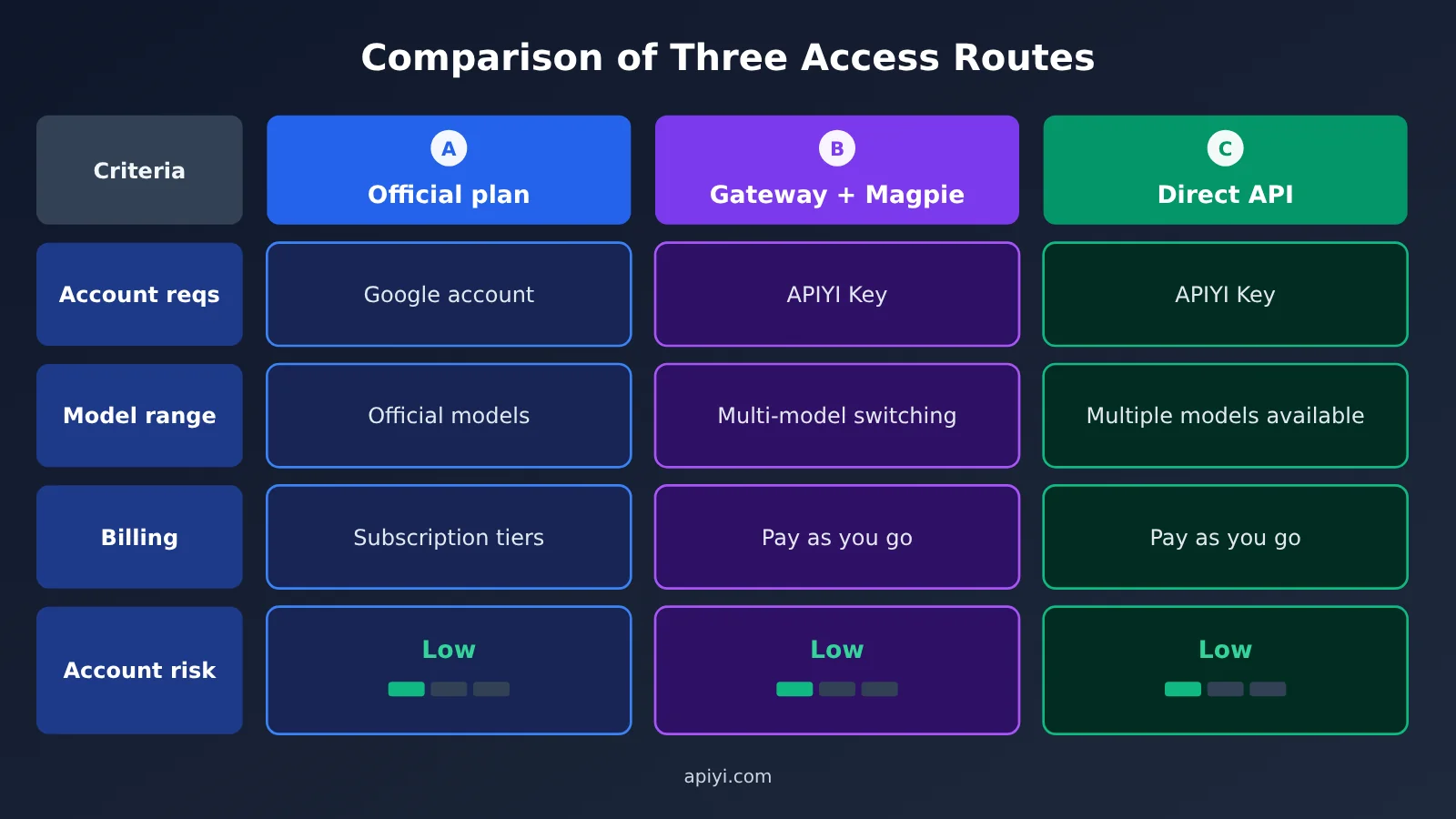
The chart compares the three routes across four areas: accounts, models, billing, and account risk. If you want to check that your API key and models work first, start with the APIYI console at apiyi.com, then decide between B and C.
Route A: Official Antigravity Subscription
If you have an eligible Google account, the official route is the first option to consider. The tiers are Free, AI Pro, AI Ultra 5x, and AI Ultra 20x. According to the official documentation, the Free tier includes a basic allowance that refreshes weekly. Pro and Ultra refresh every five hours; Pro also has a weekly limit, and both can use AI credits beyond their included allowance.
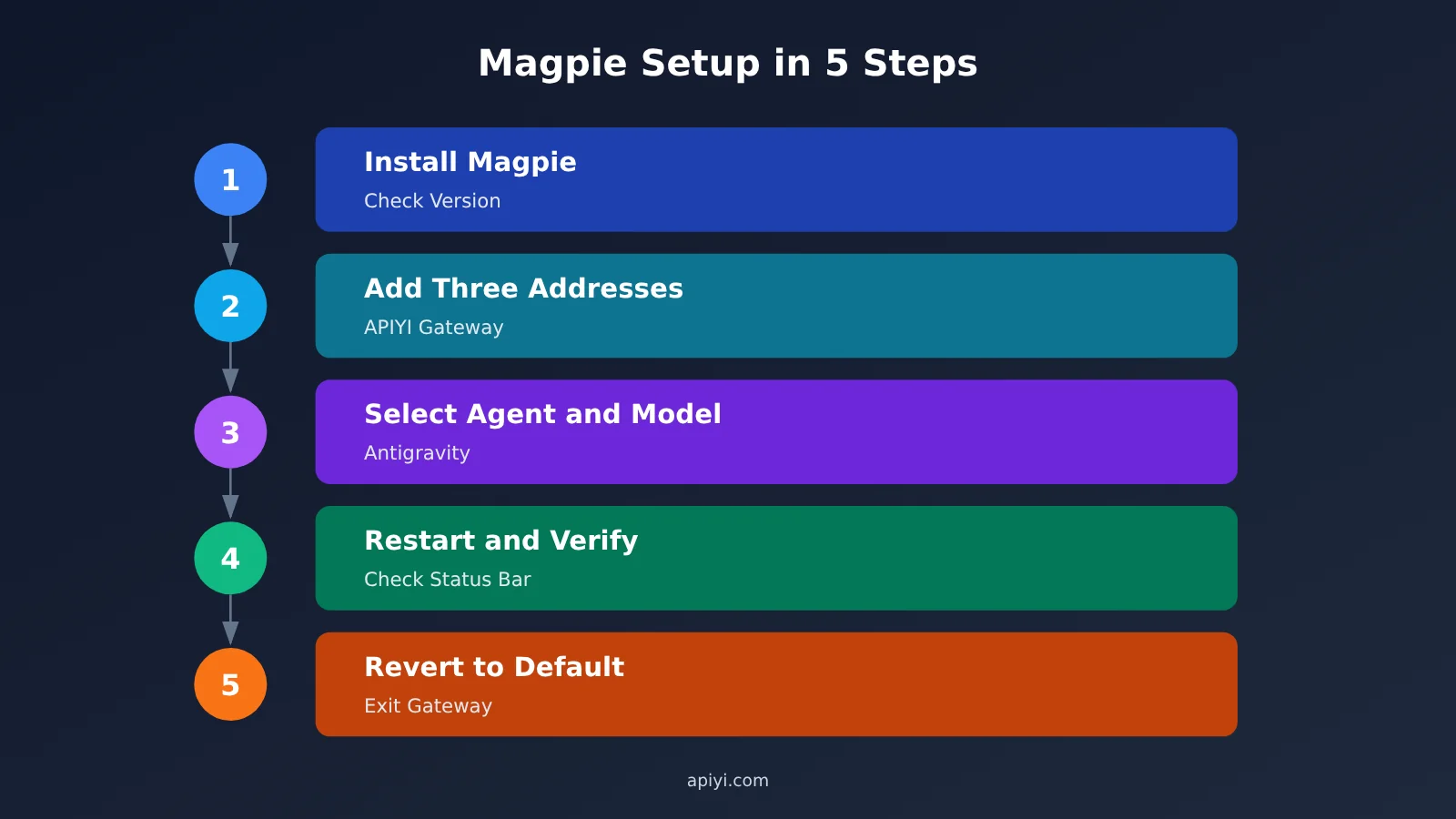
Route B: Antigravity + Magpie + APIYI in 5 Steps
This route is based on Google’s enterprise gateway documentation and Magpie’s documentation. The complete setup hasn’t been tested locally. Interface labels may vary slightly between Magpie versions, so check the version you have installed.
Step 1: Install Magpie and check the versions.
- Download Magpie from
usemagpie.aior the Releases page atgithub.com/yetone/magpie. - Make sure the app version is at least
2.15(the latest on the official website is2.28.2). - Make sure the CLI version is at least
agy 1.2.15.
Step 2: Add APIYI in Magpie. Go to the “Providers” page, click “+ Add Provider,” select “Proxy” or “Custom,” and enter APIYI as the name. Then enter the address for your chosen protocol, paste your API key, fetch the model list, and select models such as gemini-4-argon and claude-opus-5-5.
- OpenAI-compatible protocol address:
https://api.apiyi.com/v1 - Anthropic native protocol address (use the root domain without
/v1, or it will become/v1/v1/messagesand return a 404):https://api.apiyi.com - Gemini native protocol address (set the SDK version to
v1beta):https://api.apiyi.com
Step 3: Select Antigravity and a model on the Agents page. Select the Antigravity row for the desktop app, or the Antigravity CLI row for the command line.
- To use Gemini 4 Argon, select
apiyi/gemini-4-argon - To use Claude Opus 5.5, select
apiyi/claude-opus-5-5
Step 4: Restart and verify. The verification steps differ for the app and CLI, so don’t just check whether the configuration saved successfully.
- The app’s status bar should show
Connected: Enterprise Gateway - The app’s Account Settings should show
Enterprise Gateway Mode Active - Start the CLI in a new terminal:
agy - Check the current CLI model:
agy modelsor/model
Once the status is correct, start a new session and ask a question to confirm you get a response.
Step 5: Switch back to the default to exit. In Magpie, switch the relevant agent back to its default. The app will restore its previous Google login and settings.
- For the CLI, you can also run this command to remove the shell function and exit:
magpie agy default
What Configuration Changes Behind the Enterprise Gateway
Magpie configures the App by writing gateway settings to the user-level configuration file ~/.antigravity/settings.json and connecting to the local gateway at 127.0.0.1:3425. This is a community implementation by Magpie, not an official MDM solution. The official approach for enterprise administrators is to deploy admin_settings.json through MDM.
If you’re troubleshooting configuration on the CLI or IDE path, you can check it against these official environment variables:
- Specify the gateway’s HTTPS address:
AGY_LLM_GATEWAY_URL - Enter the API key issued by the gateway:
AGY_LLM_GATEWAY_API_KEY - Specify the protocol, either
genaioropenai:AGY_LLM_GATEWAY_WIRE_PROTOCOL - Restrict the list of allowed models:
AGY_LLM_GATEWAY_MODELS
To confirm that requests are actually going through APIYI, check three places: whether the App’s status bar shows Connected: Enterprise Gateway; whether the APIYI console’s usage records or logs show invocations of the corresponding model; and whether the model name in Magpie’s session history is apiyi/gemini-4-argon or apiyi/claude-opus-5-5. Asking the model “what model are you?” isn’t enough—it may not know which route its requests take. Run a small task first, then decide whether to use it long term. Costs are based on your APIYI usage.
Route C: Use Claude Code or Codex Directly with APIYI
If all you need is an agent that can write code, this is the simplest route. After creating an API key at APIYI apiyi.com, point Claude Code to the Anthropic native root domain and select claude-opus-5-5. Tools like Codex use an OpenAI-compatible base_url; check the tool’s documentation and the console for specific configuration options and available models.
APIYI Model Pricing at a Glance
The table below comes from the APIYI platform’s model list. Prices are in $/1M tokens, and the data was updated on October 27, 2026. Actual charges are shown in the console.
| Model | Input | Output | Cache Read | Supported Endpoints |
|---|---|---|---|---|
| gemini-4-argon | $2 | $10 | $0.1 | chat、gemini |
| claude-opus-5-5 | $4 | $20 | $0.2 | chat、messages |
| gemini-3.8-flash | $0.75 | $3.75 | $0.075 | chat、gemini |
As of November 3, 2026, Carbon isn’t yet available on APIYI, but we’ll launch it as soon as possible. Once you’ve connected, we recommend testing the setup with Flash first, then switching to Argon or Opus 5.5 depending on the task’s difficulty.
Antigravity Enterprise Gateway: Limitations and Considerations
Read this section before configuring anything. First, let’s be clear: this setup is neither a reverse proxy nor an account pool. In enterprise gateway mode, the app doesn’t use Google sign-in or consume your official Antigravity quota. Model requests go directly to your own gateway. That means there’s no risk of Google banning your account for this setup. The account ban warning in the Magpie documentation applies to using Antigravity account quota through external services, which is a different approach.
Here’s what you do need to watch out for:
- Feature limitations: The enterprise gateway was designed for Gemini Enterprise organizations. Using it as an individual to connect a third-party gateway is an unofficial use. There’s no guarantee it will remain available, and future versions may change its behavior or restrict access.
- Feature differences: The official documentation doesn’t say whether the new UI, voice Agent, and cloud execution are available in gateway mode. Don’t assume they’ll work when making plans.
- Data boundaries: According to the official documentation, model requests, context, and responses all pass through the gateway—in this case, Magpie’s local gateway and APIYI. Before using it with confidential code, check that it meets your company’s requirements.
- Local execution: Terminal commands and file changes still run in the local sandbox and still require your approval. Don’t relax your review of commands just because you’ve switched models.
- API keys and costs: API keys may appear in configuration files and your shell environment. Don’t commit them to your code repository. Consider creating a separate API key so you can disable it if something goes wrong. You’ll be charged based on your APIYI usage, so start with a small test if your Agent context is large.
Antigravity Major Update FAQ
Q1: When is the major Antigravity update coming?
We don’t know. Posts by Varun Mohan and Kevin Hou only indicate that something is coming; the official team hasn’t announced a date or version number. Check the official changelog and account announcements for confirmation rather than relying on screenshots of reposts.
Q2: Will Gemini 4 Carbon be added to Antigravity?
There’s no official confirmation. Carbon has launched, but it’s initially available to defenders in the Fairwind program and is being rolled out gradually. Kevin Hou didn’t mention Carbon by name, so community speculation isn’t confirmation.
Q3: Can regular Antigravity accounts use their own API key?
No. The official team has explicitly said that regular accounts don’t currently support BYOK or custom endpoints. To use your own API key, you’ll need enterprise gateway mode. Individuals can connect to APIYI at apiyi.com through Magpie, but this is an unofficial setup, and you assume the risk of features not working as expected.
Q4: Does Antigravity enterprise gateway mode conflict with an official subscription?
They’re two separate options. In gateway mode, model requests go to the gateway you specify, and Google sign-in isn’t used. According to the Magpie documentation, switching the Agent back to its default restores the app’s original login and settings.
Q5: Is using Antigravity through APIYI expensive?
It depends on your usage and the model. Based on the platform’s model list, 1 million input tokens plus 100,000 output tokens, excluding caching, costs about $3 for Argon, $6 for Opus 5.5, and $1.125 for Flash. Agent tasks can consume a lot of context, so it’s best to start with a small test using the free credit for new users, then check the actual charges in the console.
Antigravity Major Update Summary
Antigravity Major Update: Key Takeaways
- Release status: As of November 3, 2026, the latest official version is still v2.28.2.
- Three leaks: The new UI, voice agent, and cloud execution haven’t been released. Don’t treat them as official features.
- Carbon status: The model has been released, but it isn’t available in Antigravity or on APIYI yet.
- Bring your own key: Standard accounts don’t support it; the only option is enterprise gateway mode.
- Practical setup: Use Antigravity + Magpie + APIYI to access Argon and Opus 5.5 with one API key.
- Risk considerations: Personal use is an unofficial scenario, and features may change between versions. Test on a small scale first, and assess the risks before using confidential code.
The bottom line: Don’t wait for “next week.” Separate evidence from speculation, switch models now if you’re comfortable with the risks, or use an official option or the API directly if you’re not. To check models and costs first, use test credits on APIYI at apiyi.com to run a small task, then decide whether to connect it to Antigravity.
Author: APIYI Technical Team
Technical discussions: Contact us through the APIYI website homepage. For more resources, visit the documentation center at docs.apiyi.com.