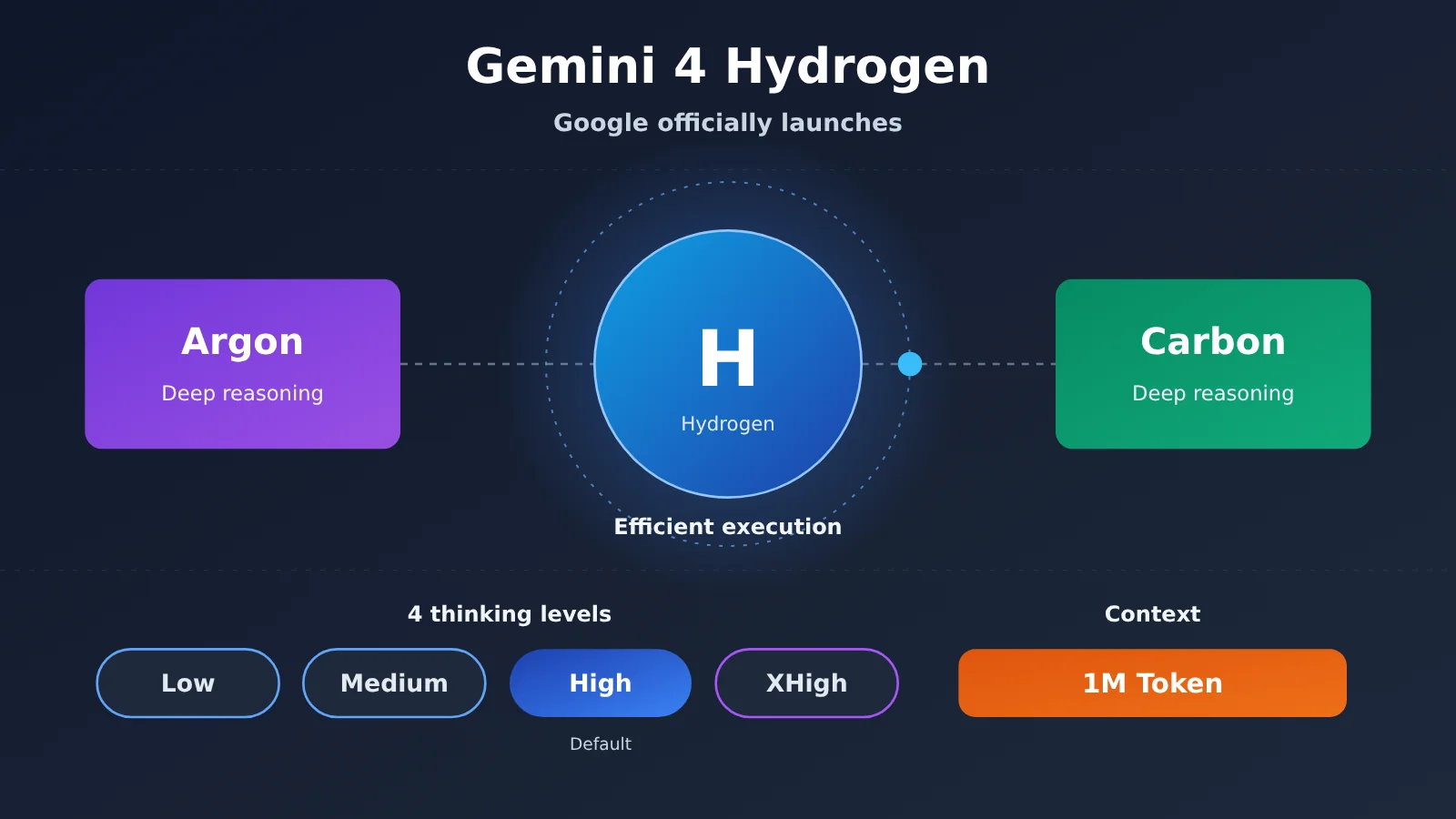
Author’s note: Gemini 4 Hydrogen hands day-to-day coding, document processing, and Agent execution to a single model. This article walks through its new capabilities, where you can use it for free, and how it divides the work with the rest of the family.
One-sentence summary: Gemini 4 Hydrogen is Google’s high-efficiency execution model in the Gemini 4 family, built for everyday coding, multi-tool Agents, and multi-format document handling. Free users can try it through Auto mode in the Gemini App or the free tier of Google AI Studio.
Know these 5 terms before you read
- Agent: A system where a model and a tool execution environment work together on multi-step tasks — for example, retrieving files, then editing code, then running tests.
- Token: The unit by which models measure and process text and other information. API billing and context allowances are both counted in Tokens.
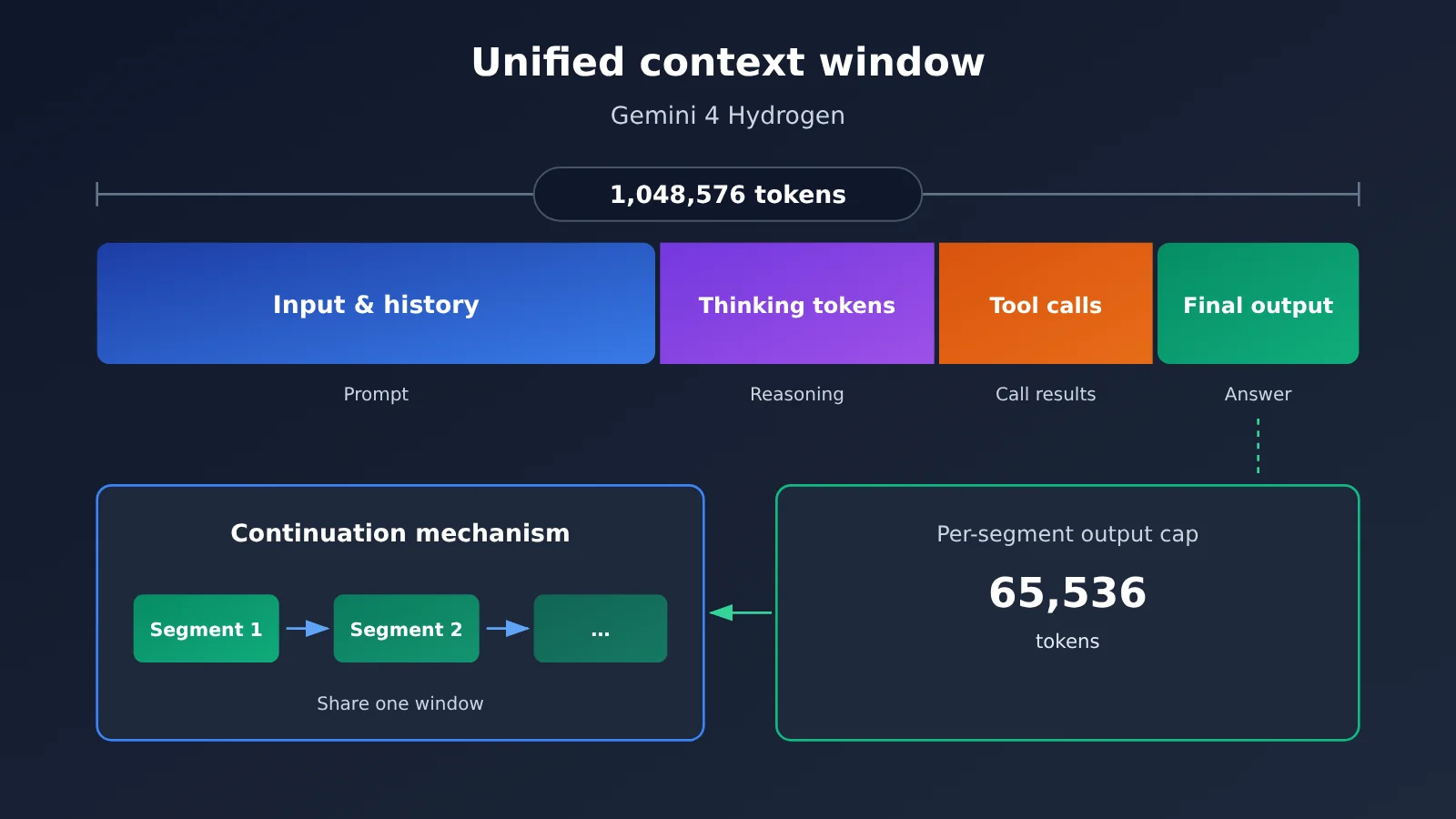
- Context window: The range of information a single model pass can hold; the exact allowance is defined by the model. Hydrogen’s input, thinking, tool calls, and output together total 1,048,576 tokens.
- thinking_level: The parameter that controls how deeply the model reasons. Hydrogen offers four settings: Low, Medium, High, and XHigh.
- Grounding: Tying generated answers back to retrieved external evidence — for example, Google Search Grounding and Google Maps Grounding.
Google officially released Gemini 4 Hydrogen on November 12, 2026, and it’s rolling out gradually across the Gemini API, Google AI Studio, the Gemini App, and Google Search. The biggest change this time is that it brings the intelligence level of the Gemini 4 series into high-frequency everyday tasks. On Terminal-Bench 4.1, the official score is 57.0%, compared with 18.2% for the previous generation, Gemini 3.8 Flash.
This isn’t a leak or a teaser. The Google official blog, the Google DeepMind model card, Google Cloud technical documentation, and the Google Chinese-language official blog have all cross-confirmed this launch, and TechCrunch, Ars Technica, 9to5Google, and The Verge have covered it as well.
The core value: A few minutes is all you need to figure out what Gemini 4 Hydrogen upgrades, where you can use it for free, and whether it fits your work.
Google Officially Releases Gemini 4 Hydrogen: the Gemini 4 Family Welcomes a New Member
Gemini 4 Hydrogen: Key Details at a Glance
| Item | Verified Details |
|---|---|
| Release date | November 12, 2026, rolling out globally |
| Publisher | Google DeepMind |
| API model ID | gemini-4-hydrogen |
| Official positioning | A high-efficiency model for everyday coding and AI agent execution |
| Sibling models | Gemini 4 Carbon, Gemini 4 Argon |
| Context budget | 1,048,576 tokens combined across input, thinking, tool calls, and output |
| Thinking levels | Low / Medium / High / XHigh; High is the API default |
| Knowledge cutoff | March 2026 |
| Product status | Generally available (Google Cloud labels it short-term GA and promises at least 45 days’ notice before retirement) |
Within the Gemini 4 family, the division of labor among the three models is fairly clear. Carbon and Argon handle complex, long-running deep reasoning, while Hydrogen emphasizes speed, everyday coding, multi-tool calls, and automated execution. The official model card also says Hydrogen was adapted from Gemini 4 Carbon, but Google didn’t disclose the exact parameter count.
Hydrogen can be used on its own or serve as the executor or verifier in a multi-model agent system. A common pattern is to let Carbon or Argon make the judgment, then have Hydrogen do the actual work. Ars Technica interpreted the release as Hydrogen taking over the spot occupied by the Flash series.
Official Results: Gemini 4 Hydrogen vs. 3.8 Flash
| Evaluation | Gemini 4 Hydrogen | Gemini 3.8 Flash | Data Source |
|---|---|---|---|
| Terminal-Bench 4.1 | 57.0% | 18.2% | Google official |
| Task completion speed under the same test conditions | About 2.5x faster | Baseline | Google official |
| Frequency of fabricated facts | More than 5x lower | Baseline | Google official |
| Enterprise data tasks such as graph data and SQL | 2–2.8x execution speed, 12%–23% fewer tokens | Baseline | Partner testing |
These figures come from official announcements or partner testing, so you can’t directly infer that every task will be 2.5x faster. In DeepMind’s model card cross-model evaluation, Hydrogen scored 76.1% on AutomationBench-AA, 71.6% on Agents’ Last Exam v1.1, and 58.8% on HLE-Diamond. But on Terminal-Bench 4.1 (57.0%) and OSWorld-2.1 (77.6%), it trails Claude Sonnet 5.5’s 63.9% and 83.9%. The official methodology notes also mention that some competitor scores come from vendors or public leaderboards, and the test configurations aren’t fully consistent.
What capabilities does Gemini 4 Hydrogen enhance?
Upgrades for four specific task categories
Google’s official list of highlighted scenarios can be grouped into four categories, each mapping to a concrete part of everyday work:
- Code editing and debugging: Understand a codebase, locate errors, fix bugs, update dependencies, and run tests. The main improvement here is precise editing—changing only what needs to be changed and leaving unrelated code untouched.
- Multi-step Agent execution: Call tools in sequence, retrieve files in parallel, and perform actions. When a tool call fails, it can adjust its strategy and keep going.
- Document and multimodal understanding: It can read PDF, DOC/DOCX, PPT/PPTX, XLS/XLSX, OpenDocument, charts, and web pages. A single request can include up to 3000 images or documents; video input runs about 45 minutes with audio and about 1 hour without audio, and audio can be up to about 8.4 hours.
- Interactive web development: Generate interactive pages, website prototypes, runnable components, and visual content.
One thing to note: Hydrogen outputs text only—images, audio, and video can only be inputs. It can understand video and take part in video production workflows, but it isn’t a video generation model itself. The video editing examples Google showed rely on custom skills and external tools.
Gemini 4 Hydrogen Real-World Cases: Box, Pixelcut, and Google Demos
The partner data below comes from early testing disclosed in Google’s announcement — it hasn’t been independently re-tested by a third party. Box uses Hydrogen for enterprise documents, spreadsheets, and data calculations, running roughly 2x faster than 3.8 Flash with 12% fewer tokens. Pixelcut ran 276 rounds of automated design and code generation, got 1.8x the speed, and improved code cleanliness by 30%.
Google’s own demos lean heavily visual. For instance, generating 3D structures in real time on a shared voxel island using natural language (Geminisland); generating an e-commerce site prototype with WebGL2 effects and 3D product components; and generating Google Slides from a YouTube talk video plus a template, with automatic detection and correction of overlapping text. These cases show that Google has proven out the corresponding workflows — but ordinary users won’t necessarily nail it on the first try with the same prompt.
Million-Token Unified Context and Four Thinking Levels
Hydrogen’s 1,048,576 tokens is a single unified budget: input, conversation history, thinking tokens, tool-call tokens, and final output all draw from it. So it’s not “1 million in, then another 1 million out.” A single foreground generation is typically capped at 65,536 tokens; longer outputs require continuation_token or the background long-generation mechanism, and they still count against that unified budget.
Thinking level makes a big difference in practice. Below is the independent evaluation Artificial Analysis completed on November 12 — third-party data:
| Thinking level | Officially recommended use | Intelligence Index | Avg. time per benchmark task | Avg. cost per benchmark task |
|---|---|---|---|---|
| Low | Simple tasks like classification | 27 | 1.3 min | $0.29 |
| Medium | Routine programming | 41 | 3.7 min | $0.80 |
| High (API default) | Multi-step agents | 51 | 8.3 min | $1.87 |
| XHigh | Complex deep reasoning | 54 | 13.5 min | $3.16 |
The times and costs in this table are results from the standardized benchmark tasks of Artificial Analysis Intelligence Index v5.0.1 — they don’t represent the actual latency or cost of each message in ordinary chat. Two things stand out. First, under the same model name, High and Medium differ by 10 points, so any comparison has to state which level was used. Second, XHigh scores only 3 points more than High while average cost jumps from $1.87 to $3.16, so the top level isn’t necessarily a good deal.
How to Try Gemini 4 Hydrogen for Free: Three Entry Points Explained
How Each Tier Can Use Gemini 4 Hydrogen
| Entry point / user tier | Hydrogen usage | Notes |
|---|---|---|
| Gemini App free account | Triggered automatically through Auto routing | Simple questions mostly use Flash-Lite; requests that need reasoning may be routed to Hydrogen |
| Google AI Plus | Can select manually | Switch in the model picker |
| Google AI Pro | Can select manually, and can use it in Tasks | Being gradually rolled out in Antigravity |
| Google AI Ultra | Can select manually, and can use higher-tier models | Orchestrator (Carbon/Argon) available |
| Google AI Studio free tier | Select the model ID directly | Subject to free-tier quota limits |
| Gemini API free tier | Call gemini-4-hydrogen |
RPM/TPM/RPD limits are calculated per project |
Entry point 1: Gemini App. When free users turn on Auto, the system automatically chooses a model based on task difficulty, and requests that need reasoning may be handed off to Hydrogen. With Auto turned off, free accounts use Flash-Lite. There’s another easily confused detail: when you manually select a model in Gemini App, if you don’t separately specify a thinking level, the default is Low, while the default level for the Hydrogen API is High.
To check which model was used for a particular response, on desktop you can follow the official help center instructions: click More → Show thinking steps below the response, then scroll to the bottom to view the model information. Interfaces may differ across clients and regions, so refer to what’s actually displayed.
Entry point 2: Google AI Studio. You can select Gemini 4 Hydrogen directly from the model list and chat with it for testing. This is a good way to validate how your prompt and thinking level perform before you start writing code. The free tier doesn’t have a fixed number of calls; instead, it evaluates RPM (requests per minute), TPM (input tokens per minute), and RPD (requests per day, reset at midnight Pacific Time) per project. The actual quota is subject to the effective limits shown in AI Studio.
Entry point 3: Gemini API. Both the free and paid tiers can call it, but the quotas are different. In addition, content from the free API tier may be used to improve Google products; the official pricing page states that paid-tier content is not used for this purpose. Keep this in mind when handling sensitive business data.
Google uses the phrase “gradual rollout.” On launch day, some users reported that the model option in Gemini App appeared briefly and then disappeared, or that the model could be seen in Antigravity but calls failed. A global launch doesn’t mean that network access, account eligibility, and service policies in mainland China are unaffected.
Gemini 4 Hydrogen API Call Example
If you need to integrate into an existing project through the OpenAI-compatible endpoint, here’s what that looks like:
import openai

client = openai.OpenAI(
    api_key="YOUR_API_KEY",
    base_url="https://api.apiyi.com/v1"  # APIYI OpenAI-compatible endpoint
)

response = client.chat.completions.create(
    model="gemini-4-hydrogen",  # The actual available model names are subject to the platform's model list
    messages=[{"role": "user", "content": "帮我定位这段 Python 代码的 Bug 并给出最小修改"}]
)
print(response.choices[0].message.content)
View the complete code with a system prompt and error handling
import openai
from typing import Optional

def ask_hydrogen(
    prompt: str,
    system_prompt: Optional[str] = None,
    max_tokens: int = 4000
) -> str:
    """Use Gemini 4 Hydrogen for everyday coding or document-organization tasks"""
    client = openai.OpenAI(
        api_key="YOUR_API_KEY",
        base_url="https://api.apiyi.com/v1"
    )
    messages = []
    if system_prompt:
        messages.append({"role": "system", "content": system_prompt})
    messages.append({"role": "user", "content": prompt})

    try:
        # Note: Hydrogen ignores custom temperature/top_p/top_k, so there's no need to set them
        # Thinking tokens are billed as output, so max_tokens needs to leave room for thinking
        response = client.chat.completions.create(
            model="gemini-4-hydrogen",
            messages=messages,
            max_tokens=max_tokens
        )
        return response.choices[0].message.content
    except Exception as e:
        return f"Error: {str(e)}"

print(ask_hydrogen(
    prompt="把这份会议纪要整理为三级标题的 Markdown 文档",
    system_prompt="严格遵守用户指定的格式,不添加无关内容"
))
🚀 Quick start: APIYI apiyi.com offers an OpenAI-compatible endpoint — one API key is all you need to call mainstream models like OpenAI, Claude, and Gemini, and new users get free trial credits. Before you integrate, check the platform’s model list to confirm Hydrogen’s availability and its model name; how parameters like thinking level get passed is documented in the platform docs.
Developers migrating from 3.8 Flash should pay close attention to a few breaking changes:
thinking_budgetandMINIMALare no longer supported — if you keep using them, you’ll get an HTTP 400.- The default thinking level has changed from Medium to High.
- Explicit context caching is no longer supported; only implicit caching with a minimum of 4096 tokens.
- Multi-turn tool calls require properly saving and passing back thought signatures.
How Should You Choose Between Gemini 4 Hydrogen, Flash, Argon, and Carbon?
Split the work by task difficulty, response speed, and execution complexity
| Model | Task difficulty | Response speed | Execution complexity | Typical tasks | Official API standard price (input/output) | Available platforms |
|---|---|---|---|---|---|---|
| Flash-Lite | Low | Fastest | Low | Simple Q&A | Not provided in source materials | Gemini App and others |
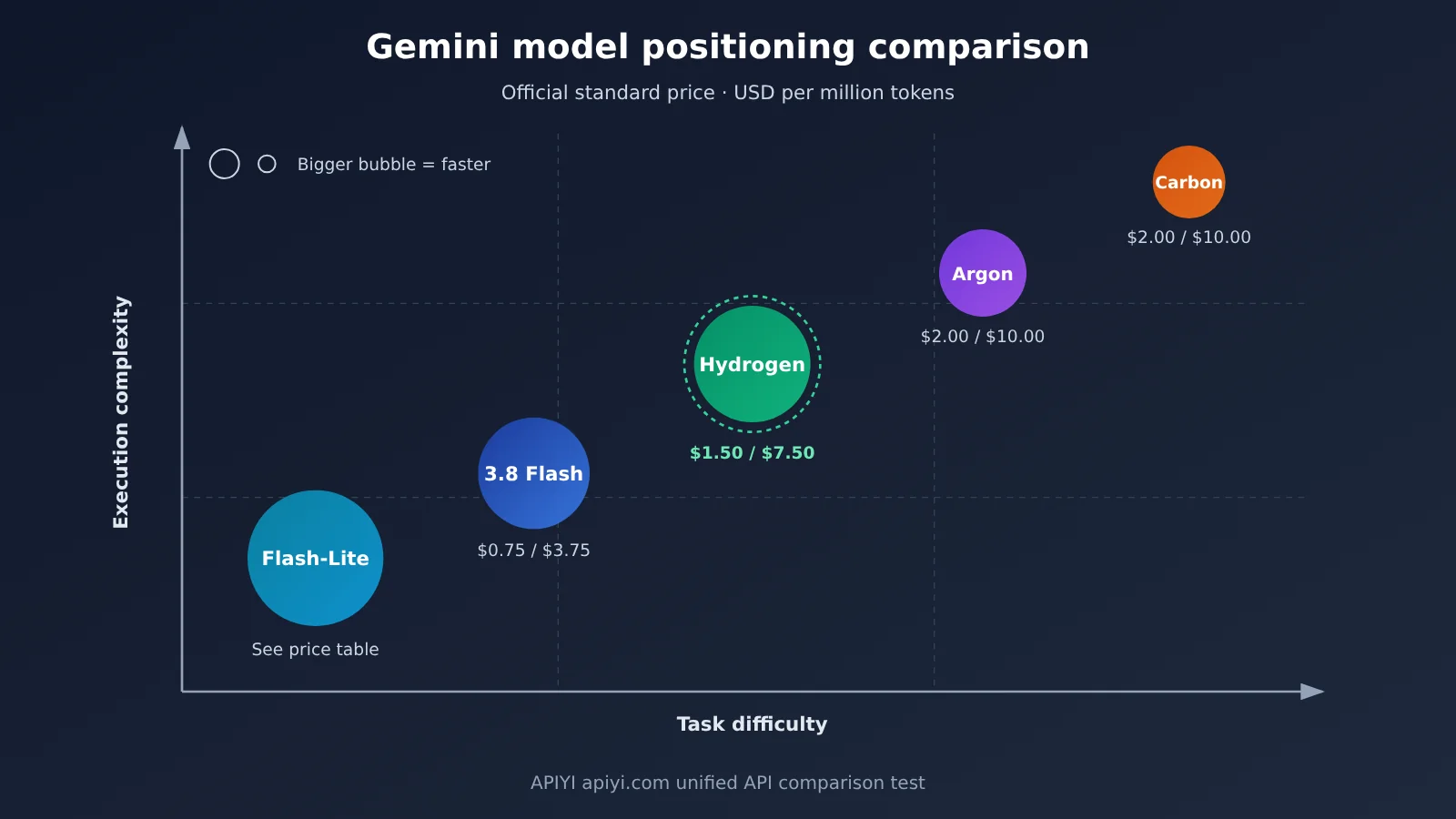
| Gemini 3.8 Flash | Low to medium | Fast | Medium | Light everyday tasks | $0.75 / $3.75 (until December 31, 2026) | Gemini API, APIYI apiyi.com (see the model list) |
| Gemini 4 Hydrogen | Medium to high | Fast | High (many tools) | Everyday coding, research processing, agent execution | $1.50 / $7.50 | Gemini API, AI Studio, APIYI apiyi.com (see the model list) |
| Gemini 4 Argon | High | Medium | High | Complex workflows | $2.00 / $10.00 (until November 30, 2026) | Gemini API and others |
| Gemini 4 Carbon | Highest | Slow | Highest | Deep architecture design, long-horizon hard tasks | $2.00 / $10.00 (until November 30, 2026) | Gemini API and others |
The prices come from the official Google AI Studio pricing page, in USD per million tokens, verified on November 13, 2026, and calculated for Standard tier calls. The pricing page notes that 3.8 Flash moves to $1.50/$7.50 starting January 1, 2027, while Argon and Carbon move to $4/$20 starting December 1, 2026. No comparable price change has been announced for Hydrogen so far. Hydrogen’s Batch and Flex pricing is $0.75/$3.75, and Priority is $2.70/$13.50.
So at launch, Hydrogen’s per-token standard price is twice what 3.8 Flash costs today — not cheaper. Thinking tokens are billed at the output rate, so the total cost of a real task depends on how long the model thinks, how often it retries, how many tools it calls, and how efficiently it finishes. On the paid tier, Google Search Grounding includes the first 5,000 calls each month for free (shared with Gemini 3 and newer models), then $14 per 1,000 calls. The free API tier doesn’t get that free allowance.
Solo Use vs. Multi-Model Collaboration
Mapping tasks to models looks something like this: hand simple Q&A to Flash-Lite; for everyday coding, document cleanup, and moderately complex agent tasks, Hydrogen is the balanced value pick; for deep architecture design that requires cross-module reasoning, go with Carbon or Argon. Using Hydrogen on its own works well for tasks with clear goals and well-defined steps. But when you hit a hard problem that keeps forcing you to reassess direction, going solo makes it easy to burn too many steps heading the wrong way.
The poster child for multi-model collaboration is the Google Antigravity Orchestrator released alongside these models. In that flow, Carbon first analyzes the code repository and decides on a modification plan, Hydrogen handles the actual edits, dependency upgrades, and test runs, and anything that turns into a complex error goes back to Carbon for a judgment call. Google reports that on Terminal-Bench 4.1, this approach cuts quota consumption by an average of 24% versus using Carbon alone, completes tasks 19% faster, and delivers success performance close to Carbon.
💡 How to choose: which model you pick depends on task difficulty and budget. A good approach is to take the same batch of real tasks and run them through Hydrogen’s Medium and High tiers as well as Argon, then compare completion rate and token consumption. APIYI apiyi.com supports a unified interface for calling multiple models — switching models only requires changing the
modelparameter, which makes this kind of comparison easy.
Gemini 4 Hydrogen Impact Analysis
Impact on Developers
- A new option at the agent execution layer: Hydrogen’s official scores show clear gains over 3.8 Flash on multi-tool invocation and automation tasks, making it a solid fit as the executor and verifier in agent systems.
- Migration means config changes: Thinking parameters, caching mechanisms, sampling parameters, and tool-call signatures have all changed — simply swapping the model name may throw errors.
- Cost estimation needs a new approach: The per-unit price has doubled, while task completion efficiency may improve. You need to budget per complete task rather than per request.
Impact on the Industry and Everyday Users
- A better search experience: Hydrogen is already live in Google Search, improving how it handles complex multi-condition questions, typos, multi-path queries, and visual answers.
- “Large Language Model plans, smaller model executes” is becoming the norm: Orchestrator turned model specialization into a product feature, lowering the barrier to multi-model orchestration.
- Limitations remain: The official model card shows Hydrogen’s unjustified refusal rate worsened by 5.57 percentage points compared with 3.8 Flash, and the full safety report hasn’t been released yet. Users on Hacker News also report over-execution on some agent tasks.
Gemini 4 Hydrogen FAQ
Q1: What is Gemini 4 Hydrogen?
It’s a model in the Gemini 4 series, officially released by Google DeepMind on November 12, 2026. Its API model ID is `gemini-4-hydrogen`, and it’s positioned as a highly efficient model for everyday coding and AI agent execution, with a unified million-token context window and four thinking levels.
Q2: How is Gemini 4 Hydrogen different from Gemini 3.8 Flash?
Official numbers show Hydrogen scores 57.0% on Terminal-Bench 4.1 versus 18.2% for 3.8 Flash, and it completes tasks about 2.5 times faster under the same conditions. That said, its standard API unit price is twice 3.8 Flash’s current price, and migrating also means dealing with incompatible parameters.
Q3: Can free users use Gemini 4 Hydrogen?
Yes. On a free Gemini App account, once you turn on Auto, requests that need reasoning may be routed to Hydrogen. The free tier of Google AI Studio lets you select the model directly, but you’re bound by RPM, TPM, and RPD limits.
Q4: What scenarios is Gemini 4 Hydrogen best for?
– **Bug fixes and dependency upgrades inside a code repository**: It prioritizes precise edits and avoids touching unrelated code.
– **Synthesizing multi-format materials**: It can analyze PDFs, Excel files, PPTs, charts, and web pages at the same time.
– **Multi-tool agent execution**: It can run independently or execute specific steps under planning from Carbon/Argon.
Q5: How do I call Gemini 4 Hydrogen quickly via API?
Besides Google’s official Gemini API, you can also use an OpenAI-compatible aggregation platform:
1. Sign up at APIYI apiyi.com to get an API key and free trial credits.
2. Check the model list to confirm Hydrogen’s availability and exact model name.
3. Set `base_url` in the code from this article to `https://api.apiyi.com/v1`, then run it to verify.
Q6: What known limitations does Gemini 4 Hydrogen have?
It can still hallucinate, its knowledge cuts off at March 2026, and recent events require search. High thinking levels noticeably increase latency and cost, and it occasionally times out. It doesn’t support the Live API, explicit caching, or fine-tuning. If you want to compare other models as alternatives, you can switch models with the same code and test them at APIYI apiyi.com.
Gemini 4 Hydrogen Key Takeaways
- Official launch: Released on November 12, 2026, confirmed by the official blog, model card, and technical documentation.
- Positioning: The efficient execution model in the Gemini 4 family, responsible for everyday coding and Agent tasks.
- Context rules: 1,048,576 tokens are shared across input, thinking, tool calls, and output.
- Four thinking levels: High is the most cost-balanced default, while XHigh noticeably increases costs.
- Free entry points: Auto mode in the Gemini App, the AI Studio free tier, and the Gemini API free tier.
- Cost warning: The standard unit price is twice the current price of 3.8 Flash, so you need to calculate total cost per complete task.
- Getting started: For development integration, you can quickly compare and validate models through the unified APIYI apiyi.com interface.
Summary: Who Should Try Gemini 4 Hydrogen First?
Different users can start from different entry points:
- Everyday users: Open Auto in the Gemini App, and confirm which model is actually being called via More → Show thinking steps.
- Content creators: Test long-document organization, formatted rewriting, and synthesis of multi-format material in the AI Studio free tier.
- Developers: Focus on code changes and debugging, and check the thinking parameters and cache configuration before migrating.
- Agent builders: Use Hydrogen as the execution layer, hand complex judgment to Carbon or Argon, and compare total cost using real tasks.
Here’s how to choose a starting path: if you just want to try it out, go with the Gemini App or Google AI Studio; if you need development integration, go with the API. If you want a single key to compare how Gemini, Claude, OpenAI, and other models perform on your own business use cases, you can quickly validate through APIYI apiyi.com — new users get free testing credits.
📚 References
- Google official blog: Introducing Gemini 4 Hydrogen: launch announcement and partner case studies
- Link:
blog.google/innovation-and-ai/models-and-research/gemini-models/introducing-gemini-4-hydrogen/ -
Description: official positioning, performance comparisons, and demo cases
-
Google China official blog: Chinese launch announcement
-
Link:
china.googleblog.com/2026/11/gemini-4-hydrogen.html -
Google DeepMind model card and evaluation methodology: cross-model evaluations and safety data
- Link:
deepmind.google/models/model-cards/gemini-4-hydrogen/ -
Link:
deepmind.google/models/evals-methodology/gemini-4-hydrogen/ -
Google Cloud technical documentation: specifications and migration guide
- Link:
docs.cloud.google.com/gemini-enterprise-agent-platform/models/gemini/4-hydrogen -
Link:
docs.cloud.google.com/gemini-enterprise-agent-platform/models/guides/gemini-4-hydrogen -
Google AI Studio pricing page and rate limits: API pricing and free-tier rules
- Link:
aistudio.google.com/docs/pricing -
Link:
ai.google.dev/gemini-api/docs/rate-limits -
Gemini Apps Help Center: subscription tiers, Auto mode, and how to view models
-
Link:
support.google.com/gemini/answer/18648722 -
Artificial Analysis independent evaluation: four-tier reasoning intelligence index
-
Link:
artificialanalysis.ai/models/gemini-4-hydrogen -
Google Antigravity blog: Orchestrator multi-model orchestration
-
Link:
antigravity.google/blog/gemini-4-hydrogen-in-google-antigravity -
Third-party coverage: TechCrunch, Ars Technica, 9to5Google, The Verge
- Link:
arstechnica.com/google/2026/11/google-rolls-out-gemini-4-hydrogen-finally-replacing-3-8-flash/ - Link:
9to5google.com/2026/11/12/gemini-4-hydrogen-launch/
Author: APIYI Technical Team
Technical discussion: Feel free to contact us through the APIYI official website homepage. For more integration resources, visit the docs.apiyi.com documentation center.