Author’s note: gpt-6-sol and gpt-6.1-sol have the same input and output prices, but their cached-read rates differ by half. This article explains how to lower cache costs for long conversations by changing only the model field in your request.
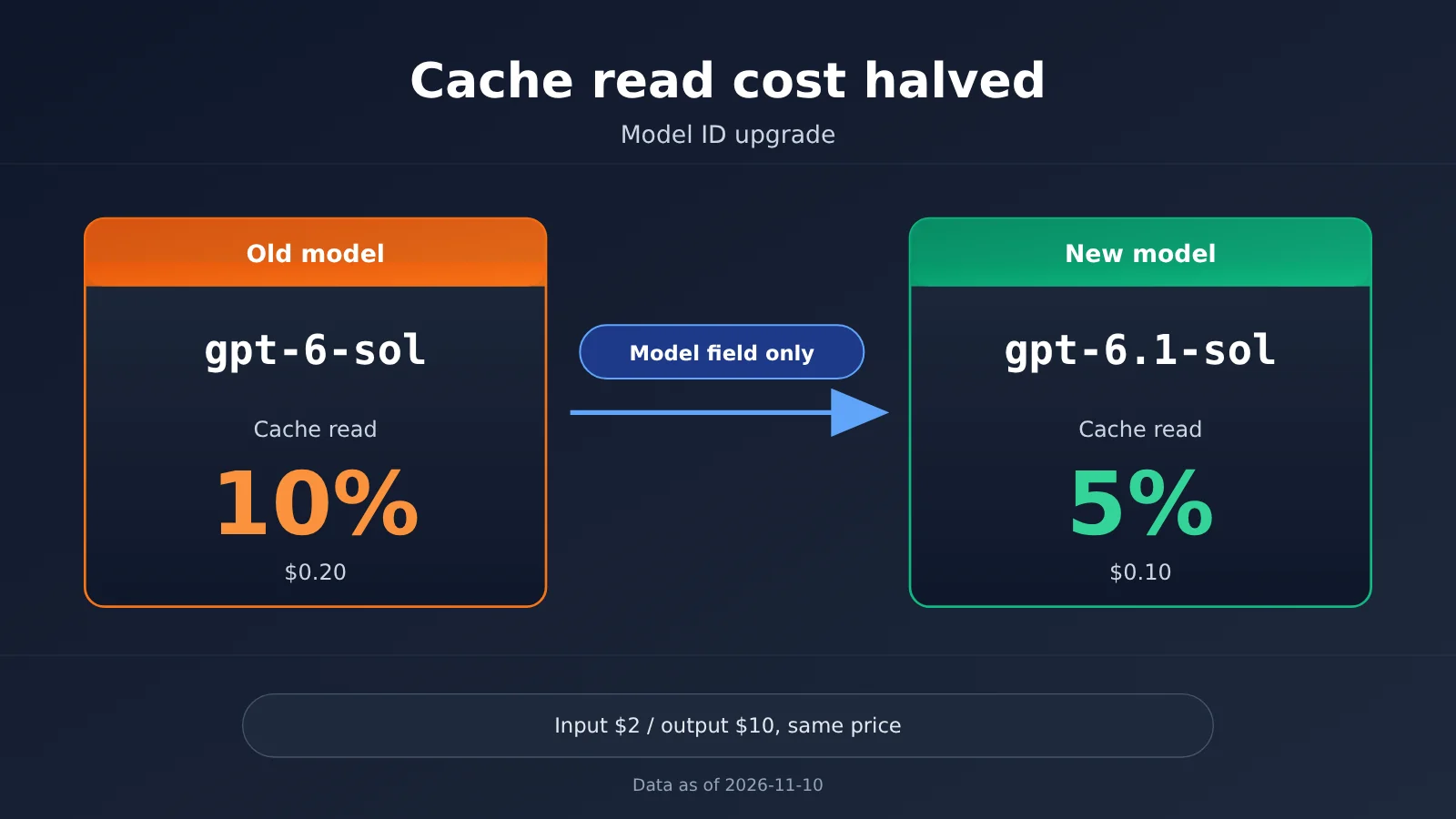
Many developers already use 6.1 Sol, 6.1 Terra, and 6 Luna in their day-to-day work. But when they check their project configuration, they may find an older service still making requests with gpt-6-sol. Here’s a small change you can make: replace gpt-6-sol with gpt-6.1-sol. Input and output prices stay the same, while cached reads drop from 10% to 5% of the input price.
This isn’t a promotion, and you don’t need to switch plans. The price difference between the two Sol models is listed directly in OpenAI’s official pricing, and the rates in APIYI’s model list match the official rates. All you need to change is a single string in your request.
The key takeaway: By the end of this article, you’ll know which model ID to change, how much you can save on cached reads, and why you can’t apply this “half-price cached reads” conclusion to assumptions about models beyond Terra and Luna—especially Luna.
Key Pricing Takeaways for gpt-6-sol and gpt-6.1-sol
Let’s start with the most important table. All prices are per million tokens. The data is current as of 2026-11-10 and comes from the standard tier in OpenAI’s official pricing. The multipliers also match the values returned by the APIYI pricing endpoint.
| Model ID | Input price | Output price | Cached input price | Cached input as % of input price |
|---|---|---|---|---|
gpt-6-sol |
$2 | $10 | $0.20 | 10% |
gpt-6.1-sol |
$2 | $10 | $0.10 | 5% |
The table shows one key difference: the two Sol models have identical input and output prices. The only difference is the cached input price. For a short, single-turn request, you’ll barely notice it. But in scenarios that repeatedly include a long system prompt, tool definitions, or conversation history, cached input tokens often make up most of the request input. A twofold difference in the multiplier can add up over time.
Why the gpt-6.1-sol cached input price deserves a closer look
Prompt Cache means that when a request’s prefix matches an earlier request, those tokens are billed at the cached input price rather than the full input price. Applications like agents, coding assistants, and customer service bots resend the same system prompt and conversation history with every turn, so cache hit rates are often high.
With this kind of workload, the cached input price often affects your bill more directly than the input price. gpt-6-sol charges $0.20 for cached input, while gpt-6.1-sol charges $0.10. For the same volume of cache hits, the former costs twice as much. If your service is still using the older ID and handles long conversations, you’re effectively paying extra for the same context.
How platform multipliers map to official prices
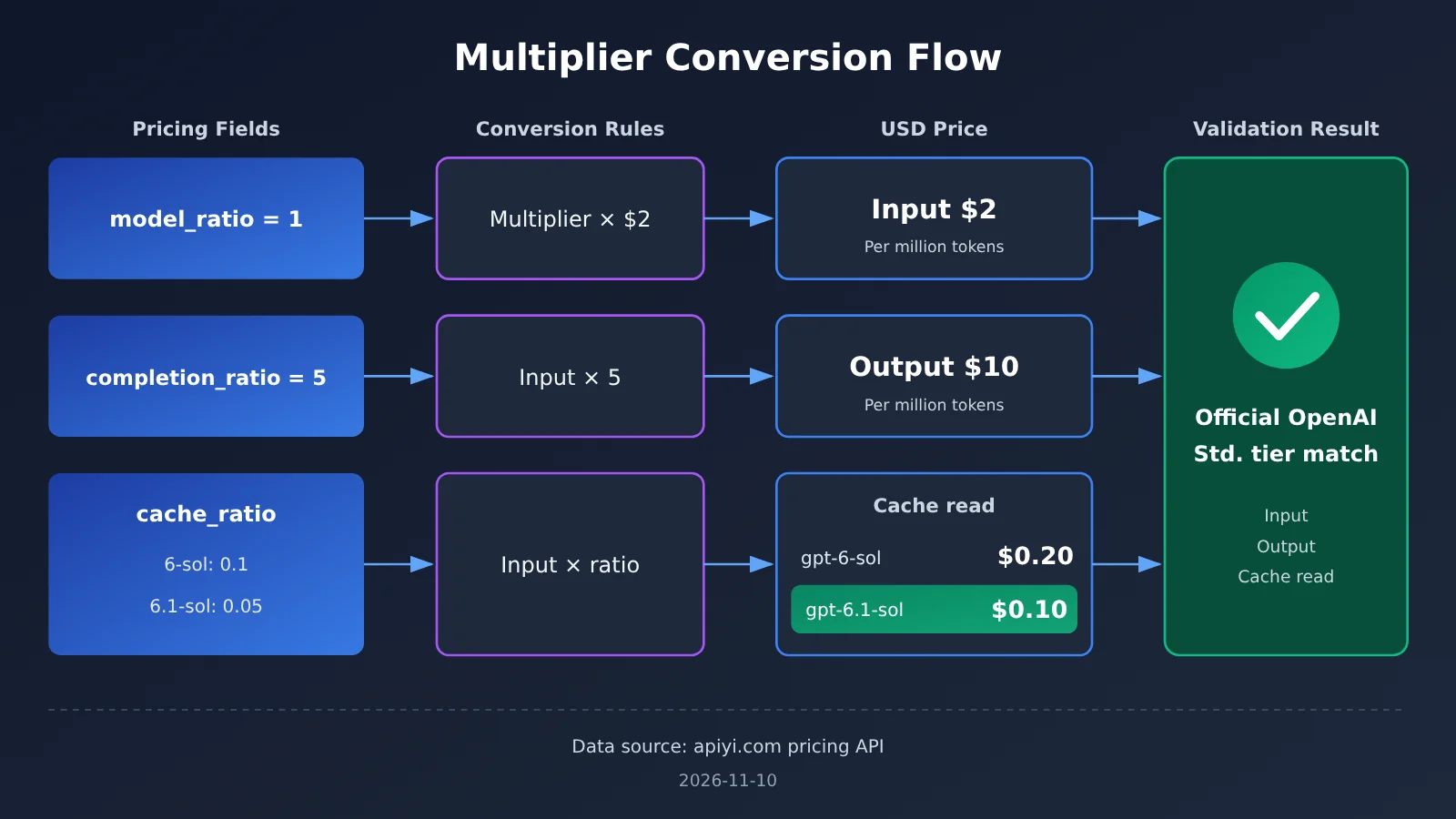
APIYI expresses prices as multipliers. The data returned on 2026-11-10 lists both Sol models with the following multipliers:
| Field | gpt-6-sol |
gpt-6.1-sol |
Meaning |
|---|---|---|---|
| model_ratio | 1 | 1 | A multiplier of 1 corresponds to an input price of $2 per million tokens |
| completion_ratio | 5 | 5 | Output costs 5 times the input price, or $10 |
| cache_ratio | 0.1 | 0.05 | Cached input costs 10% / 5% of the input price |
Using the conversion rate of “multiplier 1 = $2 per million input tokens,” both models come to $2 for input and $10 for output, with cached input at $0.20 and $0.10, respectively. These prices exactly match the official pricing. Note that this calculation covers only the model’s own multipliers and doesn’t include any group multipliers. For your exact charges, check the group associated with your account and the model list on the platform. You can also visit the APIYI model pricing page at apiyi.com to verify these three multipliers.
How to Calculate Cache Costs for Long gpt-6.1-sol Sessions
Unit prices alone don’t make the difference easy to see, so here’s a simple example. Suppose an Agent session has 100 turns, and each request reuses about 50,000 cached prefix tokens. That adds up to 5 million cache-read tokens across the session.
| Cost item | gpt-6-sol |
gpt-6.1-sol |
|---|---|---|
| Total cache-read tokens | 5 million | 5 million |
| Cache-read price (per million tokens) | $0.20 | $0.10 |
| Cache-read cost | $1.00 | $0.50 |
| Input and output costs | Same pricing | Same pricing |
That’s just one session. If you have thousands of similar sessions each day, cache reads consistently cost half as much. Since input and output prices are exactly the same, switching to gpt-6.1-sol won’t increase costs elsewhere—you’ll simply save half on cache reads.
Of course, this example assumes the cache is actually hit. If the request prefix changes every time—for example, because you put a timestamp or random ID at the very start of the system prompt—your cache hit rate will be low, and switching model IDs won’t help much. In that case, put fixed content at the beginning and changing content at the end first, then consider switching IDs. You’ll see a bigger impact.
Quick Start: How to Switch from gpt-6-sol to gpt-6.1-sol
The change is minimal: both model IDs are already available in APIYI’s model list, and you can call either one with the same API key. You don’t need to activate or purchase a new plan. Just update the model field in your request body.
The quick way: switch in 3 steps
- Find the old ID: Search your code repository and configuration center for
gpt-6-sol. Be careful not to match strings that already use the new ID, such asgpt-6.1-sol. You can search for the exact value in quotes to avoid this. - Update the model field: Change
model="gpt-6-sol"tomodel="gpt-6.1-sol". Leave client initialization as-is: keepbase_url="https://api.apiyi.com/v1"and your existing API key. - Test with a small share of traffic: Switch a portion of requests first. Check the cache token fields in the returned usage data to confirm that cache hits are working as expected, then roll out the change to all requests.
With the official OpenAI Python SDK, you can initialize the client with client = openai.OpenAI(api_key="YOUR_API_KEY", base_url="https://api.apiyi.com/v1"). When making a request, just update the model value in client.chat.completions.create(model="gpt-6.1-sol", messages=messages). There’s no need to change messages or any other parameters.
Recommended: use configuration
If your project has the model name hard-coded in several places, use this switch as an opportunity to move it into configuration. For example, set the model ID in an environment variable with OPENAI_MODEL=gpt-6.1-sol, then read it in your code with os.getenv("OPENAI_MODEL", "gpt-6.1-sol"). That way, when a new version comes out, you’ll only need to update one configuration value instead of searching and replacing it throughout the repository.
It’s also a good idea to read the client settings from environment variables, for example OPENAI_BASE_URL=https://api.apiyi.com/v1. Since the API is OpenAI-compatible, you can keep using your existing integration with the SDK, LangChain, and various agent frameworks. Just make sure the base_url and model values are correct.
🚀 Get started quickly: Before changing the ID, check the APIYI model list at apiyi.com to confirm that
gpt-6.1-solis available in a group on your account. Once confirmed, switching only requires changing the string in the request’smodelfield. New users can also use the free testing quota to run a small-scale validation first.
Common pitfalls when switching
- Only some services were updated: You may have changed the main service but left scheduled tasks or offline batch scripts using the old ID. In that case, you’ll see both models on your bill.
- The gateway has a model allowlist: If your internal gateway or proxy layer checks model names against an allowlist, add
gpt-6.1-solbefore switching. - Logs and monitoring group by model name: If your dashboard tracks costs by model name, compare the old and new IDs together after switching. Otherwise, it may look like your call volume has dropped.
Comparison of Cache Discounts for gpt-6.1-sol, Terra, and Luna
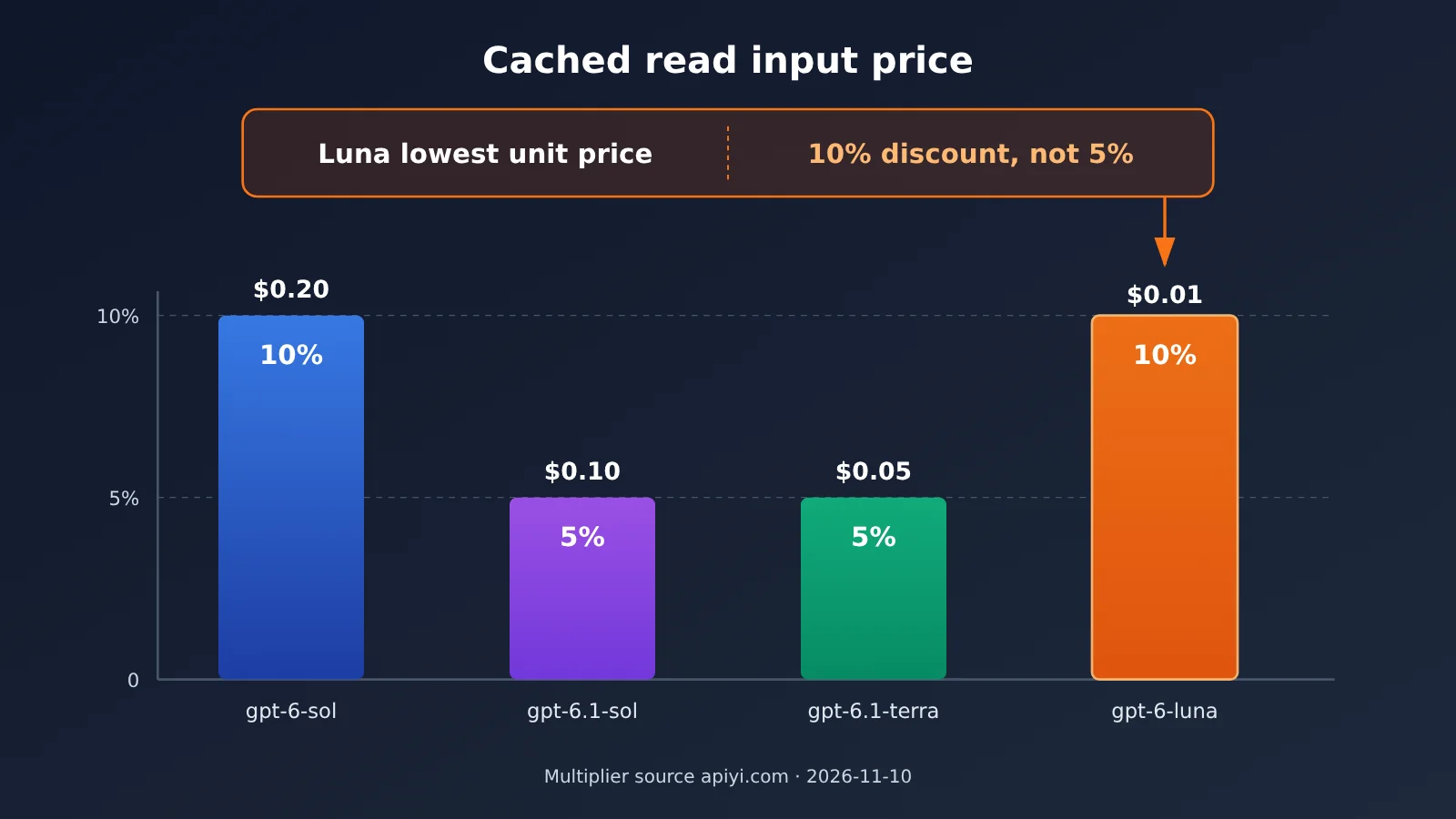
Many developers use several models at once, so it’s easy to assume that if gpt-6.1-sol has a 5% cache-read rate, the other models must have the same rate. In reality, cache-read rates are set separately for each model, so you can’t simply generalize. Here’s a comparison of the official prices and platform rates on the same day:
| Model ID | Input price | Output price | Cache-read price | cache_ratio | Available platforms |
|---|---|---|---|---|---|
gpt-6-sol |
$2 | $10 | $0.20 | 0.1 | APIYI apiyi.com, OpenAI official |
gpt-6.1-sol |
$2 | $10 | $0.10 | 0.05 | APIYI apiyi.com, OpenAI official |
gpt-6.1-terra |
$1 | $5 | $0.05 | 0.05 | APIYI, OpenAI official |
gpt-6-luna |
$0.10 | $0.50 | $0.01 | 0.1 | APIYI, OpenAI official |
How to read the comparison
Terra comparison: gpt-6.1-terra also has a cache-read rate of 5% of its input price, and its absolute unit price is lower. But this article is about choosing between IDs in the same Sol tier. Terra is in a different capability tier, so whether to downgrade from Sol to Terra is a model-selection question outside the scope of this change.
Luna comparison: gpt-6-luna has the lowest absolute price, with cache reads costing just $0.01. But its cache discount is 10% of the input price, not 5%. So the conclusion that “switching from Sol to 6.1 cuts cache costs in half” applies only to the Sol tier. Don’t use it to estimate Luna’s costs.
💡 Recommendation: If your task requires Sol-tier capabilities, switching your old ID directly to
gpt-6.1-solis the clearest benefit with the lowest risk. If you’re considering cost savings by moving to a different tier, try calling different models with the same key on APIYI, compare the results, and then estimate actual costs using the cache rates.
Frequently Asked Questions (FAQ)
Q1: What’s the actual price difference between gpt-6-sol and gpt-6.1-sol?
The only difference is the price for cache reads. Input costs $2 per million tokens for both models, and output costs $10. Cache reads cost $0.20 for `gpt-6-sol` and $0.10 for `gpt-6.1-sol`—10% and 5% of the input price, respectively. Pricing data is current as of 2026-11-10, and the official prices match the platform multipliers.
Q2: Do I need to buy a new plan or open a new account to switch to gpt-6.1-sol?
No. Both model IDs are listed in APIYI’s model catalog, and you can call either one with the same API key. You only need to change the `model` field in your request; your client’s `base_url` and authentication method stay the same.
Q3: How do I convert APIYI’s multipliers into dollar prices?
Using the convention “multiplier 1 = $2 per million input tokens”: a `model_ratio` of 1 means input costs $2; a `completion_ratio` of 5 means output costs $10; and a `cache_ratio` of 0.05 means cache reads cost $0.10. Your actual charges also depend on your account group. Check the model list on APIYI at apiyi.com for the applicable rates.
Q4: Which use cases benefit most from switching to gpt-6.1-sol?
The biggest savings are in long-context scenarios with high cache hit rates:
– **Multi-turn agents**: Each turn resends the system prompt, tool definitions, and conversation history.
– **Coding assistants**: The same set of repository files is repeatedly sent as context.
– **Knowledge base Q&A**: A fixed, lengthy document prefix is paired with changing user questions.
Q5: Can I estimate that Luna and Terra also offer “half-price cache reads”?
No, you can’t assume that. Cache reads cost 5% of the input price for `gpt-6.1-terra` and 10% for `gpt-6-luna`. Luna has the lowest absolute price, but its cache discount isn’t 5%. When estimating your budget, calculate each model separately using its `cache_ratio`.
Q6: Why hasn’t my bill dropped much after switching model IDs?
The most common reason is a low cache hit rate. For example, if your request prefix includes a timestamp or random field, it changes with every request, so you’re charged for the full input each time. Another possibility is that some services are still calling the old model ID. Check the cached-token fields in the returned `usage` data, and review call details by model in the APIYI console.
Q7: Will output quality change after I switch?
The two models are at the same capability tier, but different versions may perform differently on specific tasks. To be safe, compare them on a small amount of traffic or a test set first. Once you’ve confirmed the output meets your business requirements, you can switch over fully.
Key Takeaways: gpt-6.1-sol Cache Read Pricing
- Same input and output prices, different cache pricing: Both Sol models charge $2 for input and $10 for output, but their cache read prices differ by half.
- Cache read prices:
gpt-6-solcosts $0.20, whilegpt-6.1-solcosts $0.10 per million tokens. - Long sessions benefit most: The more cache hits you get, the more you’ll save by switching to
gpt-6.1-sol. - Only one change needed: Update the
modelfield in your request. No new plan is required. - Don’t apply this to Luna: Luna’s cache read price is 10% of its input price, not 5%.
- How to get started: Use the same APIYI key to test with a small amount of traffic before switching everything over.
Summary
Here are the key points when switching from gpt-6-sol to gpt-6.1-sol:
- Pricing structure: Input and output prices are identical. Cache reads drop from 10% to 5% of the input price. Pricing data as of 2026-11-10.
- What needs to change: Both model IDs are listed on the platform. Just replace the model name in your request; your
base_urland API key stay the same. - Where this applies: The “half-price cache reads” only apply to Sol. Calculate Terra and Luna separately using their respective cache multipliers.
If your long-session service is still using the old model ID, this is an optimization that costs almost nothing to implement. We recommend checking the model list and pricing multipliers at APIYI (apiyi.com), then following the three steps in this article to switch. The platform’s model list is the source of truth for model IDs and pricing.
📚 References
- Official OpenAI pricing: Standard-tier prices for model input, output, and cached input
- Link:
developers.openai.com/api/docs/pricing -
Details: Verify the official per-unit prices for
gpt-6-sol,gpt-6.1-sol,gpt-6.1-terra, andgpt-6-luna -
APIYI pricing endpoint: Platform model multiplier data
- Link:
api.apiyi.com/api/pricing - Details: Check the three multipliers:
model_ratio,completion_ratio, andcache_ratio
Author: APIYI Technical Team
Technical questions: Feel free to contact us through the APIYI homepage. For more integration resources, visit the documentation center at docs.apiyi.com.