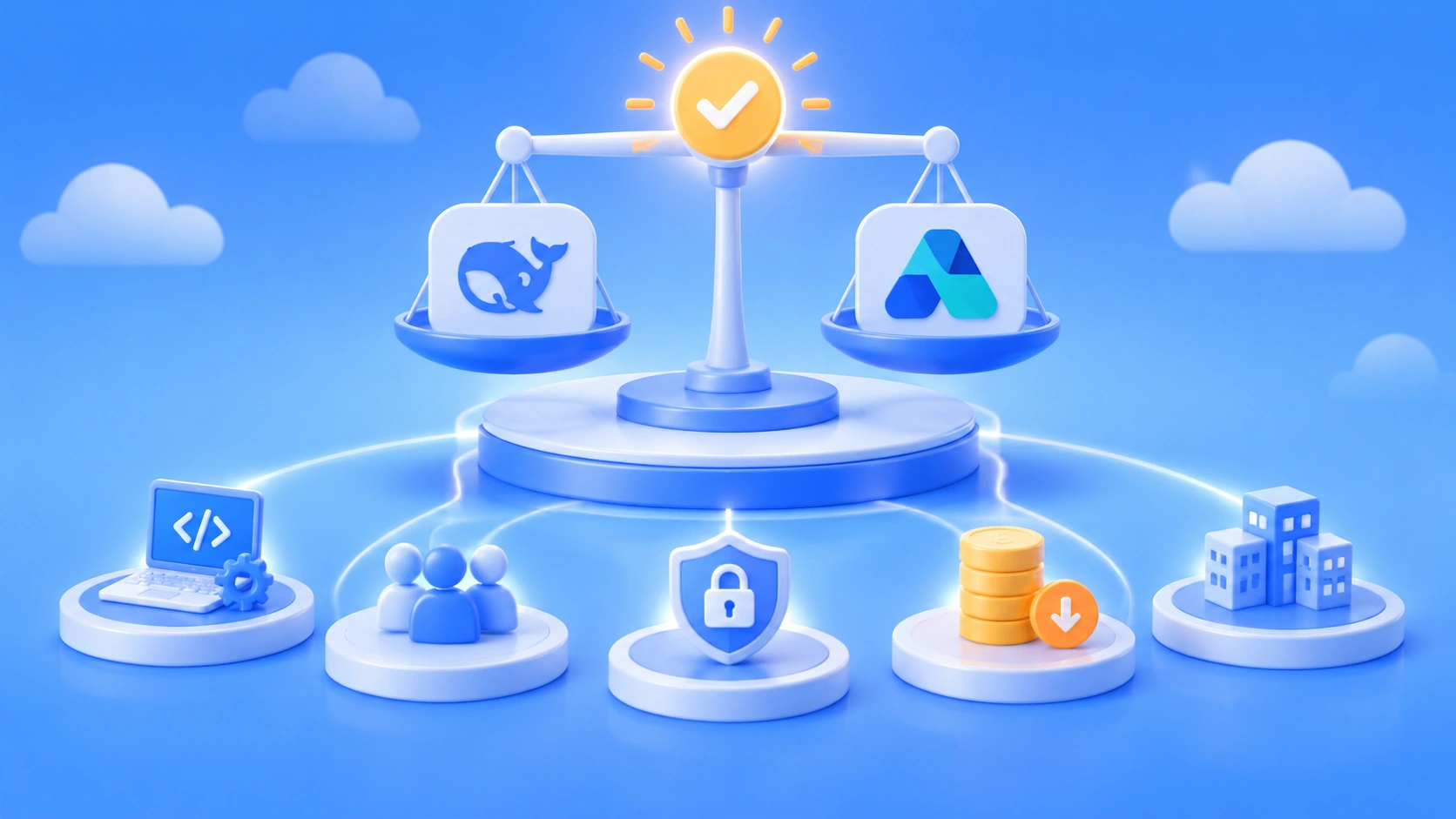
Author’s note: This article uses three dimensions—task difficulty, cost of errors, and context size—to explain how to route Large Language Models by task tier, reserving flagship models for requests that truly need them.
Many teams’ first step in adopting Large Language Models is to send every request to the strongest flagship model available. That’s fine at the prototype stage, but once request volume picks up, the bill climbs quickly—and most of those requests can actually be handled by small or mid-sized models. This article covers a practical approach to task-based tiered routing of Large Language Models to help you decide which requests are genuinely worth a flagship model.
This isn’t a puff piece claiming cheap models are just as good. Flagship models still have a clear edge in complex reasoning, long-chain code changes, and high-stakes outputs. Tiered routing is about matching the right requests to the right models, not about blindly minimizing cost.
Key takeaways: After reading this article, you’ll have a three-tier task classification standard, a routing-rule configuration checklist, and a method for calibrating your routing strategy with data after launch.
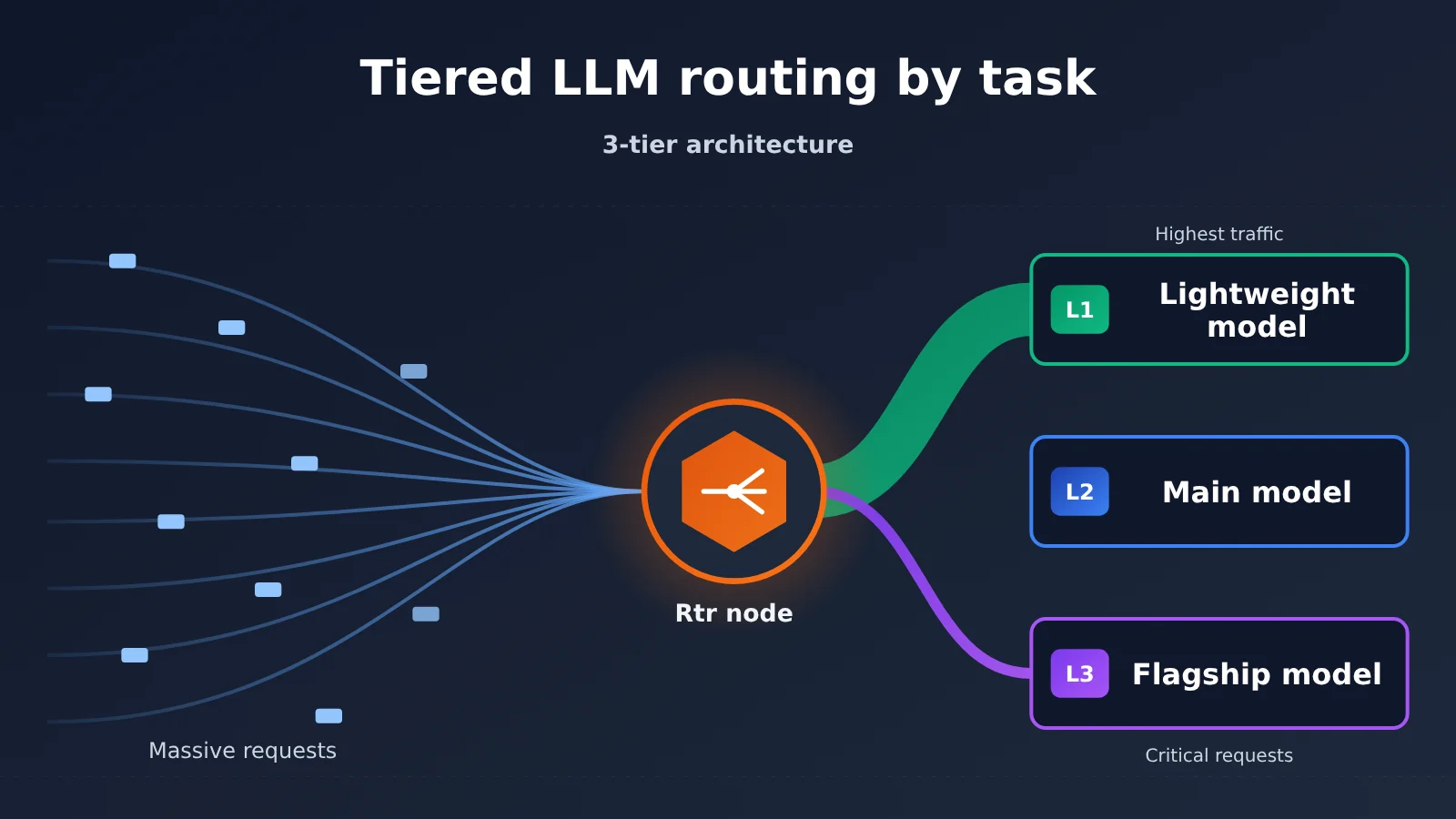
Core Principles for Task-Based Large Language Model Routing
Before we get into specific configurations, let’s lay out the core criteria for layered routing. They determine which layer a request should land in, and whether the routing policy can be maintained sustainably.
| Principle | Description | Value |
|---|---|---|
| Tier by task, not by user | Requests from the same user can vary widely in difficulty, so routing should be based on the characteristics of the individual task | Avoids waste from “all VIP users go to the flagship model” |
| Error cost takes priority over task difficulty | A simple task with serious consequences if it goes wrong may still need a flagship model or a second-pass check | Controls production incident risk |
| Default to the middle tier, promote or demote based on signals | The workhorse model handles most traffic, and you upgrade or downgrade only when specific conditions are met | Few rules, easy to maintain, easy to roll back |
| Escalate on failure | When a lower-tier model’s output fails validation, automatically retry at the next tier up | Trades a small retry cost for better overall quality |
| Calibrate with data | Log each tier’s success rate, retry rate, and per-task cost, and adjust thresholds regularly | Keeps the routing policy effective as models iterate |
Layered routing in detail: Why you can’t use flagship models for everything
The 2026 model landscape makes layered routing even more necessary. Take the public information cited in the reference material as an example: OpenAI released GPT-5.5 on April 24, 2026, offering million-token context. On the same day, DeepSeek released the V4 series in Pro and Flash variants, both supporting 1M context and releasing weights under the Apache 2.0 license. Meanwhile, models such as the Claude Opus series, Gemini 3.1 Pro, and Kimi K2.6 are also closing the gap on coding and reasoning tasks.
When top models’ scores on common benchmarks get closer and closer, “per-task cost” becomes the key metric that separates them. One third-party evaluation article notes that several models now score very similarly on coding benchmarks, and the real differentiator is the cost of completing each task. Another article argues that in coding agent scenarios like Claude Code, most token consumption doesn’t need to be handled by the most advanced model. These are third-party views, and the exact ratios vary by business, but the direction is clear: using flagship models where they matter most is more cost-effective than using them for everything.
Another easily overlooked point is latency. Flagship models usually think more deeply and produce longer outputs, so for immediate tasks like classification, extraction, and rewriting, users actually end up waiting longer. The reference material notes that after GPT-5.5 Instant became the default model in ChatGPT, answer length dropped noticeably and the hallucination rate fell. That shows lightweight versions aimed at quick Q&A are a product direction the vendor itself endorses.
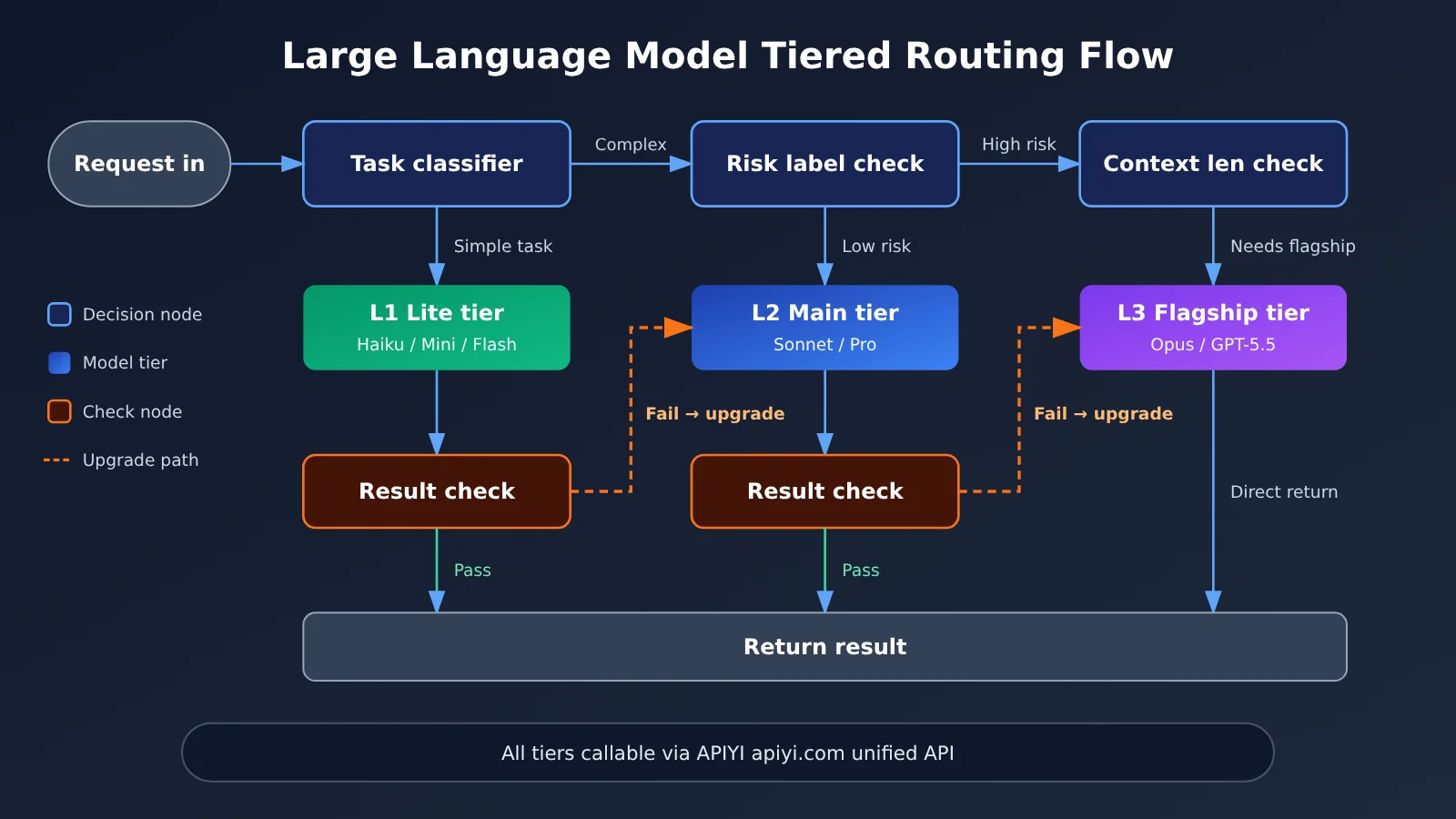
How to Split Large Language Model Layered Routing into 3 Task Tiers
The whole point of layering is to find the model that’s “just powerful enough” for each type of task. The table below is a general breakdown we’ve distilled from several projects—feel free to add or remove rows based on your own business.
| Tier | Typical tasks | Decision signal | Recommended model type |
|---|---|---|---|
| L1 Lightweight tier | Intent classification, keyword extraction, format conversion, short-text rewriting, simple Q&A | Short input, fixed output structure, clear validation rules | Haiku-class, Mini-class, Flash-class models |
| L2 Main tier | Routine conversation, document summarization, medium-complexity code generation, RAG Q&A | Needs some understanding and organizational ability, but errors can be caught and fixed | Sonnet-class, open-source large-parameter models, Pro-class general-purpose models |
| L3 Flagship tier | Multi-step reasoning, cross-file code refactoring, architecture design, high-risk outputs like legal or financial work | Multi-step dependencies, errors that are hidden and costly, comprehensive analysis over ultra-long contexts | Opus-class, GPT-5.5-class flagship models |
How to Judge L1 Lightweight Tier Tasks
The key trait of the L1 tier is “output that can be programmatically validated.” Intent classification, for example, only lets the model pick one label from a fixed set; JSON extraction can be validated against a schema; format conversion can be checked for field completeness. As long as you write the validation rules strictly enough, whatever a lightweight model gets wrong can be automatically intercepted and escalated for handling.
Comparison articles in the reference materials point out that small models like Claude Haiku 4.5 and GPT-5.4 Mini each have their own strengths—the former does better on code quality, while the latter has the edge in speed. These models are a good fit for high-frequency, low-complexity traffic, and they’re the main source of cost savings in layered routing.
How to Judge L2 Primary-Tier Tasks
The L2 tier carries most of the “needs some thinking, but not hard” requests, and it’s the recommended default routing target. Putting the default at the middle tier has two benefits: it prevents a misjudging classifier from downgrading a large batch of complex requests into the lightweight tier, and it keeps both the upgrade and downgrade rules simple.
Open-source models are worth watching at this tier. Third-party evaluations cited in the reference material argue that DeepSeek V4 Flash isn’t far behind V4 Pro on well-bounded coding tasks, and that Kimi K2.6 trails Claude Opus 4.6 by only a few points on mainstream coding benchmarks. That means many coding tasks you’d otherwise hand to a flagship model by default can first be tried at the primary tier.
How to Judge L3 Flagship-Tier Tasks
Requests that genuinely deserve a flagship model usually satisfy at least two of the following conditions at once:
- Long reasoning chain: requires multi-step planning and repeated validation of intermediate conclusions — for example, complex bug localization, mathematical proofs, or scheduling under multiple constraints.
- Errors are hidden and expensive: the output looks plausible, but detail-level mistakes are hard to catch — for example, contract clause analysis, financial metric calculations, or security-related code.
- High context synthesis difficulty: requires linking information across paragraphs in several hundred thousand tokens of material, not just retrieving a single fragment.
- The lower tier already failed: the L2 output didn’t pass validation, or the user explicitly reports the result is unusable.
🎯 Technical recommendation: Tiered routing means integrating multiple model providers at once. If each one needs its own contract and its own SDK integration, the maintenance overhead will cancel out the benefits routing brings. APIYI apiyi.com offers API access to the GPT, Claude, Gemini, DeepSeek, and other model series covered in this article, and is compatible with both OpenAI and Anthropic interface formats — switching models usually only requires changing the model name parameter.
Quick Start with Tiered Routing for Large Language Models
Here’s a minimal, workable tiered routing setup, laid out as a configuration checklist. This article doesn’t include code snippets — all the key configuration items are explained in tables, and you can implement them in whichever framework you’re using.
Step 1: A Unified Access Layer
Tiered routing only works if you can “swap models without touching code.” The recommended approach: funnel every model request through a single unified calling function. That function takes only the task type, the message content, and an optional tier override; internally, it consults the routing rules to decide which model actually gets called.
As for how to connect: if your project already uses the OpenAI SDK, you can keep using the chat completions–style interface. If you use the Anthropic SDK, you can keep using the messages-style interface. APIYI supports both formats at the same time. For the exact endpoint, authentication method, and model name list, refer to the documentation center at docs.apiyi.com.
Step 2: Define the Routing Rule Configuration
The table below lists the most commonly used configuration items in a set of routing rules. It’s best to keep them in a standalone config file so you can adjust them without restarting the service.
| Config item | Meaning | Suggested approach |
|---|---|---|
task_type |
Task type label, e.g. classify, extract, summarize, code, reason | Tag it directly at the business entry point — more stable than classifying with a model |
default_tier |
The tier used when no rule matches | Set it to L2, the workhorse tier |
risk_level |
Business risk label, split into low, medium, high | For high, route straight to L3 or add a validation step |
context_threshold |
Input token threshold that triggers an upgrade | Set it based on each model’s context window and long-text performance |
validator |
Output validation method, e.g. JSON schema, regex, unit tests, second-model review | Required for L1, recommended for L2 |
max_escalation |
Maximum number of upgrades after a validation failure | Usually 1 to 2, to prevent endless retries |
tier_model_map |
The model name and fallback model name for each tier | Model names follow the model list in the APIYI docs |
Step 3: Configure the Escalation and Downgrade Logic
Evaluate routing rules in the following order — the earlier the rule, the higher its priority:
- If the caller explicitly passes a tier override, use that tier directly. This makes debugging and manual intervention easy.
- If
risk_levelis high, route to L3, the flagship tier. - If the input length exceeds
context_threshold, route to at least L2, and decide based on task type whether to upgrade to L3. - Look up
task_typein the table: classification, extraction, and format-conversion tasks go to L1. - If none of the above rules match, use
default_tier. - If the output fails
validatorchecks, escalate one tier and retry until you hit themax_escalationcap.
Step 4: Log the Key Metrics for Each Tier
Once routing is live, log at minimum the following for every request: tier, model name, input/output token counts, whether the cache was hit, whether an escalation retry occurred, and whether validation passed. This data is the only basis for tuning thresholds later — a routing strategy without logs can only be adjusted by gut feel.
🚀 Quick start: Try running the same batch of real requests through L1, L2, and L3 separately in a test environment, then compare pass rates and per-task cost. With APIYI at apiyi.com, you can switch between multiple models through the same interface, which makes this kind of comparison experiment quick to run.
Flagship vs. Workhorse Models in Tiered Routing
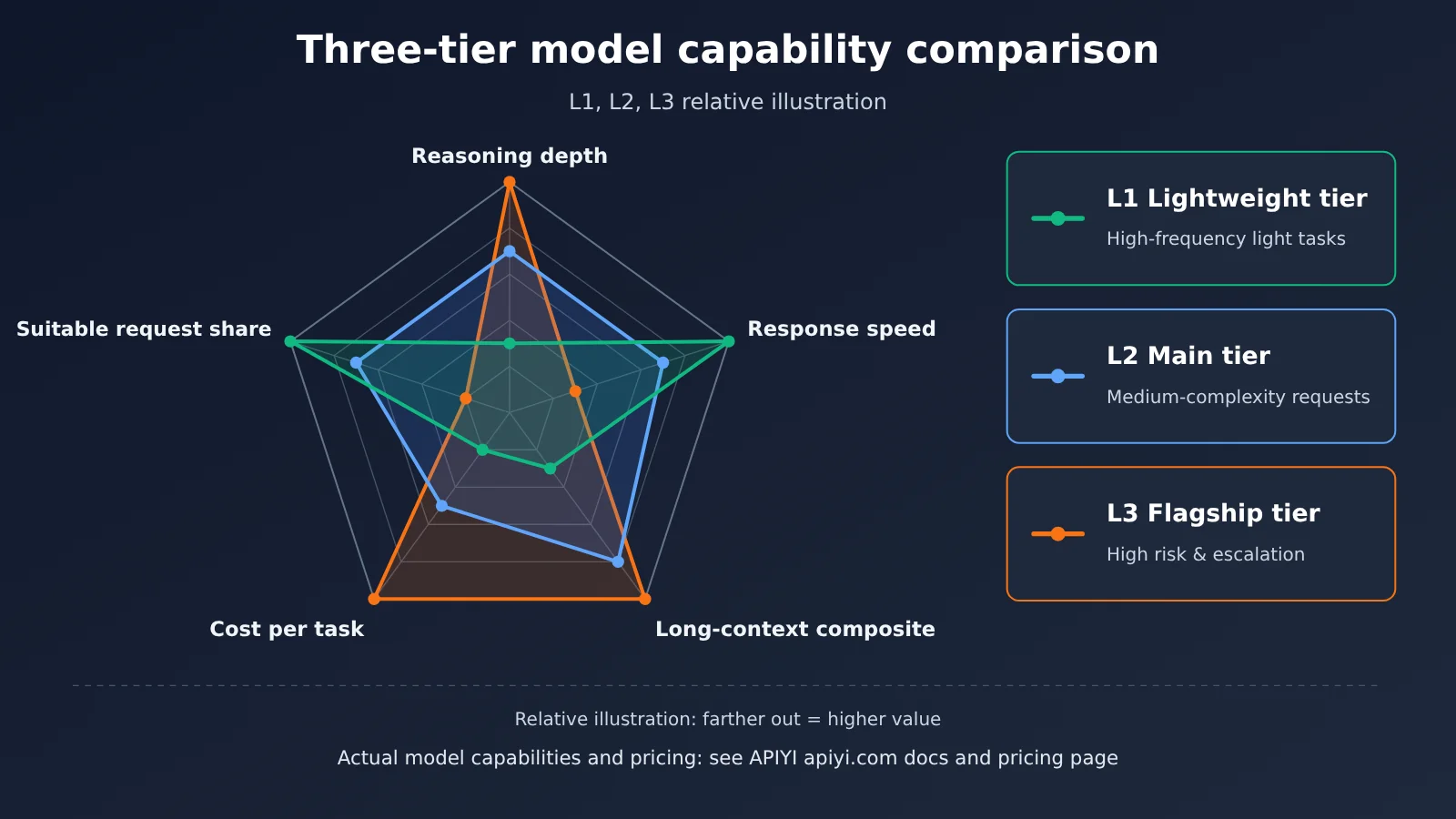
The table below groups the mainstream models mentioned in the reference materials by tier, so you can pick candidates for each tier. The positioning in the table comes from public information and third-party evaluations; actual performance changes with version updates, so it’s best to re-test with your own business data.
| Model | Common positioning | Suitable tier | Available platforms |
|---|---|---|---|
| Claude Opus 4.7 / 4.6 | Complex coding and multi-step reasoning | L3 flagship tier | APIYI apiyi.com, official API |
| GPT-5.5 | General-purpose flagship, 1M context | L3 flagship tier | APIYI apiyi.com, official API |
| Gemini 3.1 Pro | Reasoning and long context, strong cost-effectiveness | L2 to L3 | APIYI apiyi.com, official API |
| DeepSeek V4 Pro | Open-source large-parameter model, 1M context | L2 workhorse tier | APIYI apiyi.com, official API |
| Kimi K2.6 | Coding ability close to flagship | L2 workhorse tier | APIYI apiyi.com, official API |
| DeepSeek V4 Flash | Low cost, suited to clearly bounded tasks | L1 to L2 | APIYI apiyi.com, official API |
| Claude Haiku 4.5 / GPT-5.4 Mini | High-frequency lightweight tasks | L1 lightweight tier | APIYI apiyi.com, official API |
Benchmarking Flagship Models Against Workhorse Models
Flagship model benchmarking: Flagship models like Claude Opus and GPT-5.5 remain ahead in multi-step reasoning, cross-file code changes, and detecting subtle errors. But their unit price and response latency are both noticeably higher, so using them for simple tasks like classification or rewriting is a clear misallocation of resources. By contrast, flagship models are best placed in L3, handling only high-risk requests and escalations after lower-tier failures.
Open-source workhorse model benchmarking: DeepSeek V4 and Kimi K2.6 perform well on routine coding and document processing, and third-party evaluations show that the gap between them and flagship models is already small on many tasks. But on tasks that require long-chain reasoning and involve many implicit constraints, the gap remains. For most medium-complexity requests, workhorse-tier models are still the safer, more economical default choice.
💡 Selection tip: Which model you choose for each tier mainly depends on your task distribution and quality requirements. We recommend using APIYI apiyi.com to run side-by-side tests on candidate models with the same batch of samples, then decide on the primary and fallback models for each tier.
Cost Accounting Method for Tiered Routing
Whether tiered routing saves money isn’t just a question of unit price—it comes down to the “total cost per task.” A task’s total cost is usually made up of several billing components, and getting any one of them wrong will skew the conclusion.
| Billing component | Description | Pricing basis |
|---|---|---|
| Input tokens | Total volume of prompts, context, and historical messages | Based on actual data from the APIYI pricing page at docs.apiyi.com/models |
| Output tokens | Model-generated content; reasoning models may include thinking tokens | Based on actual data from the APIYI pricing page at docs.apiyi.com/models |
| Cache reads | The input portion that hits the prompt cache | Based on actual data from the APIYI pricing page at docs.apiyi.com/models |
| Cache writes | The input portion written to the cache for the first time; some models bill this separately | Based on actual data from the APIYI pricing page at docs.apiyi.com/models |
| Escalation retries | All costs incurred by re-executing on a higher tier after a lower-tier failure | Calculated cumulatively according to the actual tiers invoked |
Common Pitfalls When Calculating Per-Task Cost for Tiered Routing
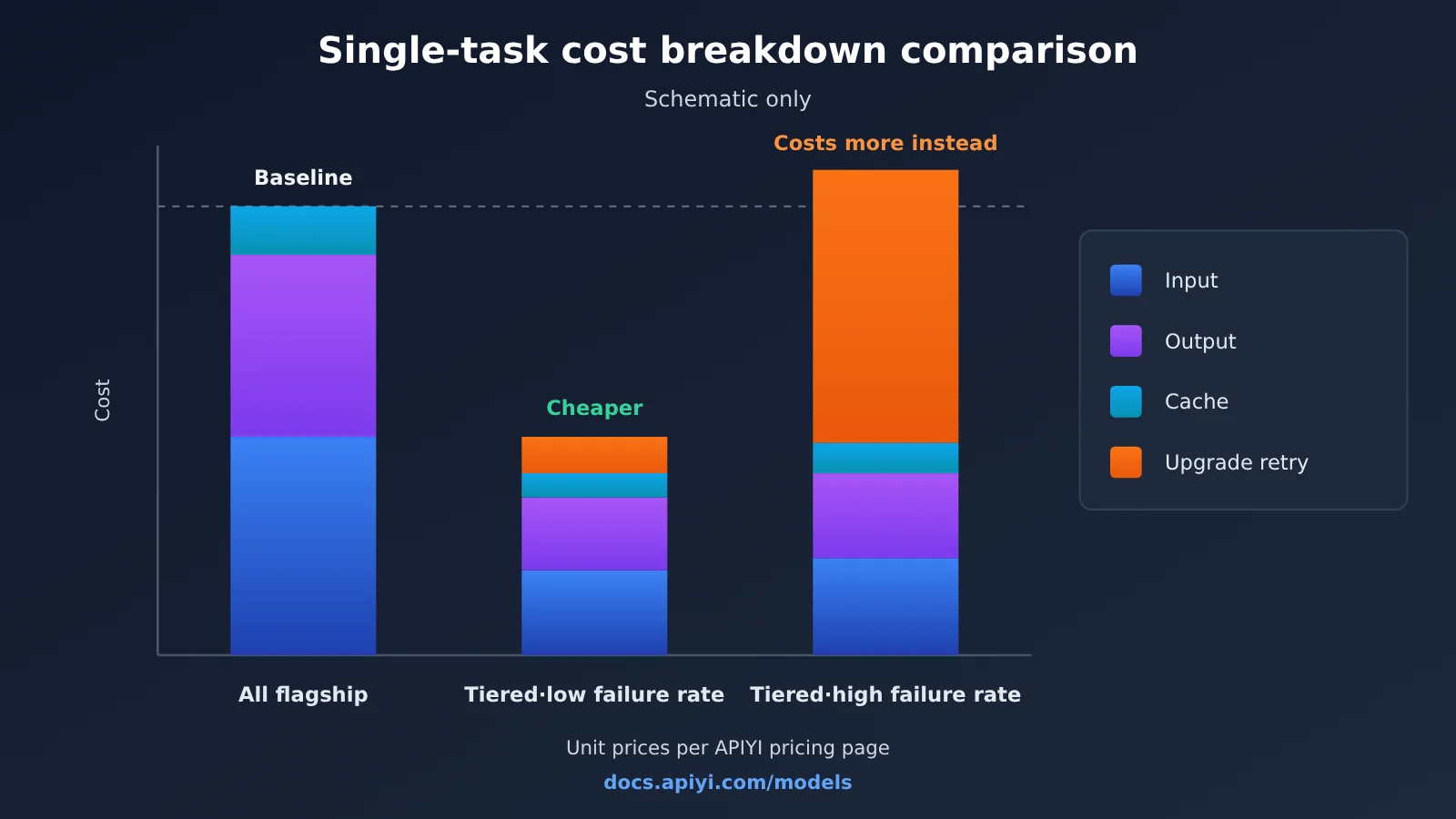
The first pitfall is double-counting cached tokens. Reference materials include an article that specifically warns about this: when calculating cache costs, you need to account for reads, writes, regular input, output, and retries separately; otherwise, it’s easy to count the same batch of tokens twice. The second pitfall is ignoring escalation retry costs. If the validation failure rate at the L1 tier is high, then “trying the cheap model first” can actually be more expensive than using the primary model directly.
So it’s worth using a simple formula to evaluate whether a type of task is suitable for a lower tier: lower-tier single-run cost plus “failure rate times higher-tier single-run cost.” If this number is significantly lower than the cost of using the higher tier directly, and the final quality is acceptable, then this type of task is a good candidate for downshifting. For specific unit prices, cache prices, and billing conventions for each model, refer to the real-time data on the APIYI pricing page at docs.apiyi.com/models; this article does not provide specific price figures.
💰 Cost optimization: When doing cost estimates, it’s a good idea to read each model’s input, output, and cache unit prices directly from the APIYI pricing page, then combine that with your own log data to calculate per-task cost. Within the same platform, billing conventions are consistent, so cross-model comparisons are less prone to error.
Frequently Asked Questions (FAQ)
Q1: What is task-based tiered routing of Large Language Models?
It means routing each request to a model tier with a different level of capability and cost, based on the task type, risk level, and context size of that request. Simple tasks go to lightweight models, routine tasks go to workhorse models, and only complex or high-risk tasks go to flagship models.
Q2: How is tiered routing different from simply “downgrading to a cheaper model”?
Simple downgrading is usually a global swap, so quality drops across the board. Tiered routing treats tasks differently and comes with validation plus automatic escalation — requests that fail at a lower tier get redone by a stronger model, so you protect your quality floor while keeping costs under control.
Q3: Once the new 2026 models ship, do I need to rework my routing strategy?
Yes. In the first half of 2026, models like GPT-5.5, DeepSeek V4, and new versions of Claude Opus are being released in quick succession, and the capability boundaries between tiers shift fast. After each major model update, it’s worth rerunning a fixed test set through every tier to check pass rates before deciding whether to adjust the tier mapping.
Q4: Which requests are most worth sending to a flagship model?
Mainly these categories:
– **Cross-file code refactoring and hard-to-locate bugs**: these require understanding dependencies across a large amount of context.
– **Output in high-risk domains**: things like contract review, checking financial definitions, and generating security policies.
– **Reasoning tasks with multiple constraints**: things like complex scheduling, weighing trade-offs between options, and mathematical derivations.
– **Requests that already failed on a lower tier**: these use the flagship as an escalation safety net.
Q5: How can I quickly set up a test environment for tiered routing through an API?
Use an API aggregation platform that supports multiple models:
1. Go to APIYI at apiyi.com, sign up, and get an API key.
2. Check the APIYI docs center at docs.apiyi.com for the base URL and available model names.
3. Following the configuration checklist in this article, pick one model each for L1, L2, and L3, then compare pass rates on the same batch of samples.
APIYI is compatible with both the OpenAI and Anthropic API formats, so existing projects usually don’t need major changes to integrate.
Q6: Doesn’t using a model to do the task classification itself add cost?
It adds a small amount of extra cost, so it’s better to tag tasks right at the business entry point — for example, the “customer support Q&A entry” is by default a certain task type. Only when the entry point can’t distinguish tasks should you use a lightweight L1 model for classification. That cost is usually far lower than the waste of misrouting to a flagship model.
Q7: What are the known limitations of tiered routing?
There are three main ones. First, the rules need ongoing maintenance — thresholds can stop working after a model update. Second, escalation and retries add latency to some requests, so you need to weigh that in scenarios with extremely tight real-time requirements. Third, different models have inconsistent output styles, so user-facing products may need unified post-processing. When these problems show up, you can raise the default tier or reduce the number of tiers.
Q8: Where should I look for pricing on tiered routing?
For input, output, and cached-token unit prices of all models, along with the billing rules, go by the actual data on the APIYI pricing page at docs.apiyi.com/models. Prices quoted in third-party articles may not match the channel you’re actually using, so it’s not a good idea to budget from them directly.
Key Takeaways: Tiered LLM Routing by Task
- Tier by task, not by user: Requests from the same user vary widely in difficulty, so judge each one individually.
- Cost of failure matters more than difficulty: A simple but high-stakes task still deserves a flagship model.
- Defaulting to the main tier is the safest bet: The middle tier catches the rest, with signal-driven upgrades and downgrades that keep the rules simple and easy to maintain.
- Lower tiers must come with validation: Only outputs a program can verify are safe to hand off to lightweight models.
- Look at total cost per task: Input, output, caching, and retries all need to be accounted for separately.
- Retest whenever models update: Models iterate fast in 2026, so tier mappings need regular recalibration.
- A unified interface lowers switching costs: With APIYI (apiyi.com), you can call multiple models through a single set of endpoints.
Summary
The key points of routing LLMs by task tier:
- Three tiers: L1 handles verifiable lightweight tasks, L2 carries the default traffic, and L3 takes only complex, high-risk, and escalated requests.
- Rule priority: Apply human overrides, risk tags, context length, task type, and default tier in that order, with automatic escalation on failure.
- Let data drive it: Record the pass rate, retry rate, and per-task cost of each tier, and tune thresholds with real data instead of gut feel.
Tiered routing isn’t about “using the cheapest model for everything” — it’s about spending flagship capability where it’s actually needed. Start with one or two high-frequency tasks, get the full loop working — classify, invoke, validate, escalate, log — and then expand to more business scenarios.
APIYI (apiyi.com) is a good place to validate a tiered setup quickly: the platform offers a unified interface across multiple models. See docs.apiyi.com for integration details, and docs.apiyi.com/models for current pricing.
📚 References
- Ofox.ai blog post list (April–May 2026): Covers model releases and comparisons for GPT-5.5, DeepSeek V4, Claude Opus, and others
- Link:
ofox.ai/blog/page/35 -
Notes: Includes third-party analyses on hybrid model routing and cache cost calculations; this article only cites the factual information from them
-
Ofox.ai blog post list (model releases and evaluations): Covers GPT-5.5 Instant, mainstream model benchmarks, and per-task cost comparisons
- Link:
ofox.ai/blog/page/36 -
Notes: Useful for understanding the public positioning of mainstream models in 2026
-
Ofox.ai blog post list (small models and open-source models): Covers lightweight and open-source models such as Claude Haiku, GPT-5.4 Mini, and Llama 4
- Link:
ofox.ai/blog/page/37 -
Notes: Useful as a reference when selecting candidate models for the L1 and L2 layers
-
APIYI Documentation Center: Information on access endpoints, API formats, and model names
- Link:
docs.apiyi.com -
Notes: Please consult this before integrating with OpenAI- or Anthropic-compatible interfaces
-
APIYI Model Pricing Page: Input, output, and cache billing data for each model
- Link:
docs.apiyi.com/models - Notes: All cost calculations in this article are based on the actual data on this page
Author: APIYI Technical Team
Technical Inquiries: Feel free to contact us via the homepage of the APIYI website at apiyi.com. For more integration resources, visit the docs.apiyi.com documentation center