Author’s note: Using Meta’s Muse as a case study, this piece explains exactly what you need to polish in an AI agent — with the focus on behavior tuning and state visibility — and lays out steps you can follow directly.
Most teams building AI agents run into the same wall: the model is already capable enough, demos go smoothly, but users try it for a few days and then churn. The problem usually isn’t the model itself — it’s that two layers, behavior tuning and state visibility, haven’t been polished properly. Using Meta’s Muse as a case study, this article breaks down what “polishing an AI agent” actually means.
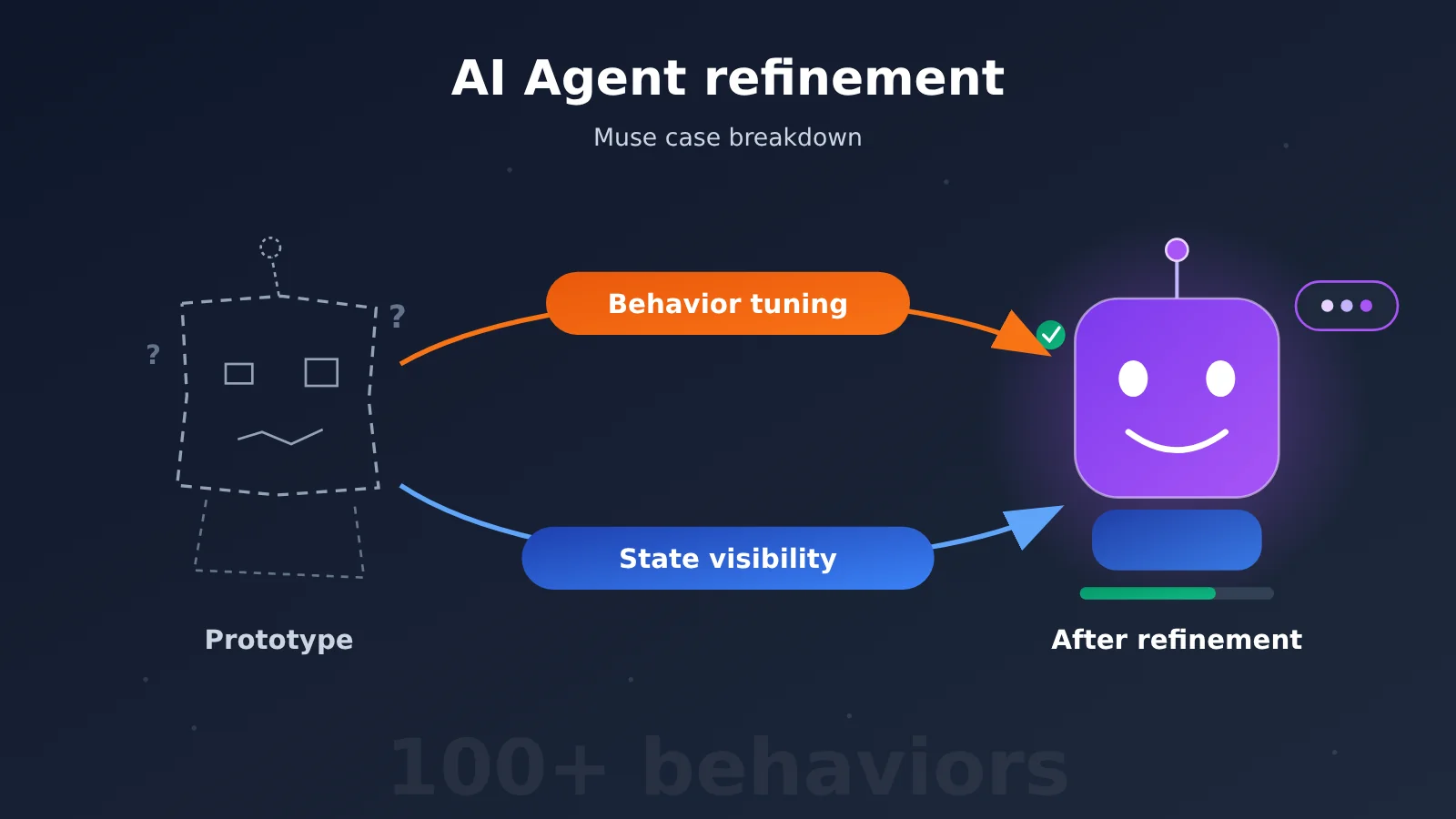
This isn’t another vague “details decide success” reflection. According to public reporting, the Muse team tested and adjusted over a hundred specific model behaviors before launch, and had the avatar use facial expressions and movements to show what the agent was currently doing. Both of these can be broken down into concrete engineering tasks.
Core value: after reading this, you’ll be able to turn “polishing” into a behavior checklist, a state signal table, and a test workflow — and apply them directly to your own agent product.
Background on AI agent polishing: why Muse is worth dissecting
Let’s start with some context. Meta’s Reality Labs division, which handles VR/AR, reportedly lost around $19.2 billion in 2025 alone, and the metaverse bet is widely seen as a very expensive failure. After that, Zuckerberg didn’t pull back to the core advertising business — he kept pouring resources into AI agents. About six weeks after Muse launched, it reportedly reached 10 million users.
Two details about the project tie directly to “polishing.” First, the team was led by Alexander Wang and Nat Friedman from Scale AI, and according to Wang himself, the model and product sides together number fewer than 200 people. The small team was deliberate — the goal was to avoid the compromises and inconsistent experiences that creep in when large teams make decisions by consensus. Second, Muse was never positioned as “the smartest model on the market.” Its edge is that it narrows the gap between “what the model can technically do” and “what it actually feels like for an ordinary person to use” — everyday tasks like canceling a subscription or tracking a bill, for example.
For developers, Muse’s revenue and scale aren’t all that instructive. What is worth studying is how it thinks about polishing: polishing is a set of concrete, testable behaviors, not marketing language.
Key Areas of AI Agent Polish
If you abstract away what Muse did, AI agent polish comes down to a few directions:
| Point | Description | User benefit |
|---|---|---|
| Behavior tuning | Test and adjust specific model behaviors one by one before launch (Muse had over a hundred) | The agent’s reactions are predictable — not good one day and bad the next |
| Decision boundaries | Make clear what it handles itself and what it asks the user about first | Fewer interruptions, without overstepping |
| State visibility | Show what the agent is doing through visual or textual signals | Users don’t have to guess “did it get it? is it working?” |
| Experience consistency | Keep behavior consistent across entry points and pages | Small frictions don’t pile up into real usage cost |
| Edge cases | Handle errors, interruptions, and the second and third tabs seriously | It still feels smooth through daily, repeated use |
AI Agent Polish Focus One: Behavior tuning isn’t “a smarter model”
“A capable model” and “a usable agent” are two different things. A very strong model that doesn’t know when to stop and confirm, when to just act, or how to report progress will still drive people up the wall. The hundred-plus behaviors the Muse team tuned are mostly exactly that.
What you’re tuning here is how it responds within a scenario, not the model parameters. If a user says “cancel that subscription for me,” should the agent list the subscriptions it found and ask for confirmation first, or just go ahead? When it reaches the payment page, should it confirm again? Every judgment point like this is a behavior that has to be tested and pinned down.
AI Agent Polish Focus Two: State visibility is a design job
Muse’s avatar uses small animations to signal that it’s currently doing something, so users don’t have to read technical status messages. That answers the question everyone has when handing a task to an AI: did it understand me? Is it actually working?
Eliminating that uncertainty is design work, and it has to cover every corner of the product — not just the demo flow. According to reports, before launching its mobile app, Meta had already developed facial expression and motion generation technology synced with voice, preparing for real-time voice experiences and future wearables. Most companies push this layer to “after we validate the core idea.” Muse did it up front.
AI Agent Polishing: A Quick-Start Guide with 6 Hands-On Steps
Here’s how to adapt Muse’s approach into a process that even a small or mid-sized team can run. You don’t need a hundred people, and you don’t need a ten-billion-dollar budget — what you need is the patience to keep doing the “second pass, third pass” work.
Step 1: Build a behavior checklist for your AI agent
Start by listing the decision points your agent will hit on real tasks. For each one, spell out the trigger condition, the expected behavior, and a counterexample. You can start with 30 to 50 items and keep adding to the list as test feedback comes in. Here’s a category reference:
| Behavior category | Typical decision point | Polishing standard |
|---|---|---|
| Intent confirmation | Ambiguous instructions, e.g. “cancel that subscription” | When there are multiple candidates, list them for the user to pick — don’t guess |
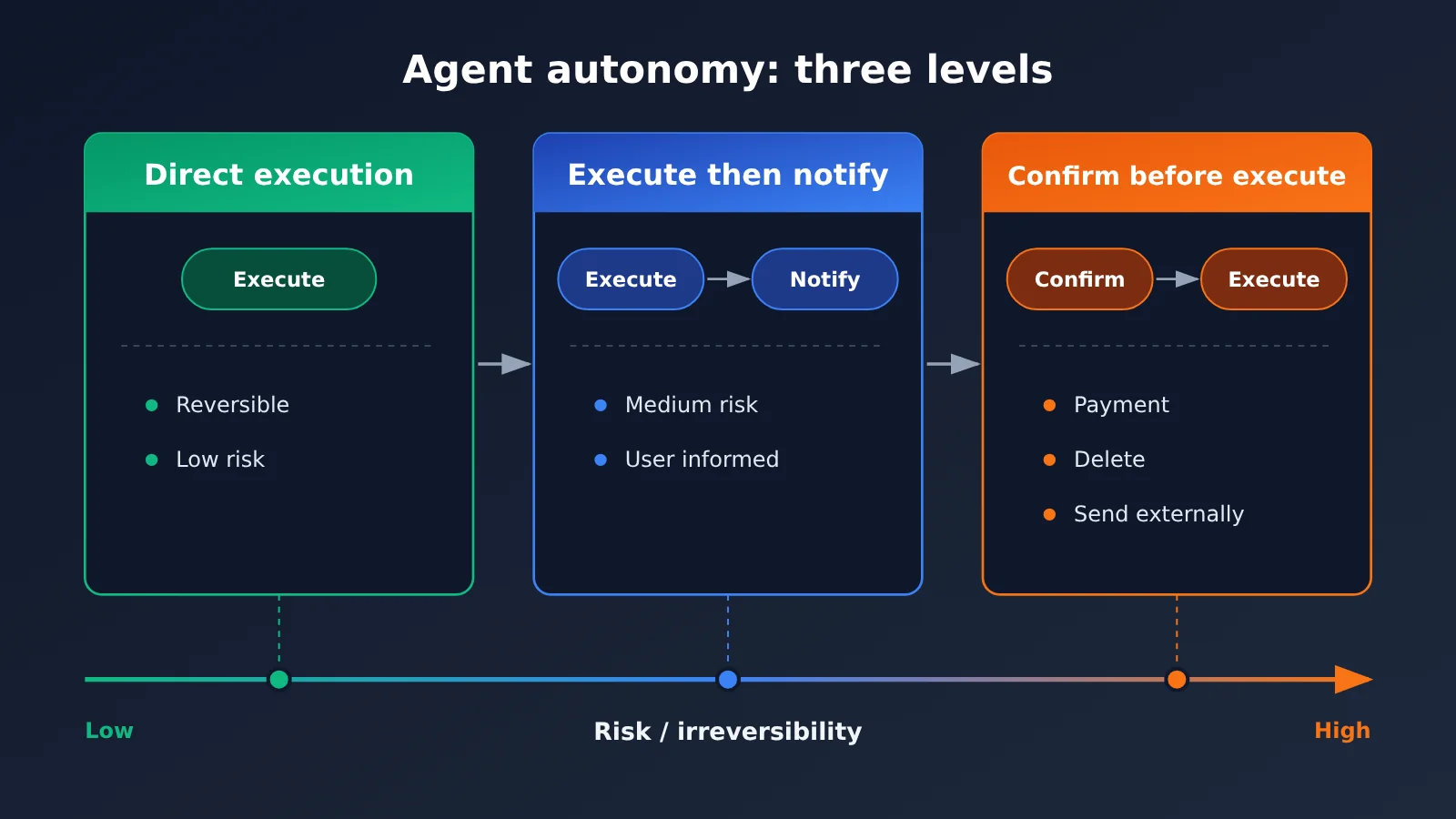
| Autonomous execution | Low-risk, reversible operations | Just execute, then give a brief report when done |
| High-risk interception | Anything involving payment, deletion, or sending something out | Require a second confirmation, and explain the consequences |
| Progress reporting | Multi-step, long-running tasks | Give visible feedback at every key step |
| Failure handling | Site won’t load, insufficient permissions | Explain the cause and suggest next steps — never fail silently |
| Task wrap-up | Task complete | Give a clear “done” signal and a summary of the results |
Step 2: Define the boundary between AI agent autonomy and confirmation
Once you have the checklist, define an “autonomy level” for each category of action. A common approach is three tiers: execute directly, execute and then notify, and confirm before executing. The decision mainly comes down to two things: whether the action can be undone, and how costly a failure would be.
This is the step where teams most often disagree. That’s exactly why Muse keeps its team small: boundary decisions need one person who owns the overall experience and makes the call — you can’t let each module decide based on what’s “locally reasonable.” Otherwise, the same action ends up requiring confirmation on page A but executing directly on page B.
Step 3: Map AI agent internal states to user-visible signals
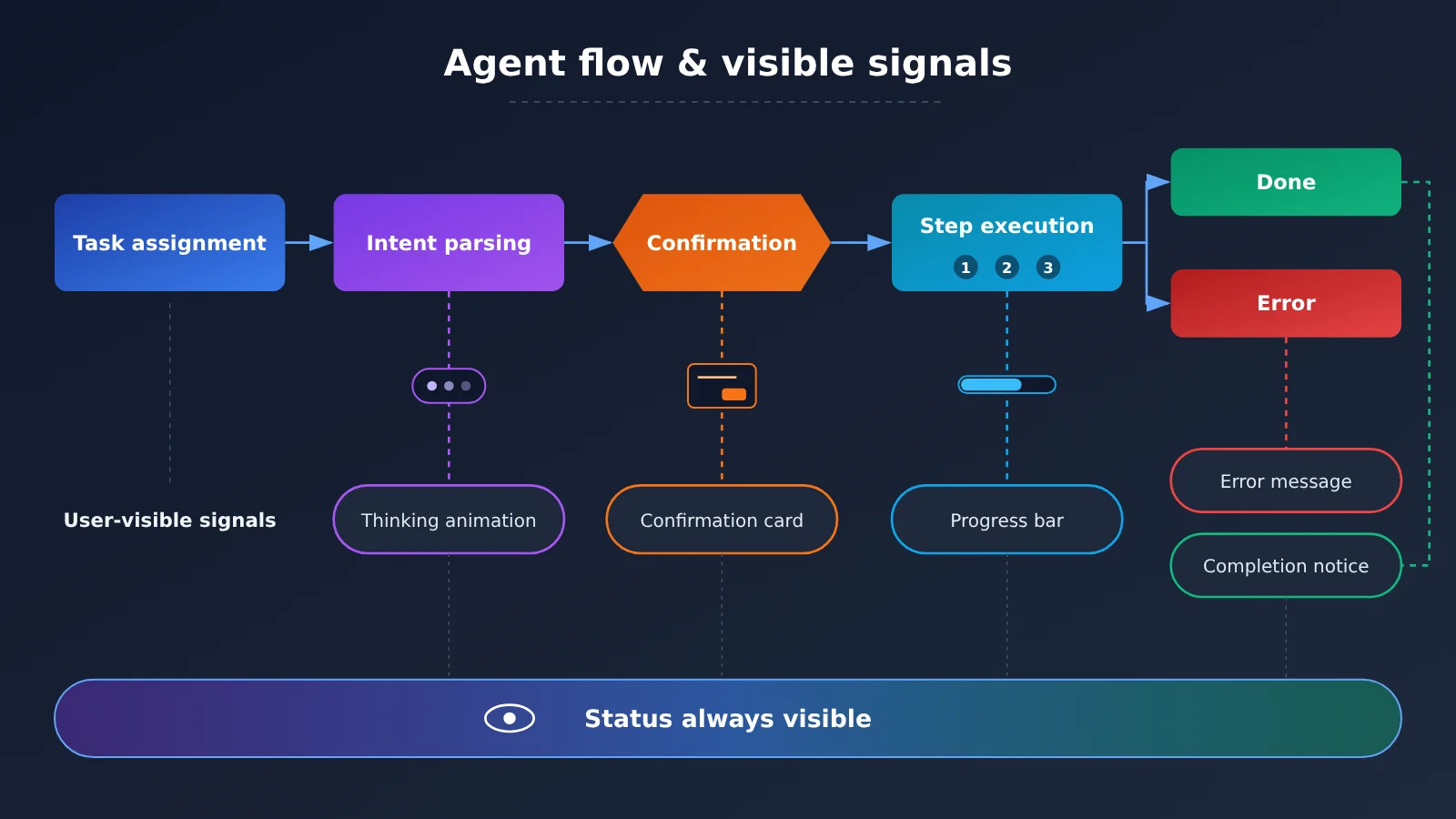
An agent has many internal states, but users only care about a handful of them. In practice, you consolidate internal states into five or six states users can understand, then give each one a fixed signal:
| Agent internal state | User-visible signal | Common anti-pattern |
|---|---|---|
| Parsing intent / planning | Thinking animation or “Understanding your request” | Blank screen for a few seconds; the user thinks it’s stuck |
| Calling tools / accessing external services | Show the current step name, e.g., “Opening the subscription page” | Showing raw tool names or JSON |
| Waiting for user confirmation | Highlight the confirmation card and spell out the consequences | Burying the confirmation question in a long reply |
| Executing (multi-step) | Step-by-step progress, marking what’s done and what’s in progress | Just a spinner icon |
| Completed | Clear completion marker and result summary | The reply ends without saying whether the task succeeded |
| Error / interrupted | Explain the cause and available actions in plain language | A technical error, or no feedback at all |
On the engineering side, you can use streaming output from the model API to drive these signals. With the OpenAI-compatible format, enabling stream returns content and tool calls chunk by chunk; streaming events in the Anthropic Messages format distinguish text blocks from tool_use blocks. The frontend can listen for these events and switch to the corresponding visible state — no need to wait for the entire reply to finish.
Step 4: Design a behavioral test set for the AI agent
Every behavior needs its own test case, covering at least three scenarios: “normal input, ambiguous input, and abnormal environment.” When testing, don’t just check whether the answer is right—also check:
- Does it confirm what should be confirmed, and does it avoid pestering the user where it shouldn’t?
- Do status signals appear on time at every stage?
- Does the same task behave consistently when started from different entry points?
- When something goes wrong, can the user understand it and know what to do next?
It’s worth freezing the test set and running it end-to-end every time you change a prompt, swap models, or adjust tools—so you don’t fix one thing and break three.
Step 5: Run comparisons across different AI agent base models
Muse makes one thing clear: the value of the polish layer doesn’t depend on the “strongest model.” The same behavior checklist will perform differently across models, so you need side-by-side comparisons to find the combination that meets your behavior standards at a reasonable cost.
| Polish stage | Primary model requirements | Selection approach | Available platforms |
|---|---|---|---|
| Intent parsing and planning | Stable reasoning, instruction-following | Prefer flagship or reasoning models | APIYI apiyi.com, official API |
| Tool call execution | Stable function-call format | Choose models with reliable tool-calling performance | APIYI apiyi.com, official API |
| Progress copy / status updates | Fast response, low cost | Choose lightweight, fast models | APIYI apiyi.com, official API |
| Batch test set evaluation | High volume, reproducible | Choose cost-effective models to act as reviewers | APIYI apiyi.com, official API |
🎯 Technical tip: When comparing multiple models, you can route all calls through APIYI apiyi.com. APIYI provides APIs for the mainstream Large Language Models covered in this article and is compatible with both OpenAI and Anthropic interface formats. With the same agent code, you just switch the
modelparameter to compare—no need to write a separate adapter layer for each vendor. For integration methods and endpoint addresses, refer to the APIYI documentation center at docs.apiyi.com.
Step 6: Keep doing the “second and third pass” on your AI agent experience
One of the references uses a good analogy: repainting the dining room isn’t enough — you also have to clean the bathrooms. Today’s AI tools can produce a polished first version fast, and that actually makes people more inclined to keep building new first versions instead of fixing the parts of the existing product that “work, but don’t work well.”
A good habit: every week, pull out moments from real usage logs where users hesitated, asked the same question twice, or gave up halfway, then go back to Step 1 and add them to your behavior checklist. Products people keep coming back to are built in these unglamorous second and third passes.
💰 A note on cost: behavior test sets need to be run over and over, so invocation volume adds up. For per-model input and output pricing, plus how caching is billed, go by the actual numbers on the APIYI pricing page at https://docs.apiyi.com/models — this article doesn’t list specific prices.
Comparing AI agent refinement approaches
| Approach | Core method | When it fits | Main limitation |
|---|---|---|---|
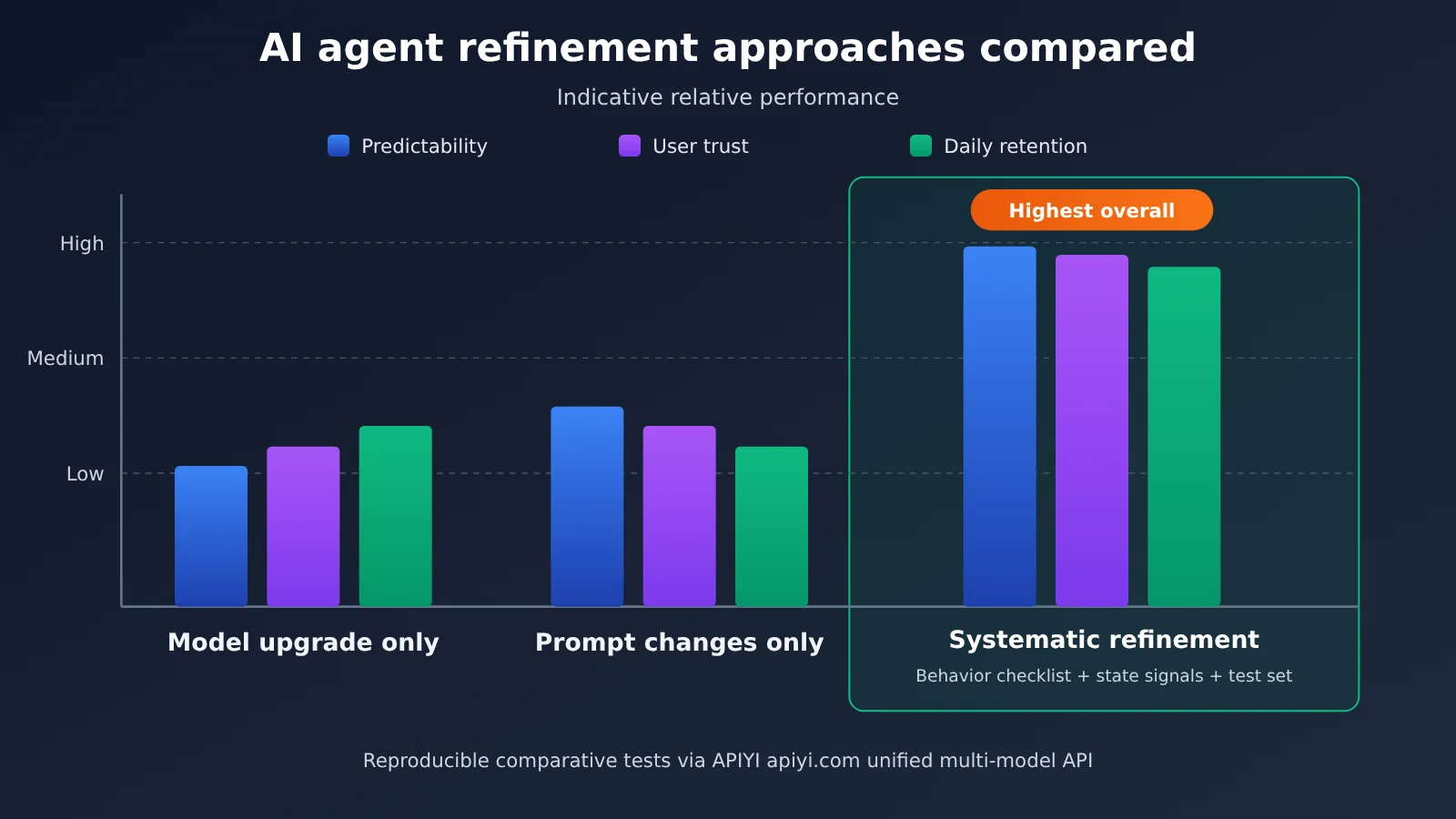
| Swap in a stronger model only | Upgrade the base model and hope the experience improves on its own | Early prototypes with clearly insufficient capability | Costs go up, and behavioral issues like confirmations and status reporting stick around |
| Tweak prompts only | Pile more rules into the system prompt | Patching a few individual issues at small scale | The more rules you stack, the messier it gets, and without tests they tend to conflict |
| Systematic refinement | Behavior checklist + autonomy boundaries + state signals + test set | Day-to-day, task-oriented agents aimed at real users | Big upfront investment, and someone has to own the overall experience |
How the AI agent refinement approaches stack up
Benchmarking “just swap the model”: stronger models genuinely lead on complex reasoning, but they won’t magically know which actions in your product need confirmation first, or how progress should be shown. Systematic refinement, by contrast, tackles the friction users actually feel — Muse is a good example, since it achieved solid early growth without relying on the most powerful model.
Benchmarking “just tweak the prompts”: prompt patching shows results fast and is well suited to single-point problems. But without a behavior checklist and a test set, rules easily collide — fix one thing and you break another. For an agent you plan to run long term, systematic refinement is the safer bet.
💡 On the comparison: it’s worth validating these differences against your own business data. You can run the same test set across multiple models through APIYI apiyi.com, then combine that with the pricing page data to evaluate the return on investment.
AI Agent Polishing FAQ
Q1: What exactly does AI agent polishing mean?
It means testing, adjusting, and locking down how an agent behaves in real tasks, one item at a time. That includes when it should ask for confirmation, when it should act on its own, how it reports progress, and how it explains errors, while keeping the agent’s current state visible to users at all times. This is testable engineering work, not some vague “UX optimization.”
Q2: What’s the difference between behavior tuning and prompt engineering?
Prompt engineering is one tool. Behavior tuning is the goal and the methodology. Behavior tuning starts by defining an “expected behavior checklist” and a test set, then uses prompts, tool design, frontend interactions, and other levers to implement them, with continuous regression testing. If you only tweak prompts without building a test set, consistency is hard to guarantee.
Q3: What are Muse’s user and team sizes?
According to reports, Muse reached 10 million users about six weeks after launch. According to Alexander Wang, the model and product teams together are under 200 people. For Meta’s usual billions-of-users scale, this is just an early result. Going forward, it still needs to lower serving costs and scale up.
Q4: Which agent scenarios are best suited for state visibility?
It’s mainly suited to these scenarios:
– **Errand-style tasks**: multi-step actions like canceling subscriptions, tracking bills, and filling out forms;
– **Long-running tasks**: tasks that need to visit multiple sites or call multiple tools and take a while to complete;
– **High-risk operations**: flows involving payments, deletions, or outbound sends that need explicit user confirmation.
Q5: How do I quickly set up a multi-model test environment for agent polishing?
You can follow these steps:
1. Sign up at APIYI apiyi.com and get an API key;
2. Check the docs at docs.apiyi.com and integrate using the OpenAI- or Anthropic-compatible format;
3. Use the same behavior test set, switch the `model` parameter in turn, and run comparisons;
4. Use the actual billing data on the pricing page https://docs.apiyi.com/models to choose a suitable model mix.
Q6: What are the costs and limitations of systematic polishing?
– **Upfront investment**: Building the behavior checklist and test set takes time, and you won’t see “new features” in the short term;
– **Invocation costs**: Regression tests call models repeatedly, and billing follows the pricing page of the platform you use;
– **Organizational requirements**: Someone needs to make the final call on the overall experience; otherwise, boundary rules will end up inconsistent as different parties compromise;
– **Limitations**: Polishing can’t paper over hard gaps in model capability. If capability is clearly insufficient, you still need to switch models.
AI Agent Refinement: Key Takeaways
- Refinement can be tested: Before launch, Muse adjusted more than a hundred specific model behaviors.
- Easy to use doesn’t mean smartest: Muse’s advantage is reducing friction, not having the strongest model capabilities.
- Someone must own the boundaries: The rules for when the agent acts autonomously versus confirms first need to be unified, not decided independently by each module.
- State must be visible: Use signals to answer the user’s questions: “Does it understand? Is it working? Is it done?”
- Edge cases matter just as much: Errors, interruptions, the second tab, and demo flows deserve the same treatment.
- Multi-model comparisons are more reliable: With APIYI’s unified interface, you can compare different models using the same test set.
Summary
Core takeaways for AI agent refinement:
- Behavior tuning: Turn judgment points into a checklist. For each item, spell out the trigger conditions, expected behavior, and counterexamples, then keep running regressions against a test set.
- State visibility: Consolidate internal states into a small set of signals users can understand, spanning the entire flow of understanding, execution, confirmation, completion, and error handling.
- Continuous iteration: Find friction points in real usage records, and commit to a second and third pass instead of constantly rebuilding the first version.
Muse’s experience applies equally to small and medium-sized teams: small teams own the key decisions, take the boring details seriously, and after a failure change what actually matters and try again. None of this requires losing tens of billions first.
If you’re ready to build a behavior test set for your own agent, you can quickly compare multiple models through APIYI at apiyi.com. The platform is compatible with OpenAI and Anthropic API formats. For integration instructions, see docs.apiyi.com; for pricing, refer to https://docs.apiyi.com/models.
📚 References
- MindStudio — Meta’s Muse Case Study: Background, team, and polishing details for Muse
- Link:
mindstudio.ai/blog/meta-muse-ai-companion-lessons -
Note: Primary source for the case facts in this article, published November 4, 2026
-
APIYI Documentation Center: Unified access guide for multiple models
- Link:
docs.apiyi.com -
Note: How to connect using OpenAI- and Anthropic-compatible formats
-
APIYI Model Pricing Page: Billing units and per-unit prices for each model
- Link:
docs.apiyi.com/models - Note: Input and output pricing, plus cache pricing, follow the actual data on this page
Author: APIYI Technical Team
Technical discussion: Feel free to reach out to us through the APIYI website at apiyi.com to talk about agent polishing practices. For more resources, visit the docs.apiyi.com documentation center.