Author’s note: Starting from the public hands-on tests of three personal Agents, this piece breaks down the interface-layer problems behind their execution shortcomings, and lays out a fix list covering tool calling, fault-tolerant retries, format compatibility, and cost control.
On November 4, 2026, 36Kr published “Personal Agents Take the Table: Who Blinked First?”, putting three personal Agents on the same table for a side-by-side test. Conclusions from this kind of comparison tend to converge: Agents don’t lack the ability to “talk a good game” — they lack the ability to “finish the job.” The core question this article focuses on is that most of an Agent’s execution shortcomings come from the interface layer, not just from the model itself.
This is not another “which Agent is smarter” ranking article. We won’t rehash the original’s specific scores. Instead, we group the execution failures commonly seen in tests like these into 5 categories, then map each one to something that can actually be changed in an Agent’s interface design.
The core value: after reading this, you’ll know which interface parameters to check first when building your own Agent, how to handle failures, and how to switch smoothly between the OpenAI and Anthropic API formats.
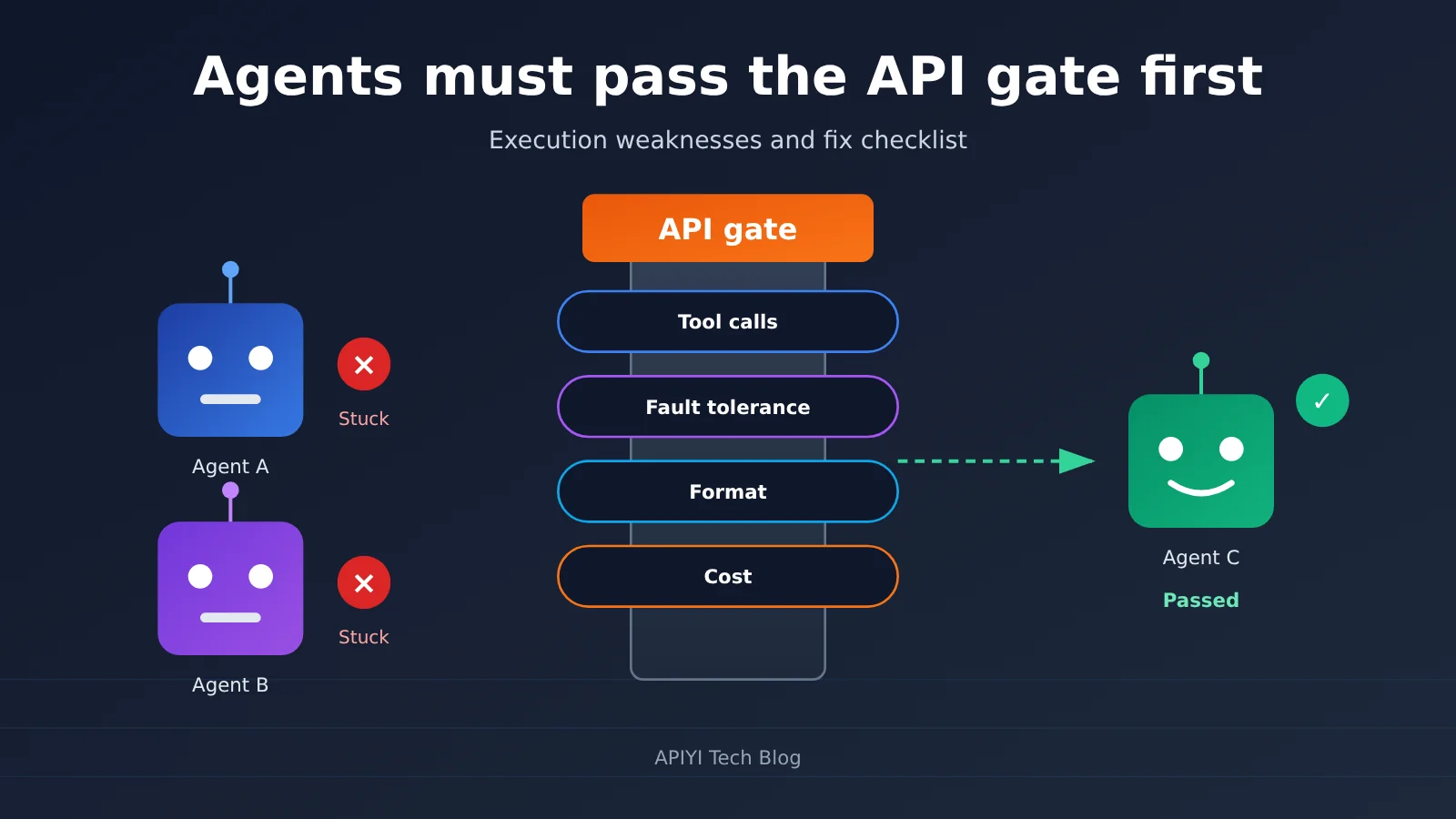
Core Weaknesses in Agent Interface Execution
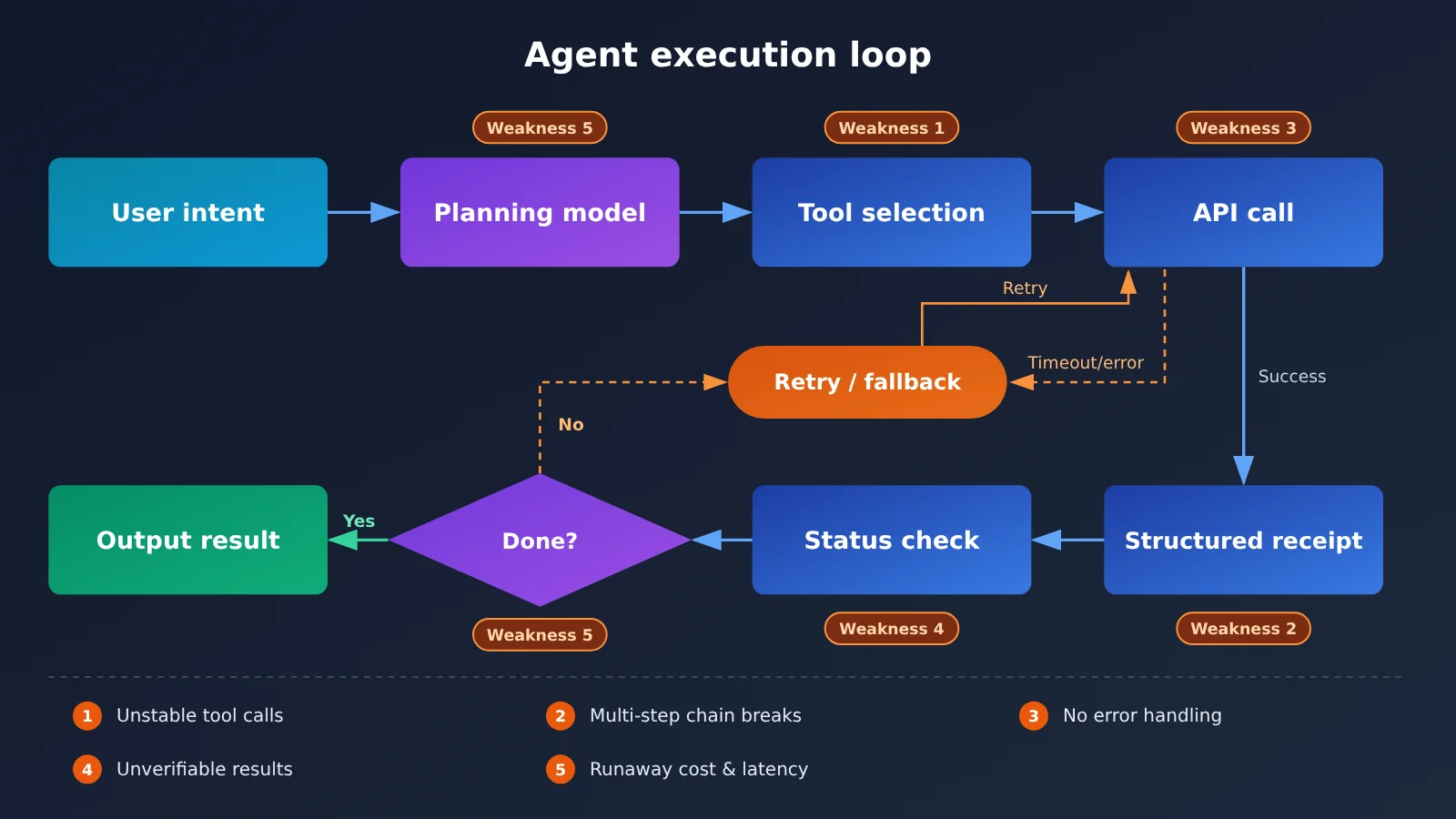
A personal agent’s job is to finish the whole task for the user—booking tickets, sorting email, pulling research together, operating web pages. If a single step in the middle fails, what the user experiences is “it didn’t finish.” Trace the common failures from real-world testing back far enough, and they almost always come down to the 5 categories of interface problems below.
| Execution weakness | Typical symptom | Root cause at the interface layer | Fix direction |
|---|---|---|---|
| Unstable tool invocation | Wrong tool picked, missing parameter fields, invalid format | Vague tool descriptions, schema has no constraints | Trim the toolset, write strict parameter schemas |
| Multi-step task chain breaks | Forgets the goal by step three or four | Loose context management, tool results not passed back correctly | Standardize message history, compress intermediate results |
| No fallback for external failures | Gives up outright on rate limits or timeouts, or falsely claims completion | Doesn’t distinguish error types, has no retry strategy | Tiered retries by status code, plus timeouts and degradation |
| Results can’t be verified | Replies “done” when nothing actually happened | Missing execution receipts and status checks | Require a structured receipt at every step |
| Cost and latency out of control | Loops on calls, one task burns a huge number of tokens | No step cap, no use of caching | Set a max number of rounds, tier models by task, use caching |
Deep Dive on the Key Agent Interface Weaknesses
The first two weaknesses look like model capability problems, but engineering can solve a good chunk of them. The most common cause of unstable tool invocation is stuffing dozens of tools into the model at once, with descriptions that overlap—so naturally it picks the wrong one. Narrow the tools down to what the current task actually needs, and spell out each parameter’s type, allowed enum values, and whether it’s required, and the error rate usually drops noticeably. Broken multi-step chains tend to come from how tool results are passed back: if results aren’t bound to their matching call ID per the protocol, the model has no way to confirm whether the previous step actually succeeded.
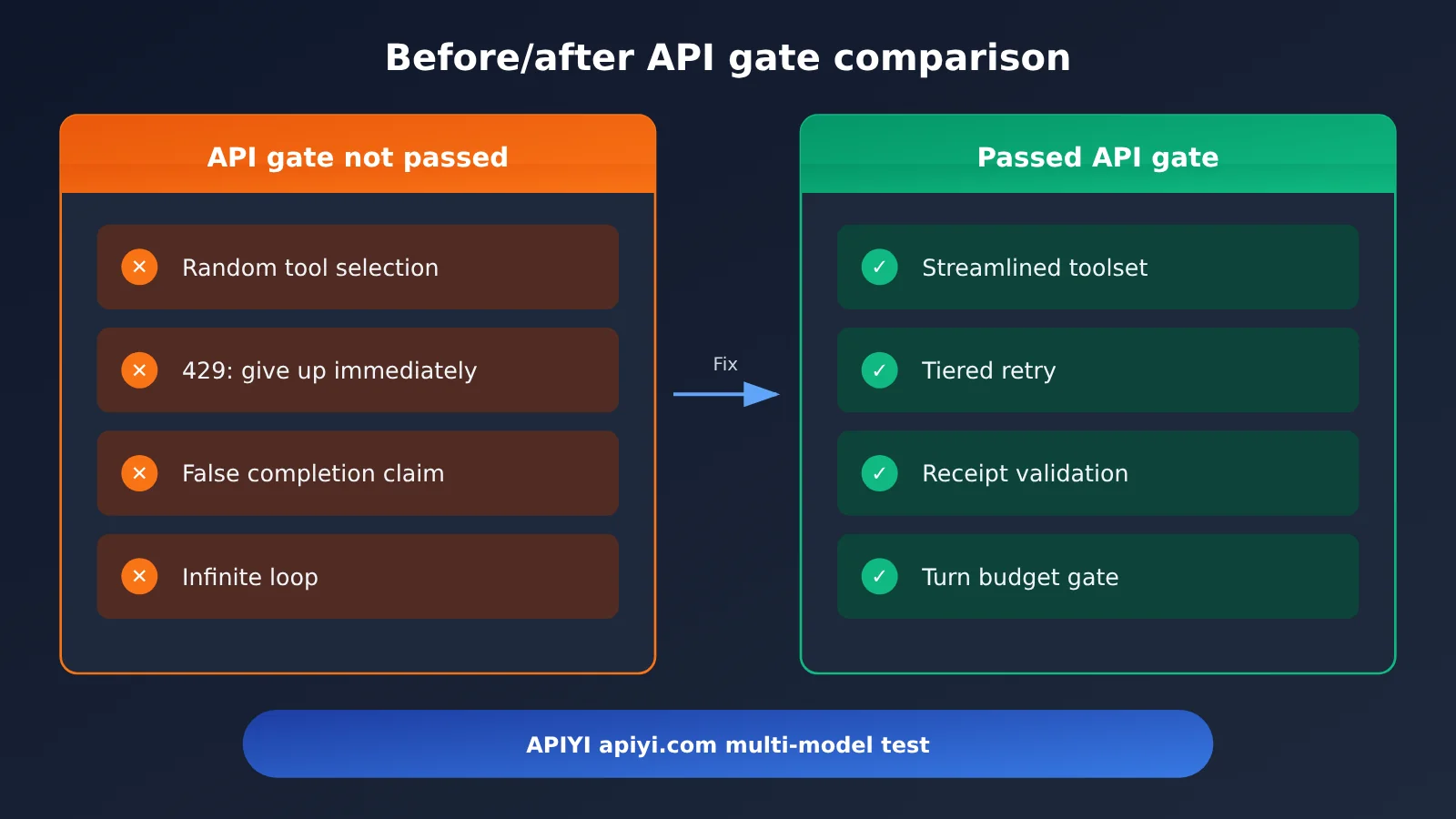
The last three weaknesses are pure engineering problems. A competent agent has to know “what to do when it fails” and “how to prove it’s done.” In real testing, what disappoints users most isn’t failure itself—it’s pretending to succeed after failing. That’s why receipt mechanisms and error tiering at the interface layer are more useful than swapping in a bigger model.
Agent API Quick-Start: A 5-Step Checklist
The steps below don’t depend on any particular framework — they work whether you’re hand-rolling the Agent loop or using an off-the-shelf Agent framework. As this article requires, no code is included here; all the key configuration lives in the tables.
Step 1: Unify Your Agent API Entry Point
Agents usually need a combination of “a strong model for planning, a fast model for execution.” If you connect to a separate vendor for every model, authentication, error formats, and billing rules will all differ, and troubleshooting gets expensive. The easier path is a single entry point that’s compatible with both the OpenAI and Anthropic API formats — then switching models is just a matter of changing base_url, api_key, and model.
| Config | Purpose | Suggested Value |
|---|---|---|
base_url |
API endpoint | Follow the provider’s docs, e.g. the address given in the APIYI docs at docs.apiyi.com |
api_key |
Auth credential | Keep it in an environment variable — never put it in prompts or logs |
model |
Model name | Configure planning and execution separately so you can swap each on its own |
timeout |
Per-request timeout | Set by task type; loosen it a bit for long-output tasks |
max_retries |
SDK automatic retry count | Keep it small — handle tiered retries in your own business layer |
🚀 Quick start: APIYI provides API access to the mainstream Large Language Models covered in this article, and it’s compatible with both the OpenAI and Anthropic API formats — existing SDKs just need a
base_urlchange to connect. For setup instructions, see the APIYI documentation center: docs.apiyi.com.
Step 2: Tighten Up the Agent’s Tool Calling Parameters
Tool calling is the first gate for an Agent’s execution reliability. The stricter the parameters, the less room the model has to “freestyle,” and the lower the error rate.
| Parameter | Meaning | Practical advice |
|---|---|---|
tools |
List of callable tools | Only expose the tools needed for the current stage in a single turn, and describe clearly “when to use, when not to use” |
tool_choice |
Tool selection strategy | Specify a tool when you need to force a certain action; set to auto for open-ended Q&A |
| Parameter schema | Tool input structure | Put required fields in required, and use enums instead of free text whenever possible |
response_format |
Structured output | Require the final receipt in JSON structure for easy programmatic validation |
max_tokens |
Output limit | Required in Anthropic format, so estimate it per task |
temperature |
Randomness | Lower it for execution-type steps to reduce the chance of getting different actions from the same input |
Step 3: Handle the Differences Between OpenAI and Anthropic Formats
Many Agents “suddenly get dumb” after switching models. The reason isn’t the model — it’s that the two formats use different tool protocols, and the results get returned in the wrong place. The table below lists the differences most likely to trip you up.
| Item | OpenAI Chat Completions format | Anthropic Messages format |
|---|---|---|
| System prompt location | Placed in messages with role system |
Uses a top-level system parameter |
| Tool definition | type: function plus a function object |
name, description, input_schema |
| Model-initiated call | tool_calls in the assistant message |
Content block of type tool_use |
| Tool result return | A message with role tool carrying tool_call_id |
A tool_result content block in a user message, corresponding to tool_use_id |
| Output limit | max_tokens optional |
max_tokens required |
Neither format is better or worse. What matters is maintaining only one intermediate representation inside the Agent, then converting it to the matching format at request time. If you use an endpoint that supports both formats at once, such as APIYI, you can let the Claude series go through the native Anthropic format while other models use the OpenAI format, preserving the fullest tool calling capabilities for each.
Step 4: Design fallbacks for failed agent API calls
“Give up the moment it fails” and “pretend it succeeded” are the two behaviors that hurt the experience most in real-world testing. The right approach is to classify errors by type first, then decide whether to retry, degrade gracefully, or tell the user honestly.
| Error type | Common cause | Agent’s response strategy |
|---|---|---|
| 400 parameter error | Invalid tool parameters, malformed message format | Don’t retry blindly — send the error message back to the model so it can correct itself once |
| 401 / 403 auth | Key invalid or insufficient permissions | Stop immediately and prompt the user to check their configuration |
| 429 rate limit | Too much concurrency or quota exhausted | Retry with exponential backoff, and switch to a backup model if needed |
| 5xx server error | Upstream service instability | Retry a limited number of times; degrade once the limit is exceeded |
| Timeout | Long output or network jitter | Switch to streaming output, or break the task into smaller pieces and retry |
There’s another detail that’s easy to overlook: tools with side effects must be idempotent. For operations like sending emails, placing orders, or writing to a database, confirm whether the previous attempt actually took effect before retrying — otherwise the agent will do the same thing twice.
Step 5: Give the agent receipts and a cost gate
Every tool execution should return a structured receipt containing at least three fields: whether it succeeded, what it did, and a key result identifier. Before the agent declares a task complete, the program — not the model — should verify the receipts. That’s how you eliminate “falsely claiming completion” at the mechanism level.
On the cost side, I’d suggest three gates: a maximum number of loop iterations, a per-task token budget, and duplicate-call detection. Planning, execution, and classification work can be assigned to different tiers of models, and long system prompts and tool definitions should stay as stable as possible so you can take advantage of prompt caching. For specific input, output, and cache unit prices, as well as billing conventions, refer to the actual data on the APIYI pricing page at https://docs.apiyi.com/models — this article doesn’t quote any unverified price figures.
💡 Tip: During the build phase, run the full loop with a small amount of traffic first, then add tools gradually. With APIYI apiyi.com, you can quickly compare how different models handle tool calls under a single key — switching only requires changing the
modelfield.
Agent API Layering: A Selection Guide
High-performing Agents rarely use just one model. Layering by responsibility improves stability and makes cost control easier.
| Responsibility layer | Capability requirements | Selection approach | Available platforms | Pricing reference |
|---|---|---|---|---|
| Planning layer | Long context, complex reasoning, task decomposition | Choose a flagship model with strong reasoning | APIYI (apiyi.com), official API | See APIYI’s pricing page |
| Execution layer | Stable tool calling, fast responses | Choose a mid-tier model with consistent tool-calling performance | APIYI (apiyi.com), official API | See APIYI’s pricing page |
| Lightweight layer | Intent classification, format validation, summary compression | Choose a low-latency, low-cost small model | APIYI (apiyi.com), official API | See APIYI’s pricing page |
For the specific models available and the latest model names, check the APIYI docs at docs.apiyi.com. Run a batch of samples for each of your real tasks, measure tool-call success rate, average number of turns, and per-task cost, then decide which model to use for each layer—don’t just rely on public leaderboards.
FAQ
Q1: What is an Agent’s “interface barrier”?
It’s the engineering layer an Agent has to get through between “thinking it through” and “getting it done” — tool definitions, invocation protocols, error handling, result receipts, and cost control. The model makes the decisions; the interface layer makes sure those decisions land reliably. If you don’t clear this barrier, even a strong model will look like it has poor execution capability.
Q2: Is poor execution a model problem or an interface problem?
Both, but interface problems are the ones people underestimate. Choosing the wrong tool, malformed parameters, broken chains, and claiming success after a failure — a good chunk of these can be mitigated by tightening the schema, standardizing how results are passed back, and adding receipt validation. Get the interface layer solid first, then decide whether you really need a different model.
Q3: What trend do the hands-on tests of three personal Agents point to?
That November 2026 hands-on report from 36Kr shows personal Agents have entered a phase of “who can actually finish the job,” with the competition shifting from conversation quality to the execution loop. For how each product performed, see the original article — this piece only distills the general engineering takeaways.
Q4: Should I choose the OpenAI format or the Anthropic format?
Choose based on the model. The Claude family uses the native Anthropic format, which gives you full access to features like tool calling and caching; most other models are more universally supported through the OpenAI format. APIYI is compatible with both formats, so you can maintain a unified intermediate representation inside your Agent and convert per model at request time.
Q5: How do I quickly connect multiple models to my own Agent?
1. Sign up at APIYI apiyi.com and get an API Key;
2. Configure `base_url` following the docs at docs.apiyi.com;
3. Fill in `model` separately for the planning layer and the execution layer, then run comparison tests on the same batch of tasks.
You don’t need to change the SDK at all — just adjust the configuration.
Q6: How do I estimate Agent costs, and where do I find pricing?
First measure the average number of turns, input tokens, and output tokens per task, then multiply by the unit price of the corresponding model. For input, output, and cache unit prices and billing rules, always defer to the actual data on the APIYI pricing page at https://docs.apiyi.com/models — models vary considerably, so calculate against the live page.
Q7: My Agent gets less stable as I add more tools. What should I do?
Expose tools dynamically by task stage, giving the model only a small set of relevant tools per turn. You can also use a lightweight model to do routing/classification first, then hand the corresponding tool subset to the execution model. Writing clear applicability boundaries in tool descriptions is more effective than piling on more examples.
Q8: What limitations remain after I’ve built a solid interface layer?
The interface layer can significantly improve stability, but it can’t fix the model’s own reasoning ceiling, nor can it handle changes in third-party sites or services. For long-chain tasks, still keep human confirmation points — especially for irreversible operations like payments, deletions, and outbound sends.
Agent Interface Execution Capability: Key Takeaways
- Execution gaps usually sit at the interface layer: wrong tool selection, broken chains, and false claims of completion — most of these have engineering fixes
- Fewer tools beat more: expose tools in stages, and the stricter the parameter schema, the more stable things get
- Isolate format differences: keep a unified internal representation, and convert to OpenAI or Anthropic format only at request time
- Errors must be classified: fix on 400, back off on 429, degrade on 5xx, and make side-effecting operations idempotent
- Completion is judged by the program: structured receipts plus state validation, so “fake completion” can’t slip through
- Put gates on cost: turn limits, token budgets, tiered model usage — and pricing follows the APIYI pricing page
- Getting started: connect multiple models through APIYI’s unified entry point — just change
base_urlandmodelto compare
Summary
Real-world testing of three personal Agents gives developers something to think about: the focus of Agent competition is shifting from “can it chat” to “can it finish the job.” To close the execution gap, the highest-return investment is getting the interface layer right first:
- Tool invocation: trim the tool set, tighten schemas, standardize how results are returned;
- Fault tolerance and fallbacks: error classification, limited retries, idempotency protection;
- Verifiable and controllable: structured receipts, programmatic validation, cost gates.
Start by running one real task through the full loop, then expand capabilities step by step. We recommend connecting through APIYI at apiyi.com — it’s compatible with both OpenAI and Anthropic API formats, which makes it easy to compare execution stability across different models. Docs are at docs.apiyi.com, and pricing follows https://docs.apiyi.com/models.
📚 References
- 36Kr: Personal Agents Join the Table — Who’s Showing Their Nerves First? A hands-on report on three personal agents
- Link:
36kr.com/p/4055385191224452 -
Note: This is the source of the topic for this article; see the original for specific products and hands-on results
-
APIYI Documentation Center: Setup configuration and available models
- Link:
docs.apiyi.com -
Note:
base_urlconfiguration, OpenAI and Anthropic format integration methods -
APIYI Model Pricing Page: Per-model unit prices and billing rules
- Link:
docs.apiyi.com/models - Note: All price-related content in this article is based on the actual data on this page
Author: APIYI Technical Team
Technical Discussion: Feel free to reach out to us on the APIYI official site at apiyi.com. For more integration resources, visit the docs.apiyi.com documentation center.