Author’s note: A quick guide to what’s affected by the retirement of the old Grok Imagine model identifier, whether the old API still works, official pricing changes, and how to manage quality and costs when migrating to 2.0.
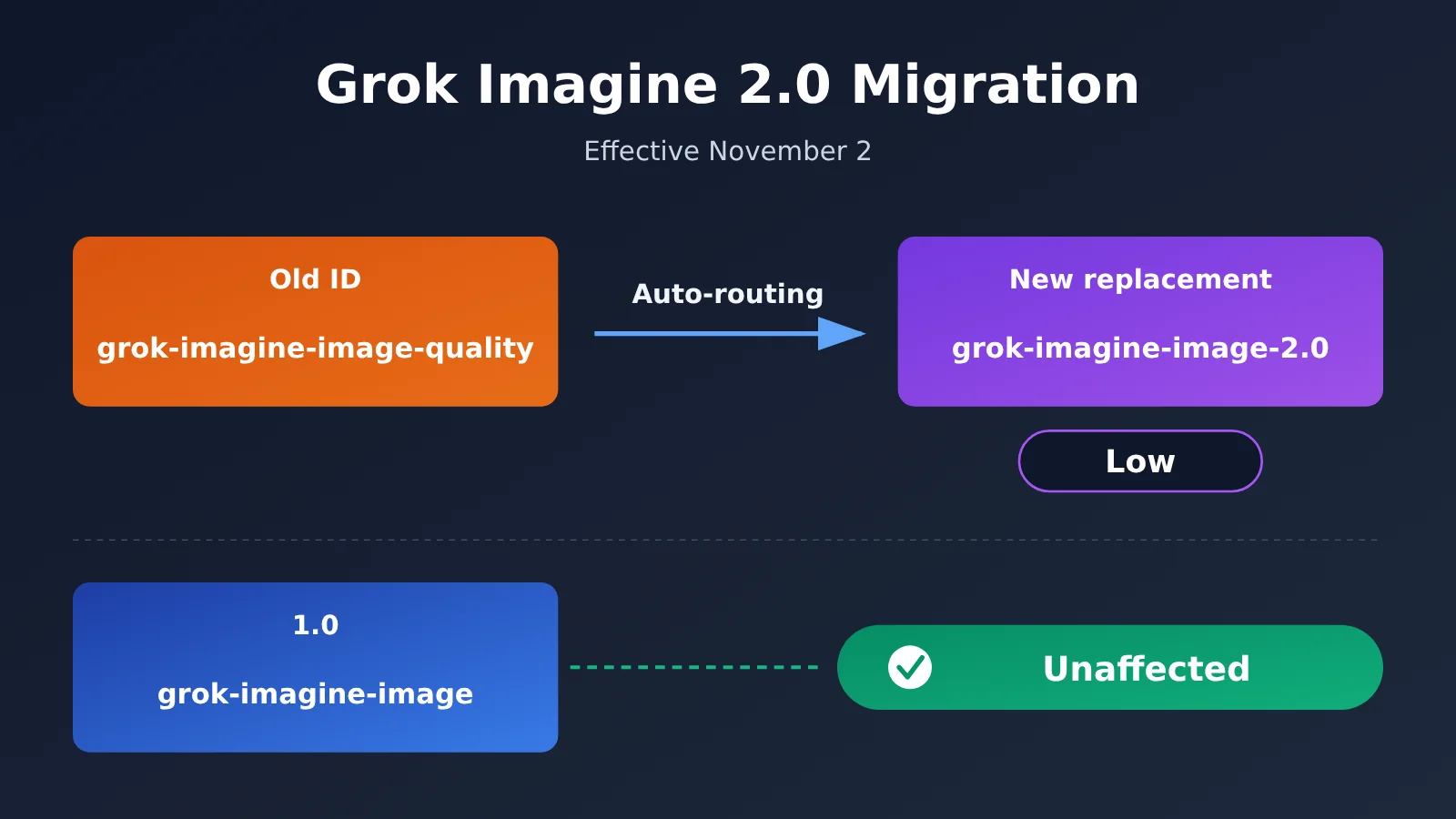
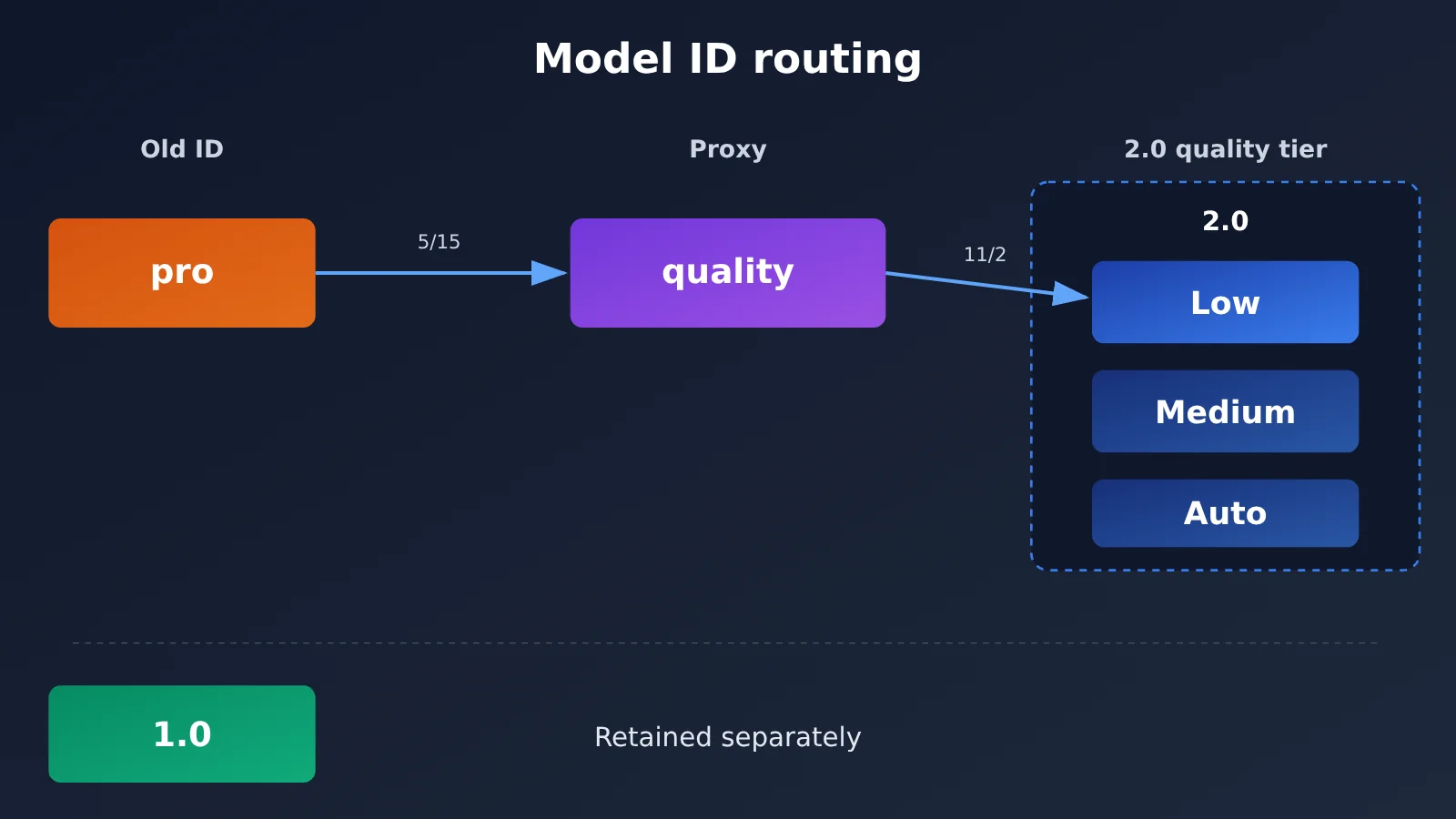
Today, November 2, 2026, xAI is officially carrying out its Grok Imagine image model migration. What’s being retired is the API model identifier grok-imagine-image-quality, not Grok Imagine as a whole. You can still call the old identifier, but requests will be handled by grok-imagine-image-2.0 at Low quality. The 1.0 model, grok-imagine-image, is unaffected.
This isn’t a rumor, and 2.0 wasn’t just released today. xAI confirmed the arrangement in its official migration guide and gave 60 days’ notice on September 2. The migration rules and prices in this article come from xAI’s official documentation.
What you’ll learn: In three minutes, find out whether you’re affected, whether the old API still works, if you need to change your code, and how to choose a quality setting to control costs.
What Grok Imagine Retired Today: Key Facts at a Glance
| Item | Details |
|---|---|
| Effective date | November 2, 2026 |
| Retired identifier | API model identifier grok-imagine-image-quality |
| Replacement model | grok-imagine-image-2.0, with quality fixed at low |
| Affected endpoints | POST /v1/images/generations and POST /v1/images/edits |
| Compatibility | The old identifier continues to resolve, and request and response structures remain compatible |
| Unaffected | grok-imagine-image (1.0) |
| Outside the scope of this change | Grok Imagine video models |
The easiest mistake is to read “retired identifier” as “service shutdown.” According to the official announcement, requests using the old name won’t necessarily fail just because the name has been retired. The server will route them to 2.0 instead. But the fact that the old identifier still works doesn’t mean the old model is still running behind it.
Grok Imagine 2.0 Migration Timeline
- May 15:
grok-imagine-image-prowas retired, with requests redirected togrok-imagine-image-quality. - August 7: xAI released Imagine Image 2.0 under the API name
grok-imagine-image-2.0. A new Quality Mode also launched in its consumer products. - August 28: The 2.0 API added
quality=auto, and the default changed from Medium to Auto when no quality was specified. The limit for editing reference images increased from 3 to 5, and 21:9 and 5:2 aspect ratios were added. - September 2: xAI published migration guidance, announcing that the old Quality identifier would be retired in 60 days.
- November 2: The migration rules took effect.
Can You Still Use the Old Grok Imagine Models? Who’s Affected by the Migration
To see whether you’re affected, first check the model value in your code and configuration. If you generate images only through the Grok website or mobile app, note that the announcement directly concerns API identifiers. It doesn’t mean an option in the interface has been removed today.
| Current usage | Affected? | What happens after November 2 | Recommended action |
|---|---|---|---|
grok-imagine-image-quality |
Yes | Served by 2.0 Low | Run regression tests and plan an explicit migration |
grok-imagine-image-pro |
Yes | Routed to 2.0 Low through a chain of redirects | Replace the old identifier soon to avoid multiple mapping layers |
grok-imagine-image-2.0 |
Not replaced | Continues to run at the selected quality level | Check whether you rely on the default Auto setting |
grok-imagine-image (1.0) |
No | Officially confirmed to be unaffected | No changes needed because of this event |
| Third-party API platform | Depends on the platform | Depends on the upstream model, name mapping, and parameter handling | Check with the platform and review your logs |
You don’t have to change your code today, since the old identifiers won’t stop working as a direct result of this retirement. But if your application has specific requirements for output style, editing results, or cost, it’s still worth upgrading proactively so you can choose the model and quality tier yourself.
Keep in mind that compatible request structures don’t guarantee identical images. When the underlying model changes, the same prompt can produce different styles, compositions, and details. That’s a common engineering risk with model migrations. The public information available so far doesn’t indicate that a large-scale quality incident occurred today, but it’s still a good idea to spot-check production outputs.
Grok Imagine 2.0 Pricing: Not Every Option Is Cheaper
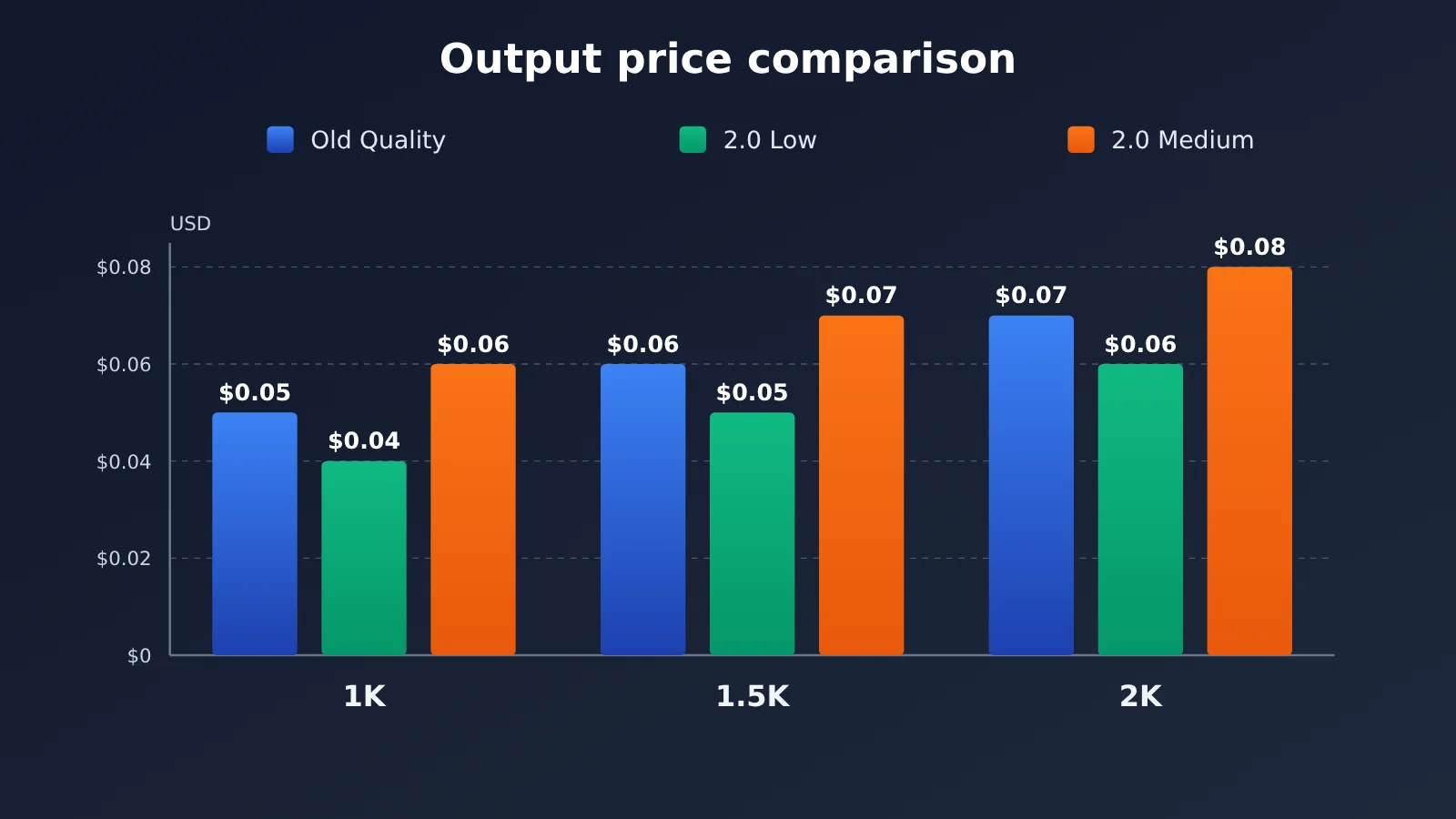
xAI’s official pricing charges per output image. For 2.0, the price depends on both the quality tier and resolution. With automatic migration to Low, each output image costs $0.01 less. If you choose Medium, each image costs $0.01 more than with the old Quality tier.
| Resolution | Old Quality | 2.0 Low | Low vs. Old Quality | 2.0 Medium | Medium vs. Old Quality |
|---|---|---|---|---|---|
| 1K | $0.05 | $0.04 | 20% lower | $0.06 | 20% higher |
| 1.5K | $0.06 | $0.05 | About 16.67% lower | $0.07 | About 16.67% higher |
| 2K | $0.07 | $0.06 | About 14.29% lower | $0.08 | About 14.29% higher |
Both 2.0 and the old Quality tier also charge $0.01 per input reference image. For 1.0, output images cost $0.02 each at 1K and 2K, while input images cost $0.002 each. Although the official price list includes 1.5K, the generation parameter documentation currently specifies only 1k and 2k. Don’t use resolution="1.5k" in production code without testing it first.
Grok Imagine Batch Image Generation Cost Estimates
The table below uses official unit prices to calculate theoretical costs, not actual enterprise bills. The text-to-image examples exclude reference image inputs, failed retries, taxes, and third-party platform fees.
| Scenario | Old Quality | 2.0 Low | 2.0 Medium |
|---|---|---|---|
| 1,000 1K text-to-image outputs per month | $50 | $40 | $60 |
| 20,000 1K text-to-image outputs per month | $1,000 | $800 | $1,200 |
| 10,000 2K text-to-image outputs per month | $700 | $600 | $800 |
| 1 reference image + 1 1K edited output | $0.06 | $0.05 | $0.07 |
For editing workloads, you’ll also need to account for input costs. For example, using 5 reference images to produce one 2K Medium image costs $0.05 for input and $0.08 for output, for a theoretical total of $0.13. The official $0.01-per-image price reduction mainly refers to output pricing, so you can’t apply the output price reduction in the table directly to the total cost of editing tasks.
What’s the Difference Between Grok Imagine’s Low, Medium, and Auto?
Low uses less compute and costs less. It’s also the fixed tier used when the old Quality model is automatically migrated. Medium uses more compute and is intended for tasks where output detail matters more. With Auto, xAI selects the quality tier. The current official rule uses Low for image generation and Medium for image editing, but that mapping could change in the future.
One easy mistake is to change model to 2.0 without specifying quality.
| Invocation method | Text-to-image | Image editing | Best for |
|---|---|---|---|
| Continue using the old Quality identifier | Fixed at Low | Fixed at Low | A smooth transition without changing code yet |
2.0 + quality="low" |
Low | Low | Batch production where cost control is the priority |
2.0 + quality="medium" |
Medium | Medium | Tasks that need more detail and can accommodate higher costs |
2.0 + omit quality or use Auto |
Currently Low | Currently Medium | When you’re comfortable letting the server choose the tier |
For example, an editing task with 1 reference image and 1 1K output theoretically costs $0.06 with the old Quality model. If you switch to 2.0 and omit quality, it currently uses Medium, bringing the cost to $0.07. Continuing to use the old identifier routes the task to Low, costing $0.05. For a predictable budget, it’s best to always specify the quality tier explicitly.
Also, the API’s Low, Medium, and Auto tiers aren’t directly equivalent to the Fast and Quality options on the Grok website. It’s best to describe them separately in documentation, code, and product descriptions to avoid confusing your team.
How to Migrate to Grok Imagine 2.0: Parameters, Verification, and SDK Considerations
The recommended migration path is straightforward: change model to grok-imagine-image-2.0 and explicitly set quality based on your needs. The official API example below follows the structure in xAI’s documentation. You’ll need to replace the API key before running it; no paid calls were made for this article.
curl -X POST https://api.x.ai/v1/images/generations \
  -H "Content-Type: application/json" \
  -H "Authorization: Bearer $XAI_API_KEY" \
  -d '{
    "model": "grok-imagine-image-2.0",
    "prompt": "A professional technology magazine cover",
    "quality": "low",
    "resolution": "1k",
    "aspect_ratio": "16:9",
    "n": 1
  }'
For image editing, you can explicitly select Medium quality. The image URL below is a placeholder; replace it with an image you can access:
curl -X POST https://api.x.ai/v1/images/edits \
  -H "Content-Type: application/json" \
  -H "Authorization: Bearer $XAI_API_KEY" \
  -d '{
    "model": "grok-imagine-image-2.0",
    "prompt": "Change the background to a clean white studio",
    "quality": "medium",
    "image": {
      "url": "https://example.com/input.jpg",
      "type": "image_url"
    }
  }'
How to Confirm a Grok Imagine Request Actually Runs on 2.0
xAI says the model field in the response shows the model that actually handled the request, not just the alias supplied by the client. During migration, you can send a test request using the old identifier, record the model value in the response, and check it against the corresponding bill.
xAI also provides cost_in_usd_ticks in usage. Divide it by 10000000000 to convert the cost to US dollars. This is how the official API behaves; you’ll need to verify separately whether third-party platforms return these fields unchanged.
SDK Compatibility for the Grok Imagine Edit API
You can call the text-to-image API through an OpenAI-compatible client, passing extended parameters like quality in extra_body. Image editing requires extra attention: the OpenAI SDK’s images.edit() uses multipart/form-data, while the xAI edit API requires application/json, so you can’t use it directly. xAI recommends using the xAI SDK, Vercel AI SDK, or a native HTTP request that meets the API’s requirements instead.
Before going live, check these implementation details:
- Saving images: The API returns temporary URLs by default. Download or transfer any assets you need to keep long-term, or request Base64 data instead.
- Number of images:
nsupports values from 1 to 10 and defaults to 1. The default resolution is 1K. - Edit inputs: You can use up to 5 source images, with input fees charged per image.
- Rate limits: The official table lists 6 requests per second for T0, 12 for T1, 25 for T2, 50 for T3, and 100 for T4. Check the xAI Console for your actual limits.
- Batch processing: The model page lists Batch API support, but batch pricing is shown as N/A. Don’t assume a discount is available.
Check Before Calling Grok Imagine Through an Aggregation Platform
If you use an aggregation platform to manage models in one place, confirm that the target model is available before migrating. This article couldn’t independently verify whether APIYI currently offers grok-imagine-image-2.0, supports all quality parameters, or what its actual price is. The code below checks for the model first, but its inclusion doesn’t mean the model is necessarily available.
from openai import OpenAI

client = OpenAI(
    api_key="YOUR_API_KEY",
    base_url="https://api.apiyi.com/v1"  # APIYI OpenAI-compatible API
)

target_model = "grok-imagine-image-2.0"
available_models = {model.id for model in client.models.list()}

if target_model not in available_models:
    raise SystemExit(f"{target_model} 当前不在可用模型列表中")

response = client.images.generate(
    model=target_model,
    prompt="A professional technology magazine cover",
    extra_body={"quality": "low"}
)

print("实际模型:", getattr(response, "model", "响应未返回"))
print("图片地址:", response.data[0].url)
View the Grok Imagine migration regression test code
import os
from openai import OpenAI

client = OpenAI(
    api_key=os.environ["IMAGE_API_KEY"],
    base_url=os.getenv("IMAGE_API_BASE_URL", "https://api.apiyi.com/v1"),
)

MODEL = "grok-imagine-image-2.0"
QUALITIES = ["low", "medium"]
PROMPTS = [
    "Product photo of a white ceramic mug on a clean studio background",
    "A tech conference poster with the title FUTURE API in large letters",
]


def run_regression():
    """Compare quality levels using fixed prompts and record the actual model and image URL."""
    for prompt in PROMPTS:
        for quality in QUALITIES:
            response = client.images.generate(
                model=MODEL,
                prompt=prompt,
                extra_body={"quality": quality},
            )
            print({
                "requested_model": MODEL,
                "actual_model": getattr(response, "model", "not_returned"),
                "quality": quality,
                "prompt": prompt[:30],
                "image_url": response.data[0].url,
            })


if __name__ == "__main__":
    run_regression()
Migration tip: First, check the model list and billing details on APIYI at apiyi.com, then use a small batch of requests to verify that parameters are passed through correctly. New users can use free test credits for this step. Don’t switch production traffic if the model isn’t available.
The Impact of the Grok Imagine 2.0 Migration
What It Means for Developers and Product Teams
The first change is that the model version is no longer obvious at a glance: a successful call doesn’t mean the old model is still running. Logs should record both the requested model and the model returned in the response. Second, budgets need to be calculated for each route. At the same resolution, Low and Medium usually differ by $0.02, so it isn’t accurate to say that 2.0 is simply cheaper. Third, product acceptance testing should include regression tests with fixed samples for e-commerce images, posters, portraits, and local edits.
Is Grok Imagine 2.0’s Quality Worth Upgrading For?
What we can confirm is that requests now run on 2.0, the migration uses the Low tier, and the corresponding price per output has dropped. None of that proves every image will be better. xAI says 2.0 improves instruction following across multiple conditions, text layout, and image editing. It also says the model ranked second on both Arena’s text-to-image and image-editing leaderboards on launch day—a historical result from August 7. Later Arena snapshots show it ranked sixth overall for text-to-image on October 26 and fifth overall for single-image editing on October 23.
Independent tests also need to be read in the context of their samples. In Voyager’s 12-image sample, generation took roughly 11 to 95 seconds per image. ImageBench reported a roughly 79% pass rate across 192 evaluations and an average latency of 69 seconds, though its automated judgments can be wrong. A few Reddit users have also reported issues such as overly smooth skin and local edits affecting the entire image. Those reports, however, mostly describe consumer-product experiences from August and September. They shouldn’t be treated as assessments of today’s API redirection or as representative of all users.
That makes typography, posters, and images with multiple conditions good candidates for early 2.0 testing. For photorealistic portraits and editing tasks that require the original image to remain largely unchanged, a cautious phased rollout makes more sense. Arena reflects human preferences, not your business’s acceptance rate, so you’ll still need to validate the model with your own samples.
What to Look for in a Grok Imagine API Service
When you call a model through a third-party platform, the same model name doesn’t necessarily mean the upstream routing and billing are identical. xAI’s official pricing also isn’t necessarily the price you’ll pay on a third-party platform. Before choosing a service, check each of the following:
- Model support: Is 2.0 available? Are legacy identifiers retained? Which model actually handles the request?
- Parameter compatibility: Are
quality,resolution, andaspect_ratiopassed through correctly? Are the editing defaults clear? - Pricing transparency: How are output fees and reference image input fees calculated? Can charges be traced to individual requests?
- Ease of migration: How much needs to change when switching models? Can logs reveal changes to the underlying model?
APIYI apiyi.com provides an OpenAI-compatible interface and lets you call models from multiple providers with one Key, making it useful for comparing and switching models. For Grok Imagine specifically, you should still use the checklist above to verify current support and pricing first.
Grok Imagine Migration FAQ
Q1: Was Grok Imagine completely shut down today?
No. The API identifier retired today is `grok-imagine-image-quality`. Grok Imagine 2.0 and 1.0 are still available, and video models aren’t affected by this image identifier retirement.
Q2: Can the old Quality endpoint still return results today? Do I need to change my code immediately?
According to the official announcement, the old identifier will continue to resolve, with requests served by 2.0 Low. So you don’t need to change your code immediately just to prevent the identifier from failing. But if you want to choose the quality tier yourself, it’s best to migrate explicitly and verify the output.
Q3: Was Grok Imagine 2.0 released today?
No. Version 2.0 was released on August 7, 2026, and the retirement notice was published on September 2. November 2 is simply the effective date when the old Quality identifier was retired and requests began redirecting.
Q4: Will Grok Imagine cost more after the automatic migration?
Based on official list prices, the automatic switch from the old Quality model to 2.0 Low costs $0.01 less per image at the same resolution. However, costs may be higher than the old Quality model if you choose Medium explicitly or omit `quality` when editing and Auto selects Medium.
Q5: Will all third-party platforms automatically reflect the Grok Imagine changes?
You can’t tell from xAI’s announcement alone—you’ll need to check each platform. If you use APIYI apiyi.com, check the current model list and prices first, then send a test request to verify the actual model and how the `quality` parameter behaves.
Q6: How can I test whether Grok Imagine 2.0 suits my business without spending much?
Prepare a fixed set of prompts and reference images, test both Low and Medium, and record the actual model used, costs, and human review results. If your chosen platform supports the model, you can use free test credits at APIYI apiyi.com to run a small-scale test first.
Grok Imagine 2.0 Migration: Key Takeaways
- What’s being retired: The
grok-imagine-image-qualityidentifier is being retired today, not the entire Grok Imagine product line. - Compatibility: The old identifier remains usable, but requests are now always handled by 2.0 Low. Version 1.0 is unaffected.
- Pricing changes: Switching to Low saves $0.01 per output image, while Medium costs $0.01 more than the old Quality tier.
- Parameter gotcha: In 2.0, omitting
qualitydefaults to Auto. Image edits currently use Medium, which isn’t equivalent to the old identifier’s behavior. - How to verify: Check the response
model, request charges, and sample images. A successful API response alone isn’t enough. - SDK limitation: The OpenAI SDK’s
images.edit()can’t be used directly with xAI’s image editing API. - Platform choice: You can check model availability and pricing on APIYI apiyi.com before running a small-scale test. Don’t assume platform support by default.
Summary: What to Do After the Old Grok Imagine Identifier Is Retired
The key change isn’t that the service is shutting down—it’s that the model behind the old identifier has changed. Here’s what you need to know:
- Can you still use the old model? Version 1.0 remains available. You can still call the old Quality identifier, but it now runs on 2.0 Low.
- Do you need to change your code? Not immediately, but it’s a good idea to explicitly use
grok-imagine-image-2.0and specifyquality. - How can you control costs? Test Low first for batch jobs, then evaluate Medium when you need more detail. For editing tasks, don’t forget to include reference image charges.
Start by checking your configuration for the old identifier, then run quality and billing regression tests using a fixed set of samples. If you need to compare multiple image models, you can check currently available models on APIYI apiyi.com. Confirm support before gradually switching traffic.
📚 References
- xAI Migration Guide: November 2 image model retirement and redirection rules
- Link:
docs.x.ai/developers/migration/imagine-image-quality-nov-2 -
Details: Confirms which models are being retired, routing to 2.0 Low, that 1.0 is unaffected, and how to migrate
-
xAI Image 2.0 Announcement: The 2.0 release date and official capability descriptions
- Link:
x.ai/news/grok-imagine-image-2 -
Details: Covers the August 7 release; capability descriptions reflect xAI’s official claims
-
xAI Developer Release Notes: The Auto default and August updates
- Link:
docs.x.ai/developers/release-notes -
Details: Useful for confirming the timeline of 2.0 API parameters
-
xAI Official Pricing: Image output and reference image input prices
- Link:
docs.x.ai/developers/pricing -
Details: The basis for all official unit prices and theoretical cost calculations in this article
-
xAI Image Generation Documentation: Parameters for quality, resolution, aspect ratio, and more
- Link:
docs.x.ai/developers/model-capabilities/images/generation -
Details: Useful when writing request parameters and checking responses
-
xAI Image Editing Documentation: The editing API and SDK compatibility
- Link:
docs.x.ai/developers/model-capabilities/images/editing -
Details: Confirms the
application/jsonrequirement and OpenAI SDK limitations -
xAI Cost Tracking and Rate Limits Documentation: Per-request costs and account limits
- Link:
docs.x.ai/developers/cost-tracking - Link:
docs.x.ai/developers/rate-limits -
Details: Useful for checking individual request costs and planning concurrency
-
Arena Leaderboards: Dated snapshots of text-to-image and image editing rankings
- Link:
arena.ai/leaderboard/image/text-to-image - Link:
arena.ai/leaderboard/image/image-edit/single-image -
Details: Based on human preference evaluations; rankings change over time
-
Third-Party Tests: Independent evaluations by Voyager and ImageBench
- Link:
voyager.so/resources/models/grok-imagine-2 - Link:
imagebench.ai/imagebench-v1/xai--grok-imagine-2 - Details: Useful as a reference for task performance, but not representative of platform-wide averages
Author: APIYI Technical Team
Technical discussions: Contact us through the APIYI homepage at apiyi.com. For more resources, visit the documentation center at docs.apiyi.com.