Claude Artifacts can now be installed as desktop apps on Windows and Mac. Anthropic rolled out Install as app (Beta) on November 24, 2026: eligible interactive Artifacts can be installed through Claude Desktop, each getting its own app icon and standalone window. One caveat — this isn’t a universal native installer, and it isn’t offline software. The Artifact is still hosted by Claude, so opening it requires an internet connection and a signed-in Claude Desktop session.
This isn’t a reskin of “add a web page to your Dock.” Once installed, and with your authorization, an Artifact can tap desktop capabilities like system notifications, global keyboard shortcuts, always-on-top windows, and the menu bar or system tray. A plain browser shortcut gets none of that.
What you’ll get from this article:
- The exact product shape of this release: what an “installable app hosted by Claude Desktop” actually means.
- The prerequisites for installing: client version, OS version, which Artifacts qualify, and organizational policies.
- The complete flow from creation to installation, plus how to launch it on each platform.
- Where the permission tiers draw the risk boundary, what state survives an uninstall, and how to validate the whole thing with a Pomodoro timer sample.
Index: We’ll start with a concept table and a quick impact overview to get you oriented. The “Objective facts” section follows the official announcement and help docs to walk through product shape, creation and installation, permissions, and lifecycle in order. The “Analysis and opinion” section gives our read on use cases and risks, along with a sample where a developer reproduces the prototype through the API. Then FAQ and further reading.
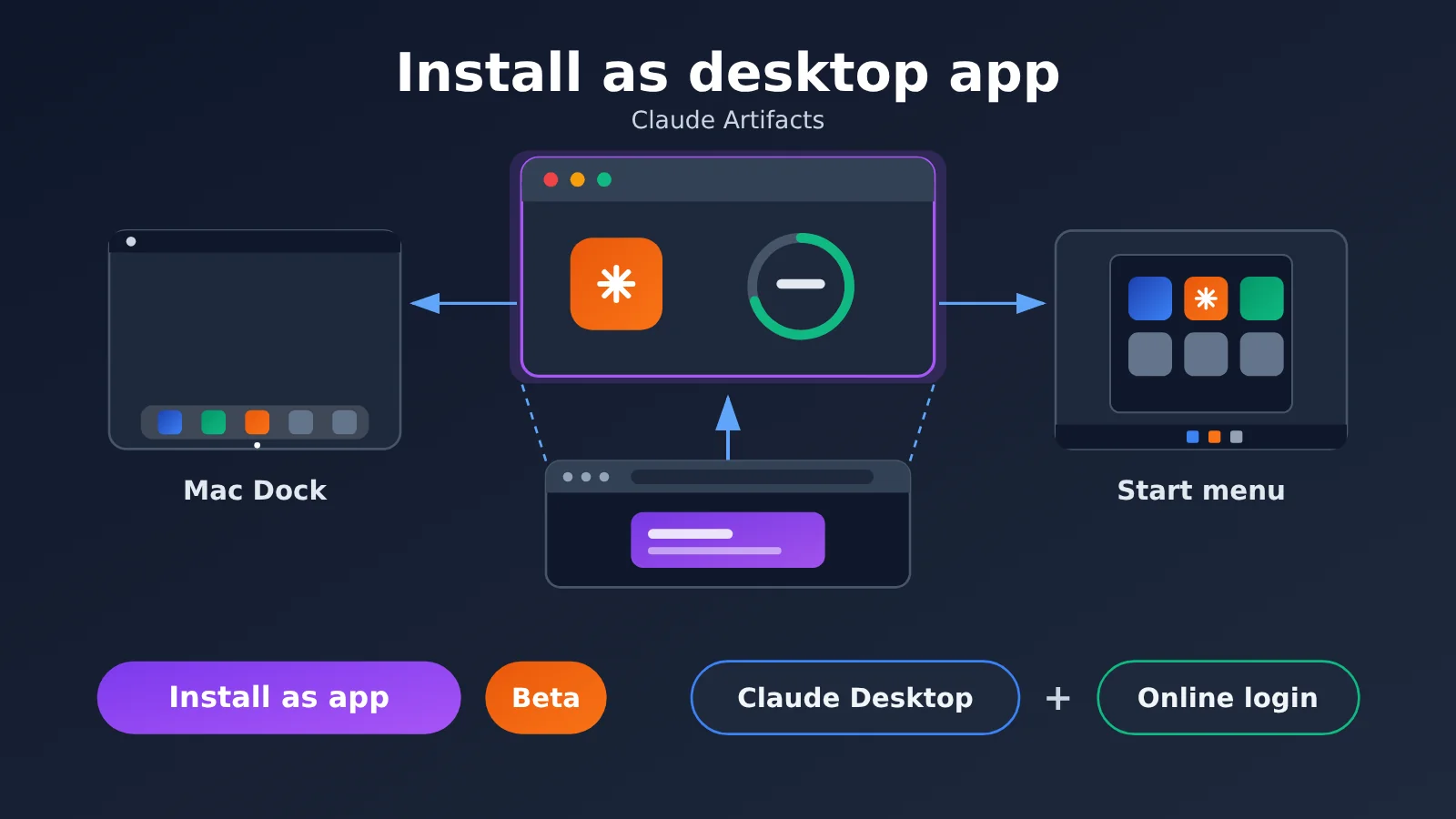
Claude Artifacts Desktop App: To Know Concept Guide
| Concept | Brief explanation |
|---|---|
| Artifact | An interactive creation Claude generates in a conversation, such as a mini-tool, page, or visualization |
| Install as app | This Beta feature installs eligible Artifacts as desktop entries with their own icon and window |
| Claude Desktop | Anthropic’s Mac/Windows client that handles installation and running, and provides the desktop capability bridge |
| Create and edit files | The capability that must be enabled to create Artifacts; formerly called Cloud code execution and file creation |
| Legacy Artifacts | Artifacts created in chat before September 16, 2026; they can’t be installed during the initial rollout |
| Full computer access | The highest permission tier: it can run programs and read, modify, or delete files, without asking for each action |
| Menu bar / tray | A persistent entry point in the macOS menu bar or the Windows taskbar notification area |
Claude Artifacts Desktop Installation Impact at a Glance
- Regular users: You can open the mini-tools you use often directly from the Dock or Start menu instead of digging through chat history. It still requires an internet connection and login, so it can’t replace offline software.
- Individual developers / creators: You can hand your work to authorized people to install and use without code signing or packaging an installer. Note that permissions are requested again after an Artifact is updated. If you want to reproduce the “generate tools through conversation” capability in your own product, you can use APIYI apiyi.com to call Claude models through a unified interface for prototype validation.
- Enterprise admins: Installation is on by default for Team and off by default for Enterprise; full computer access is off by default. When both organizational policies and device management policies are in place, the stricter one applies, so plan ahead.
The Facts: What Is the Claude Artifacts Desktop App?
The Product Form as Anthropic Officially Defines It
According to Anthropic’s product announcement dated November 24, 2026, Install as app lets eligible interactive Artifacts install to Mac or Windows through Claude Desktop, where they get “its own icon” and a standalone window. Users can open it from the operating system’s app entry points. Anyone else granted access to the same Artifact can install it the same way on their own device.
Anthropic officially calls it a desktop app, while also clarifying that it’s a standalone-window form of the same Artifact. The work itself is hosted by Claude, and the app updates automatically along with the underlying work. What’s delivered to users is an accessible Artifact; the client is responsible for installing and running it.
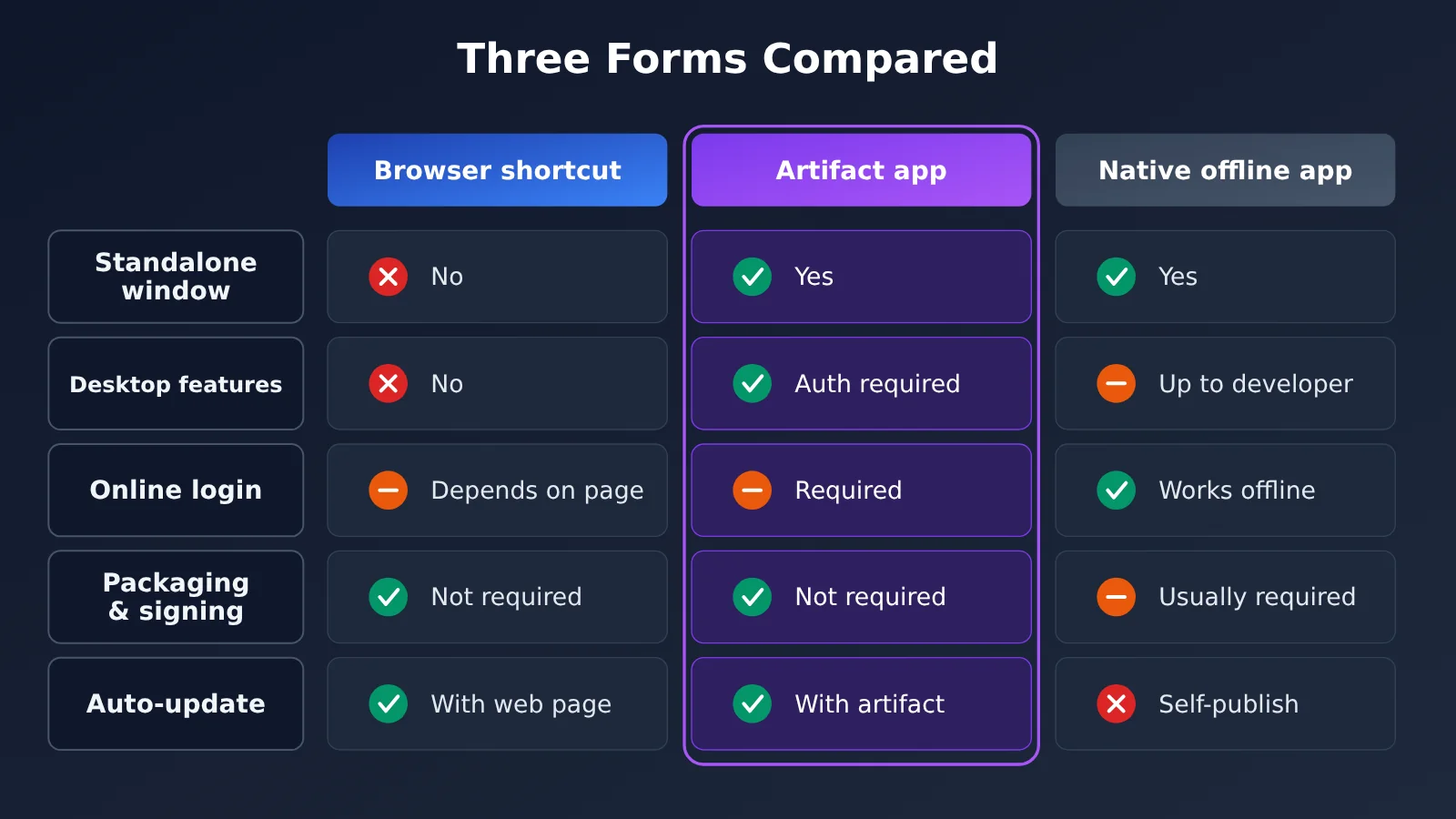
| Comparison dimension | Browser shortcut | Installed Claude Artifact app | Traditional native offline software |
|---|---|---|---|
| Entry point | Added to dock / home screen | Standalone icon + standalone window | Standalone installer |
| Desktop capabilities | None (explicitly stated by Anthropic) | Notifications, keyboard shortcuts, always-on-top, tray, etc., available after authorization | Depends on the developer |
| Network and login | Depends on the web page | Requires network access and an active Claude Desktop login | Usually works offline |
| Packaging and signing | Not required | Not required | Usually required |
| Update mechanism | Follows the web page | Updates with the underlying Artifact | Developer publishes new versions |
Claude Artifacts: The Two Stages of Creation and Installation
Stage one is creation. Describe the tool you want in a chat on Claude’s web or desktop app, and Claude generates a standalone preview that you can keep refining — interaction and logic included — through conversation. Before you start, you’ll need to turn on Create and edit files: individual users can check this under Settings → Capabilities, while team members are subject to their organization’s settings.
At launch, a few categories of artifacts can’t be installed: artifacts generated from templates like Docs, Slides, and Sheets, older Artifacts created in chat before September 16, 2026, and legacy Cowork live artifacts (artifacts made before August 19, 2026 fall under a different set of rules).
Stage two is installation. Installing requires the following:
- Download or update Claude Desktop to version 6.28899.0 or later. The client generally requires macOS 13 Ventura or later, or Windows 10 or later.
- Open the artifact and choose Install as app from the title menu, the right-click menu, or the Share menu, then click Install to confirm. An artifact’s own interface can also include an install button, but that still needs confirmation.
- On Mac, you can open it from the Claude Apps folder under Applications in your home directory, from Spotlight, or from the app launcher — and you can keep the icon in the Dock. On Windows, you can open it from the Claude Apps folder in the Start menu or from a desktop shortcut. On both platforms, you can also go through File → Apps in Claude Desktop.
Even if you can install Claude Desktop on Linux, this Beta feature isn’t available there yet. Web and mobile don’t support desktop installation either.
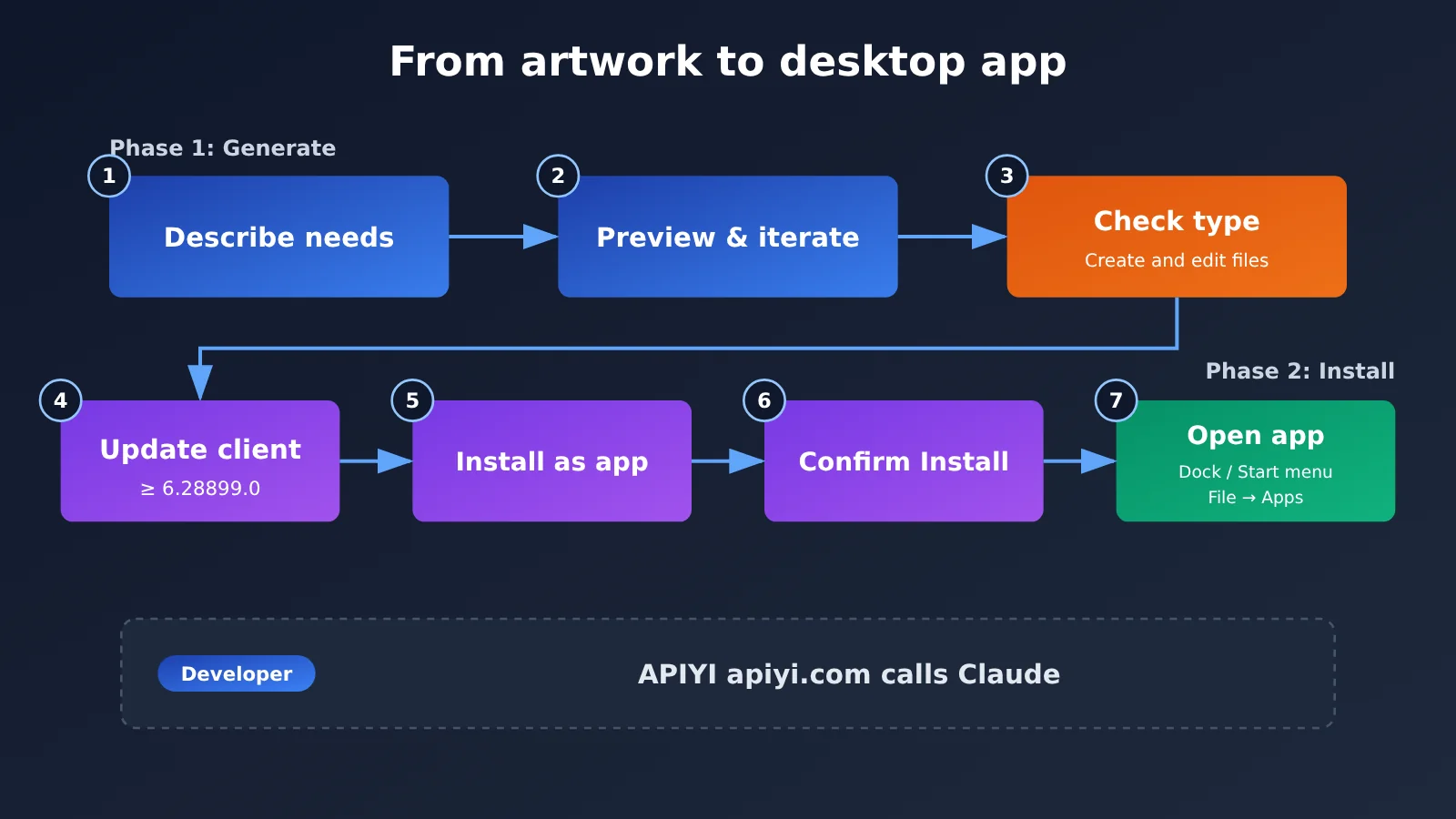
Can’t find the Claude Artifacts install entry? Here’s how to troubleshoot
The official guidance is to work through these steps in order: on Mac, check for updates from the Claude menu; on Windows, check for updates via Help in the menu button. Then confirm whether your account and organization have Beta access. Finally, confirm that the artifact is of an installable type. When the docs say “rolling out to all plans,” that refers to the release scope — it doesn’t mean every updated device will see the button that same day.
| Plan / Configuration | Install feature by default | Full computer access by default | Notes |
|---|---|---|---|
| Individual plans | Gradual rollout | Generally limited to your own artifacts | Depends on Beta rollout status |
| Team | Enabled | Disabled | Admins can adjust |
| Enterprise | Disabled | Disabled | Must be enabled by the owner |
| HIPAA-ready / hybrid deployment | Cannot be enabled | Cannot be enabled | Education organizations have additional restrictions |
How Claude Artifacts runtime permissions are tiered
The basic runtime uses browser-level capabilities, which suits pure computation, interactive lists, filtering, and processing data that the user actively enters. Notifications, global shortcuts, always-on-top windows, and menu bar or tray access are controlled permissions — an artifact requests them one by one based on what it actually needs. If the user declines, the artifact can fall back to in-window alerts, plain buttons, or similar alternatives.
Full computer access can run programs, and can also read, modify, or delete files without asking each time. Artifacts that come from outside your organization, or whose authorship can’t be verified, generally can’t request this tier. The official side doesn’t pre-review every artifact individually, and the permissions a user grants apply only to the current version. After an artifact is updated — including edits you make yourself — authorization is requested again, and permissions you’ve already declined stay declined until you change them manually.
There’s one more easily overlooked detail: if an artifact loads code from other websites, changes to that external code won’t trigger a new authorization prompt.
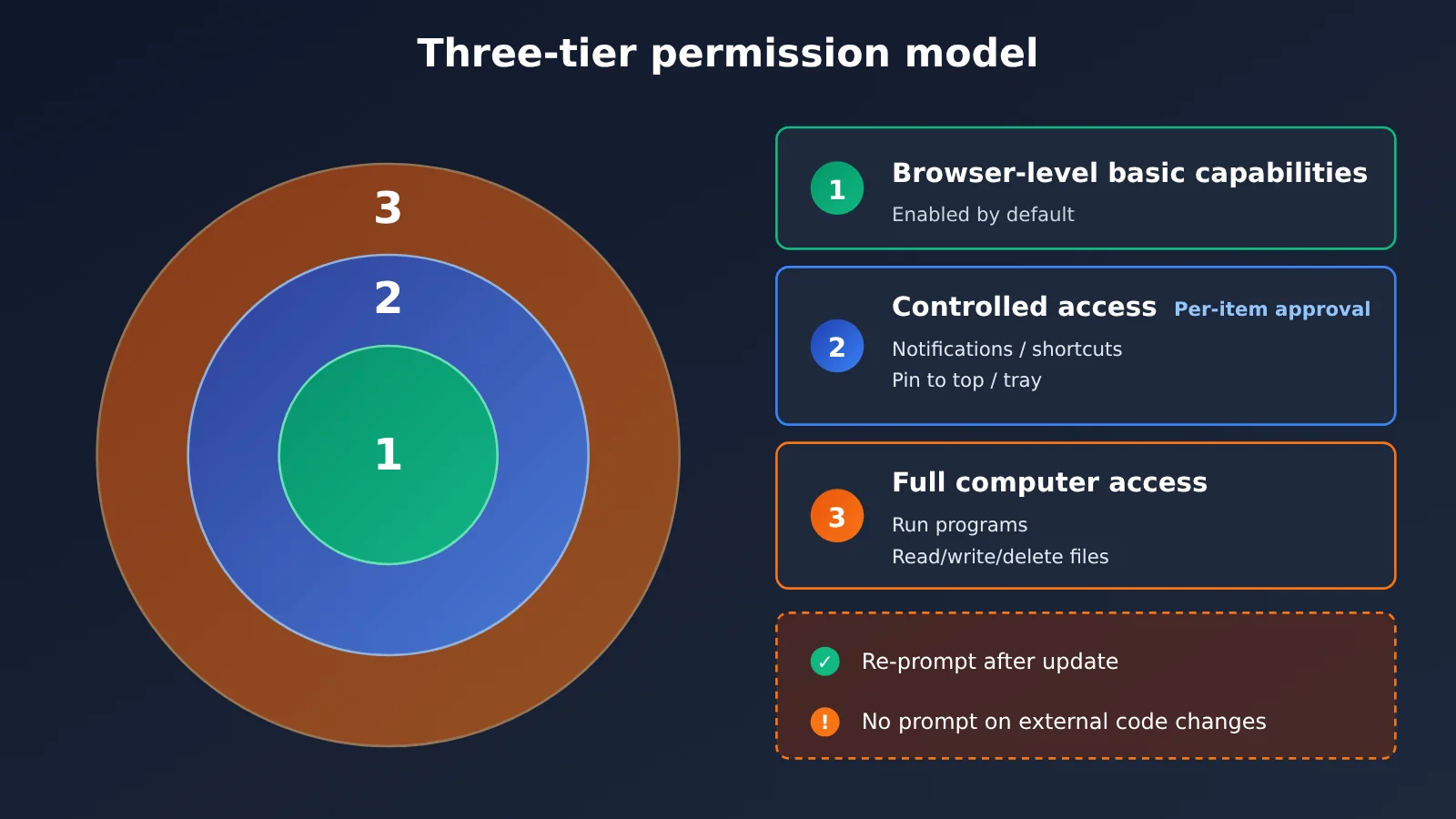
The Lifecycle of the Claude Artifacts Desktop App
- Closing the window isn’t quitting: If an app has a tray icon or menu bar entry, it keeps running in the background after you close its window.
- Revoking access doesn’t roll back changes: Turning off full access may make the app reload or close, but file changes that already happened aren’t undone.
- Uninstalling: This withdraws the permissions you granted earlier; the original artifact stays intact. On a Mac, just drag the app to the Trash; on Windows, remove the shortcut.
- Sharing can stop working: If the source artifact is no longer shared, the desktop icon may still be there, but it won’t open properly.
Official Demos and Acceptance Test Examples (Keeping Evidence Sources Separate)
Vendor demos (official announcements, not our own hands-on testing): The announcement showcased Linnet, a layered image editor; Phosphor, a file manager; Sift, a file-rule organizer; Tern, a terminal with a Claude assistant; and Vitals, a menu bar/tray tool for checking computer performance. These demos cover both web-style editing and system integration, but you can’t infer from them that every artifact you get through a link will have full access.
Acceptance test example (a reproduction approach put together from the official help docs, not our own testing data): Take a Pomodoro timer as an example.
- Set the timer to one minute in the preview, then check that start, pause, reset, and return-to-zero all behave correctly.
- After installing, grant notification permission, switch to another app, and see whether you get a system alert.
- If you deny notifications, the interface should still show that the countdown has finished.
- Try “closing the window” and “explicitly quitting” separately, and watch whether the tray or menu bar status is still there.
Pure timer logic doesn’t need to ask Claude every second. Chatting while generating and iterating on an artifact counts toward your usage allowance; at runtime, only requests sent to Claude count against your plan allowance.
Sharing acceptance test: The author first confirms the actual audience in Share, then a second user with permission opens the link and installs it on their own signed-in desktop, recording three results separately: “link is readable, interaction works, installation succeeds.” Connectors inside an organization use each person’s own account permissions, so you can’t substitute the author’s view for someone else’s permission check.
Community feedback: As of November 27, 2026, this article hasn’t collected any verifiable community testing data, so we don’t cite any.
Analysis: What Claude Artifacts Going Desktop Means
Our take: The core value of this upgrade is lowering the barrier to distributing “small tools,” not replacing native development. In the past, going from a web prototype to a desktop tool meant dealing with packaging, signing, and distribution channels. Now you just share the Artifact, and the other person installs it in the client. This approach suits lightweight tools that teams iterate on internally—timers, kanban boards, data cleanup dashboards, and the like.
The risks also cluster around “automatic updates.” Authorization follows the version, and updates trigger a new permission prompt, which is a protection in itself. But changes to external scripts won’t trigger a prompt, and full access can directly delete or modify files. So we recommend: for artifacts that involve file operations, only trust authors whose identity you can confirm within your organization; after each update, recheck permissions and key output results. This is our inference based on the documentation, not an official statement.
For developers, if you want to reproduce the “conversation generates a single-file tool” experience in your own product, you can directly call the Claude model to generate an HTML prototype. This is different from installing an Artifact: the former is an API flow you control, while the latter is a capability of the official Claude client.
Minimal API Example for a Claude Artifacts-Style Prototype
import openai

client = openai.OpenAI(
    api_key="YOUR_API_KEY",
    base_url="https://api.apiyi.com/v1"  # APIYI unified endpoint
)

resp = client.chat.completions.create(
    model="claude-sonnet-4-5",  # Replace with the Claude model name currently available on the platform
    messages=[{"role": "user", "content": "生成一个单文件 HTML 番茄钟,含开始/暂停/重置"}]
)
print(resp.choices[0].message.content)
View the full implementation code (generate and save an HTML prototype)
import re
import openai

client = openai.OpenAI(
    api_key="YOUR_API_KEY",
    base_url="https://api.apiyi.com/v1"
)

SYSTEM = "你是前端工程师,只输出一个完整的单文件 HTML,放在 ```html 代码块中。"

def build_tool(requirement: str, model: str = "claude-sonnet-4-5") -> str:
    """Call Claude to generate a single-file HTML tool prototype"""
    resp = client.chat.completions.create(
        model=model,
        messages=[
            {"role": "system", "content": SYSTEM},
            {"role": "user", "content": requirement},
        ],
        max_tokens=4000,
    )
    text = resp.choices[0].message.content
    match = re.search(r"```html\s*(.*?)```", text, re.S)
    return match.group(1) if match else text

def save(html: str, path: str = "pomodoro.html") -> None:
    with open(path, "w", encoding="utf-8") as f:
        f.write(html)
    print(f"已保存到 {path},用浏览器打开预览")

if __name__ == "__main__":
    html = build_tool(
        "番茄钟:可设置分钟数,支持开始/暂停/重置,"
        "结束时在页面内显示醒目提示,不依赖外部脚本"
    )
    save(html)
🚀 Quick start: Sign up at APIYI (apiyi.com) to get free trial credits. One API key can call Claude, OpenAI, Gemini, and other models, making it easy to compare the quality of prototypes generated by different models.
Claude Artifacts Desktop App FAQ
Q1: Can I use Claude Artifacts offline after installing it as a desktop app?
No. Artifacts are hosted by Claude, so opening them requires an internet connection and an active Claude Desktop session. They’re installable apps hosted inside Claude Desktop, not offline native software.
Q2: How is this different from “Add to Dock / Home Screen” in a browser?
The official documentation groups those browser entry points under shortcuts and explicitly says they don’t provide the desktop capabilities this feature offers. Only artifacts installed via Install as app in Claude Desktop can use notifications, global shortcuts, keep-on-top, and the tray after you grant authorization.
Q3: Why can’t I see Install as app even after updating the client?
Check these in order: is the client version ≥ 6.28899.0; does your account or organization have Beta access; and is the artifact an interactive Artifact that isn’t legacy and isn’t template-generated? This feature is off by default for Enterprise and has to be enabled by an owner. It can’t be enabled in HIPAA-ready configurations or hybrid deployments.
Q4: What scenarios are Claude Artifacts desktop apps good for?
They work well for lightweight internal tools that teams update frequently — a Pomodoro timer, a filtering dashboard, a performance-monitoring tray tool, or a file-organization rules tool (the last one requires full access and is subject to admin restrictions). They’re a poor fit for anything that needs to run offline or must ship as a standalone installer.
Q5: Can developers build something similar — “generate a tool through conversation” — with the API?
You can generate a similar prototype, but you won’t get Artifact’s install and hosting capabilities. Using the code in this article as a reference, set base_url to APIYI’s endpoint at apiyi.com, call a Claude model to generate a single-file HTML page, and then decide on deployment yourself.
Q6: What are the known limitations today?
The main ones: the feature is still in Beta; it isn’t supported on Linux, the web, or mobile; full access generally isn’t available for artifacts outside your organization; changes to external scripts don’t trigger re-authorization; and revoking permissions doesn’t roll back file changes that already happened. If you want to gauge Claude model capabilities first, you can run small-scale tests using the free quota from APIYI at apiyi.com.